pi-go
Health Pass
- License — License: MIT
- Description — Repository has a description
- Active repo — Last push 0 days ago
- Community trust — 120 GitHub stars
Code Fail
- rm -rf — Recursive force deletion command in .devcontainer/post-create.sh
Permissions Pass
- Permissions — No dangerous permissions requested
No AI report is available for this listing yet.
Go implementation of AI coding agent
pi-go



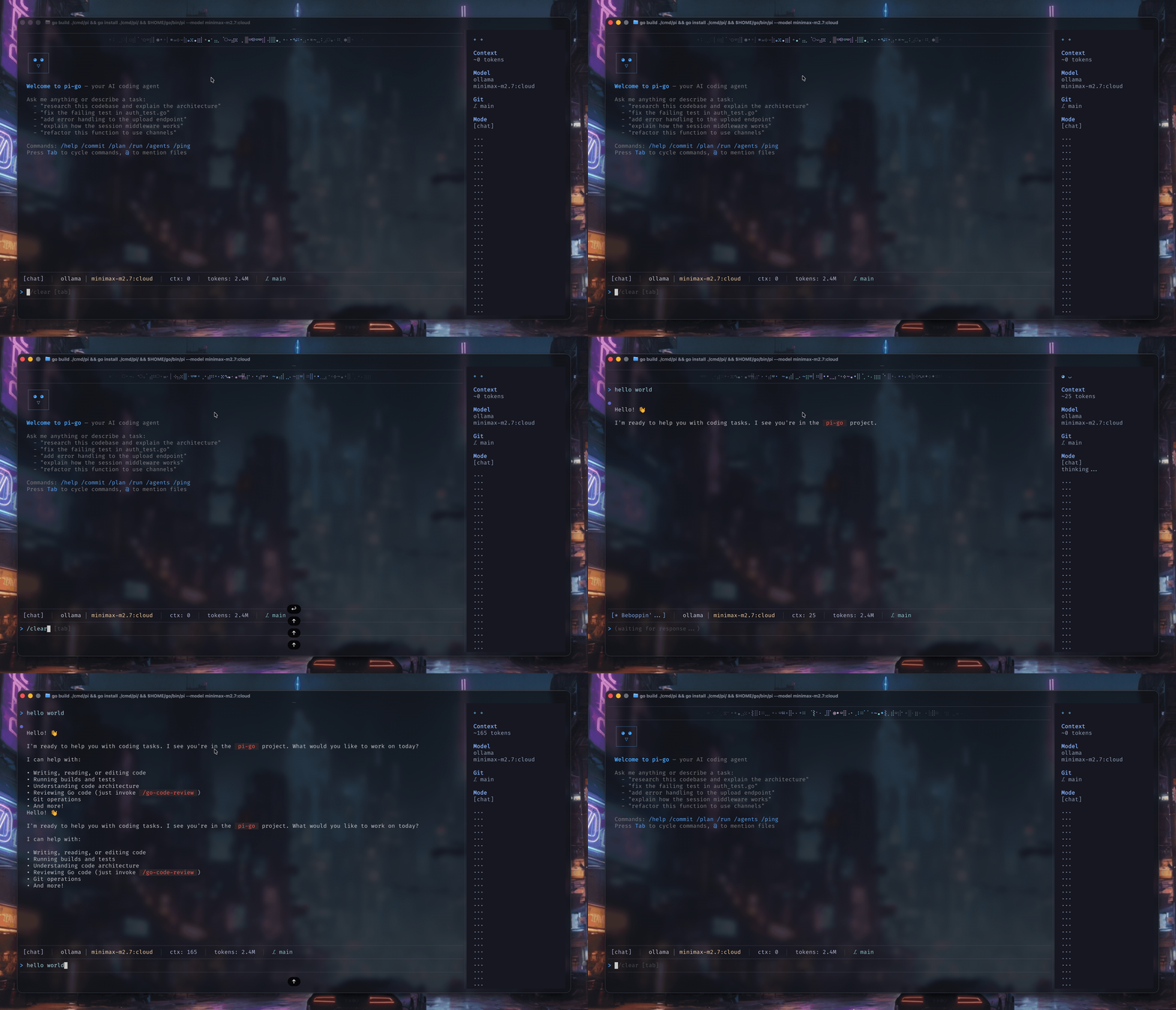
A terminal-based coding agent built on Google ADK Go. It connects to multiple LLM providers, runs
sandboxed tools, integrates LSP, and ships with a process-based subagent system.
Features
- Multi-provider LLM — Claude (Anthropic), GPT/O-series (OpenAI), Gemini (Google), and Ollama for local models
- Sandboxed tools — read, write, edit, shell, grep, find, tree, and git operations. All tools are restricted to the project directory via
os.Root. - Interactive TUI — Bubble Tea v2 with Markdown rendering (Glamour), slash commands, and theming
- Session persistence — JSONL append-only event logs with branching, compaction, and resume
- Model roles — Named configurations (default, smol, slow, plan, commit) selectable via CLI flags
- Subagents — Process-based multi-agent system with types: explore, plan, designer, reviewer, task, quick_task
- LSP — JSON-RPC client for Go, TypeScript/JS, Python, and Rust, with auto-format and diagnostics hooks
- AI Git tools — Repository overview, file diffs, hunk parsing, and LLM-generated conventional commits (
/commit) - RPC server — Unix socket JSON-RPC 2.0 for IDE/editor integration
- Memory Palace — 4-layer contextual memory with SQLite storage, semantic embeddings (all-MiniLM-L6-v2), temporal knowledge graph, and project/conversation miners
- Extensions — Hooks (shell callbacks), skills (
.SKILL.mdinstructions), and Model Context Protocol (MCP) servers - Skills audit — Security scanning for hidden Unicode characters, BiDi attacks, and supply-chain threats in skill files (
pi audit)
Architecture
cmd/pi/             Entry point — CLI parsing, output mode selection
internal/
├── agent/          ADK agent setup, retry logic, runner
├── cli/            Cobra CLI flags, output modes (interactive, print, json, rpc)
├── config/         Global and project config (roles, hooks, MCP, themes)
├── audit/          Security scanner for skills (hidden Unicode, supply-chain threats)
├── extension/      Hooks, skills, MCP server integration
├── lsp/            LSP JSON-RPC client, language registry, manager, hooks
├── palace/         Memory Palace — drawers, layers, KG, miners, embedder, search
├── provider/       LLM providers implementing genai model interface
├── rpc/            Unix socket JSON-RPC 2.0 server
├── session/        JSONL persistence, branching, compaction
├── subagent/       Process spawner, orchestrator, concurrency pool
├── tools/          Sandboxed tools (read, write, edit, bash, grep, find, git, lsp)
└── tui/            Bubble Tea v2 UI, slash commands, commit workflow
Request flow
User input → CLI → Agent → LLM provider → Tool calls → Sandbox → Response → TUI
                     ↕           ↕            ↕
              Session store   Palace       LSP servers
              (JSONL events)  (memory,   (format, diagnostics)
                              KG, search)
See ARCHITECTURE.md for detailed documentation.
Installation
Quick install (recommended)
curl -fsSL https://raw.githubusercontent.com/dimetron/pi-go/main/scripts/install.sh | bash
This script detects your OS/arch, downloads the latest release binary, and installs it to /usr/local/bin (or ~/.local/bin if needed).
go install
go install github.com/dimetron/pi-go/cmd/pi@latest
Make sure your GOPATH/bin is in your PATH. The binary will be installed as pi.
Build from source
git clone https://github.com/dimetron/pi-go.git
cd pi-go
go install ./cmd/pi
Pre-built binaries
Download the latest release for your platform from the Releases page.
Requirements
- Go 1.25+
- At least one LLM provider API key (
ANTHROPIC_API_KEY,OPENAI_API_KEY,GEMINI_API_KEY) or a running Ollama instance
Build
make build      # build the pi binary
make test       # run unit tests
make lint       # golangci-lint (vet, staticcheck, errcheck, …)
make e2e        # run E2E integration tests
make clean      # remove binary
Usage
# Default interactive mode
pi

# Select a model by prefix
pi --model claude:sonnet
pi --model openai:gpt-4o
pi --model gemini:gemini-2.5-pro
pi --model ollama/gemma4:12b-mlx
pi --model minimax-m3:cloud # automatically detect ollama if :cloud

# Use model roles
pi --smol          # fast, cheap model
pi --slow          # most capable model
pi --plan          # planning-oriented model

# Additional options
pi --continue      # continue last session
pi --session <id>  # resume specific session
pi --system "..." # custom system instructions
pi --url "..."    # custom API endpoint URL

# Non-interactive modes
pi --mode print "explain this codebase"
pi --mode json "list all TODO comments"
pi --mode socket --socket /tmp/pi-go.sock  # JSON-RPC 2.0 over a Unix socket
pi --mode rpc                              # pi-compatible NDJSON over stdio (for pi-acp)
Slash commands
| Command | Description |
|---|---|
/help |
Show available commands |
/model |
Switch model mid-conversation |
/session |
List and switch sessions |
/branch |
Create a conversation branch |
/commit |
Generate and apply a git commit |
/compact |
Compact session history |
/agents |
Show running subagents |
/history |
Show command history |
/plan |
Start a Plan-Driven Development (PDD) session (auto-resumes if a spec exists) |
/run |
Execute a spec with task agent |
/skill-create |
Create a new skill |
/skill-list |
List available skills |
/skill-load |
Reload skills from disk |
/memory |
Memory Palace commands (see below) |
/audit |
Scan skills for hidden Unicode threats |
/restart |
Restart pi-go |
/clear |
Clear conversation |
/exit |
Exit the agent |
Memory Palace
A 4-layer contextual memory system that gives the agent persistent awareness across sessions.
Layers:
| Layer | Name | Description |
|---|---|---|
| L0 | Identity | Static identity file |
| L1 | Essential Story | Top-15 drawers by importance, injected into system prompt |
| L2 | On-Demand Recall | Context-filtered drawer chunks |
| L3 | Search | Semantic (embedding) or keyword (FTS5) search |
CLI commands:
# Setup
pi memory model download         # download all-MiniLM-L6-v2 embedding model
pi memory model status           # check model path and status
pi memory init [dir]             # create palace.db + generate mempalace.yaml

# Ingest
pi memory mine <dir>             # mine source files into drawers
pi memory mine --convos <dir>    # mine conversation files (JSONL/text)

# Query
pi memory status                 # palace overview (drawers, wings, rooms, KG)
pi memory search <query>         # semantic or keyword search
pi memory wake-up                # print L0+L1 context for system prompt
pi memory recent [project]       # recent memory observations

# Knowledge Graph
pi memory kg query <entity>      # query triples involving an entity
pi memory kg add <s> <p> <o>     # add a fact triple
pi memory kg timeline <entity>   # chronological timeline of facts
Configuration via mempalace.yaml in the project root:
wing: my-project
rooms:
  - name: auth
    patterns: ["internal/auth/**"]
    keywords: [jwt, token, session]
  - name: api
    patterns: ["internal/api/**"]
    keywords: [handler, endpoint, route]
When the Palace is enabled, the agent also gains tool access: palace-search, palace-add-drawer, palace-kg-query, palace-kg-add, palace-diary-write, palace-traverse, and more.
Security audit
# Scan all skill files for hidden Unicode characters
pi audit

# Scan with verbose output (include info-level findings)
pi audit -v

# Output as JSON for CI pipelines
pi audit --format json --output report.json

# Auto-remove dangerous characters (creates .bak backups)
pi audit --strip

# Preview what would be removed
pi audit --strip --dry-run

# Scan a specific file
pi audit --file path/to/SKILL.md
Skills are automatically scanned on load — skills with critical findings (Unicode tags, BiDi overrides, variation selector attacks) are blocked from loading.
Configuration
Pi reads configuration from ~/.pi-go/config.json (global) and .pi-go/config.json (project-local):
- Model roles — Map role names to specific model strings
- Hooks — Shell commands triggered on tool events (e.g., post-write formatting)
- MCP servers — External tool servers via Model Context Protocol
- Themes — Terminal color schemes via
themeconfig field - Base URLs — Per-provider endpoints via the
baseURLsfield
Provider base URLs
Self-hosted or LAN endpoints can be declared in config instead of exported in every shell:
{
  "roles": {
    "default": { "model": "ollama/gemma-4-e4b:latest", "provider": "ollama" }
  },
  "baseURLs": {
    "ollama": "http://192.168.1.10:11434"
  }
}
Precedence is --url flag, then environment variable, then baseURLs config. The matching env vars areANTHROPIC_BASE_URL, OPENAI_BASE_URL, GEMINI_BASE_URL, MISTRAL_BASE_URL, and OLLAMA_HOST. A per-shell or
CI override still takes effect. An empty env var does not mask a configured value.
Custom OpenAI-compatible provider
For OpenAI-compatible APIs with model names that Pi cannot infer from a prefix, explicitly set the role provider toopenai and point OPENAI_BASE_URL at the custom endpoint:
export OPENAI_API_KEY="your-api-key"
export OPENAI_BASE_URL="https://api.example.com/v1"
{
  "roles": {
    "default": {
      "model": "Qwen3.5-397B-A17B-FP8",
      "provider": "openai"
    }
  }
}
Then run Pi normally:
pi
You can also pass the endpoint per invocation:
OPENAI_API_KEY="your-api-key" pi --model Qwen3.5-397B-A17B-FP8 --url https://api.example.com/v1
When --url or OPENAI_BASE_URL is set, unknown model names are treated as custom OpenAI-compatible models. Settingprovider: "openai" in config avoids relying on model-prefix detection.
MCP server integration
Pi supports the Model Context Protocol. Use it to extend the agent with external tools. Configure servers in~/.pi-go/config.json:
{
  "mcp": {
    "servers": [
      {
        "name": "tavily-search",
        "url": "https://mcp.tavily.com/mcp/?tavilyApiKey=${TAVILY_API_KEY}"
      },
      {
        "name": "filesystem",
        "command": "npx",
        "args": [
          "-y",
          "@modelcontextprotocol/server-filesystem",
          "/tmp"
        ]
      }
    ]
  }
}
Or in standalone ~/.pi-go/mcp.json (Claude Desktop compatible format):
{
  "mcpServers": {
    "tavily-search": {
      "url": "https://mcp.tavily.com/mcp/?tavilyApiKey=${TAVILY_API_KEY}"
    },
    "filesystem": {
      "command": "npx",
      "args": [
        "-y",
        "@modelcontextprotocol/server-filesystem",
        "/tmp"
      ]
    }
  }
}
Supported transports:
- HTTP/Streamable —
urlfield for cloud-based MCP servers - Stdio —
command+argsfor local subprocess servers
Environment variable substitution: Pi automatically expands ${ENV_VAR} patterns in server URLs using .pi-go/.env
Editor integration
Pi can run as an Agent Client Protocol (ACP) server. Use it from any IDE that supports ACP.
Zed
Add pi to Zed's agent_servers in your settings:
{
  "agent_servers": {
    "pi": {
      "type": "custom",
      "command": "pi",
      "args": ["acp-server", "--model", "glm-5.2:cloud"],
      "env": {}
    }
  }
}
Then invoke via Zed's agent panel (⌘⇧A / Ctrl+Shift+A) and select "pi". The agent runs in the current Zed project
directory with full access to pi's tools and memory.
License
See LICENSE for details.
Reviews (0)
Sign in to leave a review.
Leave a reviewNo results found