infai
Health Pass
- License — License: Apache-2.0
- Description — Repository has a description
- Active repo — Last push 0 days ago
- Community trust — 11 GitHub stars
Code Fail
- rm -rf — Recursive force deletion command in .github/workflows/release-infaiw.yml
- rm -rf — Recursive force deletion command in .github/workflows/release.yml
- rm -rf — Recursive force deletion command in install.sh
- network request — Outbound network request in scripts/buildlog.py
Permissions Pass
- Permissions — No dangerous permissions requested
No AI report is available for this listing yet.
Local-first AI in your terminal. infai: run llama.cpp and vLLM models from one TUI with launch profiles, live telemetry, and Hugging Face downloads. infaiw: a daemon-based agent harness with sidecar loops, MCP, and human-in-the-loop approvals.
infai
██╗███╗   ██╗███████╗ █████╗ ██╗
██║████╗  ██║██╔════╝██╔══██╗██║
██║██╔██╗ ██║█████╗  ███████║██║
██║██║╚██╗██║██╔══╝  ██╔══██║██║
██║██║ ╚████║██║     ██║  ██║██║
╚═╝╚═╝  ╚═══╝╚═╝     ╚═╝  ╚═╝╚═╝
Two terminal tools for local-first AI, from one repository.
| What it is | Website | |
|---|---|---|
| infai · engine | A control plane for local inference. Find or download a model, save a launch profile for llama.cpp or vLLM, and run and monitor many models from one TUI. | infai.dipankar-das.com |
| infaiw · workflows | An agent harness that works with you, not around you. It runs as a background service with durable sessions, delegated sidecar loops, MCP, and approvals that wait for you. | infai.dipankar-das.com/infaiw |
Each is a single Go binary for macOS and Linux, released and installed separately.
Use either one on its own, or both together.
infai: local inference
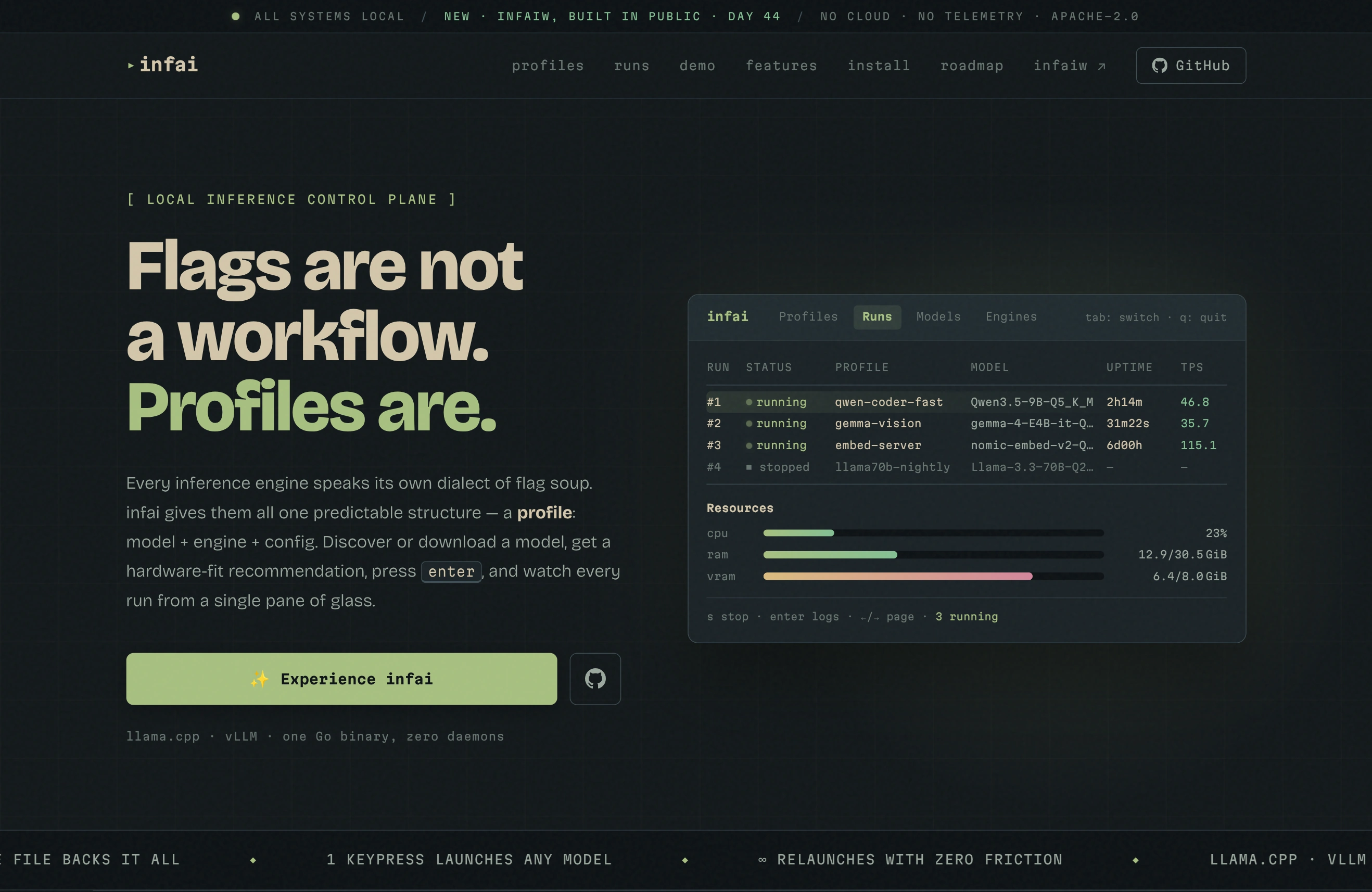
Every inference engine has its own dialect of flags. infai gives them one shape, the
profile: model + engine + config. Define it once, then launch it with a keypress.
Install
brew install dipankardas011/tap/infai # macOS and Linux
- Linux packages: install
infaifrom the
openSUSE Software portal,
which has repository setup for Debian, Ubuntu, Fedora, and openSUSE. - Script (Linux): installs to
/usr/local/bin.curl -sL https://raw.githubusercontent.com/dipankardas011/infai/main/install.sh | bash - Binary: download one from Releases
(Linux and macOS, amd64 and arm64).
Quick start
infai            # open the TUI
infai --version
On first launch infai creates its local database. In the Engines tab, add your
llama.cpp or vLLM binary. In the Models tab, add a model folder and press s to
sync it, or press w to download from Hugging Face. Then create a profile in
Profiles and press enter to launch it.
Features
- Profiles: named launch configurations (context size, GPU layers, KV-cache types,
flash attention, sampling, ports, extra flags), with engine-aware options for
llama.cpp and vLLM. - Runs dashboard: run several models at once, with status, uptime, and live
tokens per second for each one. Ports are checked before launch. - Live telemetry and logs: system and per-model CPU, RAM, and VRAM, plus a
scrollable server log you can copy. - Model library: scans folders for GGUF and SafeTensors files, reads their
metadata, and links multimodal projectors automatically. - Hugging Face downloads: search the Hub, pick a GGUF quantization, and download
with resumable, atomic transfers. Provenance stays attached to the model. - Hardware-fit checks: estimates whether a model fits your hardware and suggests
launch settings before you start. - 11 themes: tokyonight, everforest, onedark, rosepine, gruvbox, catppuccin, nord,
dracula, kanagawa, solarized, monokai.
Keys
tab / shift+tab switch tabs, t picks a theme, ? shows help, q quits.
| Tab or screen | Keys |
|---|---|
| Profiles | enter launch · n new · e edit · x delete · / filter |
| Runs | enter view · s stop · r restart · x remove · pgup/pgdown page |
| Models | enter info · s sync · i import · w download · o open on Hugging Face · x remove |
| Engines | a add · e rename · x delete |
| Profile editor | ctrl+a advanced options · ctrl+s save · esc discard |
| Server logs | s stop · r restart · c clear · y copy · esc back |
Data
Profiles, folders, engines, and settings live in one SQLite file. Back it up with cp.
| OS | Path |
|---|---|
| Linux | ~/.config/infai/config.db |
| macOS | ~/Library/Application Support/infai/config.db |
Schema migrations run automatically on startup.
infaiw: agent harness
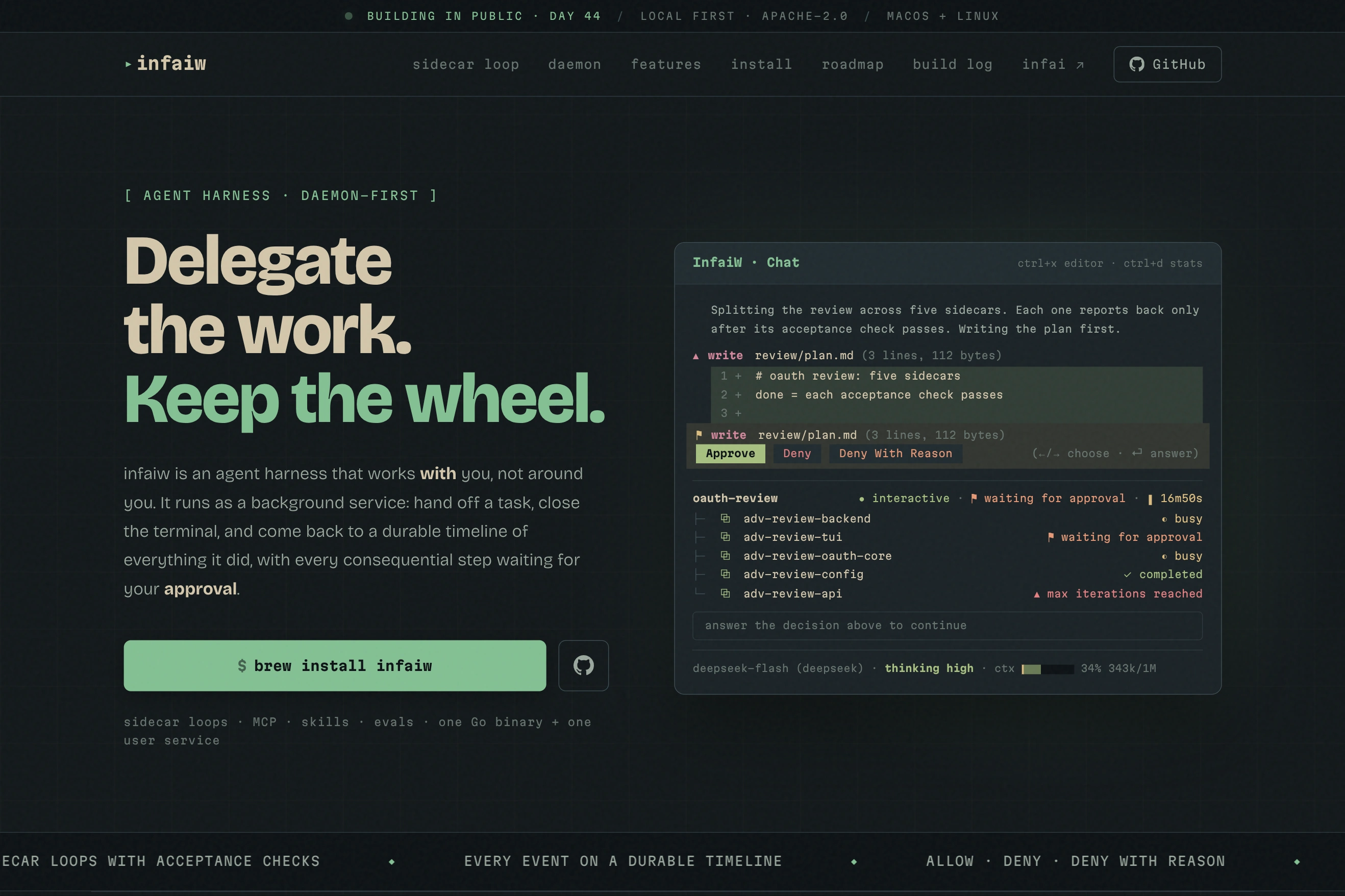
infaiw runs agents as a background service, so a session keeps working after you
close the terminal. The infaiw TUI is a client: attach from several terminals,
leave, and come back to the same session.
- Sidecar loops: delegated subagents that are not done until an acceptance check
passes. Each loop is its own session and is recorded on the timeline. - Durable, branching timelines: every session is an event timeline that is
compact to store and fast to replay, and you can branch from any point. - Human first: approvals wait for you even after you close the window. Approve,
deny, or deny with a reason. - Inter-session messaging: sessions have mailboxes, and the engine routes messages
between them. - Task checklists with intent: each task records what was expected, so the agent
can recover the goal mid-task. - Hybrid auto-compaction: recent events stay verbatim and older ones are
compressed. - Tools: files, bash, web fetch and search, images in and out, skills, MCP servers
(with OAuth, elicitation, and prompts), and evals. - Providers: DeepSeek and OpenAI Codex, with configurable thinking levels.
Install and start
The service is opt-in: installing the package does not start it. Run these as your
normal user, without sudo.
Homebrew (macOS and Linux)
brew install dipankardas011/tap/infaiw
brew services start infaiw
Linux packages: install infaiw from the
openSUSE Software portal, then:
systemctl --user daemon-reload
systemctl --user enable --now infaiw.service
Quick start
infaiw provider login    # sign in to a model provider
infaiw                   # open the TUI and start a session
The TUI attaches to localhost:6000 by default. Use --host and --port to reach
another server, and --session <uuid> to resume a saved session.
| Command | Does |
|---|---|
infaiw |
Open the chat TUI |
infaiw server |
Run the agent server in the foreground (the service runs this) |
infaiw provider list | login | logout |
Manage model provider credentials |
infaiw mcp list | add | edit | remove | refresh |
Manage MCP servers and their authorization |
Keys
| Keys | Action |
|---|---|
ctrl+o |
Sessions |
ctrl+m |
Switch model |
ctrl+t |
Cycle thinking level |
ctrl+d |
Session stats |
ctrl+x |
Edit the message in your $EDITOR |
ctrl+v / ctrl+u |
Paste an image / clear attachments |
/ |
Commands, skills, and MCP prompts |
← → enter |
Choose and answer a pending approval (ctrl+g for detail) |
ctrl+c |
Quit the TUI (the session keeps running) |
Running the service
HomebrewHomebrew manages launchd on macOS and systemd on Linux. Usebrew services stop infaiw or brew services restart infaiw. Logs are in$(brew --prefix)/var/log/infaiw.log. Upgrading the formula stops a runninginfaiw server, and the service starts the new binary; an inactive service stays
inactive.
If you installed the old cask, migrate once:
brew uninstall --cask infaiw
brew update
brew install dipankardas011/tap/infaiw
brew services start infaiw
The executable moves from the Caskroom to the Cellar. Your user data is not moved
or removed.
--userruns the service as your account, not root.enablestarts it on future logins;--nowalso starts it immediately.- Follow the logs with
journalctl --user -u infaiw.service -f(ctrl+cstops
following, not the server). - Package upgrades restart running instances; inactive ones stay inactive.
- Stop it and disable startup with
systemctl --user disable --now infaiw.service.
Your data and configuration are kept.
Without lingering, a user service stops after your last session ends. To keep it
running after logout and start it at boot (may need admin rights):
sudo loginctl enable-linger "$USER"
Packaging follows the Homebrew service DSL,
openSUSE unit guidelines,
and Debian's dh_installsystemduser
with --no-enable.
Configuration
infaiw server is configured only through INFAI_AGENT_* environment variables, for
example INFAI_AGENT_PORT=6000. Background services do not inherit your shell
environment, so put them in ~/.config/infaiw/server.env (chmod 600 if it holds
secrets) and restart the service.
Building from source
Requires Go 1.26+. infai also needs a C compiler, because it uses SQLite through CGO;
infaiw does not.
git clone https://github.com/dipankardas011/infai.git
cd infai
CGO_ENABLED=1 go build -o infai ./cmd/inference
CGO_ENABLED=0 go build -o infaiw ./cmd/agent
go test ./...
Contributing
Bug reports and pull requests are welcome on
GitHub. See AGENTS.md for the
architecture and conventions.
The website lives on the gh-pages branch; edit it by committing there. Provider
catalogs are the exception: they live in catalog/ on main, next to the code that
reads them.
infaiw is being built in public, one post a day; follow along from the
build log.
License
Reviews (0)
Sign in to leave a review.
Leave a reviewNo results found