Clawdeck
Health Pass
- License — License: MIT
- Description — Repository has a description
- Active repo — Last push 0 days ago
- Community trust — 23 GitHub stars
Code Pass
- Code scan — Scanned 12 files during light audit, no dangerous patterns found
Permissions Pass
- Permissions — No dangerous permissions requested
No AI report is available for this listing yet.
SideCrab / Claw'deck: an ambient Claude Code status panel for the Corsair Xeneon Edge (iCUE widget + local companion, Windows)
SideCrab 🦀




An ambient Claude Code status panel for the Corsair Xeneon Edge.
New here? Read Getting started: a 20-minute walkthrough from
nothing installed to a working panel, with what you should see at each step.
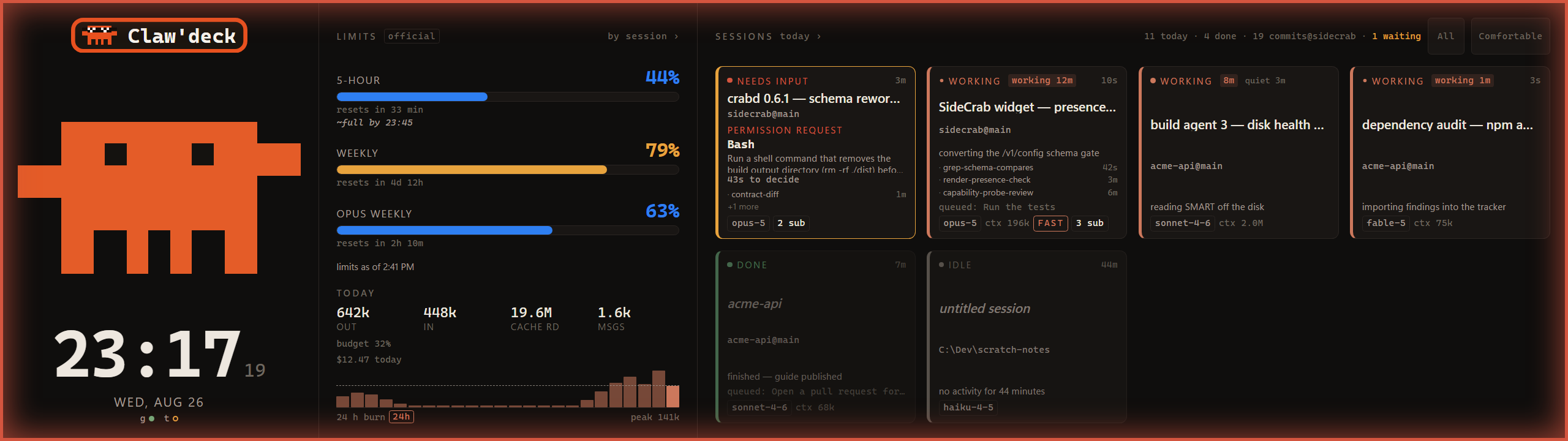
SideCrab turns the Xeneon Edge on your desk into a live view of every Claude Code session on
your PC. Session cards, rate-limit gauges with a reset countdown, today's token burn, a clock, a
"needs your attention" alert, and a pixel crab whose mood is the status. When a session stops to
ask you something, you find out from across the room instead of by cycling through terminal
windows. Then you can answer it from the panel.
What you need
| Required | Notes | |
|---|---|---|
| Operating system | Windows 10 or 11 | Windows only. The companion is a Windows service and the notifier uses Windows toasts. There is no macOS or Linux build. |
| Corsair iCUE | 5.44 or newer | SideCrab is an iCUE widget. Without iCUE there is nothing to install it into. Double-clicking the package to import it needs iCUE 5.46.67 or newer; on older iCUE you import from inside the app. |
A display iCUE calls dashboard_lcd |
The Xeneon Edge (2560 × 720) | The panel is designed full-screen for the Edge. Smaller iCUE slots get a reduced layout. |
| Claude Code | Installed and used on the same PC | The companion reads Claude Code's local session data. It cannot see sessions on other machines. |
PowerShell 7 (pwsh) |
For the companion installer | Not Windows PowerShell 5.1. |
| Python 3.13 | For the companion | A real install on PATH. The Microsoft Store "python" alias stub is rejected, because it cannot host a background service. |
Everything runs on one PC and talks only over 127.0.0.1. Nothing is sent anywhere.
Two ways to run it
Widget only. Install the widget and run nothing else. You get the crab, the clock, and the
CPU and GPU temperatures your iCUE sensors expose. No setup, no background process. Claude Code
data is simply absent, and the panel says so.
Widget + companion (the point). Run the small local service, crabd, on the PC where you use
Claude Code. The panel comes alive: live session cards, limit gauges with a depletion forecast,
burn history and an optional daily token budget, a daily recap with a drillable week strip, and
alerts when a session is waiting on you.
How it works
Claude Code hooks ──POST──▶  crabd (127.0.0.1:2722)  ◀──poll── SideCrab widget (iCUE / Xeneon Edge)
~/.claude usage + JSONL ──▶  one /v1/state JSON feed  ──write─▶ /v1/action · /v1/config
                             + blocking hook answers  ◀──poll── notifier (Windows toasts)
- Claude Code tells crabd what is happening. The installer adds a few hooks to your
~/.claude/settings.json. Each one is a tiny localhost POST that fires when a session starts,
when you submit a prompt, when a session stops, and when it needs your attention. They time out
in two seconds and never block Claude Code if crabd is not running. - crabd keeps the picture. It turns those events into per-session state (working, waiting,
finished, needs input), reads your rate limits from the same local credentials Claude Code
uses, and reads the session transcripts read-only for token burn and elapsed time. It serves all
of that as one JSON document onhttp://127.0.0.1:2722/v1/state. - The widget draws it. Every three seconds the iCUE widget polls that URL and repaints. The
crab's posture is the summary: calm when all is well, alert when something waits on you, worried
when the feed is stale or gone. - Taps go back the same way. Acknowledge, dismiss, pin, "Continue", and (if you turn it on)
approve or deny go to crabd on localhost. Nothing free-text is ever sent to a session.
What the companion reads: ~/.claude (session transcripts, hook payloads, the local usage
credential). What it never does: write to ~/.claude, log or transmit your OAuth token, listen
on a network interface, or send anything off the machine. The only outbound call is the usage-limit
check to Anthropic's API with your own token, the same call Claude Code makes.
The panel is honest about not knowing. No companion, a stopped companion, or a feed older than
30 seconds all produce a worried crab and a "data as of HH:MM" banner. Unknown values render as an
em-dash, never as zero. A green-looking panel always means the data is fresh.
Install
Step 1 — the widget (5 minutes)
- Download
SideCrab-<version>.icuewidgetfrom the
releases page. - Import it into iCUE: double-click the file (iCUE 5.46.67+), or in iCUE open the Xeneon Edge's
dashboard editor and import the widget from the file. - Place it full-screen on the Xeneon Edge.
You now have the crab, the clock and your temperatures. If this is all you want, stop here.
Step 2 — the companion (10 minutes)
Open PowerShell 7 on the PC where you run Claude Code:
git clone https://github.com/Dixie-sketch/Clawdeck.git C:\Dev\sidecrab
cd C:\Dev\sidecrab
pwsh -File .\setup\Install-SideCrab.ps1 -WithToast
The installer:
- registers a logon Scheduled Task for
crabd(and the notifier if you asked for it), and starts it, - backs up
~/.claude/settings.json, then merges in the SideCrab hook entries. Re-running never
duplicates them and other hooks are left alone, - registers the toast identity and the
sidecrab-ack:handler for the notifier, underHKCU,
no elevation needed, - asks whether to enable panel approvals. Say no until you have read the section below.
Then check it:
pwsh -File .\setup\Install-SideCrab.ps1 -Status   # read-only status of every piece
pwsh -File .\setup\Test-SideCrab.ps1              # end-to-end smoke test, PASS/FAIL table
Start a Claude Code session. Within a few seconds a card for it appears on the panel.
Keeping the limit gauges alive (recommended)
The gauges read the same OAuth token Claude Code uses. That token lives about six hours and is
only rewritten when a terminal claude session makes an API call, so on a machine where you
mostly use the desktop app the gauges go dark by the next morning. Fix it once with a long-lived
token:
claude setup-token                                            # opens a browser sign-in, prints a token
pwsh -File .\setup\Install-SideCrab.ps1 -LimitsToken           # paste it; stored DPAPI-encrypted for your account
crabd uses the stored token only when the CLI's own token has expired. It is decrypted in memory
on each poll, never logged and never served. Install-SideCrab.ps1 -Status shows whether one is
stored; Test-SideCrab.ps1 shows which token is answering.
Updating, uninstalling
git -C C:\Dev\sidecrab pull
pwsh -File C:\Dev\sidecrab\setup\Update-SideCrab.ps1      # restarts the tasks on the new code
pwsh -File C:\Dev\sidecrab\setup\Uninstall-SideCrab.ps1   # removes tasks, hooks and both registry keys
The widget updates separately: import the new .icuewidget from the releases page. The two sides
are built to tolerate a version gap, so updating one before the other is fine.
Using it
At a glance
- The crab is the summary. Calm = nothing needs you. Alert with a glow = a session is
waiting. Worried and grey = the data is stale or the companion is gone. It sweats when a limit
is nearly full, and it has a few tricks it does on its own. - Session cards show state, model, elapsed time, the repo it is working in, a hairline for how
full that session's context window is, and a "queued: …" line when you have sent it a next step. - Limit gauges show each rate-limit window, how full it is, when it resets, and a forecast of
when the recent burn rate would fill it. - TODAY shows token burn with a sparkline, the daily budget if you set one, and cost when
Claude Code's telemetry is flowing to the companion. - The week strip is the daily recap: sessions, commits in your configured repos, tokens.
- The hardware row shows CPU and GPU temperatures with the name of the sensor each reading
comes from, plus this PC's CPU and memory use while the companion runs.
Touch
| Gesture | Does |
|---|---|
| Tap a card | Opens its detail sheet: the question it is asking, subagents, the last event |
| Swipe a card | Acknowledge or dismiss it |
| Long-press a card | Pin it to the front (again to unpin) |
| Two-finger tap anywhere | Acknowledge every waiting session at once |
| Tap the crab | Same as two-finger tap |
| Pull down from the top edge | Refresh now |
| Tap a gauge | That window's detail: how full, when it resets, when it would fill |
| Tap a day in the week strip | Drill into that day; page with prev/next |
| Tap the moon beside the clock | Quiet for an hour · stay awake through tonight's window · back to schedule |
| Filter and density chips (top right) | Show only waiting / working / finished; comfortable or compact cards |
Sending a session its next step
On a stopped or finished session, tap the card and pick a continue prompt: "Continue", "Run the
tests", "Commit + push", or any you add in the config file. It is delivered the next time that
session's Stop hook fires. The vocabulary is fixed on purpose. There is no free-text input on the
panel and no supported way to inject arbitrary text into a live session.
Approving a permission request from the panel
When a session is waiting on a tool permission, the card shows the request with a countdown, and
you can approve or deny it from the panel. This ships off. Read the next section before you
turn it on. Turning it on is three steps:
pwsh -File .\setup\Install-SideCrab.ps1 -WithApprovals   # 1. arm it (prints the pairing code)
pwsh -File .\setup\Install-SideCrab.ps1 -PairingCode     #    ...or print the code again later
- In iCUE, open the SideCrab widget's settings and paste the code into Approval Pairing
Code. 3. Tap Approve or Deny on the next request. A tap without the code, or with a wrong
one, is refused and the terminal dialog keeps the decision, exactly as if the panel were not
there.
Configuration
~/.sidecrab/config.json, all keys optional. Most of these are also editable from the panel's
settings sheet.
{
  "quietHours": { "start": "22:00", "end": "07:00" },  // dim panel, no glow, no toasts
  "toast":  { "enabled": true, "thresholdSec": 120, "approvalThresholdSec": 20 },
  "digest": { "enabled": false, "time": "09:00" },     // one "yesterday" toast per day
  "budget": { "dailyOutputTokens": 5000000 },          // null to clear; one toast on crossing
  "continuePrompts": ["Continue", "Run the tests"],    // extra taps on a stopped session
  "panelApprovals": { "enabled": false },              // approve/deny from the panel — see below
  "recapRepos": ["C:\\Dev\\sidecrab"]                  // extra repos to count commits in
}
continuePrompts and recapRepos are hand-edited only. The panel reads them but does not write
them.
Before you turn on panel approvals
Approving a tool call from a wall-mounted touchscreen is a real security decision, so the
guarantees are worth reading rather than assuming:
- It ships off. The installer asks.
- crabd never decides on its own. There is no code path that answers "allow" without a
deciderequest arriving on localhost first. The normal source of that request is a tap on
the panel. - Only a paired panel can decide (crabd 0.29.0 / widget 0.27.0). crabd mints a
ten-character pairing code into~/.sidecrab/panel-tokenon first start, and every
Approve or Deny must carry it. The code lives in the widget's iCUE settings, which no web
page can read, so a page you visit that forges the widget'snullOrigin gets a403and
nothing else. Ten wrong codes in a minute lock the gate for a minute. Each tap also names
the exact request it saw (requestId), so a tap can never land on a request that replaced
it. This closed the SEC-a and WID-a findings recorded inSECURITY.md. - Every failure is a pass-through. Timeout, no tap, disabled, malformed, companion down: all
return no decision, and the normal terminal dialog does its job. The worst case is the behaviour
of a machine where SideCrab was never installed. - The toast has no buttons. When a request goes undecided, the notifier tells you and says
"Decide on the panel." A notification action is one click from a lock screen; that is fine for
acknowledging a dot and not for allowing a command. - Verified live, operator present (2026-08-27) via
setup\Verify-PanelApproval.ps1: a panel
Approve ran the command with no keyboard, a panel Deny blocked it, and a full minute of ignoring
both surfaces ended in the pass-through with the terminal dialog in charge. Two behaviours worth
knowing: the terminal dialog is raced, not suppressed (whichever surface answers first wins),
and the two-button card carries a real mis-tap risk. Run the same script on your own machine
before trusting it.
Troubleshooting
| You see | It means | Do |
|---|---|---|
| Worried grey crab, "data as of HH:MM" | The companion is stopped, or the feed is older than 30 s | Install-SideCrab.ps1 -Status, then Update-SideCrab.ps1 to restart the task |
| Panel is fine but no session cards | Hooks are not firing | Check ~/.claude/settings.json has the SideCrab entries; re-run the installer, which merges them idempotently |
| Limit gauges show an em-dash and "token expired" | The CLI's access token in ~/.claude has passed its ~6 h life and nothing has refreshed it |
Store a long-lived token once (below), or run any claude command in a terminal to refresh the file |
| Temperatures frozen or wrong | The wrong iCUE sensor is selected | The row names the sensor it reads. Pick the right one in the widget settings |
| "No usable python.exe found" | Only the Store alias stub is on PATH |
Install Python 3.13 from python.org and tick "Add to PATH" |
| A finished session still reads "working" | A session was killed by an app restart, so no end hook fired | It clears itself within 15 minutes; taps on it are refused rather than queued |
| Something else | pwsh -File .\setup\Test-SideCrab.ps1 prints a PASS/FAIL table for every piece |
Known caveats
- The glow is parked. The Corsair SDK crashes in every non-interactive console context tested,
so theSideCrab-glowtask ships disabled on purpose, and the panel's fleet dot honestly shows
it stopped. The installer will not re-enable it on a re-run. - The status-line feed is a fallback, not a replacement. It fires only in an interactive
terminal session. The credential-based limits path works regardless. - Cost figures need telemetry.
costUSDappears only when Claude Code's OTLP telemetry is
flowing to the companion. It is never estimated from token counts.
Known issues
The honest list lives in docs/BACKLOG.md. Worth knowing before you install:
- Panel approvals need pairing - a widget older than 0.27.0 or a companion older than
0.29.0 cannot approve anything: the tap is refused and the terminal dialog decides. Update
both, then enter the pairing code (see above). Approvals still ship off. - GHOST-a - after a crabd restart, a session that was killed by an app restart can read
workingfor up to 15 minutes before transcript aging retires it. - About two dozen small cosmetic or edge-case items under "Small, known, not yet fixed".
Security and privacy
Localhost-only by design. The companion reads ~/.claude read-only, never writes there, and
transmits nothing. There is no telemetry, no crash reporting, no update check.SECURITY.md has the threat model, the disclosed residuals, and how to report a
vulnerability.
For developers
Want to contribute? Read CONTRIBUTING.md first: it is short, and it explains
the four rules every change is held to.
| Path | What |
|---|---|
widget/ |
The iCUE widget: HTML/CSS/JS, packaged to .icuewidget with Corsair's WidgetBuilder CLI (icuewidget validate widget · icuewidget package widget). Dev notes in widget/DEV.md |
companion/ |
crabd: hook receiver, session state machine, limits + burn reader, history, /v1/state |
notifier/ |
Native Windows toasts: waiting session, permission request, daily digest, budget crossed, companion gone quiet |
lighting/ |
sidecrab-glow: pulses Corsair RGB while a session waits (parked, see above) |
hooks/ |
The Claude Code hook fragment and the status-line command that feed crabd |
setup/ |
Install / update / uninstall / smoke-test / verification scripts |
docs/ |
Getting started · PRD · STATE-CONTRACT, the producer/consumer API and the source of truth for both sides · BACKLOG · audit findings |
Design rules that drive most decisions: honest failure (unknown is null or an em-dash,
never 0, never a stale value re-served), every alert must survive a healthy night (each
threshold is replayed against real data, each gate mutation-proven), contract first (schema
marks the last breaking shape; additive fields are detected by presence), and a fixed
vocabulary, never free text.
Tests, all headless:
python -m unittest discover -s companion\tests -t companion\tests
python -m unittest discover -s notifier\tests  -t notifier\tests
python -m unittest discover lighting\tests
pwsh -File .\setup\tests\RunTests.ps1
node widget\tests\test_ordering.js
License
MIT. See LICENSE. SideCrab is an independent hobby project and is not affiliated with
or endorsed by Anthropic or Corsair; Claude and Claude Code are Anthropic's marks and iCUE and
Xeneon are Corsair's, named here only to say what the panel works with.
Reviews (0)
Sign in to leave a review.
Leave a reviewNo results found