herdr-revive
Health Uyari
- License — License: MIT
- Description — Repository has a description
- Active repo — Last push 0 days ago
- Low visibility — Only 9 GitHub stars
Code Basarisiz
- fs module — File system access in .github/workflows/ci.yml
- process.env — Environment variable access in mods/revive/lib/sessions.js
- exec() — Shell command execution in mods/revive/main.js
- process.env — Environment variable access in mods/revive/omp/revive.ts
- process.env — Environment variable access in mods/revive/pi/revive.ts
- process.env — Environment variable access in mods/revive/revive.mjs
Permissions Gecti
- Permissions — No dangerous permissions requested
Bu listing icin henuz AI raporu yok.
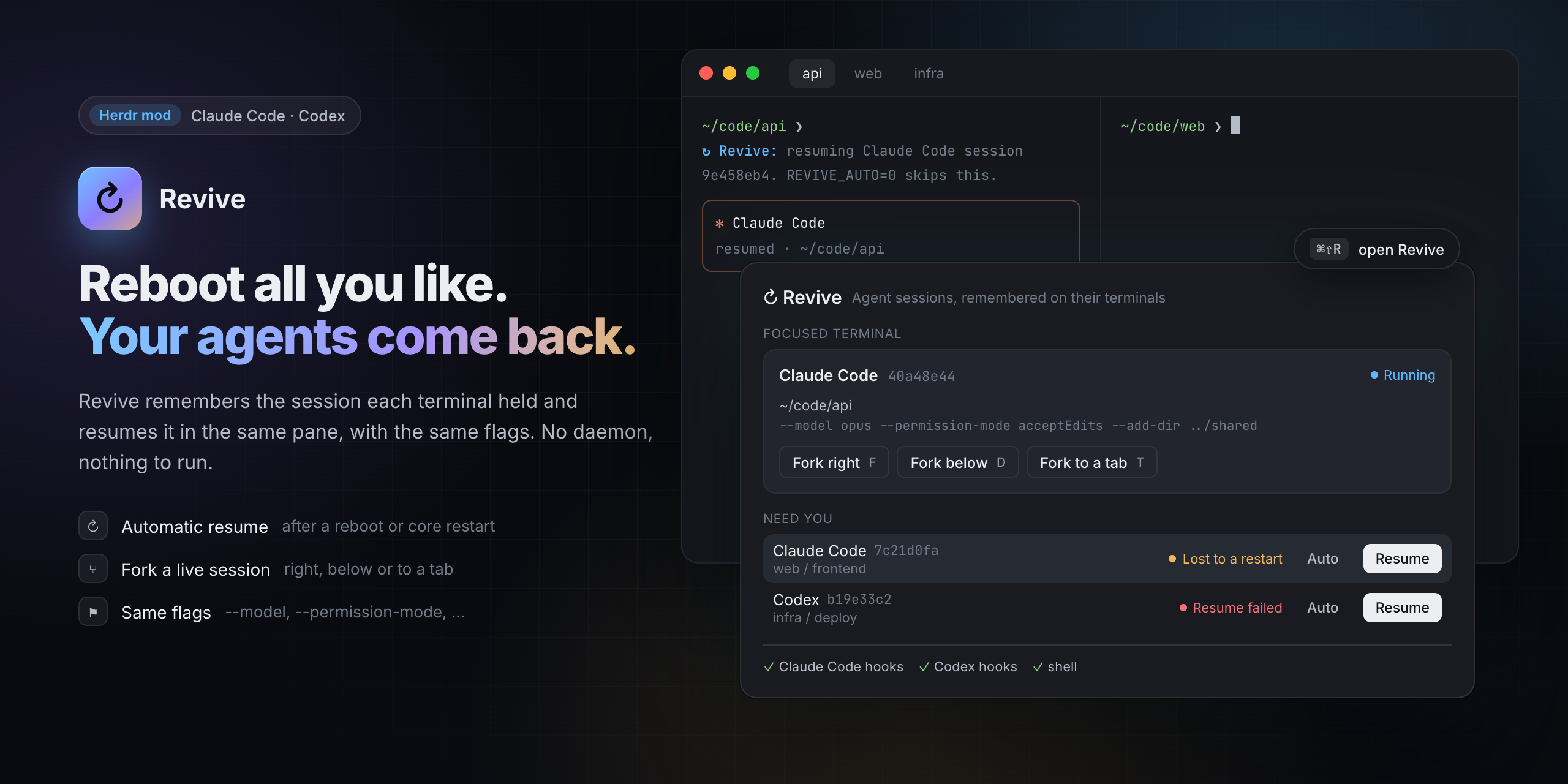
Bring back the coding agent a Herdr terminal lost to a restart or reboot, and fork a live session beside it.
↻ Revive

Bring back the coding agent a Herdr terminal lost, and fork a live
session beside it.
Herdr keeps your terminals through app restarts and updates. When the machine reboots or
herdr-core stops, each pane comes back with a fresh shell in the same folder, but the agent
that was running there is gone. Revive remembers which session each terminal held and,
when its shell comes back, starts that session again in the same pane, with the same
flags.
Requires the Herdr desktop app 0.1.9+, Node 20+, and Claude Code. Codex,
Factory Droid (droid) and the
Cursor CLI (cursor-agent) are supported too, but
experimental: see Limits. pi support is experimental and
community-maintained (tested with pi 1.4; pi issues: ping @llehouerou).
oh-my-pi (omp) support is experimental (tested
with omp 18.16).
Features
- Automatic resume. After a reboot or a core restart, the pane's new shell runs
claude --resume <id>(orpi --session <id>,omp --resume <id>,codex resume <id>,droid --resume <id>,cursor-agent --resume <id>) in the session's folder, before you touch anything. A dim
line says what it is doing. - Only what was lost. A session you ended yourself (
/exit, Ctrl+C,/logout; pi's/quit, omp's/exit) is
forgotten on the spot. A session that was never sent a message is skipped, since it has
nothing to resume. A shell you start inside a pane never resumes anything. - Same flags, within limits.
--model,--permission-mode,--dangerously-skip-permissions
and similar flags come back with the session, permission and sandbox modes included
(Codex's approval and sandbox flags; for Droid--auto; for Cursor--force/--yolo,--sandbox; omp's--auto-approve,--approval-mode): the session comes back the way it
ran, and it waits for your input before it does anything. The first prompt,--resume
itself and secrets (--api-key,-H) are left behind. So is anything that makes the agent
load code, configuration or instructions it wouldn't load otherwise: settings, hooks,
extensions, plugins or MCP servers (--settings,--mcp-config,--plugin-dir,-e/--extension,--hook,--config,--approve-mcps), extra instructions
(--system-prompt,--append-system-prompt,--skill) and extra folders (--add-dir,
omp's--allow-home, Cursor's--workspace). Folders the agent loads its settings or sessions from are never taken from the record either: for a session
started under another config folder (CLAUDE_CONFIG_DIR,CODEX_HOME,PI_CODING_AGENT_DIR, …) Revive records only the variable's name. It resumes such a
session by itself only when the new shell sets that variable on its own (in your rc
file, say); a session started with pi's or omp's--session-dirnever resumes by itself.
Instead the shell prints a dim line once. The dialog lists the session and shows the
command to run in a shell that has what it needs; it doesn't type it itself, and it
offers no fork for it. The
session's working folder is used by its real path, and only when it exists, is yours
and is not writable by everyone; otherwise the session is not resumed at all, not even
by hand, since the agent would start in another folder with its flags. The flags are kept in a terminal label, which any
program that can talk to herdr-core can change, and they run unattended after a reboot;
so they are filtered again when they are read back, not only when they are recorded. - Fork. Open the conversation of the focused agent as a new session beside it (right,
below or in a new tab), with the same flags. Both work in the same folder; a fork copies
the conversation, not the files. Claude Code, Codex and Droid (droid --fork <id>) fork;
the Cursor CLI has no fork, so the dialog offers none for it. - Resume by hand. An agent that died under a shell that survived it (a crash, a
kill)
is listed as Interrupted, with a Resume button. One whose resume failed is listed
as Resume failed. - Per terminal. Turn automatic resume off for one terminal in the dialog, or for a
whole shell withREVIVE_AUTO=0. - Nothing to run. No background process. Sessions are remembered as labels on their
herdr-core terminals, so the record lives exactly as long as the terminal does.
Install
In Herdr, ask your agent to add github.com/dmazlum/herdr-revive: it readsRECIPE.md and every file, copies mods/revive, mergeskeys.json, checks the mod and runs the install step. Or by hand:
git clone https://github.com/dmazlum/herdr-revive
cp -R herdr-revive/mods/revive ~/.config/herdr-app/mods/
herdr-app check ~/.config/herdr-app/mods/revive
node ~/.config/herdr-app/mods/revive/revive.mjs install
install adds two hooks (SessionStart, SessionEnd) to ~/.claude/settings.json when
Claude Code is installed (~/.claude exists), the
same two to ~/.codex/hooks.json when Codex is installed, to Droid's
hooks when the droid CLI is installed (~/.factory/hooks.json if you have one, else thehooks key of ~/.factory/settings.json, since Droid reads that one only while there is nohooks.json), and sessionStart/sessionEnd to ~/.cursor/hooks.json when thecursor-agent CLI is installed. A CLI counts as installed when it is on PATH or in~/.local/bin (cursor-agent also under ~/.local/share/cursor-agent); a ~/.cursor folder
alone doesn't count, since the Cursor editor makes one and reads that hooks.json too.
Droid's and Cursor's hooks run revive.mjs hook --agent droid|cursor. Claude Code's hook
names the engine as "$HOME/…" when it is under your home folder, so a settings.json
synced between machines finds it on each. It links pi's extension
(mods/revive/pi/revive.ts) as ~/.pi/agent/extensions/herdr-revive.ts when pi is
installed, and omp's (mods/revive/omp/revive.ts) as~/.omp/agent/extensions/herdr-revive.ts when omp is, and adds a short block to the file
your shell reads at start: ~/.zshrc for zsh; for bash on macOS the first of~/.bash_profile, ~/.bash_login and ~/.profile that exists (herdr-core starts terminals
there as login shells, which don't read ~/.bashrc), and on Linux ~/.bashrc, since
herdr-core starts bash there without -l (herdr-core#99).
Only one bash file keeps the block: a block an earlier version put in another one (a
Linux login file, say) is taken out.
zsh is asked where its .zshrc is, so aZDOTDIR set in ~/.zshenv is followed. A symlinked file (a dotfiles repository) is
changed where the link points, and every file keeps its permissions. The first time it
changes a file, the original is copied to <file>.revive-backup; later runs keep that
copy. Running it again
changes nothing, so it is also how you update the shell block after updating Revive. The
Install button in the dialog does the same. Codex asks you to trust new hooks the next
time it starts; Droid warns that its hooks changed and shows them in /hooks; pi loads the
extension the next time it starts (or at /reload), omp the next time it starts. An extension already at that path (a
copy your package manager placed, say) is left as it is, and uninstall takes out only the
link install made. --no-codex, --no-pi, --no-omp, --no-droid and --no-cursor leave that
agent's files alone. If an agent's file isn't valid JSON, that agent is skipped with a note,
the file is left as it is, and the rest is installed.
node ~/.config/herdr-app/mods/revive/revive.mjs install --zsh --bash   # both shells
node ~/.config/herdr-app/mods/revive/revive.mjs install --no-pi        # skip pi (or --no-codex)
node ~/.config/herdr-app/mods/revive/revive.mjs uninstall              # take it all out
node ~/.config/herdr-app/mods/revive/revive.mjs doctor                 # what is installed
Then merge keys.json into ~/.config/herdr-app/keys.json:
| Key | What it does |
|---|---|
cmd-shift-r → mod.open:revive |
Open the dialog for the focused terminal |
F / D / T in the dialog |
Fork the focused agent right / below / to a new tab |
↵ in the dialog |
Resume the focused terminal's session |
R |
Refresh |
| Esc | Close |
While developing, copy the folder again after each change; Herdr reloads the mod within
a second. Copy, don't symlink: Herdr doesn't reload a symlinked mod folder when its files
change.
cp -R herdr-revive/mods/revive ~/.config/herdr-app/mods/
Updates
Herdr updates its own mods, not ones you added: yours is a copy, and nothing tells you
when this repo changes. To hear about a new version, watch the repo for releases (on
GitHub: Watch → Custom → Releases). Each
release says what changed and whetherkeys.json did; merge it again when it did.
The version you have is "version" in ~/.config/herdr-app/mods/revive/mod.json. To
update, ask your agent to replace that folder with the latest mods/revive fromgithub.com/dmazlum/herdr-revive. Adding it again isn't enough: an agent never
overwrites a mod, it would add a second copy under a new name. If the mod was renamed when
it was added (a name clash), the renamed folder is the one to replace, renamed the same way.
Or by hand:
git -C herdr-revive pull          # or clone it again
rm -rf ~/.config/herdr-app/mods/revive
cp -R herdr-revive/mods/revive ~/.config/herdr-app/mods/
herdr-app check ~/.config/herdr-app/mods/revive
node ~/.config/herdr-app/mods/revive/revive.mjs install
Run install after every update: it brings the hooks and the shell block up to date and
changes nothing when they already are.
How it works
- When an agent starts a session in a Herdr terminal, its
SessionStarthook runsrevive.mjs hook(pi has no hooks file: Revive's pi extension runs it with the same
payload). The session id is the hook'ssession_id(Claude Code, Codex, Droid, pi) orconversation_id(Cursor, whose folder comes fromworkspace_roots). That labels the
terminal (hc label) with the agent, the session id,
the folder, the flags worth keeping, and the pid and start time of the terminal's
program. Only the agent in the terminal's foreground is recorded (with any wrapper
that launches it): aclaude -pit runs as a tool is not. - When the session ends,
SessionEndtells why. You ended it: the labels go. A signal
ended it (reasonother): the labels stay./clearleaves them to the new session,
which records itself. Droid sends Claude Code's reasons. Cursor'scompletedanduser_closeforget the session; anything else (aborted,error, …) keeps it. - After a reboot or a core restart, herdr-core gives the terminal a new shell. Its rc file
checks, without starting anything, that a session is remembered and that it is the
terminal's own shell, then asksrevive.mjs check. A terminal whose program is no
longer the remembered one (by
pid and start time, since pids start over after a reboot) lost its agent, socheck
prints the commands that resume the session. The shell runs them at its first prompt,
once its rc files are done, and hands the agent the terminal device itself, so prompt
themes that hold the shell's output while it starts (an instant prompt) don't get in
the way. - If the agent exits with an error within 15 seconds, the terminal is marked as failed and
the dialog offers a retry. A failed session is not tried again automatically.
hc get t3 --json | jq '.labels | with_entries(select(.key | startswith("revive.")))'
hc label t3 revive.auto=off      # no automatic resume for t3
REVIVE_DEBUG=1 zsh               # say why a shell did or didn't resume
Limits
- Local only. Terminals on another machine are not remembered yet.
- Sessions started before Revive was installed have no record. The dialog still finds a
running one from the files its agent writes (Claude Code:sessions/<pid>.json; Droid:
the newest~/.factory/sessions/<folder, dashed>/<id>.jsonlwritten since it started;
Cursor: the newest~/.cursor/chats/<md5 of the folder>/<id>/), so it can be forked, but
it won't come back by itself. - An agent that died while its shell lived on is not resumed automatically, since nothing
told the shell. Use Resume in the dialog. - Codex support is experimental. Its hooks follow the same format as Claude Code's,
and Codex behind a wrapper (npm'snode …/bin/codex, a launcher script) is recognized,
but Revive can't check whether a Codex session can be resumed before trying. Codex
0.163.0 also runs its sessions in a shared background daemon, which Revive was not
built for:SessionEndalways reports reasonother, so Revive can't tell a session you ended
from one a crash or a restart ended. A session you left with/quitstays
remembered, shows as Interrupted, and comes back at the next restart. To stop that,
turn automatic resume off for that terminal in the dialog./quitsends noSessionEnd. When the daemon stops (its pane closes), it sends one
for every session it held.- The daemon, not the terminal's Codex process, runs the hooks, so they can't tell which
terminal a session is in, and a session it runs is not recorded. The dialog still
shows the running Codex, without Fork. To have Codex sessions recorded, run Codex
without the daemon:daemon_auto_start = falseunder[features]in~/.codex/config.toml. Codex warns that this can turn off features for other apps that
share the daemon. - Codex fires
SessionStartat a session's first message, so a session is recorded
only from then.
- pi support is experimental and community-maintained, tested with pi 1.4.0; a new pi
release may change its flags,--session/--forkor how it ends on a signal. pi is
recorded through its extension, only for an interactive pi in a herdr terminal
(not-p,--mode json|rpc,--no-session, or the subagents pi starts):- pi reports
quitfor every end,/quitand a reboot alike. The extension tells
them apart by listening for the SIGTERM and SIGHUP a reboot, a core restart or akillsends: a session a signal ended stays remembered; one you quit is forgotten. - pi renames its process
pi, sopsand Herdr no longer see its flags; the
extension sends its command line with the hook. - pi keeps sessions where its flags, environment or settings say, so the record names
the session file, and the transcript check looks only at that file. - A pi started before the extension was installed (or before
/reload) is not
recorded.
- pi reports
- omp support is experimental, tested with omp 18.16.0 on Linux. It is recorded through
its own extension, only for an interactive omp in a herdr terminal (not-p,--mode json|rpc|rpc-ui,--no-session, or its subagents):- omp's
session_shutdowncarries no reason. The extension tells a reboot, core
restart orkill(SIGTERM, SIGHUP: kept) from/exit, Ctrl+C or Ctrl+D (forgotten). /new,/resumeand/forkinside omp reportsession_switch; the new session is
recorded in place of the old one.- omp renames its process
omp; the extension sends its command line with the hook. - The extension is linked into
~/.omp/agent/extensions. omp also readsPI_CODING_AGENT_DIR; Revive assumes that variable belongs to pi and links omp's
extension into omp's default folder. Named profiles (--profile) have their own
extension folder and are not installed into.
- omp's
- Droid (1.1.0) and the Cursor CLI (2026.10.22) were checked by hand: the hooks record the
session and flags, and resume (and Droid's fork) reopen the conversation. Cursor
sendscompletedfor/exitand Ctrl+C twice (forgotten),abortedwhen it is killed
with SIGTERM (kept), and nosessionEndat all when its terminal closes (kept). Not
checked yet: a real reboot with either. Like Codex, neither is checked for a resumable
session before trying: a failed resume is marked Resume failed. - Cursor installs as
cursor-agentandagent.agentis a common name, so it counts as
Cursor only under a path that says so (…/cursor-agent/…) or when it reports itself as
Cursor to Herdr. Cursor's hooks also run for the Cursor editor's chats; outside a Herdr
terminal they do nothing. - Shell support: zsh and bash. Other shells can run
revive.mjs check --shell $$from
their own rc file and evaluate what it prints.
Development
npm test # labels, states, flags, quoting, the resume script, install and uninstall
The UI is checked in Herdr: herdr-app check, then herdr-app shot while the dialog is
open. To test a real restart without touching your own terminals, start a second
herdr-core with its own HC_SESSION and XDG_STATE_HOME/XDG_RUNTIME_DIR (a short path:
socket paths are limited to about 100 bytes) and restart that one.
License
MIT
Yorumlar (0)
Yorum birakmak icin giris yap.
Yorum birakSonuc bulunamadi