meeting-transcriber-go
Health Uyari
- License — License: MIT
- Description — Repository has a description
- Active repo — Last push 0 days ago
- Low visibility — Only 6 GitHub stars
Code Gecti
- Code scan — Scanned 12 files during light audit, no dangerous patterns found
Permissions Gecti
- Permissions — No dangerous permissions requested
Bu listing icin henuz AI raporu yok.
A private meeting archive for macOS: records calls, writes down who said what, keeps decisions and tasks. Local transcription, optional AI, built-in MCP server.
Meeting Transcriber
A private meeting archive for macOS. It records your calls, writes down who said what, and keeps the decisions and the follow-up work. Transcription runs on your Mac: no bot joins the call, and no account is needed.
Download for macOS · Apple Silicon · macOS 14.2 or newer · MIT
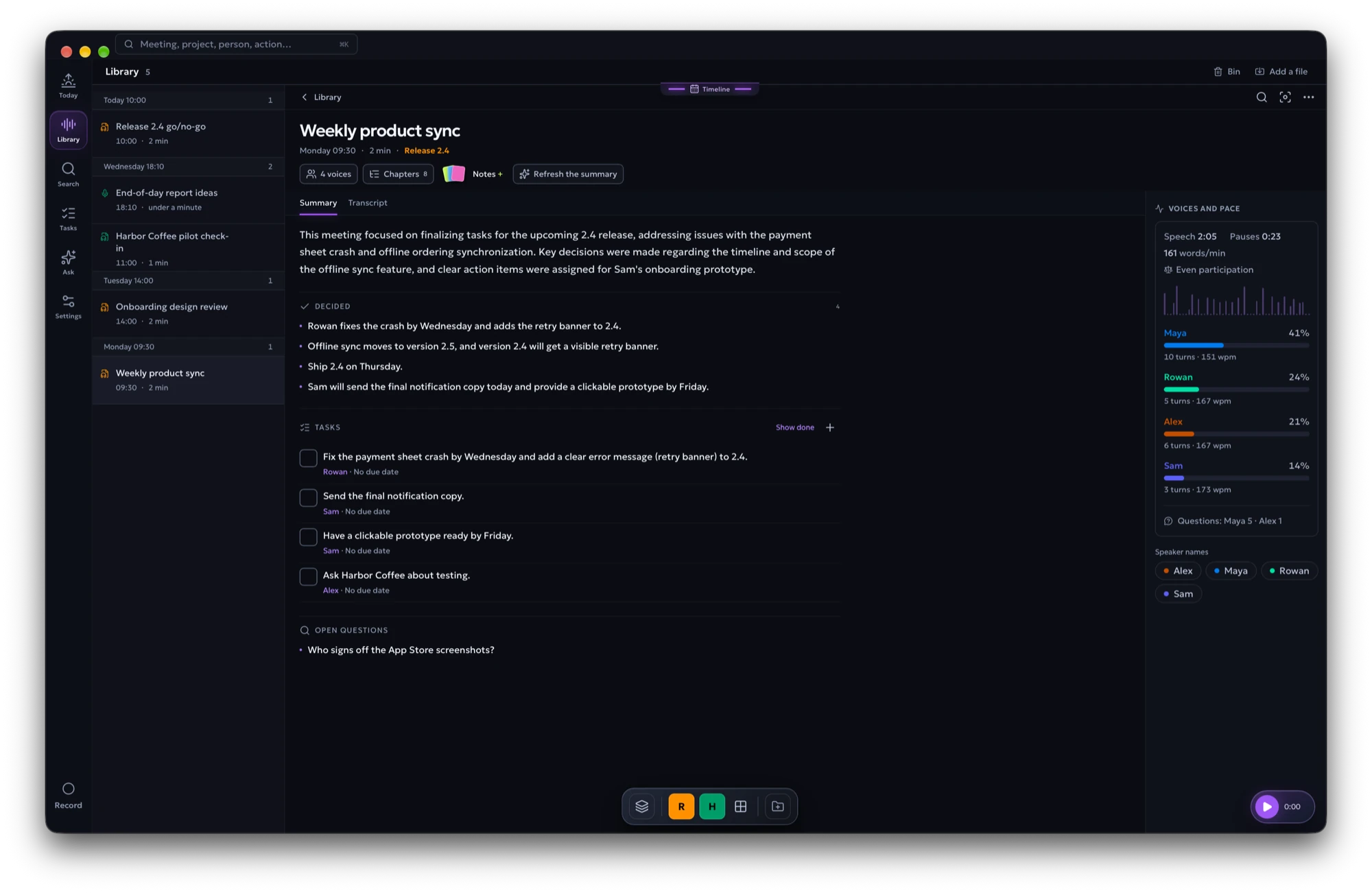
You leave a call knowing something was decided, but not where it was said or
who agreed to do it. Meeting Transcriber records the microphone and the other
side of the call, turns the audio into a transcript with speaker names, and
keeps it on the Mac with the decisions, questions and tasks that came out of
it. Over weeks it becomes an archive you can search, ask and hand to your own
AI tools.
What it does
Records the call, with a strip that stays out of the way
The app notices when a conversation starts and records it, or you press
Record. The microphone and the system audio go to separate channels, so
your voice is never confused with the people on the call. While it records, a
strip under the menu bar asks you to tell the others, then shows the latest
line it heard, with Pause and Stop at hand. The strip stays over
full-screen apps and is left out of screen sharing.

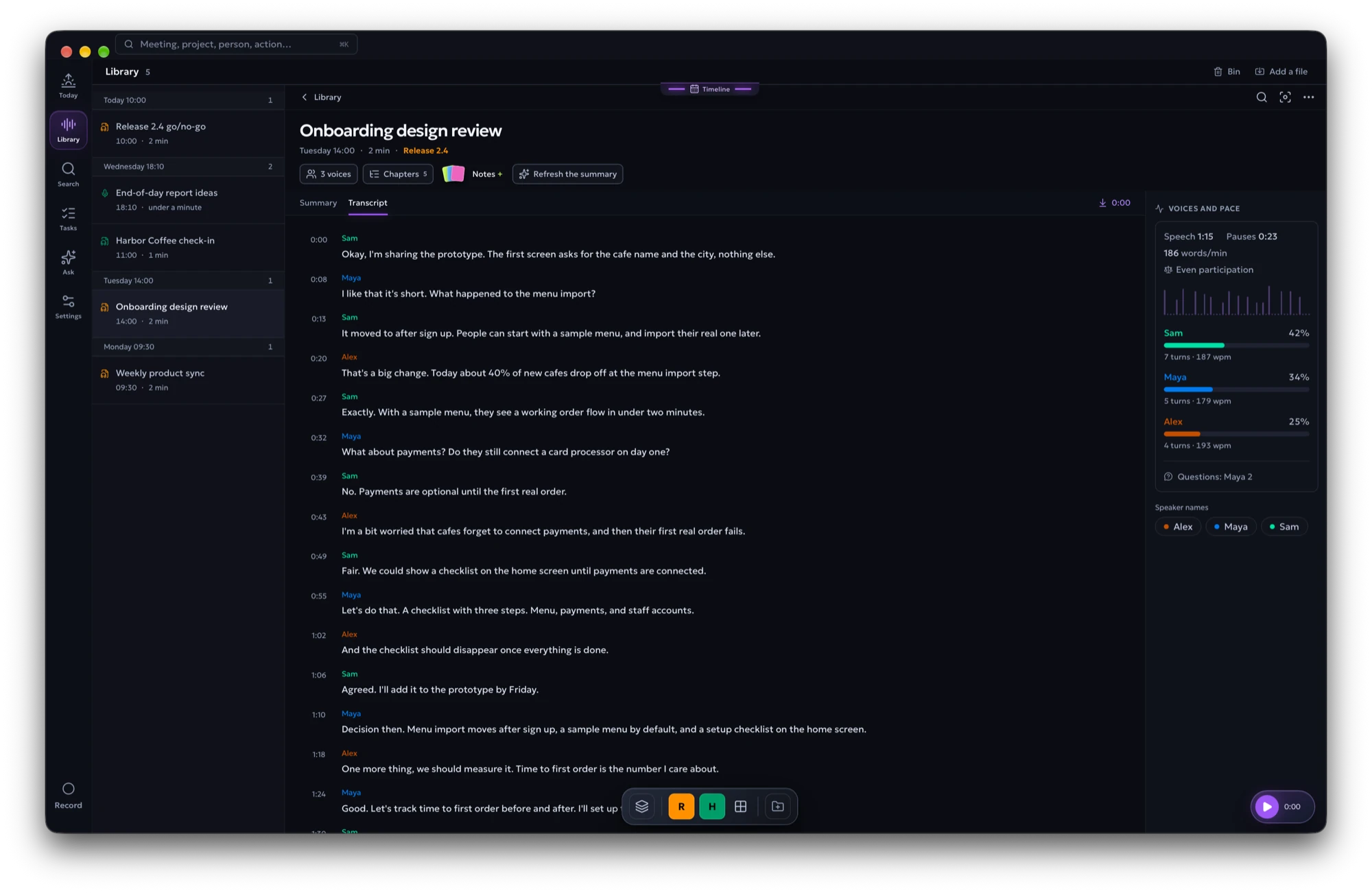
Writes the transcript and learns the voices
Whisper turns the recording into a transcript; speaker separation splits the
other side of the call into voices. Name a voice once and later meetings use
the name when the voice matches. Click any line to hear it.
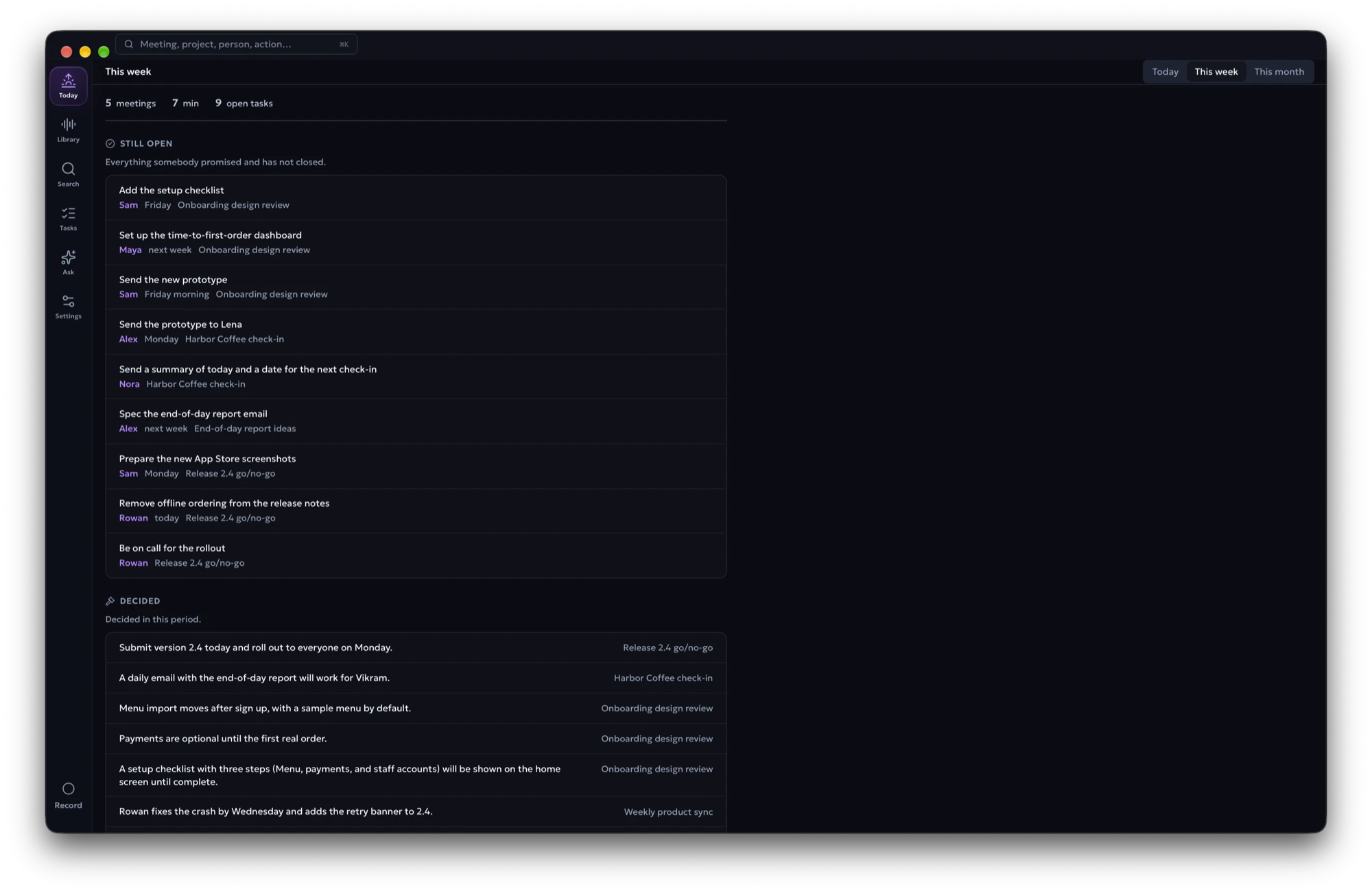
Keeps what was decided and who does what
With AI switched on, each meeting gets an overview, chapters, decisions, open
questions and tasks with owners and deadlines. Today collects what happened recently and what is
still open; Tasks lists every promise across meetings.
Takes voice notes
Press Note, say what you must not forget, and press it again. Only your
microphone is recorded, and the note is transcribed straight away. With AI on,
the note can come back as you would have typed it, with what you mean to do as
tasks dated from the day you said it: on its own when automatic summaries are
on for everything, or when you ask. Notes keeps them as cards, apart from
your meetings.
Follows a project across meetings
File meetings into a project and it keeps a living document: where things
stand, the work list, decisions, questions and people, each linked to the
meeting it came from. An item you edit is pinned: the model can mark it done
but never rewrites it.
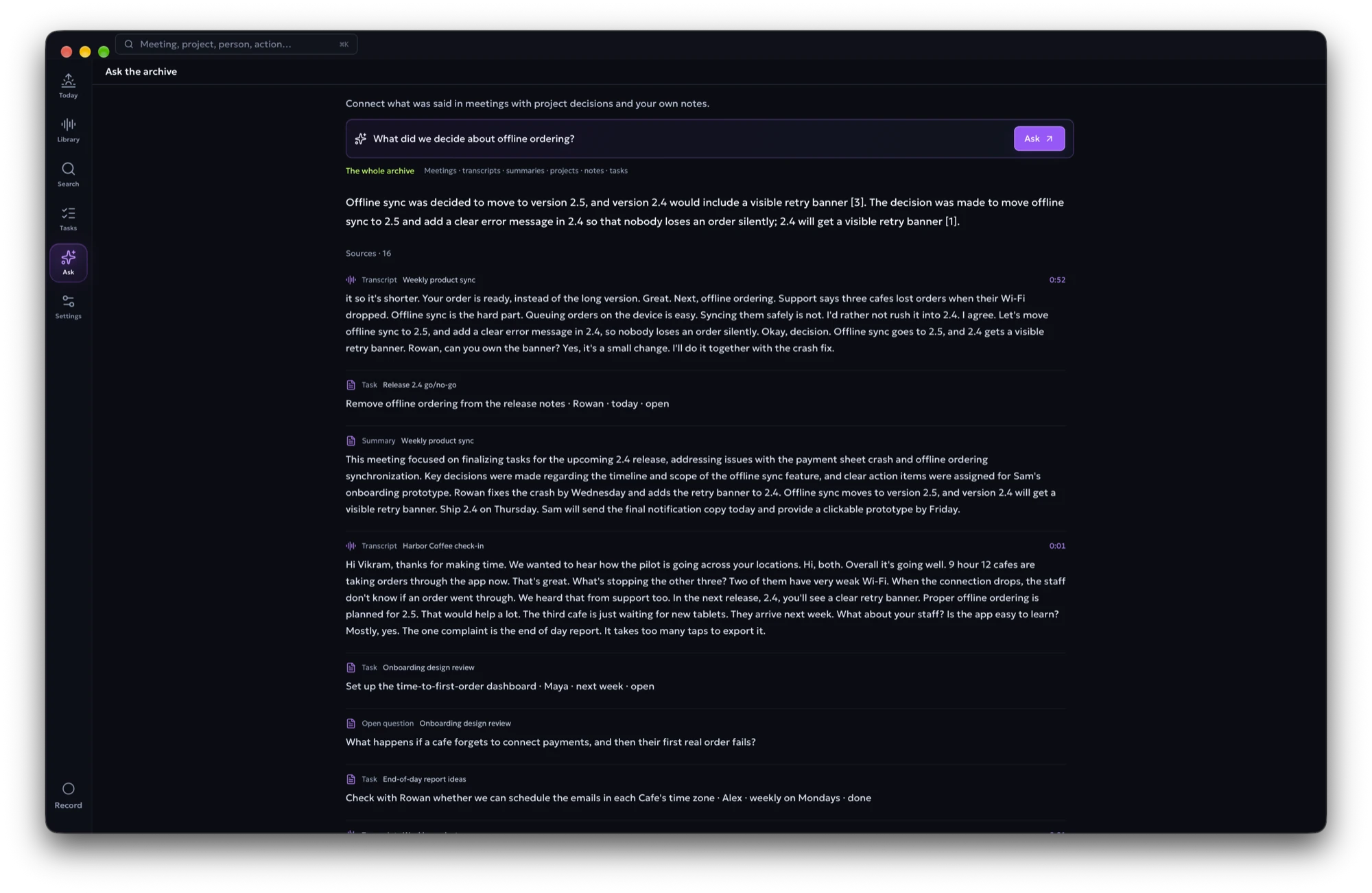
Answers questions from your archive
Search by words, or by meaning when AI search is on. Ask answers from your
meetings, notes and projects and links every answer back to the passages it
used.
Lets your AI tools read it
A read-only MCP server is built in. Claude Desktop, Codex, ChatGPT and VS Code
with GitHub Copilot can search transcripts, open meetings, list tasks and read
project state. See MCP access.
Everything else
| Area | What you get |
|---|---|
| Recording | Automatic or manual, microphone and system audio on separate channels, live transcript, pause and stop from the strip |
| Voice notes | A Note button, transcription straight away, the text in your own words, tasks with dates, a screen of their own |
| Import | Audio and video files from the native file picker |
| Transcript | Timestamps, speaker names, click to play, waveform, notes, retranscription |
| People | Learned voice names; the person at the Mac is identified once in Settings |
| Summary | Overview, chapters, topics, decisions, open questions, tasks with owners and deadlines |
| Today and Tasks | A recent briefing, open and overdue work, recurring questions |
| Projects | A living status per project, with links back to each meeting |
| Search and Ask | Local keyword search, search by meaning, answers with sources |
| Schedule | Transcribe right after a recording, at a set time, or when nobody is using the Mac; Transcribe now puts one meeting first |
| Retention | Audio expires after a set number of days; transcripts, summaries and notes stay |
| MCP | Read-only access to meetings, transcripts, notes, projects, tasks, briefings and people |
| Interface | English or Ukrainian, switched in Settings |
Private by design
| Runs on your Mac | Optional, and only if you choose it |
|---|---|
| Recording, transcription and speaker separation | Summaries, Ask and project updates from OpenAI or GitHub Copilot |
| Voice names, playback, analytics | Search by meaning with OpenAI embeddings |
| Keyword search and the whole archive | |
| Summaries, Ask and search by meaning with a local model |
AI is optional. Without it, recording, transcripts, speaker names and keyword
search all work. With the local option, summaries and answers come from a model
that runs on the Mac, so nothing leaves it.
The MCP server only listens on 127.0.0.1 and never returns API keys or raw
voiceprints. The app asks GitHub once an hour whether a newer version exists
(Settings → Storage turns that off) and offers to install it; nothing else
leaves the Mac without your choice.
Install
- Download the
.dmgfrom the
latest release. - Open it and drag Meeting Transcriber to Applications.
- Open the app. It is not notarized by Apple, so the first time macOS refuses
to open it. Go to System Settings → Privacy & Security, find the message
about Meeting Transcriber and choose Open Anyway. You do this once. - Allow Microphone and System Audio Recording when macOS asks.
On the first launch the app downloads about 600 MiB into ~/MeetingTranscriber:
the transcription, speech-detection and speaker models, and FFmpeg.
The window opens straight away and shows the download; after that, recording
and transcription work offline.
Transcription uses Whisper large-v3-turbo, so it handles the languages Whisper
does. Set the language in Settings or let it be detected for each meeting.
English and Ukrainian are the most tested.
AI options
Choose in Settings → AI and archive. Recording and transcription do not
depend on it.
- OpenAI — paste an API key.
- GitHub Copilot — the app fetches the Copilot CLI (about 90 MB), you sign
in with GitHub in the browser and pick one of your plan's models. Requests
use your plan's AI Credits; Business and Enterprise plans need the Copilot
CLI policy enabled. - Local — the app fetches Gemma 4 E2B (2.8 GB) and runs it with the bundled
llama-server. Paste a Hugging Face.gguflink to use a bigger model.
Search by meaning can run locally too, with Qwen3 Embedding 0.6B (0.6 GB).
Where your data lives
~/MeetingTranscriber/
├── config.toml       settings, the AI choice, and an optional OpenAI key
├── meetings.db       transcripts, summaries, projects, notes, and search data
├── recordings/       captured and imported audio
├── models/           downloaded models, local AI models included
├── bin/              FFmpeg, and the Copilot CLI when chosen
├── copilot/          the Copilot CLI's own state
├── cache/            playback files
└── logs/mt.log       the application log
MT_HOME moves the whole folder. Audio is kept for 30 days by default; deleting
audio never deletes the transcript or anything made from it.
MCP access
The MCP server is part of the app, not a second program. It opens as soon as
the database is ready, without waiting for the speech models.
flowchart TB
    DB[("The same SQLite archive<br/>the app uses")]
    Tools["9 read-only MCP tools"]
    HTTP["Streamable HTTP<br/>127.0.0.1:8765/mcp"]
    Stdio["stdio mode<br/>--mcp-stdio"]
    Codex["Codex / ChatGPT"]
    VSCode["VS Code<br/>GitHub Copilot"]
    Claude["Claude Desktop"]

    DB --> Tools
    Tools --> HTTP
    Tools --> Stdio
    HTTP --> Codex
    HTTP --> VSCode
    Stdio --> Claude

    classDef data fill:#ECFDF5,stroke:#10B981,color:#064E3B
    classDef transport fill:#EEF2FF,stroke:#6366F1,color:#1E1B4B
    classDef client fill:#FFF7ED,stroke:#F97316,color:#7C2D12
    class DB,Tools data
    class HTTP,Stdio transport
    class Codex,VSCode,Claude client
The tools list and open recordings, search transcripts and stored knowledge,
read projects, list action items, build a recent briefing and list recognised
people. Codex, ChatGPT and VS Code connect to the HTTP endpoint while the app is
open; Claude Desktop starts the same executable in stdio mode.
Settings → MCP Server shows the live status and ready-to-copy configuration
for each client. The same examples are in docs/mcp.md.
How it works
One process owns everything: the React interface is embedded in the Go
executable by Wails, and the same process records, runs the queue, keeps the
SQLite database and serves MCP.
flowchart LR
    Person["Person at the Mac"]
    Clients["Claude · Codex · GitHub Copilot"]
    AI["OpenAI · GitHub Copilot<br/>optional, or a local model"]

    subgraph App["Meeting Transcriber.app"]
        direction TB
        UI["React interface<br/>Wails webview"]
        Core["Go application services"]
        Capture["Microphone + system audio"]
        Pipeline["Transcription + speakers"]
        MCP["Read-only MCP server"]

        UI <--> Core
        Capture --> Core
        Core --> Pipeline
        Core <--> MCP
    end

    subgraph Local["~/MeetingTranscriber"]
        DB[("SQLite archive")]
        Audio["Recordings"]
        Models["Model files"]
    end

    Person --> UI
    Clients <--> MCP
    Pipeline <--> Models
    Core <--> DB
    Capture --> Audio
    Pipeline --> Audio
    Core -. "summaries, embeddings, Ask" .-> AI

    classDef app fill:#EEF2FF,stroke:#6366F1,color:#1E1B4B
    classDef local fill:#ECFDF5,stroke:#10B981,color:#064E3B
    classDef external fill:#FFF7ED,stroke:#F97316,color:#7C2D12
    class UI,Core,Capture,Pipeline,MCP app
    class DB,Audio,Models local
    class Person,Clients,AI external
A live call and an imported file enter the same queue. A recording in progress
always comes first, so old imports never make the current meeting lag.
flowchart LR
    Start{"Live call or<br/>imported file?"}
    Capture["Capture or copy audio"]
    Queue["Add to SQLite queue"]
    Decode["Decode and align channels"]
    ASR["Transcribe locally"]
    Speakers["Separate speakers"]
    Names["Apply learned names"]
    Save["Save transcript + voice evidence"]
    Index["Build searchable passages"]
    Summary{"AI chosen?"}
    AI["Summarise and<br/>update the project"]
    Ready["Ready in Library,<br/>Today, Search, and MCP"]

    Start --> Capture --> Queue --> Decode --> ASR --> Speakers --> Names --> Save --> Index --> Summary
    Summary -->|"yes"| AI --> Ready
    Summary -->|"no"| Ready

    classDef local fill:#ECFDF5,stroke:#10B981,color:#064E3B
    classDef decision fill:#FFF7ED,stroke:#F97316,color:#7C2D12
    classDef result fill:#EEF2FF,stroke:#6366F1,color:#1E1B4B
    class Capture,Queue,Decode,ASR,Speakers,Names,Save,Index local
    class Start,Summary decision
    class AI,Ready result
The microphone channel is the person at the Mac; the system channel is everyone
else. Speaker separation runs on the system channel, so your own voice echoing
in the room does not become a second speaker. The .app carries the speaker
libraries, an audiotee helper for system audio and llama-server for local
models; the models themselves are downloaded per user.
The reasoning behind these choices, with the measurements, is in
engineering decisions and
architecture.
Build from source
You need an Apple Silicon Mac with macOS 14.2 or newer, Go 1.26.2, Node.js
with npm, CMake and the Xcode Command Line Tools. The first build fetches the
pinned native sources and frontend dependencies.
make           # build/mt, the development binary
make bundle    # build/Meeting Transcriber.app
make run       # open the bundle, so macOS gives the permissions to the app
make install   # replace /Applications/Meeting Transcriber.app with this build
make dmg       # build/MeetingTranscriber.dmg
make test      # go vet and go test
Always run the .app. Started as a bare build/mt from a terminal, the
microphone permission belongs to the terminal and the app records silence.make cert creates a local signing identity once, so macOS keeps the
permissions across rebuilds.
To work on the interface with sample data and without the models:
cd frontend
VITE_DESIGN=1 npm run dev
Contributing
Issues and pull requests are welcome. AGENTS.md is the working
agreement for this repository: how the code is organised, what must not break,
and how changes are tested. Audio, model and threshold changes are decided by
measurements in exp/, described in experiments; the
roadmap lists what comes next.
License
MIT. See LICENSE.
Acknowledgements
Meeting Transcriber stands on these projects:
whisper.cpp and
llama.cpp (MIT),
sherpa-onnx (Apache-2.0),
audiotee (MIT),
Wails (MIT),
React, Motion,
Lucide and Tailwind CSS, and
the Geologica typeface (SIL Open
Font License, notice).
The models it downloads keep their own licences: Whisper large-v3-turbo (MIT),
Silero VAD (MIT), pyannote segmentation 3.0 (MIT), 3D-Speaker CAM++
(Apache-2.0), Parakeet TDT 0.6B v3 (CC BY 4.0), Gemma 4 E2B (Apache-2.0) and
Qwen3 Embedding 0.6B (Apache-2.0). FFmpeg is downloaded as a separate program
under its own licence.
Yorumlar (0)
Yorum birakmak icin giris yap.
Yorum birakSonuc bulunamadi