session-kit
Health Gecti
- License — License: MIT
- Description — Repository has a description
- Active repo — Last push 0 days ago
- Community trust — 12 GitHub stars
Code Gecti
- Code scan — Scanned 12 files during light audit, no dangerous patterns found
Permissions Gecti
- Permissions — No dangerous permissions requested
Bu listing icin henuz AI raporu yok.
Many AI coding sessions. One place to see which one needs you. A local, keyboard-first picker for Claude Code, Codex, and shell sessions that survive SSH disconnects.
 Session Kit


Many AI coding sessions. One place to see which one needs you.
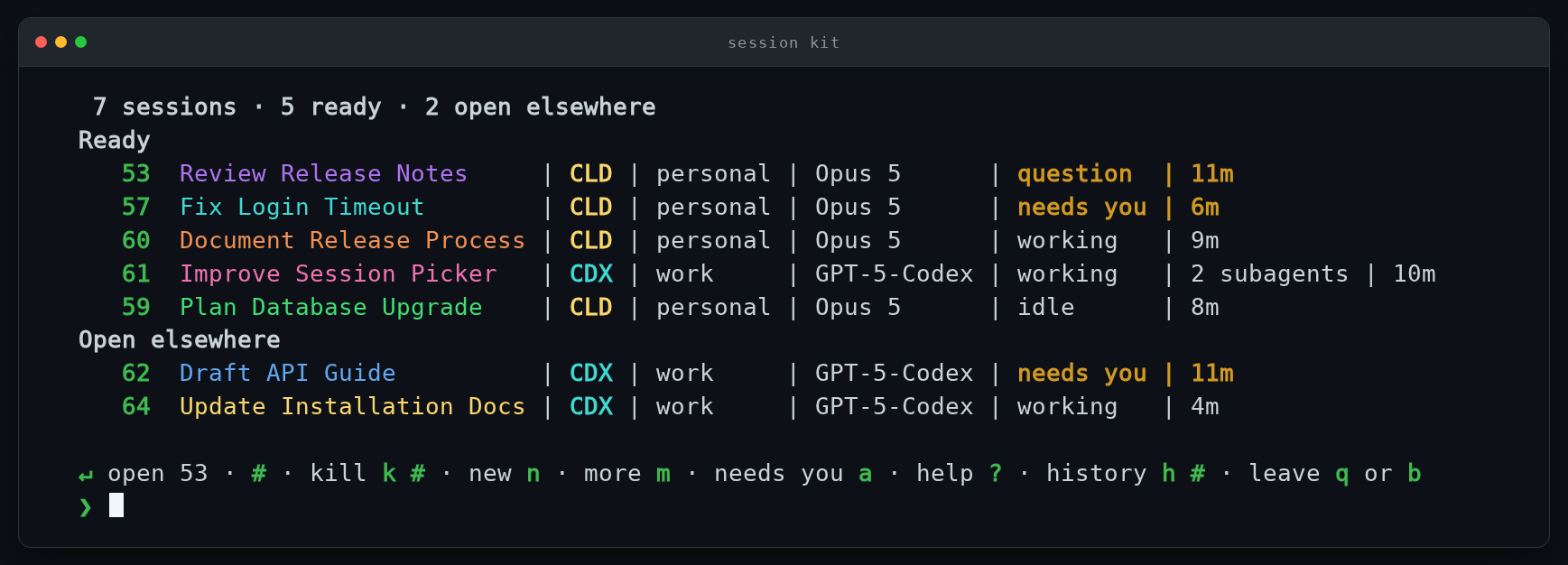
Session Kit is a local picker for Claude Code, Codex, and shell sessions. Type kit and every session you are running is in one list, with a stable number, a name, and a state word that says whether it is waiting on you or still working. The sessions run on the host, so closing the terminal or dropping SSH does not end them.
Install · The picker · Delegated work · How it works · Safety model · Documentation
Public beta.
v0.4.2supports Linux with systemd and macOS 14 or newer. Start on a single trusted Unix account where provider conversations can be recovered. Session Kit is not a security boundary against another process already running as the same Unix user.
What you get
| Capability | What it means |
|---|---|
| One list | Managed Claude Code, Codex, and shell sessions in a single keyboard-first picker. |
| States that mean something | question, needs you, working, and idle have exact definitions and sort consistently. |
| Stable session numbers | Open, inspect, close, and find sessions without copying internal shpool IDs. |
| Survives disconnects | The session stays on the host when a terminal window closes or SSH drops. |
| Guarded actions | Every mutation rechecks exact live identity immediately before it runs, and refuses on any doubt. |
| Recoverable conversations | Closing a Claude Code or Codex session records the exact conversation for restore. |
| Isolated working copies | A delegated session gets its own git worktree on its own branch, and hands it back when it closes — kept instead, with the reason named, whenever giving it back could lose work. |
| Account-aware | Provider accounts are enrolled and shown per session. A conversation whose weekly quota runs out is carried to another enrolled account once, and you are told afterwards. |
| Local only | No hosted account, no analytics, no update beacon, no telemetry. |
| Provider-aware display | Names, account aliases, models, terminal titles, and per-session colors stay visible without becoming identity evidence. |
Is this for you?
It fits best if you run several AI coding sessions at once, work on a remote host over SSH, and want to know at a glance which session is blocked on you rather than opening each one to find out.
Here is what it does not do:
- No diff review. It will not show you what a session changed. That stays in git and your editor.
- No cost or spend accounting. It can read the provider's own quota percentages and act when one runs out, but it does not price or count tokens.
- Not a multiplexer. It runs on shpool and does not replace tmux, or try to.
- Not a security boundary. It protects you from acting on the wrong session, not from a hostile process running as you.
If what you actually need is reviewing the diff each agent produced, a different tool will serve you better.
Install
Session Kit installs per user, on the Linux or macOS machine where the work runs.
mkdir session-kit-download
cd session-kit-download

gh release download --repo dob323/session-kit --pattern 'session-kit-*'

if command -v sha256sum >/dev/null; then
  sha256sum --check session-kit-*.sha256
else
  shasum -a 256 --check session-kit-*.sha256
fi

tar -xzf session-kit-*.tar.gz
cd session-kit-*/

./install.sh --check
./install.sh

session-kit doctor
session-kit services enable
session-kit doctor
./install.sh --check is read-only. Do not work around a refusal — Session Kit prints the reason and the remedy it expects.
Requirements
- shpool
0.11.0 - Claude Code, Codex, or both
- one trusted Unix account, with per-user service access
Linux additionally needs a readable /proc, a systemd user manager, Bash 4+, and Python 3.10+.
macOS additionally needs macOS 14+, an active desktop login for the per-user launchd GUI domain, Homebrew Bash 4+, and Python 3.11+.
For supported shpool paths, provider setup, manual asset download, project import, and activation, read Install Session Kit.
Installing with an AI assistant
If Claude Code, Codex, or another terminal agent is doing the installation, give it this:
Install Session Kit from
https://github.com/dob323/session-kit. Use the latest release artifact, not a clone ofmain. Download the release archive with its.sha256and.provenance.jsonfiles, verify the checksum, extract it, and run./install.sh --checkfirst. Fix only the remedies that preflight explicitly names. Then run./install.sh,session-kit doctor,session-kit services enable, andsession-kit doctoragain. Never bypass a refused step. Show me the final doctor output and finish by telling me to typekit.
First run
kit
New session defaults to Claude Code. A session can also be started directly:
sp new claude
sp new codex
sp new shell
Project aliases, provider choice, account selection, and configured models make those launches more specific. See Projects and Use Session Kit.
The picker
Ready sessions come first. Sessions already attached to another window appear under Open elsewhere. Within a group, attention state determines the first part of the order, followed by provider and activity.
The state words are deliberately small and literal:
| State | Meaning |
|---|---|
question |
Claude has a blocking prompt open now. Codex does not claim this state yet. |
needs you |
The provider finished its turn and is waiting for you. |
working |
The provider is driving the current turn. |
idle |
A needs-you transcript has not moved for the configured idle window. |
pending |
A launch that has not finished, or a value Session Kit cannot currently read. It is not a fifth state. |
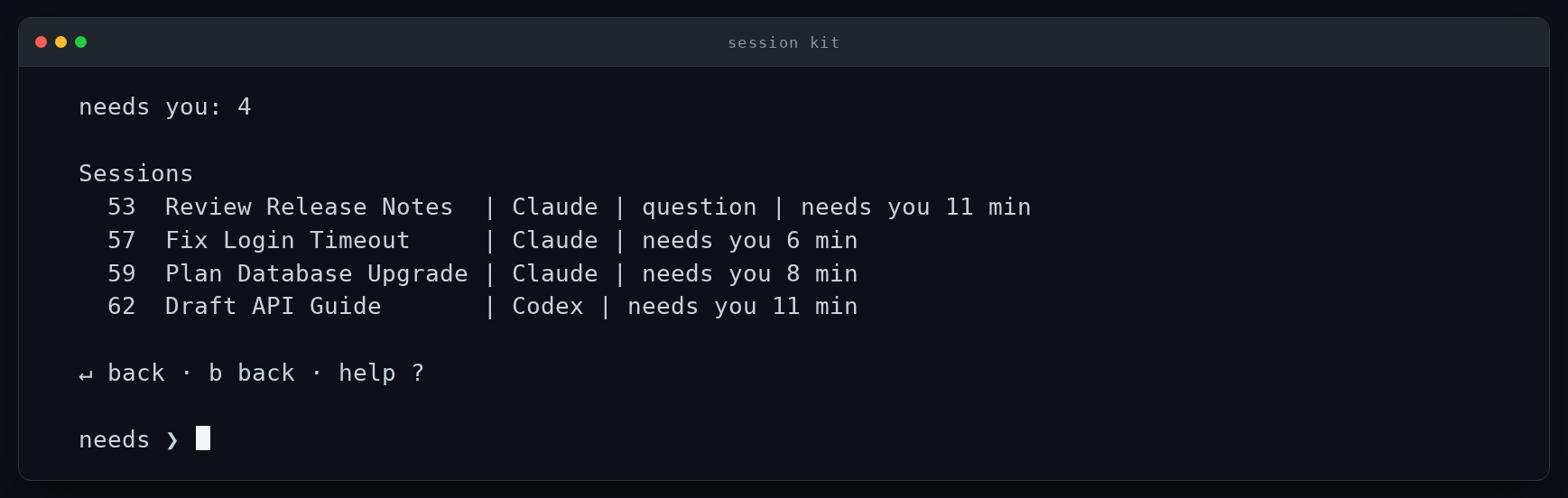
Pressing a narrows the list to just those sessions, with how long each has
waited.
The home screen keeps the common actions one key away:
| Input | Action |
|---|---|
Enter or a session number |
Open the first visible session, or the numbered session. |
k <numbers> |
Close one or more visible sessions. Lists and ranges work. |
n |
Start a new session. |
m |
Open More. |
a |
Show everything that needs you. |
h <number> |
Read settled history without opening the session. |
? |
Show picker help. |
b or q |
Leave the home screen for an ordinary shell. |
A session that is open elsewhere defaults to Move it here after a fresh identity check. The earlier window returns to its picker, and the provider conversation is not duplicated.
Press ? for the full key reference — filtering, ranges, grouping, forking, renaming, and g to jump to the next session that needs you are all there. See Picker navigation for the cursor-driven picker, mouse behavior, action panels, machine sessions, and closed-session restore.
Delegated work
A session started as machine-origin is given its own git worktree, on a branch the kit cuts for it, so two workers on one repository never edit the same files. Any session can ask for one by branch:
sp new claude --worktree <branch>
Closing the session gives the copy back, and every close does it — sp close, the picker's k, bye or a clean provider exit, and the scheduled cleanup pass. The copy is kept instead, with the reason named out loud, whenever giving it back could lose work: uncommitted, staged or untracked files, ignored files that were created there, a commit not yet in the reference, somebody still working in the directory, or a check that could not run at all.
A directory that is not a git repository has nothing to isolate, and a person's own session is never moved out of the directory they chose. See Use Session Kit for the complete rules.
How it works
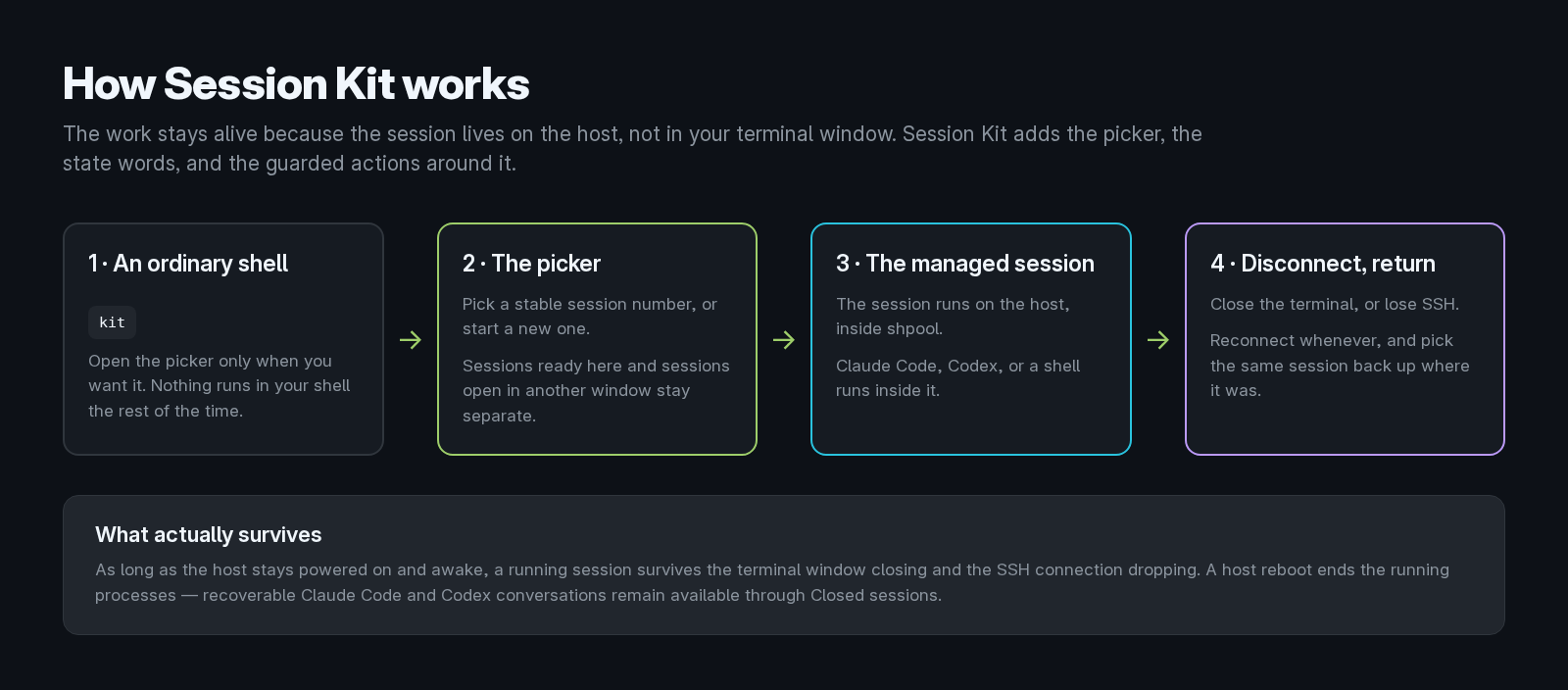
Install Session Kit where the work actually runs.
- On a local workstation, sessions survive closing the terminal window.
- On a remote host, they also survive the SSH client disconnecting.
- The laptop you connect from can sleep, disconnect, or shut down.
- The host must stay powered on and awake for the processes to keep running.
- A host reboot ends them. Recoverable Claude Code and Codex conversations remain available through Closed sessions.
There is no Session Kit server to deploy.
Safety model
Session Kit deliberately separates what you see from what it trusts.
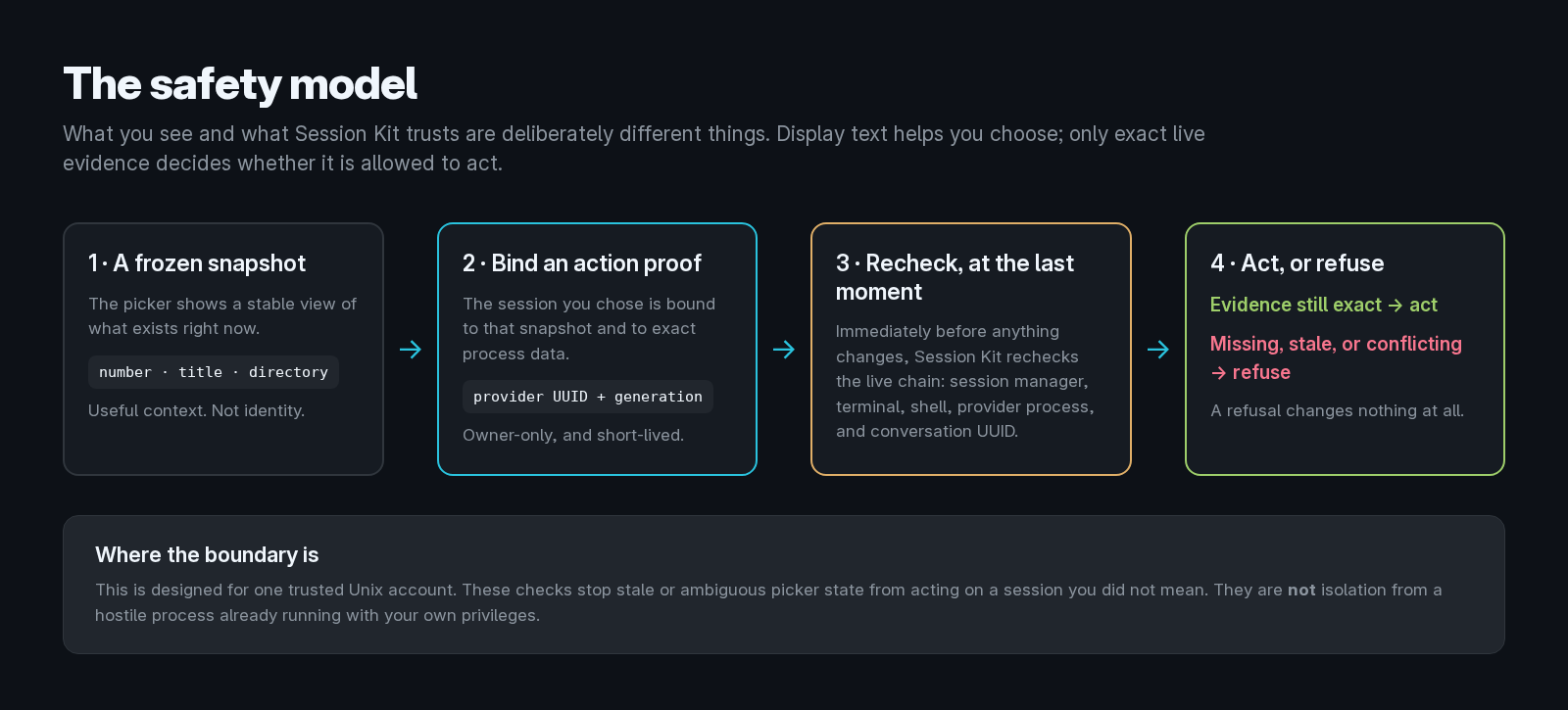
- Provider UUID plus exact process generation is identity.
- Session number, title, directory, timestamps, and terminal output are display context.
- Every mutation rechecks live identity immediately before it runs.
- Missing, stale, partial, duplicated, or conflicting evidence fails closed.
- A refusal changes nothing.
Before a proof-bound action, Session Kit can bind and recheck the session manager, terminal generation, managed shell, provider process and ancestry, exact provider conversation UUID, and frozen snapshot generation. The proof is owner-only and short-lived.
This protects against stale or ambiguous picker state selecting a different session than the one you intended. It does not isolate mutually hostile processes running with your own Unix-user privileges.
Read Security and local data and Architecture for the complete trust model.
Claude Code and Codex
Session Kit does not replace either provider.
For Claude Code, it can supply the installed status line, session name and color integration, exact conversation identity, account profiles, guarded resume behavior, and optional attention evidence.
For Codex, it leaves the Codex status bar under Codex control, and supplies per-launch terminal-title items and the session theme without editing ~/.codex/config.toml.
Provider authentication stays in provider-owned storage. Session Kit does not ask for, copy, print, or log provider tokens.
Read Claude Code and Codex integration for the exact contracts.
Display
Session Kit is developed and tested against Ghostty, but any truecolor terminal runs the key-driven picker. The cursor-driven picker has a reduced-color fallback.
NO_COLOR=1 kit
SESSION_KIT_NO_COLOR=1 does the same. State words and safety meaning never depend on color.
Opening, moving, or creating a session can push the session name into the terminal title; returning to the picker restores session kit. Set SESSION_KIT_TAB_TITLE=off to disable title pushes.
Local data and privacy
No hosted service, no Session Kit account, no analytics, no update beacon, no telemetry.
By default:
- terminal journals are off;
- external notifications are off;
- provider transcripts stay in provider-owned storage;
- the picker action log stores fixed action and outcome labels, not terminal contents;
- private Session Kit state is owner-only and is never uploaded.
Optional history can contain prompts, source code, command output, credentials, and other sensitive terminal content. Read Security and local data before enabling it.
Maintenance
session-kit doctor
session-kit update --source <release-directory>
session-kit rollback [--to <full-commit>]

session-kit services enable
session-kit services disable
session-kit services status

sp help
sp help exit-codes
sp help selectors
Updates install an immutable local release and atomically move current. Rollback selects a verified release already on the machine. Read Update and roll back before changing releases.
shpool
Session Kit runs on shpool. It does not vendor or replace it.
The repository includes optional shpool patches with their scope and checks. session-kit doctor records the shpool binary validated at installation and reports when that binary later changes. See shpool-patch/ before choosing a patched binary.
Documentation
| Topic | Document |
|---|---|
| Install | docs/install.md |
| Configure | docs/configuration.md |
| Use Session Kit | docs/usage.md |
| Picker navigation | docs/picker-navigation.md |
| Projects | docs/projects.md |
| Claude Code and Codex integration | docs/provider-integration.md |
| Security and local data | docs/security-and-data.md |
| Troubleshooting | docs/troubleshooting.md |
| Update and rollback | docs/update-and-rollback.md |
| Uninstall | docs/uninstall.md |
| Architecture | docs/architecture.md |
| Release history | CHANGELOG.md |
Contributing and support
Bug reports, documentation fixes, and pull requests are welcome. Changes that weaken the identity or safety model may be declined.
Read CONTRIBUTING.md before opening a pull request. Report vulnerabilities through SECURITY.md, not a public issue. Participation is covered by the Code of Conduct.
License
Session Kit is released under the MIT License.
The optional shpool patches modify Apache-2.0 software. See THIRD_PARTY_NOTICES and the included license material for those components.
Yorumlar (0)
Yorum birakmak icin giris yap.
Yorum birakSonuc bulunamadi