Kronn
Health Gecti
- License — License: AGPL-3.0
- Description — Repository has a description
- Active repo — Last push 0 days ago
- Community trust — 10 GitHub stars
Code Basarisiz
- rm -rf — Recursive force deletion command in .github/workflows/desktop-build.yml
Permissions Gecti
- Permissions — No dangerous permissions requested
Bu listing icin henuz AI raporu yok.
Self-hosted control plane for AI coding agents (Claude Code, Codex, Gemini, Ollama). Shared MCPs, reusable workflows, AI audit that makes any repo AI-friendly. Engineering, not prompting : smaller prompts, fewer hallucinations, lower token bill.





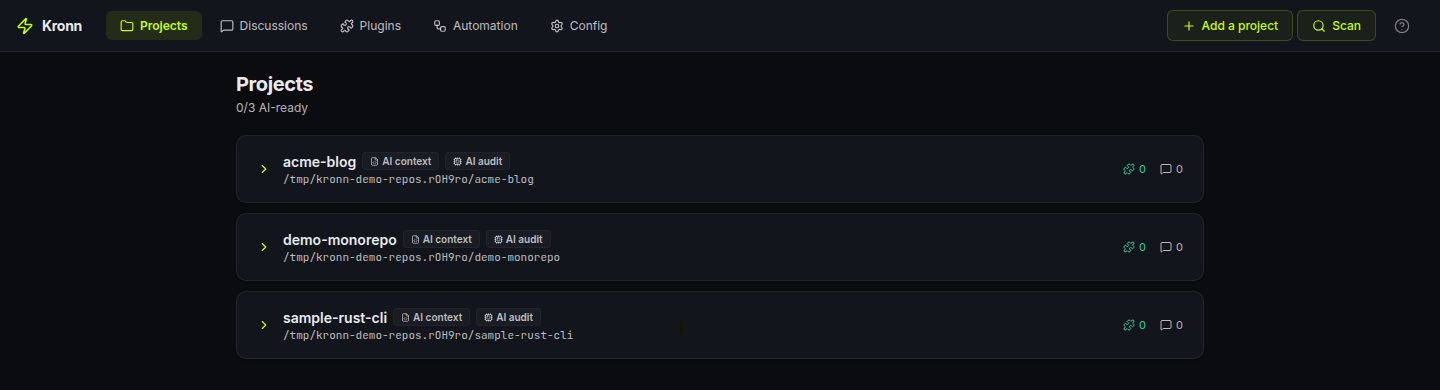
Run Claude Code, Codex, Gemini, Ollama (100% local) and 3 other AI coding CLIs from one self-hosted dashboard, with shared MCPs, secrets, and repeatable workflows.
Smaller prompts, more code where code is enough: fewer hallucinations, lower token bill, eco-design by default.
Status: 0.8.2. Functional but pre-1.0. Breaking changes happen between minor versions; patch versions are safe.
License: AGPL-3.0. Using Kronn locally to build your own product is fine; the copyleft only kicks in if you distribute a modified Kronn to others. See License notes.
Contents
- 60-second pitch
- The Kronn way: engineering, not prompting
- Quick start
- What you can do
- Core concepts
- When Kronn fits, and when it doesn't
- Trust
- Links
60-second pitch
If you've ever:
- Juggled Claude Code + Codex + Copilot in five terminals with seven MCP config files going out of sync (MCP = Model Context Protocol, the open standard agents use to plug into tools and data sources), Kronn unifies them in one tab with shared MCPs, secrets, and project context.
- Pasted the same prompt 30 times across tickets/files, save it once as a Quick Prompt, fan it out as a Batch over your tracker. Real-world example: 30 PR drafts produced over coffee, gated for human approval before they land.
- Watched a 500-line mega-prompt half-hallucinate 12 different tasks. Kronn lets you decompose: deterministic code where it's mechanical (API, exec, webhooks, zero tokens), small focused AI prompts only where reasoning matters, each one validated via compare-agents before it ships.
- Wanted AI on your code but NOT your code on Anthropic. Plug Ollama, run Llama / Gemma / Qwen locally. $0 API cost, $0 data leak, same UI.
Kronn is a self-hosted control plane for AI coding agents: Claude Code, Codex, Vibe, Gemini CLI, Kiro, GitHub Copilot CLI, and Ollama. Backend in Rust, frontend in React, secrets in an encrypted vault on your machine.
Already happy with one CLI? Kronn pays off the moment you add a second agent or want to replay a prompt across N files. It's the layer above your single assistant.
The Kronn way: engineering, not prompting
Most "AI-powered" workflows rely on one mega-prompt asking the agent to do 12 things at once.
Expensive in tokens. Flaky in output. Opaque when it breaks. Non-deterministic by nature.
Kronn flips that:
- Decompose your task into a workflow of small, bounded steps.
- Use code where code is enough:
ApiCallto fetch,JsonDatafor fixtures,Execfor shell,Notifyfor webhooks,BatchApiCallto fan out N HTTP calls in parallel. Zero tokens, deterministic, debuggable. - Use AI only on the reasoning step, with a small focused prompt, naturally more reliable than a prompt juggling 12 concerns. Need to run that small prompt across N items? Use
BatchQuickPromptto fan it out in parallel discussions. - Validate each AI prompt via compare-agents. If Claude, Codex and Gemini all converge on the same answer → ship it. If they diverge → your prompt is ambiguous, fix it before it costs you 30× in a batch.
- Eco-design built-in: tokens only burn where they actually earn their cost. Less spend, less carbon, more predictable output.
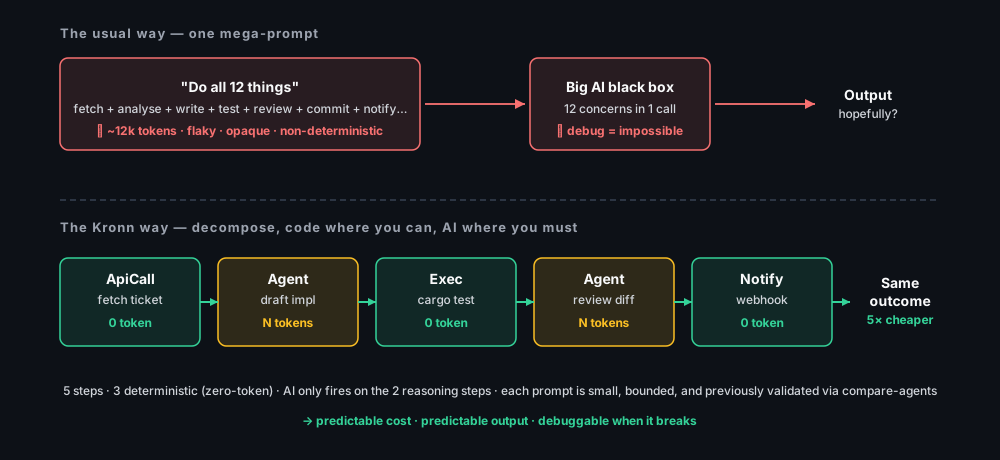
This is what makes Kronn different from Cursor (one prompt, one agent) and from LangGraph (Python-only, no CLI agents, no compare).
Quick start
Prerequisite: at least one agent installed locally (Claude Code, Codex, Vibe, Kiro, Gemini CLI, GitHub Copilot CLI) or Ollama for fully-local models. Kronn drives the runtime you already use; it does not ship its own LLM. The setup wizard auto-detects what's on your $PATH with an npx runtime fallback for npm-published agents.
Desktop app: recommended for solo use
Download the installer for your OS from Releases. No Docker, no extra runtime. Per-OS steps in docs/install.md.
Self-hosted (team-shared, always-on, headless server)Requires Docker + Docker Compose. On Windows, WSL2 (Docker Engine inside WSL works, Docker Desktop optional).
git clone https://github.com/DocRoms/Kronn.git
cd Kronn
./kronn start
# → http://localhost:3140
In both modes the setup wizard scans your repos and walks you through API keys.
Day 1: first 5 minutes
- Open a project the wizard found (or add one). Kronn scans existing
.mcp.jsonfiles and adopts MCPs automatically. - Start a discussion, pick an agent, ask something. The agent runs locally with your MCPs injected, no manual config per CLI.
- Save a useful prompt as a Quick Prompt with
{{variables}}. One-shot or fan-out (Batch) over a list of items.
When you want orchestration (multi-step, conditional, scheduled, gated), graduate to a Workflow.
What you can do
Four flows that scratch real itches. Each one is a primary use case, pick whichever maps to your day.
1. Batch a Quick Prompt over N tickets
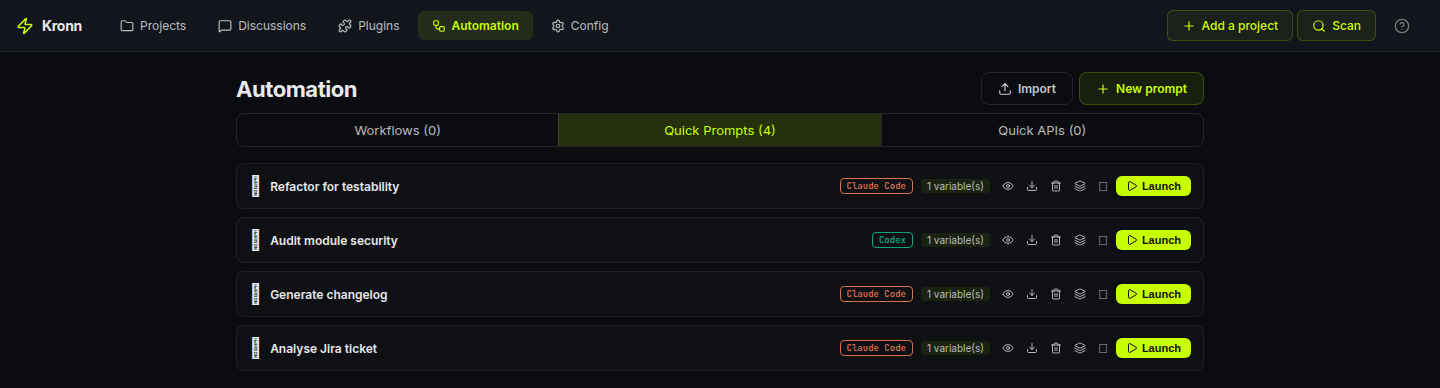
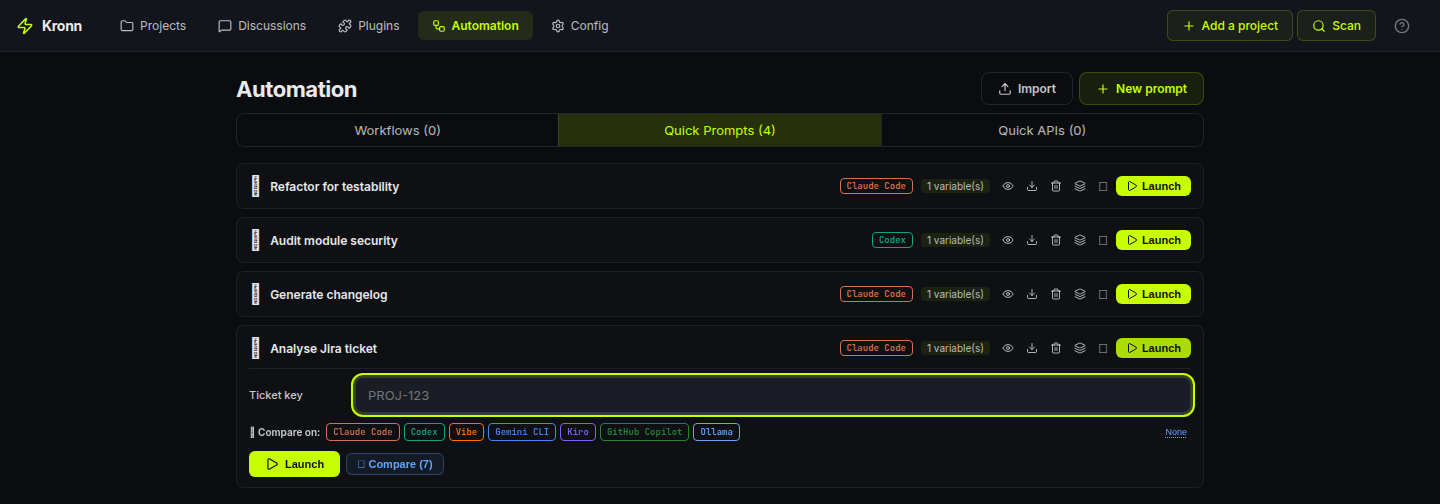
Save Analyse {{ticket}} and draft a PR as a Quick Prompt. Paste 30 Jira keys (or pull them from a tracker step). Kronn fans out one discussion per item, in parallel, each with its own git worktree if you want isolation. Land them all behind a single human-approval Gate so nothing merges without you.
Concrete run (real numbers from a 30-ticket batch on Claude Sonnet, 4k input + 6k output tokens per ticket, with prompt caching on): **$3 of API spend, ~3 min wall time, 0 manual copy-paste.** Same batch on Ollama with
gemma3:27brunning locally: $0, ~12 min wall time depending on your hardware.
2. Validate small AI prompts via compare-agents 🤝
Before you wire a prompt into a workflow, click Compare across N installed agents on any Quick Prompt. Kronn spawns one discussion per agent (Claude, Codex, Gemini, Vibe, Ollama…), same rendered prompt, results streaming live in parallel.
If they all converge on the same answer → your prompt is solid, ship it into a Batch or a Workflow step. If they diverge → your prompt is ambiguous, fix it before it costs you 30× on a batch run.
Compare-agents = the QA gate of prompt engineering. Cheap to run once, saves a fortune if it catches a bad prompt before it enters production.
3. Stay 100% local with Ollama
Run Llama 3, Gemma, Qwen, Codestral on your machine via Ollama as a first-class agent. Same Discussions / Quick Prompts / Workflows surface, Kronn just routes the calls to http://localhost:11434/v1/ instead of the cloud. Pick your default model right from Settings. Zero token bill, zero code leaving your laptop.
4. Burn tokens only where they earn their cost
A real Auto-Dev workflow in Kronn looks like:
ApiCallfetches the Jira ticket → 0 tokensAgent(Claude, small focused prompt validated via compare-agents) drafts the implementation → N tokens, the only step where reasoning mattersExecrunscargo test→ 0 tokensAgent(small focused prompt) reviews the diff against the tests → N tokens, boundedNotifyposts the result to Slack → 0 tokens
5 steps, 3 deterministic. AI fires only on the 2 reasoning steps, each with a small bounded prompt. Result: predictable cost, predictable output, debuggable when it breaks. See The Kronn way.
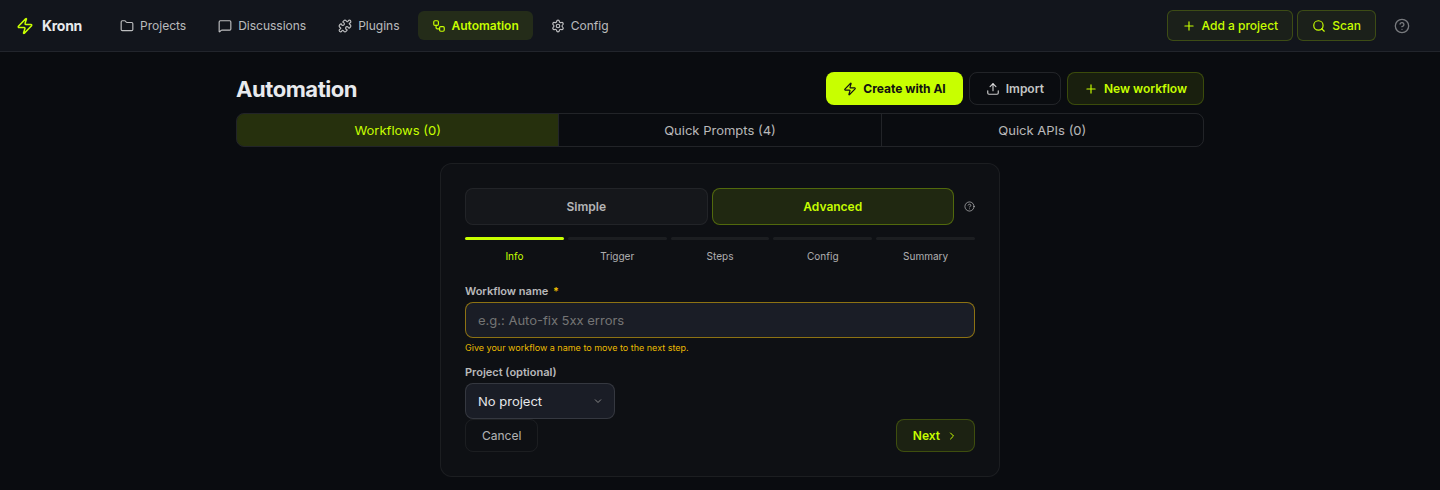
You build this via the wizard UI (drag-drop step types, autocomplete on agent/MCP/QP references) or a hand-written WORKFLOW.md file (Symphony-compatible), no DSL to learn, both modes interop.
Workflow engine supports 8 step types total: Agent, ApiCall, BatchApiCall, BatchQuickPrompt, JsonData, Notify, Gate (human approval), Exec (shell, allowlist-gated). Full reference in docs/architecture/overview.md.
5. Audit your codebase with an AI that doesn't forget
Most "ask an AI about my repo" flows restart cold every conversation. Kronn flips that: the first time you onboard a project, an audit pass reads your source + configs and writes a structured docs/ tree that lives in the repo.
docs/AGENTS.md: stack, common tasks, source-of-truth files, code-placement rulesdocs/repo-map.md: folder tree + key entrypointsdocs/coding-rules.md: linters, formatters, conventions actually observeddocs/testing-quality.md: coverage, untested components, smoke commandsdocs/architecture/overview.md: patterns, data flow, legacy migrations tabledocs/operations/debug-operations.md: commands + troubleshootingdocs/operations/mcp-servers.md: per-MCP capabilities discovered via introspectiondocs/glossary.md: domain glossary built from your actual codedocs/tech-debt/*.md+docs/inconsistencies-tech-debt.md: one detail file per finding, severity-tagged, all linked from a single index table.
Unknowns get marked <!-- TODO: verify --> or <!-- TODO: ask user -->. A validate phase walks you through them interactively, project status moving NoTemplate → TemplateInstalled → Bootstrapped → Audited → Validated.
The whole tree is injected as project context into every Discussion, Quick Prompt and Workflow on that project, so your agent doesn't restart from scratch every chat.
Drift detection is granular: each section tracks its source files (e.g. coding-rules.md watches package.json + tsconfig.json + rustfmt.toml). When those drift, the section is flagged as stale and you can re-audit just that step. No re-running the whole audit when one config changed.
What 0.8.2 hardens (from real-world misses)
- Mandatory baseline checklist: Step 9 now ALWAYS scans 5 categories that are too common to skip (Dockerfile USER / display_errors / opcache / HEALTHCHECK, compose resource limits, CI quality gate +
StrictHostKeyChecking,.env*secrets, web a11y/CSP). Each item produces an explicit "verified present / verified absent / TD" line so you trust the audit didn't just look the other way. - Anti-repetition memory: each audit reads existing TDs as priors and REUSES their IDs instead of churning slugs. An
audit_historyYAML block on each TD detail file tracks every pass. A reconciliation report (_reconciliation-<date>.md) classifies dropped TDs asFixed / Stale / Missed / Uncertainso nothing silently vanishes between audits. - Two-tier Status:
Verified in source(the agent opened the file and confirmed) vsInferred(pattern-matched only). Phase 3 validation skips Verified ones to save your time. - Specialized audit kinds: alongside the canonical 10-step Full audit, Kronn ships focused passes —
Drift,Security,Docker,Performance,Accessibility,Database,ApiDesign, plus aCustomescape hatch. Each one writes to its own index file so it doesn't clobber the Full audit's TDs. - Health badge with cluster recommendations: every run is persisted in
audit_runswith duration, severity counts (Critical × 12 + High × 4 + Medium × 1.5 + Low × 0.3 = score 0–100) and arecommendations_jsonlist. When ≥3 findings cluster in one dimension (e.g. 5 Docker TDs), the dashboard surfaces "Run a focused Docker audit" inline. - Community-standards gate: if your project shows OSS intent (LICENSE present OR remote on github/gitlab/codeberg OR README mentions "contribute"), Step 9 also flags missing
LICENSE,SECURITY.md,CONTRIBUTING.md,CODE_OF_CONDUCT.md, issue/PR templates. Private projects skip this block entirely.
This is what makes Kronn a knowledge-persistence layer with strict baselines, not just a prompt launcher.
6. Close the loop: audit → tickets → AutoPilot → PR
The audit isn't a doc that sits in a folder. 0.8.2 wires it into action.
When the AI confirms KRONN:VALIDATION_COMPLETE on the validation discussion, the page surfaces two CTAs:
- "Mark audit as validated" — flips the project's status, freezes the TD baseline.
- "Setup AutoPilot" — opens the workflow wizard with the
ticket-to-prpreset already applied AND configured for your project:- Tracker auto-detected from your
repo_url(github.com → mcp-github, gitlab.com → mcp-gitlab, …) {owner}/{repo}path params filled in from the parsed remote- First step (
fetch_issue) switched from JSON fixture → realApiCallagainst your tracker - Land on the Steps page in Advanced mode so you see the full 9-step pipeline (
fetch_issue → analyze → plan_gate → implement → run_tests → review → create_pr → ready_gate → notify_done).
- Tracker auto-detected from your
The 9-step preset uses Kronn's désagentification discipline: only analyze, implement and review burn agent tokens. The rest is mechanical (ApiCall, Exec, Gate, Notify).
The killer pattern this unlocks: create a GitHub issue from your phone → AutoPilot's Tracker trigger picks it up → the workflow drafts the PR while you're away from the keyboard, pausing at plan_gate for your approval and at ready_gate before the PR is merged. Real autonomy with two human checkpoints.
Exec steps now survive worktree-only environments
The run_tests step is typically npm test, cargo test, composer test, pytest, … — all of which need vendored deps that don't exist in a fresh git worktree (no node_modules, no vendor, no target). Each Exec step now has an optional Setup phase that fires immediately before the main command:
☑ This step runs in a git worktree — install dependencies first
    Setup command: composer install --no-interaction --prefer-dist
                   (auto-detected from composer.json — edit if needed)

Main command:     bin/phpunit -c phpunit.xml.dist
Same allowlist + same timeout. Setup fails → main is NOT executed and you see the install logs. Setup succeeds → main runs in the prepared worktree. Common patterns are pre-listed (composer, npm ci, pnpm, yarn, poetry, pip) — pick one, override if needed.
For dockerized projects, the docker-in-docker volume mismatch is solved at the infra layer (self-mount + host-path translation), so docker compose run --rm svc <cmd> works from a worktree without any extra config.
Core concepts
Objects you create
- Project: a git repo Kronn knows about. Tracks AI context (
docs/AGENTS.md) plus a structured audit tree (docs/glossary.md,docs/repo-map.md,docs/architecture/overview.mdand friends) covering legacy hotspots, test gaps, coding conventions and per-MCP capabilities. Each section has drift detection: re-audit only what's stale. - Discussion: a chat thread bound (or not) to a project. Single agent or multi-agent debate. Streams in real-time via SSE, persisted in SQLite, optionally isolated in a git worktree.
- Quick Prompt: reusable prompt template with
{{variables}}and conditional sections. One-shot, fan-out, or chained. - Workflow: a multi-step pipeline. Triggered by cron, by a tracker (Jira / GitHub), or manually. See docs/architecture/overview.md for the engine guarantees.
How agents are shaped
Three independent layers injected into the agent's system prompt:
| Layer | Answers | Example |
|---|---|---|
| Profile | WHO is talking | "Senior backend engineer" / "Tech writer" |
| Skill | WHAT it knows | "Rust ownership" / "JSONPath RFC 9535" |
| Directive | HOW it talks | "Concise, no apologies" / "Always reference the file path" |
17 default profiles, 25 default skills, custom ones via Markdown + YAML in ~/.config/kronn/.
Integrations
MCP / API / hybrid plugins: configure once with encrypted secrets, link to projects N:N. MCPs sync to the right config file per agent (.mcp.json for Claude Code, ~/.codex/config.toml for Codex, .gemini/settings.json for Gemini, etc.). API plugins inject endpoints + auth into the system prompt so the agent calls them via Bash curl, no MCP server needed. OAuth2 client-credentials handled transparently.
Any REST API works. 40+ built-in plugins (GitHub, GitLab, Jira, Stripe, Slack, Chartbeat, Adobe Analytics, AWS CloudWatch…) cover the common cases, and a Custom API option lets you describe any other vendor in a freeform form: name, base URL, description, optional docs link, and the credential fields the agent needs. An AI helper bubble pre-fills the form from a curl example or a docs URL in one click.
When Kronn fits, and when it doesn't
Fits if you run multiple AI CLIs, want to decompose AI work into bounded workflows (PR review, audit, generate-from-spec, batch over tickets), where mechanical steps are deterministic code and AI only fires on reasoning. Bonus: self-hosted with secrets in your own vault.
Doesn't fit for pure RAG pipelines, in-process Python orchestration (LangGraph is the better path), or workloads needing managed multi-tenancy. Kronn is a mixed-step workflow engine (CLI agents + deterministic code) on local files, not a Python LLM framework, not a multi-tenant SaaS.
Vs other tools:
| Tool | Why not them | Where Kronn fills the niche |
|---|---|---|
| Cursor / Copilot Workspace | One agent, one mega-prompt, no workflow engine, no batch, no compare-agents | When you want to graduate from one-shot to a repeatable, auditable pipeline |
| n8n | Generic automation, no agent context, no MCP | When AI is one step among others, not the orchestrator itself |
| Temporal | Durable execution at massive scale (Uber/Stripe-grade) with replay + signals; overkill for orchestrating CLI agents on a laptop, no AI primitives | When you want the workflow pattern without Temporal's operational footprint |
| LangGraph | Python in-process, no CLI agents, no MCP plumbing, no compare-agents | When you want to orchestrate the real CLIs (Claude, Codex…) with their own caches/sessions |
| LiteLLM | LLM API router, but no workflow or CLI agents | Complementary: you can put LiteLLM behind a Kronn Agent step |
Trust
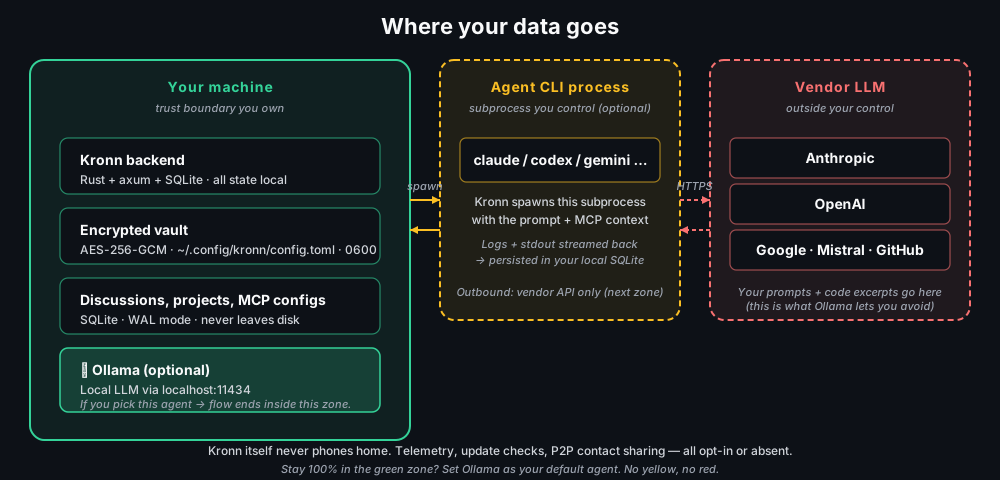
Self-hosted means we owe you precision on where your data goes.
- Stays local by default. Backend Rust + axum + SQLite, vault encrypted at rest (AES-256-GCM). Master key is a random 32-byte secret generated at first launch, stored in
~/.config/kronn/config.toml(file mode0600, dir0700on Unix; per-user ACLs on Windows). Filesystem-permission protection; no OS keychain or Argon2id passphrase yet. Agent prompts go to the CLI vendor you chose (Anthropic / OpenAI / Google / Mistral / nobody if you pick Ollama). Kronn itself never phones home. Full data-flow diagram in docs/operations/auth-and-tls.md. - Container/host boundary. Docker mode mounts your
$HOMEread-only and~/.<agent>config dirs read-write: exactly what's needed to drive agents, nothing more. Detailed mounts list in docs/install.md. - Hardening. SSRF guards on API plugins (RFC1918, IPv6 ULA, DNS-rebind detection). Exec step is allowlist-gated per workflow, no
sh -c, argv literals only. Auth bypass + TLS migration plan in docs/operations/auth-and-tls.md. - Bus factor. Single core maintainer today, AGPL-3.0, all design + contribution docs in docs/AGENTS.md. Forks welcome; code is structured to let you replace any agent backend without touching the engine.
License notes (AGPL-3.0)
In practice, for the 99% of users:
- Use Kronn locally to code your own product? AGPL doesn't apply to that. You're not distributing Kronn.
- Run Kronn as a SaaS for other users? AGPL applies: your modified Kronn must be open-sourced too.
- Fork Kronn for internal use within your company? AGPL doesn't kick in (no distribution outside the org).
Full text in LICENSE. If your legal team wants more nuance, dual-licensing discussions are open.
Links
- docs/install.md: install per OS, Docker, WSL2, Tauri desktop
- docs/architecture/overview.md: backend/frontend topology, workflow engine reference
- docs/operations/auth-and-tls.md: auth, TLS, data flow
- docs/AGENTS.md: full reference for contributors (humans and AI agents)
- CONTRIBUTING.md: DCO, coding rules, test policy
- CHANGELOG.md: release notes
- LICENSE: AGPL-3.0
Yorumlar (0)
Yorum birakmak icin giris yap.
Yorum birakSonuc bulunamadi