durable-pi
Health Uyari
- License — License: MIT
- Description — Repository has a description
- Active repo — Last push 0 days ago
- Low visibility — Only 8 GitHub stars
Code Basarisiz
- execSync — Synchronous shell command execution in scripts/create-demo-share.mjs
- process.env — Environment variable access in scripts/create-demo-share.mjs
- network request — Outbound network request in scripts/create-demo-share.mjs
- execSync — Synchronous shell command execution in scripts/smoke.mjs
- exec() — Shell command execution in scripts/smoke.mjs
- process.env — Environment variable access in scripts/smoke.mjs
- network request — Outbound network request in scripts/smoke.mjs
- execSync — Synchronous shell command execution in scripts/upgrade-pi.mjs
- process.env — Environment variable access in scripts/upgrade-pi.mjs
- network request — Outbound network request in scripts/upgrade-pi.mjs
Permissions Gecti
- Permissions — No dangerous permissions requested
Bu listing icin henuz AI raporu yok.
自架的 pi agent 工作台:一個 Cloudflare Worker + 每位使用者一個 Durable Object,含知識庫與可分享檔案。

Durable Pi
Your own multi-user AI workspace, on Cloudflare's free tier.
Durable agent runtime · per-user spaces · Chinese-first knowledge base · files shared from your own domain.
One Worker and Durable Objects. No server, no external database.






English · 繁體中文 · Quick start · Features · How it works · Deploy
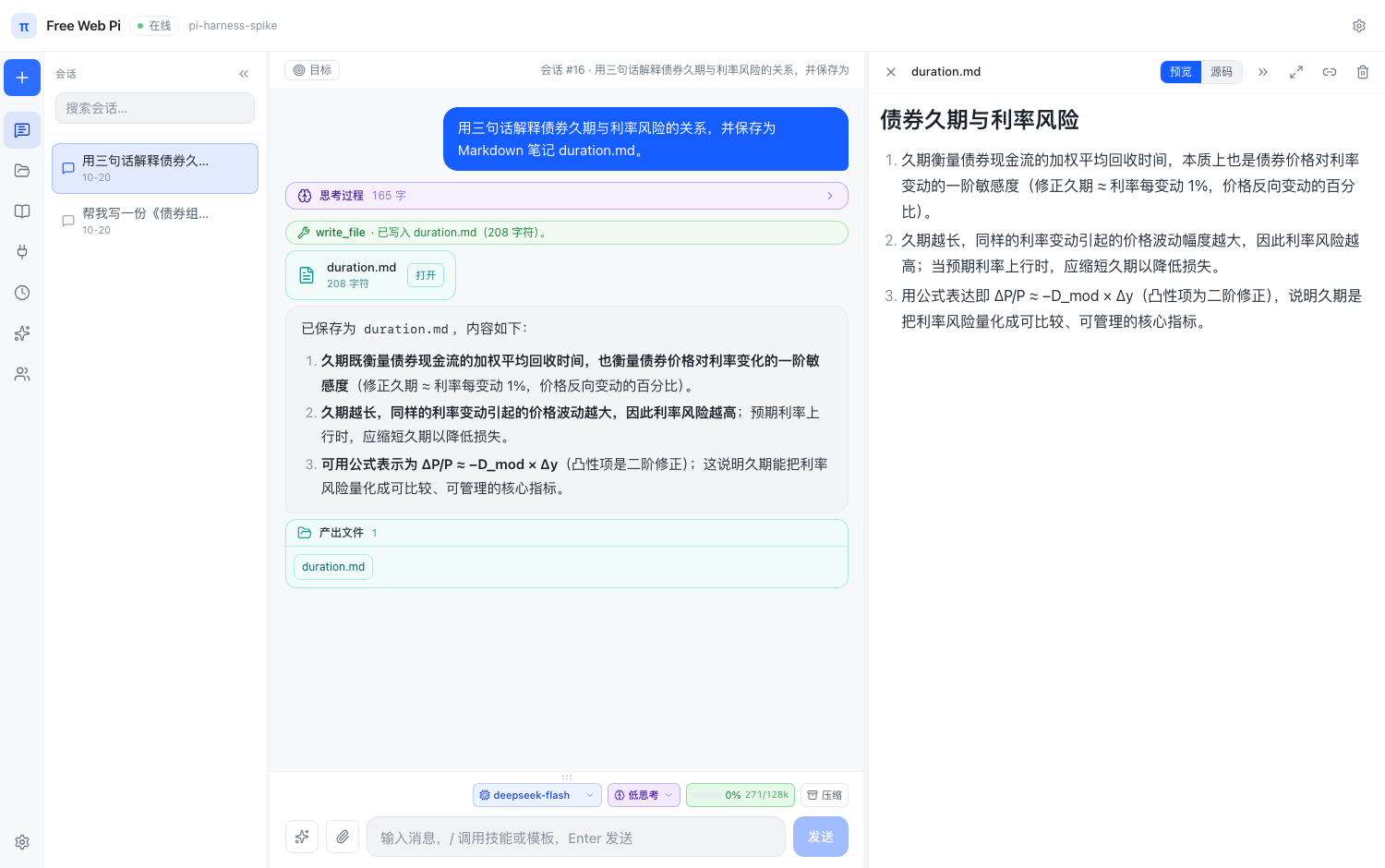
Self-hosted by design: there is no shared public instance — you deploy it into your own Cloudflare account.
Three things it does
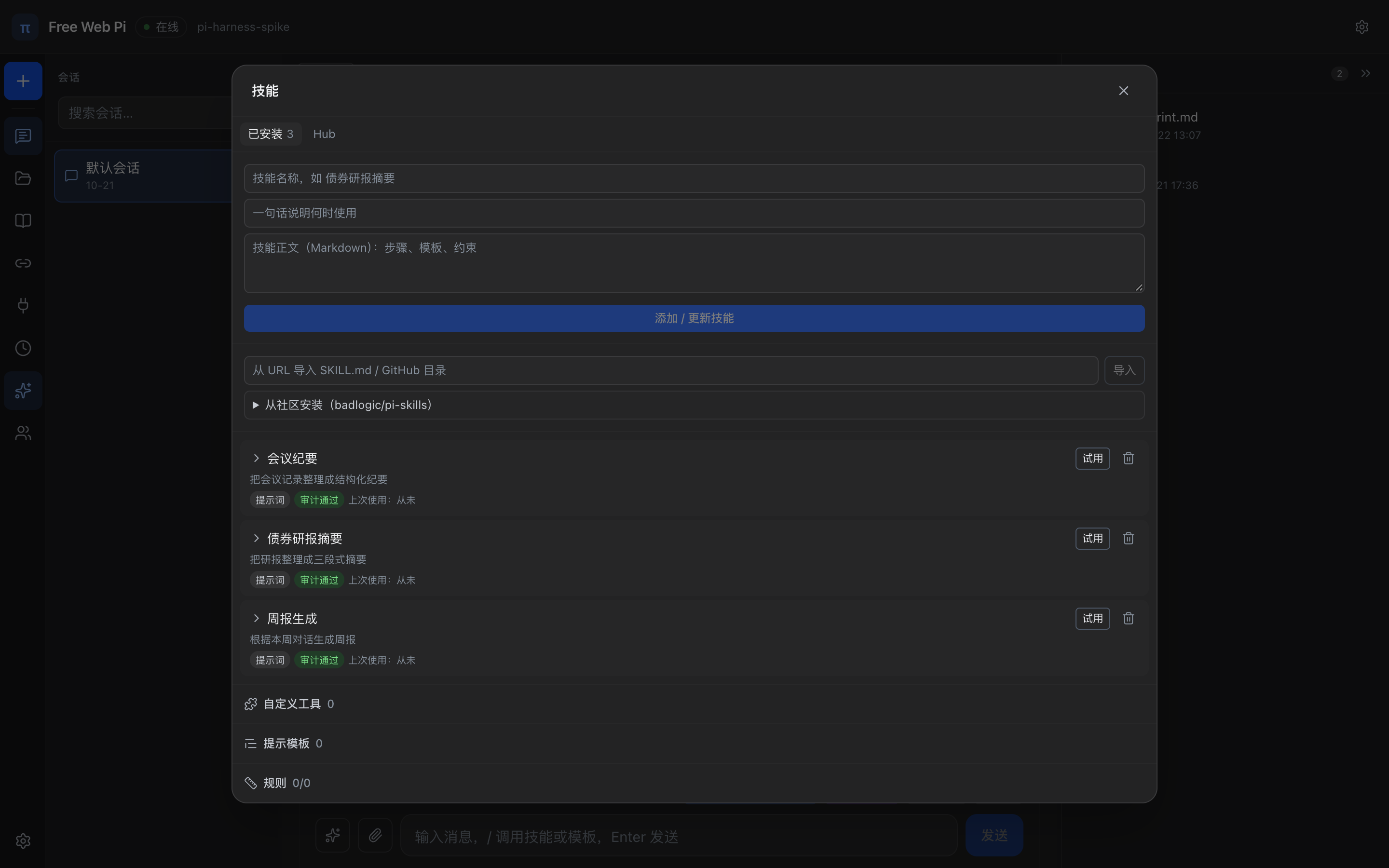
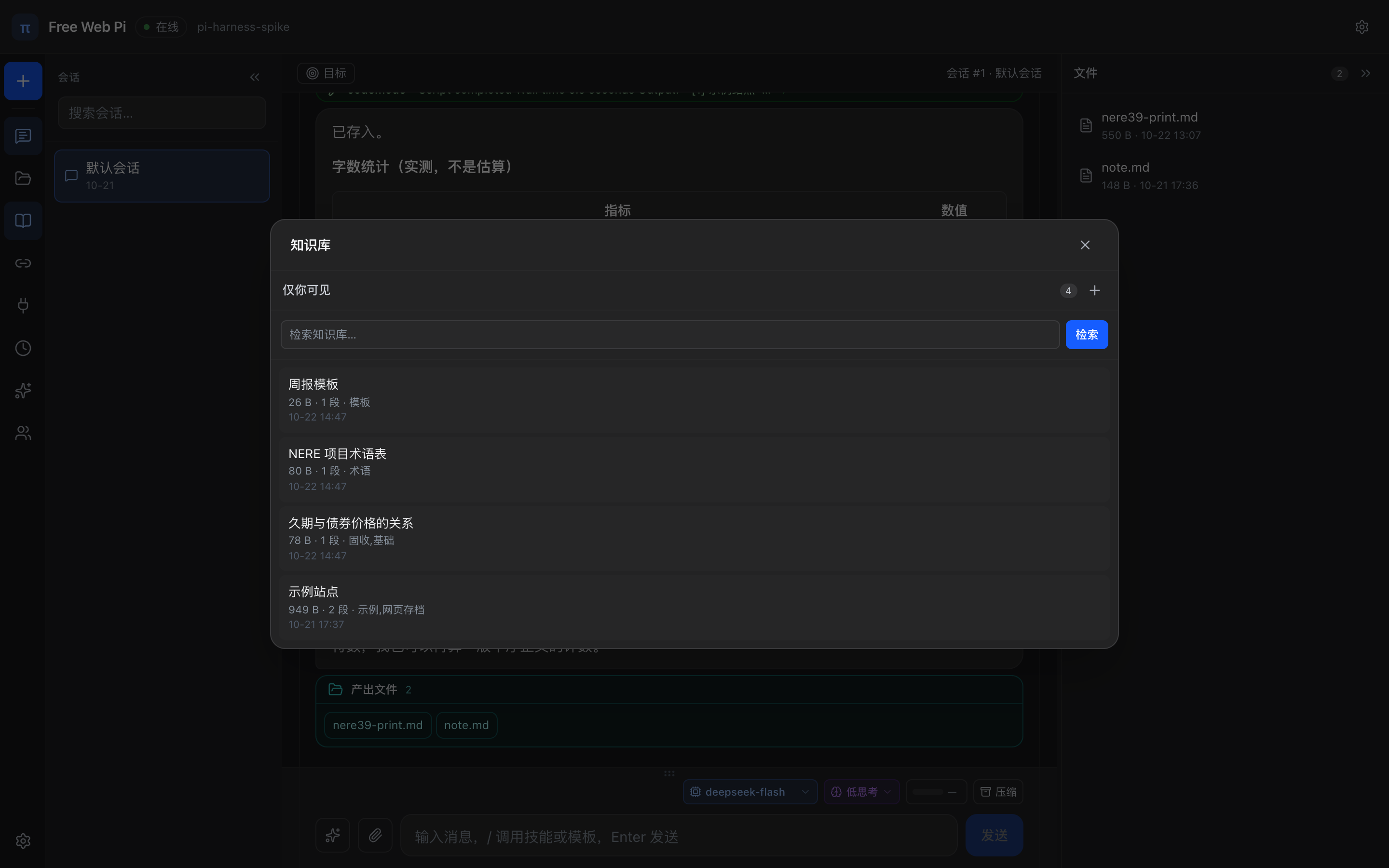
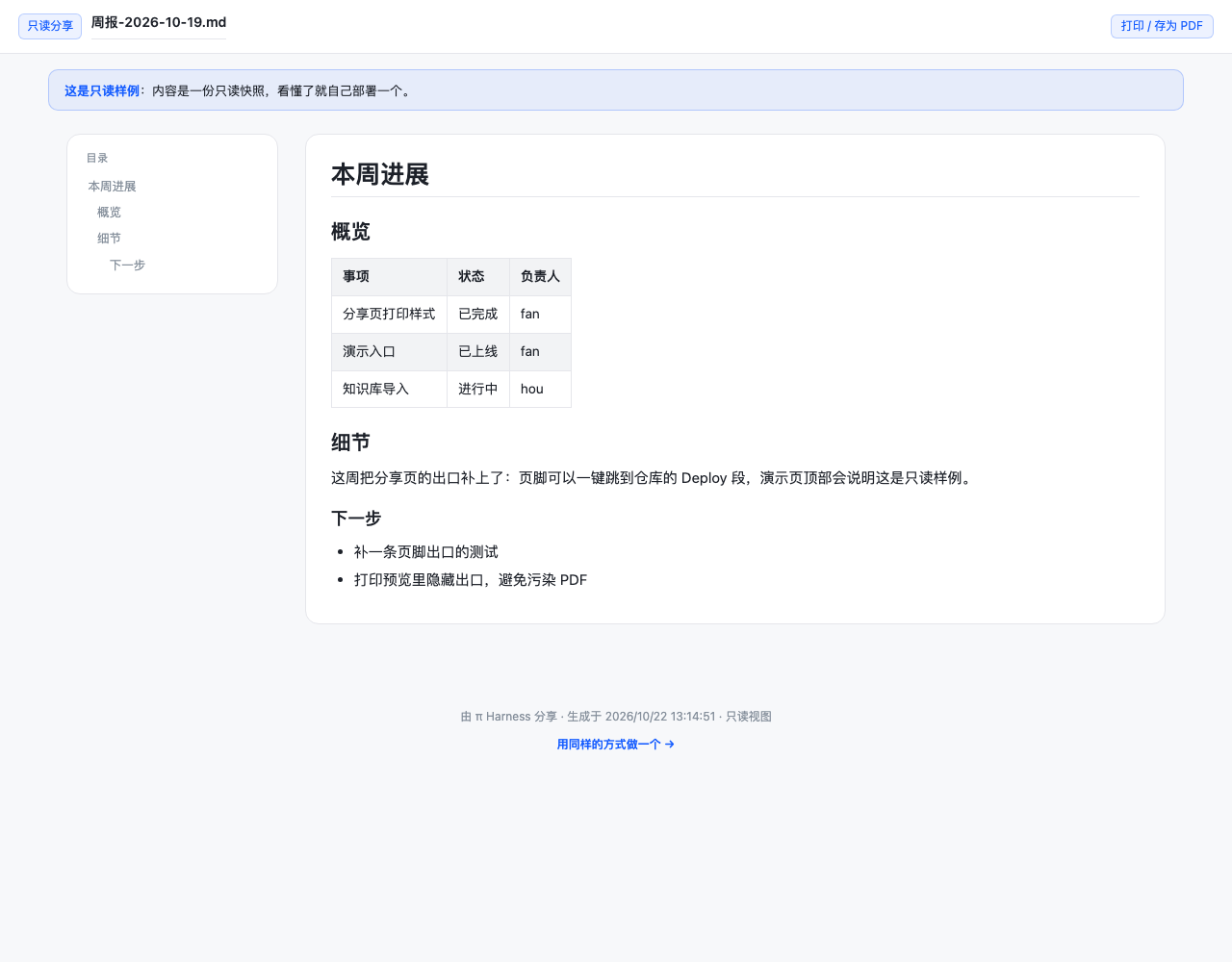
Skills — audit before install · Knowledge base — per-user FTS5 search · Share page — read-only, on your own domain
Why this exists
Most AI chat apps are rented, not owned:
- Close the tab and the context is gone.
- The report lives in a chat log, not a file you can send.
- Sharing means copy-paste, screenshots, or a link on someone else's domain.
- A team sharing one account has one shared history.
- Self-hosting usually means a VPS, Postgres, Redis, and a weekend.
Durable Pi is the opposite: a workspace you deploy to your own Cloudflare account, with a durable agent, isolated spaces, a knowledge base, and files you share from your own domain.
What you get
- A durable agent, not a chat shell. Work is persisted before it runs. Restart the Durable Object and it continues. Cron automations and goal mode keep going with the browser closed.
- Per-user spaces. Invite codes; each user gets their own Durable Object — sessions, files, memory, knowledge base, and share tokens are isolated. The owner issues, resets, and revokes codes from the UI. Revoking is immediate: the old token stops working and every share link that user created returns 404, while their data is retained by default; a separate, explicitly confirmed purge removes it (export first, irreversible after).
- Files with a share button — on your own domain. The agent writes Markdown and HTML into a workbench. One click produces a public page served from your Cloudflare domain (the default
*.pages.devsubdomain, or a custom domain you bind) with an expiry (1 hour to forever), four themes, a table of contents, and a print / PDF button. The left-rail share panel shows open counts and lets you revoke a link; the model can callshare_file/share_conversationitself. - A knowledge base that answers first. Per-user FTS5 index with Chinese bigram tokenization and bm25. The top 3 chunks are injected before every turn; the model can also call
kb_searchitself. Import Markdown, plain text, or a URL; the same source with the same body is deduplicated, and a changed body replaces the old document in place. PDF/DOCX import needs the optional Workers AI binding, and vector retrieval needs the optional Vectorize binding — neither is configured by default. - A Skill Hub with an audit gate. The catalog ships 12 prompt skills (6 built in, 6 external). Browse, filter, inspect the audit report, and install — but only after a deterministic audit: prompt / JavaScript / TypeScript pass; Python, shell, binaries, host APIs and undeclared network use are blocked before they reach the database. Installed skills show runtime, audit verdict, and last use, with a one-click trial that only fills the composer.
- Real tools. 26 built-in tools in the default install: web search, MCP servers, skills, share links, prompts, rules, custom JS tools, parallel subagents, and a QuickJS codemode sandbox.
- Control and visibility. Read/write/exec tool approvals with per-tool overrides, thinking levels, a context meter, manual compaction, step plans, and structured
ask_usercards. - Chinese-first, four themes. The UI, prompts, and docs are written in Chinese; light, dark, sepia, and midnight themes; pages.dev proxy for access from mainland China.
How it differs
- No always-on server. Nothing to keep alive but a Worker and one Durable Object per user. There is no VPS, container, Postgres, Redis, or object store to patch, size, or pay for. The evidence is the deployment:
wrangler.jsoncdeclares one Worker and two Durable Object classes, andGET /api/backupexports the per-user workspace state (files, knowledge base, settings, skills, shares, session metadata) as JSON. - Durable Object SQLite is the database. Sessions, files, memory, knowledge base, approvals, automations, and share tokens live in the per-user DO's SQLite through versioned migrations (
src/worker/db/migrations.ts, currently v10). Tasks are persisted before they run, so a restarted object resumes instead of losing the turn. - Skills pass an audit before install.
POST /api/skills/importrunssrc/worker/lib/skill-audit.tsfirst; a blocked skill returns HTTP 422 and is never written.npm run catalog:checkis a CI gate that keeps the 12-skill catalog free of blocked entries and verifies everysha256against the skill body. - The share link is the output. A finished report is a file in the workbench, not a chat log. One click — or the
share_filetool — turns it into a read-only page at/s/<token>on your own domain, with an expiry and a theme;DELETE /api/shares/<token>revokes it immediately.
5-minute quick start
Requirements: Node.js 22, a Cloudflare account (the free plan is enough), and an OpenAI-compatible model endpoint of your choice (Base URL + API key; you paste it into the app after the first login, not into wrangler).
Run locally (about 3 minutes)
git clone https://github.com/dogbro2/durable-pi.git
cd durable-pi
npm install
npm run build:web

# Local secrets: only the variable names are shown here. Fill in your values after the =.
printf 'ACCESS_PASSWORD=\n' > .dev.vars

npx wrangler dev     # Worker + Durable Objects: http://localhost:8787
Open http://localhost:8787 and enter your ACCESS_PASSWORD value. Confirm the Worker is up:
curl http://localhost:8787/api/auth
# {"required":true,"authenticated":false,"owner":false,"demoUrl":""}
The Worker refuses to serve at all when ACCESS_PASSWORD is empty unless you explicitly set PI_ALLOW_OPEN=1 (local development only), so an accidental public deployment fails closed. For UI work, npm run dev:web runs Vite with hot reload on http://localhost:5173 and proxies /api to 8787. wrangler dev serves the built dist-web/, so re-run npm run build:web after frontend changes.
Model setup: there is no built-in provider and no DEEPSEEK_API_KEY any more. Open Settings → Models and add an OpenAI-compatible endpoint (Base URL, API Key, model IDs); chat stays disabled with a clear message until you do. Search, page fetching and automatic memory use the same screen's tool service fields — leave them empty to switch those features off entirely.
Deploy to your account (about 2 minutes)
One-click: the Deploy to Cloudflare button above forks the repository into your GitHub account, builds it with Workers Builds, and deploys it to your Cloudflare account. Set the build command to npm run build:web. After the first deploy, add ACCESS_PASSWORD under Worker → Settings → Variables and Secrets, then redeploy. Provider keys are entered in the app, not as secrets.
Or from the CLI:
npx wrangler login
npm run build:web
npx wrangler deploy                  # first deploy creates the Worker and both Durable Objects

npx wrangler secret put ACCESS_PASSWORD
Open the *.workers.dev URL printed by wrangler deploy and sign in with the ACCESS_PASSWORD value. wrangler secret put uploads a new version immediately, so no separate redeploy is needed.
Run the full suite with npm test — unit, API, and multi-user isolation cases, including real wrangler dev instances (about 30 seconds). The deploy badge above is the source of truth for pass/fail; this README does not track a test count.
How it works
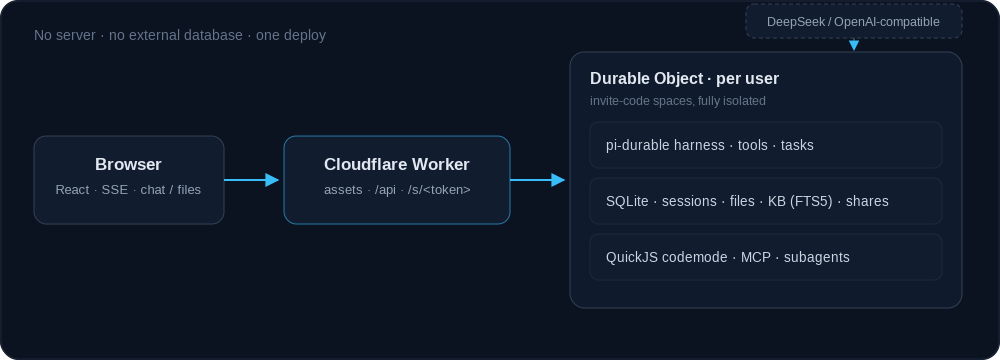
- One Worker serves the React app and the API (
/api/*, share pages at/s/<token>). - One Durable Object per user holds sessions, files, memory, knowledge base, and share tokens in SQLite. No external database.
- pi-durable runs the agent loop and persists tasks; QuickJS runs codemode; MCP adds external tools. Models come only from what you configure in Settings — any OpenAI-compatible endpoint.
Deploy
One-click
The Deploy to Cloudflare button above (or this link) copies the repository into your GitHub account, builds it with Workers Builds, and deploys it to your Cloudflare account.
- Build command: set it to
npm run build:web. The repo has nobuildscript, so leaving this blank deploys withoutdist-web/and fails. - Deploy command: keep the default
npx wrangler deploy. - After the first deploy, add
ACCESS_PASSWORDunder Worker → Settings → Variables and Secrets, then redeploy. WithoutACCESS_PASSWORDthe Worker returns 503 instead of running open (setPI_ALLOW_OPEN=1only for local debugging). - No Vectorize index and no Workers AI binding are needed:
wrangler.jsoncships neither, and the knowledge base uses SQLite FTS5. Add the bindings back only if you want vector retrieval or PDF/DOCX import (the code paths are still there and degrade when unbound).
From the command line
npm install
npm run build:web
npx wrangler login
npx wrangler deploy
npx wrangler secret put ACCESS_PASSWORD
Or push to main and let GitHub Actions deploy. Add CLOUDFLARE_API_TOKEN, CLOUDFLARE_ACCOUNT_ID, and SMOKE_PASSWORD to the repository secrets; CI runs the test suite, deploys, and smoke-tests the live Worker.
Portable runtime: Netlify / Vercel (Neon + object storage)
The same REST contract also runs on a Node serverless platform. src/server/ is the portable runtime: users, settings, providers, sessions and file metadata live in Neon (Postgres), and file bytes in any S3-compatible object storage (Cloudflare R2, MinIO, Wasabi, ...). File upload / list / download / preview / delete, settings, providers and multi-user management are fully functional; the agent loop (chat, knowledge base, skills, share pages, automations) returns 503 pointing at the Cloudflare deployment — it needs per-user Durable Objects, which only Cloudflare provides.
Shared variables, whichever platform:
| Variable | Required | Meaning |
|---|---|---|
ACCESS_PASSWORD |
yes | Owner password; the runtime fails closed (503) without it |
DATABASE_URL |
yes | Neon connection string (use the -pooler / port 6543 endpoint; it runs the idempotent DDL from src/server/schema.ts on boot) |
S3_ENDPOINT / S3_BUCKET |
for file bytes | Object storage; without them every file byte endpoint returns 503 (metadata still works) |
S3_REGION |
suggested | e.g. auto for R2, your region otherwise |
S3_ACCESS_KEY_ID / S3_SECRET_ACCESS_KEY |
for external S3 | Leave unset for R2 (same-account) or SigV4-signed buckets |
S3_FORCE_PATH_STYLE |
only with MinIO | 1 for path-style URLs |
PI_ALLOW_OPEN |
no | 1 disables the password gate (local debugging only) |
BUILD / DEMO_SHARE_URL / REPO_URL |
no | Shown on the landing page, same names as the Worker |
PI_MEMORY_STORAGE |
no | 1 keeps file bytes in process memory instead of S3 (local only) |
Netlify — import the repository in the Netlify UI and finish. netlify.toml already sets the build command (npm run build:web), the publish directory (dist-web), and the routing (/api/* → one bundled function that shares createApp; /* → dist-web/index.html). No build settings to touch in the UI; just add the environment variables above under Site settings.
Vercel — import the repository in the Vercel UI, then one required setting: Project Settings → General → Output Directory = dist-web (Vercel refuses to set this from vercel.json; the build command npm run build:web is set there). api/api/[[...path]].ts catches every /api/* request into the same handler.
Local run without Cloudflare:
export DATABASE_URL="postgres://user:password@host/db"
export S3_ENDPOINT="https://r2.develop.aws"
export S3_BUCKET="pi-files"
# Portable runtime server: http://127.0.0.1:8787 (overridable via PORT / HOST)
npm run dev:server
Then npm run dev:web in a second terminal — Vite proxies /api to 8787 by default, or point it anywhere with PI_PROXY_TARGET=http://127.0.0.1:9000. Without a database URL the server exits with the missing-variable name list instead of serving.
Contract equivalence is pinned by tests/unit/portable-runtime.test.ts (full REST surface against Node's in-memory SQLite + in-memory storage) and by the Worker suite's file upload / download / preview cases in tests/api/api.test.ts; both run in CI.
Optional: turn on Workers AI and Vectorize
Neither binding ships with wrangler.jsonc, and nothing in the default install needs them. Adding them back is a config edit plus one CLI command — no code change, the code paths are already there and degrade when unbound.
| Binding | What it unlocks | Without it |
|---|---|---|
AI (Workers AI) |
PDF / DOCX → Markdown (env.AI.toMarkdown) and bge-m3 embeddings |
PDF/DOCX import returns 501 ai_unavailable; upload Markdown / TXT or paste the text |
KB_VEC (Vectorize) |
vector and hybrid retrieval modes for the knowledge base |
Retrieval stays on FTS5 keyword search (bm25 + Chinese bigram) |
Vector search needs both: embeddings come from AI, the index from KB_VEC. AI alone is enough for PDF/DOCX import.
1. Create the index once per account — the name and dimensions must match wrangler.jsonc, and nothing creates it for you:
npx wrangler vectorize create pi-kb --dimensions=1024 --metric=cosine
2. Add both bindings to wrangler.jsonc:
"ai": { "binding": "AI" },
"vectorize": [{ "binding": "KB_VEC", "index_name": "pi-kb" }],
3. Redeploy: npm run build:web && npx wrangler deploy.
4. Switch the app over: Settings → 記憶 (memory) → 知識庫檢索, pick 向量 or 混合, then click 重建向量索引 to backfill existing chunks (200 per click; GET /api/kb/status reports indexed and pending).
Notes:
wrangler devhas no workingAI/Vectorizebindings, so vector retrieval is empty locally — verify it on a deployed instance.- Set
CF_DISABLE_VECTOR=1to force keyword-only retrieval even when both bindings exist (used by the test suite). - Switching back to
ftsstops querying the vectors but does not delete them. - Embeddings and queries bill to Workers AI, and Vectorize has its own quota; check current pricing before enabling a large index.
Is it for you?
Yes if you want an AI workspace you own, reports you can share as links, or isolated spaces for a small team — without running a server.
No if you want a zero-setup SaaS, need vector/semantic search over millions of documents, or want a coding IDE rather than a general workspace.
Docs
- 繁體中文 README — full feature table, architecture notes, HTTP API, and operational caveats
- v1.0.0 release notes — what shipped, with demo links
- Knowledge base design — why FTS5, how chunking and prefetch work, limits
- Changelog — every release; v1.0.0 entries carry PR numbers
License
MIT. Not affiliated with Cloudflare, Inc. Cloudflare, Workers, and Durable Objects are trademarks of Cloudflare, Inc.
Yorumlar (0)
Yorum birakmak icin giris yap.
Yorum birakSonuc bulunamadi