hermit
Health Uyari
- License — License: Apache-2.0
- Description — Repository has a description
- Active repo — Last push 0 days ago
- Low visibility — Only 5 GitHub stars
Code Basarisiz
- rm -rf — Recursive force deletion command in .github/workflows/android.yml
Permissions Gecti
- Permissions — No dangerous permissions requested
Bu listing icin henuz AI raporu yok.
Hermit: the open-source AI agent that lives on your phone. Does everything. Tells no one.





The AI agent that lives on your phone, and nowhere else.
The model runs on your Android phone. Your memories stay there, encrypted.
Anything that sends, pays or logs in waits for your fingerprint.
The harness · How it works · What works today · Build it · Device lab · Roadmap · joinhermit.com
9:47 p.m. Carla writes on WhatsApp: "¿Nos vemos el jueves a las 7 en el café?"
You tell Hermit: "Tell her yes, Thursday at 7 at the café."Hermit reads her message, writes the reply and holds up a sheet: this exact text, to Carla Rojas, at this exact number. Your fingerprint sends it. The model that read her message and wrote yours never left your phone. Neither did her message.
That model is BotPsy-0.8B: 0.8 billion parameters, 4-bit, about 530 MB. With a generic agent setup, it got 21 of 40 everyday tasks right on a phone. We didn't swap it for a bigger model. We rebuilt everything around it.
Same file. Same phone. 21 of 40 became 39 of 40.
Why Hermit

Privacy you can verifyThe model runs on the phone. Your memories and the activity log stay there, in an encrypted database. No account, no analytics, no crash reports, no server. CI fails the build if a tracker sneaks in, even through another package. Don't trust us. Read the code. |

An agent that actsIt answers your WhatsApp, works your inbox, sets reminders, adds events, fills logins from its vault and pays on a testnet wallet. The model only proposes. Code decides, shows you the exact action and waits for you. |

A harness that makes a tiny model goodNative tool calls, a router that forces the call when your words need one, code that reads dates and times, and checks on every step. On 100 blind tasks it never saw, the same model went from 73 to 93. |
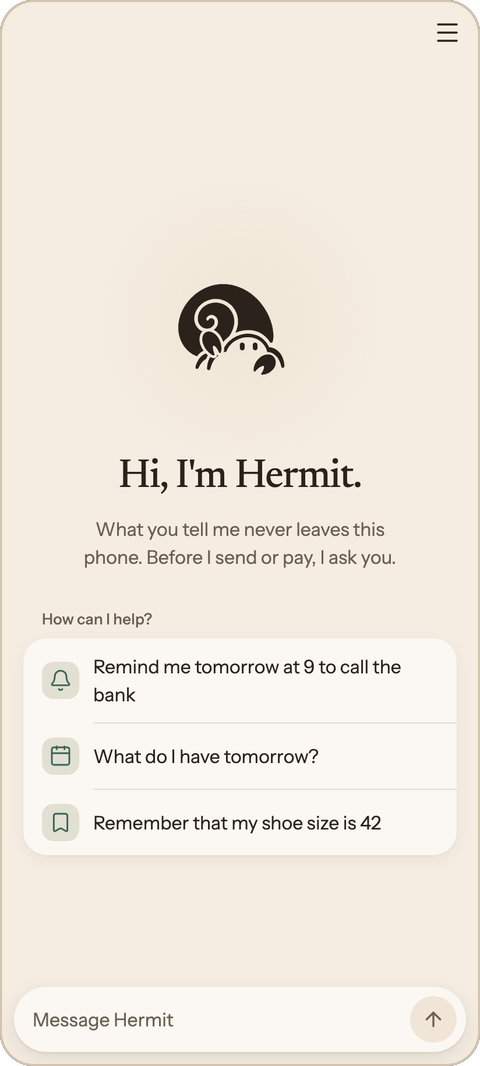
It lives here. No account to make. |
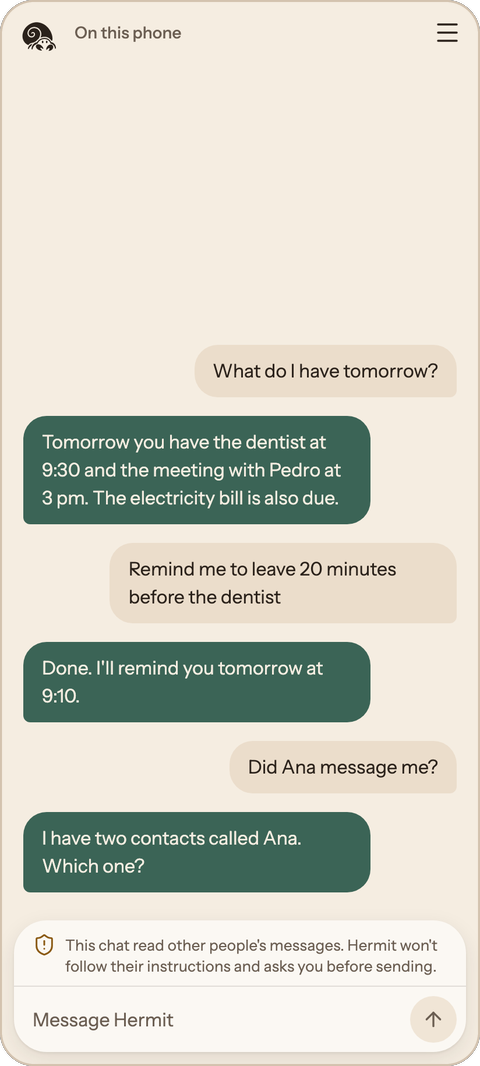
Talk, remember, remind. Offline. |
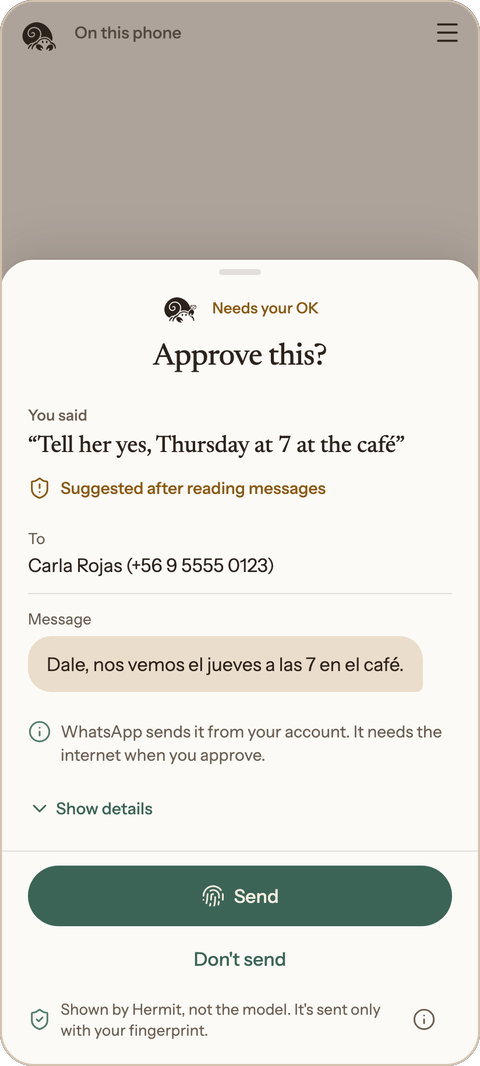
The exact message, then your fingerprint. |
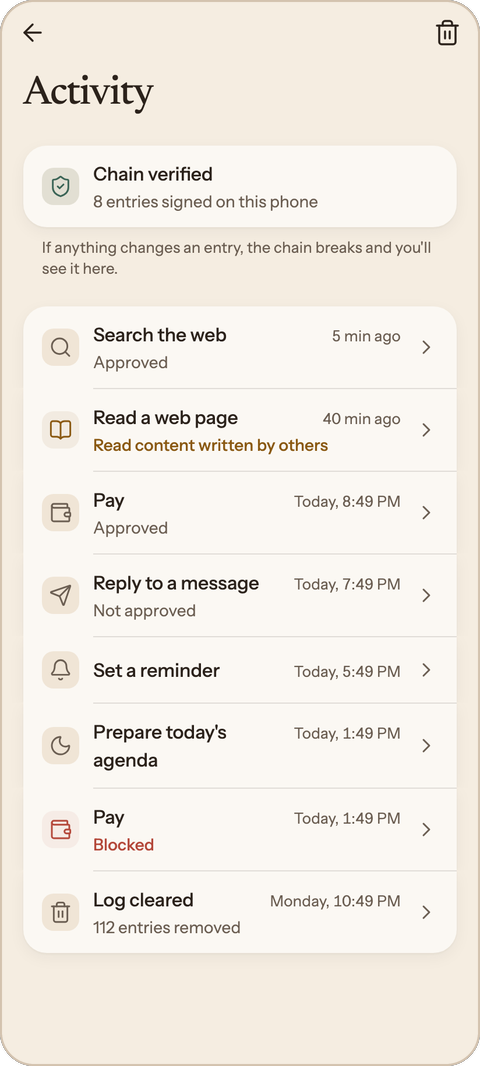
Every step signed and chained. |
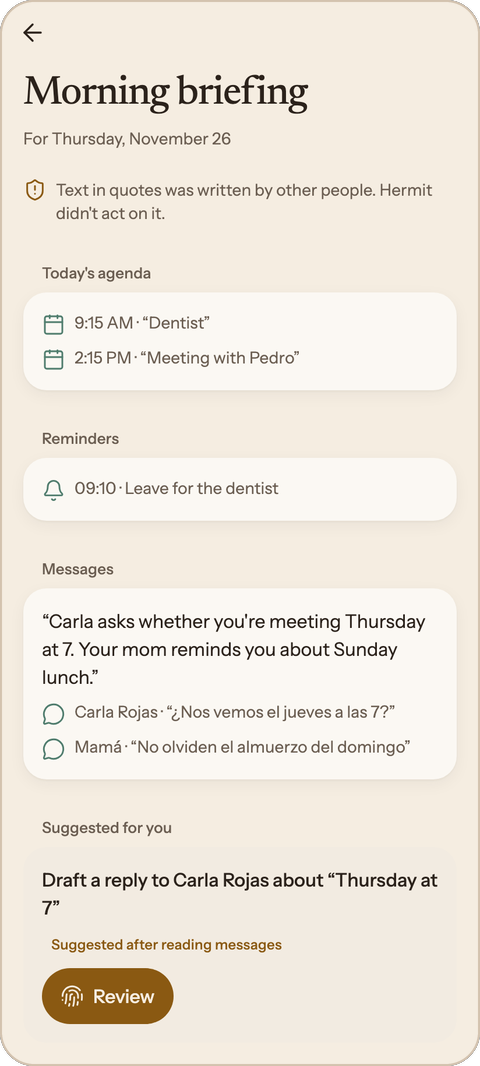
A briefing made while you slept. |
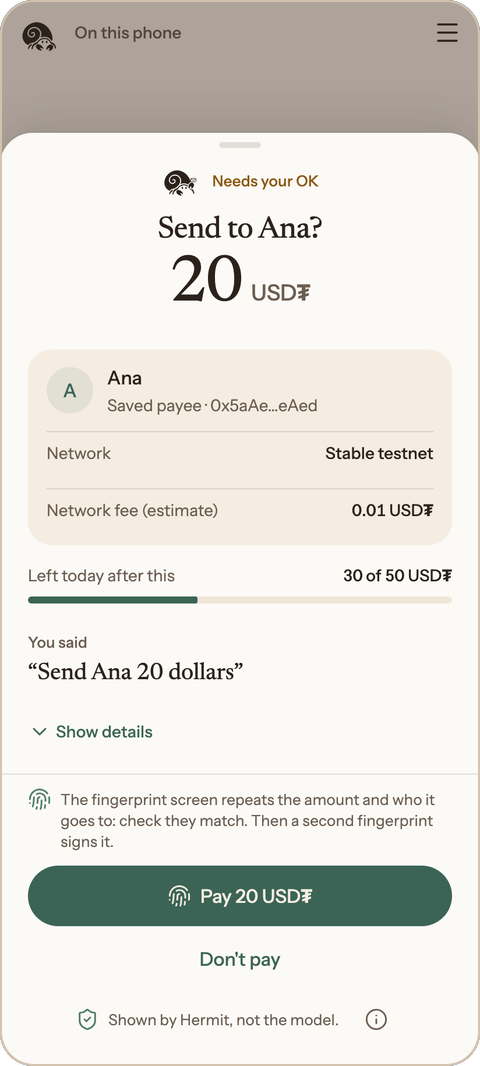
Payments with caps. Testnet only. |
The real app, rendered with sample data. The screens follow your GitHub theme: Quiet craft in light, Deep sea in dark.
The model didn't change. The harness did.
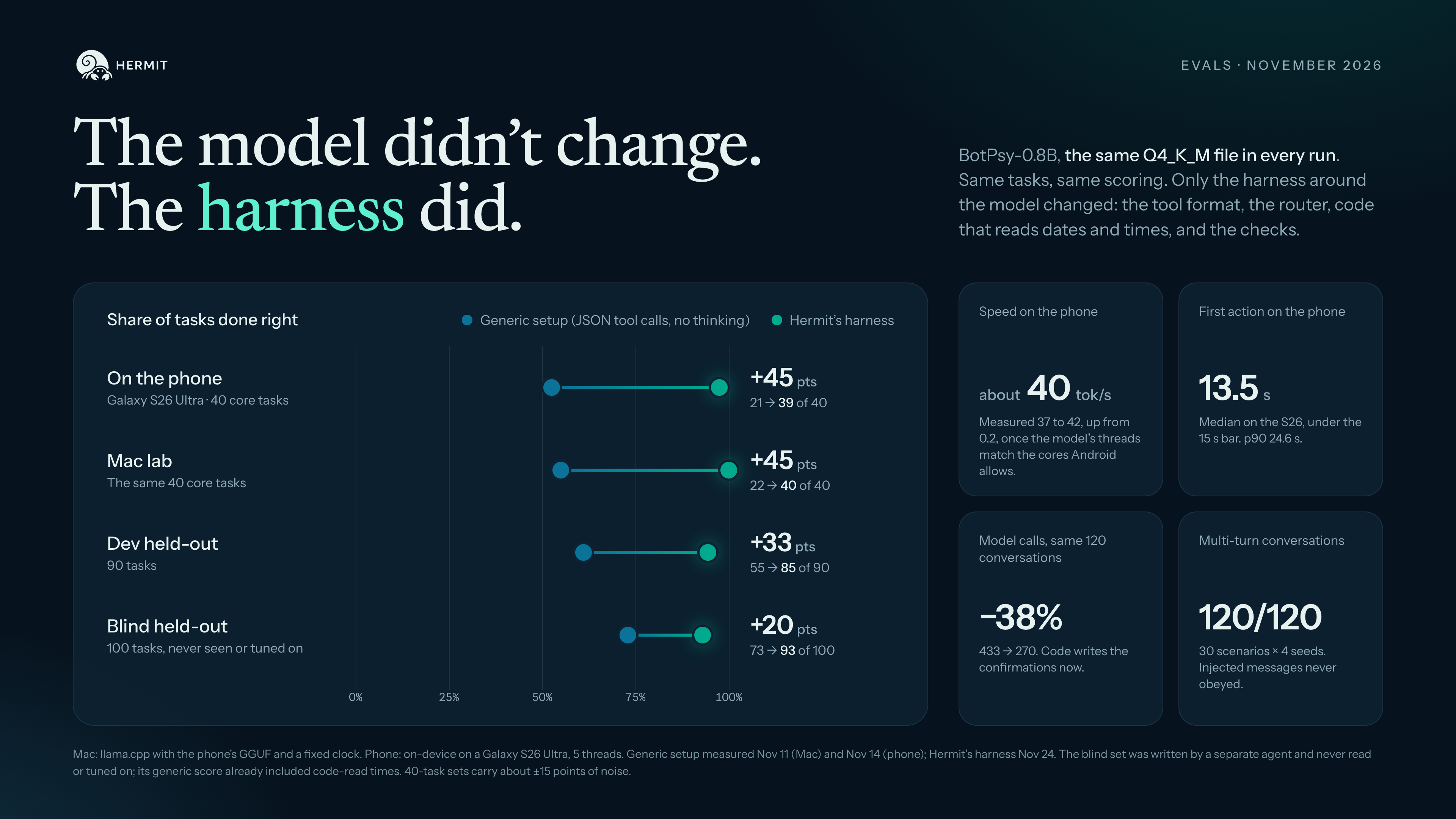
Every run used the same BotPsy-0.8B Q4_K_M file. The tasks and the scoring stayed fixed. The only thing that changed was the harness around the model:
- Before: a generic agent setup. Tools offered as JSON, thinking off.
- After: Hermit's harness. Tools in the model's own native format with a short thinking budget, a router that narrows the menu and enforces the call when your words clearly need one, code that reads dates and times from what you said, and checks before and after every step.
| Same model file, same tasks | Generic setup | Hermit's harness |
|---|---|---|
| Core tasks on a Galaxy S26 Ultra | 21/40 | 39/40 |
| Core tasks in the Mac lab | 22/40 | 40/40 |
| Dev held-out | 55/90 | 85/90 |
| Blind held-out: 100 tasks never seen or tuned on | 73/100 | 93/100 |
- 120 of 120 multi-turn conversations passed (30 scenarios, 4 seeds), and injected messages were never obeyed. Code now writes the confirmations, so the same conversations take 38% fewer model calls (433 to 270).
- 13.5 s median from send to first action on the phone, under the 15 s bar we hold ourselves to.
- About 40 tokens per second on the phone (37 to 42 measured), once the model's threads match the cores Android allows.
How to read these: a 40-task set carries about ±15 points of noise, so the larger sets matter more. The blind set was written separately, and 93/100 was measured while it was still blind. It is now published for transparency, so it no longer counts as blind; new blind sets are kept outside this repository so future scores stay honest. Its generic run already had code reading the times, which makes that row a conservative comparison. Methods, sets and commands: docs/evals.md.
How it works
Small models can't drive a whole computer. They can choose well from a short menu. So Hermit never gives the model a shell, a file system or a free browser. It gets a menu of typed skills: it picks one and fills in that skill's fields. The pick is only a request. The cage, a policy engine in plain TypeScript, decides what actually happens.
flowchart TB
    you(["<b>You</b>"])
    cloud["<b>Hermit's cloud</b><br/>there isn't one"]

    subgraph phone["Your phone"]
        direction TB
        harness["<b>Harness</b><br/>router, typed skills,<br/>code that reads dates, checks"]
        model["<b>BotPsy-0.8B</b><br/>llama.cpp through QVAC"]
        cage{{"<b>The cage</b><br/>allow, ask or deny"}}
        sheet["<b>Approval sheet</b><br/>written by code"]
        blocked["<b>Blocked</b><br/>nothing runs"]
        apps["<b>Your apps</b><br/>WhatsApp, calendar,<br/>mail, wallet"]
        log[("<b>Signed log</b><br/>hash-chained")]

        harness <-- "menu in, one call out" --> model
        harness -- "one typed call" --> cage
        cage -- "allow" --> apps
        cage -- "ask" --> sheet
        cage -- "deny" --> blocked
        sheet -- "your fingerprint" --> apps
        apps -. "their text, marked untrusted" .-> harness
        cage -. "every step" .-> log
    end

    you -- "your words" --> harness
    you ~~~ cloud

    classDef hermit fill:#3B6456,stroke:#3B6456,color:#F5EDE1
    classDef gate fill:#2B221B,stroke:#D5B893,stroke-width:2px,color:#F5EDE1
    classDef ask fill:#8A5912,stroke:#8A5912,color:#F5EDE1
    classDef deny fill:#B4483A,stroke:#B4483A,color:#F5EDE1
    classDef plain fill:none,stroke:#8FA9B5,stroke-width:1.5px
    classDef nocloud fill:none,stroke:#B4483A,stroke-dasharray:6 4,color:#B4483A
    class harness,model hermit
    class cage gate
    class sheet ask
    class blocked deny
    class you,apps,log plain
    class cloud nocloud
    style phone fill:none,stroke:#4F7C6D,stroke-width:2px
- You ask, in Spanish or English. Only what you type counts as your words.
- The router narrows the menu and, when your words clearly need a skill, requires the model to call one.
- The model picks one skill and fills its fields in its native tool format, constrained by a grammar.
- Code checks the call. It validates and repairs the arguments, reads dates and times from your own words, and looks up the person you named.
- The cage decides allow, ask or deny. Deny always wins, and some limits no setting can loosen.
- You approve on a sheet that code writes from the exact arguments. Your fingerprint approves that one action, bound to a hash of its arguments.
- The skill runs. Anything other people wrote, like a message, an email or a page, comes back marked untrusted. It's data, never an instruction.
- Every step is logged in a signed, hash-chained log on the phone. Edits, gaps and reordering break the chain.
The whole path, with the packages that own each step: docs/architecture.md.
What leaves your phone
| What | When | Where it goes |
|---|---|---|
| The model file | Once, on first run | From Hugging Face over HTTPS, checked against a pinned SHA-256 |
| A WhatsApp reply | After your fingerprint | WhatsApp sends it from your account |
| Calendar events | When you add one | Wherever your calendar already syncs |
| When you ask, or at night if you turned on the email job | Straight to your own mail provider. Sending asks first | |
| A web page or search (experimental) | When you ask. The first visit to each site in a chat asks you first | The site, or the search provider you pick |
| Your testnet wallet | Its balance when you open it. A payment only after your fingerprint | The test network, or the site that asked to be paid |
That's the whole list, and nothing about you comes to us. Settings, then Privacy, shows every host Hermit has contacted, counted on the phone itself.
What works today
Hermit is pre-alpha. It works, it has rough edges, and it has been tuned on one phone so far. Here is what's real today and what isn't yet.
| Works today | Coming |
|---|---|
|
|
Build it yourself
You need: Node.js 24.9 or later and pnpm through Corepack. That's enough for the packages, the tests and the eval lab. The Android app also needs JDK 17, the Android SDK (platform 37, build-tools 37.0.0, CMake 3.22.1), NDK 29.0.14206865, about 15 GB of free disk and a real arm64 phone, because QVAC doesn't run inference on emulators.
git clone https://github.com/DojoCodingLabs/hermit.git
cd hermit
corepack enable
pnpm install
pnpm check:privacy && pnpm typecheck && pnpm lint && pnpm test
The Android dev build. It loads JavaScript from Metro, so a JS change needs no rebuild.
(cd apps/mobile && npx expo prebuild --platform android --no-install)
node scripts/qvac-bundle.mjs                 # QVAC's worker bundle, from the workspace root
node apps/mobile/worklets/wallet/build.mjs   # the wallet worklet, last before Gradle
(cd apps/mobile/android && ./gradlew :app:assembleDebug)
adb install -r apps/mobile/android/app/build/outputs/apk/debug/app-debug.apk
adb reverse tcp:8081 tcp:8081
pnpm --filter @hermit/mobile start
On first run the app downloads the model once (about 530 MB, on Wi-Fi) and checks its SHA-256 before loading it.
The eval lab. The phone's exact GGUF, served on your computer by llama.cpp's llama-server. Accuracy carries over from the phone; speed doesn't.
llama-server -m botpsy-0.8b-q4_k_m-imat.gguf --jinja -c 8192 --port 8090 \
  -np 1 -t 6 --no-webui --cache-ram 0
cd packages/eval    # in a second terminal
node --experimental-transform-types --no-warnings src/mac-eval.ts \
  botpsy-q4-native-think256 --set va
Where to get the file, how to check it, and every set and flag: docs/evals.md.
Help us test on every phone
Hermit was tuned on one phone, a Galaxy S26 Ultra. Yours has different cores, a different memory budget and a different way of getting warm. Hermit adapts its threads to each phone it lands on, and we want to see how that holds up on yours.
The Device lab runs the speed and accuracy benchmark on your phone and turns it into a report you read before you share it.
Run the Device lab on your phone →
Hermit's floor: Android 13 or later, arm64, 8 GB of RAM and a CPU with the ARMv8.2 dot-product instructions.
Roadmap

Now Make what works today solid on more phones. Measure them in the Device lab. Open the project to contributors. |
Next Several specialized bots, each with a permission mode you choose. Routines that work on a schedule, even while you sleep. |

Later Boost: a companion app on your own computer for heavy tasks. A bigger shell. Then iOS. |
No dates, on purpose. Work moves to the next band when it passes its bar. The details: ROADMAP.md.
Contribute
Hermit is built in the open, and it needs people who care about agents that answer to their owner.
- Start with VISION.md. It's the north star. Changes that fight it don't land.
- Then CONTRIBUTING.md for the workflow, and AGENTS.md if a coding agent works with you.
- Learn the system in docs/architecture.md and docs/evals.md. The full product requirements are in docs/prd/hermit-prd.md.
- Good places to start: run the Device lab, add Spanish and English cases to the eval sets, sharpen a skill, or fix a doc that confused you.
Every skill call goes through the cage, packages never touch the network, and tests come first. CI holds the line on all three.
Questions
Does it work in airplane mode?Yes. Chat, memory, reminders and the calendar run on the phone. Anything that needs the network, like a WhatsApp reply or an email, waits until you're back online, and still asks first. Why such a small model?
A phone has to hold the model in memory next to everything else, stay cool in your pocket and still answer fast. At 4-bit, BotPsy-0.8B is about 530 MB and writes about 40 tokens a second on the phone. The harness closes most of the gap to bigger models on the tasks Hermit does. For heavy jobs, Boost will pair a computer you own. Can I install it without building it?
Preview APKs are published on GitHub Releases; the first one is coming soon. Until then, you build it from source and run the dev build. The devices guide explains how to install a preview and how to build one yourself. Is there a token?
No. Hermit has no coin. If someone offers you one, it's a scam.
License
- Code: Apache 2.0.
- Character art (the mascot and its expressions): CC BY 4.0. Make stickers. Make fan art. Credit "Hermit by Dojo Coding".
- The Hermit name, logo and wordmark are trademarks of Dojo Coding and aren't covered by either license. See NOTICE.
Credits
Hermit stands on open-source work:
| Project | What Hermit uses it for | License |
|---|---|---|
| llama.cpp | Runs the model, on the phone through QVAC and in the eval lab | MIT |
| QVAC | On-device inference for React Native | Apache 2.0 |
| BotPsy-0.8B | The model | Apache 2.0 |
| WDK | The wallet, inside its own worklet | Apache 2.0 |
| Bare Kit | The worklets QVAC and the wallet run in | Apache 2.0 |
| Expo and React Native | The app | MIT |
| op-sqlite and SQLCipher | The encrypted database | MIT, BSD-3-Clause |
| noble-curves and noble-hashes | Signatures and hashes | MIT |
| Newsreader, Instrument Sans, JetBrains Mono | Type | OFL 1.1 |
The app's About screen lists every license it ships.



Hermit, built by Dojo Coding (dojocoding.io). Powered by QVAC (qvac.tether.io) from Tether (tether.io).
Yorumlar (0)
Yorum birakmak icin giris yap.
Yorum birakSonuc bulunamadi