Trek
Health Warn
- License — License: Apache-2.0
- Description — Repository has a description
- Active repo — Last push 0 days ago
- Low visibility — Only 7 GitHub stars
Code Fail
- rm -rf — Recursive force deletion command in .github/workflows/release.yml
Permissions Pass
- Permissions — No dangerous permissions requested
No AI report is available for this listing yet.
Every agent. One trail. A native desktop app (Rust + GPUI) for macOS, Windows and Linux that runs Claude Code, Codex, OpenCode, Cursor, Copilot and other ACP agents, plus API and local models, from one inbox, with an iPhone companion for approvals on the go.

Trek
Every agent. One trail.
A free, open-source native desktop app that runs your coding agents from one inbox.
Claude Code, Codex, OpenCode, Cursor, Copilot, API and local models. On macOS and Windows, with an iPhone companion and a remote for any phone’s browser.





trekdesktop.com · All releases · Install notes · Build from source
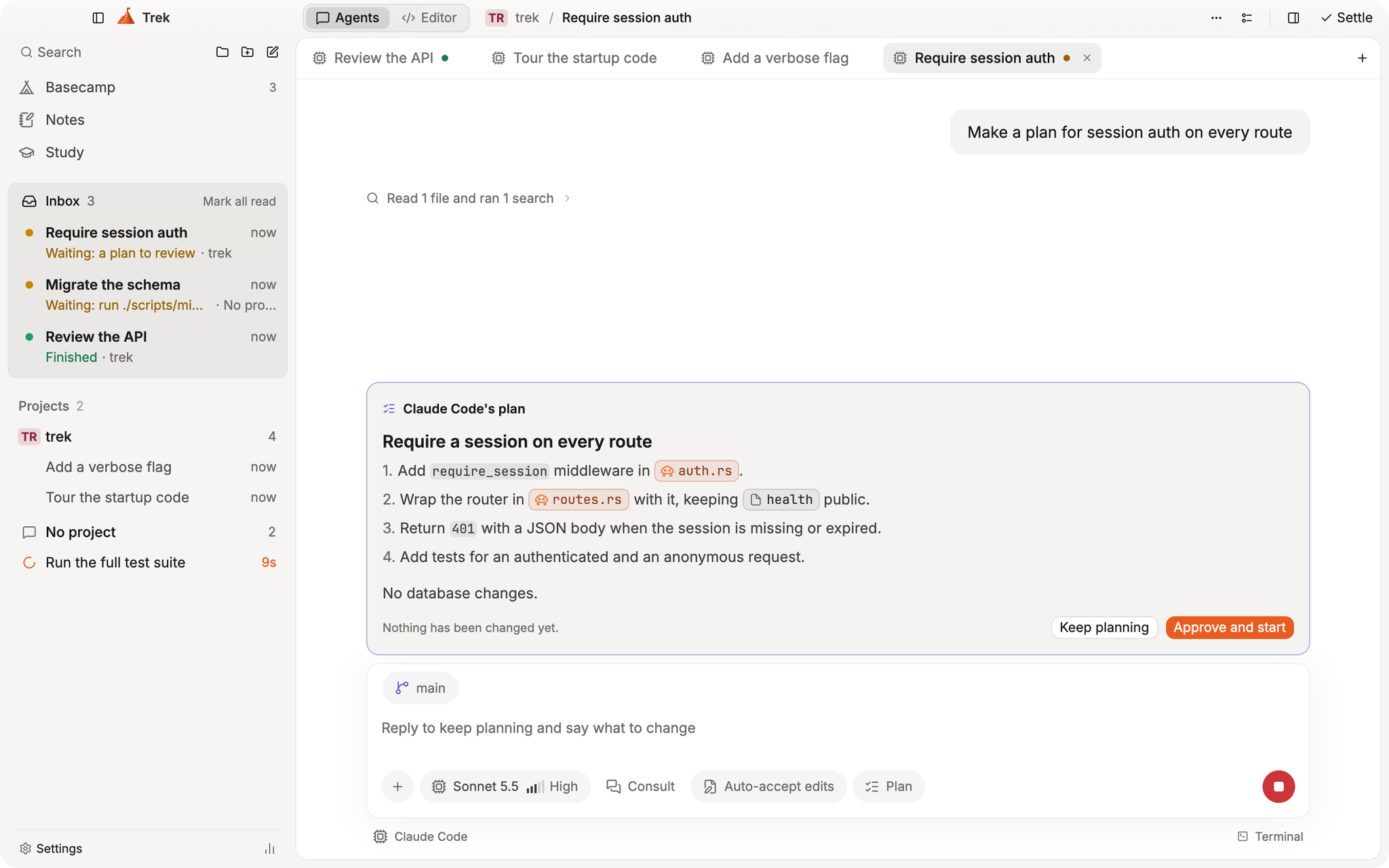
Platforms
 macOS 13+ · Apple silicon, Intel 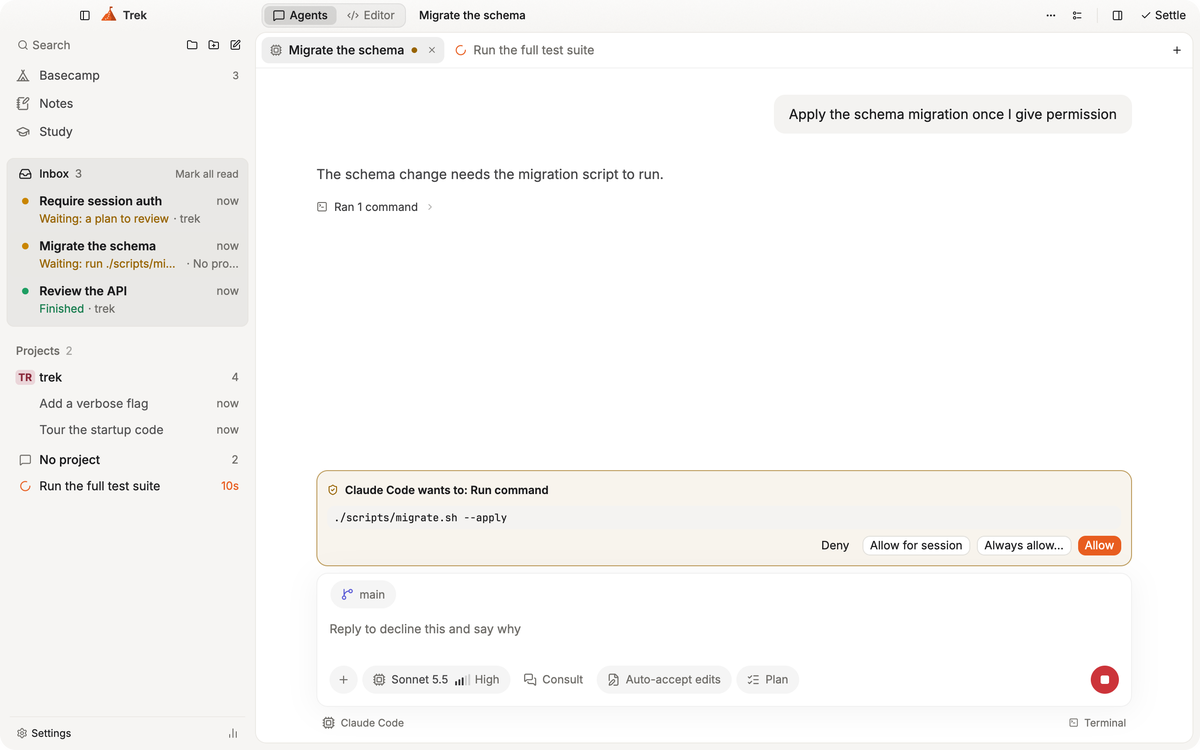
Menu bar icon, Dock badge, notifications, iOS Simulator. |
 Windows 11 · x64 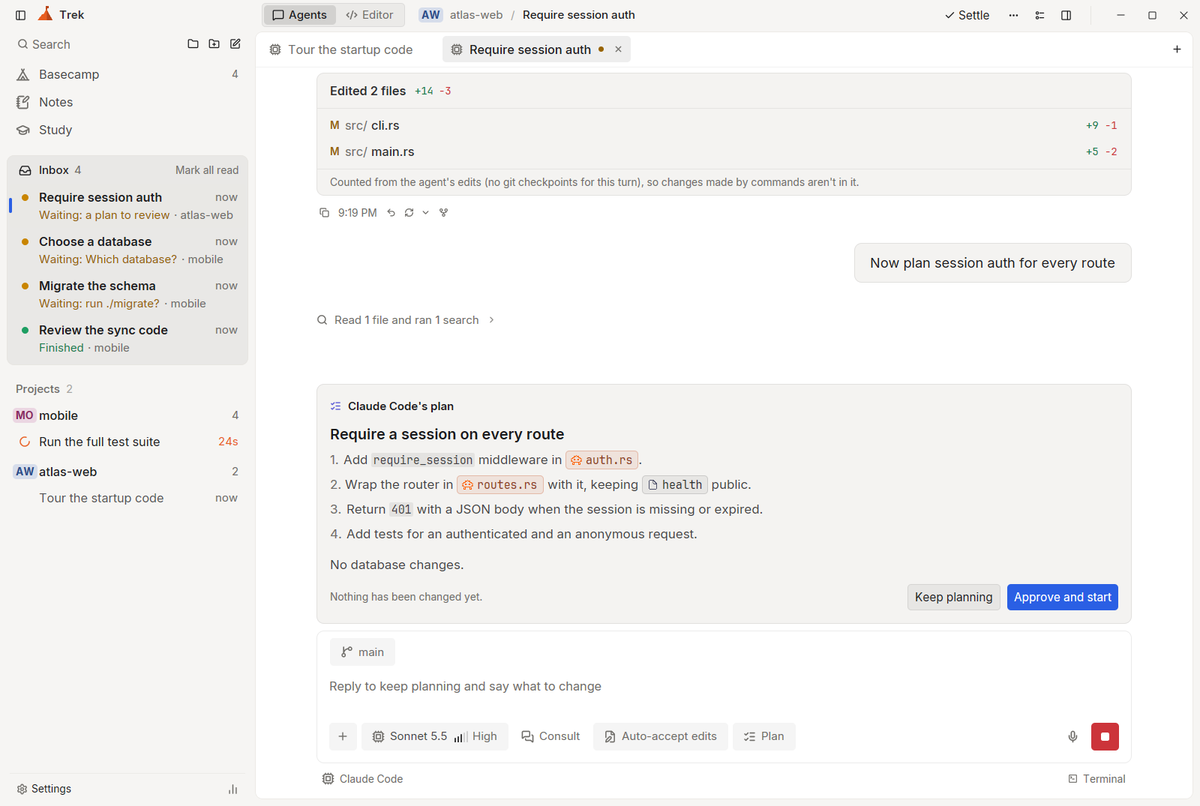
Tray icon, taskbar badge, toasts. The thread pictured is an example. |
 iPhone iOS 26 · SwiftUI The agents keep running on your computer; the phone is the inbox and the remote. Every thread and its status, approvals, questions and plans, steering, new threads, Notes and voice input. A sub-agent opens to its own work, where you can stop it or message it. The four themes are there too, or it matches your Mac. Built from source for now (ios/README.md). No iPhone? An Android phone, or any phone’s browser, pairs from the same Settings page and gets the same remote at trekdesktop.com/remote, connected straight to your computer (docs/MOBILE.md). |
||
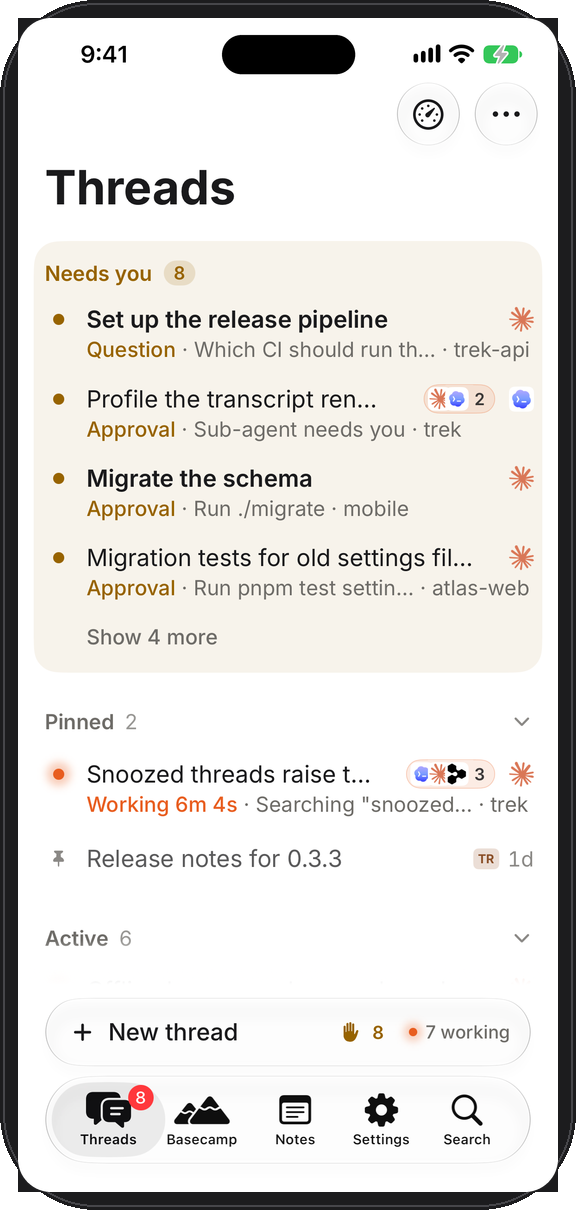
Threads |
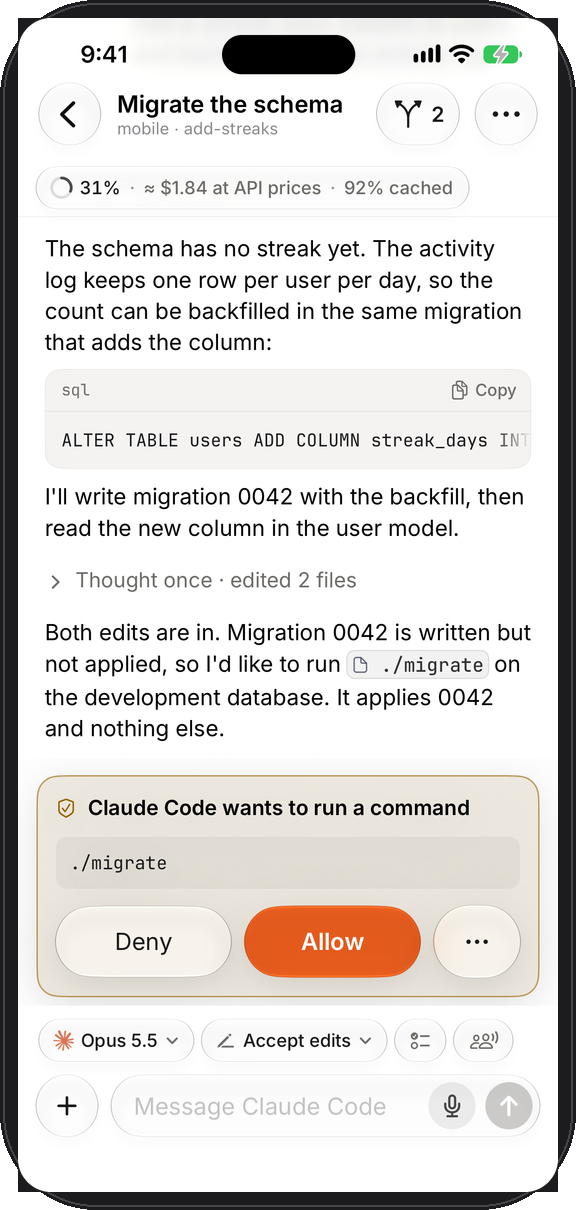
Approvals |
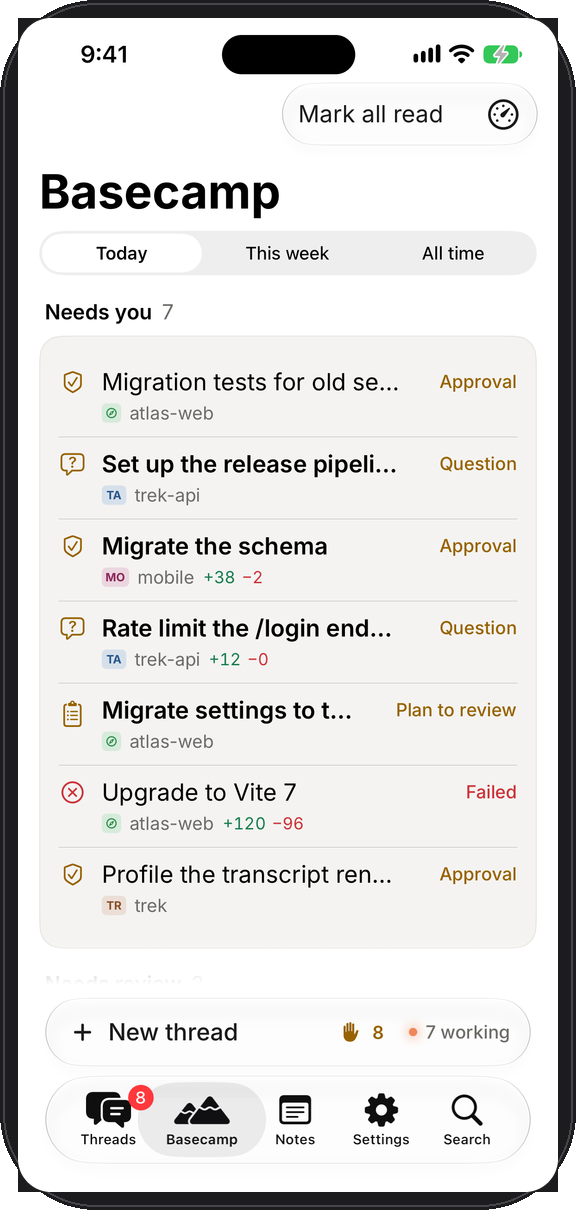
Basecamp |
Features
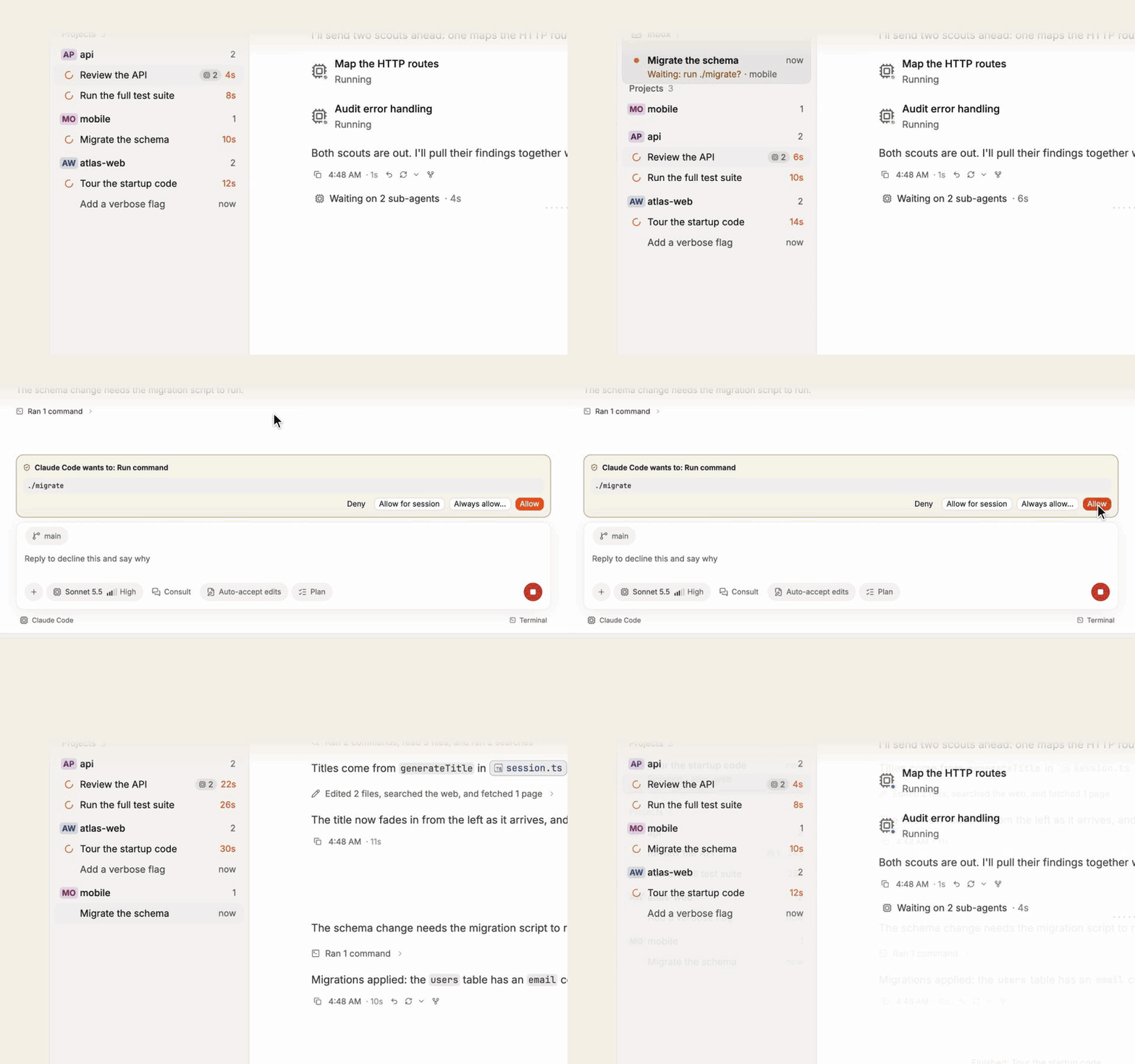
One stops to ask, goes to the top, and gets back to work once you answer. Staged threads.
| Agents and models | |||
|---|---|---|---|
 Your CLI agents With the logins you already have |
 API and local models Keys in the system keychain |
 Agents consult agents Codex reviews Claude's plan, and back |
 You stay in charge Four hand-holding levels, plus Plan mode |
| Inbox and threads | |||
 One inbox Running and waiting threads on top |
 Search everything Full-text search and a ⌘K palette |
 Undo any turn Edit, retry or fork; files roll back too |
 Bring your history Imports Claude Code, Codex and OpenCode |
| Review and git | |||
 Changes per turn See, review or undo each turn's edits |
 Worktrees Give a thread its own branch |
 Pull request cards Checks, conflicts and merge, live |
 Built-in editor Keep or undo the agent's hunks |
| Tools beside the thread | |||
 Terminal A real one, next to every thread |
 Browser Element picking, devtools, agent-driven |
 iOS Simulator A live mirror with touch (macOS) |
 Computer use and MCP Opt-in, in the background on a Mac; your own MCP servers |
| Phone and machines | |||
 Trek for iPhone Answer approvals away from your desk |
 Push through ntfy Know when an agent needs you |
 Your other machines Start and follow threads on them |
 Pinned TLS pairing Over your LAN or Tailscale |
| Native | |||
 Menu bar and tray Idle, working or needs you |
 Signed updates Stable, Beta or Nightly; never mid-turn |
 Themes and backgrounds Four themes, Paper or Night, glass; painted and ASCII art |
 Light and fast Rust and GPUI, drawn on the GPU |
| Learning and your own changes | |||
 Study Learn or practise with an agent |
 Plugins Themes, mods and pages; ask an agent for one |
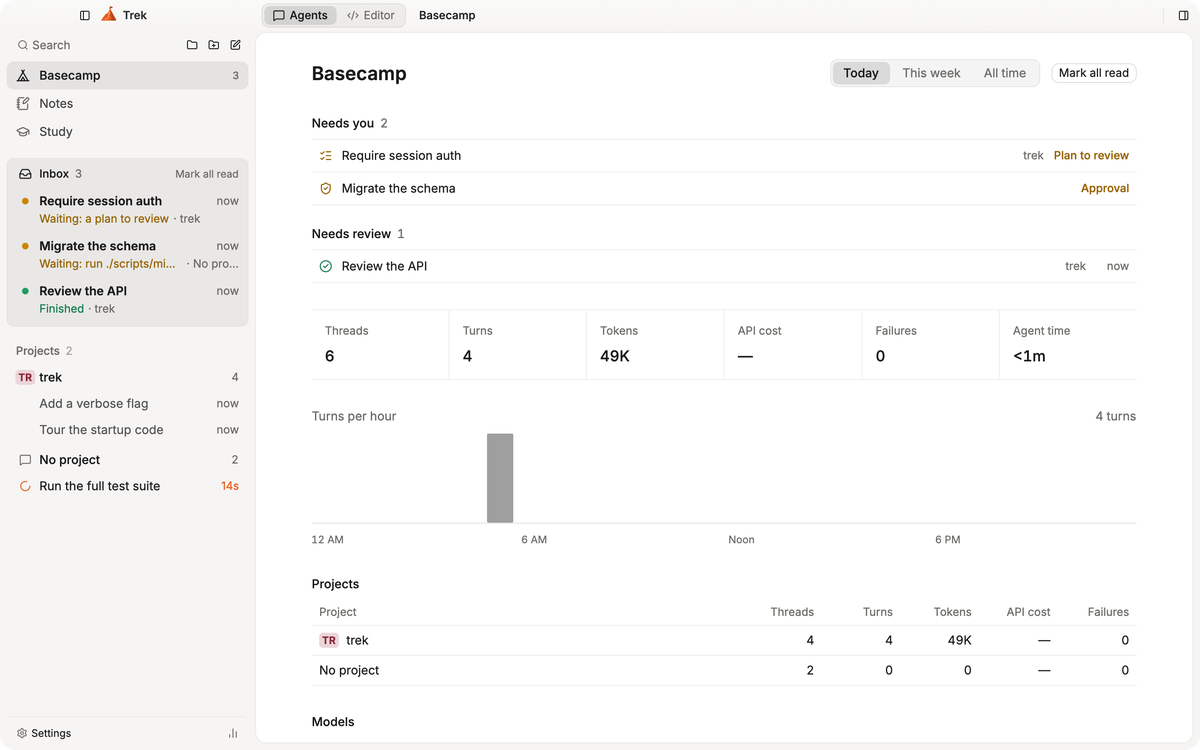
Basecamp: today across every agent |
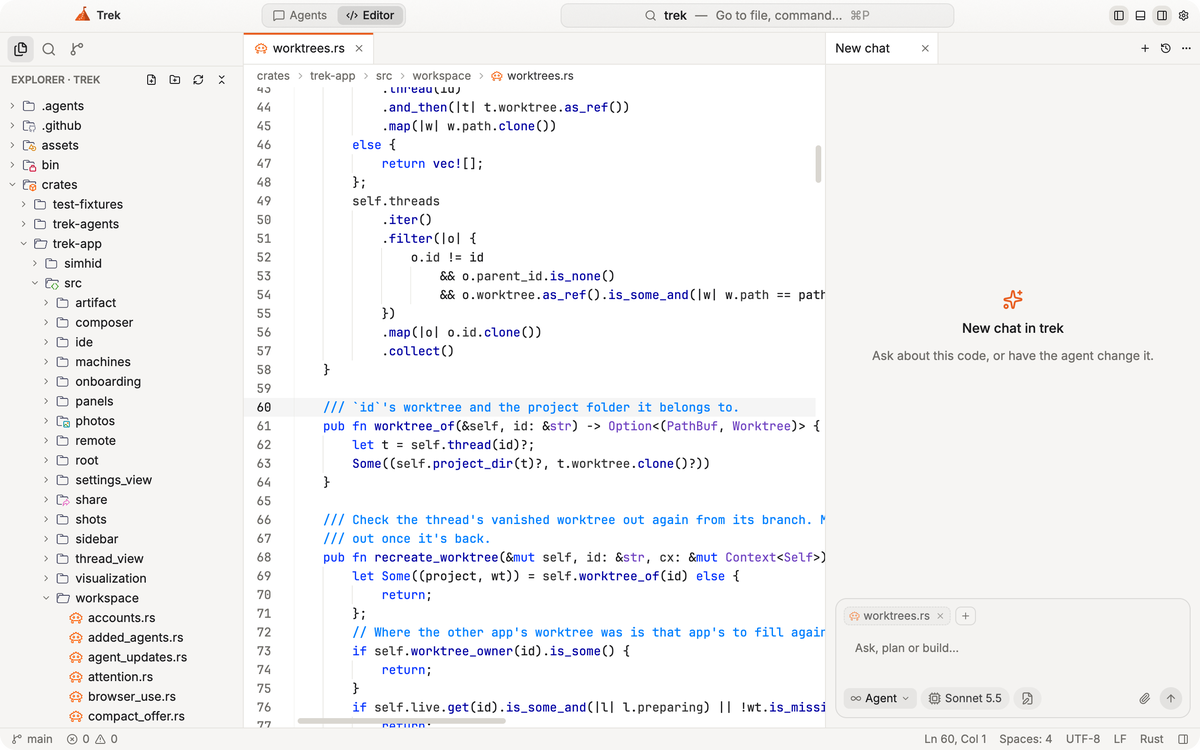
Editor: the agent beside your code |
Works with
Trek drives each vendor's own CLI, so your subscriptions work as they do in the terminal. Trek never reads or stores those credentials.
| Agents | ||||||
|---|---|---|---|---|---|---|
 Claude Code |
 Codex |
 OpenCode |
 Cursor |
 GitHub Copilot |
 Factory Droid |
 Kimi |
 Qwen Code |
 Grok |
 Devin |
 Goose |
 Amp |
 Pi |
+ any agent that speaks ACP |
| API keys and local models | ||||||
 Anthropic |
 OpenAI |
 Gemini |
 OpenRouter |
 DeepSeek |
 xAI |
 Mistral |
 Groq |
 Ollama |
 LM Studio |
llama.cpp MLX |
+ any OpenAI-compatible endpoint |
API and local models get Trek's own tools (read, edit, write, run) behind the same approval gates.
Built with
 Rust |
 GPUI |
 Tokio |
 SQLite |
 SwiftUI |
Install
macOS (13 or later, Apple silicon or Intel)
- Download the
.dmgfor your Mac from the latest release (darwin-aarch64for Apple silicon,darwin-x86_64for Intel) and drag Trek to Applications. - Releases are signed but not notarized yet. On first launch, open System Settings › Privacy & Security and click Open Anyway. Or run:
xattr -dr com.apple.quarantine /Applications/Trek.app - Install and log in to the agents you use (
claude,codex,opencode, …). Trek finds them on yourPATH.
Windows (11, x64)
- Run
Trek-Setup-x86_64.exe, or unpack the portable.zipfrom the release page into a folder of its own. - Not Authenticode-signed yet: SmartScreen asks once. Click More info › Run anyway.
- A tray icon and taskbar badge instead of the menu bar icon and Dock badge.
- No menu bar: every command is in the palette (Ctrl+K), Settings or a context menu. Shortcuts use Ctrl where the Mac uses ⌘.
- Dictation runs on the PC with an on-device speech model (141 MB, downloaded the first time you click the mic); what you say never leaves the PC. Where it can't run, the mic points to Win+H. Snapshots go through Snipping Tool.
- Closing the window keeps Trek in the tray, agents still working: its tray icon (behind the ^ arrow if Windows tucked it away) brings the window back, and its menu quits. Settings › General turns that off; then closing quits, asking first while agents are working.
- The iPhone tool works through Apple Devices (from the Microsoft Store): the phone's apps, files and AssistiveTouch, for you and agents. Its live screen and taps need Trek on a Mac.
- No iOS Simulator tool.
- The first time the phone server is on, allow Trek through Windows Firewall on private networks.
- Windows 10 22H2 works on a best-effort basis.
- Keep Trek out of folders that Controlled folder access guards (Documents, Desktop…), or updates can't install. Settings › Updates can move it.
- Logs:
%LOCALAPPDATA%\Trek\logs. - Every feature, platform by platform: docs/PARITY.md.
Linux, a preview (Ubuntu 22.04, Debian 12, Fedora 36 or later; x86_64 or Arm):
- Ubuntu or Debian: download
trek_<version>_amd64.deb(_arm64.debon Arm) and runsudo apt install ./trek_<version>_amd64.deb, which brings what Trek needs. Trek says in Settings › Updates when a new version is out; download its.debto update. - Anywhere else: download
Trek-<version>-linux-x86_64.AppImage(linux-aarch64on Arm),chmod +xit and run it. It needs GTK 3 and WebKitGTK 4.1 from your package manager (it names them if they're missing), adds itself to your app menu, and updates itself from Settings › Updates.
- Trek runs as an X11 window, in a Wayland session through Xwayland, so the desktop frames it and the Browser can work;
TREK_WAYLAND=1opts into native Wayland, without them. - A tray icon where the desktop shows them (Ubuntu does; GNOME elsewhere needs the AppIndicator extension). No menu bar: the palette (Ctrl+K), Settings and context menus have every command.
- Keys are kept in your desktop's keyring (GNOME Keyring or KWallet).
- Not on Linux: dictation, snapshots, computer use, the iOS Simulator and iPhone tools, and the Browser's ad blocker and extensions.
- Agents can watch videos on Linux as elsewhere; a transcript of the audio needs
whisperinstalled (pipx install openai-whisper). - Every feature, platform by platform: docs/PARITY.md.
iPhone: build it from source in Xcode (ios/README.md), then pair it in Settings › Phone & Machines.
Updates: Trek updates itself from Settings › Updates (Stable, Beta or Nightly). Each update is checked against a minisign signature and installed when you restart Trek, never while an agent is working.
Build from source
macOS needs full Xcode (GPUI compiles Metal shaders); Windows needs Visual Studio 2022 Build Tools (C++), the Windows SDK, CMake and LLVM (dictation's whisper.cpp is built from source, and its bindings need libclang). Rust comes from rust-toolchain.toml.
git clone https://github.com/dokyit/Trek && cd Trek
cargo run -p trek-app        # debug build
cargo test --workspace       # what CI runs
git config core.hooksPath script/hooks   # pre-push: rustfmt, the word table, the prompt budgets
On Xcode 26+, a missing Metal compiler is one command away: xcodebuild -downloadComponent MetalToolchain. App bundles, the mock agent and environment variables: CONTRIBUTING.md.
Docs
| Doc | What's in it |
|---|---|
| Design decisions | Why Trek is built the way it is |
| iPhone design and protocol | Pairing, TLS pinning, the wire protocol |
| Other machines | Running a thread on another computer |
| Performance | Launch, memory and CPU on a Mac, measured, with the command to run it again |
| Releasing | Channels, signing and the update path |
| All docs | The full index |
Status
Trek is 0.x: used every day, moving fast. Expect rough edges.
Mac (Apple silicon and Intel), Windows x64, and Linux (x86_64 and Arm, a preview). History import covers Claude Code, Codex and OpenCode.
Trek asks once before sharing anonymous usage data, and sends nothing without a yes. What is sent is in docs/PRIVACY.md.
See open issues.
Contributing
Bug reports, ideas and pull requests are welcome. Start with CONTRIBUTING.md and the Code of Conduct.
Found a security issue? Please report it privately: SECURITY.md.
License
Apache-2.0. Third-party notices are in NOTICE.
Trek isn't affiliated with or endorsed by Anthropic, OpenAI, Google, Microsoft or any other maker of the agents it runs. Their names and logos belong to their owners and are shown only to say which agent a thread uses. To have a mark changed or removed, open an issue.
Reviews (0)
Sign in to leave a review.
Leave a reviewNo results found