dot-buddy
Health Uyari
- License — License: MIT
- Description — Repository has a description
- Active repo — Last push 0 days ago
- Low visibility — Only 5 GitHub stars
Code Gecti
- Code scan — Scanned 12 files during light audit, no dangerous patterns found
Permissions Gecti
- Permissions — No dangerous permissions requested
Bu listing icin henuz AI raporu yok.
A pixel desktop pet for macOS that tells you when your coding agents (Claude Code, Codex, …) are working, done, or waiting on you.

Dot Buddy
English | 한국어
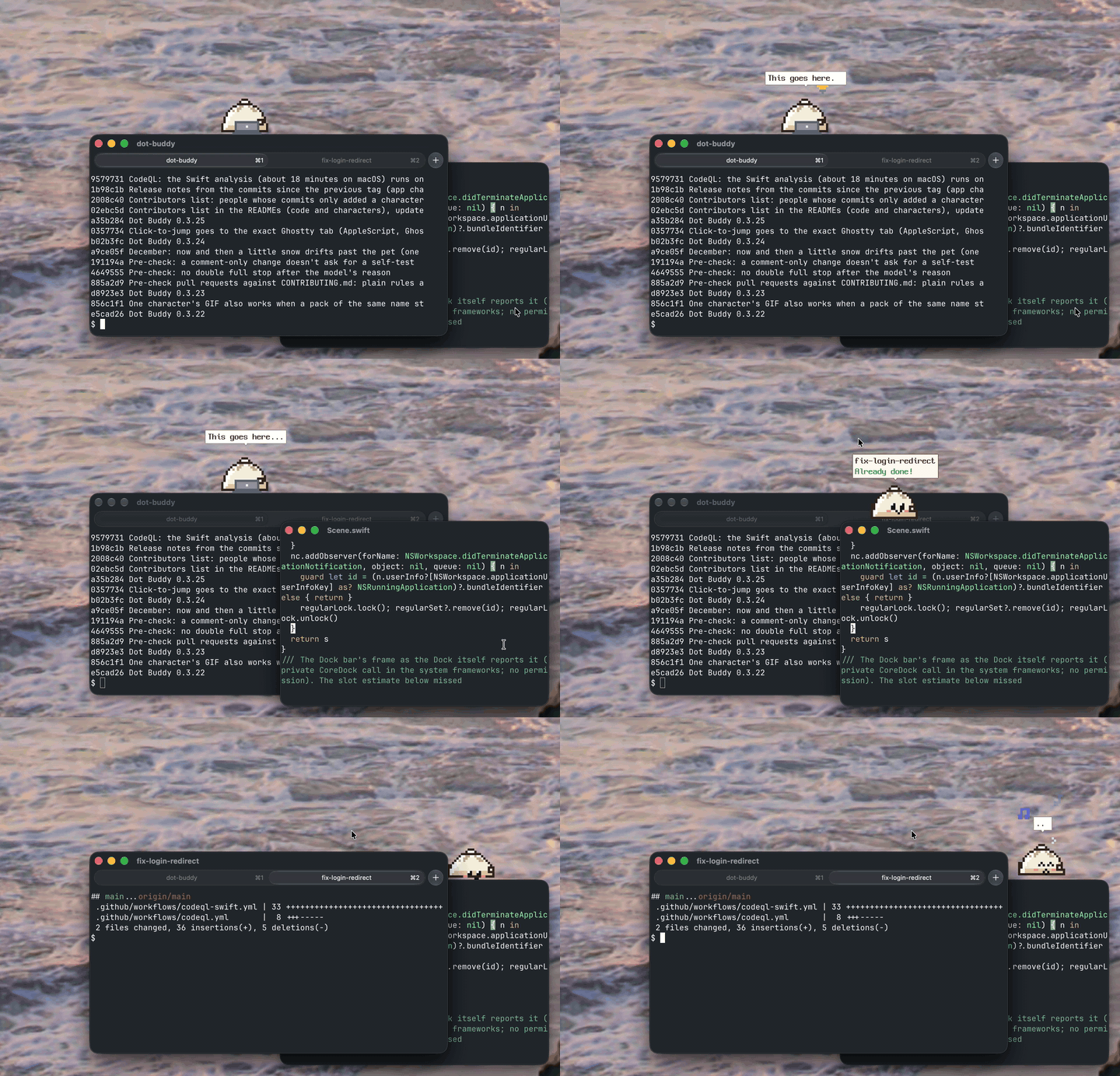
A pixel desktop pet for macOS that tells you when your coding agents are working, done, or waiting on you.
Dot Buddy lives on your desktop, walks along window edges and widgets, and watches your Claude Code sessions (other agents can plug in). When a session finishes or asks a question, it says so in a speech bubble. Click the bubble to jump to that terminal tab.
- Native Swift app, zero third-party dependencies, builds from source in about a minute
- Reads session files only; it never touches your agent's hooks or settings
- No network connections, except an opt-in update check against GitHub every 6 hours
- English and Korean UI
What it reacts to
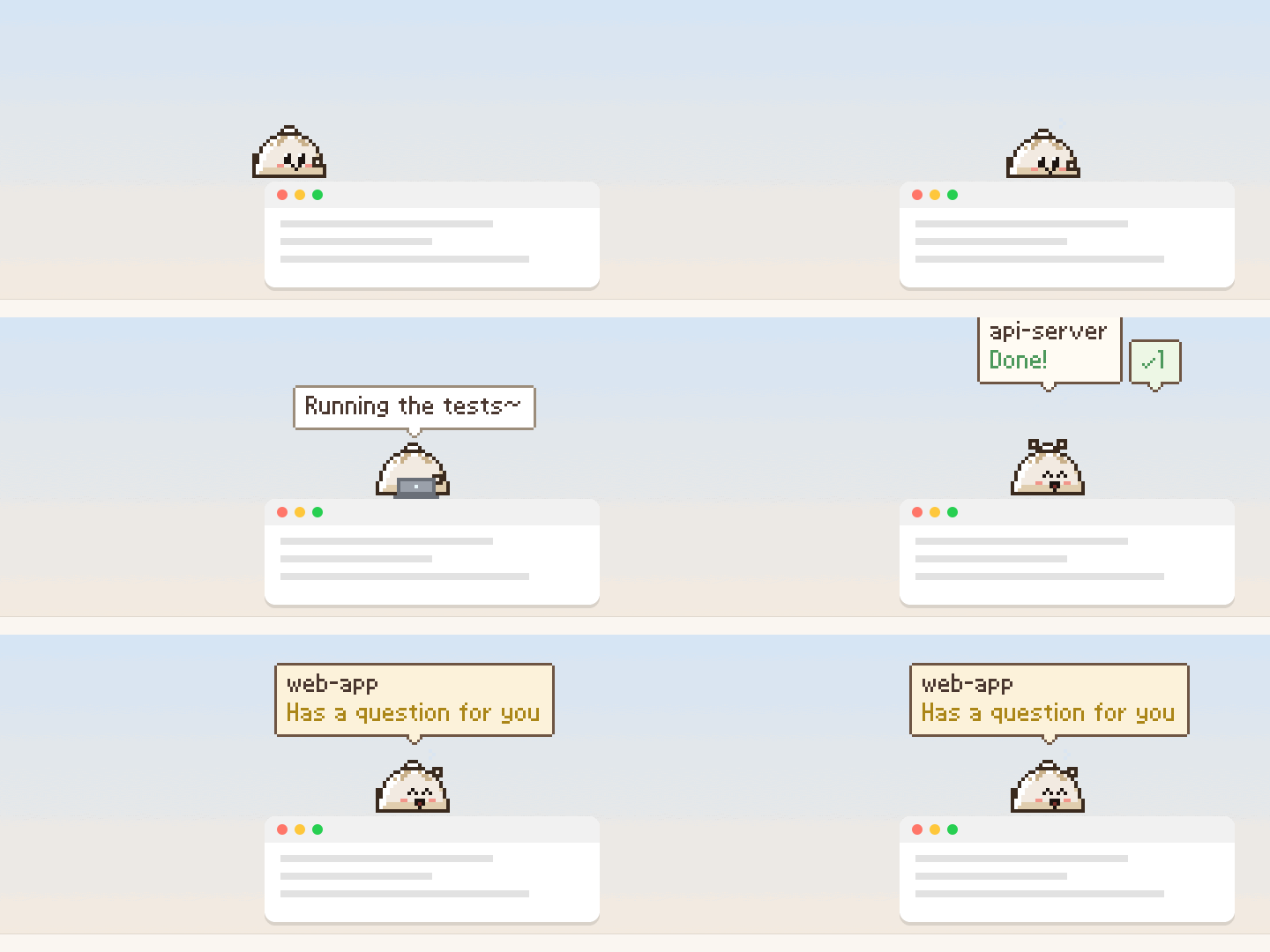
One pet shows the most urgent state across all sessions.
| State | When | What you see |
|---|---|---|
| Question | A session is waiting for your answer, or for your OK to run a tool | ? bubble, the pet waves at you. Left unanswered for 45 seconds, it comes over to your cursor (even on another monitor) and calls you, up to 3 times |
| Done | A session finished and you haven't looked yet | "Done!" bubble with the session name, a ✓ badge with the count |
| Busy | At least one session is working | Laptop out, typing; small reactions to reads, edits, tests and commits |
| Many sessions | Several sessions running at once | It cheers you on (and remembers today's record) |
| Resting | Nothing is going on | Wanders, sits on edges, falls asleep |
Clicking the pet marks everything as seen. A finished session keeps its "done" state for 5 minutes, then the pet stops nagging.
Features
Lives on your desktop. Walks along the bottom of the screen, desktop widgets and the top edges of windows. It hides behind windows and walks back out when one covers it. It moves between monitors.
Climbs, hangs, falls. Climbs window sides, hangs off ledges, sits on edges and sometimes pounces on your cursor.
Drag and throw. Pick it up and toss it; it lands on whatever window or widget it hits. Transparent pixels click through.
Click-to-jump. Click a bubble to go to that session:
Terminal Goes to cmux The exact tab (via the cmux CLI) Terminal The exact tab (AppleScript, asks for Automation permission once) iTerm2 The exact session (AppleScript, asks for Automation permission once) Ghostty 1.4+ The exact tab or split (AppleScript, asks for Automation permission once) WezTerm The exact tab or split (via the wezterm CLI) tmux, inside any of the above The exact tmux window and pane, then that terminal's tab. If no terminal shows that tmux session, the last-used one switches to it Anything else (kitty, VS Code, …) Brings the app to the front You can replace this with your own command per agent (see Configuration).
Characters. Six original pixel characters (Dumpling, Acorn, Sprout, Cloud, Candle, Pebble), each with its own lines and effects. Draw your own, or drop a character someone sent you (a zip, folder or PNG) on the pet to install it: see CHARACTERS.md.
Community characters. Install characters other people drew from the menu (Character → More Characters…), or browse the gallery, and share yours with a pull request to dot-buddy/characters.
Codex pets. Pets made for the Codex app (
pet.json+ 8×9 spritesheet) load as-is from~/.codex/pets/. A downloaded Codex pet zip works too: drop it on the pet without unzipping.Share as GIF. Character → Save This Character as GIF puts a short looping GIF of the one on screen in Downloads, ready to post.
Accessories. On special days it dresses up, like an easter egg: a party hat for the launch (until February 25, 2027), a Santa hat and a little snow in December, and something to say on Christmas and New Year's Day. Turn Off Accessories in the menu stops it.
Sound, if you want it. Off by default. Turn on Play a Sound When Done in the menu for a short system sound when a session finishes or asks something.
Today's count. The top of the menu shows how many tasks finished today.
Bilingual. Follows the system language; switch between English and Korean from the menu.
Install
Requires macOS 13 or later.
One line (recommended)
curl -fsSL https://raw.githubusercontent.com/doldoldol21/dot-buddy/main/install.sh | bash
It downloads the latest release, checks its signature and puts the app in ~/Applications. Because the download doesn't go through a browser, macOS opens it without the Gatekeeper prompt. Run it again to update; DOTBUDDY_CLI=1 also installs the command-line tools. Read install.sh first if you like; it's short.
Build from source
You need the Xcode Command Line Tools (xcode-select --install). Nothing else.
git clone https://github.com/doldoldol21/dot-buddy.git
cd dot-buddy
./build.sh                 # builds for this Mac and installs ~/Applications/Dot Buddy.app
open ~/Applications/"Dot Buddy.app"
./build.sh --universalbuilds one app for both Apple silicon and Intel Macs.APP=/path/to/Dot\ Buddy.app ./build.shinstalls somewhere else;FORCE=1rebuilds even if nothing changed.- The build downloads two pixel fonts (Galmuri and Neo둥근모, SIL OFL 1.1) and checks their checksums. Without network access it still builds and falls back to the system font.
- If
python3is installed, the build also draws the high-res built-in characters. Without it you get smaller code-drawn versions.
Homebrew
brew install --cask doldoldol21/tap/dot-buddy
The same unnotarized release zip, so the first launch needs the Gatekeeper steps below. The app updates itself after that (brew upgrade --greedy also works).
Download a release
Each release has a universal Dot-Buddy-<version>.zip. Unzip it and move Dot Buddy.app to ~/Applications or /Applications.
Release builds are ad-hoc signed and not notarized, so macOS blocks the first launch:
- Open the app once. macOS says it can't verify it; click Done.
- Open System Settings → Privacy & Security, scroll to Security, and click Open Anyway next to "Dot Buddy". The button shows up for about an hour after you tried to open the app.
- Confirm with your login password.
On macOS 14 and earlier, Control-click the app and choose Open instead. If you'd rather not bypass Gatekeeper, build from source; locally built apps aren't quarantined.
Updates
Release builds update themselves. Turn on Update Automatically in the right-click menu (it's offered on first launch): every 6 hours the pet checks GitHub, and when a new version is out it downloads it, checks its Ed25519 signature and bundle, and swaps it in while no agent is working (after three hours of waiting it swaps anyway), then says hello from the new version. Check for Updates… does the same on demand and installs right away. The previous version goes to the Trash.
Apps built from source never replace themselves; they just tell you a new version exists (git pull && ./build.sh).
Uninstall
- Right-click the pet and turn off Launch at Login, then choose Quit.
- Delete the app:
brew uninstall --cask dot-buddyif you used Homebrew (--zapalso removes the files in step 3), otherwise dragDot Buddy.appfrom~/Applications(or/Applications) to the Trash. - Remove what it keeps: your characters, session state and settings.
rm -rf ~/Library/Application\ Support/DotBuddy
defaults delete io.github.doldoldol21.dot-buddy
rm -f ~/.local/bin/dotbuddy ~/.local/bin/dotbuddy-hook   # only if you installed the command-line tools
Dot Buddy never edits Claude Code's settings or hooks, so there is nothing to undo there. If you hooked up another agent, remove the dotbuddy-hook lines you added to its config.
Quick start
- Launch Dot Buddy. The pet drops onto your desktop.
- Start a Claude Code session in any terminal and give it a task. The pet pulls out its laptop.
- When the task ends, a bubble says it's done. Click it to jump back to the tab.
- Right-click the pet for settings.
On first launch the pet introduces itself in a few bubbles, then asks whether to launch at login. You can change that later from the right-click menu.
How it works
Dot Buddy reads Claude Code's own session files instead of installing hooks:
~/.claude/sessions/*.jsongives each running session's status (busy,idle, orwaitingwith what it waits for, such as a permission prompt), name and process ID. It honorsCLAUDE_CONFIG_DIR.- A session whose process is gone drops off. A session idle for 20 minutes counts as resting.
- To notice a pending question, it reads the last 64 KB of that session's transcript and looks for an unanswered
AskUserQuestion. - While a session is working, it follows new lines appended to the transcript and reacts to tool use (reading, editing, testing, committing, subagents, errors). It never reads the earlier history. Set Chattiness to Off to stop this.
Other agents report their state through the CLI that ships inside the app (see Other agents).
Privacy
- Read-only. It never writes to
~/.claude, never edits hooks, settings,CLAUDE.mdor MCP config, and never adds anything to your agent's context. - No network unless you allow updates. On first launch it asks whether to check for updates. If you say yes, it looks at this repo's latest release on github.com every 6 hours and sends nothing but its version (User-Agent). Otherwise it never connects anywhere, except when you open More Characters…, which reads the community list from dot-buddy/characters.
build.shdownloads the fonts at build time. - What shows on screen. Bubbles show session names and terminal tab titles, never file paths, commands or your questions. If you share your screen, those names are visible; set Chattiness to Off or quit the app before presenting.
- Its own files live in
~/Library/Application Support/DotBuddy/(characters,tools.json, state files written by--report).
Other agents
Claude Code works out of the box. For other agents, first choose Install Command-Line Tools in the right-click menu (or run "$HOME/Applications/Dot Buddy.app/Contents/MacOS/DotBuddy" --install-cli). It links two commands into ~/.local/bin, and they keep working after the app updates itself:
dotbuddy: the app's CLI, used below.dotbuddy-hook TOOL ID_KEY ACTION [REPLY]: for agents whose hooks pass JSON on stdin. It reads the session id from the JSON keyID_KEYand reportsACTION(busy,idle,ask,endorevent:NAME), printsREPLYif the agent expects one, and always exits 0.
Then call it from their hooks:
DOTBUDDY=dotbuddy   # or the full path inside the app

"$DOTBUDDY" --report <tool> <session-id> busy|idle|ask|end [--name NAME] [--label LABEL] [--pid PID]
"$DOTBUDDY" --signal event read|edit|test|commit|shell|web|skill|error|bg-start|bg-done|agent-start[:name]|agent-done
"$DOTBUDDY" --run [--tool NAME] -- <command …>   # wrap any CLI: busy while it runs, done when it exits
docs/agents.md has copy-paste setups for Codex CLI, Gemini CLI, Cursor, opencode and Aider.
Custom characters
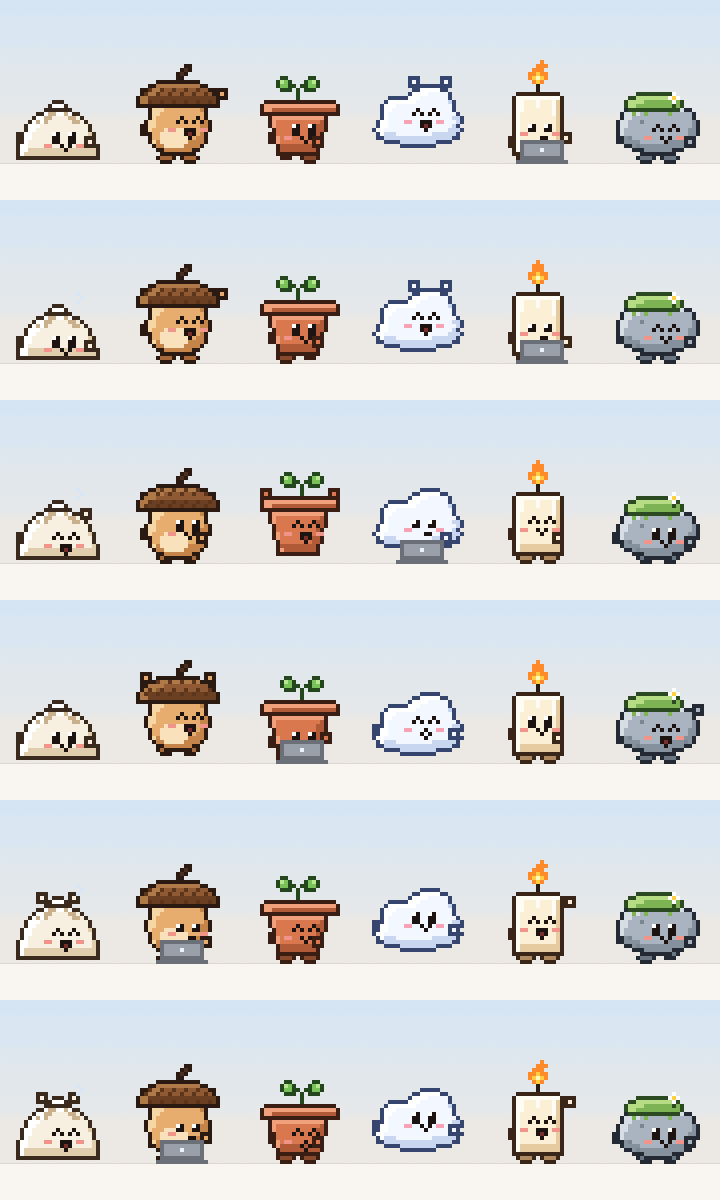
Get characters other people drew from right-click → Character → More Characters… (gallery; a downloaded zip can be dropped on the pet too).
To make your own, drop PNGs into ~/Library/Application Support/DotBuddy/charas/ (right-click → Character → Open Characters Folder) and choose Reload Characters. A single image is enough; the app animates it. Draw per-motion frames to go further. Codex pets placed there load too.
The full guide, with every motion name and the chara.json format, is in CHARACTERS.md. Made something you like? Share it so others can install it from the app.
Configuration
Settings menu (right-click the pet): Finished Today (a count, from the first one of the day), Sessions (what each one is doing; choose one to jump to it), Hide for a While, Character, Size, Wandering (how often it visits windows), Chattiness (Chatty, Normal, Quiet, Off), Font, Bubble Text size (separate from Size), Language, Turn Off Accessories, Play a Sound When Done (off by default), Check for Updates…, Update Automatically, Install Command-Line Tools, Launch at Login, Quit. When three or more sessions finish at once, they share one bubble ("4 done: api, web, docs…").
tools.json (~/Library/Application Support/DotBuddy/tools.json) customizes each agent. Changes apply on the next read, no restart needed. Keys are tool names as passed to --report (claude for Claude Code), and * applies to every tool.
{
  "codex": {
    "label": "Codex",
    "fill": "#eef4ff", "askFill": "#fff0d8", "edge": "#3a4a6a", "titleColor": "#24304a",
    "done": ["Codex is done!"],
    "ask": ["Codex has a question"],
    "praise": ["{n} Codex sessions at once!"],
    "showLabel": true
  },
  "cursor": { "open": ["open", "-a", "Cursor"] }
}
| Key | Meaning |
|---|---|
label |
Name the pet uses for this agent |
fill, askFill, edge, titleColor |
Bubble colors (#rrggbb) |
done, ask |
Last line of a done or question bubble (one is picked at random) |
praise |
Lines for many sessions at once; {n} is the count |
showLabel |
Prefix bubble titles with the label |
open |
Command to run when you click this agent's bubble, as an argument array. Placeholders: {pid}, {tty}, {id}, {tool}, {name}, {app}. If it fails, the built-in behavior runs |
open commands run as you, without a shell. Bubbles raised by --signal never run them.
Troubleshooting
| Problem | Try |
|---|---|
| The pet ignores my Claude Code sessions | Run "$DOTBUDDY" --state. If sessions is empty, check that ~/.claude/sessions/ has .json files while Claude Code runs. A recent Claude Code version is needed. |
| Clicking a bubble doesn't switch tabs in Terminal, iTerm2 or Ghostty | Allow Dot Buddy under System Settings → Privacy & Security → Automation. |
| Clicking a bubble does nothing | The session's terminal isn't a regular app (for example an IDE-hosted agent). Add an open command in tools.json. |
| Bubble text uses the system font or shows boxes | The font download failed during the build. Rebuild with network access. |
| Characters look small and simple | python3 wasn't found at build time. Install it and rebuild. |
| My character doesn't show up | Run "$DOTBUDDY" --charas to see what loaded. Check frame sizes against CHARACTERS.md. |
| "Dot Buddy can't be opened" | See the Gatekeeper steps under Download a release, or install with the one-line installer, which avoids the prompt. |
| I want it gone | Quit from the menu, delete the app and ~/Library/Application Support/DotBuddy/. Settings live in defaults under io.github.doldoldol21.dot-buddy. |
Contributing
Bug reports, characters you drew yourself and integrations for more agents are welcome. Dot Buddy is a pet to look at, so chat, AI calls and features that send input to your agents are out of scope. See CONTRIBUTING.md before you start on a feature. Report security issues privately as described in SECURITY.md.
Thank you to everyone who has helped:
Code
 doldoldol21 |
Characters
doldoldol21 |  GaneshUbale |
Sponsor
If Dot Buddy saves you some tab-switching, you can sponsor it on GitHub (right-click the pet → Sponsor Dot Buddy…). Monthly sponsors get characters made only for sponsors.
License and acknowledgements
MIT, see LICENSE. Bundled fonts are under the SIL Open Font License 1.1; details in THIRD_PARTY_NOTICES.md.
Forks are welcome under the MIT License. If you publish one, please keep the copyright notice and give it a different name and icon, so nobody mistakes it for Dot Buddy.
- OpenPets (MIT) inspired a few behaviors: click-through on transparent pixels, fast ticks only while moving, and sampling throw velocity. No code was copied.
- The Codex pet format (
pet.json+ 8×9 spritesheet) is read for compatibility. Dot Buddy is not affiliated with OpenAI or Anthropic. - Bubble fonts: Galmuri and Neo둥근모.
Yorumlar (0)
Yorum birakmak icin giris yap.
Yorum birakSonuc bulunamadi