promptcellar-for-claude-code
Health Warn
- License — License: MIT
- Description — Repository has a description
- Active repo — Last push 0 days ago
- Low visibility — Only 6 GitHub stars
Code Fail
- rm -rf — Recursive force deletion command in install/install.sh
- rm -rf — Recursive force deletion command in install/uninstall.sh
Permissions Pass
- Permissions — No dangerous permissions requested
No AI report is available for this listing yet.
Capture every prompt. Own the signal. A Claude Code plugin that logs every prompt to .prompts/ in your repo, automatically.
Promptcellar for Claude Code
Capture every prompt. Own the signal. A Claude Code plugin that logs every prompt to
.prompts/in your repo, automatically.
curl -fsSL https://get.promptcellar.io/claude-code | sh
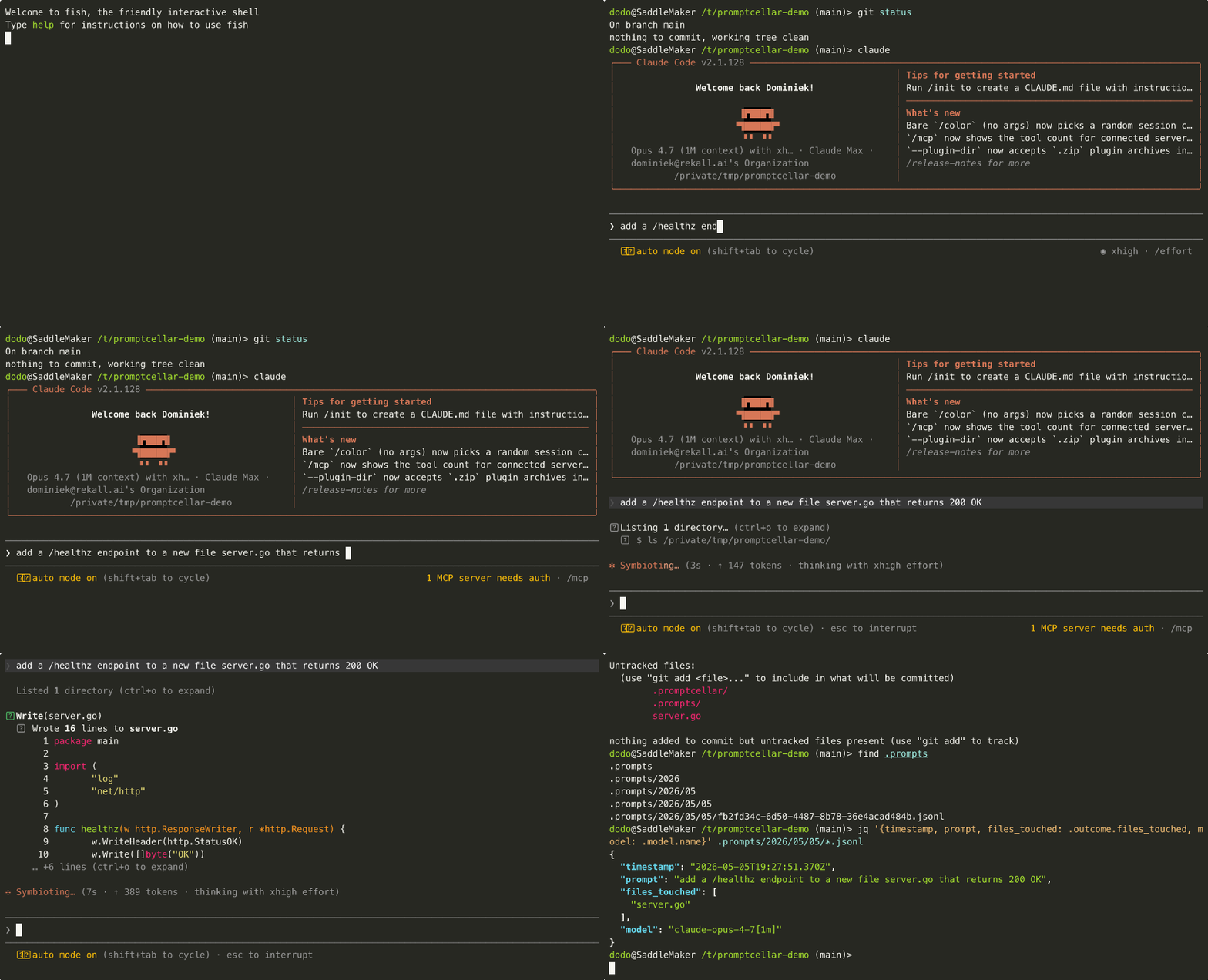
The captured data is the human signal that built the code — the questions, instructions, and corrections that shaped each commit. With it you can audit who asked the agent to do what, trace a commit back to the prompt that produced it, and keep that history under your team's control instead of in a vendor's database.
This repo is the Claude Code plugin that does the capture. The on-disk format is a separate open standard — see dominiek/promptcellar-format for the spec.
Install
curl -fsSL https://get.promptcellar.io/claude-code | sh
This adds dominiek/promptcellar-for-claude-code as a Claude Code marketplace and installs the plugin. Open a new Claude Code session in any git repo to start capturing.
Installing via Claude Code's plugin marketplace
You can also install through Claude Code directly:
/plugin marketplace add dominiek/promptcellar-for-claude-code
/plugin install promptcellar@promptcellar
The plugin self-bootstraps the platform binaries on first SessionStart by downloading them from the matching GitHub release — no separate install step needed on macOS or Linux. The bootstrap shim is POSIX shell, so Windows users should use the curl | sh installer above (under WSL/Git Bash) rather than the marketplace flow.
In-session:
/promptcellar:status     # confirm capture is on
/promptcellar:log 10     # last 10 captured prompts
/promptcellar:disable    # opt out for this repo (committed)
Building or installing from a checkout instead? See Development below.
What gets captured
For every prompt you submit, the plugin writes one JSONL record under .prompts/ containing:
- The prompt text, your git author identity, the model and tool versions in use.
- A snapshot of git state at prompt time (branch, HEAD, dirty/clean).
- A summary of what the agent did in response: files touched, commits created, status (
completed/interrupted/errored). - Token usage, estimated cost, and wall-clock duration.
Records that match a .promptcellarignore pattern are replaced with an excluded stub so the timeline stays gap-free without leaking the prompt content.
Files land at:
.prompts/YYYY/MM/DD/<session-id>.jsonl
…bucketed by session start date (UTC), one file per session, append-only. Because every session has a unique id, two branches can never write to the same file — merge conflicts in .prompts/ are avoided by construction.
Default behaviour
- On in any directory where
git rev-parse --is-inside-work-treesucceeds —.prompts/is created at the repo root. - On with redirection in any directory whose
.promptcellar/config.json(or any ancestor's) sets adestination— see Cross-repo workspace below. - Off everywhere else — no
.git/and no destination configured, so capture is skipped./promptcellar:statuswill tell you how to fix it. .prompts/and.promptcellar/config.json(the repo decision) are intended to be committed..promptcellar/state/and.promptcellar/config.local.jsonare gitignored.
Cross-repo workspace
If you run claude from a directory above multiple repos (e.g. a parent folder containing several services or packages you're editing together), point Promptcellar at a single capture destination so all prompts land in one place — typically a dedicated product/spec/prompt repo for the project.
cd ~/projects/my-product            # parent of api/, web/, infra/ etc.
/promptcellar:destination ~/projects/my-product-prompts
This writes .promptcellar/config.json with a destination field at the parent. From then on, any Claude Code session with cwd at that parent (or any descendant) captures prompts to ~/projects/my-product-prompts/.prompts/. Resolution order:
- Workspace destination — first
.promptcellar/config.jsonwith adestinationwalking up from cwd. Wins over any git repo underneath, so cross-repo prompts stay unified. - Git repo — nearest ancestor that's a git repo (the original behaviour).
- None — capture is OFF;
/promptcellar:statuswill print the command to fix it.
The destination directory itself is normally a git repo you control — version your prompts the same way you version code.
Slash commands
All user-facing controls live inside Claude Code. There is no promptcellar binary on your PATH.
/promptcellar:status                        # resolved config + counts + .prompts location
/promptcellar:doctor                        # diagnose hook wiring, transcript parser, perms
/promptcellar:enable  [--for-me] [--global] # opt-in (default scope: repo, committed)
/promptcellar:disable [--for-me] [--global] # opt-out (default scope: repo, committed)
/promptcellar:destination [<path>|--clear]  # set/clear/show workspace prompts destination
/promptcellar:log [N]                       # last N captured prompts in this repo
/promptcellar:version                       # plugin + transcript-adapter version
/promptcellar:uninstall                     # remove plugin entry; data is left intact
Enable/disable resolves through three layers, most-restrictive wins:
- Global (
~/.promptcellar/config.json) — kill switch for the whole machine. - Repo (
.promptcellar/config.json, committed) — the team's decision. - Personal (
.promptcellar/config.local.json, gitignored) —--for-meopt-out within a repo that has capture on.
Log redaction
Promptcellar treats every prompt as a log line and runs a built-in log-redaction matcher against it before the record is written. When a prompt matches a known secret or PII shape, the captured record is replaced with an excluded stub: the timeline preserves the gap (you can see capture was skipped) but the prompt text never touches .prompts/.
The matcher composes four layers, evaluated in order:
| Order | Layer | Where it lives | Wins over |
|---|---|---|---|
| 1 | .promptcellarignore |
Team-authored, committed | everything |
| 2 | Built-in secret rules | Vendored gitleaks default config (MIT) | overridden by allow |
| 3 | Built-in PII rules | Hand-rolled in internal/plfignore/pii.go |
overridden by allow |
| 4 | .promptcellarallow |
Team-authored, committed | only narrows the built-in layers — never .promptcellarignore |
Built-in secret rules (always on)
The plugin embeds the default rule set from gitleaks (MIT-licensed, vendored under internal/plfignore/vendor/gitleaks/). At time of vendoring this is 222 rules covering: AWS / GCP / Azure / DigitalOcean / Heroku / Linode / OVH; GitHub PAT (classic + fine-grained), OAuth, app, refresh; GitLab, Bitbucket, Atlassian; Anthropic, OpenAI, HuggingFace, Cohere; Stripe, Square, PayPal, Twilio, SendGrid, Mailgun, MailChimp; Slack (8+ token shapes), Discord, Telegram; npm, PyPI, RubyGems, Docker Hub; Datadog, NewRelic, PagerDuty, Algolia, Asana, Confluent, Dropbox, Figma, Notion, Postman, Sentry, Shopify, Vercel; plus generic JWT, PEM private keys, and DB connection-string URLs. Every rule ships with gitleaks' false-positive mitigations: keyword pre-filter, Shannon entropy threshold, per-rule allowlists, and a global allowlist that filters template syntax (${VAR}, {{ }}), placeholder strings ending in EXAMPLE, single-character repeats, etc.
Updating the catalog is one curl + commit — see internal/plfignore/vendor/gitleaks/README.md.
Built-in PII rules (always on)
Gitleaks ships zero PII rules, so a small hand-rolled layer fills that gap. Each pattern pairs a regex with a Go validator function that runs after the regex matches — so false positives that pass the shape check but fail the underlying algorithm get rejected.
| ID | Catches | Validation |
|---|---|---|
credit-card |
Major-issuer card numbers (Visa / MC / Amex / Discover / JCB / Diners) | Luhn (mod-10) — order numbers and transaction IDs that happen to be 16 digits don't fire |
iban |
International Bank Account Numbers | MOD-97 per ISO 13616 — random IBAN-shaped strings are rejected |
us-ssn |
US Social Security Numbers (XXX-XX-XXXX) |
SSA invalidity rules: rejects 000/666/9XX areas, 00 group, 0000 serial |
email-address |
RFC-5322-lite email addresses | regex only |
phone-number |
International (+CC …) and US ((XXX) XXX-XXXX / XXX-XXX-XXXX) |
regex only |
The patterns and validators live in internal/plfignore/pii.go. Pattern IDs surface in excluded.pattern_id so downstream consumers can bucket-count by category.
Team additions: .promptcellarignore (committed)
Drop a .promptcellarignore at the repo root for team-specific deny patterns the built-in layers don't cover — internal API-key prefixes, customer identifiers, paths to security runbooks, etc. Each line is a POSIX ERE pattern; an id: <name> line above a pattern names it for excluded.pattern_id. Same comment + blank-line conventions as .gitignore.
id: internal-api
\bSECRET_INT_[A-Za-z0-9]{20,}\b

id: security-paths
\bsecurity/(runbooks|incident)\b
.promptcellarignore is authoritative — a team's deny rule always wins, regardless of any built-in or allow rule.
Override the built-ins: .promptcellarallow (committed)
Same syntax as .promptcellarignore, inverse semantics: a .promptcellarallow match whitelists the prompt against built-in exclusions. Use it when the catalog is too aggressive — typically because docs or test fixtures contain placeholder values shaped like real tokens.
id: docs-examples
\bdocs/[^\s]+\.md\b

id: openapi-fixtures
\btest/fixtures/openapi/\b
.promptcellarallow only narrows the built-in layers; it cannot weaken .promptcellarignore. Team deny rules are sovereign.
Resolution order
For each prompt:
.promptcellarignorematches? → exclude. Done. (Team rule is authoritative.)- Built-in secret or PII rule matches?
- Also matches
.promptcellarallow? → capture normally. (Allow overrides the built-ins.) - Otherwise → exclude.
- Also matches
- Otherwise → capture.
See promptcellar-format SPEC §4 for the on-disk shape of excluded records.
Reading your captured data
It's just JSONL. jq is enough:
# Last 10 prompts across all branches
find .prompts -name '*.jsonl' -exec cat {} + \
  | jq -s 'sort_by(.timestamp) | .[-10:] | .[] | {timestamp, prompt}'

# Total cost on a branch
find .prompts -name '*.jsonl' -exec cat {} + \
  | jq -s '[.[] | select(.git.branch == "feat/auth-rewrite") | .enrichments.cost_usd // 0] | add'

# Prompts that touched a path
find .prompts -name '*.jsonl' -exec cat {} + \
  | jq -r 'select(.outcome.files_touched // [] | any(startswith("server/auth/"))) | .prompt'
The eventual MCP server (M5) will give Claude itself read access to the same data. The plain files come first; queryability is additive.
How it works
Capture is driven by Claude Code plugin hooks:
| Event | Hook | Action |
|---|---|---|
| Session opens | SessionStart |
Cache git author + tool version; flush orphan state from previously-crashed sessions as interrupted. |
| You submit a prompt | UserPromptSubmit |
Match .promptcellarignore; mint a record id; snapshot git; buffer to .promptcellar/state/<session>.json. |
| Agent runs a tool | PostToolUse |
For Edit/Write/MultiEdit/NotebookEdit, append the path to the active prompt's buffered files_touched. |
| Agent finishes | Stop |
Synchronously flush the full PLF record to JSONL: outcome summary from last_assistant_message, token and cost enrichment by briefly polling the transcript. |
Each hook is a small Go binary in plugin/bin/, invoked via plugin-relative paths declared in the manifest. Cold start is under 10ms.
A deeper walkthrough — buffer-then-flush rationale, transcript adapter strategy, crash recovery — lives in planning/IMPLEMENTATION_PLAN.md.
Repository layout
cmd/                    # Six binaries, one main.go each
  pc-hook-session/      #   SessionStart hook
  pc-hook-prompt/       #   UserPromptSubmit hook
  pc-hook-tool/         #   PostToolUse + PostToolBatch hooks
  pc-hook-stop/         #   Stop hook (synchronous flush)
  pc-cli/               #   user-facing CLI behind the slash commands
  pc-mcp/               #   stdio MCP retrieval server
internal/               # Shared Go packages
  plf/                  #   PLF record types + JSONL writer
  plfignore/            #   .promptcellarignore parser/matcher
  plfread/              #   read existing .prompts/ records (for CLI + MCP)
  capture/              #   state machine + flush logic
  transcript/           #   Claude Code transcript adapter (versioned)
  gitsnap/              #   cheap git metadata reads
  hookpayload/          #   hook stdin parsing
  toolinfo/             #   tool version detection
  pricing/              #   token → cost table
  config/               #   global/repo/personal layer resolution
plugin/                 # Claude Code plugin bundle
  .claude-plugin/plugin.json
  hooks/hooks.json
  commands/*.md         #   slash commands (AI-driven shells over pc-cli)
  .mcp.json             #   pc-mcp registration
  bin/                  #   committed shell shims that exec .real/<name>
  bin/.real/            #   built / downloaded Go binaries (gitignored)
.claude-plugin/         # Marketplace manifest (this repo IS a marketplace)
  marketplace.json
install/                # `curl | sh` and dev-mode installers
scripts/                # Release flow: bump-version, release, marketplace-publish
.github/workflows/      # ci.yml (PRs) + release.yml (tags)
discovery-plugin/       # Throwaway forensic-dump plugin used during M0
test/                   # Integration test scripts
planning/               # Design + implementation plan
                        # The PLF spec lives at https://github.com/dominiek/promptcellar-format
Development
Requires Go 1.26 or newer. The PLF JSON Schema used by the integration suite is vendored at test/fixtures/plf-1.schema.json; the upstream lives at dominiek/promptcellar-format.
git clone https://github.com/dominiek/promptcellar-for-claude-code.git
cd promptcellar-for-claude-code

make build               # all six binaries (4 hooks + pc-cli + pc-mcp) into plugin/bin/.real/
make test                # go test ./...
make test-all            # unit + M1 + M2 + M3 integration suites (~30s total)
make cross-build         # darwin/linux/windows × arm64/x64 → dist/<platform>/
make clean               # rm -rf plugin/bin/.real/ dist/
Installing from source
Two options for working off a local checkout.
Per-session (no marketplace registration). Pass --plugin-dir when launching Claude Code; the flag applies for that one session only:
make build
claude --plugin-dir ./plugin
Persistent dev install. Registers this checkout as a local marketplace and installs the plugin from it, so subsequent claude invocations pick it up without flags:
bash install/dev-install.sh
The script runs make build, validates the manifest, calls claude plugin marketplace add ./ against this repo, and installs promptcellar@promptcellar. Uninstall with /promptcellar:uninstall from inside Claude Code (or claude plugin uninstall promptcellar@promptcellar from a shell).
Note: direct cache-dir copies bypassing the
claude plugin marketplace add+claude plugin installflow are silently ignored — Claude Code marks unknown-marketplace entries asdisabled. Always usedev-install.sh(or--plugin-dirfor ad-hoc tests).
Cutting a release
A release publishes cross-compiled tarballs (darwin/linux/windows × arm64/x64) to GitHub Releases. The marketplace publication is a separate step so updating the public Anthropic listing is an explicit, conscious action.
1. Cut and tag
bash scripts/release.sh 0.4.0
The script:
- Verifies the working tree is clean and you're on
main. - Calls
scripts/bump-version.sh 0.4.0(patchesplugin/.claude-plugin/plugin.jsonplus theVersion/serverVersionconsts incmd/pc-cli/main.goandcmd/pc-mcp/main.go). - Runs
make test-all. - Commits the bump, creates the
v0.4.0annotated tag, and prompts before pushing.
When the tag is pushed, .github/workflows/release.yml cross-compiles the six binaries for five platforms and uploads tarballs to a GitHub Release.
To bump versions without cutting a release (e.g. during a feature branch), use the underlying script directly:
bash scripts/bump-version.sh 0.4.0-rc.1
2. Marketplace publication (separate, optional)
After the GitHub Release is live, only if you want this version on the public Anthropic marketplace (so users worldwide can claude plugin install promptcellar without first registering this repo as a marketplace):
bash scripts/marketplace-publish.sh
It prints the marketplace entry and PR instructions for anthropics/claude-plugins-official. You only need to do this once — subsequent releases reuse the same entry (it tracks the main branch ref).
Status
| Milestone | Scope | State |
|---|---|---|
| M0 | Discovery plugin; reverse-engineered Claude Code's hook payloads and transcript shape. | done |
| M1 | Hook binaries; buffer-then-flush state machine; six integration scenarios; <10ms cold start. | done |
| M2 | curl | sh installer; slash commands; per-repo and global enable/disable; .promptcellarignore. |
done |
| M3 | PostToolUse for files_touched and status; transcript polling for tokens/cost. |
done |
| M4 | CI integration tests; cross-build for 5 platforms; release workflow. | done |
| M5 | MCP retrieval server: promptcellar.{search,log,touched,session}. |
done |
planning/IMPLEMENTATION_PLAN.md has the detail behind each row.
License
MIT.
Reviews (0)
Sign in to leave a review.
Leave a reviewNo results found