master-fetch
Health Pass
- License — License: MIT
- Description — Repository has a description
- Active repo — Last push 0 days ago
- Community trust — 14 GitHub stars
Code Warn
- network request — Outbound network request in src/master_fetch/actions.py
Permissions Pass
- Permissions — No dangerous permissions requested
No AI report is available for this listing yet.
MCP server for web fetching with Cloudflare bypass, Trafilatura extraction, and smart routing. Free, self-hosted, no API keys.

🐕 Hound
Give your AI agent the web. $0. Two commands. ~2.5K tokens.
Fetch · crawl · bypass bot walls · read PDFs (even scanned) · interact with pages · search the web
No accounts · no Docker · no API keys · runs on your machine






pip install hound-mcp[all] && playwright install chromium
Install · Tools · Search · How it works · Comparison · Honest limits
✨ Why Hound
Hound is one MCP server that gives any agent (Claude Code, Cursor, OpenCode, Hermes, Pi, anything that speaks MCP) full web research from a single local process. Six tools, one warm browser, zero accounts.
| 🆓 $0 forever, MIT | No keys, no accounts, no per-request billing, no data sent to a third-party scraper. Search is keyless and local too. |
| 🧠 Mastered on connect | A one-time instructions block gives the agent the mental model + the #1 workflow + the known limits. Effective on turn one, not turn ten. |
| 📐 ~2.5K tokens, 6 tools | Hand-crafted tool defs, no Pydantic schema bloat. More capability than tools shipping 5K+. |
| 🎯 Every response is actionable | content_ok, next_action, summary, relevance_score, fetch_relevance. Agents branch on structured fields, not error text. |
Hound is for the agent itself. You install it once; the agent calls it whenever it needs the web.
🚀 Quick start
pip install hound-mcp[all]          # fetch + crawl + keyless search + PDF + OCR + neural rerank
playwright install chromium         # the anti-detect browser engine
hound -v        # version + update status
hound -u        # update to latest
Then point any MCP client at the hound command. No arguments, no keys, no env vars. See Install for the lean option + Tell your agent to install it for a copy-paste prompt.
🧰 The 6 tools
| Tool | One-liner |
|---|---|
smart_fetch |
Fetch any URL. HTTP first, auto-escalates to the anti-detect browser if blocked. Bulk, PDFs (with OCR + quality score), css_selector, focus, actions, pagination. |
smart_crawl |
Best-first same-domain crawl. Each page as markdown with content_ok + page_type (article / list / js_shell). discover_only, crawl_urls, focus, time + token caps. |
smart_search |
Local keyless web search. Scrapes DuckDuckGo + Bing + Wikipedia in parallel, merges + ranks. relevance_score + fetch_relevance per result. Keyword / neural / find_similar. Research mode bulk-fetches the top-N. |
screenshot |
Capture a page as an image. For multimodal agents (canvas, image-of-text, visual layout). Session auto-managed. |
cache_clear |
Clear the fetch cache. all=true wipes everything. |
version |
Installed version + update status. |
smart_fetch — Fetch any URL with full content extraction. Auto HTTP → stealthy escalation. Bulk via urls. Narrow with css_selector. PDFs auto-extracted to structured markdown (tables, headings, metadata); pages='1-5' for a subset; scanned PDFs AND CID-corrupted fonts auto-OCR with [all]. Response carries quality_score (0–1), table_of_contents, metadata. focus='query' returns only BM25-relevant blocks. actions for click/fill/scroll. Paginate with offset. Signals: content_ok, next_action, summary, is_truncated+next_offset. cache_ttl=0 bypasses cache.
smart_crawl — Best-first walk of same-domain links. Content-adaptive: article/docs → main content; list/index pages → structured link list; JS shells → detected + reported. discover_only=true → URL map. crawl_urls=[...] → second-phase selective crawl. focus prioritizes + filters. Caps: max_pages (10), max_depth (2), max_total_chars, deadline_ms (120000). Per-page content_ok + status (network error = −1) + fetched_at. Reuses smart_fetch anti-bot + cache.
smart_search — Scrapes DuckDuckGo + Bing + Wikipedia in parallel (add google), merges, dedups by normalized URL, ranks. Filters: site/exclude_sites, location/language/region, page, freshness. Modes: auto (neural if [all]+model present else keyword BM25), keyword, neural (local ONNX cross-encoder on snippets), find_similar (pass url=). expand=N autoretrieval. Research mode (fetch_content=true) auto-fetches the top-N results' full content in one call. engine_blocked lists cooling-down engines.
🔎 Local keyless search
No API key, no account, no third-party service. smart_search scrapes DuckDuckGo + Bing + Wikipedia in parallel (add google), merges, dedups, and ranks on your machine. Every result carries relevance_score (0–1) and fetch_relevance (high / med / low) so the agent fetches the 1–2 that matter instead of all 10.
Three rerank modes:
keyword— BM25 over title + snippet. Baseline, always available, even on the lean install.neural— a local ONNX cross-encoder (ms-marco-MiniLM-L-6-v2, Apache-2.0) running on theonnxruntimeHound already ships for OCR. Exa-style semantic ranking, $0, on your machine. The model downloads once (~80MB, cached, not bundled).find_similar— passurl=; Hound fetches a page you like, derives a query, and reranks candidates against that source page. Exa's find-similar, local.
Research mode (fetch_content=true): search + bulk-fetch the top-N results' full content in one call, each with content_ok. Replaces the 3-to-5-call search → fetch loop with one call.
🛡️ Search Engine Resilience Layer
Scraping public engines from your IP can be rate-limited or CAPTCHA'd. No keyless local tool is bulletproof against sustained blocking without a proxy — Hound is honest about that, and then makes the no-proxy case as robust as possible for a single user:
| # | Mechanism | What it does |
|---|---|---|
| 1 | Persistent warm session per engine | One long-lived session reused across searches — cookies + TLS accumulate, so the engine sees a returning human, not a fresh bot. Also faster (no per-search TLS handshake). |
| 2 | Per-engine pacing + jitter | Within one search all engines fire in parallel (free); only same-engine bursts across searches get a small jittered delay. |
| 3 | Circuit breaker + cooldown | A blocked engine auto-cools (15 → 120s) while the others keep serving. Results keep flowing. |
| 4 | 202 / 429 / 503 / 403 + Retry-After | DDG's HTTP 202 soft rate-limit is detected; Retry-After honored. |
| 5 | Fingerprint rotation | A pool of real Chrome / Edge / Firefox / Safari TLS profiles, picked per request. |
| 6 | Adaptive Google reserve tier | Google (most CAPTCHA-prone) fires via the stealthy browser only when the primaries fall short. |
| 7 | HOUND_SEARCH_PROXY |
Route all engine requests through your own rotating / residential proxy — the bulletproof path for heavy use. |
engine_blocked in the response tells the agent which engines are cooling down (retry shortly). Same gray-area posture as SearXNG / ddgs; no search-engine ToS compliance is claimed.
⚙️ How it works
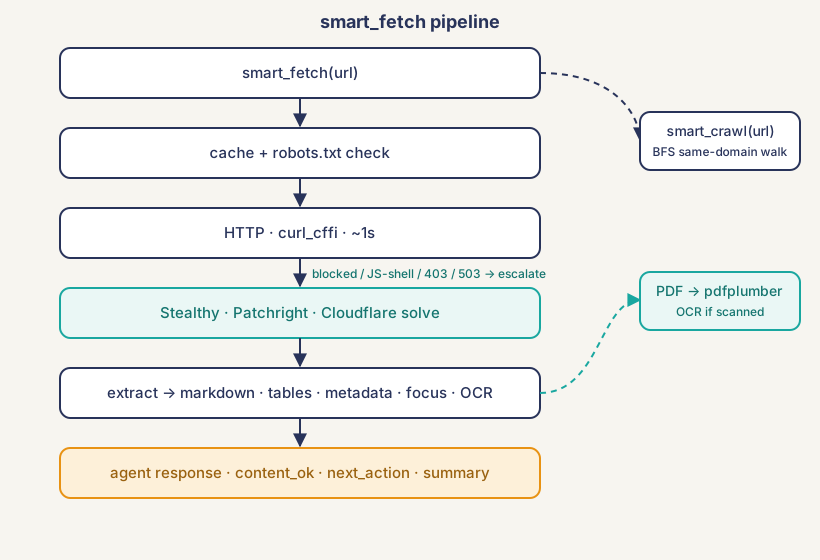
smart_fetchchecks cache + robots, tries HTTP, escalates to the stealthy Patchright browser on a block / JS-shell / 403 / 503, then extracts + enriches. PDFs branch to pdfplumber (with CID-garbage + scanned auto-OCR via pypdfium2 + rapidocr,quality_score, ToC).smart_crawlreuses the same pipeline across a same-domain best-first walk.smart_searchscrapes engines in parallel (browser-impersonated HTTP, escalating to the warm stealthy browser if blocked), merges + dedups, then reranks (keyword / neural / find_similar).- One stealthy Chrome is pre-warmed at startup and reused, so escalation skips the 3–5s cold start.
- Content over 40KB is chunked; the response gives
next_offsetso the agent pages through with one more call (served instantly from cache).
📄 PDF + scanned-PDF OCR + CID-recovery
smart_fetch detects a PDF (by content-type or %PDF magic bytes) and extracts it to structured markdown with pdfplumber (MIT, no AGPL baggage): multi-column reading order, real tables as markdown tables, font-size headings, de-hyphenated paragraphs, a metadata header, and --- Page N --- markers. Pass pages="1-5" for a subset.
The flagship trick — CID-corruption auto-OCR. Academic papers embed font subsets without a Unicode map, so extractors emit (cid:71)(cid:302)... garbage for figures/diagrams/math. But the glyphs render correctly. Hound detects CID-garbage pages, renders them via pypdfium2, and OCRs them with rapidocr, recovering the real text automatically. Scanned / image-only PDFs (and image-only web pages) are auto-OCR'd too. Every PDF response carries quality_score (0.0–1.0) and an honest content_ok; table_of_contents from the PDF outline; metadata (title/author/dates); include_media=true for per-page image metadata; password for encrypted PDFs; a .pdf URL that returns a login/paywall is reported as auth_required. All pure-pip, no system binary, with [all].
🕷️ Deep crawl (smart_crawl)
Walk same-domain links in best-first order: discovered URLs are scored by focus relevance + content-likelihood (docs/guide/api boosted, login/submit/cart penalized) + shallow depth, so content pages are crawled before junk when the budget is tight. Extraction is content-adaptive: article/docs → trafilatura main content; list/index pages (HN, aggregators, directories) → a structured * [title](url) link list; JS shells → detected + reported honestly. URLs normalized so /docs and /docs/ are never crawled twice. discover_only=true → URL map; crawl_urls=[...] → second-phase selective crawl; path_include/path_exclude to scope. Caps on pages / depth / tokens / time. Same-domain only by default.
🛡️ Anti-bot + one warm browser
smart_fetch tries plain HTTP first (~1s). If the site blocks HTTP or serves a JS shell, it auto-escalates to a Patchright anti-detect browser with Cloudflare challenge solving. Two tiers, nothing to configure. The same warm stealthy browser is the search engine scraper's anti-bot tier: when an engine rate-limits or CAPTCHAs the HTTP scraper, Hound renders the results page in the warm browser and parses that. A single Chrome warms at startup and stays alive for the whole session; pages are closed after each fetch and resource loading is dropped, so idle memory stays near baseline.
🎯 Query-focused extraction (focus)
smart_fetch(url, focus="...") returns only the BM25-relevant blocks (paragraphs, headings, tables). On a long page this cuts context 80%+ with no re-fetch (runs post-cache, so one cached page serves any focus query). Re-pass the same focus when paginating.
🖱️ Page interaction (actions)
Content behind a click, a search form, a "load more", or infinite scroll:actions=[{click:"button.load-more"}, {fill:{selector:"#q", text:"x"}}, {press:"Enter"}, {wait:500}, {scroll:3}, {wait_selector:".item"}]. Runs on the stealthy browser after load, before extraction. Forces stealthy + bypasses cache.
🏷️ Metadata on every response
Structured metadata for citation + relevance: title, description, site name, type, image, canonical URL, language, published time, author (from OpenGraph, JSON-LD, the canonical link, and <title>).
🐕 Reddit, optimized
Reddit URLs auto-rewrite to old.reddit.com (7× smaller pages) and skip straight to the stealthy browser (www.reddit.com walls HTTP). Subreddit listings parse into structured posts (title, score, comments, author, domain) from canonical data attributes, with promoted ads filtered out and sticky/NSFW posts tagged.
💾 Smart caching
SQLite cache keyed by URL + extraction type + css_selector + pages (and by query + filters + mode for search). WAL mode for concurrent access. Bad content is never cached (JS shells, bot challenges, error statuses re-fetch instead of freezing broken pages). A size cap evicts the oldest entries so a long-lived agent's cache can't grow unbounded.
📊 Comparison: free tools
Hound is compared only to other free ways to give an agent web research. Only paid services (Bright Data, ZenRows, Firecrawl paid, Exa) can compete on hard anti-bot or hosted neural search at scale — and they cost money, require accounts, and route your data through their servers.
| Hound | Crawl4AI | Jina Reader | Firecrawl (OSS / free) | DIY Playwright | |
|---|---|---|---|---|---|
| Price | $0 forever | $0 (self-host) | free, rate-limited | $0 self-host / 1K free | $0 (your time) |
| License | MIT (no attribution) | Apache-2.0 (attribution) | proprietary | AGPL-ish / cloud | n/a |
| Account / API key | none | none | optional free key | cloud needs account + key | none |
| Runs locally | yes | yes | no (their API) | self-host: yes (Redis + Docker) | yes |
| Anti-bot / Cloudflare | built-in (Patchright) | limited | none | not by default | none |
| Deep crawl | yes (best-first, budget, map) | yes | no | yes (cloud) | build it |
| PDF → structured markdown | yes (tables, subset) | partial | yes (native) | yes (cloud + OCR) | build it |
| Scanned-PDF / image OCR | yes (rapidocr, pure-pip) | no | no | yes (cloud paid) | build it |
| Page interaction | yes (actions) |
hooks (code) | no | yes (cloud) | build it |
| Query-focused extraction | yes (focus, BM25) |
yes (BM25 filter) | no | no | build it |
| Web search | yes (keyless local) | no | yes | no | no |
| Search rerank | neural + find_similar + autoretrieval | BM25 | none | none | n/a |
| Search anti-bot | yes (warm stealthy browser) | n/a | n/a | n/a | n/a |
| Agent signals | yes (content_ok/next_action/summary/relevance_score) |
no | no | no | no |
Connect-time instructions |
yes | no | no | no | no |
| MCP server | yes (official) | community | yes (official) | yes (official) | build it |
| Token cost (tools/list) | ~2.5K (6 tools) | varies | n/a | varies (12 tools) | n/a |
Takeaway: Crawl4AI is the closest free competitor (self-host Python, local, no key, has crawl + BM25), but no web search, no scanned-PDF OCR, no page interaction, no agent-optimized signals, and Apache-2.0 (attribution required) vs Hound's MIT. Jina Reader is the easiest (prefix a URL) and handles PDFs, but no anti-bot, no crawl, no interaction, no local search, routes through Jina's servers, rate-limited. Firecrawl's OSS has no anti-bot by default; the generous features live in the paid cloud. Hound is the only free tool that combines crawl, built-in Cloudflare bypass, scanned-PDF OCR, page interaction, query-focused extraction, and keyless local search with neural + find-similar rerank — all local, MIT, $0, no accounts, no keys.
When a paid service makes sensePaid scrapers (Bright Data, ZenRows, Firecrawl paid, Spider.cloud) can beat free tools on the hardest anti-bot (DataDome, Akamai, Cloudflare Turnstile) and on massive scale, because they run large residential-proxy networks. Paid search APIs (Exa, Tavily) offer hosted neural search. They cost $16 to $500+/month, require accounts + API keys, and send your queries + content through their servers. Use Hound for $0 local web research with no accounts and no keys; reach for a paid service only for enterprise scale, sites Hound explicitly can't crack, or hosted neural search at scale.
🪙 Token cost
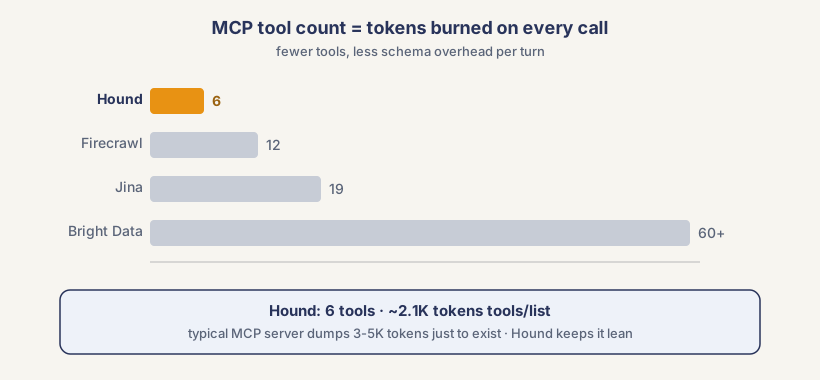
Most MCP servers cost 3–5K tokens just to exist. Hound's 6 tools cost ~2.5K tokens, and the connect-time instructions are injected once at handshake, not repeated every turn. Your context window is expensive; Hound respects it.
📦 Install
pip install hound-mcp[all]          # recommended: fetch + crawl + keyless search + PDF + OCR + neural rerank
playwright install chromium
pip install hound-mcp               # fetch + crawl + keyless keyword search
playwright install chromium
The lean install is fully functional: multi-engine keyless search with keyword BM25, anti-bot, crawl, fetch, caching. [all] adds the ONNX neural reranker, PDF extraction, and OCR (scanned PDFs + CID-recovery + image pages) on the same onnxruntime.
| Variable | Purpose |
|---|---|
HOUND_SEARCH_PROXY |
Route all search-engine requests through your own proxy (http://host:port, socks5://..., or user:pass@host:port). For sustained heavy search use with a rotating / residential proxy. Not required for normal single-user use. |
HOUND_SEARCH_MIN_INTERVAL |
Override the per-engine pacing floor (seconds, float). 0 = use the built-in defaults (DDG 1.2s, Bing 1.5s, Wikipedia 0.3s). Power-user tuning. |
No API keys or accounts are needed for anything — search is keyless and local.
🤖 Tell your agent to install it
Paste this into your agent:
Install the Hound MCP server on this machine. Follow every step. Do not skip any.

1. Figure out which agent harness you are running on (OpenCode, Hermes, Pi, etc). Then find: (a) where the MCP config file lives, and (b) what format it expects for adding a local MCP server. Read the harness docs if needed. Do not guess.

2. Run: pip install hound-mcp[all]
   Then run: playwright install chromium (But only if it isnt installed already, verify first about its existence)
   If either fails, stop and tell the user.

3. Find the MCP config file from step 1 and back it up before editing. Add a new MCP server named "hound" with command "hound", no arguments, in the format your harness requires. No API keys or environment variables are needed (search is keyless and local).

4. Save the file. Tell the user to restart the agent. After restart, smart_fetch, smart_crawl, smart_search, screenshot, cache_clear and version should be available.
Install the Hound MCP server. Follow every step. Do not skip any.

1. Run: pip install hound-mcp[all]
   Then run: playwright install chromium (But only if it isnt installed already, verify first about its existence)
   If either fails, stop and tell the user.

2. Check pi-mcp-adapter: pi list. If not installed: pi install npm:pi-mcp-adapter

3. Backup ~/.pi/agent/mcp.json, then add this inside mcpServers:
   "hound": { "command": "hound", "transport": "stdio", "lifecycle": "eager" }
   No API keys or environment variables are needed (search is keyless and local).

4. Tell the user: "Run /reload, then /mcp to verify. smart_fetch, smart_crawl and smart_search should be available."
⚠️ Honest limits
No free tool can do everything. Hound is upfront about what it can't:
| Limit | What happens instead |
|---|---|
| DataDome / Akamai / Cloudflare Turnstile (interactive) | Not bypassed. next_action tells the agent to switch sources instead of retrying. |
| Search rate-limits / CAPTCHAs | Mitigated by the Resilience Layer (warm sessions, pacing, circuit breaker, multi-engine fallback, stealthy escalation); engine_blocked reports cooling engines. Same posture as SearXNG / ddgs. |
| Neural / find_similar search | Need hound-mcp[all] (the ONNX reranker runs on the same onnxruntime as OCR; model downloads once). Lean installs get keyword BM25. |
| Sites requiring login | Out of scope (Hound does page interaction, not authenticated sessions). |
| Deep shadow-DOM / hard SPAs | actions (scroll, click, wait_selector) reach most of it; deep shadow-DOM piercing not yet wired. |
| YouTube | Minimal text. |
When a fetch or search fails, the response says exactly why and what to try next — so the agent doesn't waste calls guessing.
Reviews (0)
Sign in to leave a review.
Leave a reviewNo results found