piggy
Health Uyari
- License — License: MIT
- Description — Repository has a description
- Active repo — Last push 0 days ago
- Low visibility — Only 5 GitHub stars
Code Uyari
- process.env — Environment variable access in app/scripts/build-sidecar.mjs
- process.env — Environment variable access in app/scripts/screenshots.mjs
- network request — Outbound network request in app/scripts/screenshots.mjs
- process.env — Environment variable access in app/scripts/snapshot-dev-data.mjs
Permissions Gecti
- Permissions — No dangerous permissions requested
Bu listing icin henuz AI raporu yok.
Your Claude plan, but longer. A free macOS menu bar app that installs Claude Code token savers and measures whether they actually work.

🐷 Piggy
Your Claude plan, but longer.
The App Store - and the referee - for Claude Code token savers.




Piggy is a free, open-source macOS menu bar app for Claude Code users who keep hitting usage
limits. It installs the best community token savers with one toggle - no terminal, no config
files - and then does something nobody else does: it measures whether they actually work.
[!NOTE]
v0.1.0 is out, as an unsigned developer preview. Grab the.dmgfrom
Releases. It's the real, tested app, but Apple hasn't notarized it yet, so the
first launch takes one extra step (right-click → Open). The Install section walks
through it. Notarized, double-click builds are the next milestone.
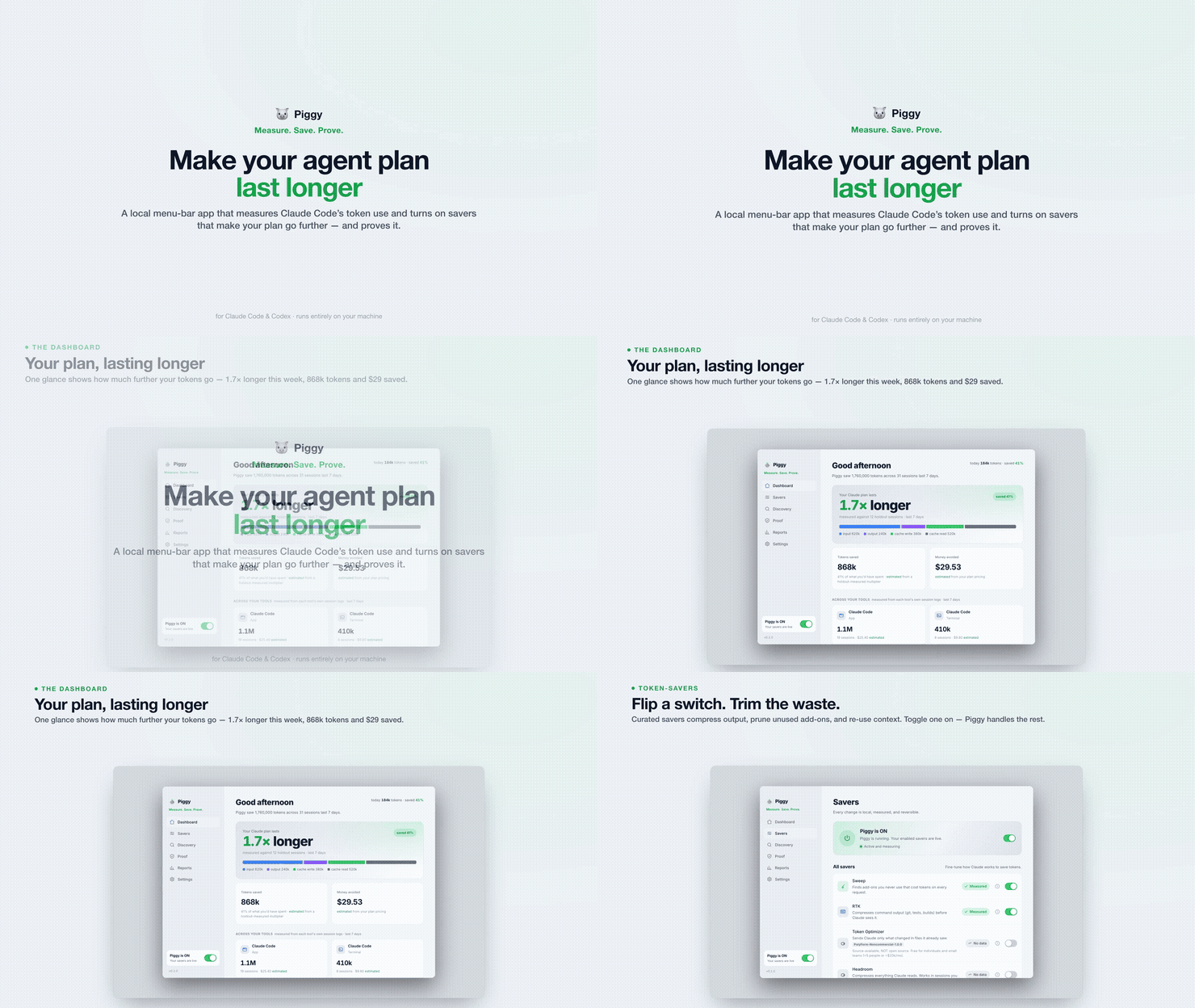
▶ Watch the full 33-second demo (the loop above is a silent highlight)

The Dashboard. The 1.7x is measured against holdout sessions. The two tiles below it are
estimated, and the app says so on both: Tokens saved reads estimated from a holdout-measured
multiplier, Money avoided reads estimated from your plan pricing.
About the screenshots and the demo. They are the real UI running on sample fixtures, captured
from the app's mock mode (npm run dev:mock), never from a real install. Every number in them is
seeded demo data. They show what Piggy displays and how it labels things; they are not anyone's
measured results, and no saver's savings should be inferred from them.
How it works
- Flip the switch. Piggy installs a curated set of token savers in the right order,
backing up your Claude settings first. Everything is reversible with one click. - Keep coding like always. Piggy reads Claude Code's own session logs to count every
token - input, output, cache - straight from the source. - See honest numbers. A small share of sessions run with savers off (a holdout), so
Piggy can show you measured savings, not marketing claims:−22% measuredbeats60–90% claimedevery day.
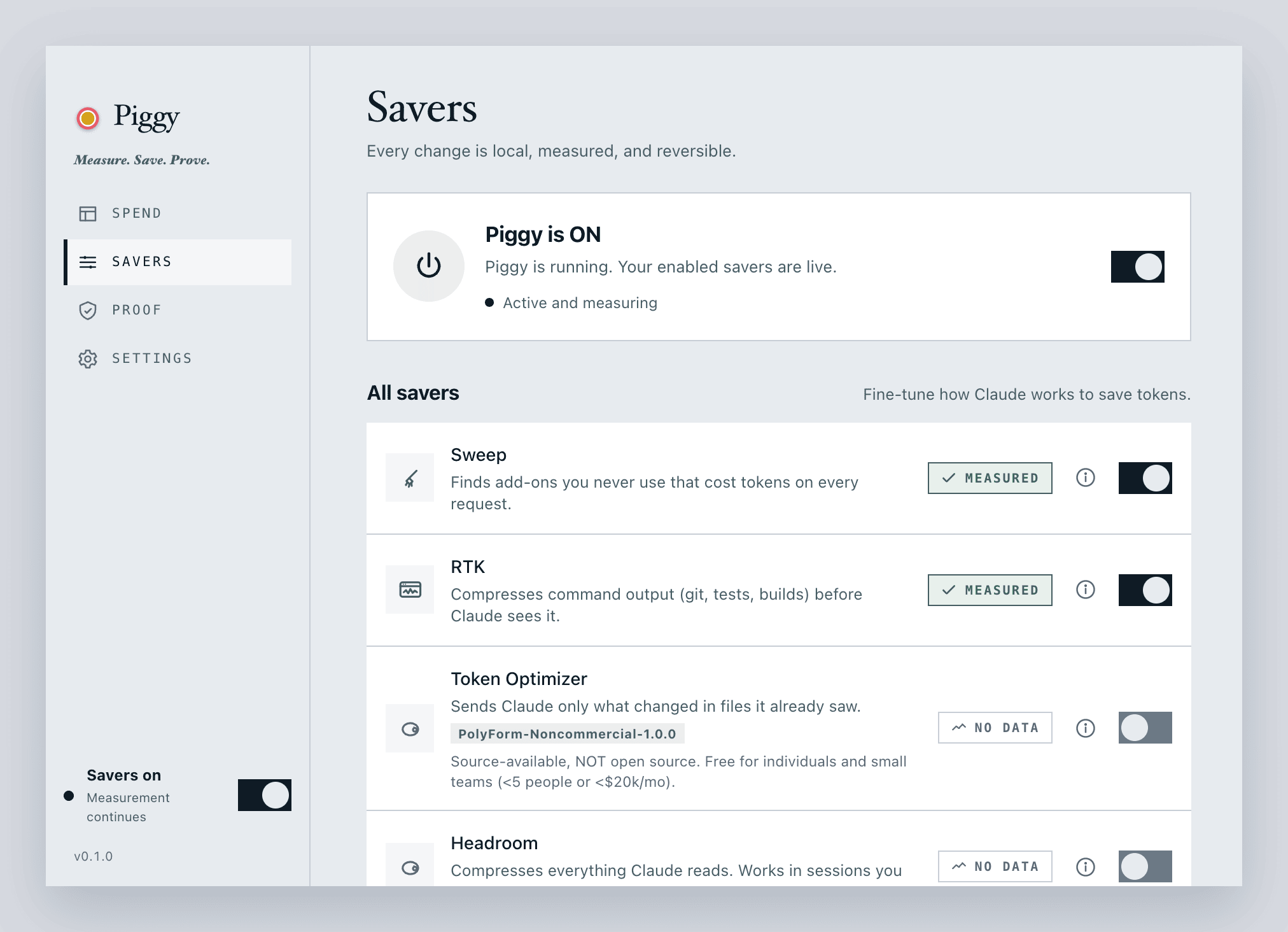
Savers. Plain English, and an honest badge. Sweep and RTK are Measured. Token Optimizer
and Headroom say No data, because there is no data. A license that is not open source is named on
the row, before you touch the toggle.
Honesty rules
- measured numbers come from your real session logs, compared against holdout sessions.
- estimated numbers involve a pricing table or a projection, and are always labeled.
- The two are never blended. If there isn't enough data, Piggy says "measuring". It never
shows a number it can't back. - Saver authors' own claims appear only on install cards, labeled claimed.
Those rules aren't a promise in a README. They're the labels on the controls. The Proof tab is
where they all land at once:
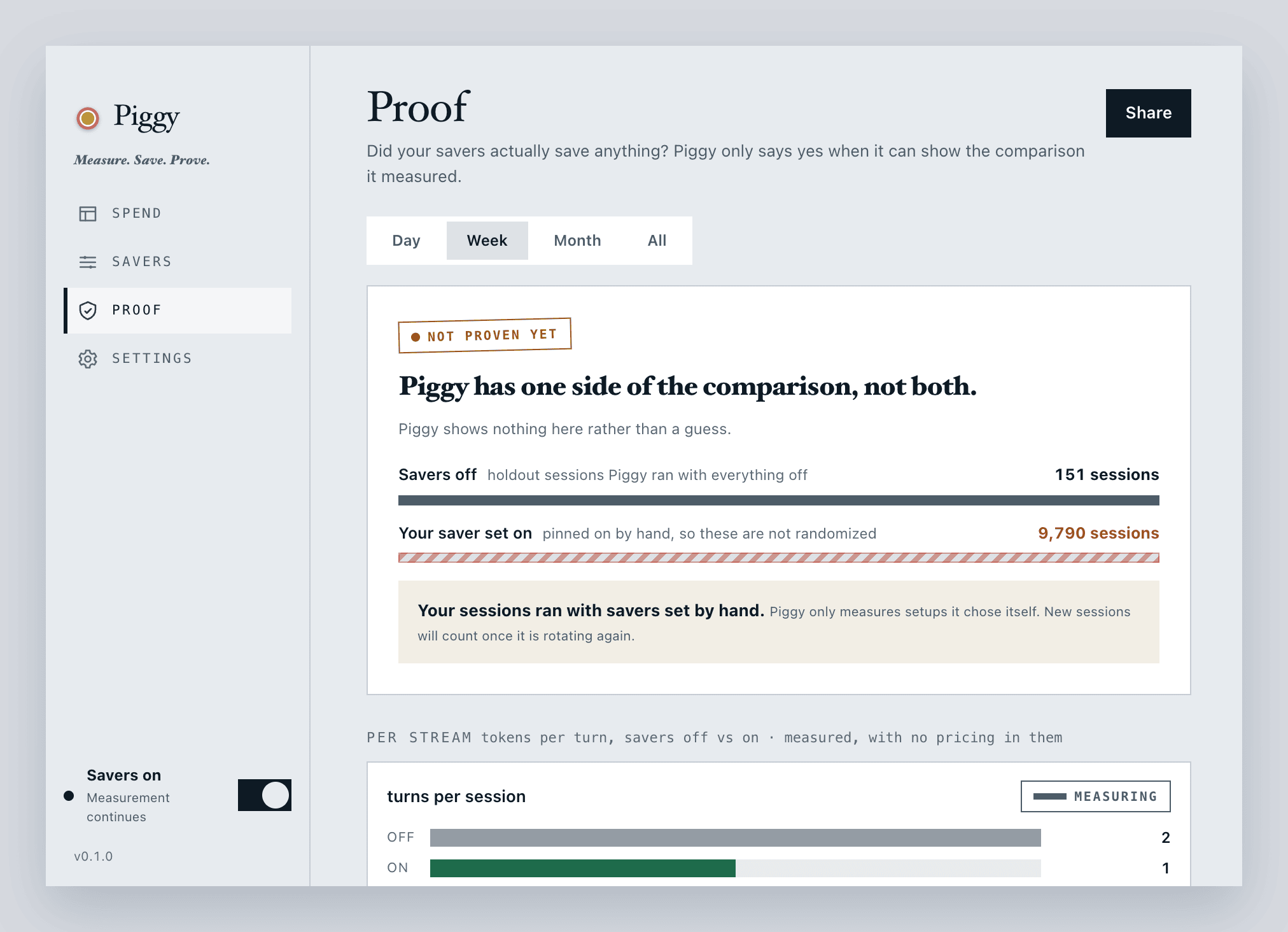
Three things in that screenshot are the whole product:
−9%and−22%, each with ann=. Per-saver deltas, each against the sessions where Piggy
held that one saver out with everything else still running, and the sample size attached, so you can
see how much session data each number rests on.tokens measuredsitting besideestimated from plan pricing. Two tiles, two labels, never
blended. Tokens are counted from your logs. Cost always involves a pricing table, so cost is
always estimated, and always says so.measured against 12 holdout sessions. The headline carries its own denominator.
What's inside
Flip the master switch and Piggy sets up a curated stack of savers, in the right order, backing up
your Claude settings first. Most install today; the two marked ² are curated but their
install path lands in a later update:
| Saver | What it does | License |
|---|---|---|
| Sweep (built-in) | Finds skills, MCP servers and plugins you haven't used lately and switches them off | MIT |
| RTK | Shrinks noisy command output (git, tests, builds) before Claude reads it | Apache-2.0 |
| Headroom | Deep compression on the sessions you start with piggy-claude |
Apache-2.0 |
| Caveman | Nudges Claude to answer in fewer words, same code | MIT |
| Ponytail | Nudges Claude to build only what you asked for, no gold-plating | MIT |
| Honey | Both at once: the smallest thing that works, explained in fewer words | MIT |
| Nadir Route | Claude asks getnadir.com which tier a task needs, then runs subagents on the cheapest capable model | Proprietary ¹ |
| Claude Token Optimizer ² | Restructures your CLAUDE.md so sessions start lighter |
MIT |
| Token Optimizer | Sends Claude only what changed in files it already saw | PolyForm-Noncommercial ¹ |
| Context Mode ² | Keeps huge tool outputs out of context until you need them | Elastic-2.0 ¹ |
¹ Source-available, not open source. Piggy names the license on the saver's row before
you touch the toggle, and never vendors or forks a saver's code: it installs from wherever the author
already publishes, pinning a known-good version where the source supports it (a GitHub release tag or
a PyPI version; Claude-marketplace plugins install the version the marketplace currently serves).
² Curated, but not installable in v0.1.0 yet - the install path lands in a later update, and
Piggy refuses to turn them on until then (in the app they read Coming in a later Piggy update).
Under the hood it's three pieces, and only the first holds any optimization logic Piggy wrote itself:
piggy-core(Rust) parses Claude Code's session logs, stores per-session token counts in
SQLite, runs the pricing and holdout math, and owns every write to~/.claude/settings.json:
timestamped backup, atomic replace, your existing hooks preserved byte-for-byte.piggyCLI (Rust) is that same core on the command line:stats,doctor,report,sweep,ledger,claudemd,probe,advise, and more. It ships inside the app.- The app is a Tauri v2 menu bar tray plus desktop window, Rust backend, React + Tailwind front end.
registry/catalog.jsonis the saver list, data not code, so a new saver is a pull request.
Privacy
No telemetry. No accounts. Your usage data never leaves your Mac. Piggy reads Claude Code's
session logs under ~/.claude, and Codex's under ~/.codex if you have it. Both read-only,
and the numbers stay local.
Piggy's own network calls all go to GitHub: downloading official saver releases, listing
newly discovered tools, and checking for its own updates when you press the button in
Settings. The saver catalog is built into the app rather than fetched, so catalog changes
reach you with app updates.
Turning a saver on is the one exception, and it's worth stating plainly: Piggy runs that
saver's official installer, which fetches from that saver's own home rather than from GitHub.
Headroom comes from PyPI at a pinned version, into an isolated venv; the plugin savers come
from the Claude plugin marketplace, fetched by your own claude binary, at whatever version the
marketplace currently serves; Nadir Route is one markdown file fetched from getnadir.com, checked
against a hash pinned in the catalog before it is written. Normal either way, but it isn't Piggy
talking to GitHub. Nadir Route is also the one saver whose running sends anything out: while it is
on, Claude posts a truncated, secret-stripped copy of the task text to api.getnadir.com to pick a
model tier, which is why its row carries that warning before you touch the toggle. Separately, once Headroom is on,piggy-claude runs your session through its local proxy, which relays to Anthropic the same
way plain claude already does.
Install
v0.1.0 is an unsigned developer preview. The real, tested app, but not notarized by Apple yet,
so Gatekeeper needs one nudge the first time.
- Download
Piggy_0.1.0_universal.dmgfrom Releases. One universal build runs
on both Apple Silicon and Intel. - Open the
.dmgand drag Piggy into Applications. - First launch only: right-click Piggy in Applications → Open → Open. macOS remembers
after that, and you launch it normally from then on.
If macOS instead says the app is "damaged", that's just the quarantine flag on an un-notarized
download, not actual damage. Clear it once and open normally:
xattr -dr com.apple.quarantine /Applications/Piggy.app
A one-command installer is now on npm: npx @amirdor/piggybank downloads the .dmg, verifies
it against checksums.txt, and copies it into Applications for you. (Source ininstaller/; package at
npmjs.com/package/@amirdor/piggybank.)
Command-line fans get a standalone CLI too. It ships inside the app: turn on Command line
tool in Settings and Piggy links piggy onto your PATH, via ~/.piggy/bin and one managed
block in ~/.zshrc. Turning it off always removes the link. The ~/.zshrc block goes too,
unless a saver you still have on keeps a binary in ~/.piggy/bin - Headroom's piggy-claude
is the usual reason it stays.
piggy stats          # token totals by window (day / week / month / all)
piggy doctor         # checks your setup and Piggy's own health
piggy --help lists the rest (report, install, sweep, restore-defaults, and more).
Working from a clone instead? cargo build --release -p piggy-cli puts it intarget/release/piggy.
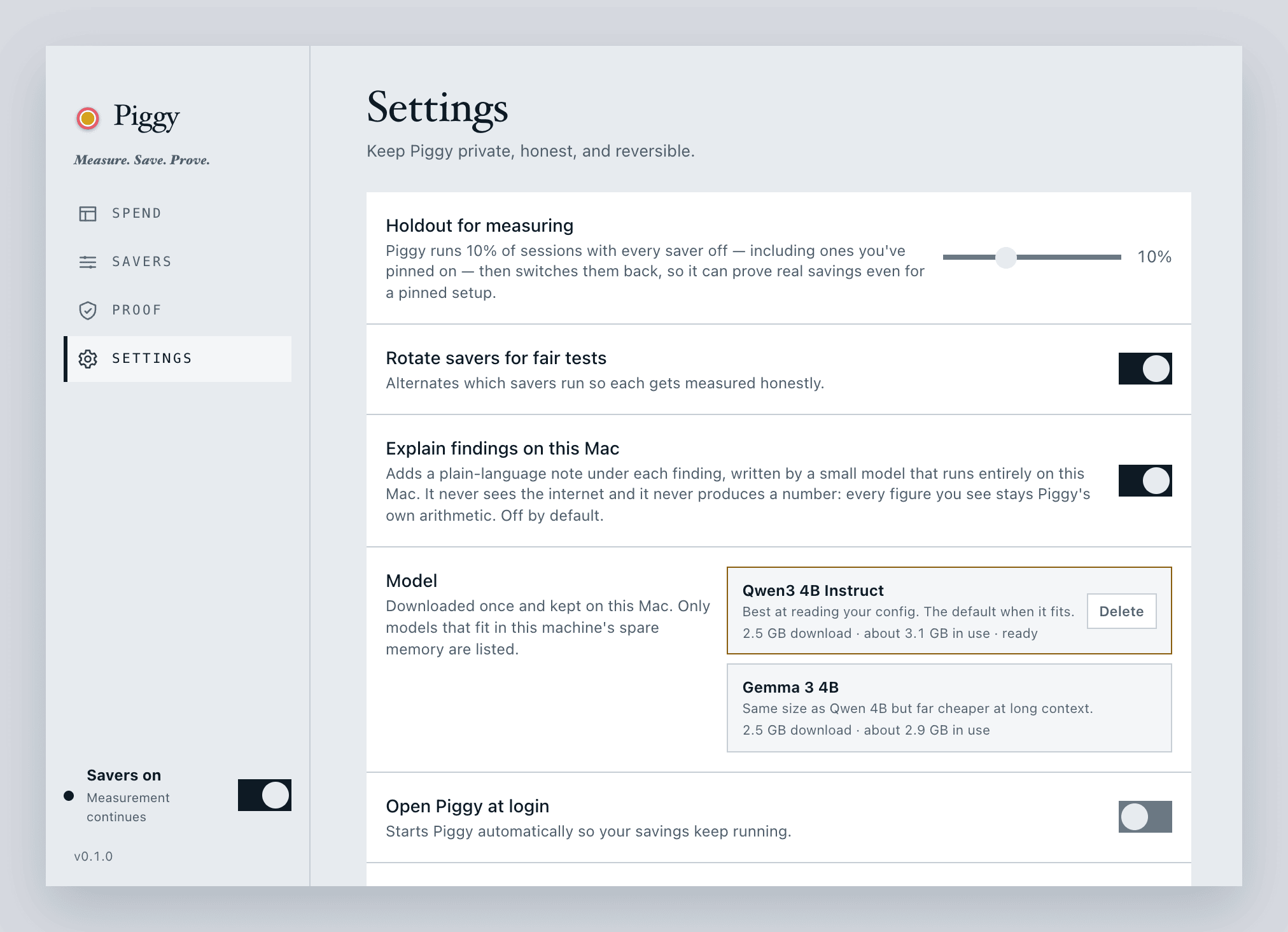
Settings. The holdout share is a dial you own. Rotation alternates which savers run so each
one gets attributed fairly. The Command line tool toggle is the piggy link described above.
Updates are checked only when you press the button.

Reports. Usage over time, per stream. In the app's own words: "Tokens are measured from
your session logs; cost and cache reuse are computed from them."
Run Claude through Piggy
Most savers work in every session automatically. The deepest one, Headroom, is scoped on
purpose: it compresses only the sessions you start with piggy-claude, a launcher Piggy
adds when you turn Headroom on.
piggy-claude    # Claude Code with deep compression
claude          # plain Claude Code, untouched
Use piggy-claude wherever you'd normally run claude. If anything ever misbehaves, plainclaude keeps working exactly as before - nothing about your normal setup changes.
Consistency matters for the numbers: while Headroom is on, Piggy counts your sessions as
compressor-on sessions. Launching plain claude with the toggle on waters down your measured
savings, so pick the wrapper and stick with it.
For saver authors
Piggy never forks or vendors your code. It installs from wherever you already publish (GitHub
release artifacts, PyPI, the Claude plugin marketplace) and pins a known-good version where the
source supports it - a release tag or a PyPI version. Where you ship a checksums file alongside a
GitHub release, Piggy verifies the download against it.
Want your tool listed? Open a PR against registry/catalog.json. Honest measurement is
applied equally to everyone. The shape of an entry is defined by the serde types incrates/piggy-core/src/registry.rs and enforced by crates/piggy-core/tests/registry_tests.rs,
which parses the catalog and checks every step kind, pin and conflict in it. There is no separate
JSON Schema on purpose: a second description of the same shape that nothing checks would drift
from the one the app actually reads.

Discover. Candidates Piggy spotted on GitHub. In the app's own words: "Piggy has not vetted
or measured any of them, and nothing here installs." Authors' figures stay labeled author claims.
The Listed for transparency section is the part worth reading: when Piggy won't install
something, it names the rules the tool broke rather than quietly leaving it out, and when the
holdup is Piggy's own unfinished work it says that instead.
What can be inside
Piggy is built so the interesting parts grow without a rewrite:
- More savers, by PR. The catalog is data. If your tool has an official release (GitHub, PyPI,
the Claude plugin marketplace), it can be listed and measured on the same honest terms as
everything already in the box. Two more sit outside the box entirely: NadirClaw (route simple
prompts to cheaper or local models) is deferred pending a v2 install path, and token-optimizer-mcp
is listed for transparency only. (The two ² rows above, Claude Token Optimizer and Context Mode,
are curated but likewise wait on install work.) - Discovery → measurement. The Discover feed at the foot of Savers already surfaces candidate
savers spotted on GitHub. The next step is wiring a spotted tool straight into a measured holdout
test. - Drafted CLAUDE.md rewrites that are worth reviewing. The advisor drafts one, and the guard
refuses anything that does not shrink the file by at least a tenth, introduces a path or a URL
the source did not have, or changes one of your own numbers. The pinned 4B models usually will
not clear that bar, so a trim ships as a burden report ("this file costs ~135k tokens a month")
and says plainly when the model tried and could not do better. A larger pinned model, or a
better prompt, is what moves that. - Notarized, signed builds so install is a plain double-click. (The
npx @amirdor/piggybank
one-liner is already live on npm; notarization is the piece still to come.) - Registry updates without an app release. The refresh-from-GitHub path is designed but stubbed
today; the catalog is embedded at build time. Wiring it lets new savers reach you between releases. - Codex, more fully. Piggy already reads Codex session logs for counting; the savers themselves
are still Claude Code only.
Want your tool in the box? See For saver authors.
Status
v0.1.0 shipped as an unsigned developer preview: a universal .dmg on the
Releases page. v0.2.0 is tagged, and the tag is what builds it:.github/workflows/release.yml gates on the tests, checks that
every version stamp agrees with the tag, and stages a draft release with the .dmg, the updater
artifacts and checksums.
All five milestones are built and tested: ✅ measurement core · ✅ install engine ·
✅ holdout measurement · ✅ menu bar app · ✅ advisor actions (559 tests: 438 Rust, 121 frontend).
M5 is the one that turned the local advisor from narration into product: it measures what your MCP
servers' tool schemas cost by launching one, reads what your CLAUDE.md files cost per month,
proposes what to switch off, move, clean up or trim, and applies each one through the same
reversible plumbing everything else uses. The advisor itself is compiled into shipped builds and
stays off until you download a model in Settings; with no model, the same suggestions arrive in the
same order with Piggy's own wording and no drafted rewrites.
Next up is Apple notarization (see What can be inside); the
signing/notarization steps live in docs/releasing.md. Design notes are in
DESIGN.md, and the M5 decisions, including everything the build did differently, are
in docs/m5-spec.md.
License
Yorumlar (0)
Yorum birakmak icin giris yap.
Yorum birakSonuc bulunamadi