Husk
Health Gecti
- License — License: NOASSERTION
- Description — Repository has a description
- Active repo — Last push 0 days ago
- Community trust — 11 GitHub stars
Code Basarisiz
- rm -rf — Recursive force deletion command in .github/workflows/apt-repo.yml
- fs module — File system access in .github/workflows/ci.yml
- rm -rf — Recursive force deletion command in installer/after-install.sh
Permissions Gecti
- Permissions — No dangerous permissions requested
Bu listing icin henuz AI raporu yok.
A desktop home for your CLI agent. Wraps claude / copilot / codex / aider in a clean Electron window with PTY, MCP, drag-drop context, sessions, voice, and a live status panel. PAI reasoning bundled.








Husk wraps claude, copilot, codex, aider, or any other terminal-based AI agent in a clean Electron window with a real PTY, drag-drop file context, voice output, session resume, and a one-glance dashboard. The reasoning, thinking format, and Algorithm phase machine are bundled in. Clone, install, run.
https://github.com/user-attachments/assets/83dcddc4-27eb-4c3c-b36c-388214416d6f
Why Husk
CLI agents are powerful and free. But they live in a black-on-black terminal that newcomers find intimidating, lose track of work in, and never discover the features of. Husk keeps the agent exactly as it is and adds the surface that makes it usable: file drops, persistent sessions, a status panel, a skills view, voice readback, and an installer that takes care of itself. If you can already use the terminal, Husk does not get in your way. If you cannot, Husk makes the same agent approachable.
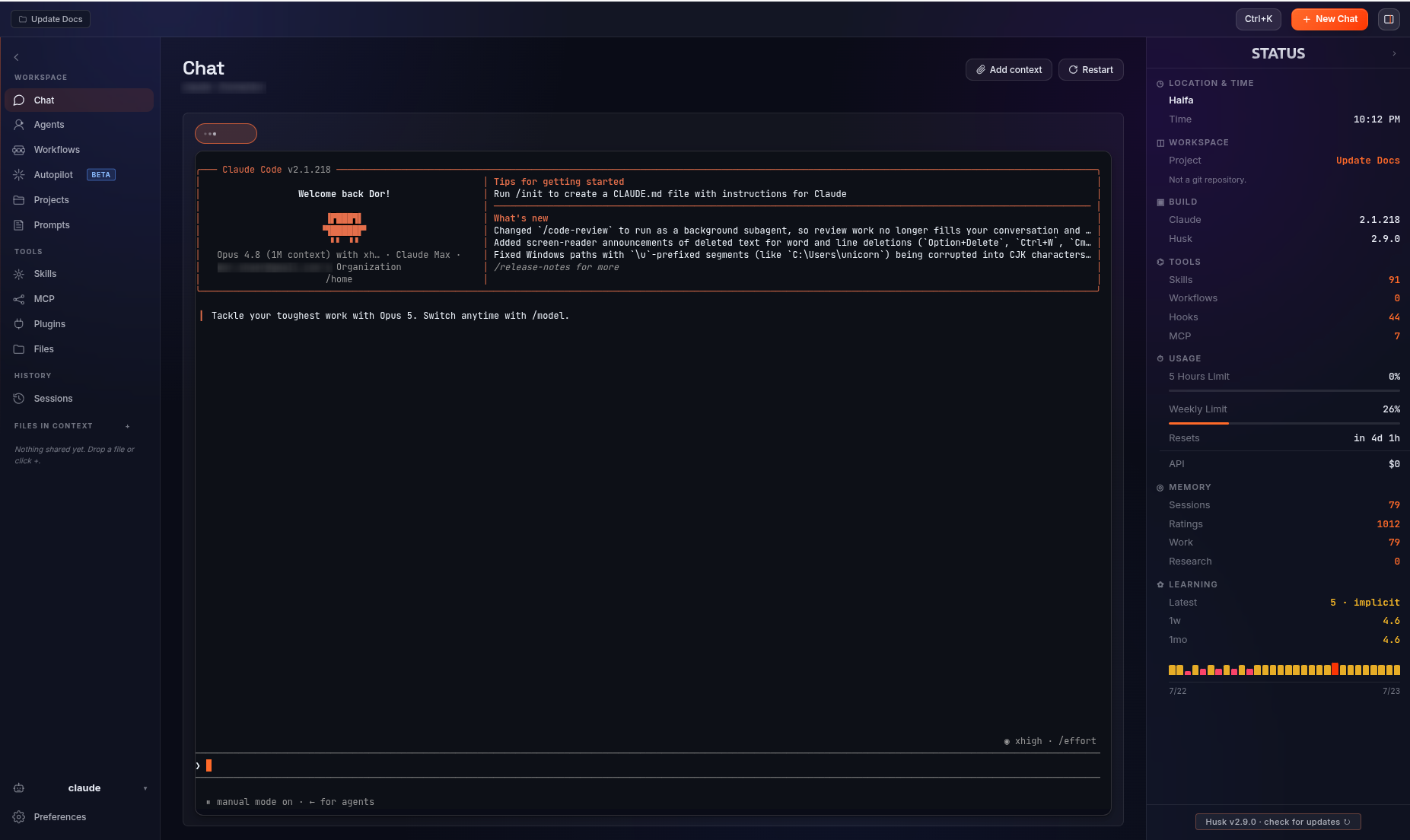
Chat in a real PTY with full TUI fidelity, drag-drop context, and a live status panel.
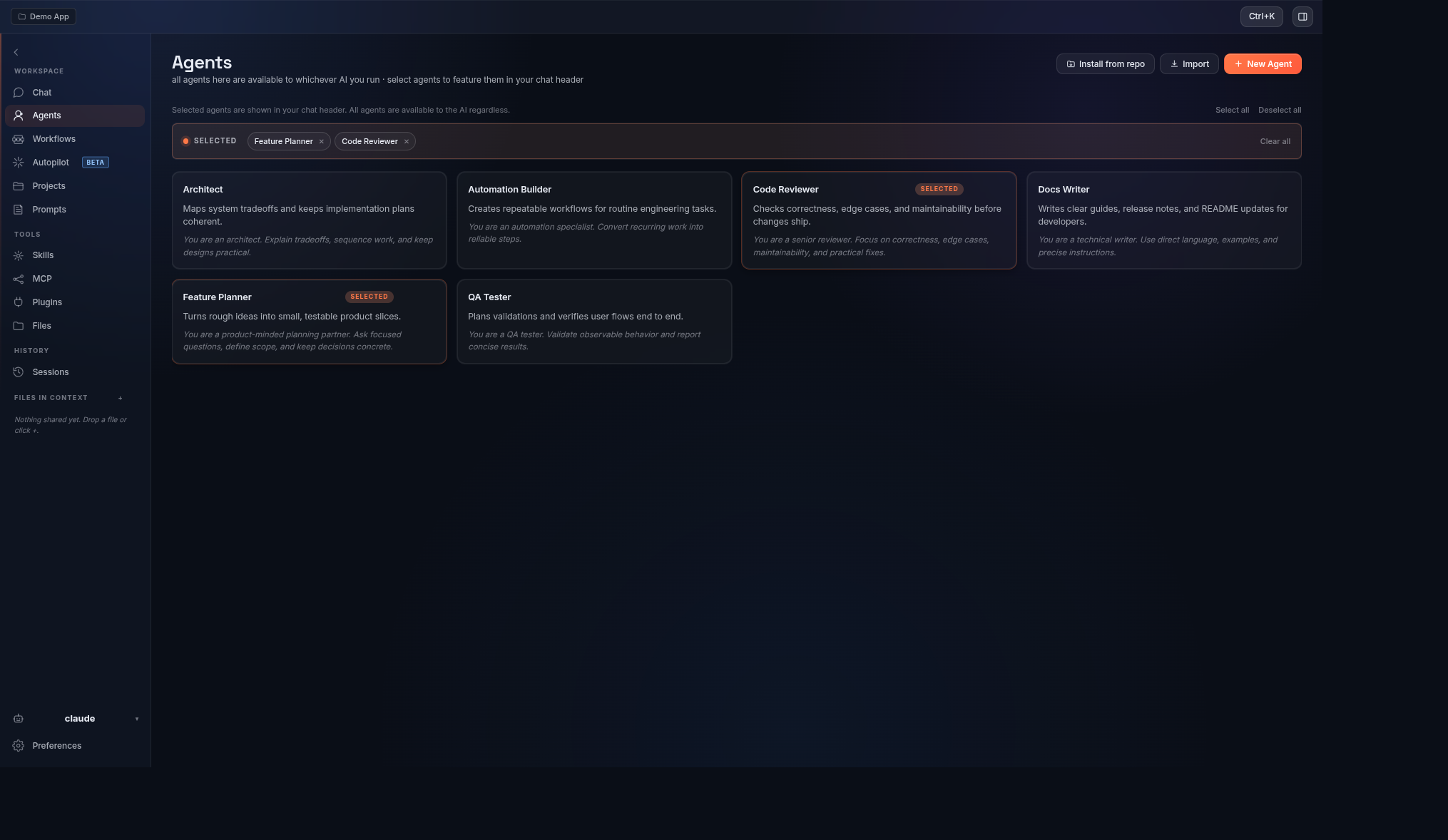
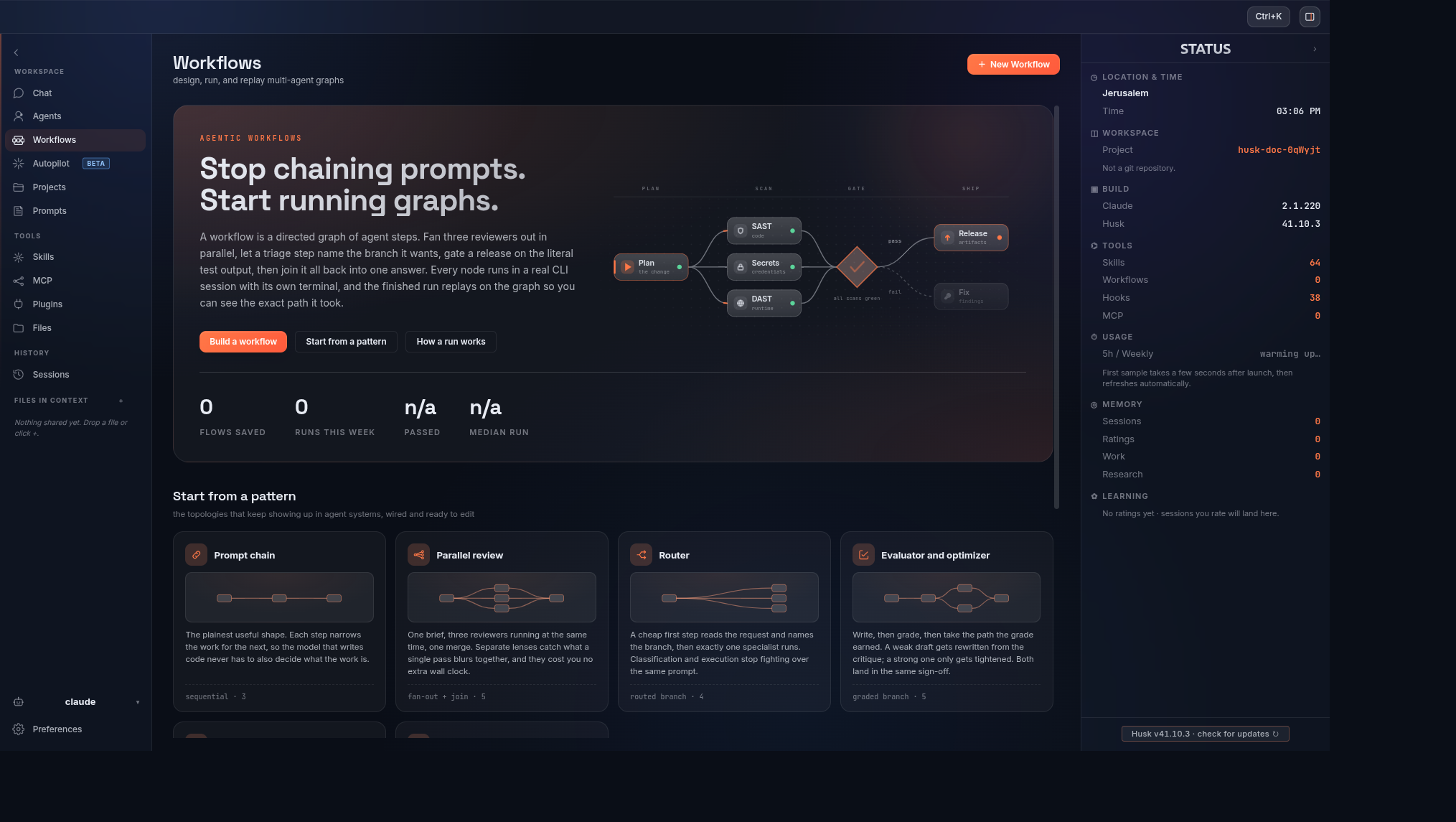
Curate the agent personas active for the next session. Start a multi-step automation from a ready-made topology, or build your own in the graph editor.
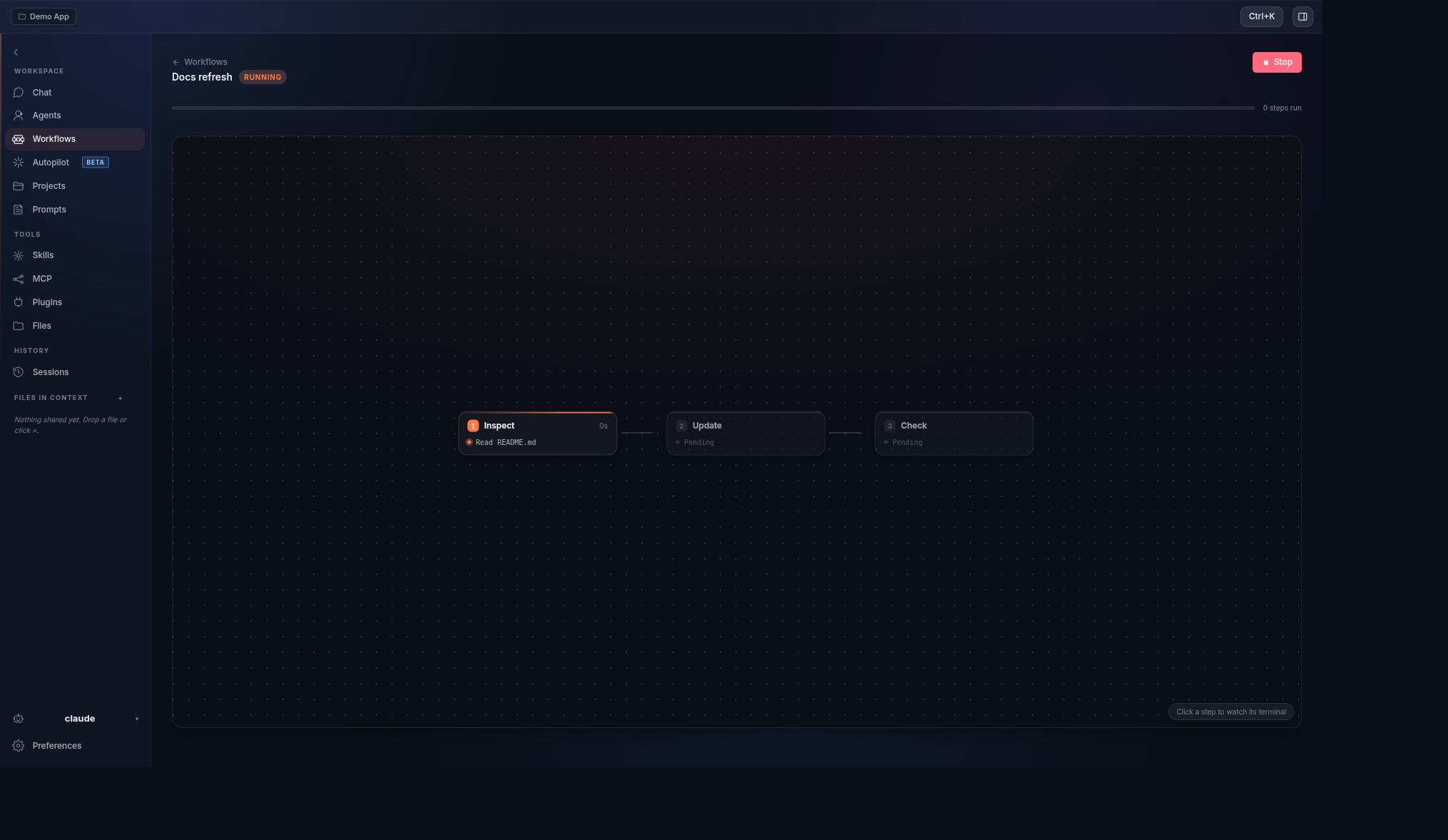
Run a workflow and watch it play out on the graph: each step lights up as it runs, the edge fires to the next, and every node keeps its own terminal.
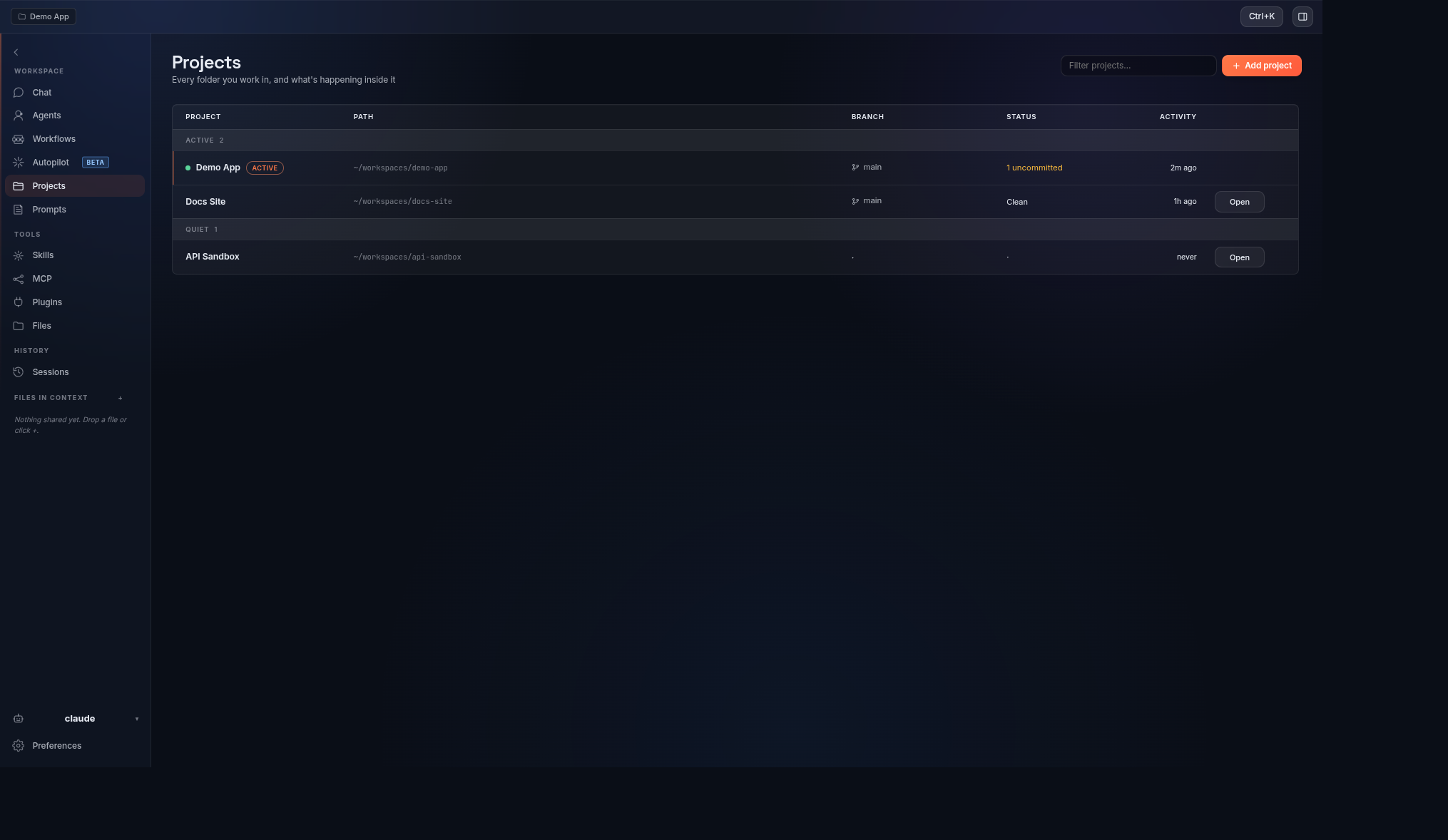
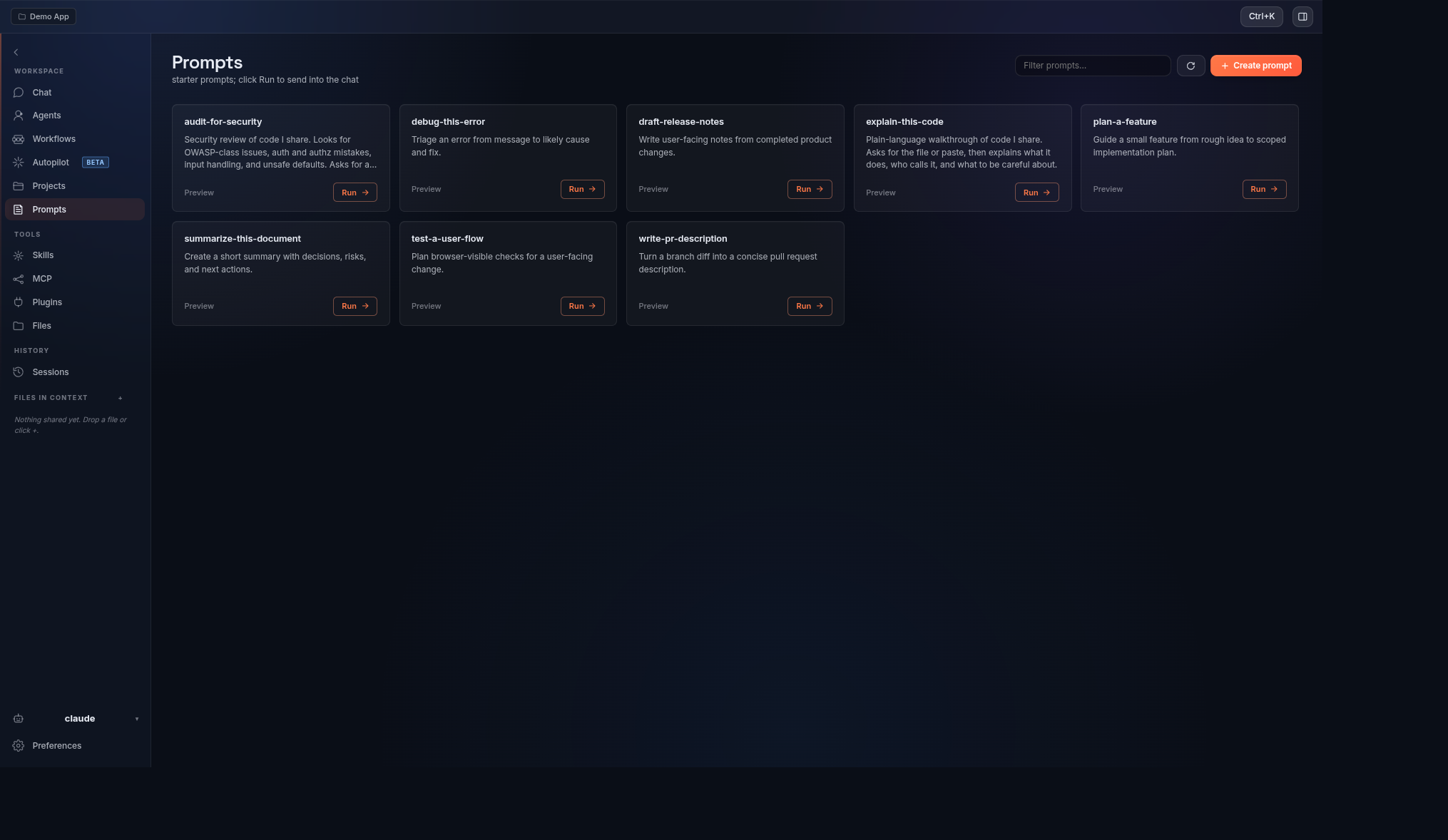
Pin folders as Projects so the agent always starts in the right cwd. Save reusable prompts and fire them with one click.
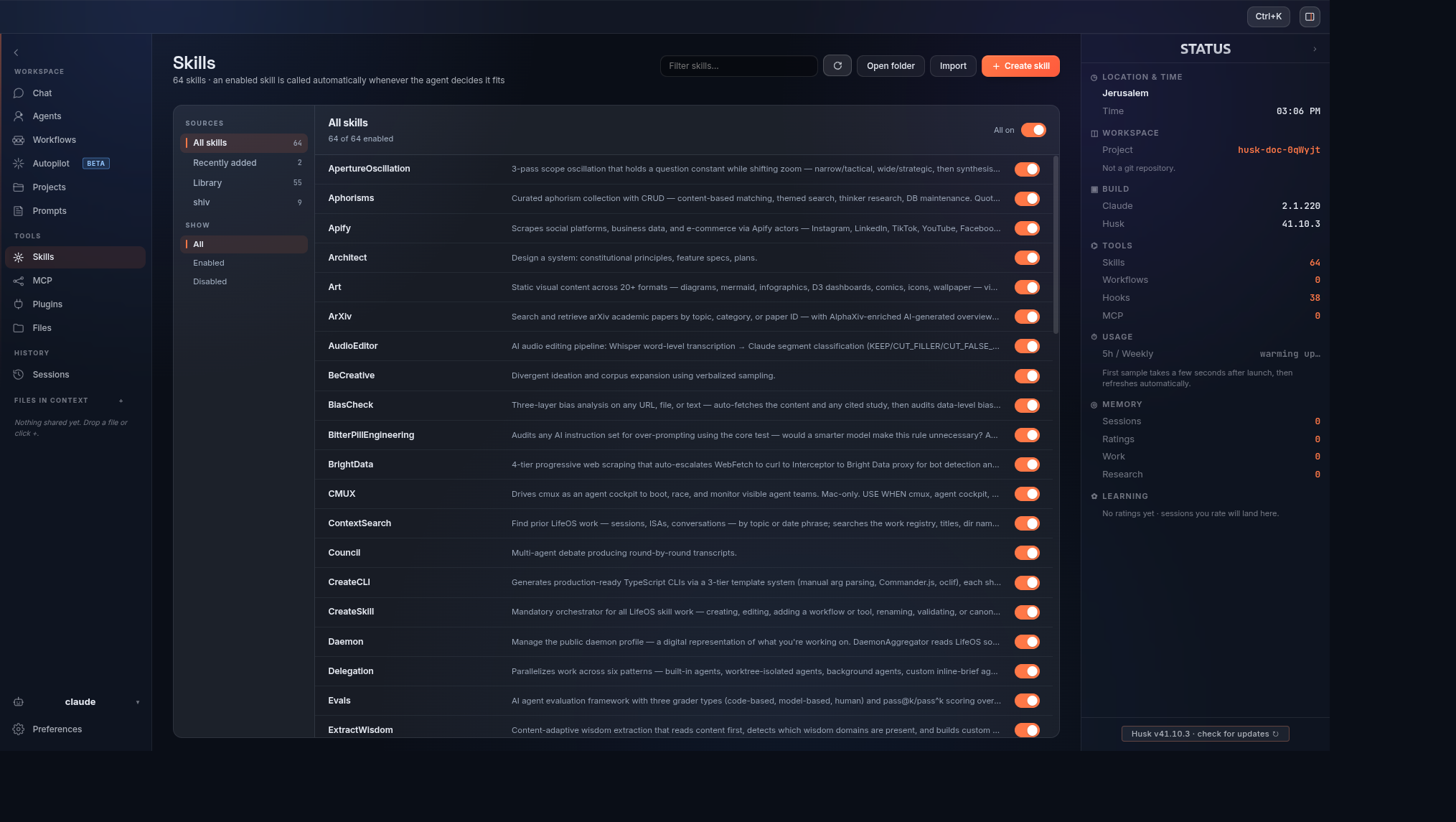
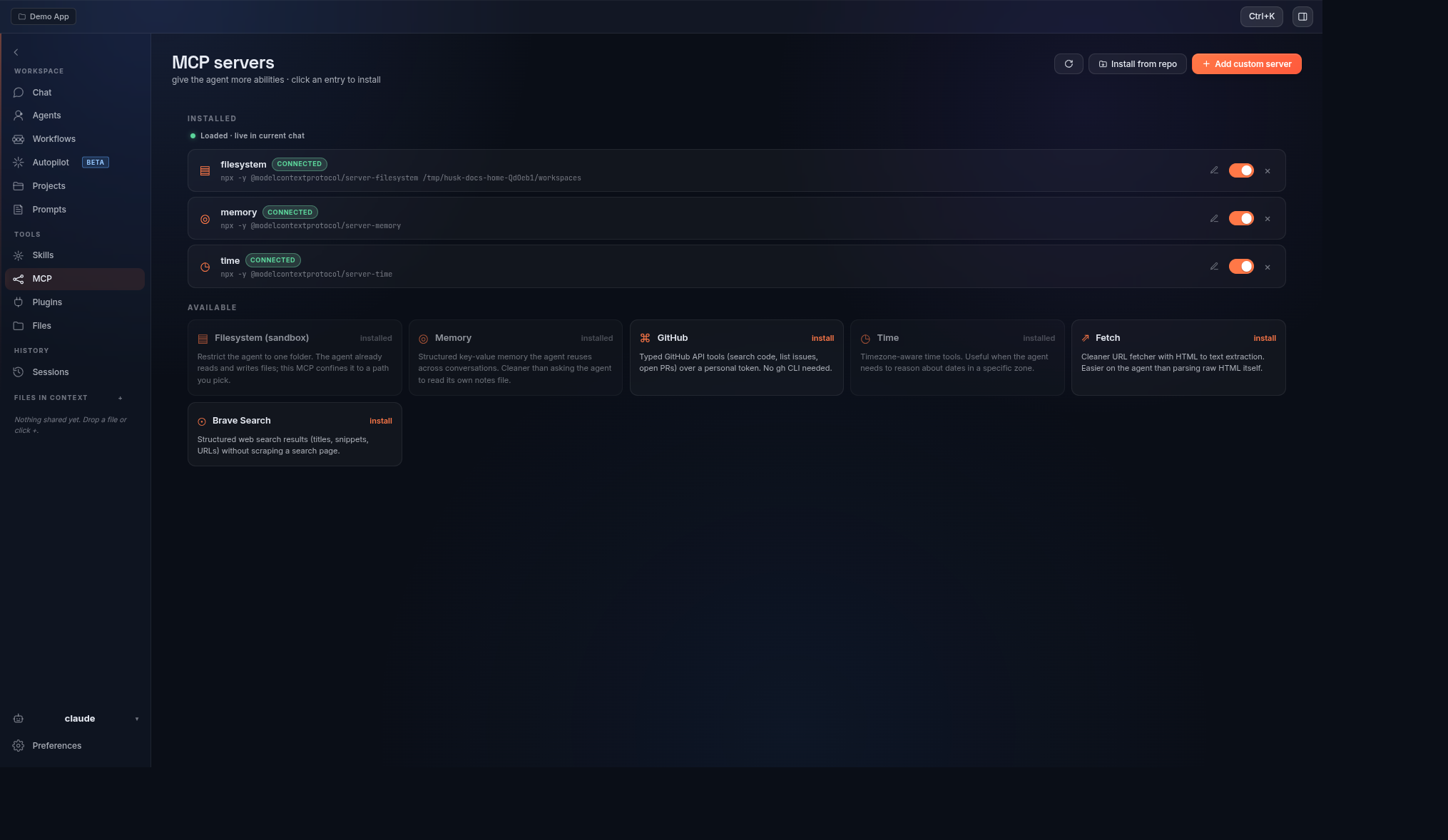
Browse skills by source, switch them on per skill or a whole folder at once, and see what was added recently. MCP servers with live connection state and a curated catalog.
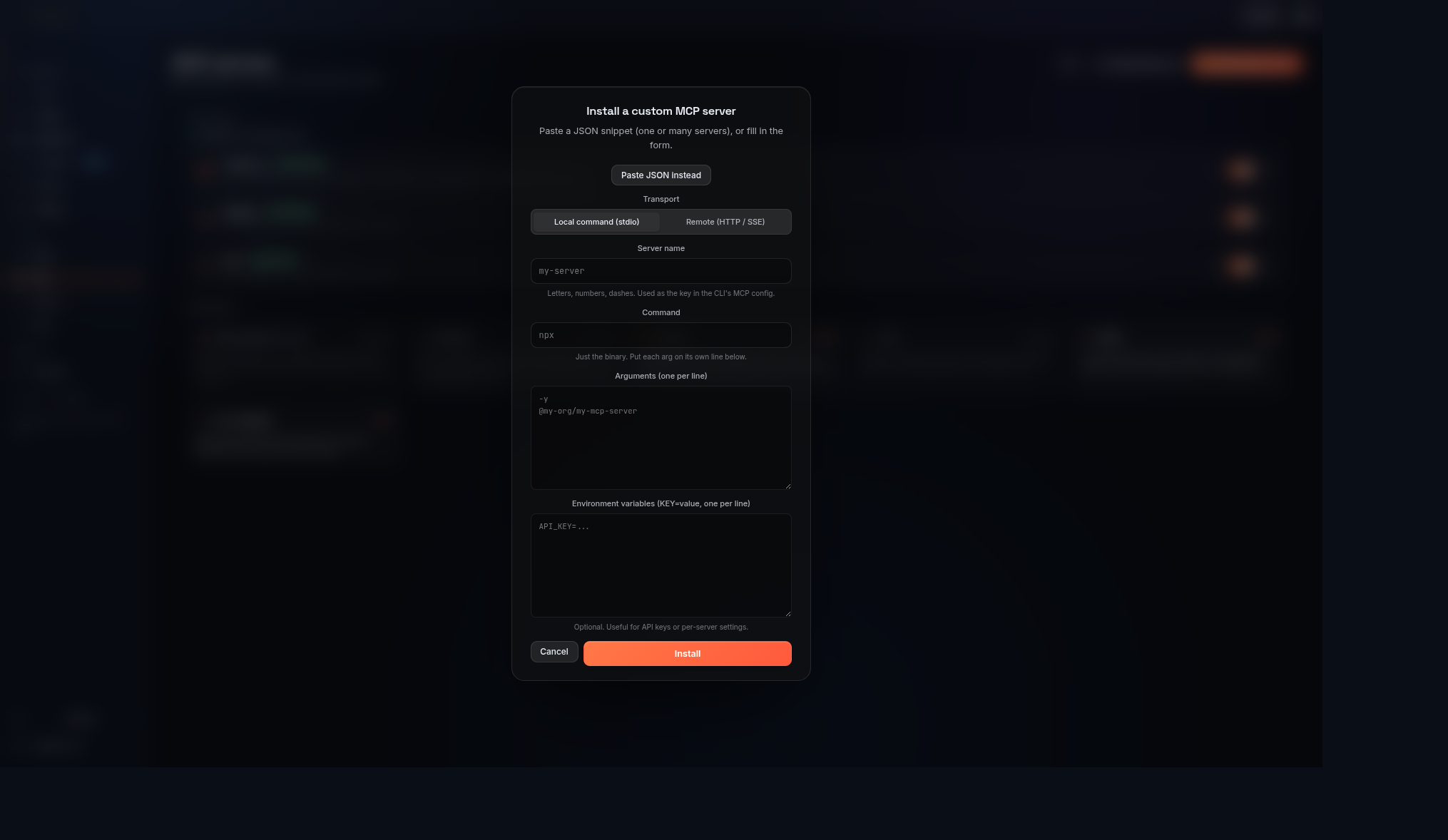
Install any MCP server: pick stdio or HTTP/SSE, fill the form, or paste the canonical JSON shape and Husk fills it for you.
Install
One line, any OS. Checksums verified, no git clone, no Node.
# Linux and macOS
curl -fsSL https://dorshaer.github.io/Husk/install.sh | bash
# Windows
irm https://dorshaer.github.io/Husk/install.ps1 | iex
On Debian/Ubuntu it wires up the signed apt repo and installs Husk, so apt upgrade keeps it current. On Fedora it installs the .rpm, on other Linux the AppImage, on macOS the .dmg, on Windows the installer.
Full per-platform install page: dorshaer.github.io/Husk.
Linux
# Debian / Ubuntu: add the signed apt repo once, then `apt upgrade` keeps Husk current
curl -fsSL https://dorshaer.github.io/Husk/husk.gpg | sudo tee /usr/share/keyrings/husk.gpg > /dev/null
echo "deb [signed-by=/usr/share/keyrings/husk.gpg] https://dorshaer.github.io/Husk/apt stable main" | sudo tee /etc/apt/sources.list.d/husk.list
sudo apt update && sudo apt install husk

# Or install a downloaded .deb by hand
sudo dpkg -i husk-v*-linux-amd64.deb || sudo apt -f install

# Or run the portable AppImage (no root; needs libfuse2)
chmod +x husk-v*-linux-x86_64.AppImage && ./husk-v*-linux-x86_64.AppImage

# Or build from source
git clone https://github.com/DorShaer/Husk.git && cd Husk && ./installer/install.sh
Only x86_64 Linux builds are published today. There is no arm64 Linux build yet, and the binaries are glibc-linked, so musl distros (Alpine) are not supported.
macOS
# One line (Apple Silicon or Intel, auto-detected)
curl -fsSL https://dorshaer.github.io/Husk/install.sh | bash

# Or download the .dmg from the releases page and drag Husk to Applications.
# Husk is not code-signed yet, so clear the quarantine flag on first launch:
xattr -dr com.apple.quarantine /Applications/Husk.app
Windows
# One line: downloads the installer, verifies its checksum, runs it
irm https://dorshaer.github.io/Husk/install.ps1 | iex
Or download husk-v<version>-win-x64.exe from the latest release and run it. The build is not code-signed yet, so SmartScreen shows a warning; choose More info > Run anyway.
Download
Prefer to grab an installer by hand? Pull the latest for your OS from the releases page:
| OS | Download |
|---|---|
| Linux | husk-v<version>-linux-x86_64.AppImage (double-click), -amd64.deb, or -x86_64.rpm |
| macOS | husk-v<version>-mac-arm64.dmg (Apple Silicon) or husk-v<version>-mac-x64.dmg (Intel); drag to Applications |
| Windows | husk-v<version>-win-x64.exe (NSIS installer) |
No Node, no npm, no git clone. Husk bundles its own Electron runtime and copies the agent reasoning layer into ~/.claude/ on first launch.
macOS first launch (unsigned builds). The .dmg ships unsigned today. Drag Husk to Applications, try to open it, click Cancel on the Gatekeeper prompt, then open System Settings → Privacy & Security, scroll down, and click Open Anyway. A second prompt confirms and Husk launches normally from then on. Faster path if you live in the terminal:
xattr -dr com.apple.quarantine /Applications/Husk.app. Apple Developer ID signing is on the roadmap.
Verifying your download
Every release ships a SHA256SUMS file plus Sigstore build-provenance attestations bound to the workflow run that produced the artifacts.
# Checksum the file you downloaded
sha256sum -c SHA256SUMS

# Verify provenance (requires gh CLI 2.49+)
gh attestation verify husk-v<version>-mac-arm64.dmg --repo DorShaer/Husk
Install from source
For contributors and tinkerers:
git clone https://github.com/DorShaer/Husk.git husk
cd husk
./installer/install.sh
install.sh runs npm install, rebuilds node-pty for Electron's Node ABI, registers Husk with your OS (.desktop on Linux, .app bundle in ~/Applications on macOS), and bootstraps LifeOS into ~/.claude/.
For pure dev mode without system registration:
./scripts/run.sh
The full walkthrough (prerequisites, building your own .deb/.dmg/.exe, troubleshooting) is in docs/build-from-source.md.
Uninstall
./installer/uninstall.sh             # remove launcher, icon, config, voice models
./installer/uninstall.sh --keep-data # preserve config and Piper voices
The source checkout and node_modules/ are protected; if the checkout is inside
a cleanup path such as ~/.local/share/husk, the uninstaller skips that path.
Usage
- Launch Husk from your applications menu, or run
huskfrom a terminal after installing. - On first run, Husk asks for the agent's name (default: Husk) and the agent command (default:
claude). Both are saved to~/.config/husk/config.jsonand can be edited later in Preferences. - Press the Launch button and start chatting. The agent runs in a real PTY, so everything you would normally do in the terminal works: tool calls, slash commands, stdin, ctrl-c, scrollback, keyboard interrupts, the lot.
- Drag files onto the window to share them with the agent. Use the topbar
+button as a fallback file picker. - Switch pages with the rail or
Alt+1..6. Open the command palette withCmd/Ctrl+K. - If a chat starts agents that keep working on their own, the topbar says how many are running and how many are waiting on you. Click it or press
Alt+Ato pick one and continue its conversation.
Pages
- Chat: the PTY surface. Drag-drop files, status panel on the right.
- Agents: pick which agent personas activate for the next session. Multiple can be active at once; import from any local CLI's agent dir, or install an agent pack from a local repo folder or a repo URL (e.g.
https://github.com/dev/agent-repo). - Workflows: a visual graph editor for chained steps with conditional branching and AI-decided routing.
- Projects: switch the agent cwd between known project directories (so Claude's "remember this folder" trust prompts work).
- Autopilot: hand the agent a goal and walk away. Solo runs one agent; Team splits the goal across collaborating parallel runs. Each run executes in its own git worktree with a dedicated PTY, an independent time/token/dollar budget, a hash-chained audit log, and an optional pre-run snapshot for one-click revert. A swarm bar shows every active run.
- Prompts: local-only prompt library; one click sends a saved prompt into the agent.
- Skills: toggle the skills bundled with Husk plus any skills you keep in
~/.claude/skills/. - MCP: install / toggle / health-check Model Context Protocol servers.
- Plugins: browse and manage Husk plugins.
- Files: drag-drop file context, with a tree view of your working directory.
- Sessions: resume any prior agent session from its JSONL log. Agents a chat started are grouped under that chat rather than listed beside it.
Preferences (agent command, name, theme, accent, voice, recap, sidebar defaults) open as a modal from the rail or Alt+6, not as a page.
Architecture
husk/
├── src/                       Application source
│   ├── main.js                Electron main process: IPC, agent control
│   ├── preload.js             contextBridge window.husk surface
│   ├── lib/                   Pure helpers (unit-tested)
│   │   ├── shell-quote.js     POSIX argv serializer
│   │   ├── path-confine.js    resolveInside / isInside under a root
│   │   ├── pty-spawn.js       Per-platform pty.spawn argv assembly
│   │   ├── user-path.js       Inherit shell PATH on GUI launch
│   │   ├── agent-md.js        Agent markdown frontmatter parser
│   │   ├── workflow-graph.js  Sanitize, migrate, traverse, route
│   │   ├── mcp/               Per-agent MCP adapters
│   │   ├── autonomy/          Autopilot budget, audit log, snapshot, supervisor
│   │   └── ...                ~28 modules total; see docs/architecture.md
│   └── renderer/              UI (single-page Electron view)
│       ├── index.html
│       ├── app.js
│       ├── styles.css
│       ├── assets/
│       └── vendor/            Bundled xterm.js + addons
├── installer/                 OS install assets + verify helpers
│   └── lib/                   Download-and-verify (verify.sh, verify.ps1)
├── libs/
│   └── lifeos/                Bundled LifeOS framework, third-party
├── test/                      Unit tests (node:test) + Electron smoke
│   ├── unit/                  node:test unit suite (500+ tests)
│   └── e2e/                   Playwright smoke (real Electron boot)
├── installer/                  source installers, packaging assets, landing page
├── package.json
├── README.md
└── LICENSE
+--------------------+       IPC       +-----------------------+
|   Electron main    |  <----------->  |       Renderer        |
|   src/main.js      |                 |    src/renderer/      |
|                    |                 |                       |
|  - node-pty        |   PTY stream    |  - chat surface       |
|  - per-platform    |  ------------>  |  - agents + workflows |
|    spawn (see lib) |                 |  - skills + prompts   |
|  - all IPC handlers|                 |  - sessions + files   |
|  - shell PATH      |                 |  - MCP + preferences  |
|    augmentation    |                 |  - status panel       |
+--------------------+                 +-----------------------+
         |                                        |
         v                                        v
   ~/.claude/*                             contextBridge
   (bootstrapped from                      window.husk API
    libs/pai on first                      (src/preload.js)
    install)
src/main.jsis the Electron main process. It assembles the PTY spawn per platform (seesrc/lib/pty-spawn.js): directpty.spawn(exe, argv)on macOS,/usr/bin/script -q -c <argv>on Linux soclaude --resumegets its TIOCSCTTY setup, and PATH+PATHEXT resolution beforepty.spawnon Windows. It exposes IPC handlers for skills, sessions, voice, MCP servers, file drops, workflows, agents, projects, and live stats.src/lib/holds the pure helpers: shell-quote, path-confine, pty-spawn, user-path, agent-md, workflow-graph, themcp/per-agent adapters, theautonomy/Autopilot safety modules, and about twenty more (seedocs/architecture.md). Each is small, with no Electron / fs / spawn coupling, and unit-tested. New IPC handler logic should land here.src/preload.jsexposes a narrowwindow.huskAPI to the renderer throughcontextBridge. The renderer never gets Node access.src/renderer/is the renderer: a single-page Electron view with rail navigation, an embedded xterm, a status panel, and the Chat / Agents / Workflows / Autopilot / Projects / Prompts / Skills / MCP / Plugins / Files / Sessions surfaces plus the Preferences modal.libs/lifeos/is the bundled LifeOS framework, copied into~/.claude/on first install. Contains the system prompt, Algorithm phase machine, agents, commands, hooks, the identity scaffold, and the curated skills set. An install that already has the older~/.claude/PAI/layout is left alone rather than given a second framework beside it.installer/holds OS install assets and the SHA-256 download verifier (verify.sh,verify.ps1).installer/holds the source installers (install.sh,install.ps1,uninstall.sh) alongside the packaging assets they use.scripts/holds the published one-line installers and the dev launcher (run.sh). The repo root stays free of loose scripts.
Updating what we vendor
./scripts/update-vendor.sh            # framework + dependencies, every gate
./scripts/update-vendor.sh --fast     # skip the package build and the e2e run
./scripts/update-vendor.sh --commit   # commit once everything passes
Refreshes libs/lifeos/ from the latest upstream release and the npm tree
within the ranges package.json already allows, then refuses to leave anything
staged unless it passes:
- Privacy. The whole vendored tree, plus every line the run added elsewhere,
is searched for identifiers belonging to the machine running it: home
directory, username, hostname, git name and email. Those are read from the
environment at run time and never written to a file, because hard-coding them
is the thing being guarded against. The framework is always taken from the
published release tarball, never from a local~/.claude, which is where a
maintainer's own notes and answered templates live. - Secrets and CVEs. gitleaks over full history and trivy over the manifests,
both pinned to the versions CI uses so a local pass means a CI pass. - Package size. Builds the
.deband fails below the 100 MiB ceiling that
the apt channel silently breaks at. - Tests. Unit always, end-to-end unless
--fast.
A failing gate restores the working tree, so a bad run leaves nothing behind.
Local corrections to vendored files (a dependency range moved off an
unpatchable version, say) live in VENDOR_FIXUPS inside the script and are
re-applied after each refresh, since re-vendoring would otherwise revert them
silently.
Testing
npm test         # node:test unit suite (500+ tests), well under a second
npm run test:e2e # Playwright smoke that boots real Electron
npm run test:all # both
CI runs both jobs on every push to main, development, and dev/**, and on every pull request to main or development.
Branches
maincarries released code. Tagsv*are cut from here, the release workflow builds installers, and SHA256SUMS plus Sigstore build-provenance attestations ship alongside them.developmentis the integration branch where active work lands. Feature branches usedev/<short-name>and open pull requests againstdevelopment.- Releases merge
developmentintomain, then av<x>.<y>.<z>tag triggers the release pipeline. - CI (lint, security scans, unit tests, Electron smoke) runs on every push and pull request to either long-lived branch.
Configuration
All settings live in ~/.config/husk/config.json and are editable from the Preferences page:
- Agent command (
claude,copilot,codex,aider, or any binary on$PATH) and agent name - Active agent profiles: one or more agent personas applied to the next session
- Active project: drives the agent's working directory so per-folder trust prompts work
- Theme (10 themes: Midnight default, Dark, Tokyo Night, Catppuccin, Rose Pine, Gruvbox, Nord, Dracula, Light, Sepia) and accent color (orange / cyan / indigo / emerald / rose)
- Voice (enable, voice model, speaking rate)
- Show recap line (when off, suppresses end-of-response summaries)
- Sidebar default state, status panel collapsed, file tree root, show hidden files
Privacy
Husk runs entirely on your machine. No telemetry. No analytics. The only network calls are made by the agent CLI itself when it talks to its model provider, and by the optional voice installer when it downloads Piper and a voice model from their public release.
License
MIT.
Credits
Husk's reasoning, thinking format, and Algorithm phase machine come from LifeOS (formerly PAI) and Telos by Daniel Miessler. If you find Husk useful go show him some love.
The terminal embedding uses xterm.js plus node-pty. On Linux the PTY is established through script(1) so claude --resume gets its controlling terminal. Voice is via Piper TTS. The workflow editor uses Drawflow.
Yorumlar (0)
Yorum birakmak icin giris yap.
Yorum birakSonuc bulunamadi