openrecord
Health Uyari
- License — License: MIT
- Description — Repository has a description
- Active repo — Last push 0 days ago
- Low visibility — Only 6 GitHub stars
Code Basarisiz
- rm -rf — Recursive force deletion command in scripts/build-app.sh
- rm -rf — Recursive force deletion command in scripts/release.sh
Permissions Gecti
- Permissions — No dangerous permissions requested
Bu listing icin henuz AI raporu yok.
Record your screen while you talk. Transcribed on your Mac with whisper.cpp. Readable by AI agents over MCP.

OpenRecord
Record your screen while you talk. Transcribed on your Mac. Readable by AI agents over MCP.


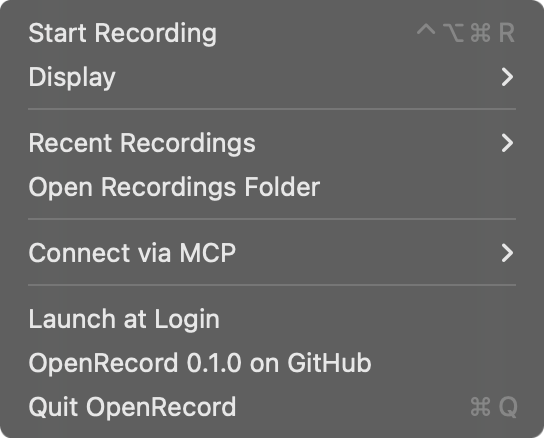
OpenRecord is a small, local, open-source take on Supercut and Loom for macOS. Explain a bug,
walk through a design, or narrate a demo. Then ask your coding agent to watch it: OpenRecord's MCP server gives
Claude Code, Cursor, Codex and other MCP clients your transcript, a search across everything you've said, and
screenshots from any moment of the recording.
No account, no cloud, no upload. Recordings and transcripts stay in ~/Movies/OpenRecord.
Features
- One-key recording: press ⌃⌥R anywhere, or use the menu bar, to record a whole display plus your microphone
into a single MP4. - On-device transcription with whisper.cpp
(large-v3-turbo, Metal-accelerated), with voice-activity detection so silence doesn't turn into invented text. The
language is detected automatically, and every segment is timestamped. - Built-in MCP server: five read-only tools to list recordings, read transcripts, search what you said, and pull
frames at any timestamp. - Small by design: a menu bar app (no Dock icon). No webcam bubble, editor, or share links.
Requirements
- macOS 15 Sequoia or later, Apple silicon (Intel Macs are untested)
- Homebrew, for whisper.cpp
- Xcode 26.1 or later (Swift 6.2), only to build from source
Install
Download
- Download
OpenRecord-<version>.zipfrom the latest release,
unzip it, and move OpenRecord to Applications. It's signed with a Developer ID and notarized by Apple. - Open it. The ◉ icon appears in the menu bar.
- Choose Set Up Transcription… in the menu. It opens Terminal to install whisper.cpp with Homebrew and download the
models (~575 MB), then choose Check Again.
Build from source
Building takes about a minute:
git clone https://github.com/dorukgunes/openrecord.git
cd openrecord
make whisper     # brew install whisper-cpp, then download the models (~575 MB)
make install     # build OpenRecord.app and copy it to /Applications
open /Applications/OpenRecord.app
make app builds into build/OpenRecord.app instead if you'd rather not install it.
Signing: macOS ties Screen Recording and Microphone grants to the app's code signature.
make appsigns with
your Developer ID or Apple Development certificate when you have one, so the grants survive rebuilds. Without a
certificate it falls back to an ad-hoc signature, and you'll re-grant access after each rebuild. To pick a specific
identity, setCODESIGN_IDENTITY="...".
First recording and permissions
The first time you record, macOS asks for two permissions:
| Permission | Why | Where to change it |
|---|---|---|
| Microphone | Your narration | System Settings › Privacy & Security › Microphone |
| Screen Recording | Capturing the display | System Settings › Privacy & Security › Screen & System Audio Recording |
macOS may ask you to reopen OpenRecord after you allow Screen Recording. The global hotkey uses Carbon'sRegisterEventHotKey, so OpenRecord does not need Accessibility access.
About once a month, macOS 15 also asks whether OpenRecord may bypass the system private window picker and directly
access your screen and audio. Choose Allow. macOS asks this of every app that records a screen picked in the app
instead of in Apple's picker. Despite the wording, OpenRecord never records system audio, only your microphone.
Recording
- Press ⌃⌥R to record the selected display, or ⇧⌃⌥R (Shift-Control-Option-R) to select and record
a portion. You can also choose Start Recording or Record a Portion… from the ◉ menu bar icon. Choose which
screen to record under Display. - Talk through what you're doing. The menu bar shows the elapsed time.
- Press ⌃⌥R again to stop either kind of recording. OpenRecord saves the video and transcribes it in the background. A few seconds
later, Recent Recordings shows it as transcribed.
Each recording is one folder:
~/Movies/OpenRecord/2026-11-04_22-09-48/
├── recording.mp4      # H.264 (HEVC above 4096 px), display + microphone, 30 fps
├── meta.json          # title, date, duration, resolution, microphone, transcript status
└── transcript.json    # {language, segments: [{start, end, text}]}, times in seconds
To delete a recording, delete its folder.
Connect your agent (MCP)
The server is the openrecord-mcp binary inside the app. The Connect via MCP menu item copies the Claude Code
command or a JSON config with the right path filled in. The snippets below assume the app is in /Applications.
claude mcp add --scope user openrecord -- /Applications/OpenRecord.app/Contents/MacOS/openrecord-mcp
Add to ~/Library/Application Support/Claude/claude_desktop_config.json:
{
  "mcpServers": {
    "openrecord": { "command": "/Applications/OpenRecord.app/Contents/MacOS/openrecord-mcp" }
  }
}
Add to ~/.cursor/mcp.json:
{
  "mcpServers": {
    "openrecord": { "command": "/Applications/OpenRecord.app/Contents/MacOS/openrecord-mcp" }
  }
}
Add to .vscode/mcp.json (or run MCP: Add Server and choose Command (stdio)):
{
  "servers": {
    "openrecord": { "type": "stdio", "command": "/Applications/OpenRecord.app/Contents/MacOS/openrecord-mcp" }
  }
}
Add to ~/.codex/config.toml:
[mcp_servers.openrecord]
command = "/Applications/OpenRecord.app/Contents/MacOS/openrecord-mcp"
Tools
| Tool | Arguments | Returns |
|---|---|---|
list_recordings |
limit (default 20) |
Newest first, with duration, transcript status and a preview of what you said |
get_recording |
id |
Metadata and the local video path |
get_transcript |
id, start_seconds, end_seconds |
One [m:ss] text line per segment |
search_recordings |
query, limit |
Moments where you said every word, ignoring case and accents, across all recordings |
get_frames |
id, timestamps or count (default 4), max_width (default 1024) |
Up to 10 JPEG screenshots |
Every id also accepts "latest". All tools are read-only and idempotent, and they never touch the network.
Things to ask
- "Watch my latest OpenRecord recording and fix the bug I describe."
- "Find where I talked about the invoice total and show me the screen at that moment."
- "Turn yesterday's walkthrough into a Linear ticket with repro steps and screenshots."
- "Summarize my last three recordings."
Privacy and security
- Local only. The app and the MCP server make no network requests. Only
make whispergoes online, to install
whisper.cpp from Homebrew and download models from Hugging Face. - What leaves your Mac is up to you. When your agent calls a tool, the transcript or frames it gets go to that
agent's model provider, as with any other context you give it. - Treat recordings as untrusted input. Anything on screen or said aloud ends up in transcripts and frames. That
includes text written to manipulate an AI (prompt injection). The server tells clients to treat this content as
data, but keep approval prompts on for tools that can act, such as shell commands, writes or web requests. - Stored unencrypted in
~/Movies/OpenRecord, like any other video. FileVault protects it at rest. - Recording ids from MCP clients are checked against an allowlist, so tools can't read outside the recordings folder.
Report vulnerabilities privately; see SECURITY.md.
Troubleshooting
Recording won't start, or says it needs Screen Recording permissionChoose Open Privacy Settings… in the menu and turn OpenRecord on. If it's already on, which can happen after a
rebuild or update changed the signature, reset the grant and relaunch:
tccutil reset ScreenCapture io.github.dorukgunes.openrecord
tccutil reset Microphone io.github.dorukgunes.openrecord
whisper.cpp or its model is missing. Choose Set Up Transcription…, or run make whisper, then Check Again.
Recordings made in the meantime are transcribed the next time OpenRecord launches. You can also choose Transcribe
Again on a recording under Recent Recordings.
Another app probably owns the shortcut. Check the log for Couldn't register ⌃⌥R:
log show --last 10m --info --predicate 'subsystem == "io.github.dorukgunes.openrecord"'
The MCP server reads the same ~/Movies/OpenRecord folder as the app. If you set OPENRECORD_LIBRARY for one, set
it for both. To see exactly what an agent would get, run make smoke, which talks to the server over stdio.
Configuration
| Environment variable | Default | Used by |
|---|---|---|
OPENRECORD_LIBRARY |
~/Movies/OpenRecord |
app and MCP server |
OPENRECORD_WHISPER_CLI |
whisper-cli from Homebrew or PATH |
app |
OPENRECORD_WHISPER_MODEL |
~/Library/Application Support/OpenRecord/models/ggml-large-v3-turbo-q5_0.bin |
app |
FAQ
Why a separate whisper.cpp install instead of bundling it? The app stays under 7 MB, and Homebrew keeps
whisper.cpp updated and Metal-optimized. You can point OPENRECORD_WHISPER_MODEL at a smaller or larger model.
System audio, webcam, single windows? Not yet. The scope is deliberately narrow: you, talking over one display.
Open an issue if you need more.
Why isn't it sandboxed or on the App Store? It runs whisper-cli as a separate process, and its MCP server is
launched by other apps. Both are awkward inside the App Sandbox.
How it works
┌──────────────── OpenRecord.app ────────────────┐        ┌───────────── your agent ─────────────┐
│ menu bar UI ─ ScreenCaptureKit ─► recording.mp4 │        │ Claude Code / Cursor / Codex / …     │
│                 whisper-cli ───► transcript.json│        │                                      │
│ openrecord-mcp ◄── reads ~/Movies/OpenRecord ───┼─stdio──┤ list / transcript / search / frames  │
└─────────────────────────────────────────────────┘        └──────────────────────────────────────┘
| Module | Role |
|---|---|
OpenRecordCore |
Recording library on disk, ScreenCaptureKit recorder, whisper.cpp transcription, frame extraction, search |
OpenRecord |
SwiftUI menu bar app and global hotkey |
OpenRecordMCPServer / openrecord-mcp |
MCP tools over stdio, built on the MCP Swift SDK |
Contributing
Bug reports, ideas and PRs are welcome. CONTRIBUTING.md covers building, the test suites (including
the ones that record your real screen), and the release process.
License
MIT © 2026 Doruk Güneş
Yorumlar (0)
Yorum birakmak icin giris yap.
Yorum birakSonuc bulunamadi