grux
Health Warn
- License — License: MIT
- Description — Repository has a description
- Active repo — Last push 0 days ago
- Low visibility — Only 8 GitHub stars
Code Fail
- rm -rf — Recursive force deletion command in Grux-Mac/build.sh
- rm -rf — Recursive force deletion command in Grux-Mac/scripts/oss-guarantee.sh
- crypto private key — Private key handling in Grux-Mac/scripts/oss-scan.py
- rm -rf — Recursive force deletion command in Grux-Mac/tools/build-icon.sh
Permissions Pass
- Permissions — No dangerous permissions requested
No AI report is available for this listing yet.
The god agent for solopreneurs on Mac. 39 features, native SwiftUI, your own key or a local model. No account, no server, no telemetry.
Grux
The god agent for solopreneurs on Mac.
Thirty nine features in one native window. Grux watches the window you are working
in, reaches the mail, calendar, contacts, notes, documents and files already on
your machine, sits in on your meetings, and opens real terminal sessions to finish
the work. It talks to a model you pay for directly, or to a local model with no key
at all. There is no Grux account, no Grux server, and no subscription. Your key,
your machine, your data.
If it earns it, a star is the whole ask.
Status: first public release. 39 features ship. 25 are core and 14 are
labelled BETA in the sidebar because they are real but rough. Nothing is hidden
behind a waitlist. See Feature tiers for exactly which is which.
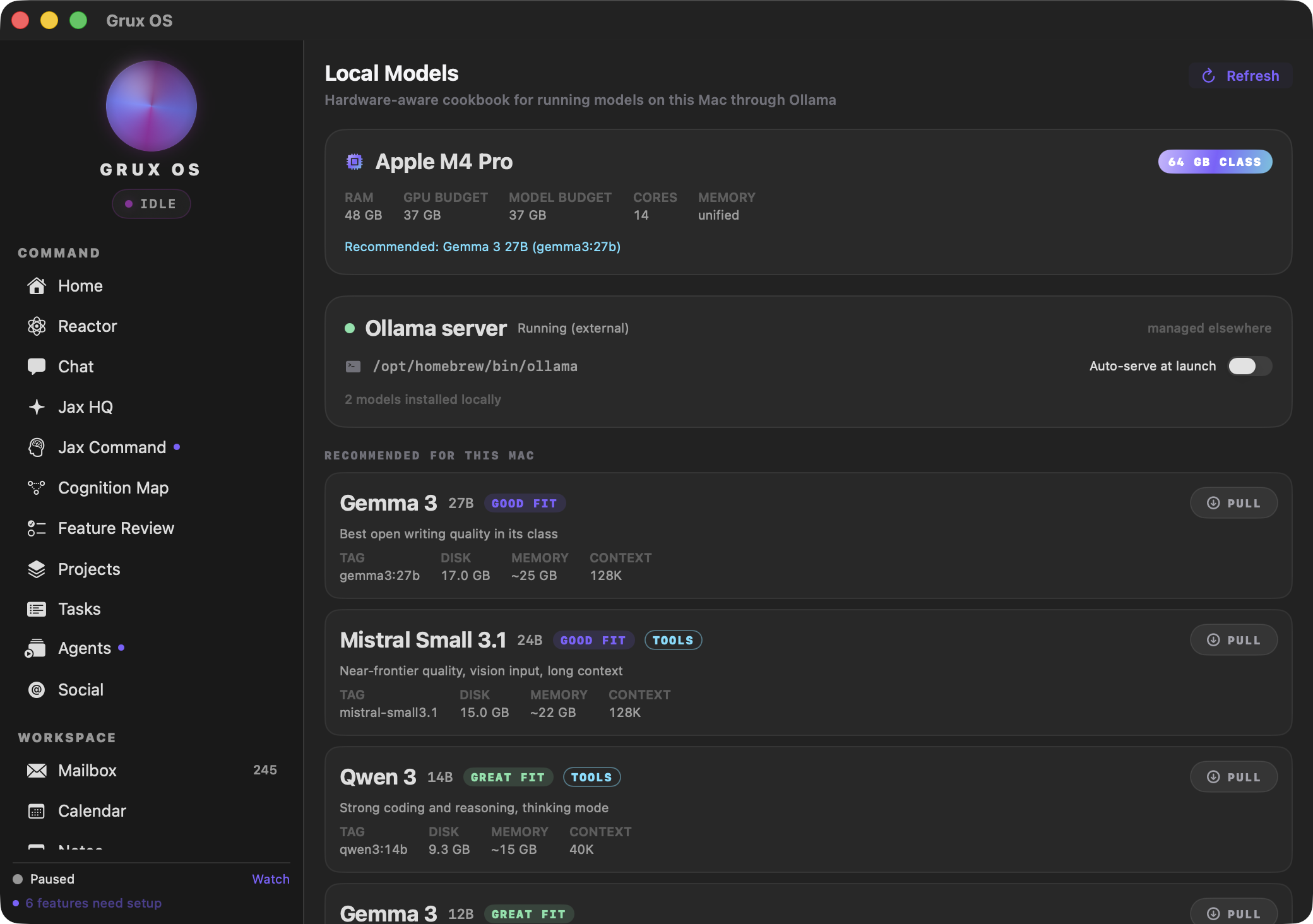
Grux reads your hardware and tells you which local models actually fit it, so you
can run the whole thing without sending a token to anyone.
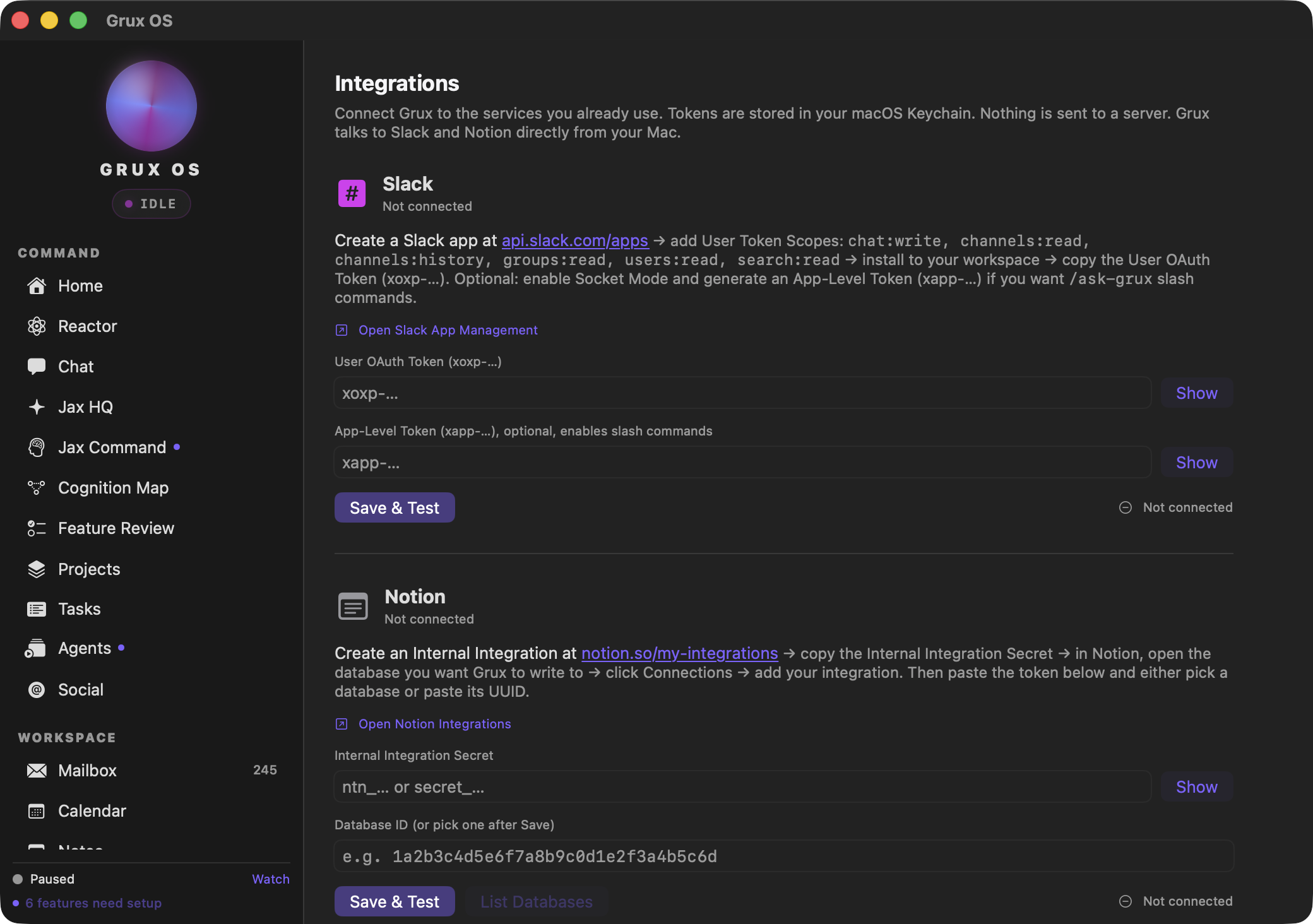
Credentials go to your Keychain and services are called directly from your
machine. There is no server in the middle because there is no server.
These are the real interface, not mockups. Two surfaces rather than a gallery,
because the rest of the app is full of the author's own mail and calendar and
those are not yours to look at.
Table of contents
- What it actually does
- What it costs
- Requirements
- Building
- First run
- Permissions, and what each one buys
- Privacy posture
- Feature tiers
- The phone companion
- Repository layout
- Tests
- Who made this
- Security
- Contributing
- License
What it actually does
The short version: one window, a sidebar of surfaces, and an assistant that can
reach the things a Mac assistant should be able to reach.
- Chat with tool use, against Anthropic or a local model.
- Local models through Ollama, so you can run the whole thing without sending
a token to anyone. - Mailbox, Calendar, Contacts, Notes, Documents against your real accounts,
not a hosted copy of them. - Meetings that record both the microphone and system audio, transcribe on
device with WhisperKit, and never upload the raw audio. - Projects, Task Stack, Schedules, Skills, Commands for the work around the
work. - Research over the web, with a search key you supply.
- A shell that runs real commands behind a path allowlist, a command
denylist, a rate limit, and an audit log. - Approvals, which is where anything sensitive stops and waits for you.
Every one of those is a real surface in the app. None of them is a stub.
What it costs
Nothing, to Grux. It is MIT licensed and there is no hosted component.
You pay your model provider directly, at their prices, on your own account. Grux
never proxies a request through anything we run, so there is no markup and no
middleman with a copy of your prompts.
If you run a local model through Ollama, it costs nothing at all.
Requirements
- macOS 14 (Sonoma) or later, Apple silicon
- Xcode 16 or later (Swift 6.0+).
Package.swiftsaysswift-tools-version:5.9,
butswift-transformerspullsswift-jinja2.x, which is written against
tools-version 6.0, so an older toolchain cannot resolve the dependency graph - An Anthropic API key, or Ollama running locally
Dependencies are deliberately thin. The only direct one is
WhisperKit for on-device speech, which
pulls in Apple's own packages plus HuggingFace's swift-transformers. There is no
analytics SDK, no crash reporter, and no telemetry package in the tree. You can
check that yourself in Grux-Mac/Package.resolved.
Building
git clone https://github.com/dotcomjack/grux.git
cd grux/Grux-Mac
./build.sh
That builds a release binary, assembles Grux.app, signs it, installs it to/Applications, and opens it.
On signing. macOS keys every permission grant to the signing identity, sobuild.sh pins one to stop the app re-prompting on every rebuild. If you do not
have that certificate, and you will not, it falls back to an ad hoc signature and
says so. The app runs fine; you will just re-grant permissions after a rebuild.
Set GRUX_SIGN_ID to your own identity hash to make grants stick:
security find-identity -v -p codesigning        # find yours
GRUX_SIGN_ID=<your-identity-hash> ./build.sh
Distributable builds. GRUX_RELEASE=1 ./build.sh signs with aDeveloper ID Application certificate and writes the artifact to your Desktop
without installing it, because signing with a different identity would revoke the
dev install's permission grants.
Add GRUX_NOTARIZE=1 to notarize and staple. Authentication is either an App
Store Connect API key, which is preferred because it works unattended:
GRUX_RELEASE=1 GRUX_NOTARIZE=1 \
  ASC_KEY=~/private_keys/AuthKey_XXXXXXXXXX.p8 \
  ASC_KEY_ID=XXXXXXXXXX ASC_ISSUER=<issuer-uuid> ./build.sh
or an Apple ID with an app-specific password, via APPLE_ID,APPLE_APP_PASSWORD and APPLE_TEAM_ID. Apple notarizes only Developer ID
signed code, so GRUX_NOTARIZE=1 without GRUX_RELEASE=1 is refused rather than
uploaded and rejected.
First run
The minimum useful setup is one key. Chat needs an Anthropic API key and
nothing else. Paste it in Settings and the app is usable.
Everything beyond that is opt in, and the app tells you what is missing rather
than failing quietly. Each sidebar row carries a dot when a feature it depends on
is unconfigured, and the setup sheet names the specific credential, permission or
step that is absent. A feature you never open never asks you for anything.
If you would rather not send anything to a hosted model at all, install
Ollama, pull a model, and Grux will use it. The Local Models
tab picks it up automatically.
Credentials go to the macOS Keychain under the service com.gruxai.grux. They are
never written to disk in plaintext and never leave the machine except to the
provider they belong to.
Permissions, and what each one buys
Grux asks for a lot, because it does a lot. Every one of these is optional, every
one is requested only when you first use the feature that needs it, and refusing
one disables exactly that feature and nothing else.
| Permission | What stops working without it |
|---|---|
| Microphone | Meetings (required). Voice input in Chat and Reactor |
| System audio recording | Meetings (required). This is the other half of the call, not your mic |
| Screen recording | Focus log and Terminal Focus (required). Screen context in Chat |
| Calendar | The Calendar tab (required). Agenda on Home, Chat calendar tools |
| Contacts | The Contacts tab (required). Contact lookup in Chat |
| Automation (AppleEvents) | Commands and Terminal Focus. App control from Chat |
| Accessibility | Focus log. Window and selection awareness in Chat |
| Notifications | Schedules, Workflows and Focus log alerts |
| Full disk access | Jax Command only. Never required |
The table above is derived from the same feature registry the app reads at
runtime, so it cannot drift from the real behaviour.
Grux is not sandboxed. ScreenCaptureKit, AppleEvents and cross app microphone
access are not available inside the App Sandbox, so the OS level path allowlist is
not available either. The filesystem boundary is therefore enforced in Swift, in
one file, and that file is the only path from the model to your disk. It carries a
read only root allowlist, a denylist covering .ssh, .aws, .env, the Keychain,
Mail, Messages and browser profiles, a size cap, a rate limit, a secret pattern
scan on everything it returns, and an audit log. That trade is written up in full
in SECURITY.md, including the parts it does not defend
against.
Privacy posture
- No account. There is nothing to sign up for.
- No server. There is no Grux backend. Nothing is proxied.
- No telemetry. No analytics SDK, no crash reporter, no usage beacon. Grep the
tree. - Your keys stay in your Keychain, and go only to the provider they belong to.
- Meeting audio is transcribed on device. The recording does not leave the
machine. - Everything the model reads from disk is logged to
~/Library/Application Support/Grux/fs-audit.log, including the denials. You
can read it at any time and it is plain text.
The one thing to be clear eyed about: when you use a hosted model, that provider
sees what you send it. Grux redacts secrets it recognises before anything goes
out, but a hosted model is a third party by definition. Run Ollama if that matters
to you.
Feature tiers
Core (25). Home, Chat, Approvals, Cognition Map, Projects, Task Stack,
Mailbox, Calendar, Notes, Documents, Contacts, Schedules, Folders, Research,
Skills, Compare, Local Models, Design Studio, Meetings, Speakers, Commands, Focus
log, Integrations, Outbound Webhooks, Settings.
Labs (14), badged BETA in the sidebar. Reactor, Jax Command, Feature Review,
Agents, Compose and send, Media Studio, Social, Workflows, Terminal Focus,
Self-Upgrade, Jax HQ, Meta Ads, Domain monitor, Phone companion.
Labs does not mean broken. It means the surface is real and the edges are not
sanded. A test asserts that every labs feature is badged and that no core feature
is, so the label cannot quietly go stale.
The phone companion
GruxPhone/ is a small iOS app that pairs with the Mac over your local network
and acts as a remote microphone and control surface. The link is
Curve25519 key exchange, ChaCha20-Poly1305 encryption and HMAC authentication, and
traffic never leaves your LAN.
It is a labs feature and it is opt in. If you never pair a phone, the Mac never
opens a listening socket.
Repository layout
Grux-Mac/            the macOS app (Swift package, builds Grux.app)
  Sources/Grux/      the app itself
  Sources/GruxShellCore/    PTY shell, safety gates, snapshot store, no UI
  Sources/GruxAgentCore/    agent orchestration, no UI
  Sources/GruxMCPServer/    read only MCP server for external agents
  Tests/GruxTests/   the suite
  docs/              the setup contract and its change record
  scripts/           the frozen-contract checker
  SECURITY.md        the threat model, in full
GruxPhone/           the iOS companion
GruxShellCore and GruxAgentCore are deliberately free of AppKit and SwiftUI, so
they can be used and tested without the UI stack.
Tests
cd Grux-Mac
swift test
Be aware that swift build does not compile the test target, so a green build
is not a green suite. The suite includes guards that are unusual and worth knowing
about before you touch them:
- The setup contract is frozen.
scripts/check-contract.pyfails if a
capability changes meaning without a dated amendment indocs/. - The identity scan fails on a personal name, address or account identifier
anywhere in the shipping tree. - The dash guard fails on an em dash or en dash anywhere that ships, comments
included. - Several guards test themselves, by planting the thing they detect and
asserting they catch it. A guard that cannot fail is not a guard.
Who made this
I have been building and shipping my own products since 2015. Right now that is
about a dozen of them, run by one person, from Detroit.
That is the reason this exists. Running a dozen small products alone was never
bottlenecked on code. It was the hour a day spent moving between a mail client, a
calendar, a terminal and four chat tabs that could not see any of it. So I built the
assistant I actually wanted: one that reads the window I am already in, handles the
mail, and takes the meeting notes.
Eight of the thirty-nine surfaces in here are literally the tooling that runs my
businesses. They ship instead of getting deleted, because taking them out would
misrepresent what you are downloading.
It was a hobby project for six months. It is not a startup, there is no account, and
there is nothing to buy. I am open sourcing it because it got useful enough to be
worth somebody else's time, and because software that reads your screen and your mail
should be readable back.
Expect rough edges. Fourteen surfaces say BETA because they earned it. If something
breaks, open an issue and tell me what you were doing.
Security
The threat model, the layered controls with file and line anchors, the denylist,
the audit log format, and an explicit section on what Grux does not defend
against are all in SECURITY.md.
To report a vulnerability, see SECURITY. Please do not open
a public issue for anything exploitable.
Contributing
Yes, please. CONTRIBUTING.md covers the frozen contract, the
house rules that are enforced by tests, and what a good pull request looks like
here. It is short and it will save you a round trip.
License
MIT. See LICENSE.
Standing on other people's work
Grux links the software below, and each of those licences asks to travel with
it. MIT is permissive about what you may do with the code and not about the
notice: retaining it is the whole of the obligation. Six of these are Apache
2.0, which asks for more, including reproducing any NOTICE file.
The full licence text of every one of them, and the NOTICE files where they
exist, are in THIRD-PARTY-NOTICES.md, which also ships
inside Grux.app so it reaches somebody who never opens this page. That file is
generated from Grux-Mac/Package.resolved, and a test fails if it drifts, so a
new dependency cannot ship uncredited.
| Package | Licence |
|---|---|
| swift-argument-parser | Apache 2.0 |
| swift-asn1 | Apache 2.0 |
| swift-collections | Apache 2.0 |
| swift-crypto | Apache 2.0 |
| swift-jinja | Apache 2.0 |
| swift-transformers | Apache 2.0 |
| whisperkit | MIT |
| yyjson | MIT |
Thanks in particular to WhisperKit,
which is why meeting transcription runs on the machine and the audio never
leaves it.
Reviews (0)
Sign in to leave a review.
Leave a reviewNo results found