agent-remote-control
Health Warn
- License — License: MIT
- Description — Repository has a description
- Active repo — Last push 0 days ago
- Low visibility — Only 6 GitHub stars
Code Pass
- Code scan — Scanned 12 files during light audit, no dangerous patterns found
Permissions Pass
- Permissions — No dangerous permissions requested
No AI report is available for this listing yet.
Send a message from anywhere and a team of specialized AI coding agents, running on your machine with the CLIs you already use, scopes the request, plans it, writes the code, reviews it and opens the pull request.
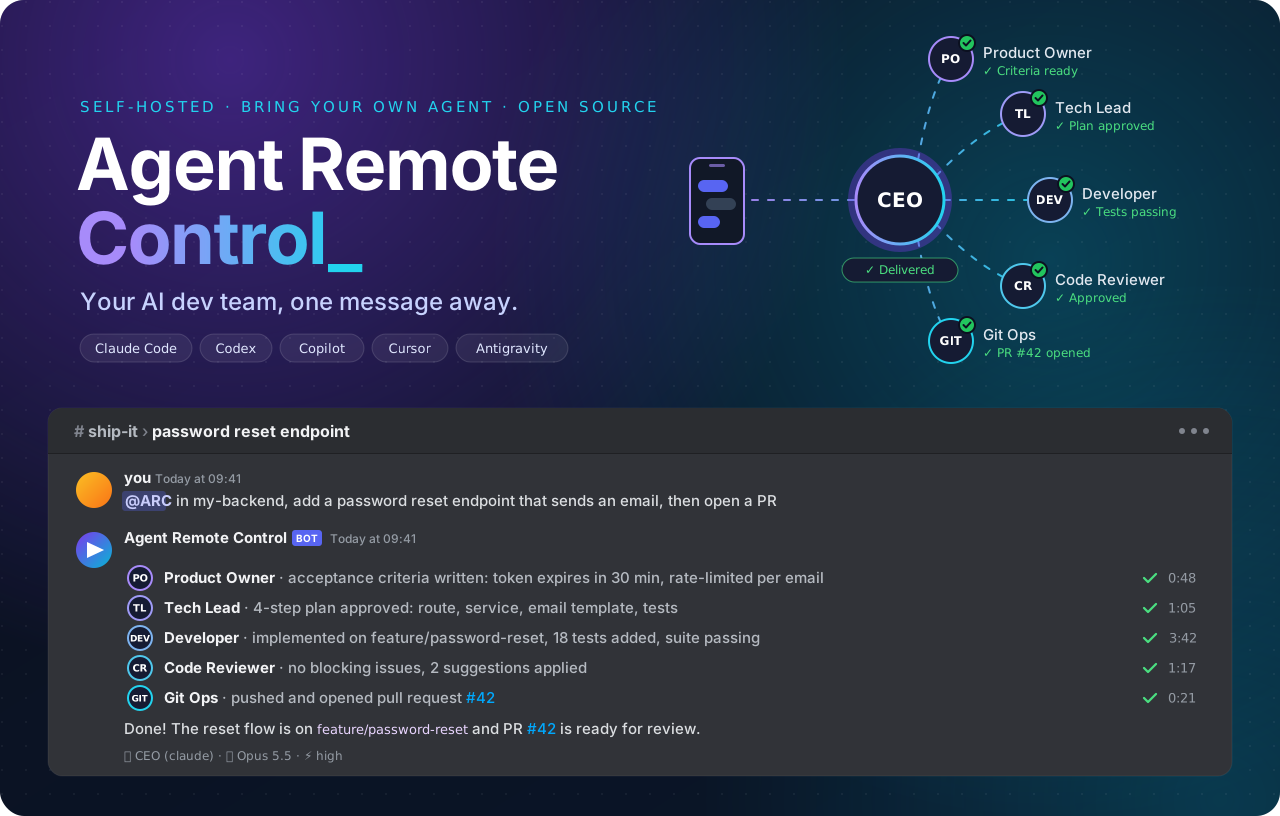
Send a message from anywhere and a team of specialized AI coding agents, running on your machine with the CLIs you already use, scopes the request, plans it, writes the code, reviews it and opens the pull request.





Quick Start · Why · Agents · The Team · How It Works · Discord Setup · Contributing
💡 Why Agent Remote Control?
AI coding agents are incredible, as long as you are sitting in front of the terminal that runs them. Agent Remote Control takes the desk out of the equation. It plugs Claude Code, Codex, Copilot, Cursor and Antigravity into Discord, wraps them in a team of specialized personas and lets you drive real work on real repositories from your phone.
- 📱 Code from anywhere. On the couch, on the train or in the coffee line: if you can open Discord, you can ship.
- 👥 A team, not a single agent. A CEO agent talks to you, scopes the request and delegates to a Product Owner, Tech Lead, Developer, Code Reviewer and Git Ops agent, in parallel when it can.
- 🔌 Bring your own agent. Five agent CLIs supported out of the box. Switch with
/agent, pick the model and effort with/model, tune each persona separately with/profiles, and every agent keeps its own session. - 🏠 Self-hosted, your credentials. Repositories, SSH keys and CLI logins stay on your machine. No hosted middleman and no extra API keys: it reuses the subscriptions you already have.
- 👀 Watch it work, live. Reasoning and tool calls stream into the Discord thread as they happen, with a typing indicator and rate-limit-safe updates.
- 🙋 Agents ask, you answer. When something is ambiguous, agents ask you questions one at a time, right in the chat.
- 🧵 One thread, one task. Each server thread is an isolated session; DMs keep a continuous one. Sessions survive restarts and resume where they stopped.
- 🛑 Steer or stop anytime. Send a follow-up while Claude Code works to steer it, or
/cancelto abort the turn. - 🌍 Speaks your language. Answers follow the language you write in; agents talk to each other in English.
- 🧱 Built to be extended. Clean Architecture with Ports & Adapters: Discord is the first channel, ACP is the agent contract, and new channels or agents are adapters away.
🚀 Quick Start
You need Node.js 24+, Git and at least one supported agent CLI installed and logged in. A Discord bot token is needed only for the Discord bot; the web interface works without it.
git clone https://github.com/douglasjunior/agent-remote-control.git
cd agent-remote-control
pnpm install                 # pnpm is pinned through the packageManager field
cp .env.example .env         # then set DISCORD_BOT_TOKEN to use the Discord bot
pnpm dev                     # server and web interface together
To use Discord, invite the bot to your server (step by step), send it a DM or mention it in a channel, pick the agent, model and effort from the numbered menu, and watch your task run. To use the browser instead, follow Web interface.
[!WARNING]
The agents run with full autonomy on the host machine. Claude Code runs inbypassPermissionsmode, Copilot withallow_all, and Codex and Cursor without approvals or sandbox. Anyone who can message the bot can execute commands with your credentials. Keep the bot in a private server with people you trust, and consider running it on a dedicated machine, VM or container. The same applies to the web access token: whoever has it can run agents on the host, so never share it or expose the server port to untrusted networks.
🌐 Web interface
A browser interface to chat with the agents without Discord. It is a separate app (packages/web) that talks to the server over a WebSocket at /ws.
- Start the server (
pnpm dev:server, orpnpm devto start the server and the web app together). - Copy the access token from the server log (
Web interface access token: ...), or fromDATA_DIR/web/access-token. In Docker, rundocker logs <container>. - Open the web app and paste the token on first use. A
#token=<token>fragment in the URL also works; it is stored and removed from the address bar.
| Mode | Command | URL |
|---|---|---|
| Development | pnpm dev:web |
http://localhost:5173 |
| Production build | pnpm build && pnpm preview:web |
http://localhost:4173 |
| Production | nginx serving packages/web/dist |
your domain |
Vite (dev and preview) proxies /ws and /health to the server, using the PORT from the root .env (default 3000), so the browser sees a single origin and the server's origin check passes. If the web app reaches the server directly instead, list its origin in WEB_ALLOWED_ORIGINS.
nginx example
server {
  listen 80;
  server_name arc.example.com;

  root /srv/agent-remote-control/web;   # a copy of packages/web/dist
  index index.html;

  location / {
    try_files $uri /index.html;
  }

  location /ws {
    proxy_pass http://127.0.0.1:3000;
    proxy_http_version 1.1;
    proxy_set_header Upgrade $http_upgrade;
    proxy_set_header Connection "upgrade";
    proxy_set_header Host $host;
  }

  location /health {
    proxy_pass http://127.0.0.1:3000;
    proxy_set_header Host $host;
  }
}
| Variable | Description | Default |
|---|---|---|
WEB_ENABLED |
Set to false to leave the web channel out of the server |
true |
WEB_ACCESS_TOKEN |
Access token; generated into DATA_DIR/web/access-token when empty |
(generated) |
WEB_ALLOWED_ORIGINS |
Extra browser origins (comma-separated) allowed to open the WebSocket | (same origin only) |
🤖 Supported Agents
| Agent | Command on PATH |
How it connects | Setup |
|---|---|---|---|
| Claude Code | claude |
Official ACP adapter @agentclientprotocol/claude-agent-acp (bundled) |
Install and log in to Claude Code |
| OpenAI Codex | codex |
ACP adapter @agentclientprotocol/codex-acp (bundled) |
codex login |
| GitHub Copilot | copilot |
Native ACP mode (copilot --acp) |
copilot login |
| Cursor | cursor-agent or agent |
Native ACP mode (cursor-agent acp) |
cursor-agent login |
| Google Antigravity | agy |
Built-in ACP ↔ agy bridge |
Install and log in to the Antigravity CLI |
You only need one of them. An agent is listed only when its command is on the PATH (including Claude Code and Codex, whose adapters ship with the dependencies). The bot lists the available agents on the first message and you can switch at any time with /agent; an agent installed while the bot runs shows up on the next listing.
👥 Meet the Team
Every conversation is handled by a CEO agent that never touches the code itself: it talks to you, decides who does what and reviews the results before answering.
| Role | What it does |
|---|---|
| 🧭 CEO | Talks with you, scopes requests, delegates all hands-on work and reviews the results. |
| 🧑💼 Product Owner | Product discovery: requirements, business rules, flows and acceptance criteria. Interviews you until no loose end is left. |
| 🧠 Tech Lead | Architecture analysis, investigations, trade-offs and actionable implementation plans. |
| 🛠️ Developer | Implementation, refactoring, bug fixing, tests and local commits, following the target project's own conventions. |
| 🔍 Code Reviewer | Unbiased review in a fresh session against project conventions, security and correctness. Can publish comments on PRs. |
| 🔀 Git Ops | Clones and locates repositories, pulls, pushes, rebases, opens pull requests and sets up SSH keys. |
🧠 How It Works
flowchart LR
    U(["📱 You"]) -->|message| D["Discord Bot"]
    D --> O["Orchestrator<br/>turns · queue<br/>sessions"]
    O --> CEO{{"🧭 CEO"}}
    CEO --> PO["Product Owner"]
    CEO --> TL["Tech Lead"]
    CEO --> DEV["Developer"]
    CEO --> CR["Code Reviewer"]
    CEO --> GIT["Git Ops"]
    PO & TL & DEV & CR & GIT --> CLI["Agent CLI over ACP<br/>Claude Code · Codex<br/>Copilot · Cursor<br/>Antigravity"]
    CLI --> WS[("Workspace<br/>your repositories")]
    O -.->|live activity<br/>+ final answer| D
Every persona runs on the agent CLI you selected, over the Agent Client Protocol. The orchestrator keeps a queue per conversation, persists ACP sessions per role and project, and streams every thought and tool call back to the channel.
Full request lifecycle (sequence diagram)sequenceDiagram
autonumber
actor User as User (Discord)
participant DiscordBot as Discord Bot Handler
participant Orchestrator as ExecuteAgentTurnUseCase
participant AgentRegistry as AgentRegistryService
participant AgentPort as IAgentPort (AntigravityAdapter / ClaudeCodeAdapter / CopilotAdapter / CodexAdapter / CursorAdapter)
participant Demux as AgentStreamDemux
participant Workspace as Workspace (Files / Git)
participant AgentBridge as AgyBridgeServer / claude-agent-acp
User->>DiscordBot: Sends message (@bot or command)
DiscordBot->>DiscordBot: Creates / binds the session Thread in Discord
DiscordBot->>Orchestrator: execute({ channelId, threadId, prompt, onActivity })
Orchestrator->>AgentRegistry: getSystemPrompt('CEO', 'TECH_LEAD', 'DEVELOPER', ...)
AgentRegistry-->>Orchestrator: Returns agent instructions and turn reminders
Orchestrator->>AgentPort: connect() & createSession(workspacePath)
AgentPort->>AgentBridge: Starts ACP subprocess / session handshake
Orchestrator->>AgentPort: prompt(promptWithInstructions)
loop Turn Execution Streaming
AgentBridge-->>AgentPort: ACP notifications (ndjson)
AgentPort->>Demux: Processes event chunks
alt Thought Block
Demux-->>DiscordBot: Emits activity: thought
DiscordBot->>User: Updates reasoning embed in the Thread
else Tool Call (Git / Files)
Demux-->>DiscordBot: Emits activity: tool (in_progress)
DiscordBot->>User: Shows tool status (e.g. "Running git clone...")
AgentBridge->>Workspace: Runs command (clone / checkout / edit)
Workspace-->>AgentBridge: Tool output
Demux-->>DiscordBot: Emits activity: tool (completed)
DiscordBot->>User: Updates tool status (e.g. "✅ git clone completed")
end
end
AgentBridge-->>AgentPort: Final turn event (result + usage)
AgentPort-->>Orchestrator: Consolidated agent message + token metrics
Orchestrator-->>DiscordBot: TurnResult (completed)
DiscordBot->>User: Posts the consolidated final answer in the Thread
📋 Prerequisites
- Node.js
>=24 - pnpm: the repository pins its version in the
packageManagerfield, socorepack enableis enough. - Git installed and configured
- At least one agent installed and authenticated, with its command on the
PATH(an agent without it is not offered):- Claude Code CLI (
claudeon thePATH, installed and authenticated by the user). The official ACP adapter@agentclientprotocol/claude-agent-acpships with the dependencies and uses theclaudefrom thePATH; when it is missing, it falls back to the binary bundled in the Claude Agent SDK. Claude Code sessions load the user's settings (~/.claude/settings.json,CLAUDE.md, hooks and skills) and run inbypassPermissionsmode, which Claude Code refuses when the process runs asrootwithoutIS_SANDBOX=1; - OpenAI Codex CLI (
codexon thePATH, authenticated withcodex login). The ACP adapter@agentclientprotocol/codex-acpships with the dependencies; sessions run in full-access mode, with no approval requests and no sandbox; - GitHub Copilot CLI (
copiloton thePATH, authenticated withcopilot login). Sessions run with tool autonomy (allow_all) enabled; - Cursor CLI (
cursor-agentoragenton thePATH, authenticated withcursor-agent login). Sessions run without interactive approvals and without a sandbox; - Google Antigravity CLI (
agyon thePATH).
- Claude Code CLI (
⚙️ Environment Variables
Copy the example file to .env at the project root and configure your credentials:
cp .env.example .env
| Variable | Description | Where to Get It in Discord | Default |
|---|---|---|---|
DISCORD_BOT_TOKEN |
Bot secret token | Bot tab > Token section > Reset Token button | (Required for the Discord bot) |
DISCORD_GUILD_ID |
Discord server ID | Right-click your server > Copy Server ID (Developer Mode enabled) | (Optional) |
WORKSPACE_DIR |
Root directory where repositories are cloned. On every startup, the application regenerates the CEO's AGENTS.md and skills in it (.agents/skills/, linked at .claude/skills); manual edits to these files are overwritten |
Local machine configuration | ./workspaces |
DATA_DIR |
Directory for persisted data (sessions.json with the ACP session ids of each conversation, agent-settings.json with the agent, model and effort of each profile, and preferences.json with global preferences such as the user language) |
Local machine configuration | ./data |
LOG_RETENTION_DAYS |
Days the log files in DATA_DIR/logs (server-YYYY-MM-DD.jsonl, one JSON record per line with conversationId when there is one) are kept |
14 |
|
SESSION_IDLE_TIMEOUT_MS |
Idle time (ms) until a conversation's agent session is closed | Local machine configuration | 1800000 (30 min) |
QUESTION_TIMEOUT_MS |
Time (ms) the user has to answer an agent's question; afterwards the recommended answer is assumed and the agent is told the user was absent. 0 disables the timeout |
Local machine configuration | 300000 (5 min) |
SHELL_COMMAND_ENABLED |
Enables running shell commands directly on the host, bypassing the agents (/shell on Discord). Disabled by default: when true, anyone who can reach the bot can execute arbitrary commands, so enable it only on a private server |
Local machine configuration | false |
SHELL_COMMAND_TIMEOUT_MS |
Time (ms) after which a shell command is aborted | Local machine configuration | 60000 |
SHELL_COMMAND_MAX_OUTPUT_CHARS |
Maximum characters of output kept (the end is kept) | Local machine configuration | 8000 |
STT_PROVIDER |
Speech-to-text provider for audio attachments and voice messages: whisper-cpp (CPU, needs whisper-cli and ffmpeg on the PATH) or none (audio is sent to the agent as a regular attachment) |
Local machine configuration | whisper-cpp |
STT_MODEL |
whisper.cpp model name; the file ggml-<name>.bin is read from DATA_DIR/models (the Docker image downloads it on startup) |
whisper.cpp models | small |
STT_MODEL_PATH |
Explicit path to a whisper.cpp model file; overrides STT_MODEL |
Local machine configuration | (Optional) |
STT_LANGUAGE |
ISO 639-1 language code of the speech, or auto to detect it |
Local machine configuration | auto |
STT_THREADS |
CPU threads used by the transcription | Local machine configuration | Number of CPUs |
STT_TIMEOUT_MS |
Maximum time (ms) of each transcription step | Local machine configuration | 300000 (5 min) |
STT_WHISPER_BIN / STT_FFMPEG_BIN |
Executables used by the whisper-cpp provider |
Local machine configuration | whisper-cli / ffmpeg |
PORT |
Port for the NestJS HTTP server | Local machine configuration | 3000 |
WEB_ENABLED / WEB_ACCESS_TOKEN / WEB_ALLOWED_ORIGINS |
Web interface settings; see Web interface | Local machine configuration | true / (generated) / (same origin only) |
🐳 Docker
Every release is published to Docker Hub as douglasjunior/agent-remote-control (linux/amd64 and linux/arm64) with the tags X.Y.Z, X.Y, X and latest. The image runs as the non-root node user and ships Git and the GitHub CLI.
Agent CLIs
- OpenAI Codex is always available: it comes with the application dependencies.
- Claude Code, GitHub Copilot, Cursor and Antigravity are made available when the container starts, according to
ARC_AGENTS(comma-separated:claude,copilot,cursor,antigravity). Claude Code uses the binary bundled with the dependencies; the others are downloaded by their installers, which fetch the latest version. An already installed CLI is kept; setARC_AGENTS_UPDATE=trueto install it again on startup. - By default the installation is lost when the container is recreated. To install each CLI only once, mount a volume at
/home/node/.local(optional; it also keeps the installed versions fixed until you update them).
Authentication
Claude Code, Codex, Cursor and Antigravity keep their login in files, so mounting their configuration directories reuses the login of the host. Mount only the ones for the agents you use:
| Agent | Host path | Container path |
|---|---|---|
| Claude Code | ~/.claude and ~/.claude.json |
/home/node/.claude and /home/node/.claude.json |
| OpenAI Codex | ~/.codex |
/home/node/.codex |
| GitHub Copilot | ~/.copilot |
/home/node/.copilot |
| Cursor | ~/.cursor |
/home/node/.cursor |
| Antigravity | ~/.gemini |
/home/node/.gemini |
GitHub Copilot may keep its login in the system keychain of the host, which the container cannot read. Pass a token instead: COPILOT_GITHUB_TOKEN for Copilot and GH_TOKEN for the gh and git of the agents, for example -e COPILOT_GITHUB_TOKEN="$(gh auth token)". The variables are read when the container is created.
The mounted files must be readable and writable by the container user, UID 1000 (node) by default. /app/data (sessions and settings) and /app/workspaces (cloned repositories) hold the state worth keeping.
docker run
docker run -d --name agent-remote-control \
  --restart unless-stopped \
  -e DISCORD_BOT_TOKEN=your-discord-bot-token-here \
  -e DISCORD_GUILD_ID=your-server-id \
  -e ARC_AGENTS=claude,copilot,antigravity \
  -e COPILOT_GITHUB_TOKEN="$(gh auth token)" \
  -e GH_TOKEN="$(gh auth token)" \
  -v arc-agents:/home/node/.local \
  -v arc-data:/app/data \
  -v arc-workspaces:/app/workspaces \
  -v ~/.claude:/home/node/.claude \
  -v ~/.claude.json:/home/node/.claude.json \
  -v ~/.codex:/home/node/.codex \
  -v ~/.copilot:/home/node/.copilot \
  -v ~/.gemini:/home/node/.gemini \
  douglasjunior/agent-remote-control:latest
Create ~/.claude.json beforehand if it does not exist; otherwise Docker creates a directory with that name.
Web interface in Docker. The image contains the server only. Publish the port (-p 3000:3000) and read the access token with docker logs agent-remote-control; the published port is protected by that token and by the origin check, but anyone who obtains the token can run agents on the container, so bind it to 127.0.0.1 (-p 127.0.0.1:3000:3000) unless a reverse proxy sits in front. Serve packages/web/dist with nginx or run pnpm preview:web on the host.
Rootless Docker
Check with docker info | grep -i rootless. The root of the container is your user on the host, so the mounted files only belong to someone the container can read when it runs as root. Add:
  --user 0:0 \
  -e HOME=/home/node \
  -e IS_SANDBOX=1 \
IS_SANDBOX=1 lets Claude Code run in bypassPermissions mode as root.
Host user other than UID 1000 (regular Docker)
Files owned by another UID, such as 0600 tokens, are unreadable for node. Derive an image whose node user has your UID (id -u, here 1001) and run it in place of the original:
FROM douglasjunior/agent-remote-control:latest
USER root
RUN usermod -u 1001 node && groupmod -g 1001 node \
  && chown -R node:node /app/data /app/workspaces
USER node
docker-compose.yml
services:
  agent-remote-control:
    image: douglasjunior/agent-remote-control:latest
    restart: unless-stopped
    # Rootless Docker: run as root, which is your user on the host
    # user: "0:0"
    environment:
      DISCORD_BOT_TOKEN: your-discord-bot-token-here
      DISCORD_GUILD_ID: your-server-id
      ARC_AGENTS: claude,copilot,antigravity
      COPILOT_GITHUB_TOKEN: ${COPILOT_GITHUB_TOKEN}
      GH_TOKEN: ${GH_TOKEN}
      # Rootless Docker only
      # HOME: /home/node
      # IS_SANDBOX: "1"
    volumes:
      # Optional: installs the ARC_AGENTS CLIs only once
      - arc-agents:/home/node/.local
      - arc-data:/app/data
      - arc-workspaces:/app/workspaces
      # Keep only the agents you use
      - ${HOME}/.claude:/home/node/.claude
      - ${HOME}/.claude.json:/home/node/.claude.json
      - ${HOME}/.codex:/home/node/.codex
      - ${HOME}/.copilot:/home/node/.copilot
      - ${HOME}/.cursor:/home/node/.cursor
      - ${HOME}/.gemini:/home/node/.gemini

volumes:
  arc-agents:
  arc-data:
  arc-workspaces:
Start it with export COPILOT_GITHUB_TOKEN="$(gh auth token)" GH_TOKEN="$(gh auth token)" followed by docker compose up -d. The full-autonomy warning applies: the agents run inside the container with the credentials you mount into it.
🔧 Discord Setup
For the Discord bot to authenticate, listen to messages, reply in direct messages (DM) or create threads in servers:
Step 1: Create the Application
- Go to the Discord Developer Portal and click New Application.
- Give your application a name (e.g.
Agent Remote Control).
Step 2: Configure the Bot, Get the DISCORD_BOT_TOKEN and Enable the Intents
- In the left sidebar, click Bot.
- Bot username: Choose a unique name (if the red error "username: Too many users have this username" appears, change it to a unique identifier such as
Jarvis-ARC-Devand click Save Changes). - Bot token (
DISCORD_BOT_TOKEN):- In the Token section, click the blue Reset Token button.
- Confirm the action and copy the generated token into the
DISCORD_BOT_TOKENvariable in.env.
- Privileged Gateway Intents:
- Scroll down to the Privileged Gateway Intents section.
- Enable the following options with the toggle on the right:
- ✅ Server Members Intent: required to identify members and senders.
- ✅ Message Content Intent: mandatory for the bot to read the text of the prompts typed by users.
- Click the green Save Changes button at the bottom of the page.
Step 3: Get the DISCORD_GUILD_ID (Optional, for a Server)
- In the Discord app (desktop or web), open User Settings (gear icon next to your profile) > Advanced tab.
- Enable Developer Mode.
- Close the settings.
- In Discord's left sidebar, right-click your server icon and select Copy Server ID.
- Paste the value into
DISCORD_GUILD_IDin.env. (With the variable set, the/agent,/model,/profiles,/usage,/canceland/languagecommands are registered only in this server, taking effect immediately; without it, registration is global.)
Step 4: Invite the Bot to the Server
- In the Developer Portal, go to OAuth2 > URL Generator.
- In the Scopes section, select:
botapplications.commands
(Important: select only these two scopes so the generated URL does not require a redirect server.)
- In the Bot Permissions section, select the required permissions:
- Send Messages
- Send Messages in Threads
- Create Public Threads
- Create Private Threads
- Read Message History
- View Channels
- Add Reactions
- Embed Links
- Attach Files
- Use Slash Commands
Permissions Integer:
380104727616(or selectAdministratorif it is your personal server). - Copy the URL generated at the bottom of the page (Generated URL field), paste it into your browser and select your server to authorize the bot.
Step 5: Talking to the Bot
Agent Remote Control works through a Discord Bot connected to your development environment. You can talk to it in two ways:
- In Private (Direct Message / DM):
- After inviting the bot to your server, click the bot's profile in the member list on the right and click Send Message (open a private DM).
- In the private chat, mentioning
@Botis optional. Just type your task directly. The bot replies in real time in the DM, keeping the conversation history.
- In Server Channels:
- In any text channel the bot has access to, mention it:
@BotName Create a healthcheck route. - The bot automatically opens an isolated Thread for that task, keeping the history organized and streaming progress with anti-rate-limit throttling.
- In any text channel the bot has access to, mention it:
- Choosing Agent, Model and Effort:
- On the first message, if there is no saved configuration yet, the bot lists the numbered agents whose CLI is on the
PATH(any of Antigravity, Claude Code, GitHub Copilot, OpenAI Codex and Cursor). Reply with the agent number, then with the model number and, if the model has effort levels, with the effort number. The task you sent runs right after. - Type
/agentto switch agents (followed by choosing its model and effort) and/modelto change only the model and effort of the current agent./agentand/modelapply to every profile. Each conversation keeps the session of each agent, so going back to an agent resumes the conversation it already had. - Type
/profilesto configure agent, model and effort per profile (CEO, Product Owner, Tech Lead, Developer, Code Reviewer and Git Ops): reply with one or more numbers separated by commas, choose the agent, model and effort, and repeat for other profiles;0exits. A profile whose saved agent is not on thePATHis listed with(not installed); its turns fail until the agent is installed again or another one is chosen. Changes apply to the next turn or delegation without interrupting work in progress. - Type
/usageto see the usage limits of every available agent, one section per agent. - Type
/shell <command>(e.g./shell df -h) to run a command directly on the host, in the workspace directory, without going through the agents. The answer is visible only to you and shows the output and exit code. The command is only available whenSHELL_COMMAND_ENABLED=true;/cancelstops it. - Every answer ends with a footer showing the role, agent, model and effort used, for example:
🤖 CEO (claude) · 🧠 Opus 5.5 · ⚡ high.
- On the first message, if there is no saved configuration yet, the bot lists the numbered agents whose CLI is on the
- Messages During a Task:
- With Claude Code, a message sent while the agent is working joins the task in progress (steering) and is answered along with it. With Antigravity, which does not support steering, the message waits for the previous task to finish.
- Turn Cancellation:
- Type
/cancelat any time (in the DM or in the server thread) to immediately abort the running turn or end an agent or model selection in progress.
- Type
Language
- The bot's fixed UI text (menus, prompts for selections, status messages) is in English.
- Agent-generated text shown to you (answers, questions, decisions and delegation results) follows a global language preference stored in
DATA_DIR/preferences.json. - On the first conversation with no saved preference, the CEO detects the language you write in and the backend saves it. When the language cannot be detected, English is used.
- Type
/languageto change it: the bot asks for the language and your next message sets it. Any language name works, e.g.Spanishorportuguês. - Agents talk to each other in English, regardless of the preference.
📘 Using the Bot Day to Day
What Can the Bot Do?
- Clone repositories: Safely clones Git projects into isolated directories under
./workspaces/<repo>. - Explore codebases: Inspects files, existing architecture, dependencies, scripts and documented rules.
- Discover and plan before coding: Turns vague ideas into acceptance criteria and breaks complex tasks into executable steps before any code changes.
- Implement and refactor: Writes clean code that adapts to the target project's architecture (Clean Architecture, MVC, microservices, etc.).
- Ensure quality: Identifies the target project's test, lint and build tools, runs validations and gets an independent code review before finishing.
- Git operations: Creates topic branches, writes standardized commits (Conventional Commits in English), pushes code and opens pull requests.
Practical Interaction Examples
1. Clone a Repository
Send in the DM or mention in the channel:
Clone the repository https://github.com/user/my-backend.git and analyze the technologies used and the folder structure.
2. Plan a Feature (Plan Mode)
For medium- or high-complexity tasks, ask the bot to plan first without changing code:
In the my-backend project, draft a step-by-step plan to create a password reset endpoint that sends an email. List the affected files and the testing strategy, but do not change any files yet.
3. Implement an Approved Plan
After reviewing and agreeing with the plan presented by the agent:
The plan is approved. Go ahead and implement the changes and run the project's test suite to make sure everything passes.
4. Commit and Push the Changes
To save the work in version control:
Create the feature/password-reset branch in the my-backend project, commit the changes following Conventional Commits in English and push to the remote repository.
How Session Control Works
- Continuous Session in DM (Direct Message):
- All messages sent in the private conversation with the bot belong to the same active session. The agent remembers the repository you are working on, the files already read and previous instructions.
- To switch focus to another project or start a fresh context, just say: "Let's work on another project: clone https://...".
- Isolated Sessions per Thread in Servers:
- Each Thread opened in a server channel represents an isolated, independent agent session.
- How to open a new session: Go to the server's main channel and mention the bot with a new request (
@BotName ...). It automatically creates a new Thread with a clean session, with no interference from previous tasks.
🏗️ Architecture
A NestJS application built on Clean Architecture with Ports & Adapters and Use Cases. Business rules are fully decoupled from technology details (Discord.js, the ACP SDK, the file system and command execution), and the code is structured as autonomous vertical modules in packages/server/src/modules/:
agent(packages/server/src/modules/agent): integration layer with AI agents over ACP. Provides theIAgentPortport, theAbstractAcpAdapterbase adapter, the real-time stream demultiplexerAgentStreamDemux, theAcpAgentPortFactoryAdapterfactory and the concrete adaptersAntigravityAdapter(AgyBridgeServerbridge to the Google Antigravity CLI),ClaudeCodeAdapter(Claude Code CLI through the official ACP adapter@agentclientprotocol/claude-agent-acp),CodexAdapter(OpenAI Codex CLI through@agentclientprotocol/codex-acp),CopilotAdapter(GitHub Copilot CLI through its native ACP modecopilot --acp) andCursorAdapter(Cursor CLI through its native ACP mode).orchestrator(packages/server/src/modules/orchestrator): channel-agnostic orchestration engine. Contains theExecuteAgentTurnUseCaseandCancelAgentTurnUseCaseuse cases, session persistence management (ISessionStorePort) and reactive event coordination.agent-definitions(packages/server/src/modules/agent-definitions): registry and parameterization of agent personas (AgentRegistryService): CEO, Product Owner, Tech Lead, Developer, Code Reviewer and Git Ops.workspace(packages/server/src/modules/workspace): repository and workspace management (IGitPort,IWorkspacePort,PrepareWorkspaceUseCase).discord(packages/server/src/modules/discord): primary input adapter through the Discord Bot (Discord.js). Manages context threads, real-time activity streaming (thoughts and tool calls) and delivery of formatted final answers.
🧪 Development
Start the NestJS application in watch mode:
pnpm dev:server
To build and run the production bundle:
pnpm build
pnpm start:prod
The project targets 100% unit test coverage of executable production code lines, with end-to-end (e2e) tests for the entry points:
# All commands run from the repository root and apply to every package in `packages/`
pnpm test        # unit tests
pnpm test:cov    # unit tests with a coverage report
pnpm test:e2e    # end-to-end tests
pnpm ts          # TypeScript static type checking
pnpm lint        # static analysis with ESLint
pnpm format      # formatting and autofix via ESLint
🤝 Contributing
Contributions are very welcome, from bug reports and ideas to new agents and new channels (Slack, Telegram, WhatsApp…).
- Read
AGENTS.mdfor the architecture, conventions and mandatory rules, and the skills catalog for the rules of the module you are touching. - Fork the repository and create a topic branch.
- Make sure
pnpm ts,pnpm lintandpnpm testpass. - Write commit messages following Conventional Commits in English and open a pull request.
Found a bug or have an idea? Open an issue.
⭐ Star History
If Agent Remote Control saves you a trip to the desk, consider giving it a star. It helps other people find the project.
📄 License
MIT © Douglas Nassif Roma Junior
🌐 Author & More Projects
Discover more open-source libraries, creative animation engines, and developer tools at douglasjunior.work.
Reviews (0)
Sign in to leave a review.
Leave a reviewNo results found