agent-ping
Health Uyari
- License — License: Apache-2.0
- Description — Repository has a description
- Active repo — Last push 0 days ago
- Low visibility — Only 5 GitHub stars
Code Basarisiz
- rm -rf — Recursive force deletion command in Tools/make_bundle.sh
- rm -rf — Recursive force deletion command in Tools/sni_cpp_vs_host.sh
Permissions Gecti
- Permissions — No dangerous permissions requested
Bu listing icin henuz AI raporu yok.
Menu-bar panel that tells you which AI coding-agent session needs you right now. macOS + Linux, reads only the logs your tools already write, makes no network calls.
Agent Ping




When Qoder, Claude Code, Codex, ZCode, WorkBuddy and OpenCode are all open at once,
what you are missing is not another dashboard — it is "which one is my turn". Agent
Ping is a menu-bar panel: it reads the logs and local databases those tools already
write on your machine, works out who is running, who is queued, who stopped with an
error, who is sitting there waiting for an answer, and who just put up a claimable
reward; then it alerts you while you are not looking, and puts the session — or the
rewards screen — in front of you. No server, no account, no telemetry: the binary
makes no network calls (checked with nm -u, see
Privacy).
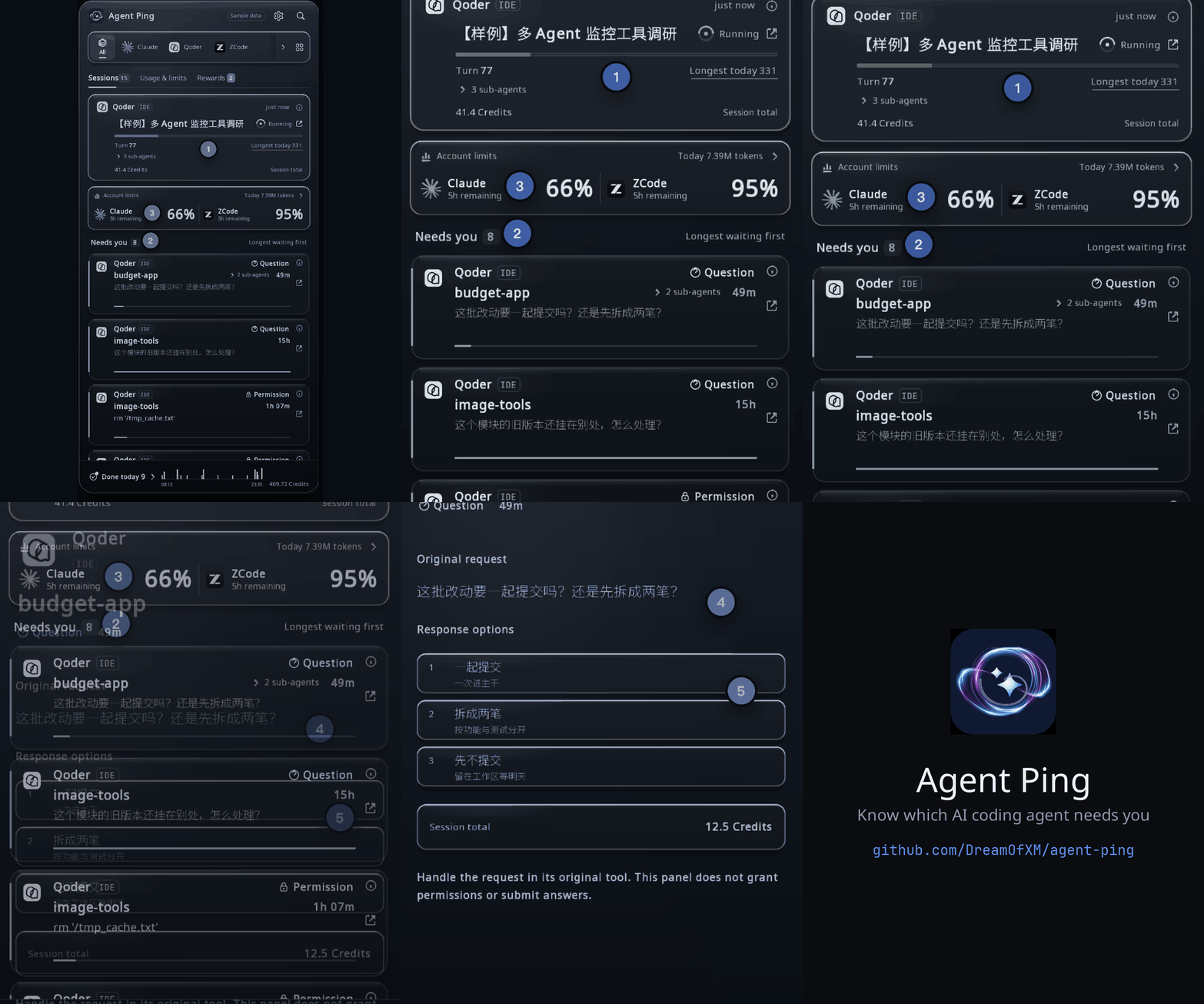
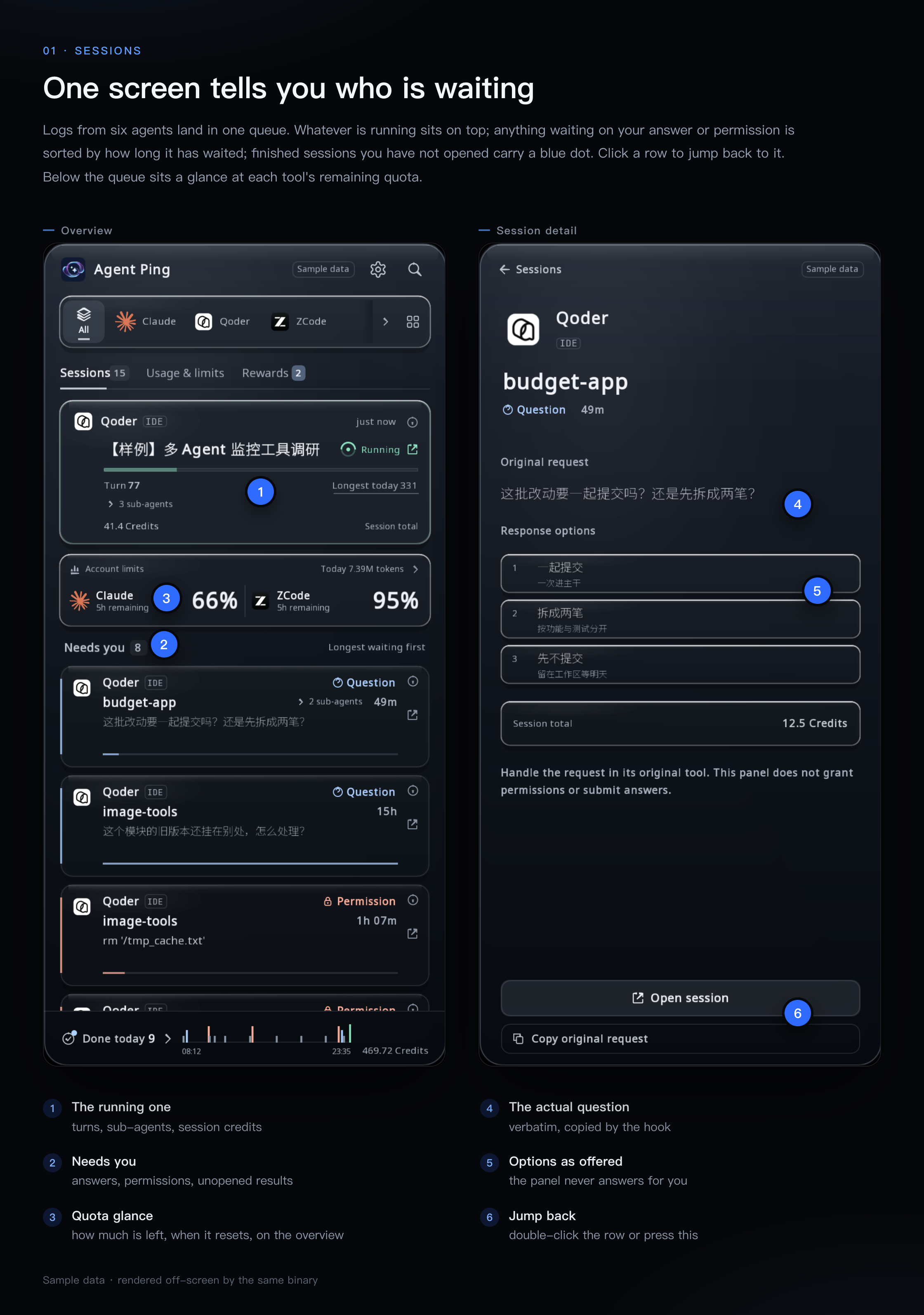
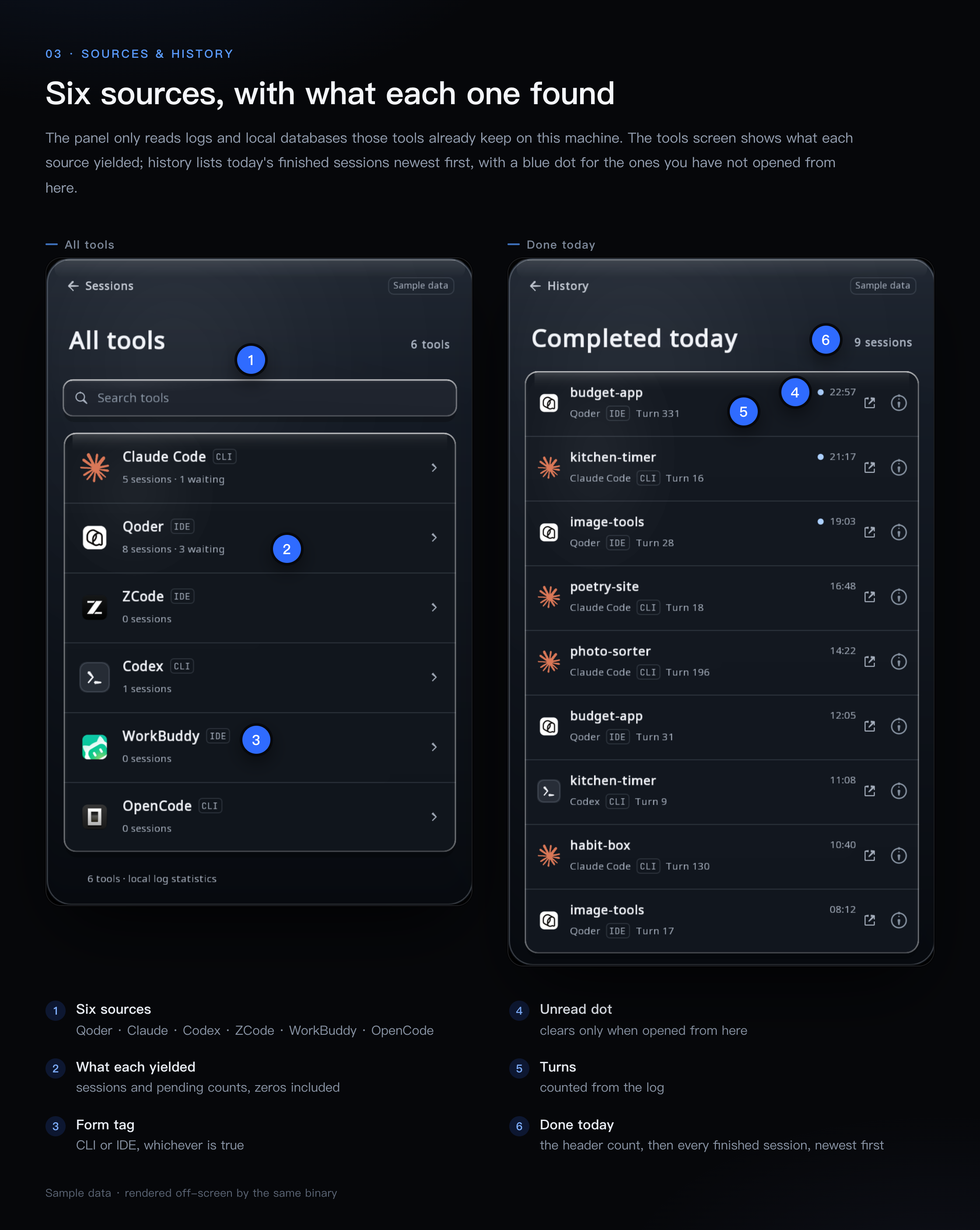
All three figures in this README are rendered offscreen by the binary this repo
builds (AGENTPING_FIXTURE=1), not staged. The Sample data pill in the header is
the product's own label: those numbers do not come from any real machine.
What it is, and what it deliberately is not
Is: a live state monitor, an alert layer, and a way back into the session that
pinged you. The unit of value is one row — one session, one state, one jump target.
Since v0.1 it also shows per-account quota and token usage, because "how much of my
5-hour window is left" is a right now question, not an accounting question. Since
October it also puts the reward-claim state three vendors write to their own disks on
screen — read-only, never claiming: clicking a card only brings that vendor's app to
the front.
Is not: a cost dashboard, and not an auto-claimer. It never converts anything into
a currency amount, never calls a billing API, never shows a quota it could not read
from a local log, and never presses Claim on your behalf. Where a source has no
field for something, the cell is not drawn — it is not filled with 0. One time
window only: today.
Screens
Ten views in one window. The rail at the top filters by tool; everything below it is
a view over the same scan round — the table folds Settings, Connect and Permission
into one row.
| View | What answers |
|---|---|
| Overview | one running card (turn, sub-agents, session credits), account quota preview, the Needs you queue longest-waiting first, and a footer of today's completions |
| Usage & limits | today's token total plus one card per tool: 5h / weekly remaining, this period's account balance where the vendor writes one, when each ends, and how stale the reading is |
| Rewards | the three vendors' reward cards: whatever is claimable now sorts first, with face value, streak and an expiry countdown on the card; a field the source cannot give stays undrawn |
| Account | one tool: total, hourly distribution, input / output / cache read / cache write, per-model split |
| Detail | the verbatim question and its options, or the failed command — opened with ⓘ on any row |
| History | completed sessions, newest first, 12 per page, more pages load as you scroll |
| Tools | which collectors are present on this machine and what each one yielded |
| Settings / Connect / Permission | toggles, hook wiring, and the Accessibility prompt |
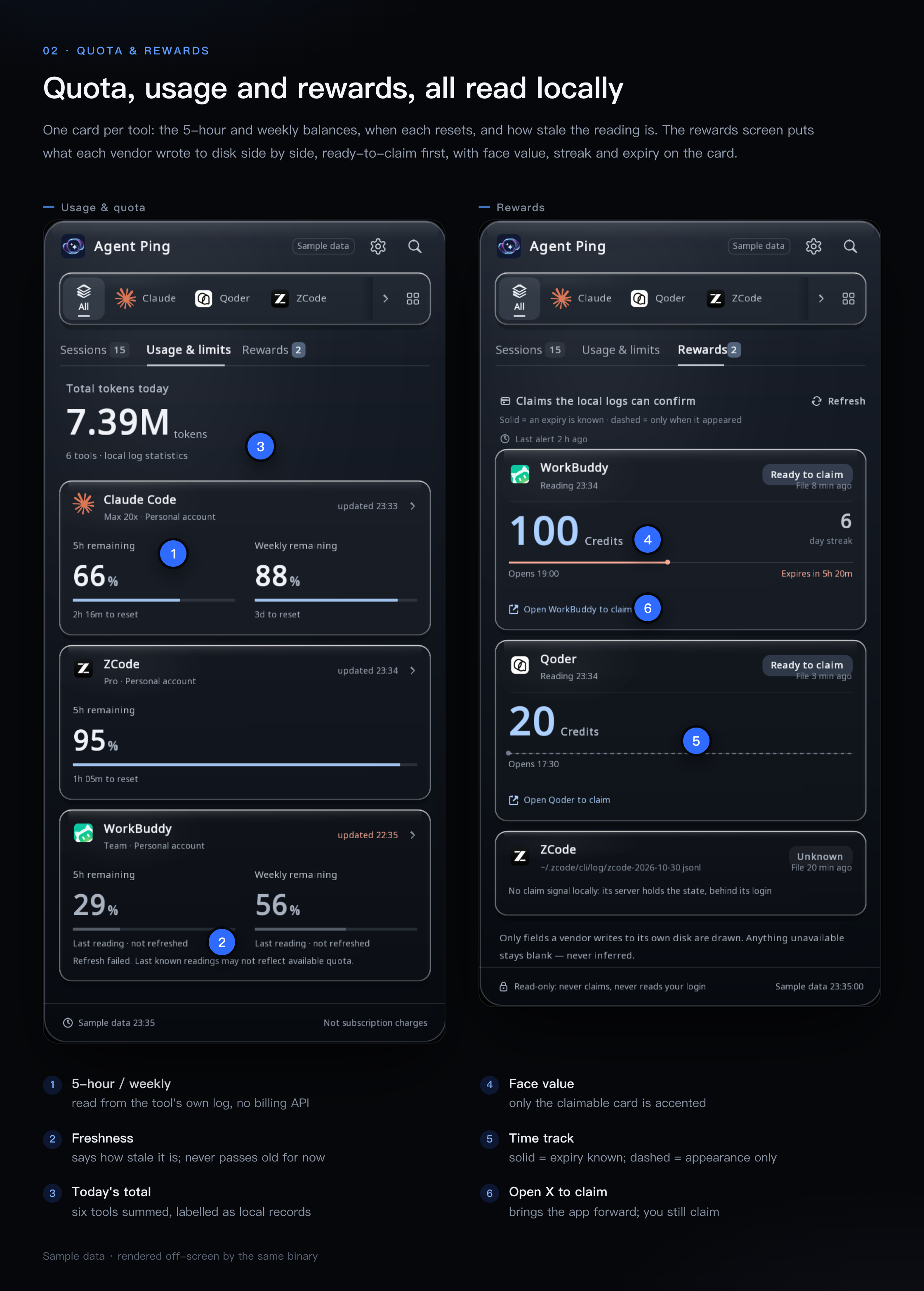
A reward card carries three different clocks: when the reading was taken, when the
source file was last written, and the footer's scan time. When they disagree, "we did
not refresh" and "that vendor wrote nothing" become two distinguishable answers.
Cross-platform
Both platforms are built and run in CI-by-hand on every release; the split is a
platform shim behind C headers (src/platform/), so the panel, scan layer and alert
judgement are one code path.
| macOS | Linux | |
|---|---|---|
| Window | borderless, transparent, follows the menu-bar item | same, via GLFW/X11 |
| Status item | NSStatusItem with a three-number label |
StatusNotifierItem over D-Bus (needs libdbus-1-dev; otherwise a stub with no tray icon) |
| Banner | UNUserNotificationCenter |
shells out to notify-send (from libnotify-bin) |
| Sound | afplay on a system sound |
paplay → pw-play → ffplay → canberra-gtk-play → aplay → cxplay, picked by what is installed and what the file format allows (aplay takes only .wav, paplay not) |
| Autostart | a plist under ~/Library/LaunchAgents |
an entry under $XDG_CONFIG_HOME/autostart |
| Jump into a session | URL scheme, AppleScript, or driving the tool's own ⌘K palette | open the session's working directory / activate the app. No palette driver. |
| Language | system locale, overridable | $LC_* / $LANG, overridable |
Interface text ships in six languages (zh, en, de, it, ja, ko) with a real dropdown
in Settings; fonts are baked per size at startup, so CJK is not a bolt-on.
How it behaves
These are deliberate choices, each of which cost a bug report to learn:
- Double-click a row to jump. A single mis-click costs a collapsed panel and an
app switch, so a row only fires on a second click on the same row within 0.5 s.
Small controls (ⓘ, the detail screen's Go to session, chips) stay single-click. - Cards do not move. Re-scans happen every 3 s and sessions gain output at
different times; sorting by "last activity" made rows jump out from under the
cursor. Each session gets a stable sequence number the first time the panel sees
it, so an established card never changes place. - A completed session carries an unread dot until you open it through this
panel. The watermark is persisted; on first run it starts at "now", so an existing
backlog does not arrive as 40 unread items. - The panel is as tall as its content (400–850 pt), and the wheel eases toward
its target instead of teleporting 40 pt per notch. - Toggles answer back. Flipping Sound plays one test chime immediately and
shows a toast, so you learn whether it works now rather than at the next alert. - Stale quota retreats. The overview only previews window readings ≤ 10 min old and
balance readings ≤ 30 min old; older ones move to the Usage screen with theirupdated HH:MMstamp instead of pinning a permanent red "needs refresh" to the first screen. - Rewards are read-only. The card draws only what each vendor writes into its own
store. Clicking it brings that app to the front and says so — Claim it inside that
app yourself — this layer never claims for you. The whole card is the hit area,
and the landing stops at the app.
Privacy — exactly what it reads
Everything below is a read of a file your tools already own. Nothing is uploaded.
The only files Agent Ping writes are listed after the table, and the two config
files are touched only when you install a hook (the Connect button orTools/install_hook.sh).
| Source | Path (macOS) | What is taken from it |
|---|---|---|
| Qoder CLI | ~/.qoder/projects/**/*.jsonl |
session id, title, cwd, timestamps, message.usage token/credit fields, user-record count |
| Claude Code | ~/.claude/projects/**/*.jsonl |
same, minus credits (the field does not exist there) |
| Codex | ~/.codex/sessions/** |
session_meta (cwd, session id), token_count records, outcome, rate_limits events |
| ZCode | ~/.zcode/cli/db/db.sqlite |
chat_sessions + last message per session, tokens.input sum, sub-agent rows (read-only) |
| WorkBuddy | ~/.workbuddy/workbuddy.db, ~/.workbuddy/projects |
session rows, providerData.usage.inputTokens |
| OpenCode | ~/.local/share/opencode/opencode.db (honours $XDG_DATA_HOME) |
session title/cwd/time_updated, part step-finish token sums and tool.state.status (read-only) |
| Rewards | ~/.workbuddy/logs/main.log, ~/Library/Application Support/com.qoder.app.stable/logs/*/main.log, ~/.zcode/v2/logs/<date>.log |
WorkBuddy's [Checkin] result; Qoder's [Campaign] claimable state and its server-side list; ZCode's billing/balance response — this period's plan, its grant_units face value and expiry, written by ZCode's own app, not by its CLI |
| Account balance | ~/.codex/sessions/**, ~/Library/Application Support/com.qoder.app.stable/logs/*/main.log, ~/.zcode/v2/logs/<date>.log |
the vendor's own remaining/total counter and the timestamp of the record it came from: Codex's rate_limits.credits, Qoder's [AccountUsage] response summary, ZCode's billing/balance response |
| Hook inbox | ~/Library/Application Support/AgentPing/hooks/*.json |
the verbatim question and its options — written by the small hook.sh that Agent Ping installs on request; the panel itself never writes into this directory |
On Linux the two Agent Ping paths move to $XDG_CONFIG_HOME/AgentPing/…
(inbox, falling back to ~/.config) and $XDG_DATA_HOME/agentping/hook.sh
(falling back to ~/.local/share). Set AGENTPING_HOOK_DIR to point both the
writer and the panel at a different inbox.
It does not read Keychain, environment secrets, auth tokens, shell history, or
your transcripts' contents beyond the fields named above. It opens no socket: the
built binary has no undefined reference to connect, sendto, getaddrinfo,socket or any HTTP client — the only *connect* symbols in the Linux build aredbus_connection_*, which is local IPC.
Files it writes:
| File | When |
|---|---|
alerted.txt, settings.txt in its state directory |
always (dedup ledger, settings, unread watermark) |
<hook.sh path> |
only when you install a hook; mode 0755, written atomically |
~/.claude/settings.json / ~/.qoder/settings.json |
only when you install a hook: one Notification entry per matcher, merged into the existing JSON |
<that config>.bak-agentping-<YYYYmmdd-HHMMSS> |
immediately before the merge, holding the original bytes |
macOS ~/Library/LaunchAgents/io.github.dreamofxm.agentping.plist, Linux ~/.config/autostart/agentping.desktop |
only while the Launch at login toggle is on |
/tmp/agentping-err-<pid>.log |
Linux only, mode 0600, only when a notification fails |
Session titles are shown on screen and are what the alert quotes, so treat the
panel the way you treat your own terminal scrollback.
Where each number comes from
| On screen | Definition | Honest caveat |
|---|---|---|
Tray 2 · 5 |
three counters in a fixed order — needs-you, running, failed — with empty slots omitted | running includes queued; which slot is which comes from the tooltip, not the label |
Needs you |
sessions waiting on you — permission, an answer, or a run that ended in an error — plus today's sessions that finished while you were away and you haven't opened yet | the second group is drawn as Unseen rows with a blue mark; it stays out of the tray counters because nobody has to act |
Running N |
sessions working plus sessions queued | |
41.4 Credits |
sum of message.usage.credits over assistant records timestamped at or after local midnight |
only Qoder CLI emits a credits field. This is that vendor's own counter, not our estimate and not money. Vendors without the field contribute 0. |
Turn 77 |
count of type:"user" records without a toolUseResult key |
no local log carries a total-turn count, so progress is a flowing bar, never a percentage |
Longest today 331 |
the same turn counter, maximum over today's sessions | |
⌄ 3 sub-agents |
ZCode rows with task_type='subagent_child' attached to that parent by parent_id |
ZCode names none of them; the label is derived from the dispatch text and the raw title is what the ⌘K search uses |
Total tokens today |
Σ over today's sessions of input + output + cache_read + cache_write as each tool reports them |
the four parts do not mean the same thing across tools — see below |
66% / 2h 16m to reset |
a quota window read out of that tool's own log (e.g. Codex writes rate_limits events while it runs) |
read locally, never from a billing API; if the tool has been idle, the reading is stale and says so |
Remaining balance 78% / 392.48M / 500M tokens |
the account counter each vendor last wrote to disk for this billing period, with its own denominator and label where it has one (ZCode's plan allowance, Qoder's credits; Codex credits carry no denominator and are shown as a raw balance) | the card always says when that reading was written, and turns to last read HH:MM once the source has not written for 30 min — Qoder writes only while its desktop app runs, so its balance can trail the CLI by hours. Nothing is refreshed by us |
Reward card 100 Credits / 6 day streak / Expires in 5h 20m |
face value, streak and this period's expiry, as each vendor writes them to disk | a vendor that does not write a field gets the cell left undrawn; Claimable / Claimed is its own state bit, not our inference; for the vendor that only reports when a reward appeared, the track is drawn dashed |
Hourly bars |
that tool's tokens summed into 24 local-hour buckets | hours with no tokens are left empty, not drawn as zero |
Token counts are summed because the Usage screen asks for it, but the sum mixes
definitions: transcripts add input + cache_read + cache_creation, Codex reports a
cumulative total, ZCode stores tokens.input, WorkBuddy's inputTokens already
includes cache reads, OpenCode writes a per-turn step-finish record. That is why
the panel labels the figure local log statistics, why each tool card carries its
own updated HH:MM, and why the account view states its formula on screen. Per-tool
numbers are the ones to act on; the headline is a shape, not a measurement.
Alerts
A session alerts once per (agent, session) key. The ledger is on disk, so
restarting does not re-alert the whole board. Per round at most 4 alerts fire; the
rest are held and go out on a later round rather than being dropped.免打扰 (DND) suppresses new alerts without clearing the ledger.
ap_notify_post returns one of four codes, and the difference matters:
| code | meaning | ledger |
|---|---|---|
| 0 | banner delivered | recorded |
| 1 | banner channel unavailable, fell back to a sound | recorded |
| 2 | neither channel works | recorded, surfaced in settings |
| 3 | platform did not answer within the deadline | key erased — this round is not counted, so it can retry |
Reward arrivals ride the same ledger under a different key
(claim:<vendor>:<period>): when a vendor flips from "nothing" to "claimable now",
one banner fires and stays until you dismiss it, and tapping it lands on the Rewards
screen. The Reward alerts toggle in Settings turns this path off (on by default),
and DND holds it back too — both only suppress delivery and never clear the ledger,
so reopening does not dump every period that piled up while they were off.
Connecting a CLI (optional)
The panel can read a session's state from logs alone, but it cannot see the text
of a question or a permission prompt without a hook. Two CLIs have a notification
hook that can be written for you:
./Tools/install_hook.sh status            # what is wired, what is stale
./Tools/install_hook.sh install claude    # or: install qoder
./Tools/install_hook.sh uninstall claude
The same three actions live in the Connect screen; the button there re-runs this
install path, so the two entry points cannot drift.
install does three things, in this order:
- writes
hook.shin its own data directory (atomic,0755); - backs up the target config as
<config>.bak-agentping-<YYYYmmdd-HHMMSS>; - merges a
hooks.Notificationentry for thepermission_promptandidle_promptmatchers, whose command is'<hook.sh>' <agent>, then rewrites
the config atomically.
The hook only copies the CLI's JSON payload into the inbox. It never answers a
prompt, and it exits 0 even when the inbox is unwritable — a hook's exit code is
read as a decision by the CLI.
Codex is detected read-only: if notify in ~/.codex/config.toml belongs to
another tool, the panel says so and does not touch the file. ZCode, WorkBuddy
and OpenCode have no hook channel; their states come from their local databases
only, so questions and options stay empty for them.
Requirements
- C++17, CMake ≥ 3.20, Ninja
- GLFW3, FreeType 2, OpenGL 3.3 core
- optional SQLite3 (without it, ZCode, WorkBuddy and OpenCode are skipped and the build warns)
- optional libdbus-1 (Linux status item; without it the build falls back to a stub with no tray icon)
- macOS 13+ or Linux with X11;
notify-sendfor banners and any ofpaplay/pw-play/ffplay/canberra-gtk-play/aplay/cxplayfor sound
Which door to use, in one line: macOS 13+ → Homebrew below, or
Build; Linux with X11 → Build only, there is no formula
for it; Windows → not supported, src/platform/ ships only macOS and POSIX
shims.
Install with Homebrew (macOS 13+)
Same app either way. The only real difference is whether it lands in your
Applications folder. If you want the double-clickable one, take the first path.
Recommended: the cask (prebuilt, goes into /Applications)
brew tap DreamOfXM/agent-ping https://github.com/DreamOfXM/agent-ping
brew trust dreamofxm/agent-ping          # third-party tap, needed once
brew install --cask agent-ping
Both Apple silicon and Intel get a prebuilt bundle (~26 MB each) and the cask
picks the right one for the machine, so an Intel Mac never pulls the arm64 zip.
Afterwards Agent Ping.app sits in /Applications and shows up in Launchpad and
Finder.
The bundle is self-contained: glfw and freetype are linked statically into the
executable, so you do not need those dependencies installed first — they are
only needed by the source build.
The cask uses
version :latest, so upgrades must pass--greedy:brew upgrade --cask --greedy agent-ping. A plainbrew upgradeskips it.
About the "cannot verify the developer" dialog: since v0.1.3 both prebuilt
bundles are signed with a Developer ID certificate, notarized by Apple, and
stapled.spctl -areportsacceptedfromNotarized Developer ID; a browser
download and a cask install both still tag it quarantined, and it passes anyway.A normal install should never show that dialog. If it does, suspect a stale
bundle first (upgrades of aversion :latestcask must pass--greedy): runbrew upgrade --cask --greedy agent-ping. A swapped upstream binary looks the
same way, so check the signature before you allow it:codesign -dv --verbose=4 "/Applications/Agent Ping.app" | grep -E 'Authority|TeamIdentifier' # expect: Developer ID Application: Xiaoming Guo (448JJF25MY)If the Team ID matches and you do need to allow it once:
- System Settings → Privacy & Security, scroll down to the line saying Agent
Ping was blocked, and press Open Anyway.- Or from a shell:
xattr -dr com.apple.quarantine "/Applications/Agent Ping.app"
Alternative: the formula (built from source, stays out of /Applications)
Use this if you would rather not run a prebuilt binary, want to compile it
yourself, or simply cannot pull 26 MB. It builds from source at the
v0.1.4 tag, so the first
install needs the Xcode command line tools and takes about a minute on an
Apple-silicon Mac.
brew tap DreamOfXM/agent-ping https://github.com/DreamOfXM/agent-ping
brew trust dreamofxm/agent-ping
brew install agent-ping
agent-ping
If
brew installstops withError: Xcode alone is not sufficient on …orYour Command Line Tools are too outdated, that is Homebrew's gate on source
builds, not this project's requirement: it wants a current toolchain before it
will compile anything from any tap.xcode-select --installonly helps when the
tools are missing outright — when they are present but old, update them instead:
System Settings → General → Software Update, orsoftwareupdate --listfollowed
bysudo softwareupdate -i "Command Line Tools for Xcode <version>". Or skip
the compiler entirely with the cask above. If you would rather not pull any of
that down, the Build section compiles the same source with the clang
that ships inside Xcode; the app is not picky about its age — a 2025-vintage
command line toolchain builds it on macOS 27 on the first try.
agent-ping is a one-line launcher for the app in Homebrew's opt directory
($(brew --prefix)/opt/agent-ping/Agent Ping.app). It does not go into/Applications because Homebrew runs builds inside a sandbox that cannot write
there — for that copy, use the cask. To start it with the session, turn on
Launch at login in the app's settings; that writes a LaunchAgent pointing at
the opt path, so the login item keeps working across brew upgrade.
Looking for it after install? There is no Dock icon and Spotlight will not
find it either — by design, since LSUIElement is set. The whole UI is the menu
bar: once it runs, the oval icon with a star appears at the right end of the bar,
next to the clock. The first launch opens the panel itself, so you get a window
to look at; close it and the icon stays behind.
Upgrade and uninstall
brew upgrade --cask --greedy agent-ping   # cask; --greedy is required
brew upgrade agent-ping                   # formula

brew uninstall --cask agent-ping
brew uninstall agent-ping && brew untap DreamOfXM/agent-ping
If you installed both, you get two icons in the menu bar — keep one.
Build
macOS (last run 2026-10-28, produces build/AgentPing-cpp.app — about 40 MB of
which is the copied fonts/, so the size moves with the fonts, not the code):
brew install cmake ninja glfw freetype
cmake -S . -B build -G Ninja && cmake --build build
sh Tools/make_bundle.sh
Linux (Debian 12 package names; installed, built, and run from a clean Debian 12
container on 2026-10-30 — the UI rendered and the tray item registered on the
session bus):
sudo apt-get install -y cmake ninja-build libglfw3-dev libfreetype6-dev \
    libsqlite3-dev libgl1-mesa-dev libdbus-1-dev
cmake -S . -B build-linux -G Ninja && cmake --build build-linux
# the alert layer needs two more packages for real behaviour:
#   libnotify-bin (banners), sound-theme-freedesktop (sound)
A slim container image needs build-essential (or another compiler) as well;libdbus-1-dev is what selects the real status item over the stub.
To install it where your desktop can find it — a menu entry with a name and an
icon, not a binary you have to remember the path of:
sudo cmake --install build-linux            # prefix defaults to /usr/local
agent-ping                                  # or launch "Agent Ping" from the app menu
That puts agent-ping in <prefix>/bin, the bundled fonts and tray icon theme
in <prefix>/share/agent-ping, and agent-ping.desktop plus the hicolor icons
in <prefix>/share. On a distro where /usr/local is not on XDG_DATA_DIRS
(nothing mainstream), pass --prefix /usr.
Try it without a display
./build/pin_imgui_shell --dump            # one scan round as text, no window
D=$(mktemp -d); AGENTPING_STATE_DIR=$D ./build/alert_probe --selftest   # 56 assertions, offline
./build/alert_probe --channel             # is the banner channel alive? 0/1/2
./build/alert_probe --post                # one synthetic alert, end to end
./build/pin_imgui_shell --hook-status     # per-CLI wiring state as text
xvfb-run -a -s "-screen 0 1400x1100x24" ./build/pin_imgui_shell --dump
Those paths are the macOS build directory — on Linux the same two binaries are inbuild-linux/, and every one of these lines was run there inside a Debian 12
container.
--dump is the reconciliation tool: every number on screen has a line in it, so a
disagreement between the panel and reality is checkable from the terminal.
The figures in this README come from the same binary's offscreen probe — it renders
all six locales side by side into a PPM:
AGENTPING_FIXTURE=1 AGENTPING_VIEW=0 ./build/pin_imgui_shell fonts /tmp/panel.ppm
# views: 0 overview · 3 detail · 4 permission · 5 history
#        6 usage · 7 account · 8 tools · 9 rewards
Known limitations
Read this before filing a bug — each item is a known gap with its cause, not a
mystery.
- macOS banners may be denied. Since v0.1.3 the bundle is signed with a
Developer ID and notarized, so the notification system no longer silently
refuses it for being improperly signed and registered; what remains is the
system notification permission, and the panel then falls back to a sound
(code 1). Allow it under System Settings → Notifications. - Jumping into a ZCode session is a workaround, not an API. ZCode exposes no
session-level URL and no CLI; the panel types the session's search tokens into its
⌘K palette, which needs macOS Accessibility permission. Without it the jump
degrades to "activate the app". It also cannot find a task whose workspace was
never opened in ZCode's own UI — that pool is ZCode-side. - The unread dot does not sync with the tool. ZCode keeps its read state in
renderer memory, not on disk, so reading a session in ZCode will not clear the
dot here. The dot means "not opened through this panel". - ZCode's reward card can only confirm a period after it has been claimed. The state
comes from thebilling/balanceresponse its app logs in~/.zcode/v2/logs/<date>.log;
a period still waiting to be claimed never appears in that log, so the panel cannot
announce it in advance. The card then reads No live period here — a statement about
this machine, not a claim that nothing is on offer. Face value is that response'sgrant_units(the total granted, not what remains), the expiry is itsends_at, and
no local log records the claim action itself. - Reward readings change only when the vendor itself refreshes. WorkBuddy's
[Checkin]is rewritten only while its window is focused; the panel does not poke
it, it just writes File X ago on the card so you can tell "we did not refresh"
from "that vendor wrote nothing". - Linux status item is young. With
libdbus-1the build ships a real
StatusNotifierItem (three-number label, tooltip, left-click show/hide, right-click
menu). Verified against a third-party SNI host inside a container; not run on a
real KDE/GNOME desktop. Withoutlibdbus-1-devit falls back to a plain window
with no tray icon. - Linux audio fallback is untested on hardware. The verification environment had
no sound device, so "it made a noise" has not been observed — only that the picker
resolves a player + file pair and the code path returns. - Linux banner clicks do not jump, and there is no palette driver: a Linux row
falls back to activating the app or opening the session's directory. Delivery
itself has been observed —alert_probe --postreports the banner handed to a
runningdunstinside an Xvfb session — but that is the whole extent of it. - No real backdrop blur. The panel is a hand-drawn glass surface, not a
compositing blur — macOS gives an accessory process no cheap way to sample what is
behind it. - Search-box keyboard focus is unproven. Both search fields pull characters out
of GLFW's input queue instead of owning a native text field, and the panel is an
accessory window. ⌘/Ctrl+F and Esc are wired and the queue append is visible in the
code, but nobody has typed a query into the live panel and watched it filter. Treat
search as unverified; if it does not take keys, that is the gap to report. - Settings, Connect and Permission are on the previous layout. The other six
views were rebuilt; those three still use the older grid and will follow. - Resource-reset cards are not implemented. No local log carries them, so the
field does not exist and the block is not drawn. - Hook install covers two CLIs. Claude Code and Qoder CLI can be wired from the
panel orTools/install_hook.sh; Codex'snotifyslot is detected but never
written; ZCode, WorkBuddy and OpenCode have no hook channel, so their detail
screens show no question text or options. - Six sources, not "every agent". Qoder CLI, Claude Code, Codex, ZCode,
WorkBuddy and OpenCode. The last three need a build with SQLite3. Anything else
is simply absent from the panel. - Dark-panel tray icon contrast is weak. On a dark tray only 19–24% of the
icon's lit pixels clear WCAG 3:1; on a light tray 39%. Fixing it needs a
single-colour symbolic variant, which would mean redrawing the approved mark.
Repository layout
src/                panel, scan layer, alert layer, platform shims
src/platform/       notify / open / statusbar / autostart / lang, split by OS
vendor/imgui/       Dear ImGui 1.93.0 WIP, vendored so the build needs no network
fonts/              OFL-licensed UI fonts, with their license texts
assets/             Info.plist, app icon, menu-bar icon, SNI theme
docs/               the figures in this README, rendered by the offscreen probe
Tools/              install_hook.sh, make_bundle.sh, probes
Formula/            the Homebrew formula, compiled from this source on install
CMakeLists.txt      both platforms, including the dependency lists above
Fonts are committed rather than downloaded so that a clone builds offline; that is
why the repository is ~40 MB of font binaries.
License
Apache License 2.0 — see LICENSE.
Third-party material keeps its own terms: Dear ImGui is MIT
(vendor/imgui/LICENSE.txt), and the UI fonts are SIL OFL 1.1
(fonts/LICENSE-*.txt). The Noto CJK files carry a Reserved Font Name, Source:
modify them freely, but a modified version may not use that name.
Yorumlar (0)
Yorum birakmak icin giris yap.
Yorum birakSonuc bulunamadi