claude-code-chat-explorer
Health Uyari
- License — License: MIT
- Description — Repository has a description
- Active repo — Last push 0 days ago
- Low visibility — Only 8 GitHub stars
Code Uyari
- network request — Outbound network request in src/analytics-web/components/ActivityHeatmap.js
Permissions Gecti
- Permissions — No dangerous permissions requested
Bu listing icin henuz AI raporu yok.
Browse, search, and explore your Claude Code conversation history with a fast SQLite-powered web interface
Claude Code Chat Explorer


Browse, search, and explore your Claude Code conversation history. A fast, self-hosted web interface powered by SQLite with full-text search.
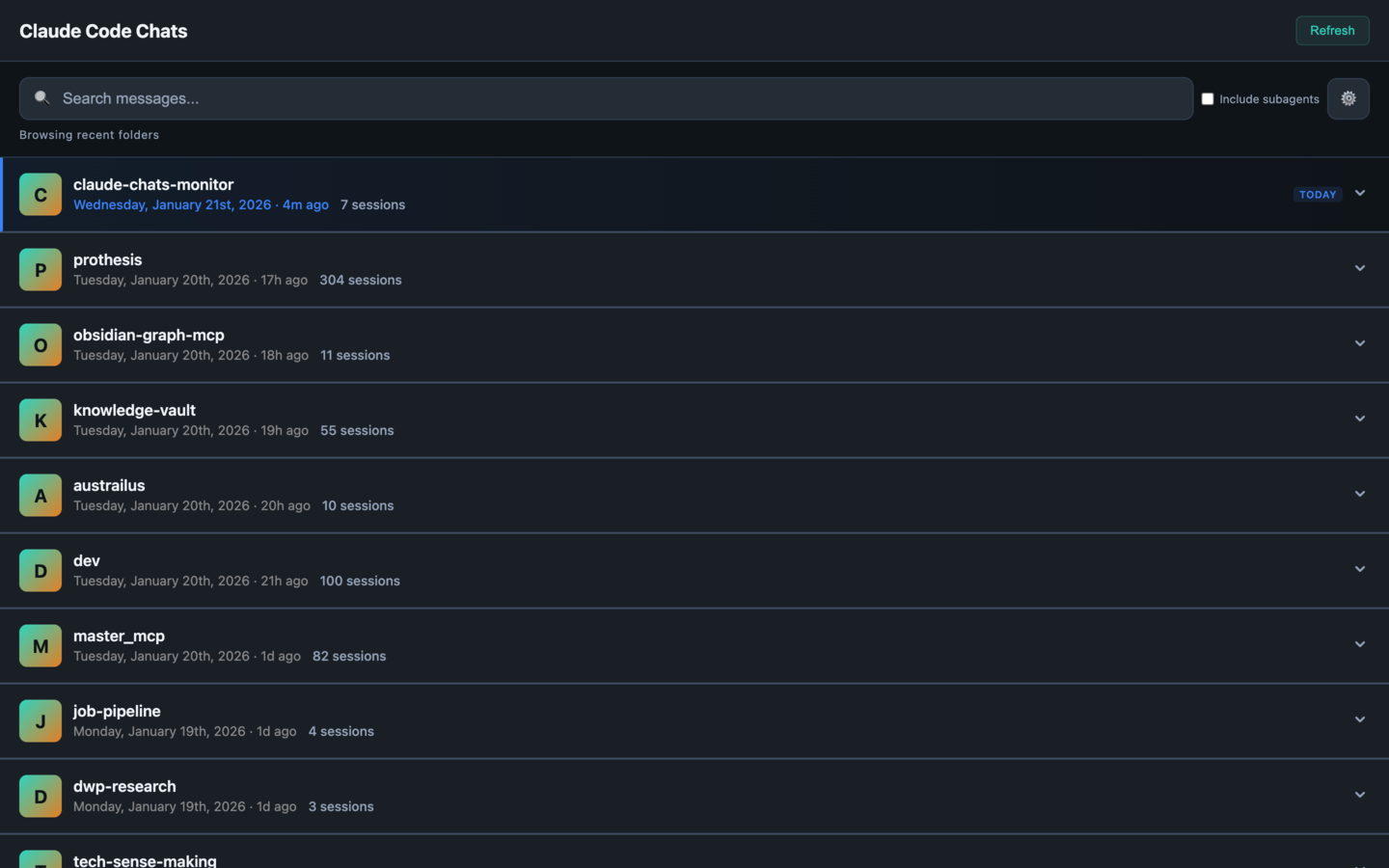
[!NOTE]
Claude Code can be configured to clean up old transcripts via thecleanupPeriodDayssetting. If you want this tool to browse your full history, confirm your retention setting first.
Why This Exists
Claude Code stores all your conversations locally in ~/.claude/projects/ as JSONL files, but there's no built-in way to browse or search them. This tool gives you:
- Full-text search across all your conversations
- Project organization - see conversations grouped by project
- Real-time updates - new messages appear instantly via WebSocket
- Token tracking - monitor your usage patterns
- Mobile-friendly - works on desktop and mobile browsers
Quick Start
# Clone the repository
git clone https://github.com/drewburchfield/claude-code-chat-explorer.git
cd claude-code-chat-explorer

# Start the container
./quick-start.sh
Open http://localhost:9876 in your browser.
Features
Browse & Search
- Project view - Conversations organized by project directory
- Full-text search - Fast FTS5-powered search with highlighted snippets
- Session details - See token counts, models used, and activity timelines
Conversation Viewer
- Full message history - User and assistant messages with timestamps
- Tool calls - Expandable view of tool usage with parameters and results
- In-conversation search - Find specific content within long conversations
- Export - Download conversations as JSON
Real-time Monitoring
- Live updates - New conversations and messages appear instantly
- Activity indicators - See which sessions are active
- Subagent tracking - View spawned Task tool agents grouped under parents
Requirements
- Docker and Docker Compose
- Claude Code installed (with conversations in
~/.claude)
How It Works
- Scans your
~/.claude/projects/directory for conversation files - Indexes conversations into a SQLite database with full-text search
- Watches for changes and updates the index incrementally
- Serves a web interface on port 9876
The database and all processing happens locally. Your conversations never leave your machine.
Architecture
claude-code-chat-explorer/
├── Dockerfile              # Multi-stage Alpine build
├── docker-compose.yml      # Container configuration
├── quick-start.sh          # Startup script
├── package.json            # Dependencies
├── src/
│   ├── chats-mobile.js     # Express server
│   ├── analytics/
│   │   ├── core/           # Conversation parsing
│   │   └── data/           # SQLite + FTS5 layer
│   └── analytics-web/
│       └── chats_mobile.html  # Web UI
└── test/                   # Vitest test suite
Configuration
Conversation History Retention
Claude Code exposes a cleanupPeriodDays setting that bounds how long inactive transcripts stay on disk. The default has varied across versions; check your current behavior and set an explicit value if you want this tool to browse a long history.
Edit ~/.claude/settings.json and add or modify the cleanupPeriodDays setting:
{
  "cleanupPeriodDays": 99999
}
| Value | Behavior |
|---|---|
99999 |
Effectively infinite (recommended) |
365 |
Keep conversations for 1 year |
30 |
Cleans up sessions inactive for 30+ days |
Note: When cleanup runs, it triggers at Claude Code session start - not continuously. Anything already cleaned up cannot be recovered.
If the file doesn't exist, create it:
echo '{"cleanupPeriodDays": 99999}' > ~/.claude/settings.json
Environment Variables
| Variable | Default | Description |
|---|---|---|
CLAUDE_HOME |
~/.claude |
Claude Code data directory |
CLAUDE_DB_PATH |
/data/conversations.db |
Database location |
Change Port
Edit docker-compose.yml:
ports:
  - "9877:9876"  # Use port 9877 instead
Management
# View logs
docker compose logs -f

# Stop
docker compose down

# Restart
docker compose restart

# Rebuild after updates
docker compose up -d --build

# Reset database (re-indexes everything)
docker compose down -v
docker compose up -d --build
Security
The container runs hardened:
- Non-root user
- Read-only filesystem
- Dropped capabilities
- Memory limits (1GB)
- Localhost-only port binding
Your Claude data is mounted read-only.
Troubleshooting
No conversations showing?
Check that Claude Code has conversations:
find ~/.claude/projects -name "*.jsonl" | head -5
Container won't start?
Check logs:
docker compose logs --tail=50
Port conflict?
Change the port in docker-compose.yml and restart.
Development
npm install
npm test              # Run tests
npm run test:coverage # With coverage
npm run test:watch    # Watch mode
License
MIT
Yorumlar (0)
Yorum birakmak icin giris yap.
Yorum birakSonuc bulunamadi