mcp-zap-server
Health Gecti
- License — License: MIT
- Description — Repository has a description
- Active repo — Last push 0 days ago
- Community trust — 47 GitHub stars
Code Gecti
- Code scan — Scanned 12 files during light audit, no dangerous patterns found
Permissions Gecti
- Permissions — No dangerous permissions requested
This is a Spring Boot application that exposes OWASP ZAP security scanning capabilities as an MCP server. It allows AI agents like Claude Desktop or Cursor to programmatically orchestrate web vulnerability scans, spider targets, import API specifications, and generate reports.
Security Assessment
Because this tool is fundamentally designed to execute network requests and perform active security scans against target URLs, it inherently handles sensitive web infrastructure interactions. The automated rule-based scan found no hardcoded secrets, no dangerous code patterns across its 12 audited files, and no risky permission requests. However, due to the nature of the tool, it can easily be instructed by an AI agent to scan and interact with external networks. Users must ensure strict authorization boundaries are configured before deploying it, as it wields significant network access. Overall risk is rated as Medium.
Quality Assessment
The project is highly maintained, with its most recent code push occurring today. It operates under the permissive and standard MIT license. It shows a healthy level of community trust for a niche integration tool, currently boasting 47 GitHub stars. The repository features comprehensive documentation, including dedicated security modes, JWT authentication setup, and a production readiness checklist, which reflects strong development practices.
Verdict
Use with caution—while the codebase is clean, actively maintained, and safe to run, the underlying functionality grants AI agents powerful network scanning capabilities that must be strictly governed and pointed only at authorized targets.
A Spring Boot application exposing OWASP ZAP as an MCP (Model Context Protocol) server. It lets any MCP‑compatible AI agent (e.g., Claude Desktop, Cursor) orchestrate ZAP actions—spider, active scan, import OpenAPI specs, and generate reports.





NOTE This project is not affiliated with or endorsed by OWASP or the OWASP ZAP project. It is an independent implementation.
MCP ZAP Server

A Spring Boot application exposing OWASP ZAP as an MCP (Model Context Protocol) server. It lets any MCP‑compatible AI agent (e.g., Claude Desktop, Cursor) orchestrate ZAP actions—spider, active scan, and generate reports.
This repository is the open-source mcp-zap-server distribution.
🚀 Using the OSS project in production? Agentic Lab offers optional deployment, CI/CD, and support services around
mcp-zap-server.
Latest Release (v0.6.0)
- Added a new default guided MCP surface with an optional expert surface for raw ZAP workflows.
- Added tool-scope authorization, abuse protection, structured correlation IDs, audit events, and Prometheus-ready observability.
- Expanded scanning support with passive scan tools, findings snapshots and diffs, API schema imports, Automation Framework plans, and active-scan policy controls.
- Evolved HA queue behavior toward claim-based worker ownership and recovery for multi-replica deployments.
See RELEASE_NOTES_0.6.0.md and CHANGELOG.md for the full upgrade and change details.
📚 Documentation
📖 View Full Documentation - Complete guides, API reference, and examples
Quick Links
- Security & Authentication Guide - Three security modes
- Client Configuration Guide - Open WebUI, Cursor, Claude Desktop, and other MCP clients
- JWT Authentication Setup - Production-ready auth
- Open WebUI Setup - Bundled browser UX for local or remote model providers
- Production Readiness Checklist - Cloud and public rollout baseline
- Authenticated Scanning Best Practices - Context/user/authenticated scan workflow
- AJAX Spider Guide - Bypass WAF protection
- Queue Retry Policy - Default retry/backoff by scan type
- Queue Coordinator and Worker Claims - Claim-based HA queue recovery and optional coordinator signals
- Local HA Compose Simulation - Run 3 MCP replicas with shared Postgres and a local ingress
- Kubernetes Deployment - Helm charts for production
Demo on Cursor
📺 Watch Demo Video | YouTube Link

Table of Contents
- Features
- Choose Your Client
- Architecture
- Queue HA Design
- Cloud Setup (AWS Example)
- Prerequisites
- Quick Start
- Services Overview
- Manual build
- Usage with Claude Desktop, Cursor, Windsurf or any MCP-compatible AI agent
- Prompt Examples
Features
- MCP ZAP server: Exposes ZAP actions as MCP tools. Eliminates manual CLI calls and brittle scripts.
- Guided + expert tool surfaces: Start with a smaller intent-first default surface or unlock the full raw workflow controls.
- OpenAPI integration: Import remote OpenAPI specs into ZAP and kick off active scans
- Findings and report workflows: Generate HTML/JSON reports, drill into findings, and compare findings snapshots across runs.
- Automation and API schema support: Run ZAP Automation Framework plans and import OpenAPI, GraphQL, and SOAP/WSDL definitions.
- Scan queue v1: Queue active, spider, and AJAX Spider scans with job lifecycle states, retries, dead-letter handling, and optional durable Postgres state.
- Operational guardrails: Enforce tool scopes, rate limits, workspace quotas, and structured request correlation for shared deployments.
- Dockerized: Runs ZAP and the MCP server in containers, orchestrated via docker-compose
- Secure: Configure API keys for both ZAP (ZAP_API_KEY) and the MCP server (MCP_API_KEY)
Choose Your Client
You can use this project in two ways:
- Open WebUI + your preferred model provider: Best for non-technical users who want a browser UI and zero MCP client setup. The bundled
open-webuiservice can talk to OpenAI-compatible APIs, Ollama, and other model backends, while the MCP connection to this server is preconfigured for them. - Any MCP client you already use: Best for technical users already working in Cursor, Claude Desktop, VS Code, Windsurf, or another MCP-capable client. Just point that client at the MCP endpoint exposed by this stack.
For the default Docker Compose stack:
- Open WebUI is available at
http://localhost:3000 - The MCP server is available to host-side clients at
http://localhost:7456/mcp - Open WebUI talks to the MCP server internally at
http://mcp-server:7456/mcp
Architecture
flowchart LR
  subgraph "DOCKER COMPOSE"
    direction LR
    ZAP["OWASP ZAP (container)"]
    MCPZAP["MCP ZAP Server"]
    Client["Open WebUI (bundled client)"]
    Juice["OWASP Juice-Shop"]
    Petstore["Swagger Petstore Server"]
  end

  MCPZAP <-->|Native MCP over Streamable HTTP| Client
  MCPZAP -->|ZAP REST API| ZAP
  ZAP -->|scan, alerts, reports| MCPZAP

  ZAP -->|spider/active-scan| Juice
  ZAP -->|Import API/active-scan| Petstore
Queue HA Design
High-level behavior for multi-replica deployments:
- All replicas can serve durable read/status requests and queue mutations.
- Any replica can claim queued work from shared durable state.
- Queue dispatch now uses claim-based worker ownership rather than a single required dispatcher leader.
single-nodeandpostgres-lockcoordinator modes still exist for identity, optional maintenance leadership, and observability.- Running jobs renew a claim lease; if a worker disappears, another replica can recover polling after lease expiry.
flowchart LR
  Client["Client / MCP Agent"] --> LB["Load Balancer"]
  LB --> R1["Replica A"]
  LB --> R2["Replica B"]

  subgraph Coord["Coordination + State"]
    Lock["Postgres Advisory Lock (Optional Coordinator)"]
    State["Durable Queue State + Job Claims (Postgres)"]
  end

  R1 <-->|lock attempt| Lock
  R2 <-->|lock attempt| Lock
  R1 <-->|read/write queue state| State
  R2 <-->|read/write queue state| State

  R1 -->|"if claim owner: start/poll"| ZAP["OWASP ZAP"]
  R2 -->|"if claim owner: start/poll"| ZAP
For configuration and troubleshooting details, see Queue Coordinator and Worker Claims and Local HA Compose Simulation.
Cloud Setup (AWS Example)
Reference deployment pattern for production-like HA:
- Run 2+
mcp-zap-serverreplicas on EKS (or ECS/Fargate with equivalent networking). - Use Amazon RDS PostgreSQL as shared backend for:
- durable scan jobs (
zap.scan.jobs.store) - leader election advisory lock (
zap.scan.queue.coordinator) - JWT revocation state when JWT mode is enabled
- durable scan jobs (
- Run Flyway-managed shared-schema migrations before MCP replicas scale out.
- Route traffic through ALB/NLB/Ingress to all replicas with session affinity enabled for streamable MCP traffic.
- Keep ZAP connectivity private (VPC internal networking/security groups).
Recommended queue-related env settings:
# Durable scan jobs
ZAP_SCAN_JOBS_STORE_BACKEND=postgres
ZAP_SCAN_JOBS_STORE_POSTGRES_URL=jdbc:postgresql://<rds-endpoint>:5432/<db>
ZAP_SCAN_JOBS_STORE_POSTGRES_USERNAME=<user>
ZAP_SCAN_JOBS_STORE_POSTGRES_PASSWORD=<password>

# Optional coordinator signals for multi-replica deployments
ZAP_SCAN_QUEUE_COORDINATOR_BACKEND=postgres-lock
ZAP_SCAN_QUEUE_COORDINATOR_NODE_ID=<unique-pod-or-task-id>
ZAP_SCAN_QUEUE_COORDINATOR_POSTGRES_URL=jdbc:postgresql://<rds-endpoint>:5432/<db>
ZAP_SCAN_QUEUE_COORDINATOR_POSTGRES_USERNAME=<user>
ZAP_SCAN_QUEUE_COORDINATOR_POSTGRES_PASSWORD=<password>
Migration baseline for shared Postgres state:
DB_MIGRATIONS_ENABLED=true
DB_MIGRATIONS_POSTGRES_URL=jdbc:postgresql://<rds-endpoint>:5432/<db>
DB_MIGRATIONS_POSTGRES_USERNAME=<user>
DB_MIGRATIONS_POSTGRES_PASSWORD=<password>
Ingress requirement for streamable MCP:
- MCP streamable HTTP sessions are stateful per replica by default.
- If you expose multiple MCP replicas behind a shared ingress, enable sticky sessions or equivalent client affinity at the ingress/load-balancer layer.
- Without ingress affinity, a client can initialize on one replica and send follow-up MCP requests to another replica that does not have that session.
- The Helm chart now provides OSS/local presets for
aws-nlbandingress-nginxsession affinity undermcp.streamableHttp.sessionAffinity.
For the OSS deployment model:
- Use sticky ingress or equivalent client affinity as the pragmatic multi-replica operating model.
- If you need different transport/session behavior, treat that as custom architecture work on top of the OSS baseline rather than the default expectation for this repository.
Helm deployment shortcut (EKS):
# copy/edit HA values (set RDS endpoint/db placeholders)
cp ./helm/mcp-zap-server/values-ha.yaml /tmp/mcp-zap-values-ha.yaml
$EDITOR /tmp/mcp-zap-values-ha.yaml

# deploy
helm upgrade --install mcp-zap ./helm/mcp-zap-server \
  --namespace mcp-zap-prod --create-namespace \
  --values /tmp/mcp-zap-values-ha.yaml \
  --set zap.config.apiKey="${ZAP_API_KEY}" \
  --set mcp.zapClient.apiKey="${ZAP_API_KEY}" \
  --set mcp.security.apiKey="${MCP_API_KEY}" \
  --set mcp.security.jwt.secret="${JWT_SECRET}"
Operational checks after deploy:
- Confirm the migration job completed successfully before checking MCP rollout.
- If
postgres-lockis enabled, confirm one replica reportsasg.queue.leadership.is_leader=1. - Submit queue jobs and verify claim owner / claim expiry are populated without duplicate scan starts.
- Terminate a worker pod/task and confirm another replica recovers polling after claim lease expiry.
Detailed coordinator behavior and troubleshooting: Queue Coordinator and Worker Claims.
Helm-specific guide: helm/mcp-zap-server/README.md.
Production baseline: Production Readiness Checklist.
Prerequisites
- LLM support Tool calling (e.g. gpt-4o, Claude 3, Llama 3, mistral, phi3)
- Docker ≥ 20.10
- Docker Compose ≥ 1.29
- Java 21+ (only if you want to build the Spring Boot MCP server outside Docker)
Security Configuration
Generate API Keys
Before starting the services, generate secure API keys:
# Generate ZAP API key
openssl rand -hex 32

# Generate MCP API key
openssl rand -hex 32
Environment Setup
- Copy the example environment file:
cp .env.example .env
- Edit
.envand update the following required values:
# Required: Set your secure API keys
ZAP_API_KEY=your-generated-zap-api-key-here
MCP_API_KEY=your-generated-mcp-api-key-here

# Required: Set your workspace directory
LOCAL_ZAP_WORKPLACE_FOLDER=/path/to/your/zap-workplace
- Important: Never commit
.envto version control. It's already in.gitignore.
Security Features
The MCP ZAP Server includes comprehensive security features with three authentication modes:
- 🔐 Flexible Authentication: Choose between
none,api-key, orjwtmodes - 🔑 API Key Authentication: Simple bearer token for trusted environments
- 🎫 JWT Authentication: Modern token-based auth with expiration and refresh
- 🛡️ URL Validation: Prevents scanning of internal resources and private networks
- ⏱️ Scan Limits: Configurable timeouts and concurrent scan limits
- 📋 Whitelist/Blacklist: Fine-grained control over scannable domains
Authentication Modes
The MCP server supports three authentication modes to balance security and ease of use:
For the shipped HTTP/server defaults, the base runtime now starts in api-key mode. none is kept as an explicit dev/test override, such as docker-compose.dev.yml.
🚫 Mode 1: No Authentication (none)
⚠️ WARNING: Development/Testing ONLY
# .env
MCP_SECURITY_MODE=none
Use this mode only for local development on trusted networks. All requests are permitted without authentication.
CSRF Protection: Disabled for MCP protocol compatibility (MCP endpoints don't support CSRF tokens).
🔑 Mode 2: API Key Authentication (api-key)
✅ Recommended for: Simple deployments, internal networks
This is the default mode for the base app/runtime configuration.
# .env
MCP_SECURITY_MODE=api-key
MCP_API_KEY=your-secure-api-key-here
Simple authentication with a static API key:
# Initialize a streamable MCP session with X-API-Key
curl -si \
  -H "X-API-Key: your-mcp-api-key" \
  -H "Accept: application/json,text/event-stream" \
  -H "Content-Type: application/json" \
  http://localhost:7456/mcp \
  -d '{"jsonrpc":"2.0","id":0,"method":"initialize","params":{"protocolVersion":"2025-03-26","capabilities":{},"clientInfo":{"name":"curl-test","version":"1.0.0"}}}'
For raw curl workflows, capture the returned Mcp-Session-Id header and send it on later tools/list or tools/call requests.
CSRF Protection: Disabled (by design) - This is an API-only server using token-based authentication, not session cookies. CSRF attacks only affect cookie-based authentication in browsers. See SECURITY.md for detailed explanation.
Advantages: Simple configuration, no token expiration, minimal overhead
Use Cases: Docker Compose, internal networks, single-tenant deployments
🎫 Mode 3: JWT Authentication (jwt)
✅ Recommended for: Production, cloud deployments, multi-tenant
# .env
MCP_SECURITY_MODE=jwt
JWT_ENABLED=true
JWT_SECRET=your-256-bit-secret-minimum-32-chars
MCP_API_KEY=your-initial-api-key
# Optional: shared revocation state for multi-replica deployments
JWT_REVOCATION_STORE_BACKEND=postgres
JWT_REVOCATION_STORE_POSTGRES_URL=jdbc:postgresql://postgres:5432/mcp_zap
Token-based authentication with automatic expiration:
# 1. Exchange API key for JWT tokens
curl -X POST http://localhost:7456/auth/token \
  -H "Content-Type: application/json" \
  -d '{"apiKey": "your-mcp-api-key", "clientId": "your-client-id"}'

# 2. Initialize a streamable MCP session with the access token
curl -si \
  -H "Authorization: Bearer YOUR_ACCESS_TOKEN" \
  -H "Accept: application/json,text/event-stream" \
  -H "Content-Type: application/json" \
  http://localhost:7456/mcp \
  -d '{"jsonrpc":"2.0","id":0,"method":"initialize","params":{"protocolVersion":"2025-03-26","capabilities":{},"clientInfo":{"name":"curl-test","version":"1.0.0"}}}'

# 3. Refresh when expired (refresh token is one-time use and rotates)
curl -X POST http://localhost:7456/auth/refresh \
  -H "Content-Type: application/json" \
  -d '{"refreshToken": "YOUR_REFRESH_TOKEN"}'

# 4. Revoke token on logout / incident response
curl -X POST http://localhost:7456/auth/revoke \
  -H "Content-Type: application/json" \
  -d '{"token": "YOUR_ACCESS_OR_REFRESH_TOKEN"}'
CSRF Protection: Disabled (by design) - API-only server with stateless JWT authentication. See SECURITY.md for OWASP compliance explanation.
Advantages: Tokens expire (1hr access, 7d refresh), token revocation, audit trails
When JWT_REVOCATION_STORE_BACKEND=postgres, revoked tokens are enforced across replicas.
Use Cases: Production deployments, public access, compliance requirements
Note: JWT mode is backward compatible—clients can still use API keys during migration.
🔐 MCP Security Compliance: This server follows the Model Context Protocol Security Best Practices. See SECURITY.md for full compliance details and roadmap.
📚 Detailed Documentation:
- Security Modes Guide - Complete comparison and migration guide
- JWT Authentication Guide - JWT implementation details
- JWT Key Rotation Runbook - Planned/emergency key rotation procedure
- MCP Client Configuration - Client setup for all modes
URL Security Configuration
By default, the server blocks scanning of:
- Localhost and loopback addresses (127.0.0.0/8, ::1)
- Private network ranges (10.0.0.0/8, 172.16.0.0/12, 192.168.0.0/16)
- Link-local addresses (169.254.0.0/16)
You can globally enable/disable URL validation guardrails in .env:
# Global toggle for URL validation checks
ZAP_URL_VALIDATION_ENABLED=true
When ZAP_URL_VALIDATION_ENABLED=false, whitelist/blacklist and private-network checks are skipped.
To enable scanning specific domains, configure the whitelist in .env:
# Allow only specific domains (wildcards supported)
ZAP_URL_WHITELIST=example.com,*.test.com,demo.org
Warning: Only set ZAP_URL_VALIDATION_ENABLED=false, ZAP_ALLOW_LOCALHOST=true, or ZAP_ALLOW_PRIVATE_NETWORKS=true in isolated, secure environments.
Quick Start
Development (Fast Builds - 2-3 minutes) ⚡
For local development, use the JVM image for fast iteration:
git clone https://github.com/dtkmn/mcp-zap-server.git
cd mcp-zap-server

# Setup environment variables
cp .env.example .env
# Edit .env with your API keys and configuration

# Create workspace directory
mkdir -p $(grep LOCAL_ZAP_WORKPLACE_FOLDER .env | cut -d '=' -f2)/zap-wrk

# Start services (JVM - fast builds)
./dev.sh
# OR manually:
docker compose -f docker-compose.yml -f docker-compose.dev.yml up -d --build
Build time: ~2-3 minutes
Startup: ~3-5 seconds
Use for: Development, testing, rapid iteration
Production (Native Image - 20+ minutes) 🏭
For production deployments with lightning-fast startup:
# Build native image (grab a coffee ☕)
./prod.sh
# OR manually:
docker compose -f docker-compose.yml -f docker-compose.prod.yml up -d --build
Build time: ~20-25 minutes
Startup: ~0.6 seconds
Use for: Production, cloud deployments, serverless
Performance Comparison
| Metric | JVM (Dev) | Native (Prod) |
|---|---|---|
| Build Time | 2-3 min | 20-25 min |
| Startup Time | 3-5 sec | 0.6 sec |
| Memory | ~300MB | ~200MB |
| Image Size | 383MB | 391MB |
| Best For | Development | Production |
 |
Open http://localhost:3000 in your browser, and you should see the Open Web-UI interface.
Set Up Custom OpenAI / Ollama API Connection
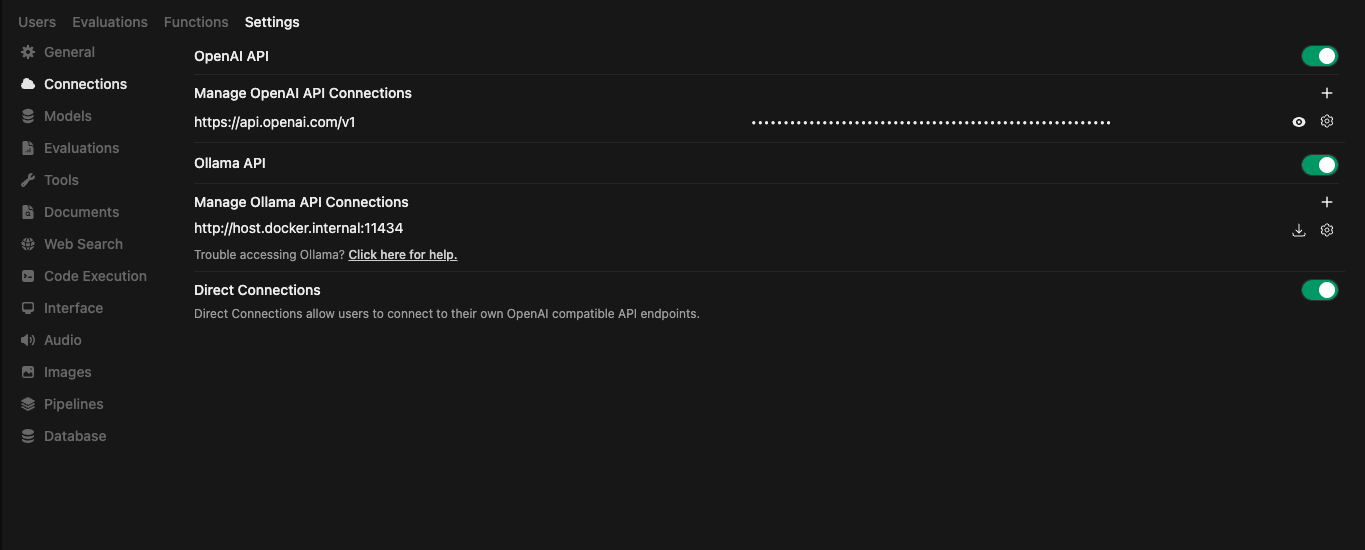
Bundled MCP Connection
The bundled Open WebUI container is preconfigured to connect to the local MCP ZAP server on first boot, so end users do not need to add the MCP server manually.
Open WebUI stores its settings in the open-webui Docker volume. If you want to reprovision the default connection from scratch, remove that volume before starting the stack again.
Optional: Manage MCP Servers in Open WebUI
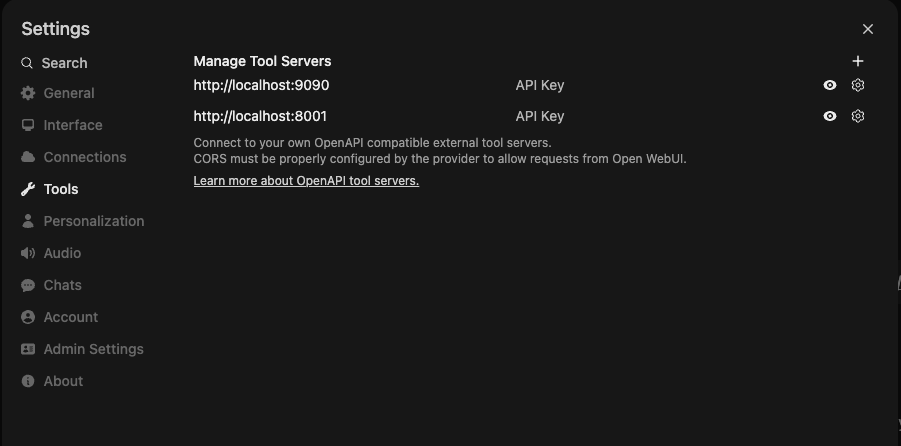
Once your model provider is configured, you can check the Prompt Examples section to see how to use the MCP ZAP server with your AI agent.
To view logs for all services, run:
docker-compose logs -f
To view logs for a specific service, run:
docker-compose logs -f <service_name>
Services Overview
zap
- Image:
zaproxy/zap-stable:${ZAP_IMAGE_TAG:-2.17.0} - Purpose: Runs the OWASP ZAP daemon on port 8090.
- Configuration:
- Requires an API key for security, configured via the
ZAP_API_KEYenvironment variable. - Restricts API callers to loopback and RFC1918 source ranges by default.
- Maps the host directory
${LOCAL_ZAP_WORKPLACE_FOLDER}to the container path/zap/wrk.
- Requires an API key for security, configured via the
open-webui
- Image: ghcr.io/open-webui/open-webui
- Purpose: Provides a web interface for managing ZAP and the MCP server.
- Configuration:
- Exposes port 3000.
- Preconfigures a native MCP connection to
http://mcp-server:7456/mcpon first boot. - Sends the MCP credential as an
X-API-Keyheader to the local MCP server. - Uses a named volume to persist backend data.
mcp-server
- Image: mcp-zap-server:latest
- Purpose: This repo. Acts as the MCP server exposing ZAP actions with API key authentication.
- Configuration:
- Depends on the
zapservice and connects to it using the configuredZAP_API_KEY. - Requires
MCP_API_KEYfor client authentication (set in.envfile). - Exposes
http://localhost:7456to host-side MCP clients in the default Docker Compose stack. - Maps the host directory
${LOCAL_ZAP_WORKPLACE_FOLDER}to/zap/wrkto allow file access. - Supports configurable scan limits and URL validation policies.
- Depends on the
- Security:
- All endpoints (except health checks) require API key authentication.
- Include API key in requests via
X-API-Keyheader orAuthorization: Bearer <token>. - URL validation prevents scanning internal/private networks by default.
juice-shop
- Image: bkimminich/juice-shop
- Purpose: Provides a deliberately insecure web application for testing ZAP’s scanning capabilities.
- Configuration:
- Runs on port 3001.
petstore
- Image: swaggerapi/petstore3:unstable
- Purpose: Runs the Swagger Petstore sample API to demonstrate OpenAPI import and scanning.
- Configuration:
- Runs on port 3002.
Stopping the Services
To stop and remove all the containers, run:
docker-compose down
Manual build
./gradlew clean build
Usage with Claude Desktop, Cursor, Windsurf or any MCP-compatible AI agent
Streamable HTTP mode
This is the recommended mode for connecting to the MCP server.
Important: You must include the API key for authentication.
If this URL points at a shared ingress in front of multiple replicas, that ingress must provide sticky sessions or equivalent client affinity.
{
  "mcpServers": {
    "zap-mcp-server": {
      "protocol": "mcp",
      "transport": "streamable-http",
      "url": "http://localhost:7456/mcp",
      "headers": {
        "X-API-Key": "your-mcp-api-key-here"
      }
    }
  }
}
Or using a JWT access token:
{
  "mcpServers": {
    "zap-mcp-server": {
      "protocol": "mcp",
      "transport": "streamable-http",
      "url": "http://localhost:7456/mcp",
      "headers": {
        "Authorization": "Bearer your-jwt-access-token-here"
      }
    }
  }
}
Replace your-mcp-api-key-here with the MCP_API_KEY value from your .env file.
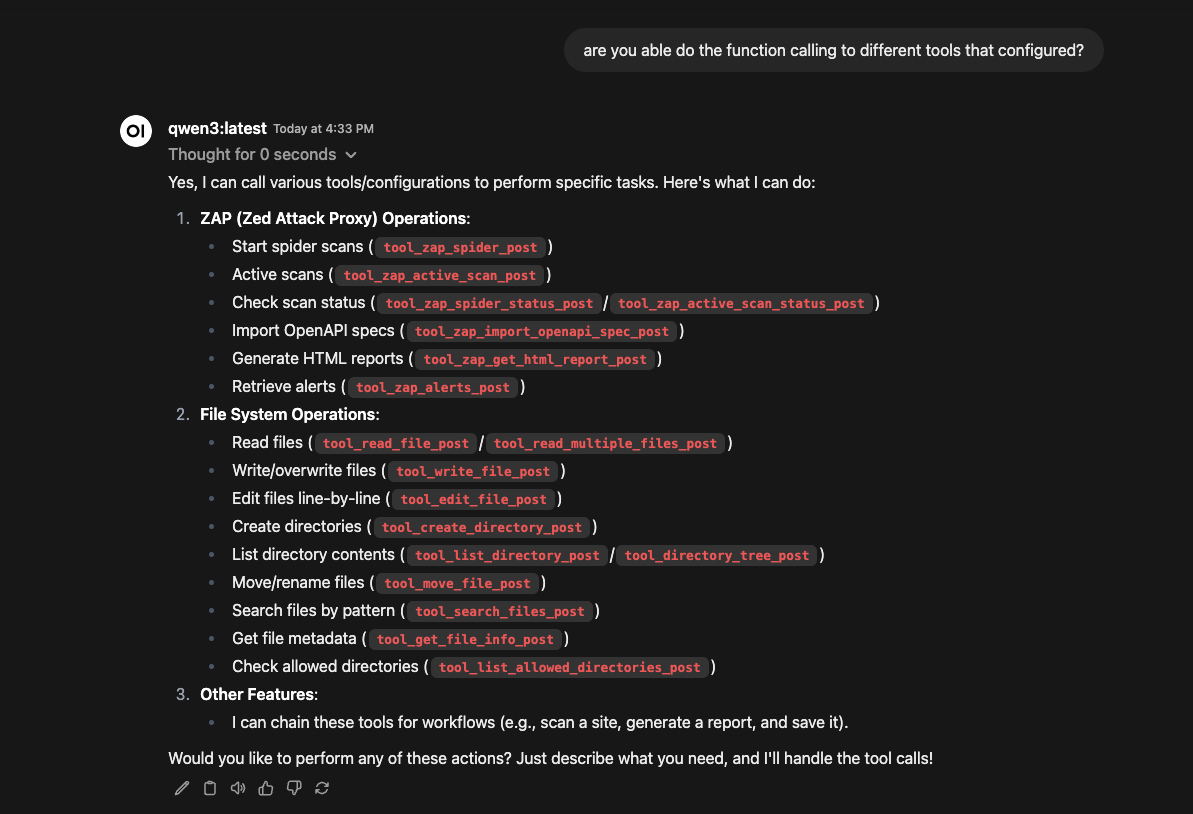
Prompt Examples
Asking for the tools available
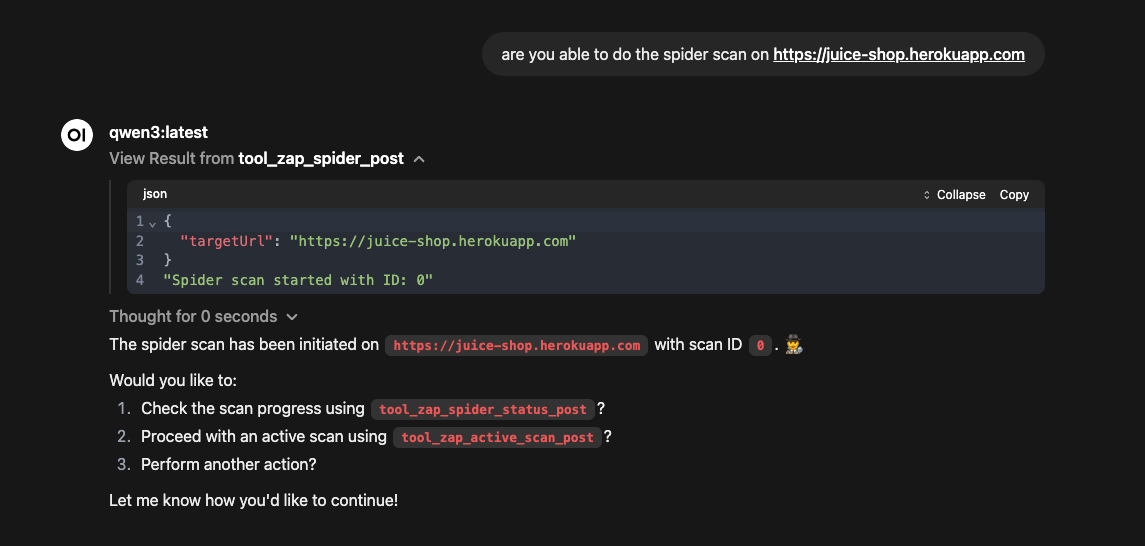
Start the spider scan with provided URL
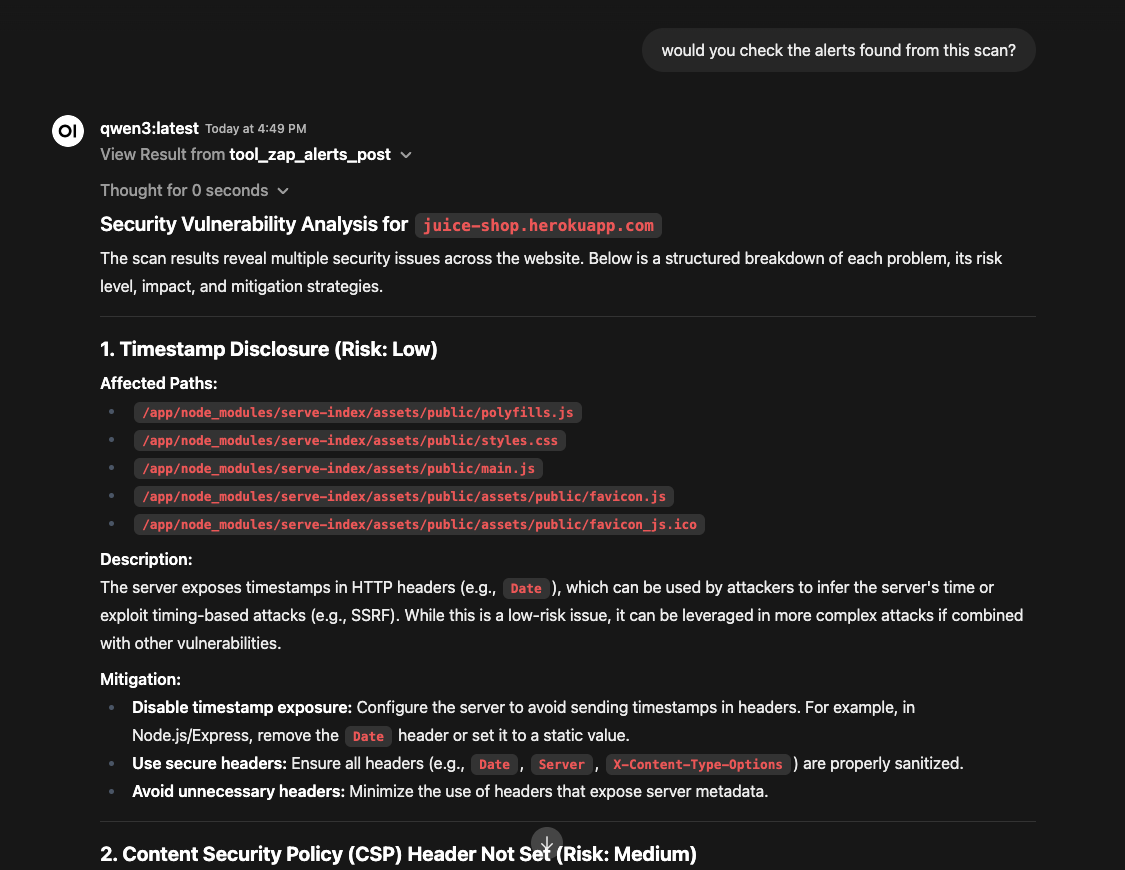
Check the alerts found from the spider scan
💼 Commercial Support
mcp-zap-server is the OSS project. If your team wants help adopting it in production, Agentic Lab offers optional commercial services around this repository:
- 🚀 Deployment Help: Custom Kubernetes/Helm configurations, HA rollouts, and air-gapped environment support.
- 🔐 Complex Authentication: Assistance with custom login flows such as OAuth2, 2FA, and SSO.
- 🛠️ CI/CD Quality Gates: Automated blocking rules for GitHub Actions, GitLab CI, and Jenkins.
- 📊 Reporting & Integration: Custom reporting pipelines, compliance mapping, and workflow integration.
Yorumlar (0)
Yorum birakmak icin giris yap.
Yorum birakSonuc bulunamadi