openGym
Health Gecti
- License — License: AGPL-3.0
- Description — Repository has a description
- Active repo — Last push 0 days ago
- Community trust — 553 GitHub stars
Code Uyari
- process.env — Environment variable access in api/server.js
- crypto private key — Private key handling in api/server.js
Permissions Gecti
- Permissions — No dangerous permissions requested
Bu listing icin henuz AI raporu yok.
Self-hosted gym & body-weight tracker — plan routines, log workouts (supersets, warm-ups, cardio), see which muscles are trained, fatigued or detrained, import from FitNotes/Strong/Hevy, passkey login. Your data, your server.
A self-hosted gym & body-weight tracker you actually own.
Plan your week, run guided workouts, track every set and your body weight over time —
on your phone, synced across devices, behind your own passkey login.
No account on someone else's server, no subscription, no ads. Just docker compose up.









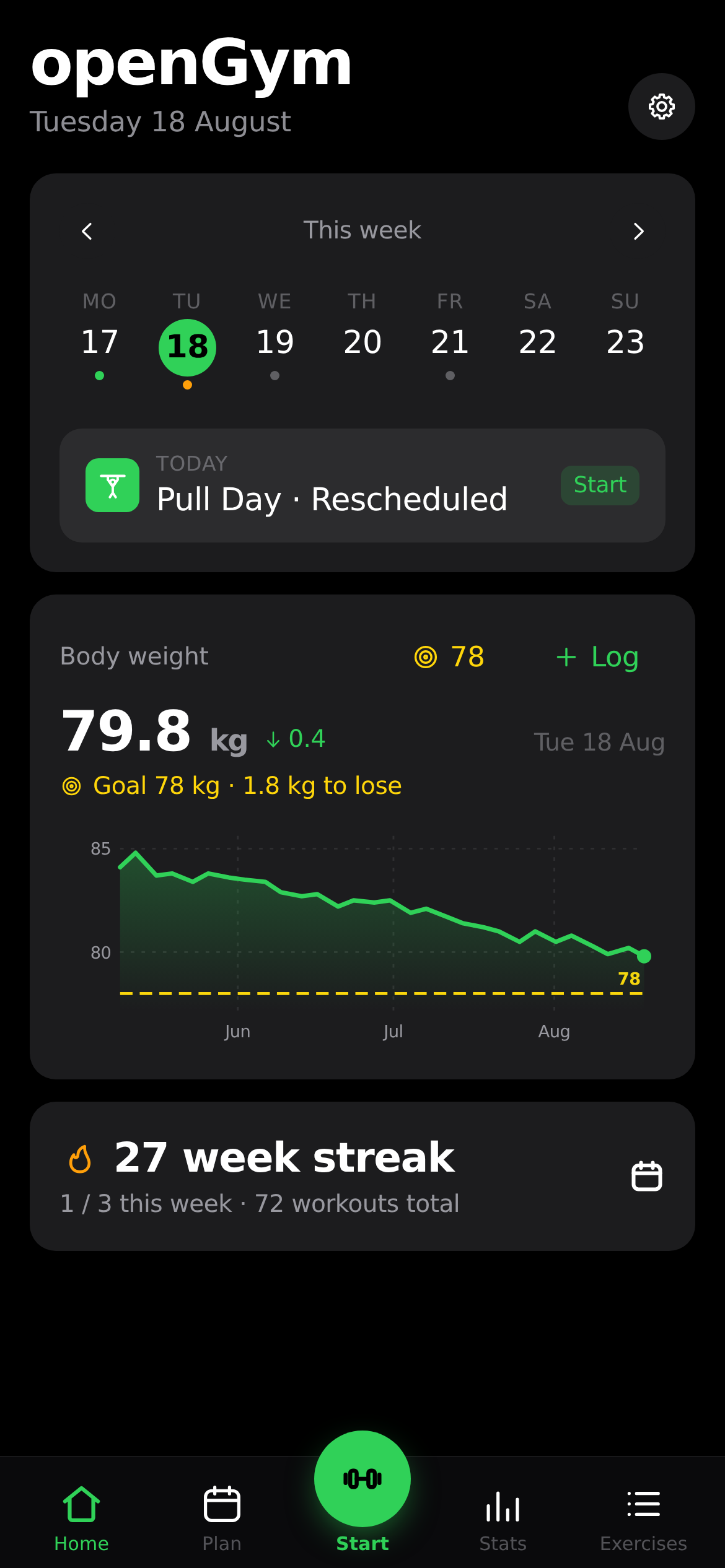 Home — today's workout & weight |
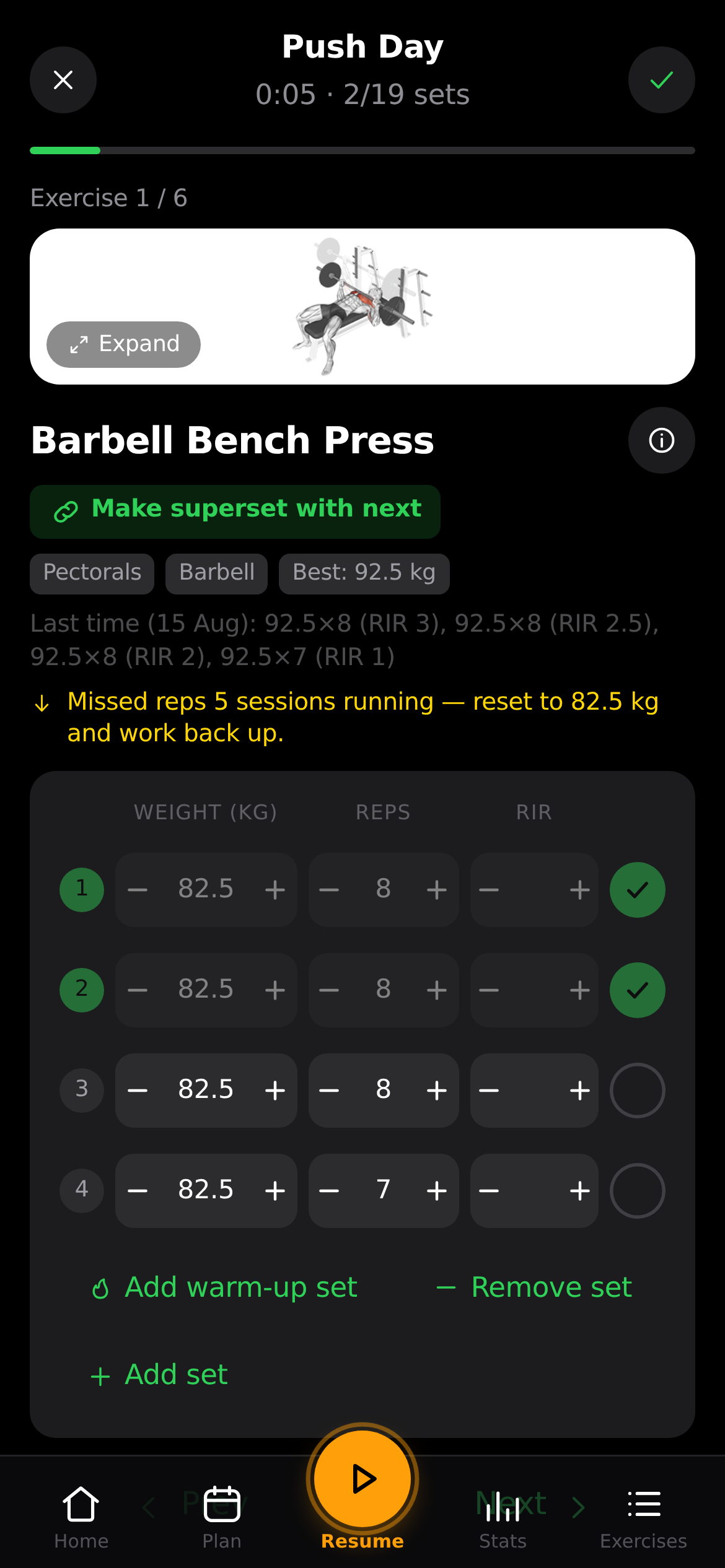 Guided workout — animated demos & sets |
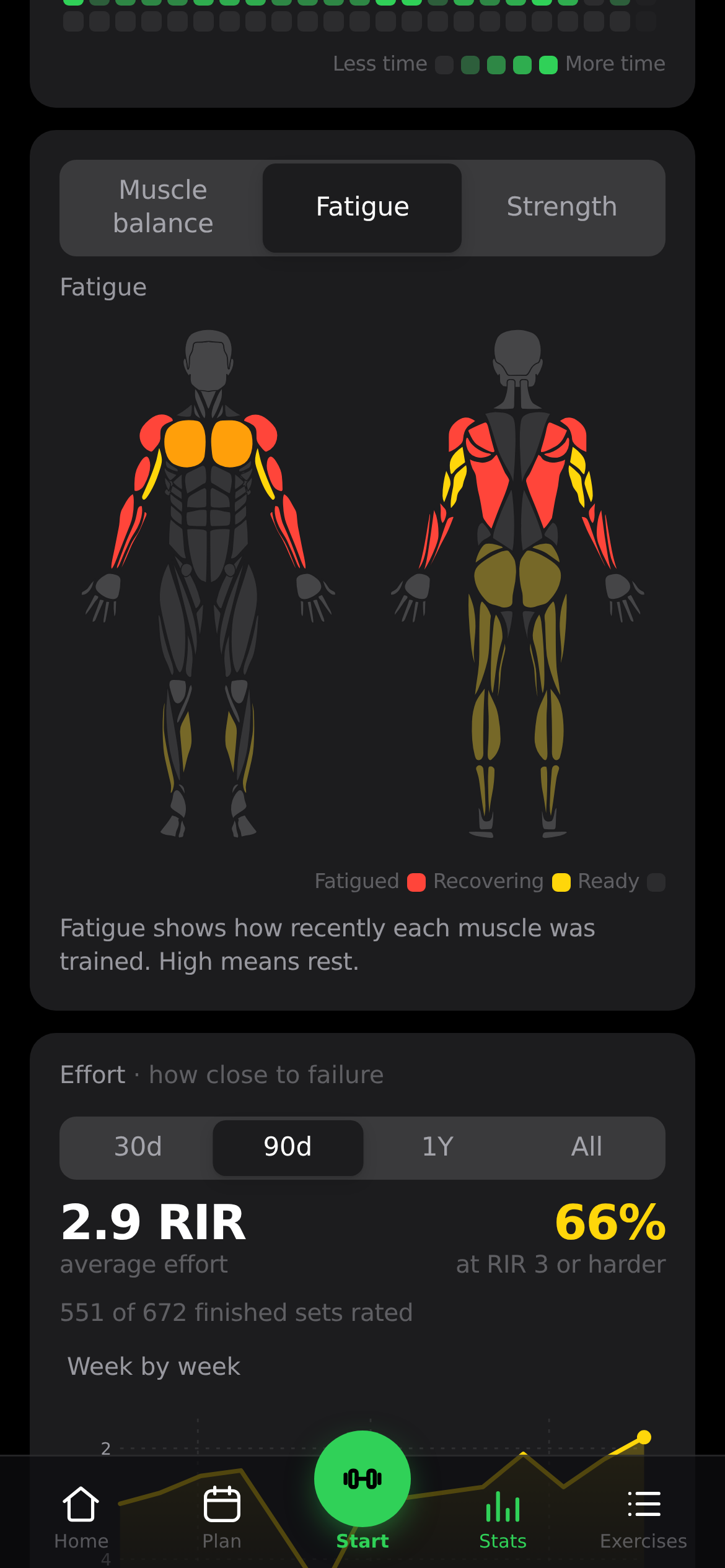 Stats — heatmap, charts & PRs |
🌐 opengym.duarte-santos.ch · ▶ Try the live demo
No signup, nothing to install — it runs entirely in your browser on example data.
There's no server behind the demo, so passkey sign-in, sync across devices and the
admin dashboard only exist in a self-hosted instance.
Why
Most workout apps lock your data behind a login on their servers, nag you to upgrade, or
disappear when the startup does. openGym is the opposite: it runs on your box, your data
stays in a folder you control, and it's yours to fork. It still feels modern — installable
as a home-screen app, passkey sign-in, offline support, sync across your phone and laptop.
Features
- ⚖️ Body-weight tracking — interactive chart with a goal line you set, gains/losses colored by whether they move toward it
- 🏋️ Weekly plan — a routine per weekday, over a library of 1,324 exercises (searchable, with animated demos)
- 🗓️ Reschedule any day — sick, missed a session, or fewer gym days this week? Move a workout to another day without touching your weekly plan
- ▶️ Guided workouts — it knows what day it is and starts today's session; asks your body weight first, pre-fills your weights from last time, rest timer, PR detection, per-exercise weight tracking
- ☀️ The screen stays awake while you train — no unlocking the phone and finding your place again between every set. On for as long as a workout is running, released the moment you finish it, and switchable off in Settings
- 🔗 Supersets — plan them into a routine or pair two exercises mid-session with “make superset with previous/next”, then work through the group back-to-back with a single rest at the end of each round. Unpair at any time; a group of one dissolves itself
- 🔥 Warm-up sets — mark the ramp-up rows as warm-ups and they stay out of the numbers that should not see them: no effect on your estimated 1RM, your progression, or the fatigue map, while still being there in the session where you need them. A weight change cascades down the rows that share their phase, not across the divide
- ➖ Change your mind mid-session — add an exercise you decided to do, or remove one you didn't, without ending the workout. Removing a member of a superset asks which one
- ⏱️ Timed exercises — planks, hangs, wall sits and loaded carries are logged by time, not reps, with a work timer that counts the set itself (separate from the rest timer) and logs the time you actually held. They can carry weight too
- 📈 Progression that follows a rule — pick one per routine, override it per exercise: linear, Greyskull LP (AMRAP top set, double jumps, 10 % resets), double progression through a rep range, or adding time. Your weights are already right when the session opens, and every target says why it's that number. Missed reps never advance the load, stalls trigger a deload, and bodyweight exercises progress in reps instead
- 💪 Estimated 1RM — per exercise, from your best eligible set (it names which one), with its own progress curve and a calculator for sets you haven't done. Won't guess above 12 reps
- 🎯 Effort per set, in your scale — an optional third column rating how hard a set was, as RIR (reps left in the tank) or RPE (the same judgement on a 10-point scale). Off by default; each set keeps the scale it was logged with, and nothing else reads the value — your progression and 1RM are unaffected
- 💪 Bodyweight exercises, logged as bodyweight — push-ups, pull-ups, dips and 300-odd others arrive knowing they carry no load, so there's no weight column and no working-weight prompt: one stepper, log the reps. Add a dip belt and it reads as an addition, and progression goes back to following the weight. Without one, reps climb — and past a ceiling you set, a set is added instead of a rep, up to the point where the honest advice is load or a harder variation
- ↔️ Reps per side — for lunges, single-arm rows and the rest. You log the total, the app shows the split ("8 per side"), and the target steps in twos so it never lands on a number one side can't have
- 🎲 Freestyle sessions — train without a plan and pick exercises as you go. Each one arrives prefilled from the last time you did it — same sets, same reps and weight by position — so an unplanned session doesn't start by asking you to retype last week
- 🏃 Cardio — log time + speed, not just weight × reps
- 📤 Share a plan — send someone your routines and week schedule as a small file (no workouts, no weigh-ins), or print it as a clean PDF. Importing merges, so their plan is never overwritten
- 🔧 Filter by equipment — narrow the library to what you actually own; the options adapt to what you've picked, so every combination on screen has results behind it
- ✨ Your own exercises — a name and a body part is enough; they behave like built-in ones everywhere, with an optional description instead of an animation
- 🟩 Activity heatmap — a GitHub-style year view, shaded by time spent training
- 💪 Muscle map, three ways — a front-and-back body diagram you can read as Balance (where the volume went, over a week, a month or all time — naming the muscles you haven't trained), Fatigue (what is still recovering, weighted by how close each set was to your maximum, decaying smoothly rather than expiring at a window edge) or Strength (how long since you trained each muscle, and behind every one the exercises that built it with their estimated 1RM). It previews what a routine hits while you build it, and shows what you just trained when you finish. Male or female figure, your pick
- 🔔 Push notifications — rest-timer alerts even with the app closed, plus an optional reminder on days you have a workout planned but haven't logged one. Opt in per profile; keys are generated on first run, nothing to configure
- 🔑 Passkeys, not passwords — Face ID / Touch ID / fingerprint login; each profile keeps its own data, synced across devices. Sign-ins last 90 days by default (configurable), and “sign out everywhere” in Settings ends every session on every device at once
- 🛠️ Admin dashboard (optional) — for whoever runs the instance: who's training right now, per-user history, disable accounts, and invite-only signup. Off by default, so a fresh instance stays open with no admin
- 🎨 Designed, not assembled — light/dark themes and 8 accent colors saved to your profile, over a hand-drawn icon set instead of emoji, so it looks the same on every phone
- 🌍 12 languages — full UI translation (EN, DE, ES, FR, IT, PT, PL, TR, RU, ZH, KO, HI); exercise instructions localized in 10 of them, loaded on demand so the app stays fast
- 📥 Bring your history with you — import from FitNotes (Android and iOS), Strong and Hevy, or body weight straight out of an Apple Health export. Exercise names are matched against the library and anything unrecognised becomes one of your own exercises, so nothing in the file is dropped
- 📦 Yours to keep — one-tap JSON export/import, guest mode, no telemetry
- 🤖 Ask an AI about your training (optional) — an MCP server lets a client like Claude Desktop or Cursor read your history in your own words: "what did I bench last week?". Read-only, spawned locally by the client, nothing leaves your box. Not in the Docker build — if you don't use an AI assistant, it isn't there
- 📱 Standalone Android app — the whole tracker as a sideloadable APK: no account, no server, data on the phone, native workout reminders (download)
Quick start (self-host)
You need Docker with Compose.
git clone https://github.com/DuarteSantos8/openGym
cd openGym
cp .env.example .env
docker compose pull   # grab prebuilt images (amd64 + arm64) — skip to build from source instead
docker compose up -d
Open http://localhost:8080, tap Create profile, and you're in. First launch downloads
the exercise media (~140 MB) once. Prefer building the images yourself instead of pulling fromghcr.io? Drop the pull step and run docker compose up -d --build — you don't need Node or
a build step locally either way.
Want it reachable from your phone over the internet with passkeys? You'll need an HTTPS
domain — a two-line change in.env. See docs/SELF_HOSTING.md.
Mobile app (no server at all)
The same codebase also builds a standalone mobile app (Capacitor): no account, no sync,
no backend — everything stays on the phone, with native workout-day reminders and share-sheet
backups. Self-hosting gets you multi-device sync and profiles for friends & family; the
mobile app is the install-and-done flavor.
- Android: download the APK and sideload it —
openGym is deliberately not on the Play Store. Or build it yourself: docs/MOBILE.md. - iPhone: Apple doesn't allow installing apps outside the App Store, so there is no iOS
download. Self-host and add it to your home screen from Safari (it's a full PWA), or build
the native app onto your own device from Xcode — see docs/MOBILE.md.
How it works
┌─────────────┐        ┌──────────────────────────────┐
│  Your phone │──HTTPS─▶│  web  (nginx)                │
│  / laptop   │        │   ├─ serves the built app    │
└─────────────┘        │   └─ proxies /api ──────────┐│
                       └──────────────────────────────┘│
                                                        ▼
                                        ┌──────────────────────────┐
                                        │  api  (Node + WebAuthn)  │
                                        │   └─ ./data (JSON files) │
                                        └──────────────────────────┘
- frontend/ — React + Vite (React Router + Zustand), built to static files inside Docker
- api/ — Node with no framework, two dependencies (
@simplewebauthn/serverfor passkeys,web-pushfor notifications), storing everything as plain JSON files under./data - web/ — a multi-stage image that builds the frontend and serves it with nginx, proxying
/apito the backend so it's all on one origin (passkeys require this)
Your data
Lives in ./data on your host: db.json (profiles + public passkeys), state-<user>.json
(each user's plan, workouts, body weight, settings), and secret (the session-cookie key).
Back up ./data and you've backed up everything. Passkey private keys never touch the
server — they stay in your phone's secure hardware / your password manager.
Configuration
All via .env (see .env.example):
| Variable | What it is | Default |
|---|---|---|
RP_ID |
Hostname passkeys are bound to | localhost |
ORIGIN |
Full URL the app is served from | http://localhost:8080 |
WEB_PORT |
Host port for the web UI | 8080 |
NGINX_PORT |
Port the web container listens on, inside the container | 80 |
BACKEND |
Name of the API service that /api is proxied to — change it if yours isn't called api |
api |
PORT |
Port the API listens on; the web container proxies to the same value | 3000 |
RP_NAME |
Name shown in the passkey prompt | openGym |
SESSION_DAYS |
How long a sign-in lasts, in days | 90 |
ADMIN_UIDS |
User ids that get the admin dashboard (comma-separated) | (none) |
INVITE_ONLY |
Require an invite code to create a profile | (off) |
ALLOW_GUEST |
Offer "Continue without account" — set 0 to require a profile |
(on) |
VAPID_SUBJECT |
Contact URL sent with push notifications | your ORIGIN |
Push notification keys are generated on first run and saved to ./data/vapid.json — nothing to set.DATA_DIR is pinned to /data by docker-compose.yml and mapped to ./data on the host; change the
host side of that volume, not the variable.
Roadmap
Rough, community-driven — ideas and PRs welcome:
- Standalone mobile app — Android APK to sideload (download); on iOS as a self-hosted PWA (no store listings planned)
- Automatic progression programs (linear, Greyskull LP, double progression) with stalls and deloads
- Estimated 1RM per exercise
- Percentage / training-max programming (5/3/1-style) on top of the progression engine
- More starter plans (upper/lower, full-body, 5×5)
- Importers from FitNotes / Strong / Hevy (including the RPE they record), and body weight from Apple Health
- Effort per set — RIR or RPE, whichever scale you think in
- Body measurements (waist, arms…) alongside weight
- Per-exercise notes & plate calculator
- Exercise instructions in German & Portuguese (UI is translated; upstream dataset doesn't ship these yet)
Tech
React 19 + Vite (React Router, Zustand) · Node (no framework) · nginx · Docker Compose ·
WebAuthn · exercise data from hasaneyldrm/exercises-dataset.
No database server, no cloud dependencies — the frontend builds inside Docker, so self-hosting
stays a one-command docker compose up.
The training logic — progression rules, 1RM estimation, how a logged session is read back —
lives in pure functions under frontend/src/lib/ with tests next to them: npm test infrontend/. Vitest is a dev dependency; the app itself ships no runtime dependencies beyond
React, the router and Zustand.
The same pure helpers power an optional MCP server (mcp/) that lets an LLM client like
Claude Desktop read your data over stdio — see mcp/README.md. Opt-in, not
in the Docker build.
Community
- Q&A — self-hosting
help, passkey/login trouble, "how do I…". Most login problems turn out to be anRP_ID/ORIGIN
mismatch. - Ideas — features
worth talking through before anyone writes code. - Show and tell
— your setup, your plan templates, whatever you built on top. - Issues — bugs, and work that's already
been agreed on.
Contributing
Issues and PRs welcome — see CONTRIBUTING.md. Good first issues: more starter
plans, exercise-data languages, import from other trackers. A ⭐ helps more people find it.
openGym is free and stays free: AGPL, no subscription, no paid tier, nothing held back for
sponsors. If it replaced a paid tracker for you and you want to chip in, the Sponsor button at the
top of the page is there — a star, a bug report or a PR is worth just as much.
License
GNU AGPL v3.0 — free and open source. You can self-host, use, modify and share it;
if you run a modified version as a network service, you must offer that version's source under
the same license. Nobody can turn openGym into a closed, proprietary product.
Exercise images/GIFs are fetched from the upstream dataset and keep their own terms — see NOTICE.md.
Yorumlar (0)
Yorum birakmak icin giris yap.
Yorum birakSonuc bulunamadi