ccswap
Health Gecti
- License — License: MIT
- Description — Repository has a description
- Active repo — Last push 0 days ago
- Community trust — 16 GitHub stars
Code Uyari
- network request — Outbound network request in internal/web/app.js
- network request — Outbound network request in internal/web/i18n.js
Permissions Gecti
- Permissions — No dangerous permissions requested
Bu listing icin henuz AI raporu yok.
Swap Claude Code between your own Claude subscription accounts, by hand or automatically near the limits. No proxy, no restart.
ccswap
English · Русский
ccswap switches which of your own Claude subscription accounts Claude Code is logged in to: when you
ask, or automatically when the account in use nears its 5-hour or weekly limit. It is not a proxy. It
swaps the login Claude Code keeps on your machine. Running Claude Code sessions pick the new one up
within about half a minute without a restart, and the unmodified Claude Code stays the only program
that sends your work to Anthropic. A small daemon watches each account's limits; you drive it from
the command line, a terminal UI or a local web page. It runs on macOS and Linux.
Install it, set up the background daemon and its Claude Code hook, and add the account Claude Code is
logged in to now (ccswap login <name> adds the others):
go install github.com/Dudude-bit/ccswap/cmd/ccswap@latest
ccswap daemon install
ccswap adopt work
[!IMPORTANT]
ccswap is unofficial and not affiliated with or endorsed by Anthropic. Use it only with accounts you
own and pay for, and read Terms of use before you add one.
Contents
- Terms of use
- How it works
- Install
- First run
- Commands
- Auto-switch
- Web page
- TUI
- T3 Code
- Limits from another ccswap
- Moving an account to another machine
- Linux servers
- Configuration
- Languages
- Troubleshooting
- Security
- Why not a proxy
- Related projects
- Contributing and licence
Terms of use
Unofficial. ccswap is an independent open-source tool. Anthropic does not make, endorse or
support it. "Claude" and "Claude Code" are Anthropic's trademarks.Your own accounts only. ccswap is for switching between Claude subscriptions that you own and pay
for, on your own machines. Never add someone else's account and never share yours. Anthropic's
Consumer Terms (effective October 8, 2025),
section 2: "You may not share your Account login information, Anthropic API key, or Account
credentials with anyone else. You also may not make your Account available to anyone else." Team and
Enterprise plans are under the Commercial Terms.Limits assume ordinary, individual use. Claude Code's
legal and compliance page:
"Advertised usage limits for Pro and Max plans assume ordinary, individual usage of Claude Code and
the Agent SDK." Moving to another subscription when one reaches its limit may be read as going beyond
that. Section 3 of the Consumer Terms also forbids accessing the services "through automated or
non-human means, whether through a bot, script, or otherwise" (except with an API key or where
Anthropic explicitly permits it) and "bypassing any of our systems or protective measures". We found
nothing from Anthropic that allows or forbids one person holding several subscriptions. Decide for
yourself whether your use fits these terms.What ccswap sends to Anthropic. No prompts and no model requests: ccswap proxies nothing. Its own
requests carry the user agentccswap/<version>:Request What for When (defaults) GET https://api.anthropic.com/api/oauth/usagean account's 5-hour, weekly and per-model limits for enabled accounts that do not need a login: the account in use every 5 minutes ( check_active), every other account every 30 minutes (check_others), all of them at once when you ask, except one asked less than a minute ago; after a429it waits outRetry-After(up to an hour) and asks less oftenGET https://api.anthropic.com/api/oauth/profilethe email of a login, to tell which account it is when you add an account, and when Claude Code holds a login ccswap has not identified yet (for example after Claude Code refreshed it), checked once a minute POST https://platform.claude.com/v1/oauth/tokenrefreshing the logins of accounts Claude Code is not using, so they stay alive when an inactive account's access token is less than 10 minutes from expiring, and right after ccswap migrate import; never the login Claude Code holdsThe refresh uses Claude Code's public OAuth client ID, the client
claude auth loginissued those
logins to. Signing in always goes through Claude Code's ownclaude auth login: ccswap never sees
your password.Tokens stay on this machine. The logins of inactive accounts live in the macOS keychain (service
ccswap) or, on Linux, in 0600 files in ccswap's folder. Apart from the requests to Anthropic above,
they leave the machine only when you move an account withccswap migrate, in an encrypted bundle.ccswap remoteshares limit numbers, never tokens. There is no telemetry, and nothing goes to the
authors.Undocumented interfaces. The usage and profile endpoints, Claude Code's OAuth client and the way
Claude Code stores its login are not public, documented interfaces. Any of them can change without
notice and break ccswap.Storing and using your OAuth tokens. The
"Authentication and credential use"
section of the same Claude Code page says: "OAuth authentication is intended exclusively for
purchasers of Claude Free, Pro, Max, Team, and Enterprise subscription plans and is designed to support
ordinary use of Claude Code and other native Anthropic applications." It also says "developers may not
collect, store, or intermediate Claude.ai credentials or session tokens — sign-in to a Claude account
must complete through Anthropic's own flow", and that this does not prevent "an end user from signing
in to the unmodified Claude Code binary with their own Claude subscription". In plain words: ccswap is
software you run yourself, on your own machine. Sign-in completes throughclaude auth login,
Anthropic's own flow. ccswap stores and refreshes the tokens of your own accounts on that machine and
sends them only to Anthropic, in the requests listed above; the authors never receive them. But ccswap
is not a native Anthropic application, and it uses those tokens itself. Whether that counts as storing
credentials under these rules is not settled by Anthropic's text. This is the main risk of using
ccswap: decide for yourself.Your accounts are at risk. The same section adds that Anthropic "reserves the right to take
measures to enforce these restrictions and may do so without prior notice." Anthropic may limit,
suspend or close accounts it finds in breach of its terms. You use ccswap at your own risk.No warranty. ccswap is provided "as is", without warranty of any kind; see LICENSE.
How it works
- Claude Code keeps its login in one place: a keychain item on macOS,
~/.claude/.credentials.jsonon
Linux, plus the account's details underoauthAccountin~/.claude.json. ccswap keeps the logins of
your other accounts in a vault of its own. - To switch, ccswap saves the current login to the vault and writes the target's in its place, holding
the same lock directories Claude Code uses for its own writes, then updatesoauthAccount. Anything
else in the item, such as MCP server logins, is left as it is. - Running Claude Code sessions read the new login within about half a minute. Nothing restarts.
- The daemon checks each account's limits and switches when the account in use reaches a threshold. A
StopFailurehook in Claude Code's settings tells it at once when a session stops on a usage limit. - ccswap never refreshes the login Claude Code is using: a refresh token works once, so refreshing it
would log Claude Code out.
docs/how-it-works.md has the details: files, locks, identification, polling and
the daemon's API.
Install
You need macOS or Linux (amd64 or arm64) and Claude Code, with claude on your PATH. On Linux the
daemon runs as a systemd user service, or under a supervisor of your choice.
With Go (1.21 or newer; the go command fetches the Go version ccswap needs):
go install github.com/Dudude-bit/ccswap/cmd/ccswap@latest
The binary goes to $(go env GOPATH)/bin, usually ~/go/bin, which must be on your PATH.
From a release. Each release has an archive per
platform (darwin_arm64, darwin_amd64, linux_amd64, linux_arm64) and a checksums.txt. Set V to
the release you want, without the v, and A to your platform. On Linux without shasum, writesha256sum for shasum -a 256. Nothing is unpacked or installed unless the checksum matches:
V=1.2.3
A=darwin_arm64
curl -fLO "https://github.com/Dudude-bit/ccswap/releases/download/v$V/ccswap_${V}_$A.tar.gz"
curl -fLO "https://github.com/Dudude-bit/ccswap/releases/download/v$V/checksums.txt"
shasum -a 256 -c --ignore-missing checksums.txt &&
  tar xzf "ccswap_${V}_$A.tar.gz" ccswap &&
  mkdir -p ~/.local/bin && install -m 0755 ccswap ~/.local/bin/ccswap
~/.local/bin must be on your PATH (export PATH="$HOME/.local/bin:$PATH" in ~/.zshrc). The
binaries are not notarized: if you downloaded the archive with a browser, macOS may refuse to run
ccswap until you lift the quarantine with xattr -d com.apple.quarantine ~/.local/bin/ccswap. curl
downloads are not quarantined.
From source. make install builds bin/ccswap and installs it into ~/.local/bin (into<prefix>/bin with make install PREFIX=<prefix>):
git clone https://github.com/Dudude-bit/ccswap.git
cd ccswap
make install
Updating. Install the new binary the same way, then run ccswap daemon install again: it restarts
the daemon on the new binary and points the service and the hook at it. Replace the file (install,make install) rather than copying over it: macOS kills a process whose binary was rewritten in place.ccswap doctor tells you if something still points at an old path. Claude Code sessions that are
already running keep the hook they started with until you restart them.
Uninstalling. First switch Claude Code to the account you want to keep: the other logins live only
in ccswap's vault. Then ccswap daemon uninstall removes the service and the hook, and you delete the
binary and ccswap's folder (~/Library/Application Support/ccswap on macOS, ~/.config/ccswap on
Linux). On macOS the vault is in the keychain: delete the items of service ccswap in Keychain Access.
First run
Install the daemon's service and the StopFailure hook, turn auto-switch off while you add accounts,
adopt the account Claude Code is logged in to now, log in to the others, then turn auto-switch back on:
ccswap daemon install
ccswap auto off
ccswap adopt work --priority 30
ccswap login personal --priority 20
ccswap login side --priority 10
ccswap list
ccswap auto on
- Claude Code reads its hooks when a session starts: sessions started before
ccswap daemon install
get the hook when restarted. Until then ccswap still sees their limits by polling. adoptadds the login Claude Code already has.loginrunsclaude auth loginin a temporary folder
and stores the result, without touching the login Claude Code uses.loginprints a link. Open it in a browser signed in to that Claude account, or in a private window,
or on another of your devices such as your phone. Then paste what the page shows at thePaste code hereprompt: theCODE#STATEcode, or the whole address of the page that shows it. A code
works only with the link that run printed.- A name is lower-case letters, digits and hyphens, starts with a letter or digit, and has at most 32
characters. - A higher priority is used first; the default is 0. Change it with
ccswap priority <name> <N>,+
and-in the TUI, or on the web page. - Auto-switch is on from the start. Turn it off while you add accounts, or ccswap may move to a
higher-priority account as soon as you add it. - When ccswap says
Log in again: ccswap login <name>, run exactly that: a login to the same email
replaces the stored one. For the account in use, log in again inside Claude Code (/login); ccswap
picks the new login up.
Commands
| Command | What it does |
|---|---|
ccswap login <name> [--priority N] |
Log in to a Claude account with claude auth login and add it, or log an existing account in again |
ccswap adopt <name> [--priority N] |
Add the account Claude Code is logged in to now |
ccswap remove <name> [--yes] |
Remove an account and its stored login (not the account in use) |
ccswap use <name> [--force] |
Switch Claude Code to an account now |
ccswap list [--json] (alias ls) |
Accounts, their limits and resets |
ccswap status |
The account in use, auto-switch, thresholds, where Claude Code's login is, the last check |
ccswap priority <name> <N> |
Set an account's priority |
ccswap enable <name> / disable <name> |
Put an account back into auto-switching, or leave it out |
ccswap auto on|off |
Turn auto-switching on or off |
ccswap strategy [fill-first|cache-aware] |
Show or set the order of automatic switches |
ccswap lang [<tag>|auto] |
Show the language and the ones available, pin one, or follow the locale again |
ccswap web |
Open the web page with a one-time settings code (on Linux, print the link) |
ccswap tui |
Interactive accounts screen |
ccswap t3 |
The listener's address and read key, for T3 Code, the page's view-only login and remote set |
ccswap remote |
Show where the limits come from: another ccswap or Anthropic |
ccswap remote set <url> |
Take the limits from the ccswap at url; asks for its read key |
ccswap remote off |
Ask Anthropic for the limits again |
ccswap migrate export <name>... [-o file] [--yes] |
Pack accounts into an encrypted bundle and remove them here |
ccswap migrate import [file] [--code CODE] [--replace] |
Add the accounts of a bundle from a file, stdin or a paste |
ccswap doctor |
Check the environment; exits with status 1 when a check fails |
ccswap daemon install / uninstall |
Install (or reinstall and restart) the daemon's service and the hook, or remove them |
ccswap daemon run |
Run the daemon in this terminal |
ccswap daemon status |
State of the service, the daemon and the hook |
ccswap signal |
The hook's command: reads Claude Code's hook payload from stdin |
ccswap completion <shell> |
Shell completion script for bash, zsh, fish or powershell |
ccswap use refuses while Claude Code's token is a few minutes from its own refresh (a switch then
could leave ccswap with a copy of the old login that the refresh has just spent), and while ccswap
cannot tell which account Claude Code is logged in to. Try again in a minute. --force switches anyway,
trusting ccswap's last record of the account in use; use it only when you know Claude Code is idle.
ccswap never overwrites a login it has no copy of: if Claude Code is logged in to an account ccswap
does not know, add it with ccswap adopt <name> first.
Auto-switch
When it moves. The account in use is left when it reaches a threshold:
- 95% of its 5-hour window (
five_hour), - 98% of its weekly window, or of a per-model weekly window such as Sonnet's (
weekly), - or when a session stops on a usage limit: the hook reports it, and the account counts as at its limit
for an hour, unless fresh numbers show that limit under 80% (then the session ran on another account).
Where it goes. To the first usable account in order: enabled, not waiting for a login, with numbers
fresh enough to trust, and under its thresholds. A higher priority comes first; within a priority the
strategy decides. The TUI and the page show this account as Next.
When it comes back. A higher-priority account is taken back once each of its windows ishysteresis (10) points under its threshold, for example under 85% of its 5-hour window.
Other rules.
- At least
min_dwell(10 minutes) between automatic switches, unless the account in use has run out. - A manual
ccswap usewith auto-switch on holds formin_dwellonly: after that ccswap may return to
a free higher-priority account. To keep your choice, runccswap auto off. - An account you
disableis never chosen automatically. You can stilluseit, but with auto-switch
on ccswap moves off it at the next tick (to another enabled account, if it has one), so runccswap auto offfirst. - The hook ignores sessions that do not use the login ccswap switches: those started with
CLAUDE_CODE_OAUTH_TOKEN,ANTHROPIC_API_KEY,ANTHROPIC_AUTH_TOKENorANTHROPIC_BASE_URL, or with
aCLAUDE_CONFIG_DIRother than ccswap's. - When every account is at its limit, ccswap stays, or moves to the account that frees up first, and
says when that is. - If Claude Code has not run for a while, its token has expired and ccswap does not switch away from it
until Claude Code refreshes it: send any message inclaude. - Notifications: on macOS a notification for each switch, a login that needs renewing, and all accounts
at their limit; on Linux the same lines go todaemon.logonly.
Strategies
Both strategies put a higher priority first. They differ within a priority:
fill-first(default): the account with the most room left. Back to a higher priority as soon as it
recovers andmin_dwellhas passed.cache-aware: back to a higher priority as soon as it recovers, likefill-first. Within a priority,
the account whose weekly room (the week and the per-model weeks) resets soonest, so room that is about
to reset is spent before it is lost; the 5-hour window counts only for running out. After a switch
every running session starts its prompt cache over on the new account, which also spends the limit.
So while the cache is warm,cache-awaremoves within a priority only for room that resets within a
day and at least an hour before the current account's. Once Claude Code has been idle for an hour the
cache has expired anyway, and it moves freely.
To have accounts spent by their resets, give them the same priority. cache-aware tells when Claude
Code last made a request from the newest write to its transcripts (~/.claude/projects/**/*.jsonl);
if it cannot read them, it treats the cache as warm. fill-first never reads them. Set the strategy
with ccswap strategy cache-aware, s in the TUI or on the page; it is kept in state.json.
How often limits are checked
- The daemon ticks every
poll_interval(60 s): it follows Claude Code's login, refreshes the tokens of
inactive accounts and decides on switches with the numbers it has. - It asks Anthropic for an account's limits every
check_active(5 minutes) for the account in use, and
everycheck_others(30 minutes) for the rest, whose numbers move only when used elsewhere. It never
asks for the limits of disabled accounts or accounts waiting for a login. - "Check limits" on the page,
rin the TUI andPOST /v1/refreshask every account now, except one
Anthropic told to wait or asked less than a minute ago. - After a
429ccswap waits out itsRetry-After(up to an hour) and asks that account at twice its
interval, capped at 10 minutes (a longer interval stays as it is), easing back after 30 answers in a
row. - An account's numbers count for about two of its intervals, longer while a
429keeps ccswap from
asking (an hour more at most). An account whose numbers are older is never switched to.
Web page
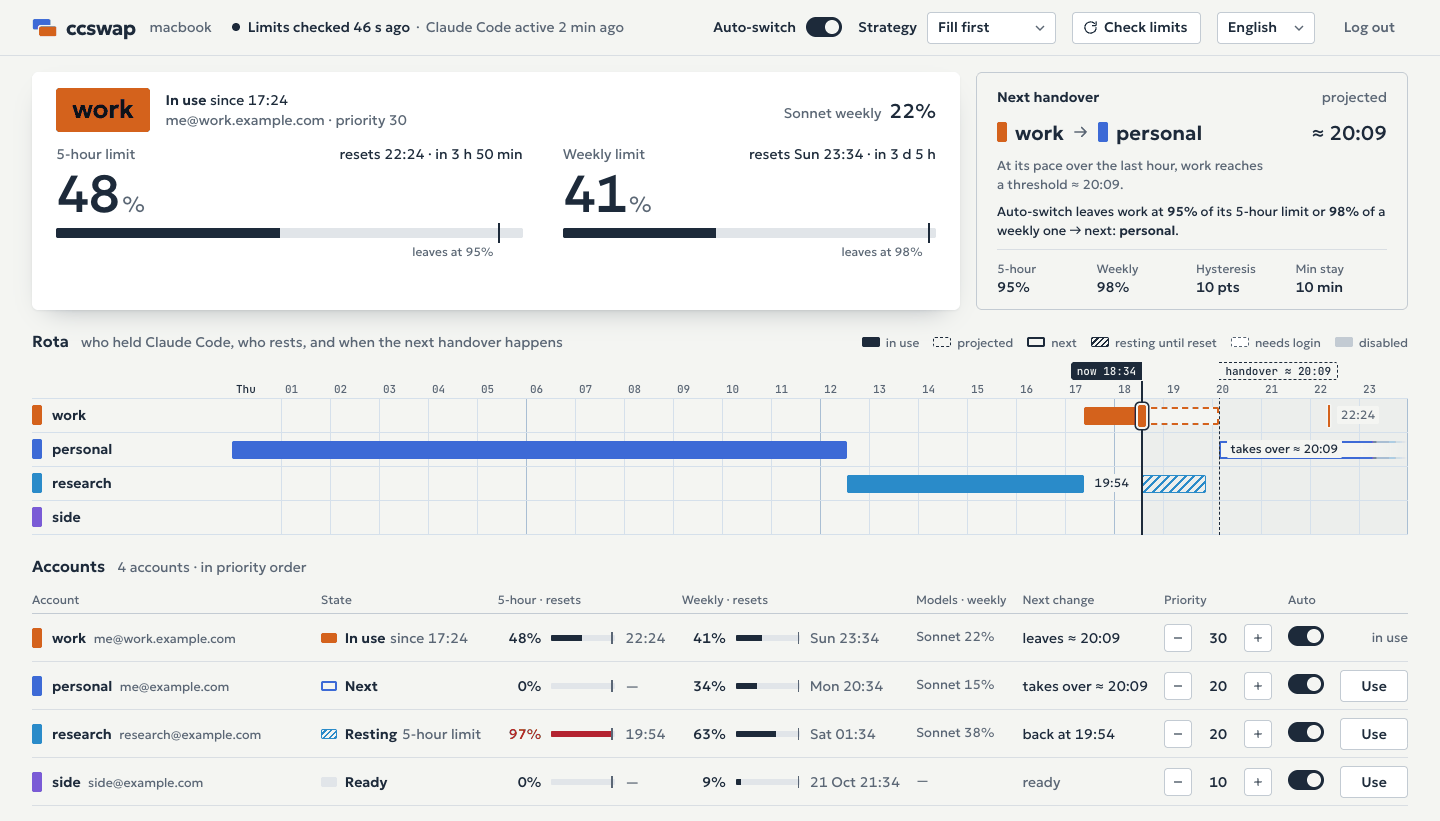
ccswap web opens the page in your browser; on Linux it prints the link. The page shows each account's
limits and resets, and a rota of the last day and the next hours: who held Claude Code and when, the
account in use and, at its pace over the last hour, when it is expected to reach a threshold. The
account auto-switch moves to then is marked Next, chosen by the same rule as the switch itself. From the
page you can change priorities, which accounts auto-switch may use, auto-switch itself, the strategy,
and the thresholds and check intervals (written to config.toml, whose comments are not kept, and used
from the next check). You can also switch accounts. Updates arrive as they happen (server-sent events
from GET /v1/events).
The page is served by the daemon's TCP listener at http://127.0.0.1:8318/management.html (/
redirects there); [t3] enabled = false turns it off. Two keys guard it:
- The read key, the one
ccswap t3prints. Logged in with it, the page only shows. "Remember the
key on this device" keeps it after the tab closes. - The admin key changes settings. It is never printed and never put in a link:
ccswap webasks the
daemon for a one-time code (single use, valid for a minute) and opens…/management.html#code=…. The
page trades the code for the admin key, drops the code from the address bar and keeps the key in the tab'ssessionStorage, so it is gone with the tab. Runccswap webagain for a new tab.
Settings change only through a listener on a loopback address (the default) and a page opened by a
loopback name (127.0.0.1, localhost or [::1]). To look at the page from your phone or another
computer, listen on all interfaces and run ccswap daemon install and ccswap web, which then prints a
link per address; such a listener only shows, even with the admin key:
[t3]
listen = "0.0.0.0:8318"
The listener speaks plain HTTP. Outside a network you trust, keep it on loopback and use an SSH tunnel:ssh -L 8318:127.0.0.1:8318 server, then run ccswap web on the server and open its link on your
computer within the minute.
Each ccswap switches only the Claude Code on its own computer, and its page names that computer. A forced
switch and adding, logging in and removing accounts stay in the terminal. The page speaks every language
ccswap has: it starts in your browser's language (English when ccswap lacks it), and its language menu
keeps your choice on that device.
TUI
ccswap tui shows the accounts and their limits in the terminal:
| Key | Action |
|---|---|
↑ k / ↓ j |
select an account |
enter |
switch to it (asks y/n when Claude Code's token is about to refresh) |
space |
include it in auto-switch or leave it out |
+ = / - _ |
priority 10 up or down |
a |
auto-switch on or off |
s |
strategy: fill-first or cache-aware |
r |
check every account's limits now |
l |
log in to a new account (asks for a name) |
? |
help |
q, ctrl+c |
quit |
T3 Code
T3 Code can show your accounts' limits from a usage hub, the
management API of CLIProxyAPI. ccswap's listener
answers the part of that API T3 Code reads, so T3 Code lists your accounts and their limits:
- Run
ccswap t3. It prints the address (http://127.0.0.1:8318by default; with a listener on all
interfaces, one per address) and the read key. - In T3 Code: Settings → Providers → Usage providers → Add hub.
T3 Code's requests are answered from what ccswap knows and ask Anthropic only for enabled accounts that
need no login and whose check interval allows it. The key only reads. If T3 Code runs on a server, add
the hub there with the server's ccswap t3. Claude Code sessions that T3 Code starts follow ccswap like
any other, unless their environment sets CLAUDE_CODE_OAUTH_TOKEN.
Limits from another ccswap
Anthropic throttles the usage endpoint per account, and every machine that asks counts. When two of
your machines run ccswap with the same accounts, let one ask Anthropic and the other take its numbers:
ccswap remote set https://ccswap.example.com
It asks for that ccswap's read key, which ccswap t3 prints there. ccswap remote shows where the
limits come from now, and ccswap remote off goes back to asking Anthropic.
- The other ccswap must be reachable: set its
[t3] listento an address this machine reaches (a LAN or
Tailscale address), or put an https proxy in front of it. - The URL must be https, or plain http to
localhostor a loopback, private or CGNAT (Tailscale)
address, because the key goes with every request. It may not carry a user or password. The key is kept
in the vault, the URL in[remote] url. - Each tick takes all accounts' numbers in one request, matching accounts by email. An account the
other ccswap does not have, the account in use once its numbers there are older thancheck_active
plus a tick, any other once they are older than twocheck_others, and every account while the other
ccswap does not answer, are asked from Anthropic directly. So is "Check limits". - Only limit numbers travel, never tokens. T3 Code on this machine sees the other ccswap's numbers too.
Moving an account to another machine
ccswap migrate moves accounts with their logins to another of your machines (a new Mac, a server, a
machine where a browser login is awkward) in an encrypted bundle. It moves, never copies: a refresh
token works once, so one login on two machines logs one of them out at the first refresh. The account in
use in Claude Code, and one that needs a new login, cannot move.
Through a file (recommended):
ccswap migrate export work -o work.ccswap
scp work.ccswap server:
ssh -t server ccswap migrate import work.ccswap
Export removes work here once the file is written and prints the code. Import asks for the code, addswork and deletes the file.
By pasting: ccswap migrate export work prints the bundle. Run ccswap migrate import on the other
machine, paste the bundle from its BEGIN line to its END line, then type the code. The accounts are
removed here before the bundle is printed, so copy it before you close the terminal.
Through a pipe: ccswap migrate export work | ssh server ccswap migrate import. The accounts are
removed here before the bundle is sent, and a pipe cannot tell whether it arrived. A bundle the pipe
refuses is saved here in migrate/ inside ccswap's folder. One that arrives but cannot be imported (no
terminal to ask for the code in, a wrong code three times, the daemon down, an account that is there
already, a bundle from a newer ccswap) is saved there on the other machine, with the command that
finishes the move. The login is lost only when the bundle went into the pipe and never came out; there
are never two copies. Plain ssh gives the import no terminal, so run the command it prints overssh -t. Run from the target machine, the import has a terminal:ssh old-mac ccswap migrate export work --yes | ccswap migrate import. Text around a bundle, such as a
login banner, is ignored.
What to know:
- The code. Export shows a one-time code once. It is never in the bundle or a log, and the bundle is
useless without it. Import asks for it without echo, three tries in all.--code CODEpasses it on the
command line, where it lands in shell history and the process list. - Import a bundle once. Import refreshes the login at once, which spends the bundle's refresh token:
a second import elsewhere gets a dead login. A bundle file is deleted after its import. - The freeze. From packing until they are removed, the accounts are frozen: ccswap neither refreshes
nor switches to them. An export that does not finish within 5 minutes, or a daemon restart, cancels
it and the accounts stay. - An interrupted import. When import cannot tell whether it went through (the daemon did not answer
in time), it says so and keeps the bundle. A minute later runccswap list: if it lists the accounts
you moved, the import landed, so delete the bundle and never import it again; if not, import it. - An interrupted export. When export cannot tell whether it went through, it keeps the bundle (the
-ofile, or a copy inmigrate/) and names a time. After it, runccswap list: if the accounts are
still listed, they stayed here, so delete the bundle; if not, the bundle is the only copy of their
logins, so import it on the other machine. If export was killed before it said anything, wait five
minutes for the freeze to end and check the same way. --replace. Import refuses an account whose email is already here. With--replacethe account
here takes the bundle's login, name, priority and enabled state. It never replaces the account in use,
or a name here that has another email. It first refreshes the bundle's login, so a working login here
is only ever replaced by a working one: a bundle that was imported before, or a refresh that fails,
leaves the account here as it was.--replaceneeds Anthropic reachable.
That first refresh spends the bundle's copy of the login. If the import then fails for another reason,
the account here takes the refreshed login, and trying the import again picks up from there. After a
daemon restart that retry is refused as used already. Keep the bundle, as it may still hold the only
logins of its other accounts, and finish the move by moving the account that took the refreshed login
(say work) out and back around it:
ccswap migrate export work -o work.ccswap
ccswap migrate import moved.ccswap --replace
ccswap migrate import work.ccswap --replace
The export keeps work's working login in a bundle of its own. Importing the kept bundle
(moved.ccswap) brings its other accounts in working and work with a dead login, and importingwork.ccswap gives work its working login back.
Linux servers
ccswap works on a Linux server the same way. There, Claude Code's login is the file~/.claude/.credentials.json, and ccswap's vault is 0600 files in ~/.config/ccswap/vault/. There are no
notifications (switches are logged in daemon.log), and ccswap web prints its links instead of
opening a browser.
Installing. Use a release archive or go install on the server, or build on another machine and
copy the binary (for an arm64 server, GOARCH=arm64):
GOOS=linux GOARCH=amd64 make build
scp bin/ccswap server:/tmp/ccswap
ssh server 'install -D -m 0755 /tmp/ccswap ~/.local/bin/ccswap && ~/.local/bin/ccswap daemon install'
Update the same way: scp cannot write over the binary of a running daemon (Text file busy), whileinstall replaces the file.
The daemon. ccswap daemon install writes the user unit ~/.config/systemd/user/ccswap.service,
enables and restarts it, adds the hook and turns on linger, so the daemon keeps running after you leave
SSH. If it cannot, it says so and prints the command to run: sudo loginctl enable-linger <user>.
Without a systemd user session (a container, a bare SSH login) it tells you to runccswap daemon run under tmux or a supervisor of your own, and leaves no unit file behind.
Logging in over SSH. ccswap login <name> prints a link: open it in any browser, your phone's
included, sign in, and paste the code at the Paste code here prompt.
Each machine has its own logins. Do not copy a login or ccswap's folder: a refresh token works once,
and a copy used on another machine logs the original out. Run ccswap login or ccswap adopt on the
server, or move the account. If the same accounts are on your
Mac too, let one ccswap ask Anthropic and the other take its numbers.
Configuration
config.toml lives in ccswap's folder: ~/Library/Application Support/ccswap/ on macOS,~/.config/ccswap/ on Linux ($XDG_CONFIG_HOME/ccswap); CCSWAP_HOME moves it. Every key is optional
and an unknown key is an error. The defaults:
poll_interval = "60s"     # a tick: follow Claude Code's login, refresh tokens, decide; 10s at least

[thresholds]
five_hour    = 95         # % of the 5-hour window at which ccswap leaves an account (above 0, up to 100)
weekly       = 98         # % of the weekly window and of each per-model weekly window
hysteresis   = 10         # points under a threshold an account must drop to before ccswap returns to it
min_dwell    = "10m"      # least time between automatic switches
check_active = "5m"       # how often Anthropic is asked for the limits of the account in use (1m to 24h)
check_others = "30m"      # and of every other account (1m to 24h)

[t3]
enabled = true            # the TCP listener: the web page, the T3 Code hub, remote
listen  = "127.0.0.1:8318"

[claude]
config_dir = ""           # Claude Code's config folder, if you run it with CLAUDE_CONFIG_DIR; absolute; "" is ~/.claude

[remote]
url = ""                  # another ccswap to take the limits from; ccswap remote set sets it

[ui]
lang = ""                 # a pinned language (en, ru); ccswap lang sets it; "" follows the locale
hysteresis must be under both thresholds. The daemon reads config.toml when it starts: after
editing it, run ccswap daemon install to restart it. The page, ccswap remote and ccswap lang write
their keys and apply them at once; such a rewrite drops the file's comments.
Environment:
CCSWAP_HOME: ccswap's folder (see above), as an absolute path.CCSWAP_CLAUDE_BIN: theclaudebinaryccswap loginruns;claudefromPATHby default.HTTPS_PROXY,HTTP_PROXY,NO_PROXY(either case) andLC_ALL,LC_MESSAGES,LANG:ccswap daemon installcopies them from your shell into the service, so the daemon reaches Anthropic
through the same proxy and speaks your language.CLAUDE_CONFIG_DIR: ccswap switches the login of[claude] config_dir, not of this variable;ccswap doctorwarns when your shell's value points elsewhere.CLAUDE_SECURESTORAGE_CONFIG_DIRis not
supported.
Languages
ccswap speaks English and Russian: the CLI, the TUI, notifications, the daemon's messages and the web
page. It follows the locale (the first of LC_ALL, LC_MESSAGES and LANG that is set; ru_RU.UTF-8
is Russian, a language ccswap does not have is English) unless ccswap lang <tag> pins one inconfig.toml; ccswap lang auto follows the locale again, and ccswap lang lists the languages. A
running daemon switches at once. A tag is matched exactly first, then by its language in its likely
script, then by its base language: pt_BR.UTF-8 takes pt-BR if ccswap has it, else pt. The web page
has its own language menu.
Adding a language takes one JSON file and no code: see
CONTRIBUTING.md.
Troubleshooting
Start with ccswap doctor. It checks that claude is on your PATH, that Claude Code has a login (on
Linux also the credentials file's mode, owner and whether it is a symlink), that your shell'sCLAUDE_CONFIG_DIR matches ccswap's, that the service is loaded and runs this binary, that the daemon
answers (and if not, whether its files or folder keep it from starting), that the hook is installed,
linger on Linux, and that the TCP listener answers. It exits with status 1 when a check fails. ccswap daemon status runs the service, daemon and hook checks only.
The daemon's log is daemon.log in ccswap's folder; past 10 MiB it is moved to daemon.log.1. The
daemon stops with exit status 78, and the service does not restart it, when CCSWAP_HOME is relative,
ccswap's folder or your home folder cannot be found, ccswap's folder cannot be created or made 0700,
the socket path in it is too long, or config.toml or state.json does not load. ccswap daemon status and the end of daemon.log give the reason. Fix it, then run ccswap daemon install.
| Message | What to do |
|---|---|
The daemon is not running |
ccswap daemon install, or ccswap daemon run to see it fail in the terminal |
The current Claude Code login is not added to ccswap |
ccswap adopt <name>, or log Claude Code in to an account you added |
Claude Code has not run for a long time |
Send any message in claude, then try again |
The current account's token is about to refresh |
Try again in a minute (or ccswap use <name> --force) |
You need to log in again: ccswap login <name> |
Run it; for the account in use, /login inside claude |
Internal daemon error: see daemon.log for details |
Read daemon.log. A line claude code entry: … means Claude Code's stored login is damaged: run claude auth login, then ccswap status |
Security
ccswap holds the logins of several accounts and runs a local HTTP listener. In short:
- The logins of inactive accounts are in the macOS keychain (service
ccswap) or 0600 files on Linux.config.toml,state.json, the socket anddaemon.loghold no tokens. - In Claude Code's files ccswap writes only the
claudeAiOauthkey of its login item,oauthAccount
in~/.claude.jsonand oneStopFailurehook in~/.claude/settings.json. - The full API is on a Unix socket only your user can open. The TCP listener serves a part of it: the
read key only reads, settings need the admin key fromccswap weband a loopback listener, and a
forced switch, adding and removing accounts,remoteandmigrateare never served over TCP. - The listener's read and admin keys last until you replace them. SECURITY.md says how to replace a
leaked one.
SECURITY.md has the full list of what is stored where, and how to report a vulnerability
privately.
Why not a proxy
A proxy such as CLIProxyAPI holds several logins and
serves them as an API to any client. That is a different job from ccswap's, and it brings three things
ccswap avoids:
- A server in the middle of every request. All of Claude Code's traffic, code included, passes
through it, and while it is down Claude Code does not work. - Other programs on a subscription login. Any OpenAI-, Gemini- or Claude-compatible client can use
the proxy. By default CLIProxyAPI makes such requests look like Claude Code: it sends Claude Code's
user agent and headers and replaces the system prompt (disable-claude-cloak-modein itsconfig.example.yaml). Anthropic's Claude Code terms
say subscription OAuth is meant for Claude Code and Anthropic's native apps, and that third-party
developers may not route requests through Free, Pro or Max plan credentials. - A prompt cache split across accounts. The cache is not shared between organizations, and each
subscription has its own. CLIProxyAPI's defaultround-robinrouting sends one session's requests to
different accounts, so each one reads the context again without the cache; itssession-affinity
is off by default.
ccswap leaves requests alone. The unmodified Claude Code talks to Anthropic, and ccswap only changes
which of your accounts it is logged in to. A switch resets the cache once, so ccswap switches near a
limit or when you ask, not per request. ccswap is still unofficial; see Terms of use.
Related projects
Other tools for several Claude accounts or for Claude Code usage, with different trade-offs:
- claude-swap: a Python CLI (
cswap) that swaps Claude Code's
credentials between accounts, with a usage dashboard, automatic rotation near rate limits and
parallel sessions. - caam: a Go CLI that swaps account
profiles for Claude Code, Codex and Gemini. - CLIProxyAPI and tools built on it such as
ccs: proxies that hold CLI logins and serve them as an API, so
requests go through the proxy instead of the native client. ccswap only answers the usage part of
CLIProxyAPI's management API, for T3 Code. - ccusage: reads Claude Code's local logs and reports token usage
and cost; it does not switch accounts.
ccswap's take: one Go binary with a daemon, CLI, TUI and web page; no proxy; switching without
restarting Claude Code; macOS and Linux.
Contributing and licence
Bug reports, fixes and translations are welcome: see CONTRIBUTING.md. Report
vulnerabilities privately, as SECURITY.md says.
ccswap is released under the MIT License. Third-party licences are in
THIRD_PARTY_LICENSES.
Yorumlar (0)
Yorum birakmak icin giris yap.
Yorum birakSonuc bulunamadi