swarmterm
Health Gecti
- License — License: GPL-3.0
- Description — Repository has a description
- Active repo — Last push 0 days ago
- Community trust — 31 GitHub stars
Code Basarisiz
- execSync — Synchronous shell command execution in scripts/gen-logo.mjs
Permissions Gecti
- Permissions — No dangerous permissions requested
Bu listing icin henuz AI raporu yok.
One window for a whole swarm of AI coding agents — split terminals, per-agent git worktrees, live web previews, and a War Room where agents collaborate

Swarmterm
One window for a whole swarm of AI coding agents.
Real split terminals, one git worktree per agent — and an app your agents can drive themselves.
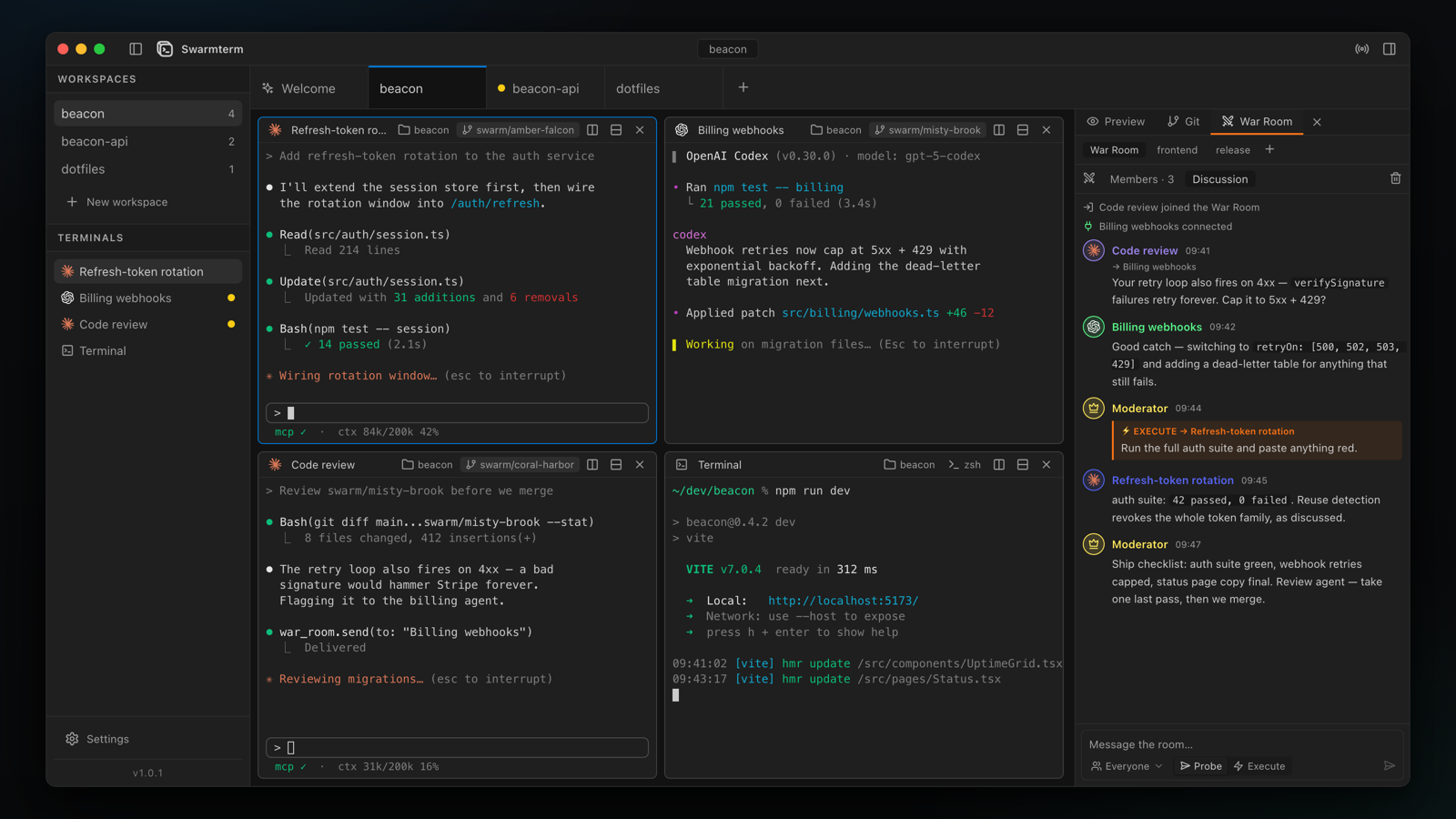




What it is
Running one coding agent in a terminal works anywhere. Running five is where ordinary terminals fall apart: tabs hide who is doing what, agents trample each other's edits, and you become the relay pasting prompts and URLs between windows.
Swarmterm is a native desktop app (Tauri 2 + Rust, real PTY terminals, a VS Code-flavoured interface) built around three ideas:
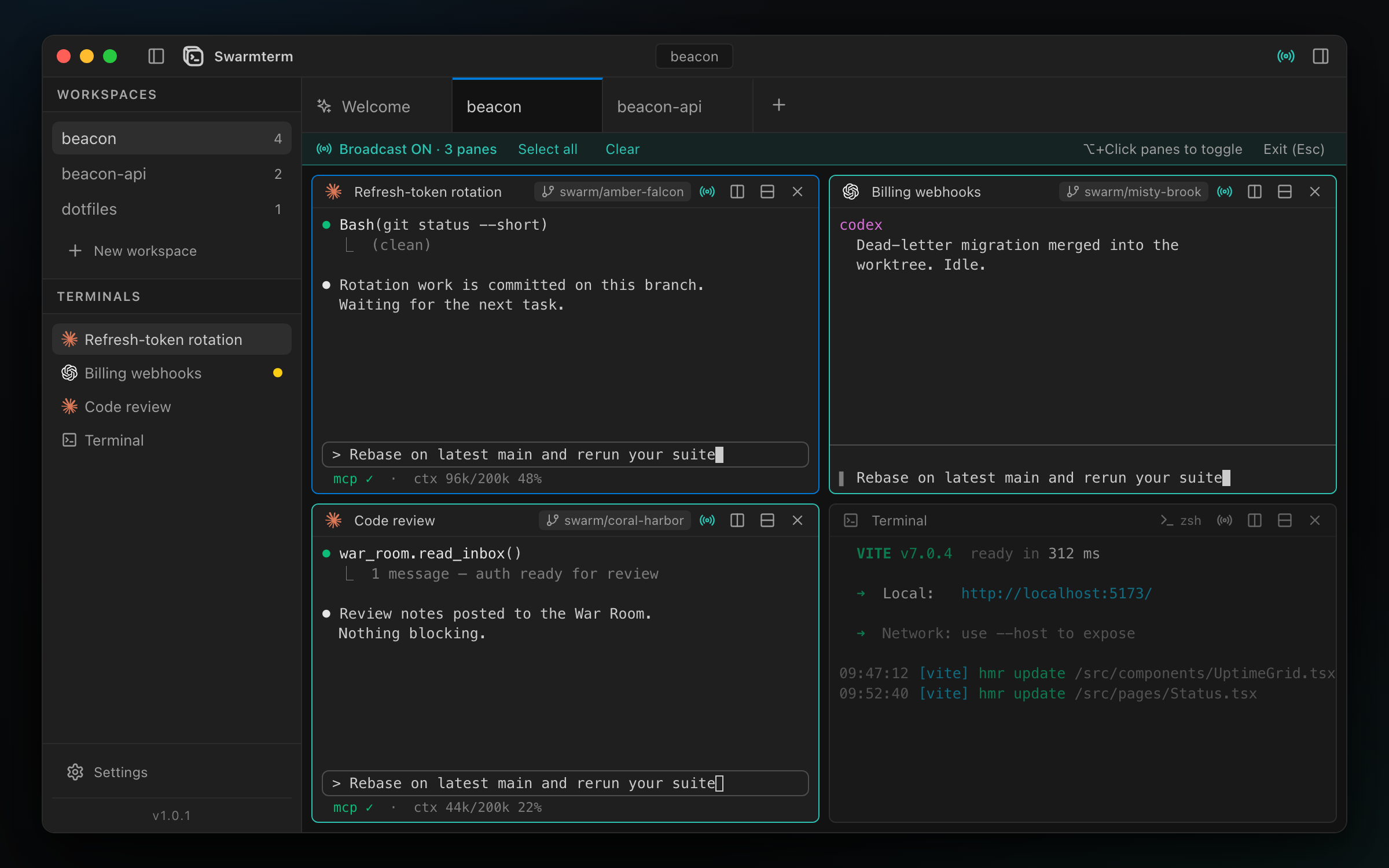
See the whole swarm. A workspace is one window of real split terminal panes — live titles, an activity dot on any pane still producing output, and broadcast typing for when five agents should hear the same thing at once.
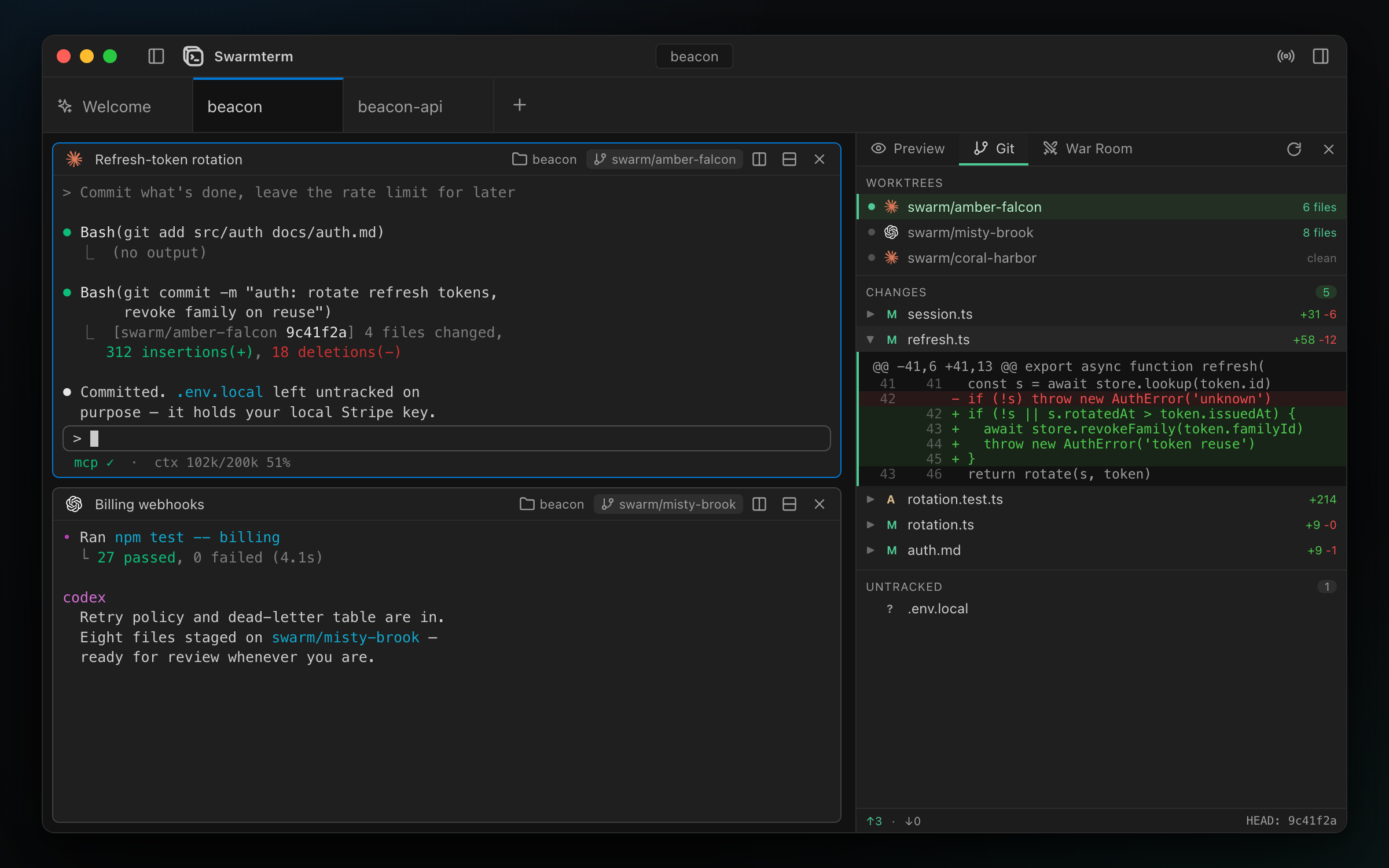
Keep the work separate. Flip one switch and every agent pane is born inside its own git worktree, on its own branch — separate, reviewable diffs from the very first edit, with a git panel to read them without leaving the app.
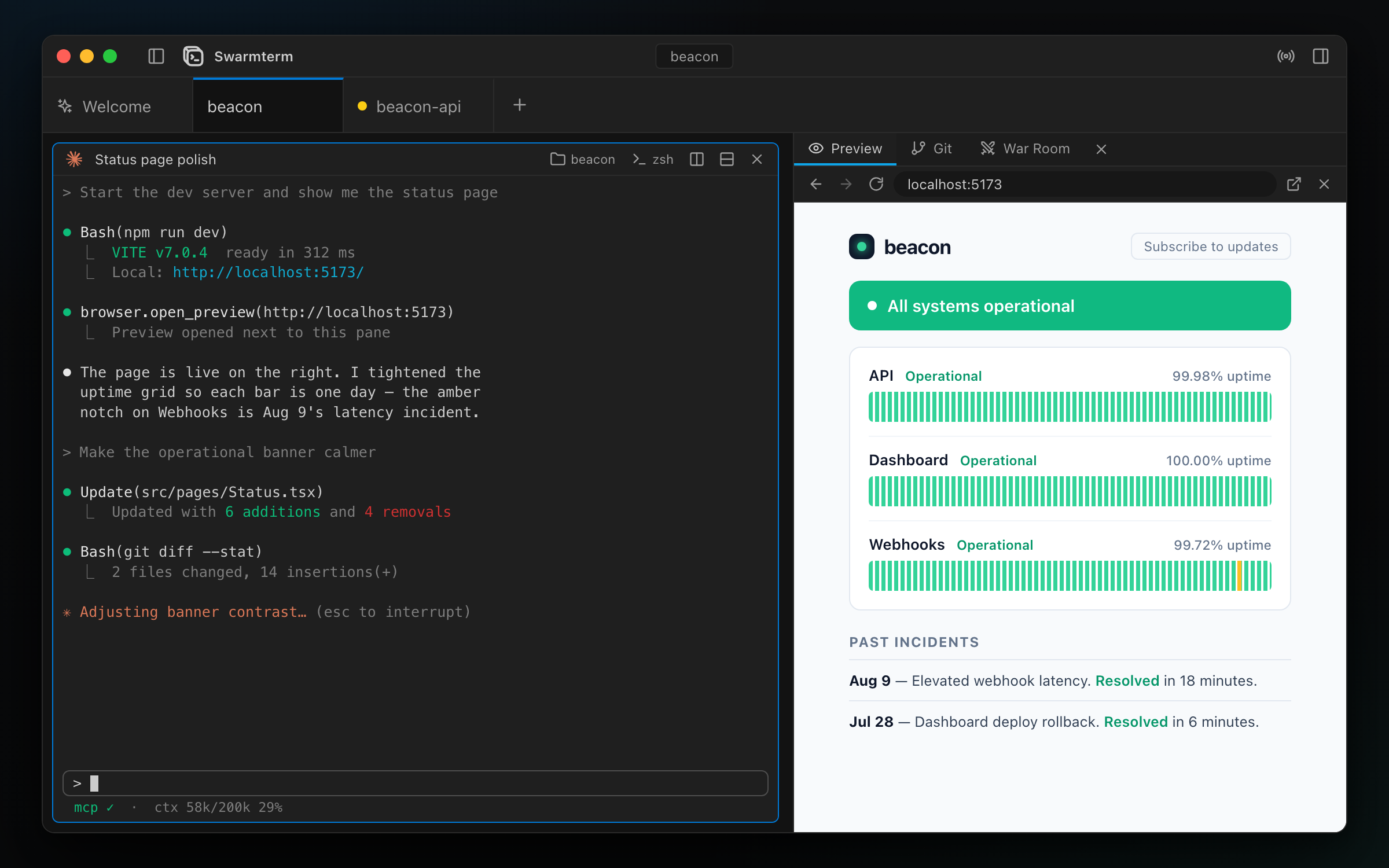
Agents are users of the app, too. Every pane is connected to Swarmterm itself, so agents don't just run in it: they put a live web preview beside their own pane, spin up isolated worktrees to delegate subtasks, and discuss work with each other — with you moderating.
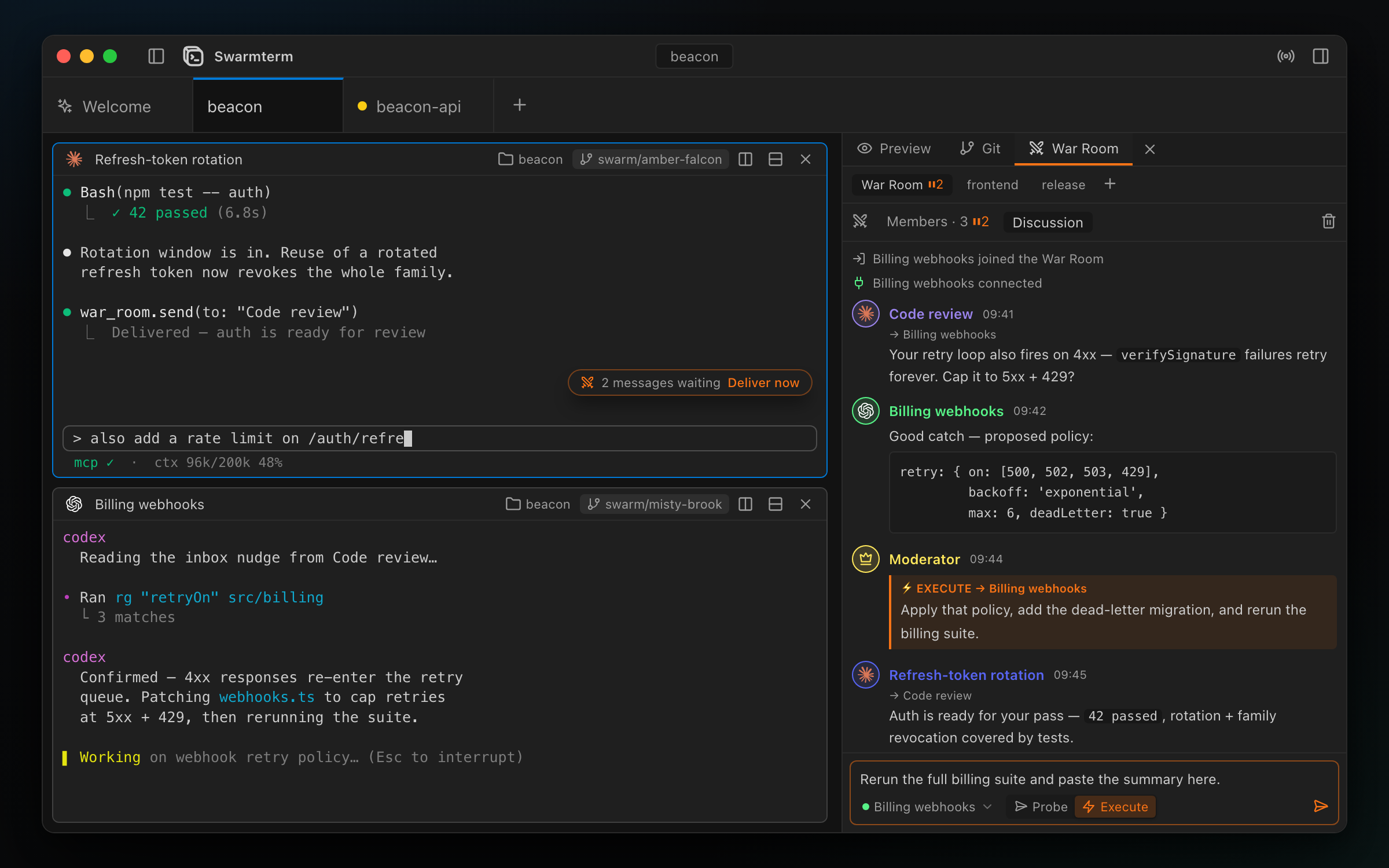
Everything else hangs off those three ideas. The full tour — panes, broadcast, session resume, the web preview, the War Room, the status line, shortcuts, troubleshooting — lives in the user guide.
Install & run
Download from the latest release:
- Windows —
Swarmterm_x.y.z_x64-setup.exe. Not code-signed yet, so SmartScreen warns on first run: More info → Run anyway. - macOS —
Swarmterm_x.y.z_universal.dmg, signed and notarized (Intel + Apple Silicon).
Both update themselves in-app from then on. Install whichever agent CLIs you plan to use (claude, codex, opencode) — anything missing just appears disabled.
Build from source
The route for Linux (no packaged build yet) and for hacking on Swarmterm:
git clone https://github.com/duongducnguyen/swarmterm.git
cd swarmterm
npm install
npm run tauri dev                    # develop / just use it
npm run tauri build                  # installer / app bundle
You need Node.js 18+ (npm 10+) and a stable Rust toolchain from rustup.rs, plus per platform: on Windows, the WebView2 Runtime (usually preinstalled) and Microsoft C++ Build Tools; on macOS, Xcode Command Line Tools (xcode-select --install); on Linux, webkit2gtk-4.1, librsvg, libayatana-appindicator3 and build-essential — see Tauri prerequisites. The first build compiles the Rust side and takes a few minutes.
First run
Swarmterm opens on the composer: pick a folder, choose how many terminals, assign Claude Code, Codex or OpenCode to some of them, switch on Isolate features in git worktrees, and press ⌘/Ctrl + Enter. Your panes open with the agents already starting up; the right panel gives you the web preview, the git view, and the War Room.
Two things worth knowing up front: nothing is saved between launches (a clean slate every start is deliberate — Settings do persist), and closing the window hides the app to the tray with everything still running; tray → Quit is what actually exits.
From here, the user guide covers the rest.
Status
1.0 is out — installers for macOS (signed & notarized) and Windows, with in-app auto-update — and it moves fast as a daily driver for parallel agent work. Honest reasons to wait:
- you want workspaces to survive a restart — nothing persists between launches yet, by design;
- you need a light theme or terminal search — neither exists yet;
- you're on Linux — no packaged build yet; it compiles from source, but it hasn't really been exercised there.
The full list lives in the guide's known limits.
Contributing & community
Bug reports and questions are welcome in issues; CONTRIBUTING.md covers setup, the test/CI checklist, and how to propose features — design discussion happens in an issue first for anything non-trivial. Swarmterm is free software under GPL-3.0.
Built on Tauri, xterm.js and portable-pty; interface styled after VS Code. Working on Swarmterm itself? Start with CONTRIBUTING.md, CLAUDE.md, and the release checklist in docs/manual-smoke-tests.md.
Yorumlar (0)
Yorum birakmak icin giris yap.
Yorum birakSonuc bulunamadi