seedeep
Health Gecti
- License — License: MIT
- Description — Repository has a description
- Active repo — Last push 0 days ago
- Community trust — 23 GitHub stars
Code Basarisiz
- rm -rf — Recursive force deletion command in .github/scripts/idle-survival.sh
- spawnSync — Synchronous process spawning in .github/scripts/idle-survival.test.ts
- process.env — Environment variable access in .github/scripts/idle-survival.test.ts
- network request — Outbound network request in .github/scripts/idle-survival.test.ts
- spawnSync — Synchronous process spawning in .github/scripts/scan-sensitive-diff.test.ts
- rm -rf — Recursive force deletion command in .github/scripts/server-lifecycle.sh
- spawnSync — Synchronous process spawning in .github/scripts/server-lifecycle.test.ts
- process.env — Environment variable access in .github/scripts/server-lifecycle.test.ts
- network request — Outbound network request in .github/scripts/server-lifecycle.test.ts
- rm -rf — Recursive force deletion command in .github/scripts/smoke-server.sh
Permissions Gecti
- Permissions — No dangerous permissions requested
Bu listing icin henuz AI raporu yok.
What Claude Code is doing between your prompt and its answer, drawn live from the logs it already writes: every model call, every tool, each subagent on its own context window and its own model, and what the session produced. Local and read-only — your session content never leaves the machine.

seedeep
See deep into what Claude Code is doing.



Claude Code writes a session log to disk as it runs. seedeep tails that log and
rebuilds the turn while it is still happening: the context window filling, every API
call with its latency and token split, every tool call and its result, and each
subagent folded under the spawn that launched it. The same view is there afterwards
to walk through.
Read-only. No proxy, no daemon, no session content leaves the machine.
npm i -g seedeep && seedeep # Node or Bun; binaries below for neither
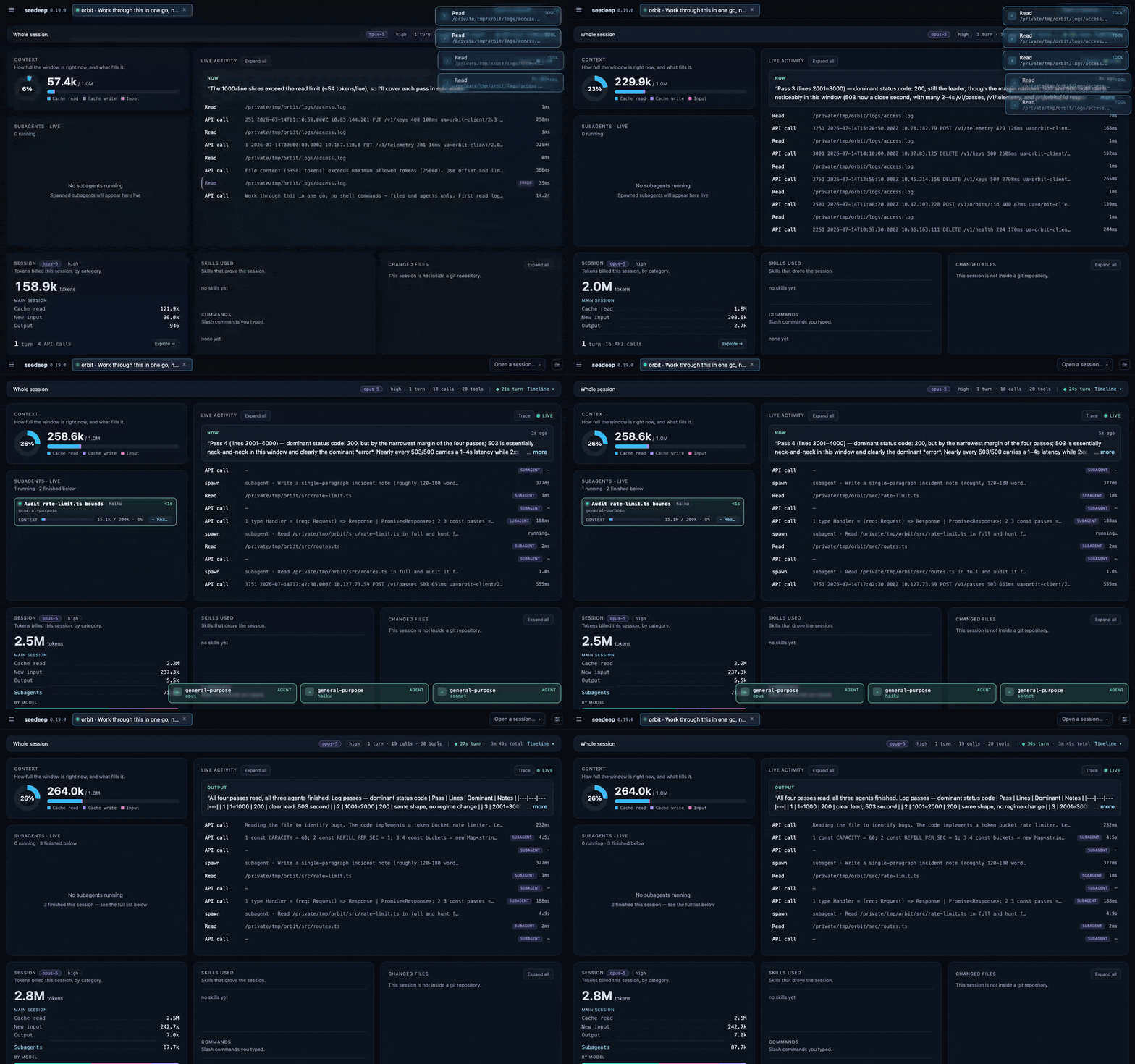
One turn, from 3% to 26% of the window: six subagents on three different models,
2.9M tokens billed, 2.5M of them the same context read again.
Why you'd run it
Eight things a Claude Code session does not report, and what seedeep shows instead.
- A failed API call ends the turn silently. An expired login, a session limit, an
overloaded server: the turn stops, the terminal keeps looking normal, and the
transcript's last line is the error itself. seedeep turns the tab red, files the
session under Broken, and turns the menu-bar icon red above every other signal. - An approval dialog reaches no log at all, so a session stopped on a permission
prompt looks identical to one that is thinking. seedeep reads Claude Code's own
live state, turns the tab amber the moment it stops, and names what is waiting to
be approved. - Subagent spend is invisible from the terminal. The live tree shows each subagent as
it launches: its own context filling, the model it actually runs on, and the
verbatim output it handed back to the main session. - The window size depends on the model. The bar follows the model your calls really
run on, so/modelmid-session moves it, and a Haiku subagent is measured against
200k inside a session running on 1M. - Most of what you spend is context you already sent. Measured on 2026-08-25 over
one machine's 770 session files and 34,724 API calls: 98% of the tokens processed
were cache reads, and 0.3% were output. Weighted by what each kind actually costs,
re-read context is still 71% of the bill. The recipe is indocs/features.md, so you can run
it on your own sessions. - Waste is scored per turn. Seven deterministic checks (no LLM) run as each turn
closes, each quoting the Claude Code documentation that justifies it. They report
what the turn did right as well. - Cost is shown per call. Every API call in the feed carries its latency, its input
and output on demand, and the split between cached context and new tokens. - Output is attributed to the session that produced it. Commits and tracker cards are
read from the calls that made them, not from anything typed in a prompt.
seedeep is under active development.
The complete tour of every surface →
What it looks like
Every capture below is a synthetic session on a fictional project. No real path,
prompt or project name appears in any frame.
The Trace
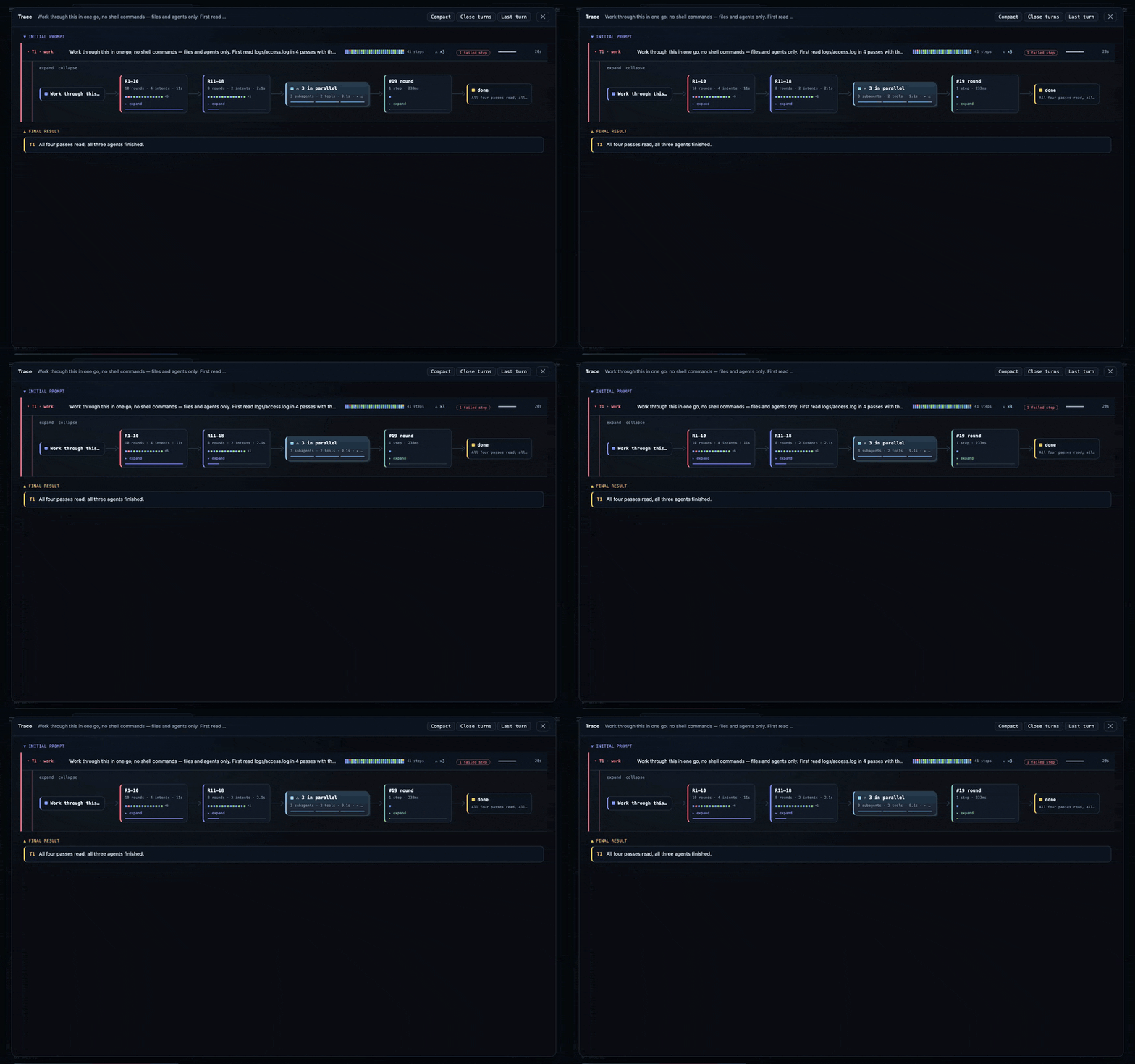
One row per turn: how many steps it took, how long it ran, whether a step failed, and
the subagent rounds it spawned. It fills in as the session works, rather than being
assembled once the turn is over. (rules)
The tray
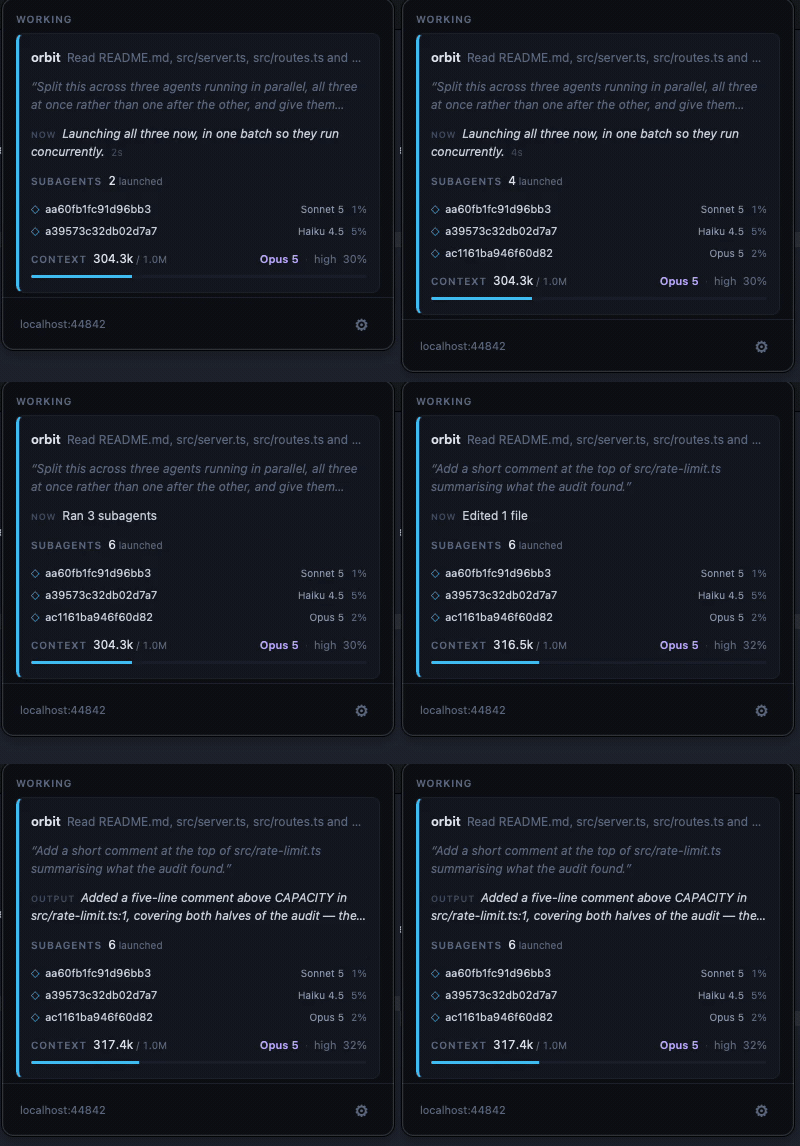
A native menu-bar client polling the same local server. It reports what the session
is doing right now, which subagents are running and on which model, and how full the
window is, with no browser tab open. (rules)
Notifications
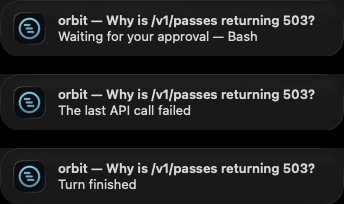
Three events are worth interrupting you for, and each has its own switch. Nothing else
notifies: not a subagent finishing, not a tool error.
| Banner | Ships | Why |
|---|---|---|
| Waiting for your approval | on | the session cannot continue until you answer |
| The last API call failed | on | it has stopped, and nothing on screen says so |
| Turn finished | off | routine news, off by default so the two above stay unmuted |
Each banner is one title and one line: which session, and what happened. The command
awaiting approval and the error text stay in the panel, because a banner is not
actionable and the webhook channel sends its payload off your machine.
seedeep ships unsigned, so macOS asks for the notification permission again after
every update. If the tray goes quiet following an upgrade, see
installing the tray.
Home
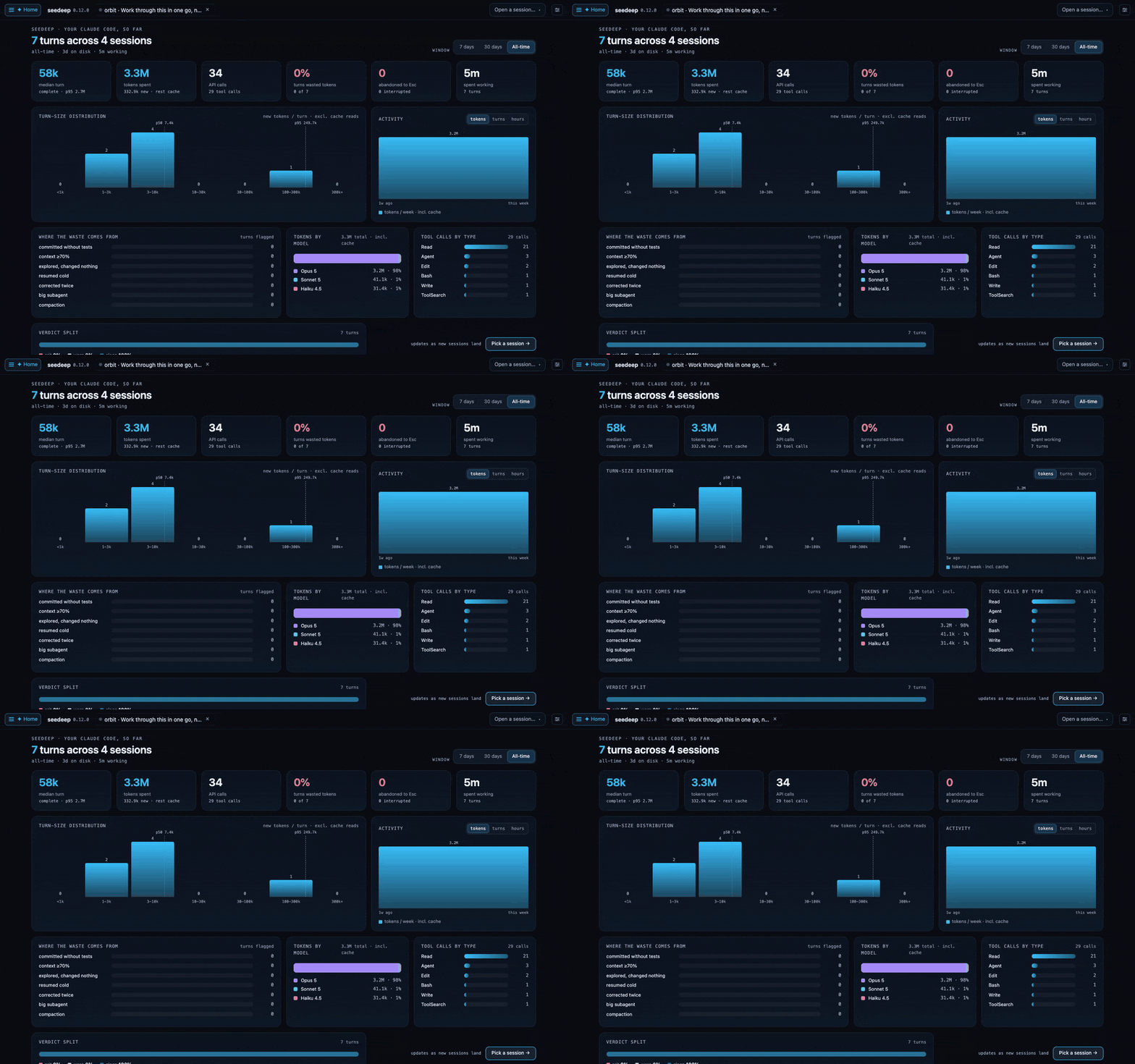
Across every session on the machine: turn-size distribution, where the waste came
from, and tokens split by the model that spent them. Subagents count under their own
model, so a Haiku explorer inside an Opus session shows up as Haiku.
Search
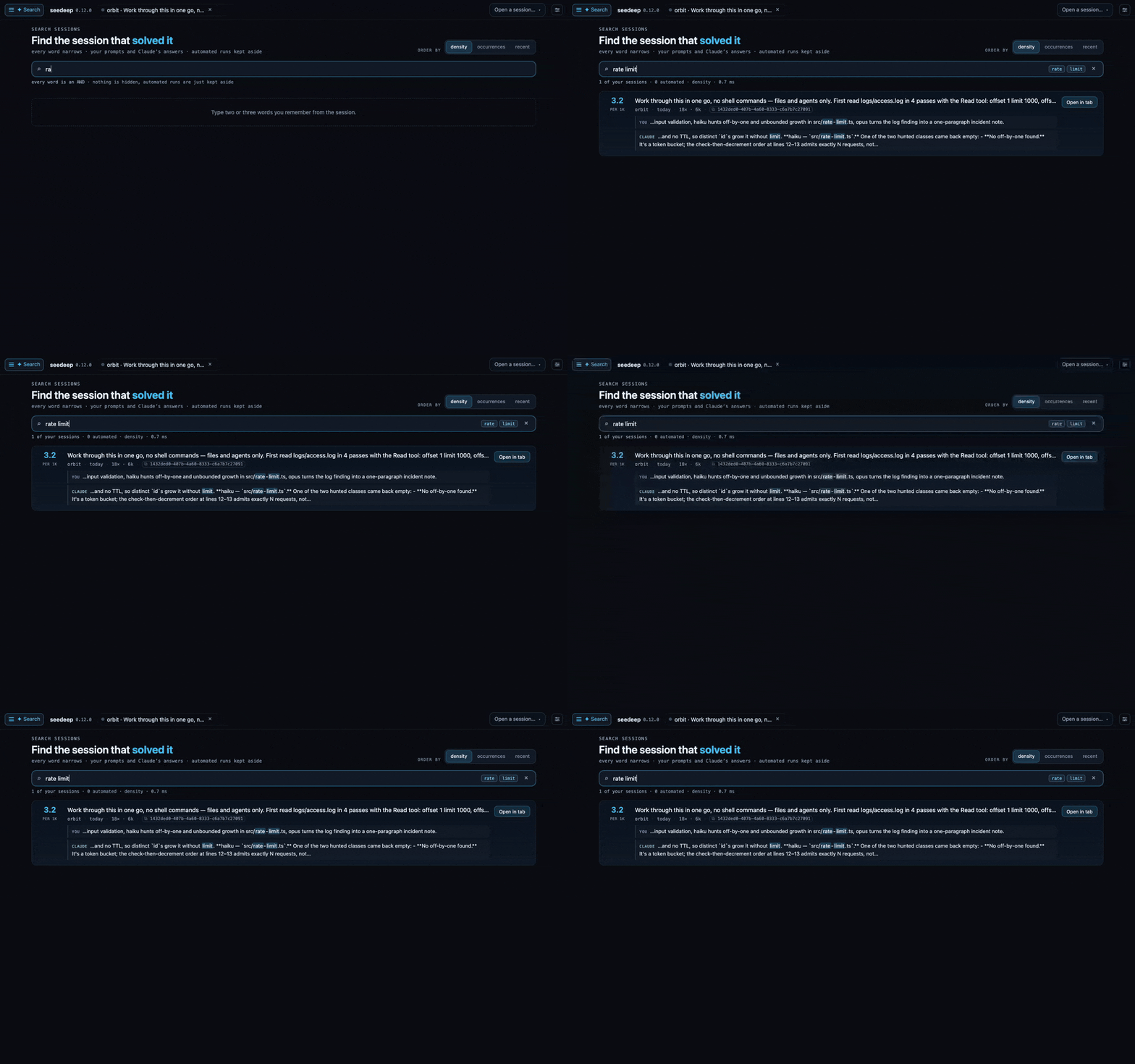
Every word narrows the results. Your prompts and Claude's answers, matches highlighted
in place, ranked by density instead of recency. Paste a commit hash or a tracker id
and it queries git and its own index too, which is where plain text search comes up
empty. (rules)
How it works
Claude Code appends one line to a local session file per content block, so a single
response becomes several lines, each stamped with its call's token usage. seedeep
tails those files and reconstructs the picture. No network interception, noANTHROPIC_BASE_URL override, nothing written back. It watches every active Claude
Code session at once, and identifies its own launching session so it never counts
itself.
Session data flows one way: the server pushes to the browser over Server-Sent Events.
See docs/architecture.md for the full design.
Install
With Node or Bun, from npm:
npm i -g seedeep          # or: bun install -g seedeep --trust
seedeep                   # watch, serve, and open the browser
With neither, take the file for your platform from the latest
release (macOS arm64/x64, Linux x64/arm64, Windows x64/arm64)
and run it. It is a standalone program, not an installer: it carries its own runtime
and the whole browser GUI inside, installs nothing, and leaves behind only~/.seedeep/. The Linux builds require glibc (Debian, Ubuntu, Fedora and
derivatives); Alpine and other musl-based distributions are not supported.
The menu-bar tray is a separate, optional download from the same release: a universal.dmg for macOS, a -setup.exe for Windows. It is a pure client, so the server still
has to run where Claude Code runs. Both are unsigned, and macOS and Windows each show
a first-launch warning.
Inside Claude Code, seedeep install-command adds a /seedeep command that opens the
GUI, stops the server, or reports what the current session cost.
Installing, running, updating, remote access and removal in full →
Which platforms have actually been run
Everything above was checked by hand on macOS, the machine seedeep is developed on.
Linux has been used once, in a VM, on arm64. Windows in a VM, several times. Building
for three systems is not the same as having used three, so here is that difference
written down.
Every release also runs each server binary on a runner of its own operating system
before anything is published: it must report its version, answer on its API and serve
the browser GUI, or the release stays a draft. That rules out a download that dies at
startup. It says nothing about whether the tool is correct or pleasant in front of a
person on that machine.
| macOS | Windows | Linux | |
|---|---|---|---|
| Server | Used daily; every claim above was checked here | Used on Windows 11 in a VM: installed from npm, server started and served its API against a real Claude Code session, status, stop, restart and install-command confirmed, consecutive cold starts measured without a failure. /seedeep there needs one line of configuration (install.md) |
arm64: used on Ubuntu 24 in a VM, GUI opened against a real Claude Code session, lifecycle and install-command confirmed. x64: exercised on every release but never used by a person, only started, left idle and driven through the full lifecycle in CI, plus a version check on Docker. Both builds require glibc; Alpine/musl is not supported |
| Tray | Used daily on a real menu bar | Installed and used on Windows 11 in a VM: the installer runs, the icon reads in the notification area, the popover opens at full height, trust-on-first-use and the connection screen work, the panel's buttons respond, notifications are delivered, and no console window appears | Not a target, deliberately: Tauri emits no tray click event on Linux, so the panel could not open (docs/tray.md) |
Concretely: on Linux x64 you are the first to use it. A defect there is expected, and
an issue saying what you saw is the most useful thing you can send.
Every Windows session so far turned up several.
Terminal sessions and the desktop app's Code tab are both watched live. One signal is
missing on the desktop app: a session stopped at a tool approval reads as working
rather than amber, because only a terminal session publishes that state and a
transcript cannot tell a call awaiting your yes from one that is running. A question
the model asks you does light amber there
(what each surface shows).
Design principles
- Read-only. seedeep only reads what Claude Code already writes. It never
modifies, proxies, or intercepts your session. - Live. The target is watching a turn as it happens, not analyzing spend after
the fact. - Runtime-agnostic core. The reducer and every rule it applies use standard APIs
only, no runtime builtins, so they run and are tested anywhere. The server around
them is Bun, shipped with it embedded, so you never install a runtime to runseedeep. - Local by default. Your session content stays on the machine unless you ask
otherwise, and asking turns on TLS and a token in the same move. The only outbound
request seedeep makes on its own is the update check againstregistry.npmjs.org,
andseedeep update --offlineskips it. - Visual. Every number is shown as something you can read at a glance.
Development
The server and the browser GUI are developed against Bun, with no
other runtime required. The menu-bar tray is a Tauri app, so building it additionally
needs a Rust toolchain and the platform SDK.
bun install
bun start          # watch, serve, and open the browser
bun run test       # run the test suite
bun run typecheck  # tsc --noEmit (the tests do not type-check)
bun run tray:dev   # build the tray panel, compile, run
If you also run an installed seedeep, develop through bun run dev andbun run tray:dev: they give the checkout a state directory and a port of its own.CONTRIBUTING.md has the full setup, the conventions, and how to
send a change.
Docs
features.md |
every surface, and the reasoning behind the rules |
install.md |
installing, running, updating, remote access, removal |
architecture.md |
the pipeline, and why it has the shape it does |
api.md |
the HTTP reference: every route, its parameters and its responses |
configuration.md |
the config file, precedence, TLS, auth, the Settings panel |
trace.md · search.md · tray.md |
the three surfaces with rules of their own |
session-output.md |
what a session shipped, worked on, and touched |
claude-code-upgrades.md |
how seedeep survives a Claude Code release |
CHANGELOG.md |
what changed, newest first |
CONTRIBUTING.md |
hit a bug or want a change? start here, and what to redact before you attach anything |
SECURITY.md |
found a vulnerability? report it privately, never as an issue |
CODE_OF_CONDUCT.md |
community standards and how violations are handled |
License
MIT © duqaXxX
Yorumlar (0)
Yorum birakmak icin giris yap.
Yorum birakSonuc bulunamadi