duvlify
Health Warn
- License — License: MIT
- Description — Repository has a description
- Active repo — Last push 0 days ago
- Low visibility — Only 5 GitHub stars
Code Fail
- process.env — Environment variable access in astro.config.ts
- process.env — Environment variable access in scripts/check-origin.mjs
- exec() — Shell command execution in scripts/env-file.mjs
- process.env — Environment variable access in scripts/env-file.mjs
- process.env — Environment variable access in scripts/index-sync.mjs
- network request — Outbound network request in scripts/index-sync.mjs
Permissions Pass
- Permissions — No dangerous permissions requested
No AI report is available for this listing yet.
Beautiful docs for humans. Native tools for agents. An open-source Astro framework for documentation you own end to end: Markdown in, static site with search, an API reference and an MCP server out.
Duvlify
Beautiful docs for humans. Native tools for agents.
A documentation framework you own end to end: write Markdown, get a fast static
site with search, an API reference, generated share cards, and a Model Context
Protocol server that lets AI agents query your docs directly.
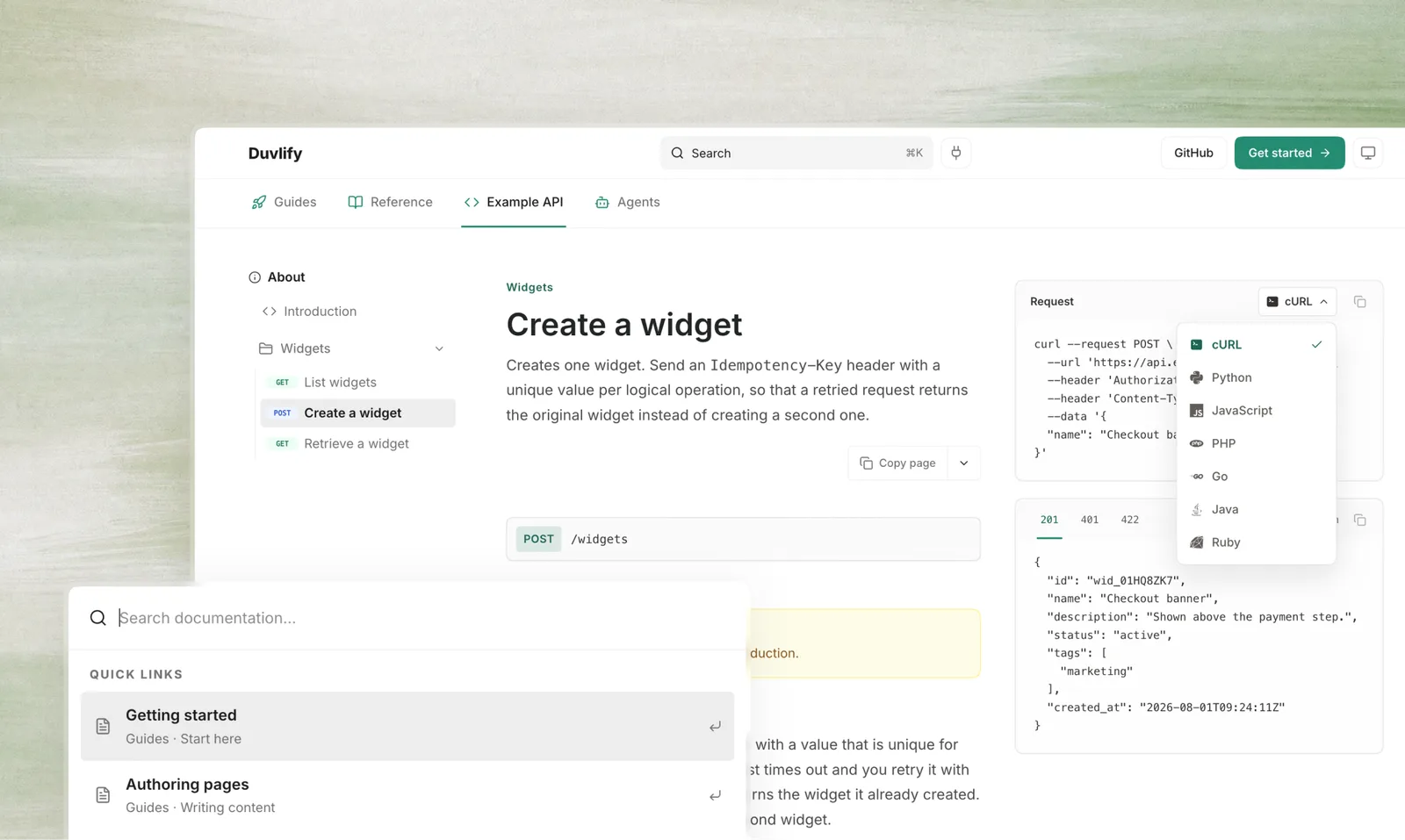
Built on Astro. No framework runtime in the browser, no
hosted service in the middle, no per-seat pricing, and no watermark on your
pages. The output is HTML.
duvlify.dev: the documentation, built with Duvlify
from the content/ folder of this repository.
npm install
npm run dev       # http://localhost:4321
A fresh clone runs with nothing configured. Search works, the agent tools answer,
and npm test passes, because every service integration defaults to off and
retrieval falls back to an index built at compile time.
What is in this repository
content/ is this project's own documentation. It is what duvlify.dev serves,
and it doubles as a live demo of every component. Replace it with your pages.
content/         the pages this site publishes
handbook/        the framework's manual, as plain Markdown. Never published
src/
  docs.config.ts identity, theme, navigation, agent settings
  content.config.ts   the frontmatter schema
  components/    the MDX component set and the page shell
  lib/           build-time logic: navigation, Markdown, manifest, SEO
  pages/         routes: HTML, .md twins, feeds, indexes, share cards
  scripts/       the interface's client-side code
  styles/        tokens, reset, shell, components
worker/          the edge Worker: headers, negotiation, agent surfaces
scripts/         build-time tooling (index-sync, snapshot-manual)
test/            assertions against a real build and a real Worker
handbook/ is the copy that survives step 1 of Making it yours. Replacingcontent/ deletes this framework's own documentation from your repository, and
the links in the table below point at duvlify.dev, a host you do not control,
describing a version you have not forked. handbook/ holds the same pages as
plain Markdown, snapshotted from the build, so the manual stays in your clone.
Once content/ is yours, treat handbook/ as frozen. It is the manual for the
commit you started from, and it stays correct however far your own pages move
from it. Nothing reads it: no build step, no test, no route. So delete it when
you no longer need it. What you must not do is regenerate it: that rebuilds it
from whatever content/ now holds, which would replace the manual with your own
documentation and delete the rest. npm run manual:snapshot detects this and
refuses, and npm run manual:check exits quietly rather than failing your CI,
but the reliable protection is knowing the folder is not yours to rebuild.
Documentation
| Getting started | run it, and the four things you will edit |
| Why Duvlify | reasons to pick it, use cases, and what you trade |
| Authoring pages | frontmatter, drafts, human- and agent-only content |
| API reference pages | point the build at an OpenAPI document |
| Deploying | Cloudflare, subpaths, and any other static host |
| Publishing in several languages | the URL shape, untranslated pages, and what every output owes a multilingual build |
| Frontmatter | every field a page can declare |
| Components | the component vocabulary, rendered on the page that documents it |
| Code and diagrams | fences, Mermaid, images, icons and embeds |
| Page layouts | the table of contents, or a panel in its place |
| Configuration | every setting in src/docs.config.ts |
| Theming | accent, font, radius, and the contrast rules that matter |
| Architecture | how the build works and why |
| Example API | a fictional API, to show what the endpoint layout renders |
| Serving agents | the MCP server, the HTTP API and WebMCP |
Features
Authoring. Markdown and MDX with a component set: callouts, cards, steps,
tabs, accordions, code groups, parameter fields, Mermaid diagrams, file trees.
Frontmatter is schema-checked; a bad edit fails the build with the file named.
Navigation from one file. Tabs, groups and page order live insrc/docs.config.ts. Titles and icons come from each page's own frontmatter and
are never restated. A page id that does not exist, or a published page missing
from the sidebar, fails the build.
Drafts. draft: true keeps a page in the repository and out of every output:
no route, no sidebar entry, no search result, no sitemap row, nothing an agent
can reach. It stays listed in the navigation config, so publishing is one line.
API reference. Point src/openapi.config.ts at an OpenAPI document and
endpoint pages render their parameters, schemas, response tabs and request
samples from it. The spec stays the single source of truth, and is published at/openapi.json for anything writing code against the API. The
Example API tab is a worked
example, built from the spec that ships in this repository.
Search. Full-text, over an index built at compile time and fetched on first
use, so page weight stays flat as the corpus grows.
Built for search engines and for models. One canonical HTML page per topic
with a JSON-LD graph and generated share cards; the same page as clean Markdown
at <page>.md or by Accept: text/markdown; llms.txt and llms-full.txt; an
Atom feed of what changed; Link headers so an agent finds all of it from aHEAD request.
An MCP server. /mcp exposes the documentation as four tools: search,fetch, list_pages and an optional report_issue. This lets an agent query
your docs while it answers, instead of guessing from training data. The same
tools are served as a plain HTTP API at /api/docs/, with a generated OpenAPI
description, and can be registered with in-browser agents through WebMCP.
Retrieval works out of the box with no external service; Cloudflare AI Search is
opt-in for semantic search.
Themeable. Accent, font and radius are one line each. Light and dark are
both designed, with contrast checked against the accent tints rather than only
the page background.
Yours past the config file. A rebrand is one file, and that is where most
sites stop. When it is not enough, the component set, the page shell and the
stylesheets are in your repository under the MIT licence: a different sidebar, a
new layout, your own component. No plan gates it and no plugin API bounds it,
because there is no plan and no plugin API. The same applies to what your readers
see: nothing in the output credits this project, so there is no badge to pay to
remove.
Commands
npm run dev |
development server |
npm run build |
typecheck, then build to dist/ |
npm run preview |
serve the built output |
npm test |
build, then assert the outputs and the agent surfaces |
npm run deploy |
build, sync the semantic index, then deploy |
npm run deploy:fast |
build and deploy without reindexing |
npm run index:sync |
upload the built Markdown to Cloudflare AI Search (deploy runs this) |
npm run index:dry |
show what the semantic indexer would upload |
npm run check:origin |
fail if the build still names the placeholder origin (both deploys run this) |
npm run images:optimize |
resize oversized screenshots down to what the layout can use |
npm run images:check |
fail if any screenshot is oversized |
npm run manual:check |
confirm handbook/ matches content/; skips once content/ is yours (CI runs this) |
npm run manual:snapshot |
rebuild handbook/: for maintaining this framework, never for a site built on it |
Making it yours
Fork or clone
Both work. The difference is what you want from upstream afterwards.
Clone if this is your company's documentation and you mainly want the code:
git clone https://github.com/DuvInc/duvlify.git my-docs
cd my-docs
git remote rename origin upstream      # keeps `git pull upstream main` available
git remote add origin <your-repo-url>
Fork if you intend to send changes back, or want GitHub to track the
relationship. The cost is that GitHub keeps the repository marked as a fork, and
opening a pull request from it defaults to targeting this repository rather than
yours. Worth knowing before your team files its first one.
Either way you inherit this repository's full history. git checkout --orphan and
a first commit will drop it if you would rather not.
Then
- Replace
content/with your pages, and rewritenavigationinsrc/docs.config.tsto match. Readhandbook/first, or keep it open. It is
this framework's manual, and it is the copy that does not leave withcontent/. - Set
site,seoandthemein the same file. Replacesrc/logo.svgandpublic/favicon.svg. - Point
src/openapi.config.tsat your spec and rewrite the pages undercontent/example-api/. Empty itspathsinstead and no API reference is
emitted at all. - Work through the tables below. The build cannot catch any of it.
- Set
SITE_URLand deploy.
For steps 1 to 3, the build will tell you what you missed. Step 4 is the one
nothing checks for you.
Everything else that still says Duvlify
This repository publishes duvlify.dev. It is the framework and its own showcase
at once, so a clone starts out carrying this project's identity in places no
build error will ever point at. Grouped by what goes wrong if you leave it.
Visible to your readers
| File | What it holds |
|---|---|
src/docs.config.ts |
site.name, titleSuffix, description, header and footer links, themeStorageKey |
src/logo.svg, public/favicon.svg |
the green D mark, in the navbar and the browser tab |
public/screenshots/duvlify.webp |
the product shot above, used on the homepage and in this file |
public/og-home.png |
the homepage's share card, referenced from content/index.mdx frontmatter |
content/ |
this framework's documentation, published as if it were yours |
Breaks or misdirects the deployment
| File | What it holds | Left alone |
|---|---|---|
SITE_URL / astro.config.ts → site |
https://docs.example.com |
every canonical tag, sitemap row and manifest URL names a host that is not yours |
wrangler.jsonc → name |
duvlify-docs |
your first deploy creates or collides with a Worker under that name |
wrangler.jsonc → ai_search.instance_name and docs.config.ts → agents.aiSearchInstance |
duvlify-docs |
inert until agents.retrieval is 'ai-search', then it queries an index that is not yours |
.github/workflows/ci.yml |
builds against vars.SITE_URL, falling back to duvlify.dev |
set a repository variable named SITE_URL, or CI tests the wrong origin |
public/_redirects |
this site's own URL history | serves redirects your site has no reason to have |
Points your users and contributors at this project
| File | What it holds |
|---|---|
.github/FUNDING.yml |
a Sponsor button on your repository, pointing at this project's author |
.github/ISSUE_TEMPLATE/config.yml |
sends your users to this repository's Discussions and security advisories |
SECURITY.md |
this repository's private advisory URL, and this project's threat model |
CONTRIBUTING.md, CODE_OF_CONDUCT.md |
this project's review conventions and its maintainer as the contact |
README.md |
this file, describing this framework rather than your documentation |
handbook/ |
see above: frozen, delete it when done, never regenerate it |
Nothing in src/components/, src/styles/ or worker/ names this project, by
design. If you find yourself editing those to change a string, that is a gap in
the configuration rather than something to work around. Please
open an issue.
To find anything this table has missed:
grep -ril 'duvlify\|duvinc' . --exclude-dir=node_modules --exclude-dir=dist --exclude-dir=.git --exclude-dir=.astro --exclude-dir=handbook
What to keep
LICENSE and NOTICE stay. MIT asks one thing in return, and it is the copyright
notice in LICENSE. Keep the file, add your own copyright line beside the
existing one rather than replacing it. NOTICE covers the icon sets and the
bundled typeface, which carry their own attribution terms and reach your readers
whether or not you credit them; it applies to your deployment too. See
Licence.
Requirements
Node 22.18 or newer. Astro itself asks only for 22.12, but the test suite
imports TypeScript sources directly, and Node strips the types without a flag
only from 22.18. .nvmrc pins the major, and CI reads it from there.
Dependency versions are pinned exactly.
Contributing
Issues and pull requests are welcome. See CONTRIBUTING.md.
Maintained on a best-effort basis by one person; there is no support SLA.
For questions and ideas, use
Discussions. For a security
issue, see SECURITY.md rather than opening an issue.
Licence
MIT. Fork it, ship it commercially, keep your changes private:
attribution is the only condition.
Third-party material that carries its own terms, including the icon sets and the
bundled typeface, is listed in NOTICE. If you deploy this site with
the default font, that file applies to you.
Duvlify is an independent project. It is not affiliated with, endorsed by, or
derived from Mintlify. The MDX component vocabulary deliberately overlaps with
other documentation tools so that existing content renders unedited; nothing else
is shared.
Reviews (0)
Sign in to leave a review.
Leave a reviewNo results found