statusline-bar
Health Warn
- License — License: MIT
- Description — Repository has a description
- Active repo — Last push 0 days ago
- Low visibility — Only 5 GitHub stars
Code Fail
- rm -rf — Recursive force deletion command in test/cases.sh
Permissions Pass
- Permissions — No dangerous permissions requested
No AI report is available for this listing yet.
Modern, fully customizable Claude Code statusline. Single-file bash + jq, no plugin runtime, no network calls. presets, themes, 42+ data tokens, transcript-aware burn rate & cache hit metrics.
statusline-bar
A customizable statusline for Claude Code. One bash file and jq — no Node, no
Rust, no daemon, no network calls.
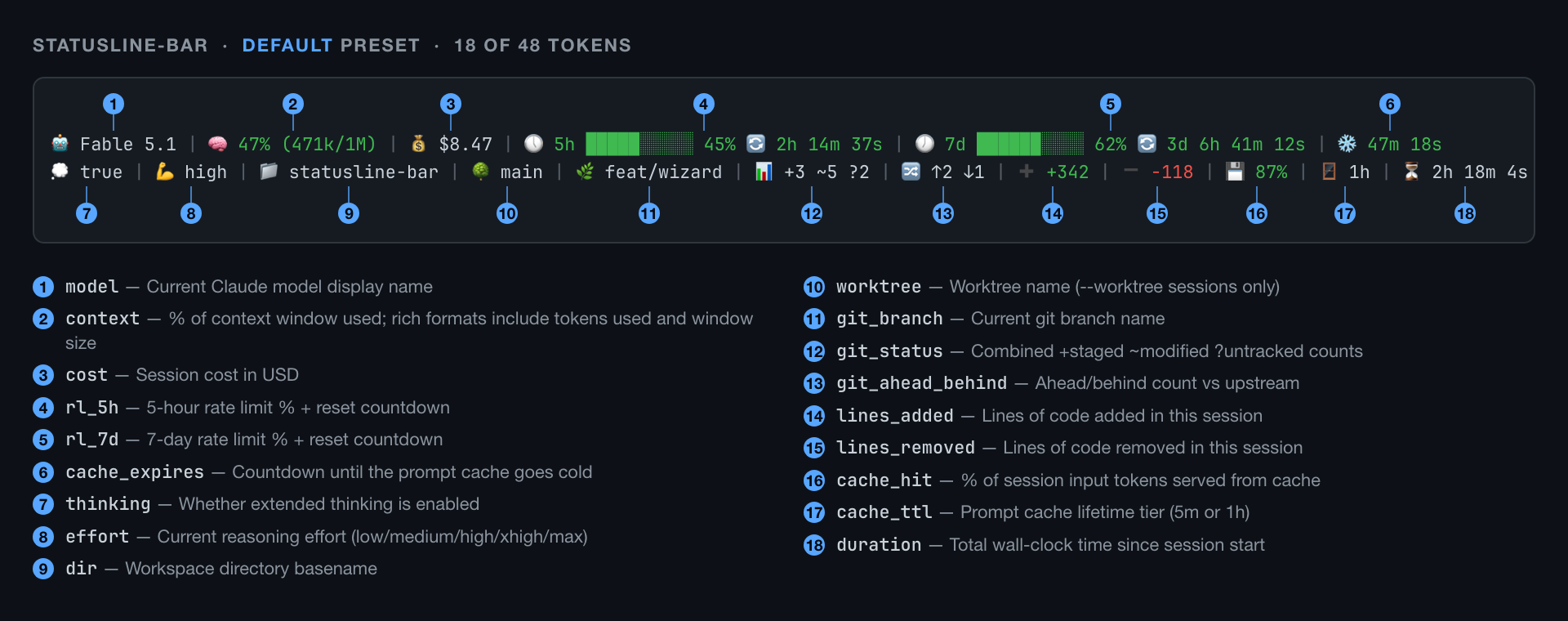
That is the default preset on a dark terminal. Here is the same statusline,
same session, on a light one:

6 of the 21 themes are drawn for a light background and 3 more work on either, so
light terminals are a first-class target, not an afterthought.
That was 18 tokens. There are 48.
Pick any of them, in any order, across up to four lines.
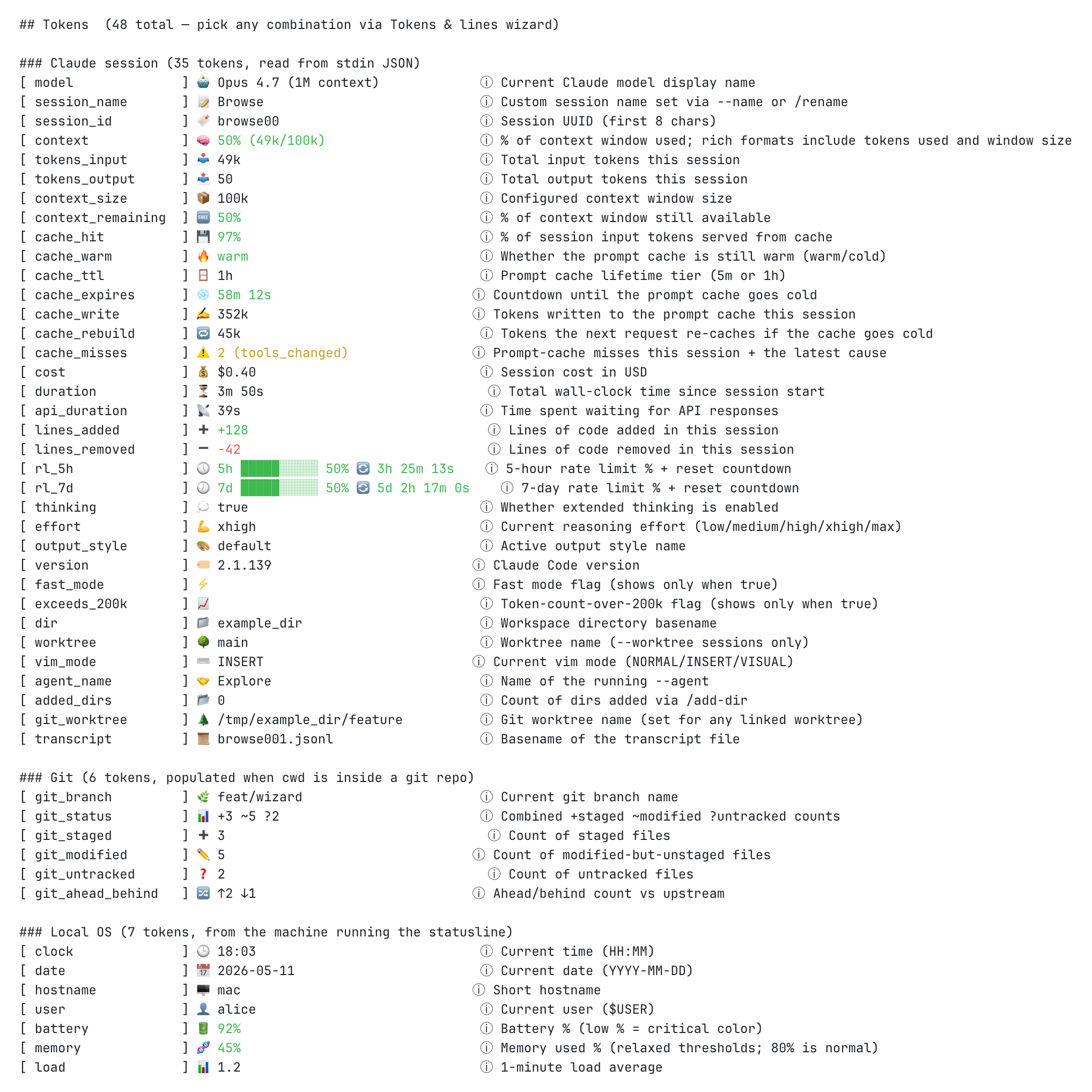 Text-only version (copy-pasteable)
🤖 Fable 5.1 | 🧠 47% (471k/1M) | 💰 $8.47 | 🕔 5h █████░░░░░ 45% 🔄 2h 14m 37s | 🕖 7d ██████░░░░ 62% 🔄 3d 6h 41m 12s | ❄️ 47m 18s
💭 true | 💪 high | 📁 statusline-bar | 🌳 main | 🌿 feat/wizard | 📊 +3 ~5 ?2 | 🔀 ↑2 ↓1 | ➕ +342 | ➖ -118 | 💾 87% | 🪟 1h | ⏳ 2h 18m 4s
Why
The Claude Code ecosystem already has a dozen good statuslines, each strong at
one thing. This is an attempt at one tool that does all of it:
- Every useful field. 48 tokens — model, cost, context, prompt-cache
health, 5h and 7d rate limits with countdowns, git branch and status and
ahead/behind, vim mode, agent name, session id, plus free local readouts like
clock, battery, memory and load. - Good out of the box. 12 presets, 21 themes, 12 progress-bar styles,
truecolor when your terminal has it. - Trivial to install. One file plus
jq. Nothing to build, nothing running
in the background. - Customizable to the last detail. Up to 4 lines, any token in any order,
and per-token overrides for prefix, format, bar style and separator.
A TUI wizard drives all of it, with a preview pane that re-renders as you move
the cursor. The config is plain JSON with a schema shipped alongside, so your
editor autocompletes it if you would rather type.
Install
Clone it somewhere stable:
mkdir -p ~/.local/share
git clone https://github.com/Dworf/statusline-bar.git ~/.local/share/statusline-bar
chmod +x ~/.local/share/statusline-bar/statusline-bar.sh
Upgrade later with cd ~/.local/share/statusline-bar && git pull.
Requirements
bash 3.2+ (already on your machine) and jq, which does all the JSON
work and is the one thing you may need to install:
| OS | Install |
|---|---|
| macOS | brew install jq |
| Debian / Ubuntu / WSL | sudo apt install jq |
| Fedora / RHEL | sudo dnf install jq |
| Arch | sudo pacman -S jq |
| Windows | winget install jqlang.jq (or choco / scoop) |
jq --version should print something like jq-1.7.1.
Optional: git for the git tokens, fc-list for Nerd Font detection, andpmset or /sys/class/power_supply for the battery token. A
Nerd Font unlocks three separators and two prefix
styles; everything else works without one.
Wire it up in Claude Code
Claude Code reads ~/.claude/settings.json. The whole file is one JSON
object — if it already has model, permissions, hooks and friends, addstatusLine alongside them, don't overwrite the file:
{
  "model": "...",
  "permissions": { ... },
  "statusLine": {
    "type": "command",
    "command": "/Users/YOUR_USERNAME/.local/share/statusline-bar/statusline-bar.sh"
  }
}
Two things that trip people up:
- The path must be absolute —
~and$HOMEare not expanded. Paste the
output ofrealpath ~/.local/share/statusline-bar/statusline-bar.sh. On
Windows, use the WSL or Git Bash path. - JSON has no trailing commas. If the key that used to be last had no comma
after it, add one before appendingstatusLine.
Restart Claude Code and the statusline appears at the bottom. If it doesn't,
run the script by hand against the bundled sample payload — you should get a
populated two-line render:
~/.local/share/statusline-bar/statusline-bar.sh < ~/.local/share/statusline-bar/test/sample-input.json
Configure
statusline-bar.sh -w # or --wizard
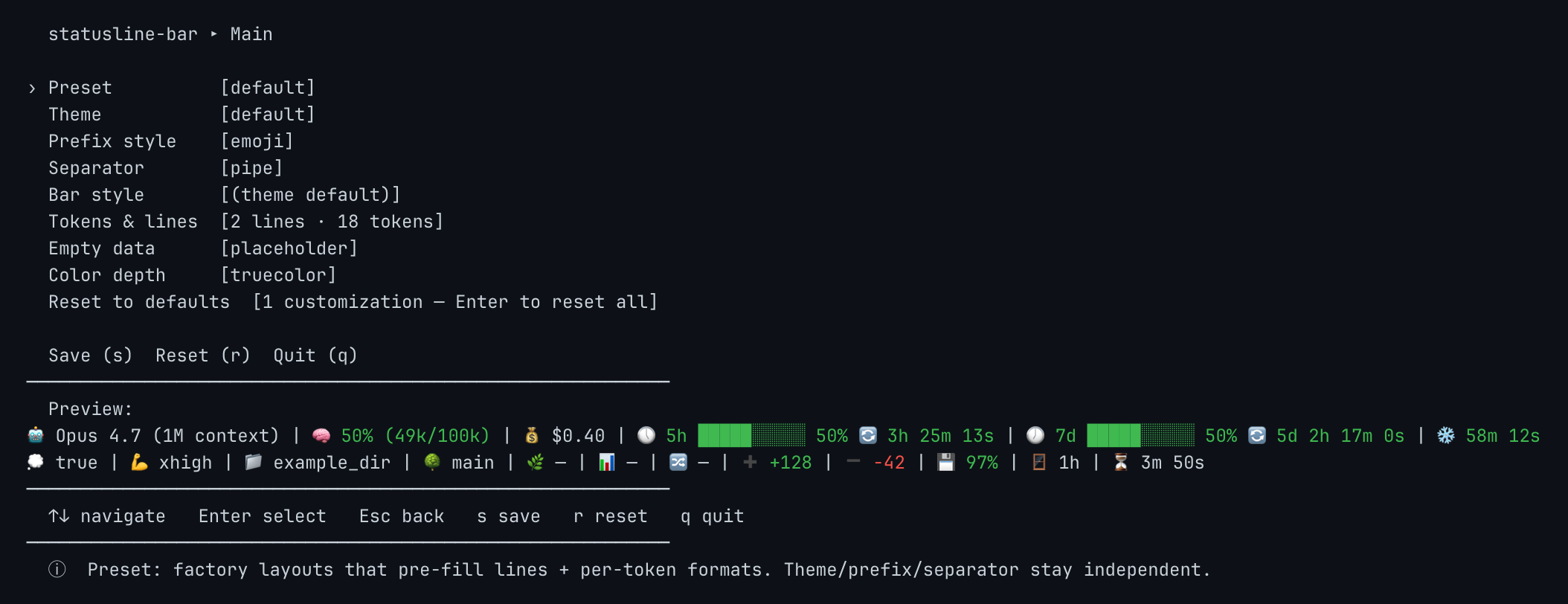
The main menu has a row per global setting — preset, theme, prefix style,
separator, bar style, Tokens & lines, empty-data behavior, color depth —
over a live preview. ↑/↓ navigates, ←/→ cycles values in place, Enter
drills in, Esc goes back, s saves, r resets, q quits.
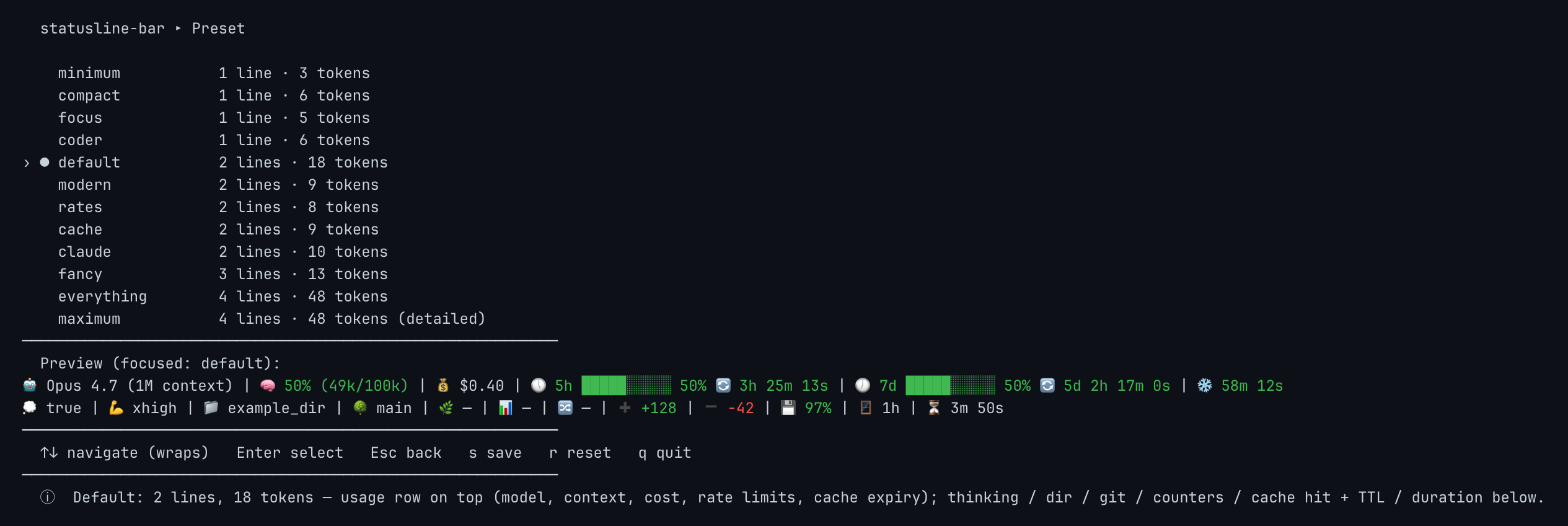
Every picker follows the same shape — options on the left, a per-option sample
on the right, the full statusline preview underneath. Nothing is a guess:
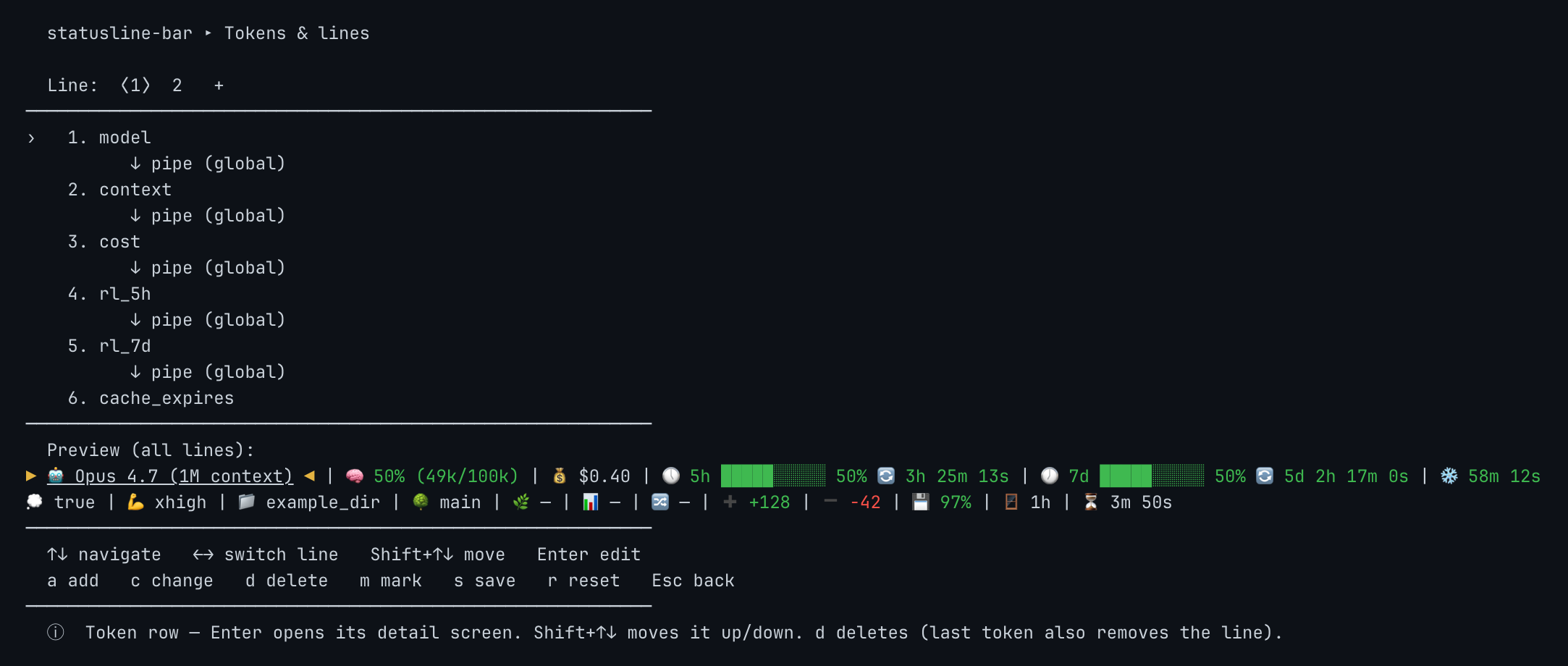
Tokens & lines is the layout editor: line tabs across the top (up to 4),
the token list with its separators inline below, preview at the bottom. a
adds a token, c changes one, d deletes, Shift+↑/↓ reorders, m/p moves
a token to another line, and Enter on a token opens its per-token prefix /
format / bar-style overrides. Full keymap in the
reference.
Where your config lives
The wizard saves to the first of these that exists, and the script reads them
in the same order:
--config PATH$STATUSLINE_BAR_CONFIG./.statusline-bar.jsonin the session's workspace directory — pin a
statusline per project$XDG_CONFIG_HOME/statusline-bar/config.json~/.config/statusline-bar/config.json- built-in defaults
Tune it live
Keep the wizard open in one terminal and a real Claude Code session in another.
Press s and the config lands on disk; Claude Code picks it up on its next
statusline refresh and renders it against your actual data — real cost, real
countdowns, real git status — instead of the wizard's synthetic preview. To
force a refresh, type / in Claude Code and pick any slash command.
What you can change
Twelve presets, from three tokens on one line to all 48 across four:
minimum |
focus |
coder |
compact |
cache |
modern |
rates (dark theme) |
fancy (dark theme) |
And the same preset under three different prefix styles — every token's label
is swappable, globally or one at a time:
| emoji (default) | ascii | nerd |
 |
 |
 |
| 48 tokens | 35 from Claude Code's stdin JSON, 6 from git, 7 from the local machine |
| 12 presets | 1-line minimum compact focus coder · 2-line default modern rates cache claude · 3-line fancy · 4-line everything maximum |
| 21 themes | 3 adaptive, 6 for light terminals, 12 for dark |
| 8 prefix styles | none label emoji nerd ascii and three combinations |
| 19 separators | ASCII, Unicode, decorative, and Powerline glyphs |
| 12 bar styles | 7 solid, 5 with sub-character precision |
| 27 formats | bars, percentages, countdowns, compact model names, hourly cost projections, combined views — each token offers only the ones that fit its data |
To see all of it rendered in your terminal at your color depth:
statusline-bar.sh -e                  # the whole catalog
statusline-bar.sh -e themes           # one section: presets | themes | prefixes
                                      # | separators | bars | tokens
More
- REFERENCE.md — every catalog in full, the config schema,
per-token overrides, and the complete CLI. - CHANGELOG.md — release history.
Contributing
Issues and PRs welcome at https://github.com/Dworf/statusline-bar.
Run the suite before submitting — 175 end-to-end cases, and they must all pass:
./test/run-tests.sh
If your change touches a token, preset, theme or catalog, regenerate the
screenshots too — see
Regenerating the screenshots.
License
MIT — see LICENSE.
Acknowledgements
- Anthropic, for Claude Code and
the open statusline interface that makes this possible.
Reviews (0)
Sign in to leave a review.
Leave a reviewNo results found