local-mcp-gateway
Health Pass
- License — License: NOASSERTION
- Description — Repository has a description
- Active repo — Last push 0 days ago
- Community trust — 18 GitHub stars
Code Warn
- network request — Outbound network request in apps/backend/src/__tests__/integration/mcp-proxy-auth-http.test.ts
- network request — Outbound network request in apps/backend/src/__tests__/integration/oauth-authorize-callback.test.ts
Permissions Pass
- Permissions — No dangerous permissions requested
No AI report is available for this listing yet.
Aggregate multiple MCP servers into a single endpoint with web UI, OAuth 2.1, and profile-based tool management
Local MCP Gateway
The Middleware Layer for your AI tools.
As AI clients multiply (Claude, Cursor, IDEs) and MCP servers proliferate (GitHub, Postgres, Slack), direct connections create an N×M fragmentation problem. Debugging is a nightmare, security is an afterthought, and context overload degrades model performance.
Local MCP Gateway is the Control Plane that solves this. It acts as a central hub where you configure your MCP servers once and expose them through curated Profiles—giving each AI assistant exactly the tools it needs, nothing more.
Local First: Your data and tools stay under your control. No cloud dependency, no SaaS API keys.
Quick Start with Docker (Recommended)
Run Local MCP Gateway instantly without cloning the repository:
curl -fsSL https://raw.githubusercontent.com/DXHeroes/local-mcp-gateway/main/docker-compose.hub.yml \
  -o local-mcp-gateway.yml && \
  docker compose -f local-mcp-gateway.yml up -d --pull always
- UI: http://localhost:9630
- MCP Endpoint: http://localhost:9631/api/mcp/default
- Data: Stored in
~/.local-mcp-gateway-data/
After starting, open the UI and sign up with your email and password to get started.
To stop: docker compose -f local-mcp-gateway.yml down
For more details, see Docker Quick Start Guide.
Features
- 🚀 Proxy & Aggregator: Combine multiple MCP servers (stdio, SSE, remote) into one
- 🛠️ Custom MCP Support: Write your own MCP servers in TypeScript with hot-reload
- 🔒 Security: Built-in API Key management and OAuth 2.1 support
- 📊 Observability: Real-time request/response logging and inspection
- 🖥️ Web Interface: Modern UI to manage servers, profiles, and logs
- 👥 Team Collaboration: Organizations with member invitations and role-based access control
- 🐳 Docker Ready: Easy deployment with Docker Compose
How it works
1. Create a profile for your use-case and configure the MCP servers you want to use.
or you can use the default gateway API endpoint and change your profile dynamically in the MCP Gateway UI
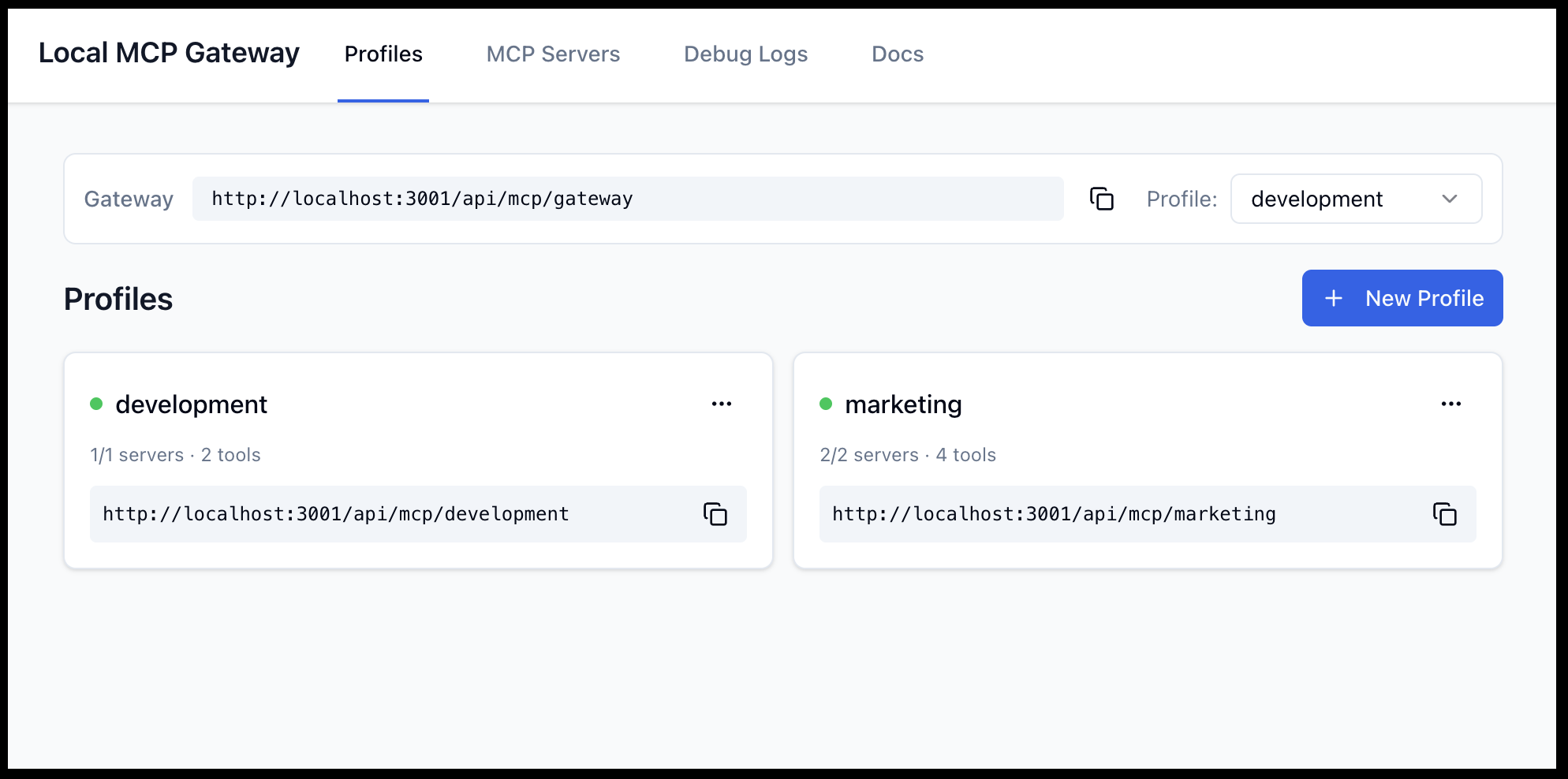
2. Configure the MCP servers in your AI client.
2.1. Using the default gateway API endpoint that changes the profile dynamically according to the profile set in the UI
{
  "mcpServers": {
    "mpc_gateway": {
      "type": "http",
      "url": "http://localhost:9631/api/mcp/gateway"
    }
  }
}
2.2. Using a specific "development" profile
{
  "mcpServers": {
    "profile_development": {
      "type": "http",
      "url": "http://localhost:9631/api/mcp/development"
    }
  }
}
2.3. Using a specific "marketing" profile
{
  "mcpServers": {
    "profile_marketing": {
      "type": "http",
      "url": "http://localhost:9631/api/mcp/marketing"
    }
  }
}
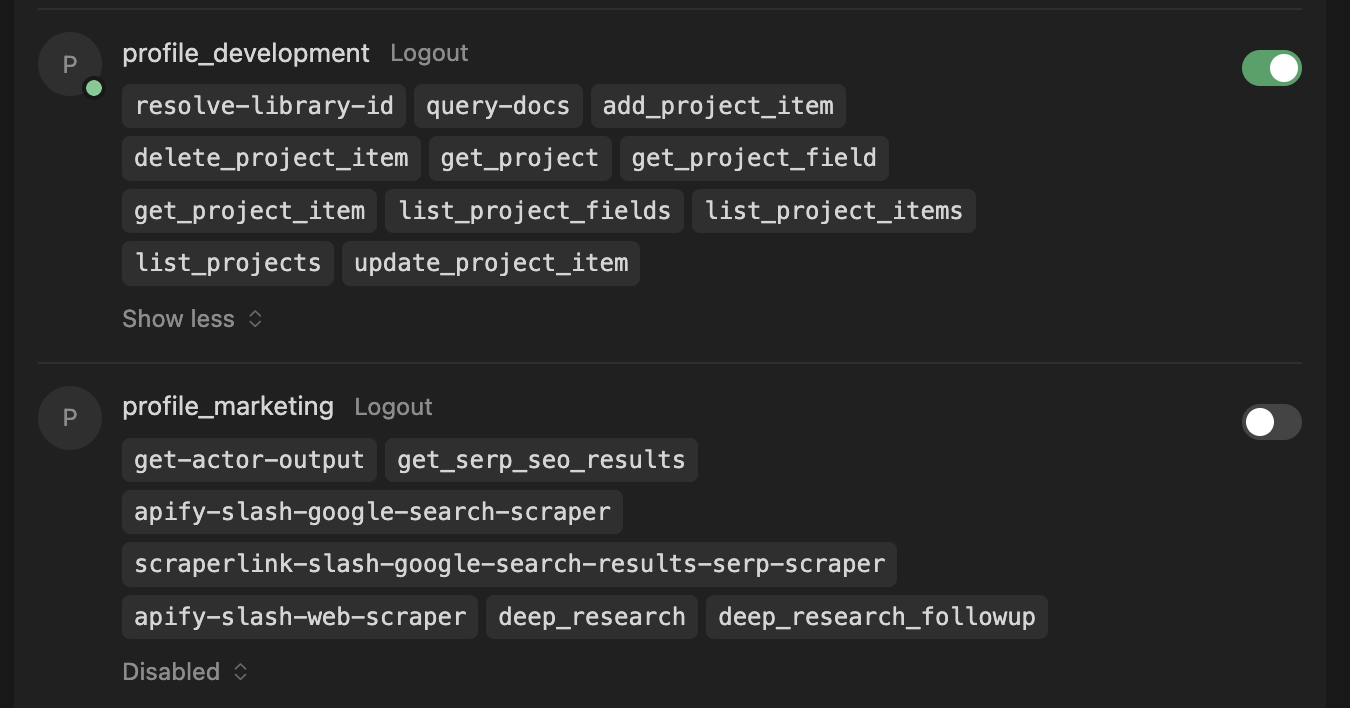
2.4. Using multiple profiles and turn them on and off in your favorite AI client
{
  "mcpServers": {
    "mpc_gateway": {
      "type": "http",
      "url": "http://localhost:9631/api/mcp/gateway"
    }
  },
  "profile_marketing": {
    "type": "http",
    "url": "http://localhost:9631/api/mcp/marketing"
  },
  "profile_development": {
    "type": "http",
    "url": "http://localhost:9631/api/mcp/development"
  }
}
3. Use the profile in your AI client.
Development Setup
If you want to develop or build from source:
Prerequisites
- Node.js 22+
- pnpm 9+
Installation
# Install dependencies
pnpm install

# Initialize database
pnpm db:seed

# Start development
pnpm dev
Development
Start both backend and frontend with hot-reload:
pnpm dev
- Backend: http://localhost:3001
- Frontend: http://localhost:3000
For Claude Desktop (HTTPS):
Start with HTTPS tunnel (using localtunnel):
pnpm dev:https
- Backend: http://localhost:3001
- HTTPS Tunnel: Public URL (displayed in console) -> http://localhost:3001
- Frontend: http://localhost:3000 (configured to show the HTTPS tunnel URL)
Use the HTTPS tunnel URL in your mcp.json configuration to avoid SSL certificate errors in Claude Desktop.
Building
pnpm build
Testing
# Run all tests
pnpm test

# Unit tests only
pnpm test:unit

# Integration tests
pnpm test:integration

# E2E tests
pnpm test:e2e

# Coverage
pnpm test:coverage
Production Usage
Running Locally (Bare Metal)
To run the production build locally:
pnpm start
This will:
- Build the application.
- Start the backend on http://localhost:3001.
- Start the frontend on http://localhost:3000.
Data Persistence:
Data is stored in ~/.local-mcp-gateway-data (your home directory) to ensure it persists across restarts and updates.
Running with Docker (from source)
Build and run from source using Docker:
docker compose up -d --build
This provides:
- UI: http://localhost:3000
- Backend API: http://localhost:3001
- MCP Endpoint: http://localhost:3001/api/mcp/default
- Data: Stored in
~/.local-mcp-gateway-data/
Integration with Claude Desktop
- Run
pnpm dev:https - Copy the public HTTPS URL from the terminal (e.g.,
https://blue-sky-42.loca.lt) - Configure your
mcp.json:"My Profile": { "type": "http", "url": "https://blue-sky-42.loca.lt/api/mcp/my-profile" } - AI Prompt: In the frontend (Profile page), copy the "AI Prompt" (TOON format) and paste it into your chat to give the AI full context about available tools.
Project Structure
local-mcp-gateway/
├── packages/          # Shared packages
│   ├── core/          # Core types and abstractions
│   ├── database/      # Prisma ORM + SQLite
│   ├── config/        # Shared configuration
│   └── ui/            # Shared UI components
├── apps/              # Applications
│   ├── backend/       # NestJS 11.x backend
│   └── frontend/      # React 19 frontend
├── mcp-servers/       # MCP server packages (auto-discovered)
└── docs/              # Documentation
Features
- ✅ Profile management
- ✅ MCP server management
- ✅ OAuth 2.1 support (PKCE, DCR)
- ✅ API key management
- ✅ MCP proxy endpoints per profile
- ✅ Debug logging
- ✅ HTTPS Tunneling for Claude Desktop
- ✅ AI Prompt Generation (TOON format) for easy context sharing
- ✅ User Authentication (email/password, Google OAuth)
- ✅ Organizations & Teams with role-based access control
- ✅ Resource Sharing — share servers and profiles with team members
- ✅ Tool Customization — enable/disable, rename, and override tool descriptions per profile
- ✅ Built-in MCP Servers — auto-discovered packages (Gemini, Toggl, and more)
License
Elastic License 2.0 - Free to use, modify, and distribute. Cannot be provided as a hosted service to third parties.
Reviews (0)
Sign in to leave a review.
Leave a reviewNo results found