zynk
Health Warn
- License — License: NOASSERTION
- Description — Repository has a description
- Active repo — Last push 0 days ago
- Low visibility — Only 5 GitHub stars
Code Fail
- exec() — Shell command execution in .pi/extensions/github-issues-autocomplete/index.ts
- exec() — Shell command execution in .pi/extensions/zynk-worktree/index.ts
- process.env — Environment variable access in .pi/extensions/zynk-worktree/index.ts
Permissions Pass
- Permissions — No dangerous permissions requested
No AI report is available for this listing yet.
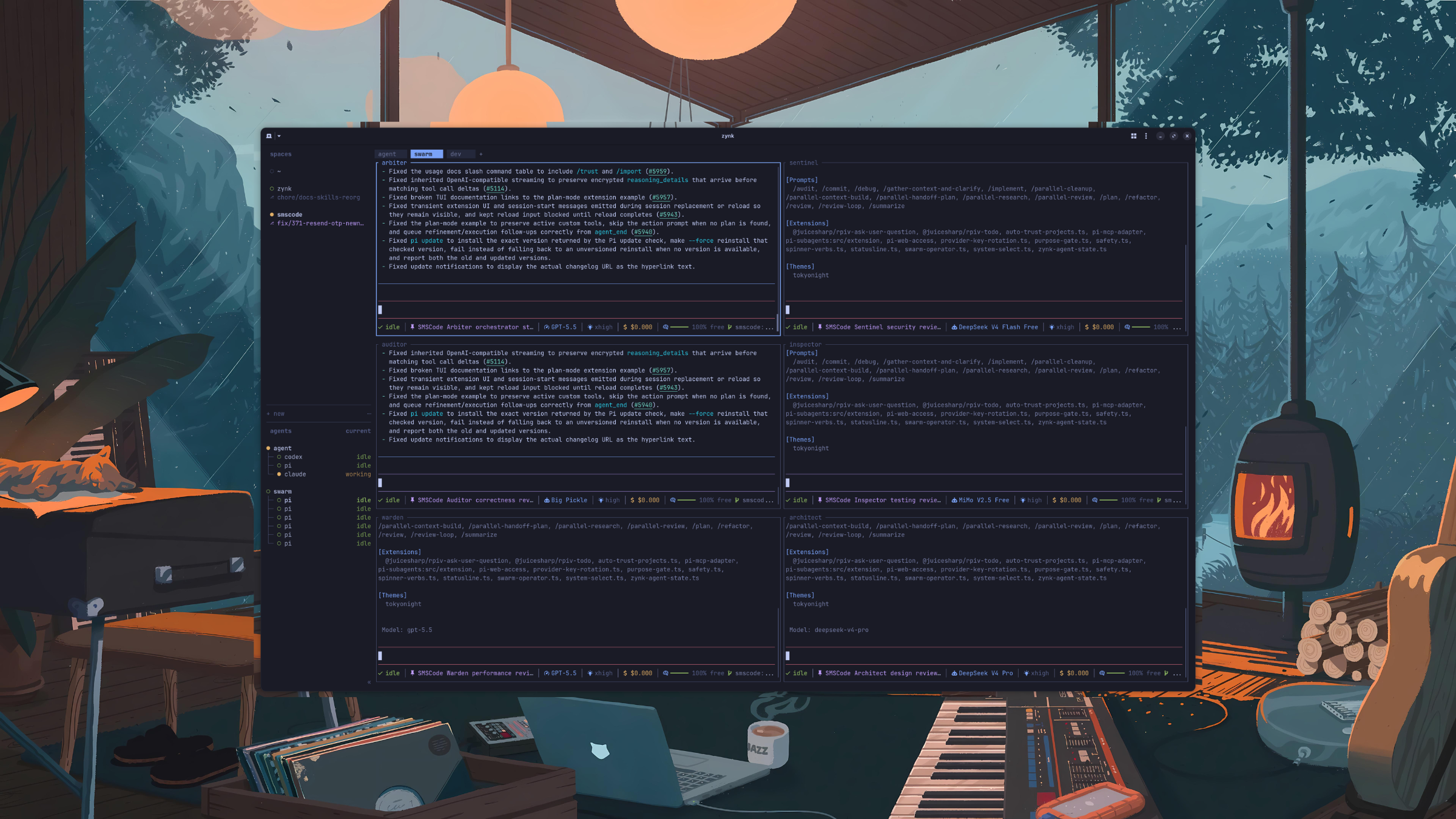
Terminal-native command center for AI agents: tmux-style workspaces plus a native message bus.
zynk
Terminal-native command center for AI agents.


Install · Quick start · Agent messaging · Supported agents · Configuration · Docs
Run Claude, Codex, Pi, and other coding agents in real terminal panes — tmux-style workspaces, tabs, and
splits — then let them message each other over a native, persisted bus. Detach and the agents keep
running; reattach from anywhere. See every agent's state at a glance — blocked, working, done — and search the
whole conversation history later.
zynk is a single Rust binary that lives in the terminal you already use. It isn't a web dashboard, an Electron
shell, or a screenshot wrapper around someone else's view: you see each agent's own terminal, with a
coordination layer on top.
Why zynk
Running many agents in terminals is powerful, and it turns chaotic fast — panes scattered across windows, no
clear "who's blocked", handoffs lost in scrollback, no shared memory or protocol between them.
zynk gives the terminal that missing coordination layer:
- Workspaces, tabs, and panes that persist across detach and full restart.
- Agent awareness — a sidebar that shows what every agent is doing right now.
- A native message bus — agents address each other by pane, with honest delivery state and a persisted,
searchable history.
Features
- Real terminal workspaces — workspaces (per repo or folder), tabs, and panes that are actual processes,
not rewritten agent views. - Agent awareness — blocked / working / done / idle, detected from process names and output, no hooks
required. - Native agent messaging —
zynk send/reply/thread/inbox/query. - Persistent conversation store — every message in a global SQLite DB, retrievable by keyword and meaning.
- Detach / reattach + restore — pane processes survive client detach; sessions restore panes after a full
restart, with opt-in recent screen history. - Integrations — official agent hooks add native session identity and semantic state reporting.
- Agent automation — typed raw keys, bounded status waits, readiness-gated prompts, and managed launches.
- Global plugins — shared private registry, argv-preserving commands, startup hooks, and agent-view filters.
- Protocol-20 terminal fidelity — Kitty key event identity, pixel mouse input, bells, outer titles, bounded
direct graphics, and clean Linux hangup/pipe handling. - Mouse-native throughout, 18 built-in themes, keyboard copy mode, and sound/toast notifications.
Install
Build zynk from source; a published crate is on crates.io.
Supported platform (ADR 0013): Linux x86_64
only (Fedora/Ubuntu). Building for any other target fails at compile time. zynk ships no prebuilt binaries
and no package-manager distribution.
Build from source — needs Rust 1.98.0 (a git checkout pins it in rust-toolchain.toml, so rustup
installs and selects that version for you and leaves your default toolchain alone), Zig 0.15.2 (the bundledlibghostty-vt is built with Zig), and network access during the build (the Zig build fetches
libghostty-vt's package dependencies; offline builds aren't supported yet). cargo install zynk --locked
builds the same 3.x crate from source under the same requirements, except that the published crate carries no
toolchain pin and so builds on whichever toolchain is active (--locked keeps the crate's packaged lockfile;
without it Cargo re-resolves dependencies).
See DEVELOPMENT.md.
git clone https://github.com/dzevs/zynk && cd zynk
cargo build --release --locked
./target/release/zynk
Quick start
Start zynk where the work lives:
zynk
zynk starts or attaches to one background session server and opens a workspace. Run an agent in the root pane.
The prefix is ctrl+b:
ctrl+bthenshift+n— new workspacectrl+bthenv/minus— split panesctrl+bthenc— new tab ·ctrl+bthenw— switch workspacesctrl+bthenq— detach (the server and pane processes keep running; runzynkagain to reattach)
Normal daemon launches and live-handoff replacements start a new POSIX session,
separate from the launching terminal. zynk status server --json exposescapabilities.detached_server_daemon, observed from the server's session ID.
Remote restart checks treat a missing field as false, so older peers trigger a
restart recommendation even when their version and protocol match. Existing
restart/install confirmations still apply. After a remote connection drops,
the client prints a reattach command; this is not a guarantee that its panes survived.
Interactive terminal setup, mouse-mode transitions, and cleanup clear seven
inherited mouse-reporting modes. With mouse capture active, the client uses a
150 ms first poll for a pending lone Escape instead of the normal 10 ms, allowing
split mouse reports to reassemble. These are poll windows, not total latency
guarantees. Recognized delayed mouse tails are discarded without swallowing
following keys or bracketed-paste text. JSON terminal streams emit no reset bytes.
With terminal.new_cwd = "follow", new terminals prefer their source pane's
foreground process-group leader CWD, then its runtime CWD, then its cached CWD.
New tabs use the source workspace's focused pane; splits and layout replacements
use their target pane or tab, even in a background workspace. Explicit CWDs and
other configured policies retain precedence. Process-derived candidates and the
final Follow choice must be absolute, existing directories; an unusable leader
falls back to the pane's runtime CWD, while an invalid final choice falls back to
HOME or the server's working directory. These are observations, not an atomic
process/filesystem snapshot, and slow procfs or directory checks can delay creation.
Public cwd and foreground_cwd reporting is unchanged: the latter can report
a nonleader group member even though new terminals follow the leader.
New workspaces likewise prefer their source workspace's focused-pane CWD before
its identity seed. A named-workspace prompt remembers the source workspace and
rechecks its current focused pane when confirmed, rather than freezing the
suggested directory or following a different globally focused workspace.
The binary client/server protocol is version 20. It carries the complete agent-automation surface together
with Kitty press/repeat/release identity, report-all state, pixel mouse input, pane bells, direct graphics,
and outer-title updates. Compatibility is equality-only: a version-19 peer receives a typed upgrade error
before any version-20 operation executes.
ui.window_title defaults to {hostname}: {workspace}. It can also use {tab}, {pane}, and{terminal_title}; doubled braces render literals, and an empty value leaves the outer title alone. The
server strips terminal control characters, sends changes only to the foreground client, and retains an
explicit API title override across live handoff until it is cleared.
Remote attach reuses one managed SSH connection by default, preserves the underlying SSH authentication
diagnostic, discovers package-manager and canonical mise installs, and installs helpers with an atomic
POSIX-shell replacement. Bridge streams return to blocking mode before forwarding. The remote host must run
the same reviewed Linux x86_64 source build; these conveniences do not weaken the existing custody checks.
Removing a linked worktree returns focus to its surviving parent workspace in
the same worktree group, even if another workspace became active during removal.
If no parent remains, normal workspace-close selection applies.
The published workspace.move_block socket method atomically moves a nonempty,
duplicate-free list of workspace IDs before an optional before_workspace_id,
or to the end when that field is absent. It returns the complete workspace list
and emits workspace.reordered only when the order changes; the event carries
the moved IDs, optional anchor, and resulting complete workspace list.
Agent messaging
This is zynk's net-new layer on top of the multiplexer. Agents send each other plain-text messages; zynk
attaches structured protocol metadata, prepends a visible awareness header, persists every message to a global
SQLite store, tracks honest delivery state, and lets agents retrieve past messages by keyword and meaning.
zynk send  <target> <text> [--type review|approve|…]   # resolve target → atomic submit, persisted
zynk reply <target> <text>                             # parent auto-derived; no --reply-to
zynk thread <conversation>                             # read-only: walk a conversation
zynk inbox                                             # read-only: messages addressed to you
zynk who                                               # live agents / panes in the session
zynk query <text> [--workspace|--conversation|--agent|--since|--limit]   # hybrid retrieval
zynk agent send-keys <target> <key> [key ...]                           # raw keys; no message row
zynk agent wait <name> [--until STATUS]... [--timeout MS]               # pin target; wait for state
zynk agent prompt <name> [--wait] [--timeout MS] -- <text>              # readiness-gated submit
Design guarantees (binding):
- Honest delivery. Send results distinguish
draftedandsubmitted; delivery events later advance toreceivedthrough the server-authoritativezynk.message_receivedevent, or tofailedon delivery
failure. zynk never collapses these states —receivedcomes from the receiving integration's event, never
from screen scraping or a socket ACK. A receiver without the zynk integration stays atsubmitted. - Body purity. The message body is pure text; all provenance (identity, workspace/tab, branch,
git_sha,
cwd) plus zynk's protocol IDs persist as structured metadata, indexed apart from the body. - Structured responses. No silent success and no bare
ok— mutating commands return a structured
response (stable JSON for automation plus concise human text) withresult, the relevant ids, delivery
state, and anexthint. Read commands (query/thread/inbox/status) default to human text, with--jsonfor the structured form. - Read-only retrieval.
query/thread/inboxopen the DB read-only (PRAGMA query_only=1) and write
zero delivery events.queryis hybrid: FTS5 keyword (BM25) + on-device embeddings via sqlite-vec, fused
with RRF.
Agents can drive zynk over the same local Unix socket — create workspaces, split panes, spawn helpers, read
output, wait for state changes, and message each other. Start with SKILL.md.
zynk wait agent-status <pane_id> --status blocked --timeout 30000 uses the server's
single-response events.wait operation and keeps the existing subscription-event JSON on stdout.
An already matching status wins even at timeout zero. Timeouts include setup and are checked
between bounded requests/polls, not as a hard wall-clock deadline. Status fields are observations,
not authenticated identity or receipt evidence. agent wait completes on Idle, Done, or Blocked,
including an already-idle Pending managed agent; use agent start when interactive launch readiness
is required.
agent send-keys is raw terminal automation and does not create a message or delivery event. agent prompt
submits only when the named agent is on the same terminal, in the foreground, interactive-ready when managed,
and neither Working nor Blocked. Prompt text and the delayed Enter remain one ordered PTY actor command; later
input cannot overtake Enter. A wait failure preserves the submitted message id and must not be retried as a new
prompt. Codex trust-directory prompts are detected as Blocked observations, not authenticated identity.
Plugin installation state is shared across named sessions in the private zynk config directory. Localzynk plugin link PATH works without starting a server. Manifest commands are argv arrays, relative programs
resolve from the plugin root, and arguments are never re-tokenized by a shell. Linux startup hooks run once per
server process, are bounded and failure-isolated, and do not run for CLI-only linking, restore replay, or
handoff import. Plugins may install a typed agent-view filter/sort projection; views change presentation only
and never grant agent identity or receipt authority.
Run zynk --skill to print the bundled automation skill. Commands that require a local server report oneserver_not_running diagnostic with a start command; protocol mismatches and typed API errors remain distinct.
Explicit pane.focus and agent.focus API requests mark every unseen pane in the
destination tab seen, including when the target is already focused. An idle sibling
therefore stops reporting done even if it was not displayed. This is tab attention
state, not proof of actual viewing, authenticated identity, or message receipt.
API tab renames immediately resize labels and click targets in the active
workspace, including its inactive tabs. Renaming a background workspace's tab
does not change the active tab bar, focus, or scroll-follow policy.
workspace.report_metadata reports display-only workspace tokens. Use a current ID fromzynk workspace list, for examplezynk workspace report-metadata "$WORKSPACE_ID" --source user:build --token build=ready --seq 0 --ttl-ms 5000.
Repeat --token NAME=VALUE or --clear-token NAME; the last occurrence for a key wins,
and values may contain =. The CLI preserves the existing structured workspace response.
The socket request has this shape (replace WORKSPACE_ID with the current ID):
{"id":"workspace-display","method":"workspace.report_metadata","params":{"workspace_id":"WORKSPACE_ID","source":"user:build","seq":0,"ttl_ms":5000,"tokens":{"build":"ready","old":null}}}
Success is {"id":"workspace-display","result":{"type":"ok"}}. Reports patch 1-16
distinct keys, with at most 32 keys stored per workspace after applying clears and sets together.
Keys contain 1-32 ASCII letters, digits, _ or -. Values are trimmed, stripped of control
characters, truncated to 80 Unicode scalar values, then trimmed again; empty values and null
clear a key. Omitted keys keep their values and deadlines. TTL is 1-86,400,000 milliseconds;
omitting it makes the keys being set persistent for the live workspace and cancels their old TTLs.
The trimmed source is 1-80 ASCII letters, digits, :, ., _ or -, not authenticated identity
or ownership: another source may overwrite the same keys. Optional seq starts at zero and
must increase per source; stale numbers are successful no-ops after syntax validation.
Without seq, reports neither allocate nor update sequence slots. A workspace retains at most
32 sequenced sources, even after clearing or expiring all values. Validation or capacity errors
leave that report's token and sequence state unchanged. Ordinary API processing can first expire
previously due metadata independently of the report's outcome.
workspace.get, workspace.list, and live session.snapshot expose nonempty tokens maps.
Subscribe with {"subscriptions":[{"type":"workspace.metadata_updated"}]} for full workspace
snapshots after changed reports and scheduled expiry. Event envelope/data tags useworkspace_metadata_updated. No-op reports do not emit; refreshing a TTL is a change.
This is an ordinary retained-history subscription, not a plugin hook, initial-state probe,
lossless log, or atomic snapshot/subscribe operation. Seed from workspace.get.
Values and sequence slots are excluded from saved session snapshots and handoff payloads;
report again after restart or handoff. Configured desktop space rows can display these tokens.
Tokens do not grant identity or message receipt.
pane.report_metadata also accepts display-only tokens alongside the existing title,
display-agent and state-label fields. Use a current ID from zynk pane list:zynk pane report-metadata "$PANE_ID" --source user:build --token build=ready --seq 0 --ttl-ms 5000.
Repeat --token or --clear-token; the last occurrence wins and = is allowed in values.
The pane CLI retains silent success and its existing API-error output, unlike the structured
workspace CLI response. A mixed socket report can be:
{"id":"pane-display","method":"pane.report_metadata","params":{"pane_id":"PANE_ID","source":"user:build","seq":0,"ttl_ms":5000,"title":"Build","tokens":{"build":"ready","old":null}}}
Nonempty pane token patches use the workspace source/key/value rules and TTL bounds above:
at most 16 request keys and 32 stored keys after clears and sets together. Omitting tokens
or sending {} keeps the legacy presentation route, including its permissive nonempty source
and unrestricted unsigned TTL. Adding nonempty tokens to such a report can therefore require
changing its source or TTL. Previously ignored tokens inputs now have meaning; malformed
token maps or values are rejected rather than silently discarded. The remaining presentation
guards do not restrict token storage or grant identity.
Pane presentation and tokens share a per-source replay sequence. At most 32 sources may make
sequenced token reports; legacy presentation sources remain uncapped. Unsequenced reports allocate
no slot and do not erase the replay fence. A nonempty all-null patch still counts as a token report.
Sources do not own keys: any accepted source may replace them. Syntax validation precedes stale
success/no-op; net capacity precedes consuming a fresh sequence. Rejected reports do not partially
change presentation, tokens or admission state, but an ordinary request can first sweep due metadata.
pane.get/list, agent.get/list and live session.snapshot expose nonempty token maps.
Subscribe with {"subscriptions":[{"type":"pane.updated"}]} for full pane snapshots after
token value/deadline changes, scheduled expiry, and stripped terminal-title changes described
below; envelope/data tags use pane_updated.
True no-ops do not emit. Identical queued payloads are not deduplicated by the server subscription.
There is no initial snapshot, new lossless history, plugin hook or events.wait selector for this kind.
Seed from pane.get; snapshot acquisition and subscription are not atomic.
The existing pane/agent info revision field counts changed token patches and expiry, including
TTL-only changes, and changes to the stripped terminal title. It does not count terminal output.
The same pane's pane.read, agent.read and pane.wait_for_output read-result revisions retain
their existing zero values. Read results now include truncated; bounded requests set it when older content
was omitted. Idle alternate-screen reads can recover server-observed history, without creating conversation
rows or delivery events. This is not a content-revision implementation or an equality guarantee across those
surfaces. The info counter is not persisted and starts at zero in reconstructed state; no cross-handoff
monotonicity is promised.
Pane CLI value options accept either --flag value or --flag=value and may precede the pane id forpane read and wait output. Pane query --current is resolved from the authenticated caller'sZYNK_PANE_ID, not UI focus; an unbound --current is refused. Worktree commands do not advertise --json,
but continue accepting it as a hidden compatibility no-op because their output is always JSON.zynk pane input ... --right-click zynk|pane selects per-pane right-click routing; split can set the initial
route. The ownership and caller checks used by ordinary pane input still apply.
Pane token values, TTLs and presentation payloads are ephemeral across restart and live handoff.
Unlike workspace admission, pane replay sequences and token-source slots survive live handoff;
cold restore drops both, and older snapshots without token-source accounting default to an empty set.
Clearing or expiring values, or respawning within the same terminal state, does not free admission
slots or erase replay fences. Respawn adds no token-value reset. Configured desktop agent rows can
display these tokens; reporting them does not change lifecycle state, hook identity or receipt authority.
Experimental pane graphics
The local socket API provides pane.graphics.set, pane.graphics.clear,pane.graphics.info, and pane.graphics.stream whenexperimental.kitty_graphics = true (default: false). An existing opt-in now
also permits image uploads, not just client-side painting. This relies on the
owner-only local socket; it is not isolation from untrusted same-user plugins.
Successfully decoded methods return feature_disabled while disabled.
Set or replace one layer using a current pane ID and base64 image bytes:
{"id":"image","method":"pane.graphics.set","params":{"pane_id":"PANE_ID","format":"rgba","image_width":1,"image_height":1,"data_base64":"AQIDBA=="}}
Formats are png, rgb, and rgba; dimensions must be nonzero. RGB/RGBA data
must match their dimensions exactly. PNG bytes are passed through, not decoded
or validated as an image. Decoded public uploads are limited to 512 KiB.
Optional placement contains signed viewport_col/viewport_row and unsignedgrid_cols/grid_rows, all defaulting to zero. Zero grid dimensions use the
pane's inner dimensions; placement is clipped to that pane.
Clear uses {"id":"clear","method":"pane.graphics.clear","params":{"pane_id":"PANE_ID"}}.
Set/clear success is the ordinary {"id":"image","result":{"type":"ok"}}
shape, with the submitted ID. Info uses the same target and returnspane_graphics_info with cell_width_px and cell_height_px, orcell_size_unavailable. Positive cell hints may include the client's existing
8x16 fallback; they do not certify measured physical dimensions.
For streaming, send an ordinary pane.graphics.stream request with pane_id
and wait for its initial ok. On the same connection, send an LF-terminated
JSON header with format, image_width, image_height, data_length, and
optional placement, immediately followed by exactly data_length raw bytes.
Each body is nonempty and at most 16 MiB; each header is at most 64 KiB including
LF. No per-frame success reply is sent. Read-idle/total limits are configured at
5/30 seconds after a header starts and for each body; waiting for the first
header byte has no such deadline. These are not wall-clock response guarantees.
This public streaming method is not listed by generated schema discovery.
A stream owns its resolved pane until closed or invalidated. Concurrent set,
clear, or second-stream requests return stream_conflict; retired frames returnstream_closed. Supplied owner/raw-data JSON fields are ignored: only the server
sets those internal fields. Internal stream method names are not public methods.
Pane removal or disabling the feature discards relevant layers and claims;
re-enabling does not restore them. Restart and successful live handoff discard
all layers and streams: reconnect and resend. Failed handoff after listener
replacement also does not guarantee stream continuity, and no finalstream_closed reply is guaranteed on connection loss.
There is no aggregate memory quota or connection cap. Concurrent valid
uploads, queued requests, per-client caches, and encoding can exhaust memory;
the 32 MiB outgoing frame limit is checked after encoding allocations. Keep the
feature experimental and default-off unless this resource limitation is resolved
or explicitly accepted and documented for the changed release policy. API
acceptance or render enqueue is not proof of display, peer parsing, or native
message receipt.
An eligible local app client can receive one validated Zynk-owned direct RGBA file transfer at a time. The
server binds ownership and image/transfer ids, bounds queueing, retires stale work, and keeps source/cache
files private and regular; unrelated terminal input cannot satisfy the acknowledgement matcher. Pixel mouse
reports use read-time host geometry. High-DPI delivery scales by the measured cell geometry, while unavailable
or refused direct delivery retains the bounded encoded-frame fallback. This optimization does not widen the
public upload limits or turn API acceptance into display proof.
Migrating custom status
The dedicated custom_status field and clear_custom_status flag are retired, including their
CLI flags --custom-status and --clear-custom-status. CLI calls using those flags are rejected
as unknown arguments before making a socket request. JSON requests retain their existing
unknown-field policy: those keys are ignored, regardless of their value type. A metadata report
containing only retired fields is rejected with invalid_metadata_request because no reportable
field remains. An otherwise valid mixed report applies its remaining fields and returns the
unchanged {"result":{"type":"ok"}} response (with the request ID), without identifying ignored
keys. Lifecycle reports likewise ignore a supplied retired key and process their remaining fields.
There is no automatic alias, value migration or new response envelope.
For display-only task text, report an explicit token using the source, size, sequence and TTL rules
above, then opt into it in desktop sidebar rows:
zynk pane report-metadata "$PANE_ID" --source user:task --token task=reviewing
[ui.sidebar.agents]
rows = [["state_icon", "agent", "state_text"], ["$task"]]
The token is not hook authority, lifecycle state or a fallback for state labels. Mobile and
navigator details no longer append legacy custom status, and the agent switcher no longer prefers
it over state labels; none of those surfaces automatically displays $task. Pane/agent JSON
projections and pane.agent_status_changed event data omit custom_status. This JSON member
retirement does not change the separately versioned binary client-frame protocol (version 19).
External JSON consumers must stop depending on the removed member; ephemeral values must be
reported again after restart or handoff.
Pane/agent info also exposes optional terminal_title and terminal_title_stripped observations,
including in live session.snapshot and full pane.updated snapshots. They are omitted when absent
and are independent of reported presentation title, display-agent, status, and hook identity.
They are read-only: metadata report parameters do not set these observations.
The raw observation is the latest completed OSC 0 or OSC 2 title, decoded with invalid UTF-8
replacement, control characters removed, and at most 256 Unicode scalars. It is not otherwise
trimmed; an empty sanitized title clears it. The stripped form trims edge whitespace and removes
one leading recognized activity glyph only when followed by whitespace or the end of the title.
Recognition includes braille spinner frames and the supported star/quarter-circle frames; an
empty stripped result is absent. Raw-only spinner changes retain the newest observation without
a title-caused revision increment or event. Changed stripped text, including a clear, advances
the saturating info revision and emits pane.updated; identical observations do neither.
Synchronization polls the latest runtime value through common API dispatch and the main loops.
Intermediate OSC values may coalesce; this is not an event for every title frame or an atomic
snapshot across panes. Detection clearing does not erase the independent observation. No new
title-specific redraw request or configurable sidebar title rendering is included here.
Cold session restore drops title observations and starts the info revision at zero. Live runtime
handoff carries the observation separately from saved session state, but not its revision. On the
replacement's first synchronization, a retained nonempty stripped title advances fresh revision
zero to one and emits an initialization pane.updated. A retained raw title with no stripped
text does not cause that increment or event. Delivery still depends on the existing bounded
512-envelope history across all event kinds, not a lossless replay guarantee. Normal handoff
exports the captured value; imported title fields have no separate 256-scalar validator beyond
the existing private handoff transport. These observations grant no identity or receipt authority.
The socket API accepts events.subscribe with {"subscriptions":[{"type":"layout.updated"}]}.
Updates contain the target tab's current pane/split geometry, focus, and zoom after the supported
pane/layout and creation operations. This is not an exhaustive TUI redraw stream or a plugin hook.
Subscriptions can replay matching entries from the existing 512-record history; reconnect with a
fresh session.snapshot because replay is neither lossless nor atomic with snapshot acquisition.
Layout and agent projections are observations, not identity or delivery-receipt authority.
pane.get, pane.list, and session.snapshot include optional scroll metrics:offset_from_bottom, max_offset_from_bottom, and viewport_rows. Offset zero means
the bottom; an omitted field means metrics are unavailable. Subscribe with{"subscriptions":[{"type":"pane.scroll_changed","pane_id":"w1:p1"}]} using the
current pane ID. Seed from pane.get: the subscription sends no initial event and
reports only subsequent sampled changes, not a lossless replay log or an atomic
snapshot/subscribe operation. These observations do not change focus or grant identity
or delivery-receipt authority.
zynk api snapshot prints the complete live session.snapshot JSON response from the running
server. It accepts no arguments. Agent projections are non-authoritative observations: this
command cannot grant a principal or confirm message receipt. Server errors retain their JSON
on stderr with exit status 1; argument errors exit 2 without connecting.
zynk api schema --json exports the socket API's JSON schema, including native receipt methods,
without a running server or database. Use --output PATH instead to write the schema to a file.
zynk completion <bash|elvish|fish|powershell|zsh> prints an offline shell-completion script;completions is an alias. It does not install files, edit shell startup files, or contact the server.
zynk pane split --current --direction right --no-focus uses the calling pane's ZYNK_PANE_ID
when available, even if another workspace is focused. Omitting the target still uses UI focus.
How it compares
| tmux | gui managers | zynk | |
|---|---|---|---|
| persistent sessions | ✓ | — | ✓ |
| detach / reattach | ✓ | — | ✓ |
| panes, tabs, workspaces | ✓ | ✓ | ✓ |
| agent awareness | — | ✓ | ✓ |
| lives in your terminal | ✓ | — | ✓ |
| real terminal views | ✓ | — | ✓ |
| mouse-native | — | ✓ | ✓ |
| agents can orchestrate | ? | ? | ✓ |
| native agent-to-agent messaging | — | — | ✓ |
| persisted + retrievable conversation | — | — | ✓ |
tmux gives you persistence and panes, but predates agents. GUI managers show agent state, but they make you
leave your terminal for their wrapped view. zynk is persistence, awareness, and a native multi-agent
conversation layer in one tool that stays out of your way.
Supported agents
Automatic detection works out of the box — process-name matching plus terminal-output heuristics.
| agent | idle / done | working | blocked |
|---|---|---|---|
| pi | ✓ | ✓ | partial |
| claude code | ✓ | ✓ | ✓ |
| codex | ✓ | ✓ | ✓ |
| droid | ✓ | ✓ | ✓ |
| amp | ✓ | ✓ | ✓ |
| opencode | ✓ | ✓ | ✓ |
| grok CLI | ✓ | ✓ | ✓ |
| github copilot CLI | ✓ | ✓ | ✓ |
| qodercli | ✓ | ✓ | ✓ |
| cursor agent · antigravity CLI · kimi code CLI · kilo code CLI · hermes agent | ✓ | ✓ | ✓ |
| kiro CLI | ✓ | ✓ | — |
Detected but not fully tested: gemini CLI, cline. For agents outside the list, zynk still works as a terminal
multiplexer; custom integrations can report agent labels over the socket API. Install official integrations
with zynk integration install <agent> (claude, codex, copilot, droid, pi, opencode, and more).
Keybindings
Press ctrl+b to enter prefix mode; default actions are prefix-first and tmux-like.
| key | action | key | action | |
|---|---|---|---|---|
prefix+c |
new tab | prefix+shift+n |
new workspace | |
prefix+n / p |
next / previous tab | prefix+shift+g |
new worktree | |
prefix+1..9 |
switch tab | prefix+v / minus |
split pane | |
prefix+w |
workspace navigation | prefix+x |
close pane | |
prefix+h/j/k/l |
focus pane | prefix+z |
zoom pane | |
prefix+shift+h/j/k/l |
swap pane | prefix+b |
toggle sidebar | |
prefix+g |
session navigator | prefix+q |
detach |
Mouse works throughout. For copy: drag-select inside a pane, or prefix+[ for keyboard copy mode (v to
select, y to copy, q to leave).
Configuration
zynk separates config from data:
- Config:
~/.config/zynk/config.toml(override the path withZYNK_CONFIG_PATH). - Data: the global conversation SQLite DB at
~/.zynk/zynk.db(override the data home withZYNK_HOME, or
the DB directory withZYNK_SQLITE_HOME).
zynk --default-config   # print the full default config
zynk config check      # print all diagnostics for the local config
config check inspects the calling process's local config, includingZYNK_CONFIG_PATH; it does not query or reload a remote server. It printsconfig: ok and exits 0 when there are no diagnostics, or config: issues found
followed by every full diagnostic and exits 1. A missing file uses valid defaults
without creating a config. Unsupported arguments, including --json, exit 2.
Inspection does not write config or start a server, but validation can inspect
referenced sound files, so slow filesystems can delay it.
The TUI shows a compact hint such as config.toml:33:8; zynk config check instead
of full warning text. Line and column are best-effort hints when a TOML diagnostic
contains a location; other warnings show the basename and command. Run the command
locally to read the full messages. Reloading still keeps invalid sections at their
previous settings while applying valid sections.
Commonly tuned options (values shown are the defaults):
[ui]
agent_panel_sort = "spaces"      # or "priority": blocked > working > done, most recent change first
pane_borders = true              # draw borders around split panes
pane_outer_borders = true        # false: keep internal splitters without an outside frame
pane_scrollbars = true           # false: hide pane scrollbars and reclaim their column
pane_gaps = true                 # keep split panes visually separated
tab_bar_position = "top"         # or "bottom"; desktop only
status_indicators = "dots"       # preserve existing marks, or use distinct "symbols"
host_cursor = "auto"             # native on ordinary Linux, drawn under WSL; or "native" / "drawn"
tab_bar_right = []                # ordered zoom/hostname/datetime/text/command status entries
tab_bar_right_separator = " "    # separator between visible right-side entries

[ui.sidebar.agents]
row_gap = 0                     # blank rows before each later agent entry
rows = [["state_icon", "agent", "state_text"]]
rows_by_agent = {}

[ui.sidebar.spaces]
row_gap = 0                     # blank rows except before indented workspace children
rows = [["state_icon", "workspace"], ["branch", "git_status"]]

[theme]
auto_switch = false              # true: follow the host terminal's light/dark appearance
dark_name = "catppuccin"         # theme used for a dark appearance when auto_switch is on
light_name = "catppuccin-latte"  # theme used for a light appearance when auto_switch is on

[update]
version_check = true             # background checks only; self-update stays unavailable (see below)
manifest_check = true            # background agent-detection manifest checks

[remote]
manage_ssh_config = true          # reuse one SSH connection; user SSH config keeps precedence

[server]
headless_cols = 120               # initial size when starting without an attached client
headless_rows = 40

[keys]
remote_image_paste = "ctrl+v"    # raw-key image paste, only in `zynk --remote`; "" disables it
A status entry is one of { type = "zoom" }, { type = "hostname" },{ type = "datetime", format = "%H:%M" }, { type = "text", text = "prod" }, or{ type = "command", command = "...", interval_seconds = 5, timeout_seconds = 2 }. At most 16 entries
are used. Commands run through /bin/sh -lc on the server, have bounded output and lifetime, are terminated
with their process group when cancelled, and never run during rendering. Invalid entries are hidden with a
config diagnostic. Headless dimensions are startup-only; reload does not resize existing panes.
Expanded sidebar gaps accept integers from 0 through 65535 and can be reloaded.
Both default to zero, packing entries more tightly. Spaces keep a parent and its
indented children together; agents apply the same gap within and between groups,
with no leading gap and no orphan group header. A final content row can fit without
room for a trailing gap. Collapsed and mobile layouts are unchanged.
No single row_gap value reproduces both pre-D1 agents rules: zero within a group
and one between groups. Setting the spaces gap to one retains inter-entry spacing,
but does not restore the old content-plus-trailing-gap admission rule at the bottom
boundary. These are rule changes, not a claim that every individual layout changes.
Expanded sidebar rows are arrays of arrays of plain string tokens, with at most
16 rows and 16 tokens per row. Agent rows support state_icon, state_text,workspace, tab, pane, agent, terminal_title, andterminal_title_stripped. Space rows support state_icon, state_text,workspace, branch, and git_status. Custom tokens use $ followed by 1..32
ASCII letters, digits, underscores or hyphens; case is significant. Agent custom
tokens read pane metadata, while space custom tokens read workspace metadata.$terminal_title is a custom key, not the title builtin. A token occurrence may instead be a table such as{ token = "workspace", fg = "#89b4fa", bold = true, dim = false }; plain strings retain their contextual
style. Unknown themes and malformed styles are diagnosed while the previous live palette/UI section remains
active on reload.
Override agent rows by canonical detected agent, independently of a renamed
display label. For example, replace rows_by_agent = {} above with this table
after the agents configuration; do not define both:
[ui.sidebar.agents.rows_by_agent]
claude = [["state_icon", "agent", "state_text"], ["terminal_title_stripped"]]
codex = [["agent", "pane"], ["$task"]]
Only the existing canonical agent labels are accepted; aliases, case changes,
whitespace and unknown labels are invalid. A missing detected agent uses global
rows even when its display label resembles a canonical name. Omitted layouts use
the defaults above. Explicit empty layouts or overrides do not fall back. Missing
values elide their occurrences; a row with no resolved occurrences disappears.
An available empty string still counts as an occurrence. An entry with no resolved
rows retains one selectable line. Empty OSC titles are separately filtered from
captured title observations; the token resolver does not redefine that capture rule.
Rows never wrap. Display-column truncation reserves icons, counters and separators,
with later flexible tokens preferred when space is limited. A final agentstate_text occurrence is right aligned. Separators are spaces after a state icon
or before Git status, and middle dots otherwise. Pane text uses its effective title
before its manual label; group headers and identity remain independent of row text.
Indented workspace children retain their label and custom tokens while suppressing
builtin branch and Git status details. Existing status glyphs, selection colors and
active backgrounds extend across admitted content lines.
Rendering, content-line clicks, scroll metrics and target follow share resolved
heights and gaps. Oversized workspace entries clip to their body; agent entries
clip to body height minus one for the group header. If a header and one content
line cannot fit, neither is admitted. The same child-height bound applies mid-group.
At one content column the sidebar keeps content and suppresses its scrollbar;
the agent sort toggle clips to the panel. A full sidebar two columns wide puts
its collapse toggle on the divider, leaving the content cell available.
Title capture continues regardless of configuration. Configured title builtins in
global or override rows request redraw in both desktop execution loops; a custom
key with the same spelling does not. Periodic Git detail demand follows builtin
space branch and git_status tokens; one-shot identity refresh remains independent.
Rows, overrides and gaps reload together. Previously ignored keys are now typed:
invalid row/token shapes, invalid override keys and negative, oversized or
non-integer gaps invalidate the UI section. Startup uses default UI settings for
that invalid section; reload preserves the previous UI while applying other valid
sections. Collapsed and mobile rendering do not use these token layouts.
An empty bracketed paste can also request a local clipboard image in a remote
client, even when keys.remote_image_paste is empty. Local clients pass empty
paste through as ordinary input without reading the clipboard; nonempty text
paste is never a clipboard-image trigger.
Separately, remote interactive clients recognize a single absolute image path
inside bracketed paste and transfer that file instead of the local path. Quoted
and backslash-escaped paths are supported; ordinary typed paths are not
reassembled. PNG, JPG/JPEG, GIF, WebP, and BMP require matching file signatures
and at most 16 MiB. Regular-file symlinks work; unreadable, missing, nonregular,
empty, oversized, or mismatched files leave the original paste unchanged.
Pasting such a valid image path has the same effect as dropping it: this is not
drag-intent detection. Local clients and JSON terminal controllers do not use
this interpretation. Signature checks are not full image decoding, and slow
filesystems can still delay reads.
ui.agent_panel_scope (3.0.x) no longer controls filtering: the agent panel shows all workspaces, andui.agent_panel_sort controls ordering only. Historical current and all values remain accepted and ignored
as compatibility no-ops. Custom keys and prefixes displace conflicting defaults.
For environments without native terminal foreground-group information, start a new server withZYNK_PROCESS_DETECTION=child-groups to opt into best-effort process detection from direct child
groups. Native foreground groups still take precedence. The default is native; unknown values
warn and use that default. This fallback can confuse background jobs with foreground jobs and
depends on readable /proc/<pid>/task/<tid>/children files. Reader failures warn once and yield
no fallback group for that probe; more than 64 inspected children also yields no group. Setting
the variable only on a client attached to an existing server does not reconfigure that server.
If a database from an earlier build already occupies ~/.zynk/zynk.db, zynk fails closed rather than
overwrite it, and points you at the explicit zynk db adopt/backup/import action.
[!NOTE]
Auto-update and update channels stay fail-closed until release-manifest hosting exists, sozynk update
doesn't fetch yet. Update with a source rebuild — then stop the old server (zynk server stop) so the new
binary takes effect.
server stop and named session stop check that both selected API and client
sockets are unreachable before reporting success, rather than accepting only
the stop acknowledgement. A still-reachable socket produces a failure. This
connectivity check is not a guarantee that every process has exited.
Docs
SKILL.md— reusable agent skill for driving zynk over the socketAGENTS.md— how co-author / reviewer agents work in this repoCLAUDE.md— project guide for the implementer (architecture, commands, conventions)DEVELOPMENT.md— build, run, and test from sourceCONTRIBUTING.md— how to contribute ·CODE_OF_CONDUCT.md
Contributing
Contributions are welcome through GitHub issues and pull requests. Read CONTRIBUTING.md
first, build from source with DEVELOPMENT.md, and run just check before opening a PR. If
you're an AI agent working on this repo, read AGENTS.md before making changes.
License & provenance
zynk is a fork of herdr, a terminal workspace manager by
ogulcancelik and the herdr contributors. zynk keeps herdr's terminal-multiplexer foundation and adds a net-new
multi-agent conversation layer (global persistence, structured protocol metadata + a visible message header,
honest delivery, and hybrid retrieval).
zynk is distributed under the GNU Affero General Public License v3.0 or later (AGPL-3.0-or-later); the fork
preserves that license unchanged. Upstream's own license changed after the fork: upstream code through upstream
tag v0.7.1 was received under AGPL-3.0-or-later, and upstream code from upstream commit cd5ea1be onward under
the Apache License 2.0, redistributed here inside the AGPL combined work as Apache-2.0 section 4 permits.
Upstream copyright notices and both license texts are preserved — see LICENSE,LICENSE-APACHE-2.0.upstream and NOTICE, which also carries the
index of files changed by zynk that hold post-relicense upstream code (the repository's convention for
tracking the change notices Apache-2.0 section 4(b) requires in modified files).
- Copyright © ogulcancelik and the herdr contributors (upstream herdr).
- Copyright © 2026 Zevs <[email protected]> — the zynk fork and its additions.
The zynk crate on crates.io (the 2.x line) was a separate, now-retired protocol/helper CLI (MIT). This native
terminal app continues the name at the 3.x line under AGPL-3.0-or-later — a different, new product. New
zynk-layer code is AGPL-3.0-or-later as part of the combined work; per AGPL, complete corresponding source is
available with any conveyed or network-served build.
Reviews (0)
Sign in to leave a review.
Leave a reviewNo results found