opencode-mobile
Health Uyari
- License — License: MIT
- Description — Repository has a description
- Active repo — Last push 0 days ago
- Low visibility — Only 5 GitHub stars
Code Basarisiz
- spawnSync — Synchronous process spawning in .agents/skills/readiness-check/check.ts
- network request — Outbound network request in .agents/skills/readiness-check/check.ts
- rm -rf — Recursive force deletion command in .github/workflows/cua-smoke.yml
- fs module — File system access in .github/workflows/publish-app-store.yml
- rm -rf — Recursive force deletion command in .github/workflows/publish-play-store.yml
- fs module — File system access in .github/workflows/publish-play-store.yml
Permissions Gecti
- Permissions — No dangerous permissions requested
Bu listing icin henuz AI raporu yok.
OpenCode Mobile — open-source Android client for the OpenCode AI coding agent. Run AI coding sessions from your phone against your self-hosted server over Tailscale. Available on F-Droid.
OpenCode Mobile
The open-source Android client for the opencode AI coding agent.
AI-assisted coding from your phone — Android, via F-Droid or a direct APK.




Not affiliated with opencode. OpenCode Mobile is an independent, community-built client and is
not made by, endorsed by, or affiliated with the opencode / Anomaly team. It talks to an opencode
server you run yourself, using opencode's open HTTP API.
Install (Android)
There are two working ways to install OpenCode Mobile today, both for Android:
F-Droid (recommended) — add our self-hosted repo to any F-Droid client, then install/update from there:
https://dzianisv.github.io/opencode-mobile/fdroid/repoIn the F-Droid app: Settings → Repositories → + (add) and paste the URL above. Current version: v0.4.3.
Direct signed APK — download the latest release and install it manually:
https://github.com/dzianisv/opencode-mobile/releases/latest
iOS is not available (see Roadmap). Google Play is in internal testing only (no public listing yet). IzzyOnDroid submission is pending.
OpenCode Mobile is a React Native / Expo app that brings the power of the opencode AI coding agent to your phone. Connect to your own self-hosted opencode server over your local network, a Cloudflare Tunnel, ngrok, or Tailscale — and write, review, and ship code from anywhere. The mobile client is free and open-source under the MIT license. There is no feature gate, no telemetry you did not opt into, and no ad network.
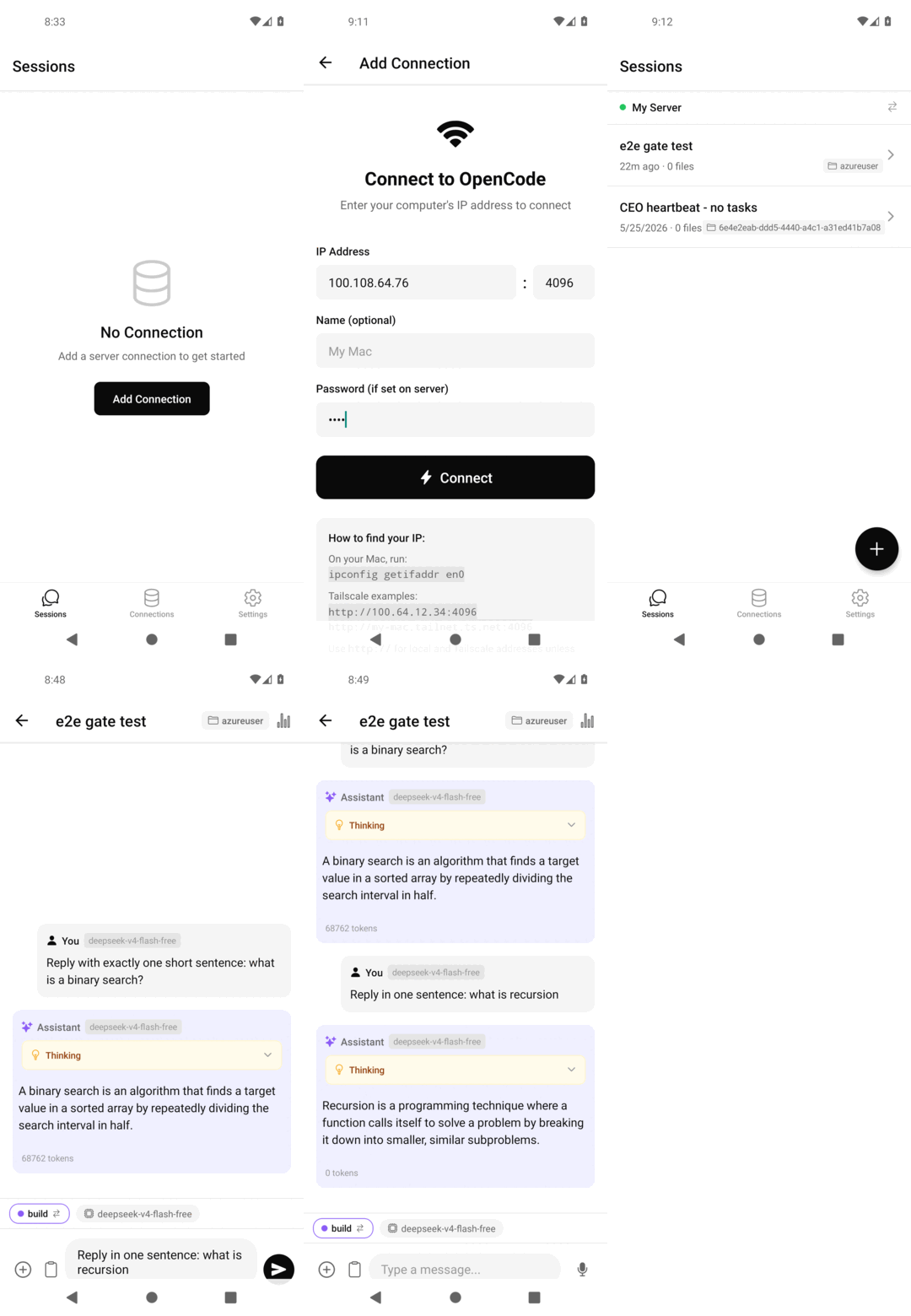
Real on-device capture: add a connection, browse sessions, and watch the agent stream a response. Verified end-to-end on an Android emulator against a live opencode server (build cc.agentlabs.opencode).
Features
- Multi-connection — manage multiple opencode servers (local network, Cloudflare Tunnel, ngrok, or Tailscale)
- Biometric unlock — Face ID, Touch ID, or Android fingerprint protects the app and individual message sends
- Streaming chat — token-by-token streaming responses directly from your opencode server
- Diff viewer — inline side-by-side diffs of every file change the agent makes
- Tool call approval — review and approve (or reject) tool calls before the agent executes them
- Secure credential storage — server credentials stored in the Android Keystore via
expo-secure-store - Session management — browse, create, and resume coding sessions
Get OpenCode Mobile
Package: cc.agentlabs.opencode · Android only · current version v0.4.3
| Channel | Status | How |
|---|---|---|
| F-Droid (self-hosted repo) | Live | Add https://dzianisv.github.io/opencode-mobile/fdroid/repo in your F-Droid client |
| Direct APK | Live | github.com/dzianisv/opencode-mobile/releases/latest |
| Google Play | Internal testing / coming soon | No public listing yet |
| IzzyOnDroid | Submission pending | Not live yet |
| Apple App Store / iOS | Not available | See Roadmap |
The two live, supported install channels are the F-Droid self-hosted repo and the direct signed APK, both Android. Google Play is internal-testing only, IzzyOnDroid is pending, and there is no iOS build.
Quick Start
Step 1 — Start opencode on your machine
# Install opencode (if you haven't already)
npm install -g opencode

# Run opencode in server mode
OPENCODE_SERVER_PASSWORD=yourpassword opencode serve --hostname 0.0.0.0 --port 4096
Step 2 — Install OpenCode Mobile via the F-Droid self-hosted repo or direct APK (or build from source — see CONTRIBUTING.md).
Step 3 — Add a connection in the app
Open the app, tap Add Connection, and choose your connection type:
- Local network — your machine's LAN IP, e.g.
http://192.168.1.100:4096 - Tunnel — a Cloudflare Tunnel or ngrok URL, e.g.
https://my-opencode.trycloudflare.com - Tailscale — your machine's Tailscale IP, e.g.
http://100.x.x.x:4096 - opencode Cloud (planned — not yet shipped) — one-tap managed hosting, no server to run
Enter the password you set in Step 1, tap Connect, and you're in.
How It Works
OpenCode Mobile is a thin client. It speaks the opencode HTTP + SSE API: listing sessions, sending messages, streaming responses, and subscribing to file-change events. All AI model calls are handled by your opencode server — you bring your own API keys (OpenAI, Anthropic, etc.) and the app never touches them. The app never proxies your code or conversation through our servers.
┌─────────────────────────────────────┐
│         OpenCode Mobile             │
│  (React Native / Expo, this repo)   │
└──────────────┬──────────────────────┘
               │  HTTP + SSE
               │  (local network / tunnel)
               ▼
┌─────────────────────────────────────┐
│       opencode server               │
│  (github.com/sst/opencode, MIT)     │
│  Running on your laptop / VPS       │
└──────────────┬──────────────────────┘
               │  API calls
               ▼
┌─────────────────────────────────────┐
│   Your AI provider                  │
│  (OpenAI / Anthropic / Gemini / …)  │
│  Your keys, your bill               │
└─────────────────────────────────────┘
Project Status
Current version: v0.4.3
| Feature | Status |
|---|---|
| Multi-connection management | Stable |
| Session list + creation | Stable |
| Streaming chat | Stable |
| Diff viewer | Stable |
| Biometric unlock | Stable |
| Tool call approval UI | Stable |
| Sentry crash reporting (opt-in) | Stable |
| Cloudflare / ngrok tunnel wizard | Beta |
| opencode Cloud one-tap connect | Planned |
| iPad / tablet layout | Planned |
| Offline session history | Planned |
Supporters and Sponsors
OpenCode Mobile is built and maintained by VIBE TECHNOLOGIES, LLC. GitHub Sponsors help cover Sentry, EAS Build, and CI costs (~$60/month). The opencode Cloud hosted backend (planned, $10/mo) is the long-term revenue model.
If OpenCode Mobile saves you time, consider sponsoring:
github.com/sponsors/VibeTechnologies
| Tier | Price | Perk |
|---|---|---|
| Supporter | $5/mo | Your name in SUPPORTERS.md |
| Backer | $15/mo | Name + early access to opencode Cloud beta |
| Business | $50/mo | Logo on agentlabs.cc/opencode + quarterly support call |
Questions or private support: [email protected]
Roadmap
Tracked on the GitHub Projects board and in the open milestones.
Near-term priorities:
- opencode Cloud one-tap connect + managed hosting
- F-Droid mainline acceptance (FCM audit + reproducible build verification)
- Tunnel setup wizard (Cloudflare / ngrok / Tailscale)
- iPad / tablet layout
- Offline session history cache
Contributing
We welcome bug reports, feature requests, and pull requests. See CONTRIBUTING.md for how to set up a dev environment and the contribution process.
Privacy
OpenCode Mobile does not collect personal data. Optional Sentry crash reporting (opt-in, off by default) sends anonymised crash traces to Sentry. No analytics SDKs are bundled. Credentials are stored exclusively on-device in the OS keystore.
Full privacy policy: dzianisv.github.io/opencode-mobile/privacy
License
MIT — see LICENSE.
Copyright (c) 2026 VIBE TECHNOLOGIES, LLC
Acknowledgments
- sst/opencode — the AI coding agent this app connects to (MIT)
- Expo — the React Native toolchain powering the app
- Every contributor who filed a bug, opened a PR, or starred the repo
Yorumlar (0)
Yorum birakmak icin giris yap.
Yorum birakSonuc bulunamadi