Adaptive-Prompt-Elicitation
Health Warn
- License — License: MIT
- Description — Repository has a description
- Active repo — Last push 0 days ago
- Low visibility — Only 5 GitHub stars
Code Fail
- eval() — Dynamic code execution via eval() in eval.py
- network request — Outbound network request in web/frontend/package-lock.json
- network request — Outbound network request in web/frontend/package.json
Permissions Pass
- Permissions — No dangerous permissions requested
This tool is an interactive prompting agent designed to improve text-to-image generation. Instead of manually writing complex prompts, users engage in a guided visual conversation to refine their intent and automatically generate better images.
Security Assessment
Overall Risk: Medium. The repository does not request dangerous local permissions or execute hidden shell commands. However, the scan flagged a critical failure for dynamic code execution using `eval()` in `eval.py`. While this might be intended for academic benchmarking, it presents a significant vulnerability if the input is not strictly controlled. Additionally, the tool makes outbound network requests (primarily in the frontend web demo) and requires you to provide third-party API keys (OpenAI, fal.ai, etc.) in a local `.env` file. There are no hardcoded secrets, but you must securely manage your own keys.
Quality Assessment
The project is actively maintained, having received updates as recently as today. It uses a permissive MIT license, which is excellent for open-source collaboration. However, community trust and visibility are currently very low; the repository has only 5 stars. This is expected for an academic paper implementation rather than a widely-adopted enterprise tool, meaning you may encounter bugs or limited support.
Verdict
Use with caution due to the presence of `eval()`, but the tool is generally safe if you run it locally and manage your API keys carefully.
Official implementation of "Adaptive Prompt Elicitation for Text-to-Image Generation" (ACM IUI 2026)
Adaptive Prompt Elicitation for Text-to-Image Generation




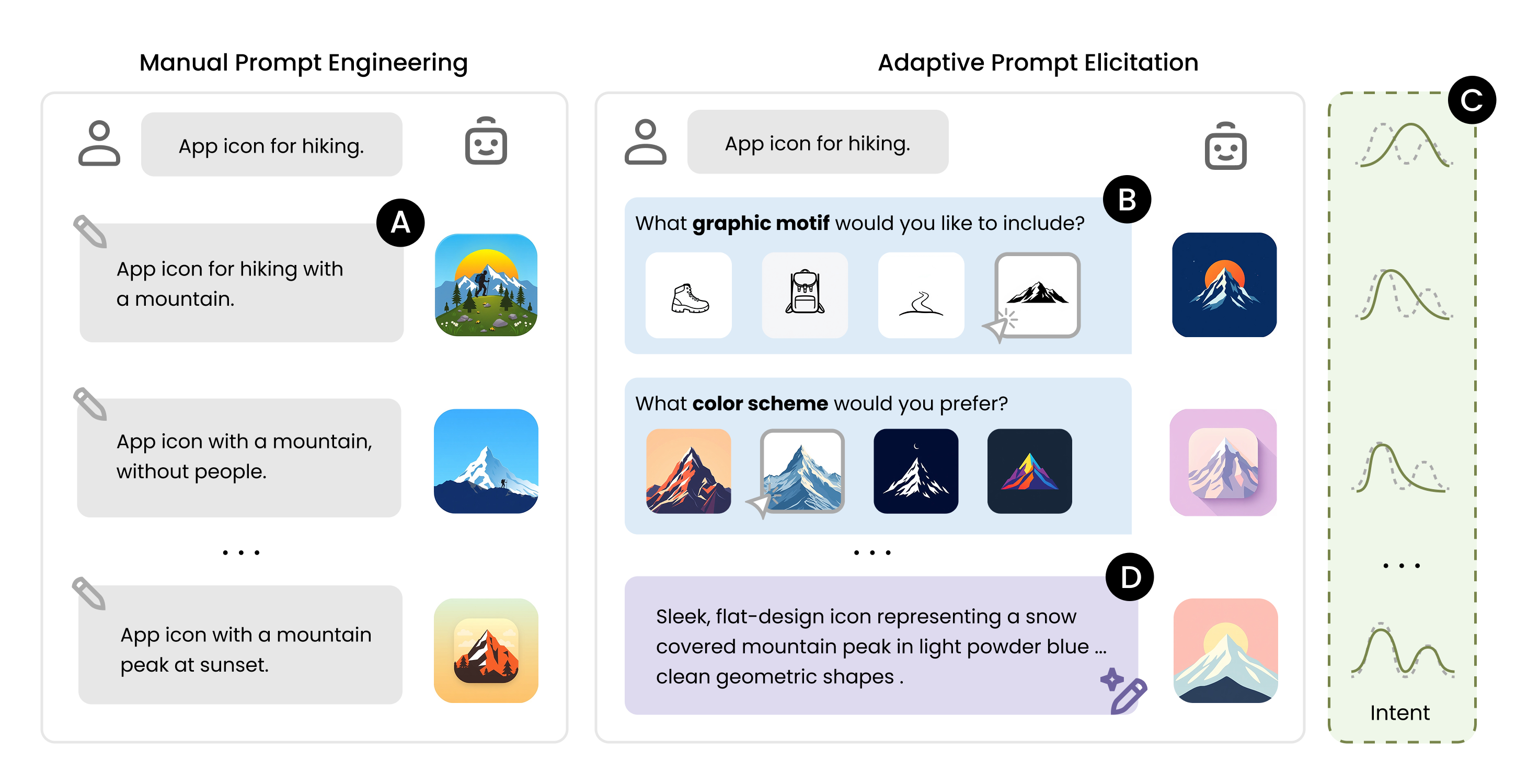
Adaptive Prompt Elicitation (APE) is an interactive prompting technique that transforms text-to-image generation from manual trial-and-error into a guided visual conversation. It actively infers the user's underlying intent through adaptive visual queries, allowing general users to craft effective prompts without extensive writing. Learn more on the project page.
Installation
1. Clone the repository and set up the environment:
git clone https://github.com/e-wxy/Adaptive-Prompt-Elicitation.git
cd Adaptive-Prompt-Elicitation

conda create -n ape python=3.12 -y
conda activate ape

pip install -r requirements.txt
2. Configure API keys:
Copy the example environment file:
cp .env.example .env
then fill in your API keys.
APE requires an LLM API key and a Text-to-Image (T2I) API key. The default configuration uses OpenAI and fal.ai:
OPENAI_KEY— OpenAI APIFAL_KEY— fal.ai API
You can alternatively use other API providers. See .env.example for the full list of supported keys (Anthropic, Google, Vertex AI).
Quick Start
from ape import Project

# Initilise a text-to-image generation project
project = Project(
    task="App Icon",
    description="Icon design for a hiking app",
    questioner="APE",   # proposed method
)

# APE generate a visual query that maximally improve the alignment
question = project.ask_questions(json_format=False)
print(question)

# Record the user's answer and update the intent specification
project.record_answer("...")
project.extract_requirements()

print(project.get_requirements())  # visual feature requirements
print(project.img_url)             # generated image
See demo.ipynb for a full interactive walkthrough.
Web Demo
An interactive browser-based demo. See web/README.md for full setup instructions.
# 1. Backend — run from the repo root
pip install -r web/requirements.txt
python web/server.py

# 2. Frontend — in a separate terminal
cd web/frontend && npm install && npm run dev
Open http://localhost:3000, enter a design type and a short description, and APE will interactively guide you through visual queries to refine the generated image.
Repository Structure
Adaptive-Prompt-Elicitation/
├── ape/                        # Core package
│   ├── project.py              # Project — manages intent state and the elicitation loop
│   ├── questioners.py          # Query strategies
│   ├── utils.py                # LLMAgent and ImageGenerator (multi-provider API)
│   ├── logger.py               # Structured JSON session logging
│   └── prompt_templates/       # LLM prompt templates
├── web/                        # Interactive web demo
│   ├── server.py               # Flask REST API backend
│   ├── requirements.txt        # Backend dependencies
│   ├── README.md               # Web demo setup instructions
│   └── frontend/               # Next.js frontend
├── demo.ipynb                  # Interactive demo notebook
├── benchmark.py                # Automated benchmarking (DesignBench / IDEA-Bench)
├── eval.py                     # Similarity metrics (CLIP, DINOv2, DreamSim, E5, OpenAI)
├── requirements.txt
└── .env.example
Benchmarking
Reproduce the paper's technical evaluation. To run the full experiment suite:
./run_benchmark.sh
Or run individual configurations:
# APE on DesignBench
python benchmark.py --dataset DesignBench --questioner APE --max-iters 15 --num-exp 5

# Interactive baseline on DesignBench
python benchmark.py --dataset DesignBench --questioner In-Context --max-iters 15 --num-exp 5 --exp-id-start 20

# APE on IDEA-Bench
python benchmark.py --dataset IDEA-Bench --questioner APE --max-iters 15 --num-exp 5
Evaluation
from eval import get_similarity_model

clip = get_similarity_model("clip")
score = clip.get_similarity("generated.png", "reference.png")
Available metrics: "clip", "dinov2", "dreamsim", "e5", "openai".
For "VQAScore", see t2v_metrics.
Supported GenAI APIs
| Provider | LLM | Image Generation |
|---|---|---|
 |
GPT-4.1-mini (default), GPT-4.1, GPT-5, GPT-5-mini | DALL-E 3, gpt-image-1 |
 |
Claude Sonnet 4, Claude Opus 4.7, Claude Haiku 4.5 | — |
 |
— | FLUX/schnell (default), FLUX/dev, FLUX Pro, ... |
 / /  |
Gemini 2.0 Flash Lite, Gemini 2.5 Flash, Gemini 2.5 Pro | Imagen 4 |
Citation
If you find this work useful, please consider citing:
@inproceedings{wen2026adaptive,
  author = {Wen, Xinyi and Hegemann, Lena and Jin, Xiaofu and Ma, Shuai and Oulasvirta, Antti},
  title = {Adaptive Prompt Elicitation for Text-to-Image Generation},
  year = {2026},
  isbn = {9798400719844},
  publisher = {Association for Computing Machinery},
  address = {New York, NY, USA},
  doi = {10.1145/3742413.3789149},
  booktitle = {Proceedings of the 31st International Conference on Intelligent User Interfaces},
  pages = {730–754},
  numpages = {25},
  series = {IUI '26}
}
License
This project is released under the MIT License.
If you build something with APE, we’d love to see it! ✨ Feel free to open a PR or share your project.
Reviews (0)
Sign in to leave a review.
Leave a reviewNo results found