factory
Health Warn
- License — License: Apache-2.0
- Description — Repository has a description
- Active repo — Last push 0 days ago
- Low visibility — Only 5 GitHub stars
Code Warn
- network request — Outbound network request in examples/catalog/app.mjs
Permissions Pass
- Permissions — No dangerous permissions requested
No AI report is available for this listing yet.
Build architecture diagrams by making a Factorio factory
Factory
A skill for building software architecture diagrams as a Factorio factory.




Quick start · Game assets · Install · Usage
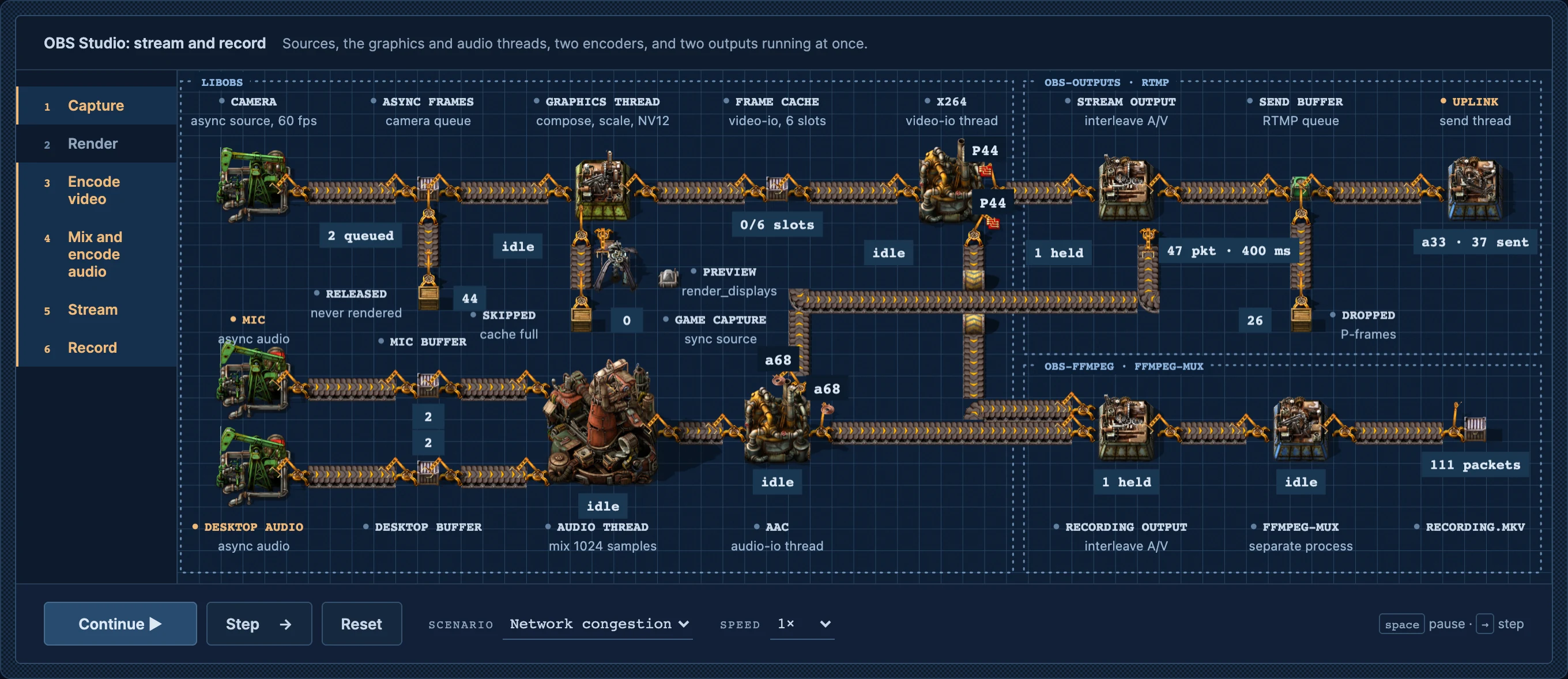
examples/obs-pipeline A high level sample of OBS Studio's architecture./factory explain how OBS works
/factory explain how my application architecture works
This skill will build a working, moving architecture diagram using a Factorio factory to explain a program, an algorithm or a whole system.
Extremely useful for planning work for software engineering. After you've written your plan on what you're going to build, give this skill your RFC or planning documents and your code repo. Simply run /factory explain <how this is going to work> When it's done, you get a great visualization of your architecture. Much, much better than trying to build confusing mermaid charts, or heaven forbid, UML diagrams or other nonsense. Factorio objects give you a shared design language too, so as you build architecture diagrams, you'll be able to spot common patterns easily.
Quick start
You need the Vite+ CLI, vp, Node.js 24, and your own copy of Factorio 2.0 with Space Age.
Support games! Wube is an excellent company. Besides, are you really a professional software engineer until you own a copy of Factorio?
If on some odd chance you've never heard of Factorio, you can read about it here.
git clone https://github.com/echohack/factory.git ~/.claude/skills/factory
cd ~/.claude/skills/factory
vp install
Export the game's data and icons once, as described in Game assets, then import the art and open the examples:
vp run assets
vp run dev
Open https://factory.localhost/array-pipeline/ in your browser.
In your harness, type
/factory explain how an LRU cache with 4 slots evicts entries
Game assets
Factory draws with Factorio's sprites, so you'll need to own the game.
- Export Data. Start the game twice, once with each option. Each run writes into the
script-outputfolder and quits. You can either do this by hand in Steam or Standalone. Your LLM can probably just do this for you with standalone if you ask nicely.Steam: in your Library, right-click Factorio and open Properties → General → Launch options. Enter
--dump-dataand press Play. When the game has closed, enter--dump-icon-spritesand press Play again. Then clear the launch options.Standalone: run the game binary with each option, for example on macOS:
/Applications/factorio.app/Contents/MacOS/factorio --dump-data
/Applications/factorio.app/Contents/MacOS/factorio --dump-icon-sprites
On Windows the binary is
bin\x64\factorio.exein the install folder; on Linux it isbin/x64/factorio.
- Import. From this repository, run
vp run assets. That's it!
vp run assets looks for the game and its exports in these places:
| Game data | Exports | |
|---|---|---|
| Windows, Steam | C:\Program Files (x86)\Steam\steamapps\common\Factorio\data |
%APPDATA%\Factorio\script-output |
| Windows, standalone | C:\Program Files\Factorio\data |
%APPDATA%\Factorio\script-output |
| macOS, Steam | ~/Library/Application Support/Steam/steamapps/common/Factorio/factorio.app/Contents/data |
~/Library/Application Support/factorio/script-output |
| macOS, standalone | /Applications/factorio.app/Contents/data |
~/Library/Application Support/factorio/script-output |
| Linux, Steam | ~/.steam/steam/steamapps/common/Factorio/data |
~/.factorio/script-output |
| Linux, standalone | factorio/data, where you unpacked it |
factorio/script-output |
If your copy is somewhere else, name the folders:
vp run assets --data "/path/to/Factorio/data" --script-output "/path/to/script-output"
Install
Factory is a standard Agent Skill: a folder with a SKILL.md at its root. Clone this repository into a skill folder, then run the import inside it.
| Command | |
|---|---|
| Claude Code, for you | git clone https://github.com/echohack/factory.git ~/.claude/skills/factory |
| Claude Code, for one project | git clone https://github.com/echohack/factory.git .claude/skills/factory |
| Codex | git clone https://github.com/echohack/factory.git ~/.agents/skills/factory |
| OpenCode | git clone https://github.com/echohack/factory.git ~/.config/opencode/skills/factory |
To update, run git pull in that folder. The imported art stays, because Git ignores it.
Claude Code picks up new skills in a running session; start a new session if /factory does not show. In Codex, run it with $factory.
Usage
Type /factory (in Codex, $factory) and say what the figure should explain:
/factory explain how Kubernetes works
It's best if you have your planning documents, source code, or other artifacts available for your LLM to parse.
More prompts/factory explain how PostgreSQL makes a COMMIT durable, go into detail about how the WAL handles it
/factory explain how Kafka handles a produce request
/factory explain how Redis runs commands on its event loop
/factory explain how Nginx serves a request
/factory explain how Chromium produces a frame
Factory browser
You can browse any of your created architecture diagrams at https://factory.localhost. Just run vp run dev to start the local server. vp build writes a static copy to dist/, and vp preview serves it.
The same sidebar holds the object library and the factory patterns: 36 arrangements from real Factorio builds, such as worker rows, splitter fan-outs, main buses and backpressure, each with its software meaning and a running example. The skill builds every diagram from them.
Contributing
Pull requests are welcome.
- Read CONTRIBUTING.md
- Report security problems by following SECURITY.md
- Changelog
License
Apache 2.0 © 2026 echohack
Reviews (0)
Sign in to leave a review.
Leave a reviewNo results found