fluxland
Health Gecti
- License — License: MIT
- Description — Repository has a description
- Active repo — Last push 0 days ago
- Community trust — 17 GitHub stars
Code Gecti
- Code scan — Scanned 12 files during light audit, no dangerous patterns found
Permissions Gecti
- Permissions — No dangerous permissions requested
Bu listing icin henuz AI raporu yok.
Fluxbox, but for Wayland, agentically built with Claude
fluxland
A lightweight, highly configurable Wayland compositor inspired by Fluxbox.



About | Screenshots | Quick Start | Features | Dependencies | Building | Configuration | Migration from Fluxbox | IPC | Man Pages | Contributing | License
About
fluxland brings the Fluxbox experience to the Wayland display protocol. For
years, Fluxbox has been the window manager of choice for users who value
simplicity, speed, and deep configurability. As the Linux desktop ecosystem
transitions from X11 to Wayland, fluxland provides a familiar home for
Fluxbox users while embracing modern display server capabilities.
This project was 100% vibe coded using Claude Code
with Claude Code Teams orchestration.
Read about how it was built — agentic development, team orchestration, and
what I learned building a 35,000-line compositor without writing a single line of code.
Built on wlroots 0.20, fluxland implements 30+ Wayland protocols and delivers
first-class support for server-side decorations with Fluxbox style
compatibility, key chains and modal keybindings, window tabbing, a configurable
toolbar with icon bar, the slit (dockapp container), and per-window rules. It
reads Fluxbox configuration files directly, making migration straightforward.
fluxland targets users who want a fast, keyboard-driven stacking compositor
with the depth of configuration that Fluxbox is known for, without sacrificing
the benefits of a modern Wayland session.
Screenshots
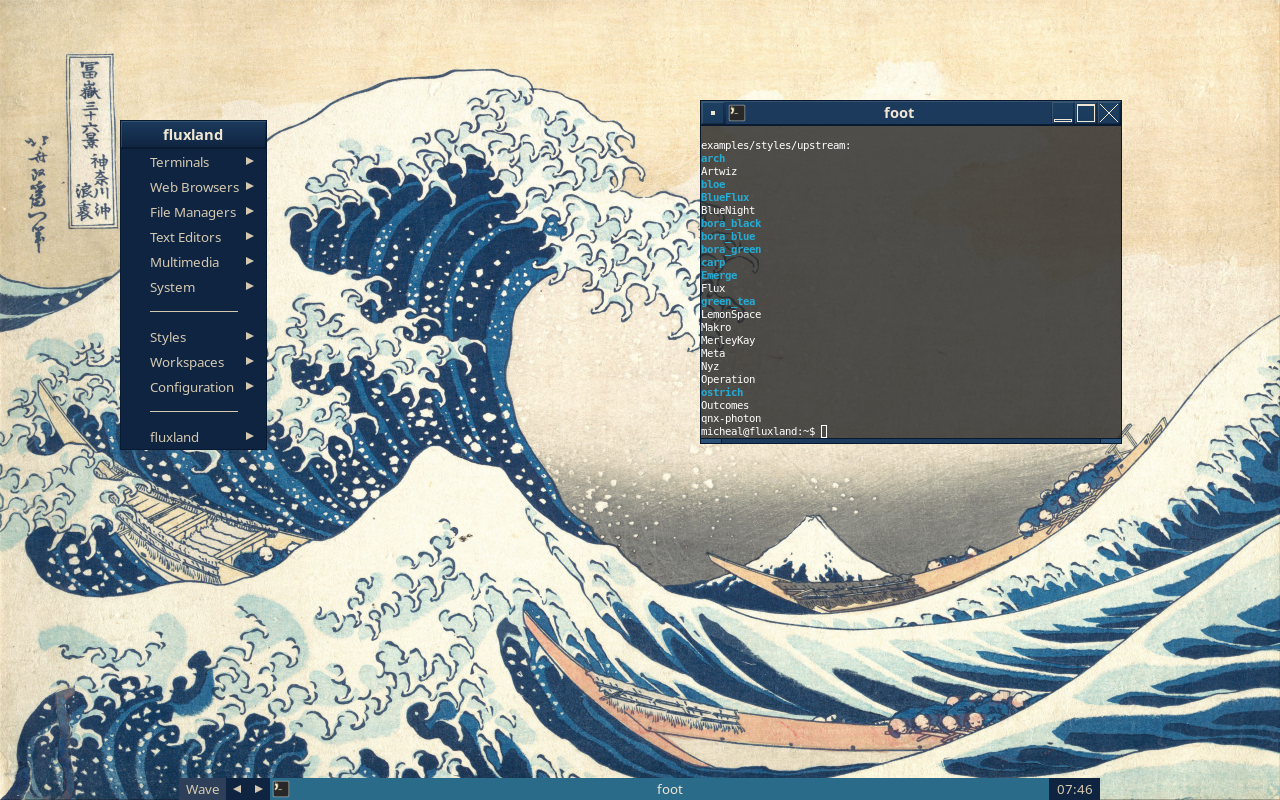
Great Wave style with ocean blue decorations.
 |
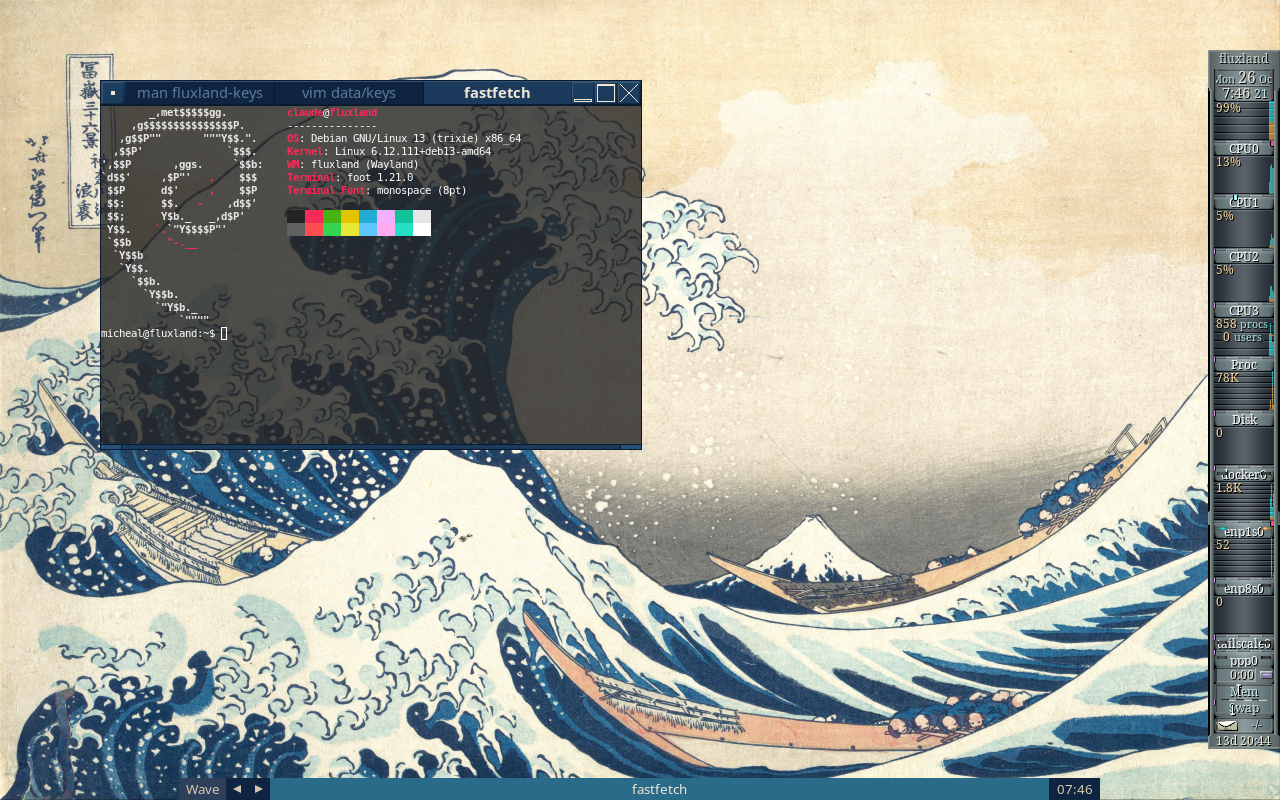 |
| Desktop with wallpaper | Three terminals tabbed in one frame (an apps file [group]), gkrellm in the slit (XWayland) |
 |
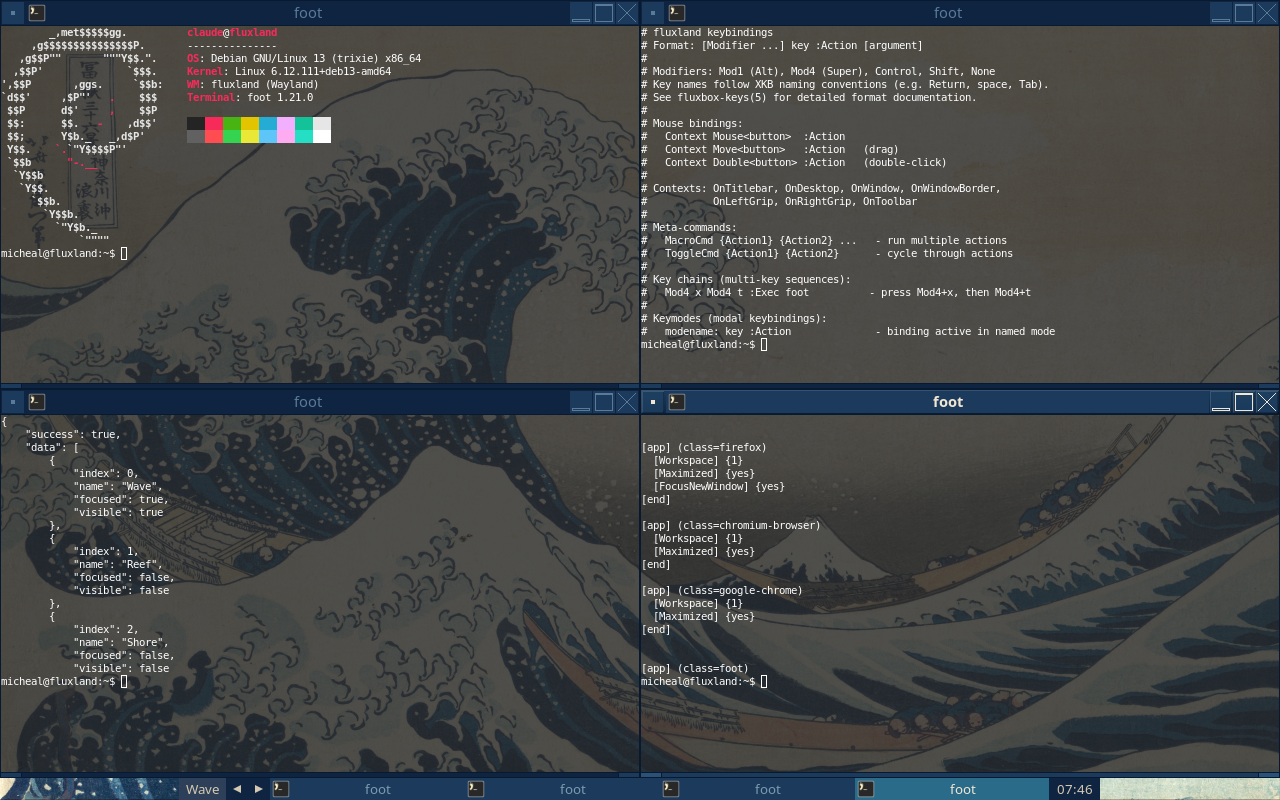 |
| Root menu | ArrangeWindows (4 windows) |
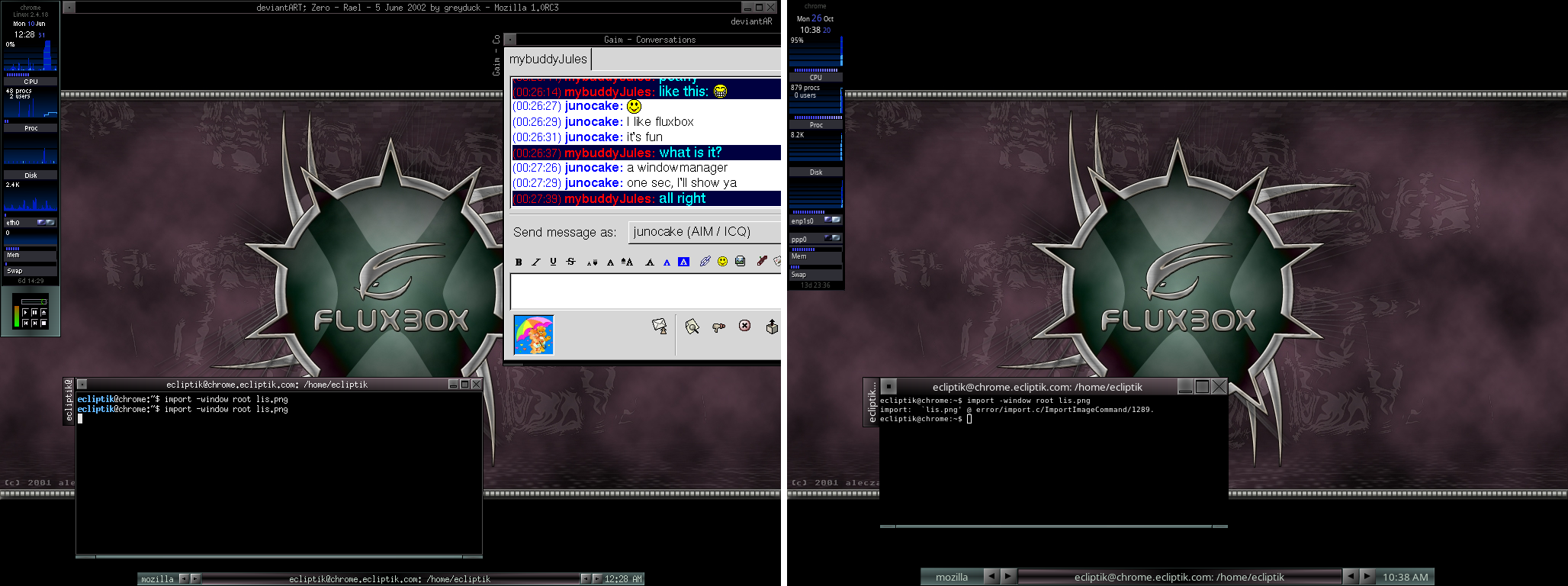
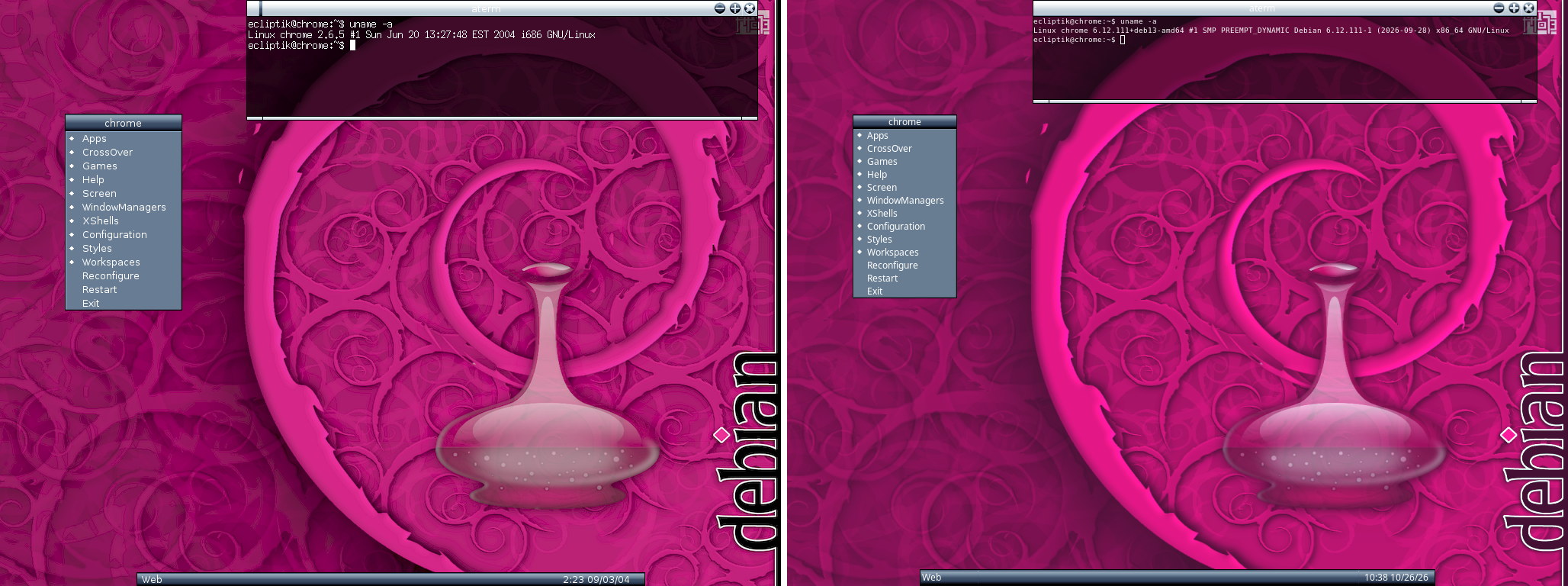
Fluxbox desktops, recreated
Four of the author's Fluxbox desktops from 2002 to 2005 (left, from
Screenshots Over the Years)
and fluxland running the same Fluxbox styles today (right). Programs
that don't run on Wayland have modern stand-ins: foot for Eterm and
aterm, Audacious with the same Winamp skins for XMMS.
 |
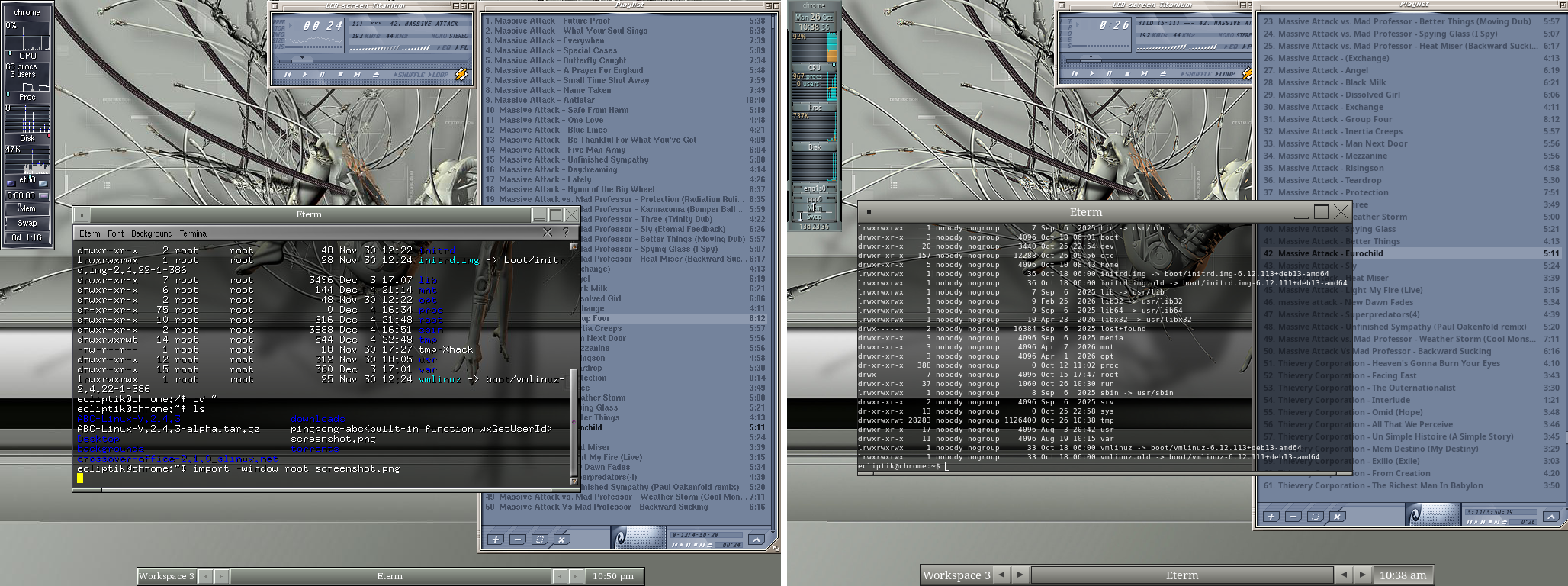 |
| 2002: Fluxarnation by aLEczapKA with its wallpaper, gkrellm's CoplandOS (original) | 2002: the Kernel Destruction wallpaper, the LCD screen: titanium skin (original) |
 |
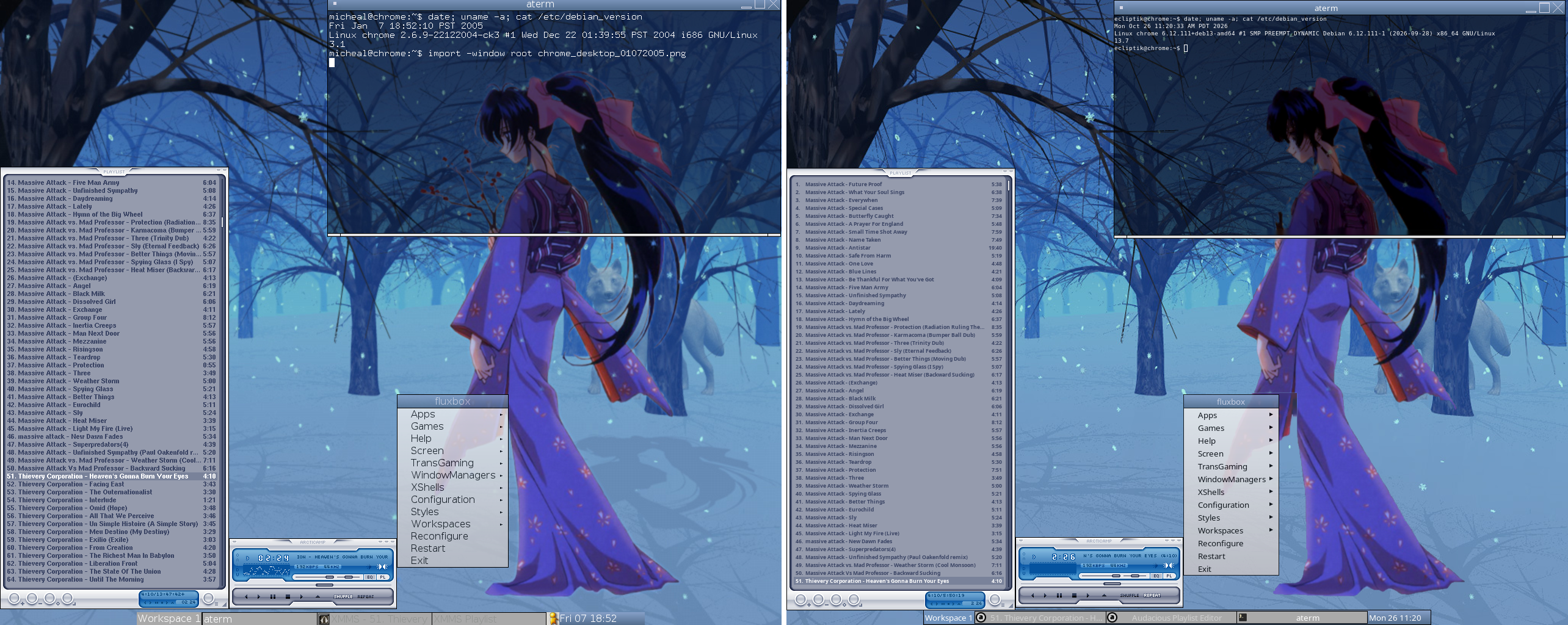 |
| 2004: Magraxx by ikaro, ayo's Debian Style wallpaper (original) | 2005: Fluxbox's Meta, lisyria's Winter's Eve wallpaper (Kaoru over Visual Paradox's Winter Eve), the ArcticAMP skin (original) |
See examples/ for styles and complete configuration examples, and the style gallery for Fluxbox style compatibility screenshots.
Quick Start
Install dependencies (see Dependencies below) and build:
meson setup build && ninja -C build
sudo meson install -C build --skip-subprojects
For distro-specific instructions, see
docs/QUICKSTART.md.Configuration. On its first start fluxland copies its default
configuration to~/.config/fluxland/(if you have a~/.fluxbox
and no~/.config/fluxland, it uses~/.fluxboxas it is; see
Migration from Fluxbox). A file you delete
comes back as the default next time.Or start from a themed example (see
examples/):mkdir -p ~/.config/fluxland cp /path/to/fluxland/examples/wave-desktop/* ~/.config/fluxland/Start the compositor from a TTY or from within another compositor:
fluxlandEssential keybindings:
Key Action Mod4+ReturnOpen terminal (foot) Mod4+dApplication launcher (wofi) Mod4+Shift+qClose focused window Mod4+fToggle fullscreen Mod4+mToggle maximize Mod4+1..9Switch to workspace Mod4+Shift+1..9Send window to workspace Alt+TabCycle windows Mod4+rReload configuration Mod4+Shift+eExit compositor Mod4is the Super/Windows key.
Features
- Server-side decorations with full Fluxbox style support (gradients, textures, fonts, colors)
- Key chains -- multi-key sequences (e.g.
Mod4+x Mod4+tto launch a terminal) - Keymodes -- modal keybinding sets (e.g. a resize mode with vim-style movement keys)
- Window tabbing -- group windows into tabbed containers, drag-to-tab from titlebars
- Toolbar with workspace switcher, icon bar, and clock; configurable placement and auto-hide
- Slit -- dock area for Window Maker dockapps and other dockable applications (e.g. gkrellm via XWayland)
- Root menu and window menu -- Fluxbox-compatible menu definitions with submenus, separators, and built-in entries
- Per-window rules -- match by app_id, title, or class with regex; set workspace, dimensions, position, decorations, layer, transparency, and more
- Auto-grouping -- automatically tab windows matching specified patterns
- MacroCmd / ToggleCmd -- combine multiple actions in a single binding or cycle between them
- Mouse bindings -- per-context (titlebar, desktop, border, grip) with click, drag, and double-click support
- Multiple focus policies -- click-to-focus, sloppy (mouse focus), strict mouse focus
- Smart window placement -- row-smart, column-smart, cascade, and under-mouse placement policies
- Workspace management -- up to 32 named virtual desktops with edge warping
- XKB keyboard layout -- full XKB configuration with multi-layout support and runtime switching
- IPC via Unix socket with JSON protocol; includes
fluxland-ctlcommand-line client - Event subscriptions -- subscribe to window, workspace, and output events for scripting
- XWayland support -- run X11 applications alongside native Wayland clients
- Live reconfiguration -- reload all config files at runtime (keys, apps, menu, style, init) via
Mod4+rorSIGHUP - Lightweight and efficient -- runs comfortably on a Raspberry Pi 3 or 2010-era Intel Atom. The compositor uses ~16-32 MB of RAM, with an optimized rendering pipeline that caches text measurement contexts, pre-allocates buffers, and skips redundant scene graph updates. The only real hardware requirement is a GPU with OpenGL ES 2.0 and DRM/KMS kernel driver support.
- 30+ Wayland protocols including:
- xdg-shell, xdg-decoration, layer-shell, session-lock
- fractional-scale, tearing-control, content-type, presentation-time
- pointer-constraints, relative-pointer, pointer-gestures
- virtual-keyboard, virtual-pointer, text-input, input-method
- gamma-control, output-management, output-power, screencopy
- data-control, xdg-activation, xdg-foreign, tablet-v2
- cursor-shape, viewporter, single-pixel-buffer, alpha-modifier
- security-context, linux-dmabuf, idle-notify, idle-inhibit
Dependencies
Build dependencies
| Dependency | Debian/Ubuntu | Arch |
|---|---|---|
| meson (>= 1.3) | meson |
meson |
| ninja | ninja-build |
ninja |
| C17 compiler | gcc or clang |
gcc or clang |
| wlroots 0.20 | built from subprojects/ (or a system wlroots-0.20) |
wlroots0.20 |
| wayland | libwayland-dev |
wayland |
| wayland-protocols (>= 1.32) | wayland-protocols |
wayland-protocols |
| xkbcommon | libxkbcommon-dev |
libxkbcommon |
| libinput (>= 1.14) | libinput-dev |
libinput |
| pixman | libpixman-1-dev |
pixman |
| pangocairo | libpango1.0-dev |
pango |
| libdrm | libdrm-dev |
libdrm |
Optional dependencies
| Dependency | Debian/Ubuntu | Arch | Purpose |
|---|---|---|---|
| XWayland | xwayland |
xorg-xwayland |
X11 application support |
| xcb, xcb-ewmh, xcb-icccm | libxcb1-dev libxcb-ewmh-dev libxcb-icccm4-dev |
libxcb xcb-util-wm |
XWayland EWMH/ICCCM |
Runtime companions (recommended)
- foot or another Wayland terminal emulator
- wofi, bemenu, or fuzzel for application launching
- swaybg for wallpaper
- waybar for a status bar
- mako or dunst for notifications
- swayidle + swaylock for idle/lock management
- grim + slurp for screenshots
Building
meson setup build
ninja -C build
To install system-wide:
sudo meson install -C build --skip-subprojects
Build options
| Option | Type | Default | Description |
|---|---|---|---|
xwayland |
feature | auto | Enable XWayland support |
asan |
boolean | false | Enable address sanitizer |
ubsan |
boolean | false | Enable undefined behavior sanitizer |
Example with options:
meson setup build -Dxwayland=enabled -Dasan=true
ninja -C build
Configuration
fluxland reads configuration from the first directory found:
$FLUXLAND_CONFIG_DIR/$XDG_CONFIG_HOME/fluxland/~/.config/fluxland/~/.fluxbox/(Fluxbox compatibility fallback)
Config files
| File | Format | Description |
|---|---|---|
init |
X resource (key: value) | Compositor settings: workspaces, focus policy, toolbar, placement, XKB layout |
keys |
Fluxbox keys format | Keyboard and mouse bindings, key chains, keymodes, macro/toggle commands |
apps |
Fluxbox apps format | Per-window rules: workspace, dimensions, position, decorations, layer, transparency, auto-grouping |
menu |
Fluxbox menu format | Root menu definition with exec entries, submenus, separators, styles directory, and built-in items |
style |
Fluxbox style format | Window decoration style: titlebar, buttons, handle, grip, frame, menu, and toolbar colors/textures/fonts |
startup |
Shell script | Autostart script executed once at launch; use for wallpaper, bars, daemons |
All configuration can be reloaded at runtime with Mod4+r (Reconfigure action)
or by sending SIGHUP to the compositor process. Example configuration files
are provided in the data/ directory.
See the man pages below for detailed format documentation.
Migration from Fluxbox
fluxland reads Fluxbox's files the way Fluxbox does: with no~/.config/fluxland it uses ~/.fluxbox as it is, andfluxland --import-fluxbox makes fluxland's own copy of it, its startup
script turned into one fluxland runs. Every Fluxbox command, init
resource, apps attribute and menu tag is supported (a handful of init
resources that mean nothing on Wayland are accepted and ignored).
- Migrating from Fluxbox: what works the same, and
what Wayland changes (the startup script's X programs,fluxbox-remote,fbrun, X11 programs and dockapps, the tray). - Compatibility: each Fluxbox name and what
fluxland does with it, from the parity test.
IPC
fluxland provides a Unix socket IPC interface with JSON messages. Thefluxland-ctl command-line tool handles socket discovery and message
formatting.
Examples
# Execute compositor actions
fluxland-ctl action Close
fluxland-ctl action Workspace 3
fluxland-ctl action Exec foot

# Query state
fluxland-ctl get_windows
fluxland-ctl get_workspaces
fluxland-ctl get_outputs
fluxland-ctl get_config

# Subscribe to events (streams JSON to stdout)
fluxland-ctl subscribe window workspace

# List all available actions
fluxland-ctl list-actions

# Test connectivity
fluxland-ctl ping
The socket path is auto-detected from $FLUXLAND_SOCK or$XDG_RUNTIME_DIR/fluxland.$WAYLAND_DISPLAY.sock. Override with -s <path>.
Man Pages
| Page | Section | Description |
|---|---|---|
| fluxland(1) | 1 | Compositor usage and command-line options |
| fluxland-ctl(1) | 1 | IPC client usage |
| fluxland-keys(5) | 5 | Key and mouse binding configuration |
| fluxland-apps(5) | 5 | Per-window rules and auto-grouping |
| fluxland-init(5) | 5 | Init file reference |
| fluxland-style(5) | 5 | Style file format |
| fluxland-menu(5) | 5 | Menu definition format |
| fluxland-startup(5) | 5 | Startup script reference |
After installation, access with man fluxland, man fluxland-keys, etc.
Contributing
Contributions are welcome. See CONTRIBUTING.md for
guidelines on code style, commit messages, and the development workflow.
License
fluxland is released under the MIT License.
Acknowledgments
Yorumlar (0)
Yorum birakmak icin giris yap.
Yorum birakSonuc bulunamadi