vcctrl
Health Warn
- License — License: NOASSERTION
- Description — Repository has a description
- Active repo — Last push 0 days ago
- Low visibility — Only 5 GitHub stars
Code Fail
- eval() — Dynamic code execution via eval() in daemon/vcweb_public.py
- network request — Outbound network request in daemon/vcweb_public.py
Permissions Pass
- Permissions — No dangerous permissions requested
No AI report is available for this listing yet.
RaspberryPi KVM and Agent AI Control for Modern and Retro Computers
vcctrl
Remote control of a real, physical retro or legacy machine: keyboard,
mouse, screen, audio, power and file transfer, driven by a CLI, an MCP
server, or a browser KVM. It exists to let automated tests run against
hardware that predates automation — DOS boxes, classic Macs, anything you
can wire a capture device and an input path to.
This project was built agentically using Claude Code.
- Web KVM — live keyboard, mouse and video in the browser, streamed over WebSocket, no client software. docs/WEBKVM.md
- File transfer — push files to the target and pull results back over its own network stack. docs/FILE-TRANSFER.md
- Automated test harness — unattended, measured test runs against real hardware. docs/HARNESS-STANDARD.md
- MCP server — drive it directly from Claude Code, Codex, or any MCP client. docs/MCP-SERVER.md
- Multi-target — one daemon driving several profiles at once. docs/PROFILES.md
- Portable skills — domain knowledge as
SKILL.mdfiles any agent can pick up. docs/SKILLS.md
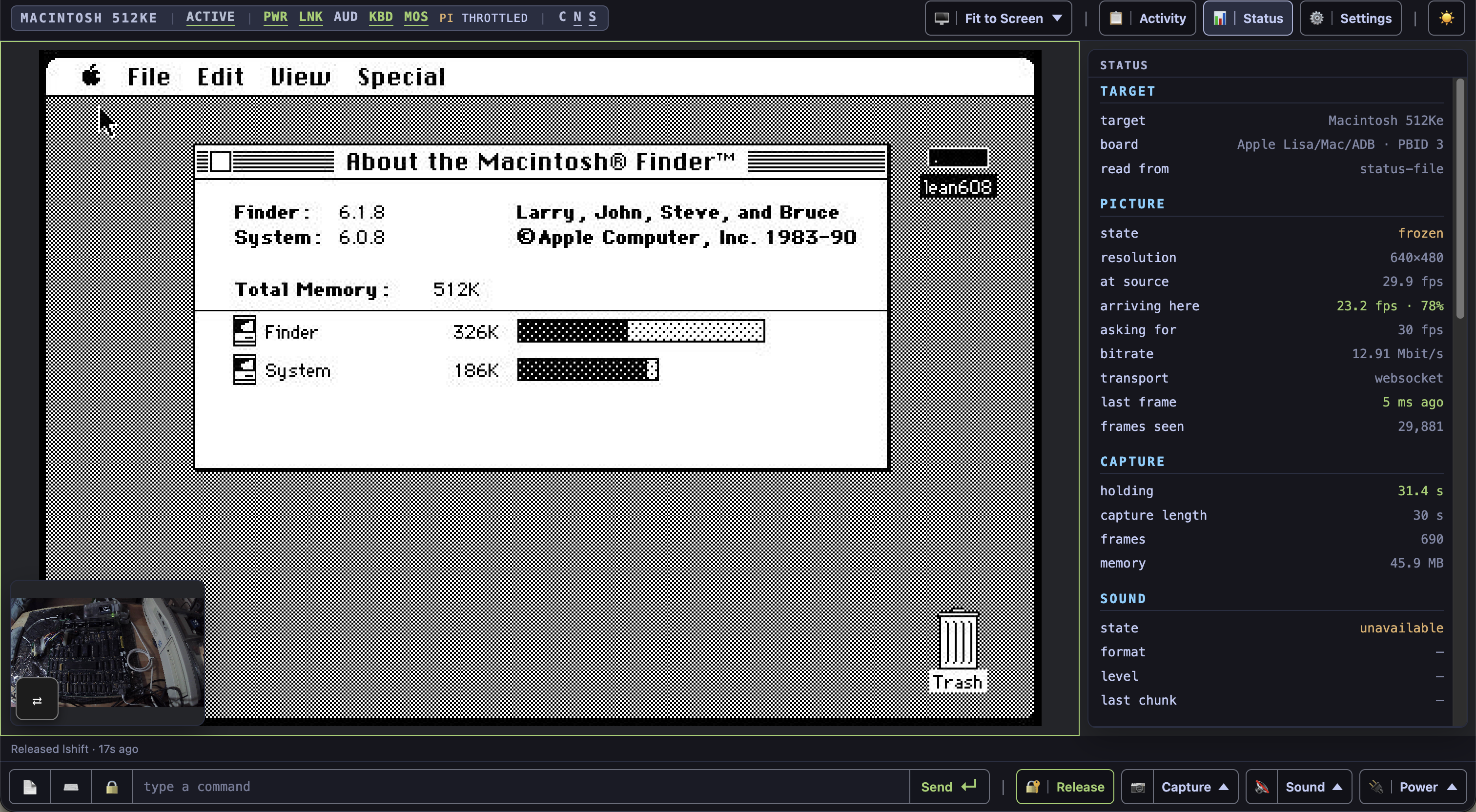
A real Macintosh 512Ke in vcctrl's web KVM: the live capture, status
pane and bench camera on the bare logic board.
Examples
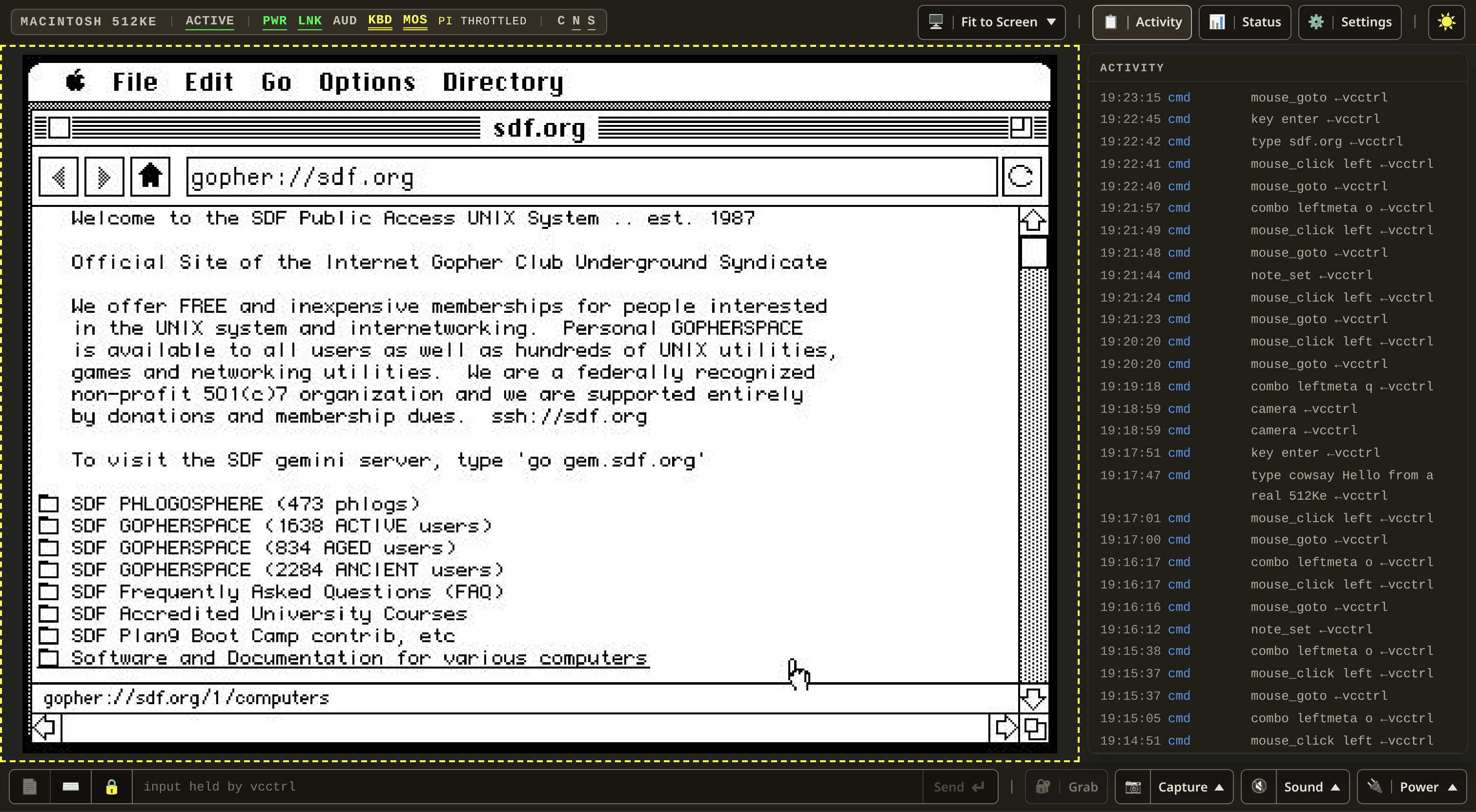
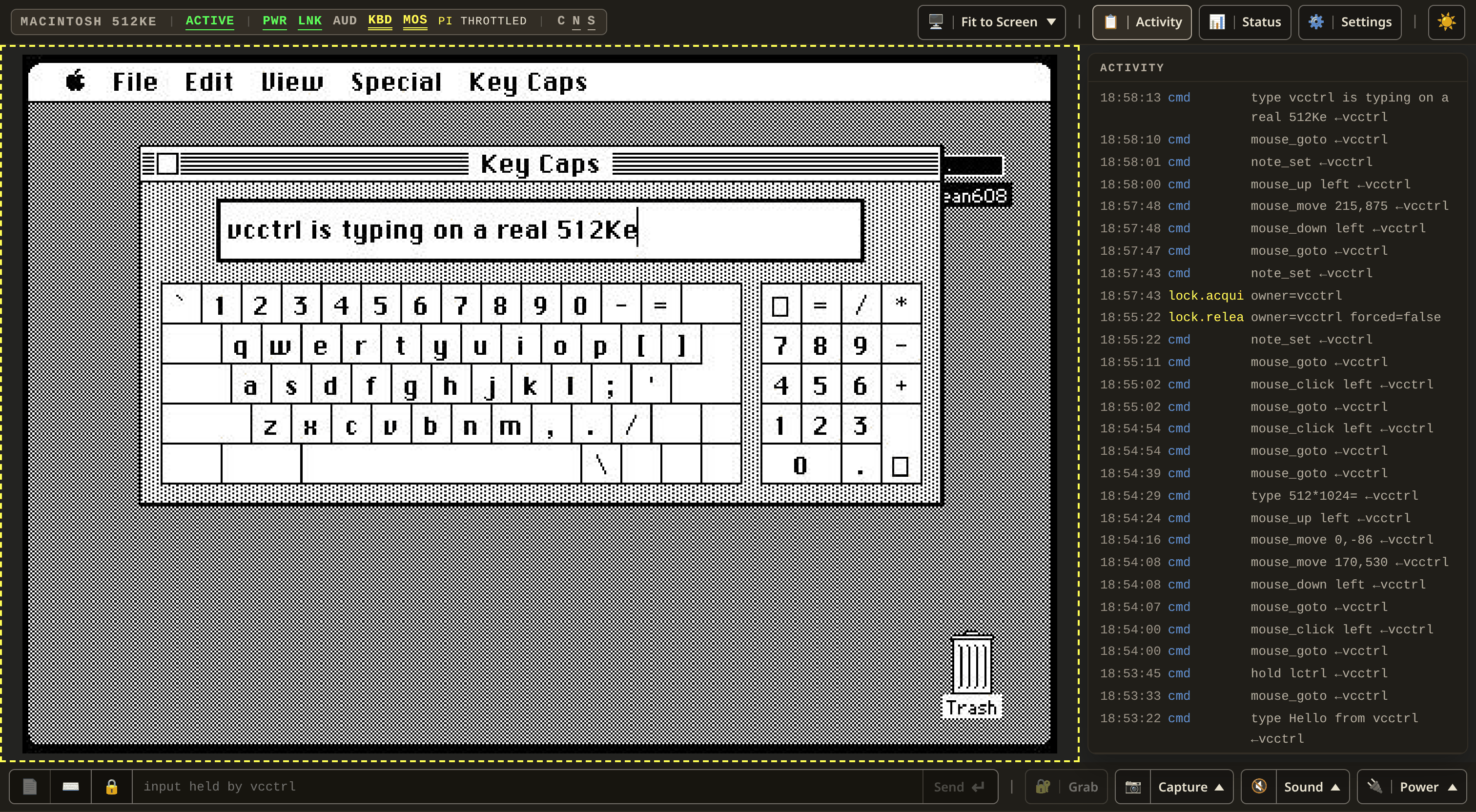
An agent driving the same 512Ke, seen in the web KVM. While it holds the
input lock the picture gets a dashed border, the command field says who has
it, and every command it sends lands in the Activity pane.
 |
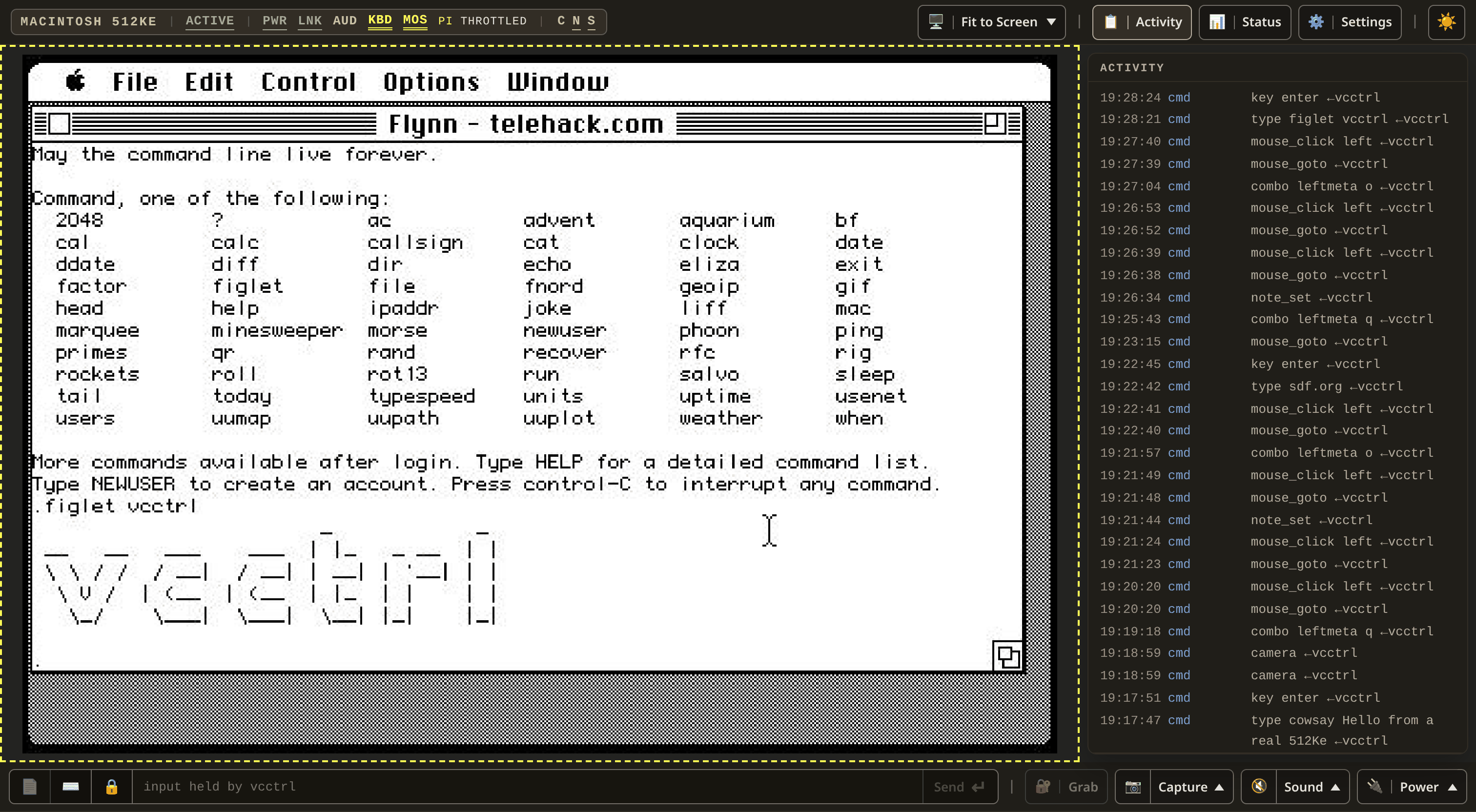 |
| Geomys, a Gopher browser, run from an AppleShare folder, loads sdf.org over LocalTalk with talkip. | Flynn, a Telnet client, also on talkip, on telehack.com: type figlet vcctrl, then key enter. |
 |
 |
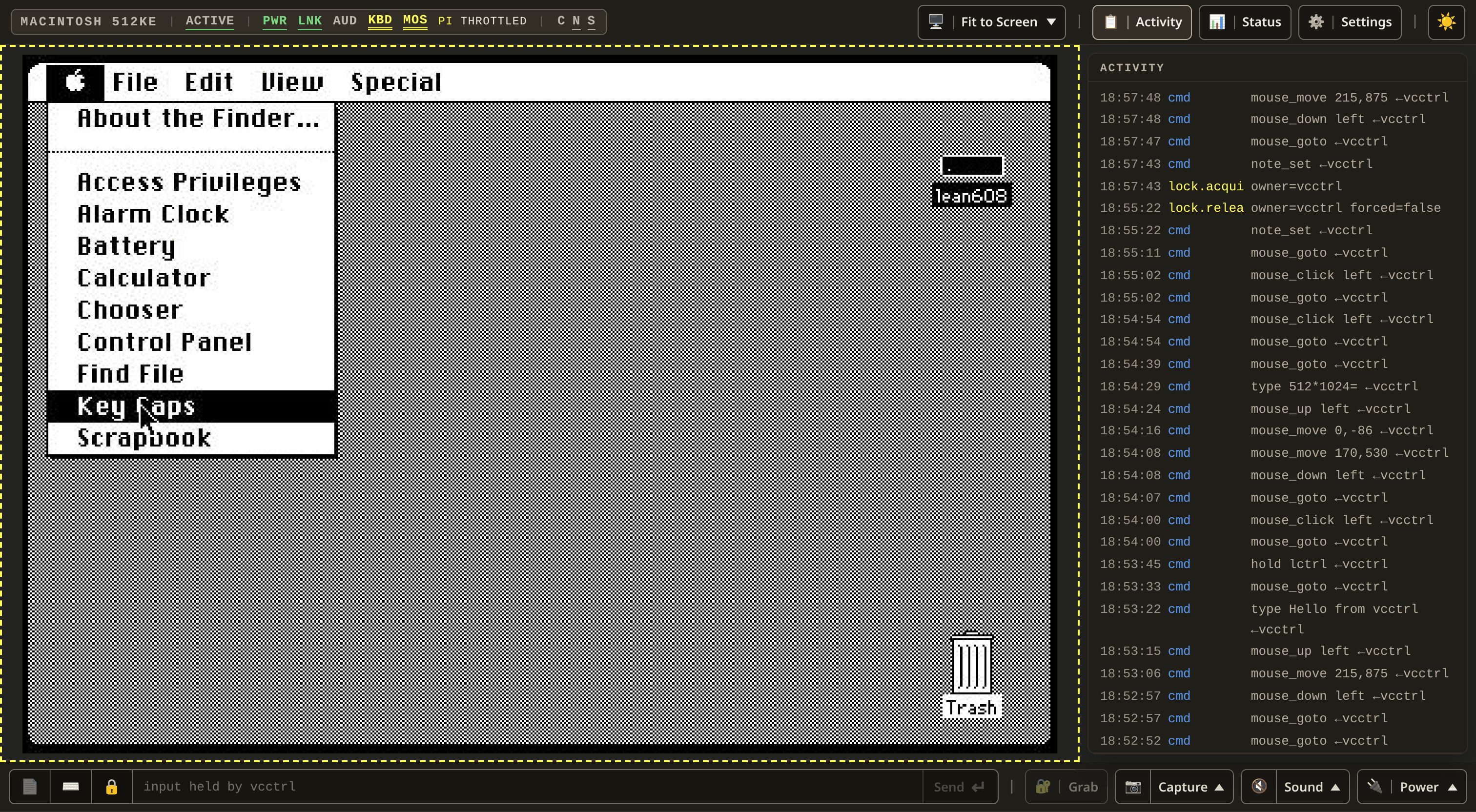
A menu, pressed and dragged: mouse_down, mouse_move, still held. |
type into Key Caps, at the Mac keyboard's own pace. |
How it works
┌─────────────────────┐        ┌────────────────┐               ┌─────────────┐
│     Control Host    │        │  Daemon Host   │               │    Target   │
├─────────────────────┤        ├────────────────┤               ├─────────────┤
│ - vcctrl CLI        │  ssh,  │ vcctrld.py     │ PS/2, Serial, │ - DOS       │
│ - AI Agents         │  ◄──►  │ - Input/output │   ADB, USB,   │ - Macintosh │
│ - Skills/MCP        │  http  │ - Video        │      ◄──►     │ - Linux     │
│ - Web Browser (KVM) │        │ - Power        │   VGA, HDMI   │             │
│                     │        │ - Audio        │               │             │
│                     │        │ - Files        │               │             │
└─────────────────────┘        └────────────────┘               └─────────────┘
Hardware and configuration
vcctrl ships three templates, one per profile-kinds/*.yaml.
Scaffold one withtools/new-profile.py --kind <kind> --name <yours>
and fill in the REPLACE_ME placeholders, using the machines below as a
reference.
Recommended hardware
What this project actually runs on, across all three configurations:
- Raspberry Pi 5 (4 GB+) — the daemon host.
- USB4VC HAT — PS/2 or ADB
keyboard/mouse emulation. - HDMI/VGA-to-USB capture dongle — plugs into a Pi USB port, presents as
a UVC device emitting MJPEG natively (tested with a MacroSilicon
MS2109/MS2130-chipset dongle). - RGB2HDMI board (Classic
Macintosh only) — sits between the Mac's video output and the capture
dongle above. - Official Raspberry Pi USB3 hub,
with the official Raspberry Pi power
supply plugged into
the hub (Modern PC only) — the hub's upstream port plugs into the
target; the Pi draws power through the hub over that same cable. - TP-Link Kasa, Kasa KLAP, or Belkin Wemo smart plug (optional, any
configuration) — remote power-cycling. - Any UVC webcam (optional, any configuration) — a second, independent
view of the physical machine.
Profiles
Retro PC — vga-ps2
A DOS/Windows-era PC with PS/2 keyboard/mouse and analog VGA out.
Hardware:
- Raspberry Pi 5 — the daemon host.
- USB4VC HAT, IBM PC protocol board — keyboard/mouse over PS/2.
- VGA-to-USB capture dongle — video and (usually) audio.
- UVC camera (optional) — pointed at the machine itself.
Distinguishing settings, not a complete config — full example: examples/vcctrl.example.yaml.
capabilities:
  input:
    backend: usb4vc-uinput
  video:
    backend: v4l2-ffmpeg
    settings:
      device: /dev/v4l/by-id/usb-MACROSILICON_xxxx-video-index0
  camera:
    backend: none   # or v4l2-ffmpeg, if you have the second camera
Classic Macintosh — rgb2hdmi-usb4vc
ADB keyboard/mouse, capture via an RGB2HDMI board. Scaffolded but
unverified/untested — no such hardware has run against this project's own
build yet, so treat the template's values as a documented guess.
Hardware:
- Raspberry Pi 5 — the daemon host.
- USB4VC HAT, Lisa/Mac/ADB protocol board — the same HAT as Retro PC,
a different board swapped in. - RGB2HDMI board, feeding an HDMI-to-USB capture dongle.
- UVC camera (optional) — same purpose as Retro PC's.
Distinguishing settings, not a complete config — full example: examples/vcctrl-macintosh.example.yaml.
capabilities:
  input:
    backend: usb4vc-uinput   # same backend as Retro PC -- the board swap
                              # is what changes, not this setting
  video:
    backend: v4l2-ffmpeg
    settings:
      device: /dev/v4l/by-id/usb-xxxx-video-index0   # the RGB2HDMI dongle
Modern PC — hdmi-usb
Any machine with HDMI out and a spare USB port. The Pi's own
USB-C port presents itself as a USB keyboard and mouse straight to the
target.
Hardware:
- Raspberry Pi 5 — the daemon host.
- Official Raspberry Pi USB3 hub — its upstream port plugs into the
target, which then sees the Pi as a plug-in keyboard/mouse through it. - Official Raspberry Pi power supply, plugged into the hub, not the
Pi — feeds the Pi over that same cable; an underpowered hub or
charger here caused a real undervoltage brownout. - HDMI capture dongle — video and (usually) audio.
- UVC camera (optional) — plugged into the Pi directly.
Driving capture, keyboard/mouse emulation and encoding together can
throttle a Pi 5 — one capture device per Pi for this configuration.
Distinguishing settings, not a complete config — full example: examples/vcctrl-modernpc.example.yaml.
capabilities:
  input:
    backend: hid-gadget
    settings:
      hid_keyboard_device: /dev/hidg0
      hid_mouse_device: /dev/hidg1
  video:
    backend: v4l2-ffmpeg
    settings:
      device: /dev/v4l/by-id/usb-xxxx-video-index0
      analog: false
Needs dtoverlay=dwc2,dr_mode=peripheral under /boot/firmware/config.txt's[pi5] section.
Power (optional)
capabilities:
  power:
    backend: kasa   # kasa | kasa-klap | wemo | shell | none
    settings:
      host: 192.0.2.20
TP-Link Kasa, Wemo, and shell-scripted relays/PDUs/GPIO are all
supported — see examples/vcctrl.example.yaml
for backend-specific settings.
What every configuration needs
A Linux daemon host (/dev/uinput for USB4VC, or a peripheral-capable USB
port for hid-gadget), root and systemd; a capture device that emits
MJPEG natively over V4L2; ffmpeg (with libx264/libopus for the optional
H.264 transport and Opus audio); Python ≥ 3.7 (≥ 3.10 for the MCP server).
Quickstart
1. Flash the daemon host. Raspberry Pi OS or Debian, arm64, Trixie
(13)+, SSH enabled.
2. Install USB4VC, then this
repo's two local patches:
python3 tools/patch-usb4vc-64bit.py --check   # then without --check to apply
python3 tools/patch-usb4vc-board.py --check
3. Clone and configure, from the control host:
git clone <this repo's URL> && cd vcctrl
cp examples/vcctrl.example.yaml vcctrl.yaml   # untracked, never commit this
$EDITOR vcctrl.yaml                           # daemon_host, plug, devices
4. Deploy:
VCCTRL_HOST=<pi-hostname-or-ip> pi/deploy.sh
(control.daemon_host in vcctrl.yaml works instead of the env var;pi/deploy.sh refuses clearly if neither is set.)
5. Install the CLI and confirm the daemon answers:
sudo cp bin/vcctrl-client /usr/local/bin/vcctrl   # or: pi/deploy.sh --client
vcctrl status
vcctrl preflight            # one gate: caps, board, power, video, input
6. Drive it:
vcctrl type 'CD \'
vcctrl key enter
vcctrl shot                 # a frame from the capture device, as a file
7. Connect an agent instead of typing verbs by hand — see below.
8. Scaffold your own profile once the above works:tools/new-profile.py --kind <vga-ps2|hdmi-usb|rgb2hdmi-usb4vc> --name <yours>.
See docs/PROFILES.md for running more than one target off one daemon.
Connect an agent: skills vs. MCP
Skills are portable knowledge — free to copy, grant nothing. MCP
is real control of physical hardware — registering it is a hardware-access
decision, not a documentation one; never commit a real hostname to get it
working.
Skills (Claude Code, Codex, Cursor — no checkout needed):
npx skills add <this repo's URL> \
  --full-depth -a claude-code -y \
  -s vcctrl-mcp-workflows -s vcctrl-common-workflows \
  -s vcctrl-rig-hazards -s vcctrl-camera   # --agent codex for Codex
Installs the four hardware-portable skills. Two more
(vcctrl-repo-conventions, vcctrl-webkvm-copy) describe this repo's own
conventions and are left out on purpose — see docs/SKILLS.md
if you want them anyway.
MCP (drives the real hardware):
# daemon mode -- once deployed (docs/MCP-SERVER.md sec. 4), no local checkout
claude mcp add --transport http vcctrl-mcp-daemon https://<your-daemon-host>/mcp

# control mode -- needs a local clone + venv
cd vcctrl
python3 -m venv agent/.venv && agent/.venv/bin/pip install -r agent/requirements.txt
claude mcp add vcctrl-mcp -- "$(pwd)/agent/.venv/bin/python3" "$(pwd)/agent/vcctrl_mcp.py"
Restart the session after registering — /mcp doesn't pick up a fresh
server live. Full reasoning and the safety model: docs/MCP-SERVER.md.
Layout
bin/vcctrl              control-host CLI -- ssh's to the daemon, no logic itself
bin/vcctrl-client       the real CLI; installed on the daemon host as /usr/local/bin/vcctrl
bin/vcctrl-*            one-off diagnostics run from the control host (audio, capture, card ID)
daemon/vcctrld.py       input/video/audio/power/file server; owns the devices
daemon/vcweb.py         the control web KVM; daemon/vcweb_public.py is the read-only mirror
common/vcconfig.py      shared config loader (both hosts import it)
agent/vcctrl_mcp.py     MCP server exposing the CLI's tools
harness/vcctrl-*        cell/sweep/collect -- automated test runs against a target
profile-kinds/*.yaml    hardware-configuration templates (tools/new-profile.py reads these)
pi/install.sh           systemd units and setup on the daemon host
pi/deploy.sh            push + install from the control host
vendor/                 third-party code (see THIRD-PARTY.md)
tests/                  pytest tests/ -- no hardware required
Status, by configuration
| configuration | proven | notes |
|---|---|---|
Retro PC (vga-ps2) |
working end to end | keyboard, mouse, video, audio, power, file transfer, the web KVM — all on real hardware; docs/lab/FINDINGS.md |
Modern PC (hdmi-usb) |
working end to end | no USB4VC needed; multi-profile (one daemon, several targets) proven the same way |
Classic Macintosh (rgb2hdmi-usb4vc) |
scaffolded, unverified/untested | templates exist; no such hardware has run against this project's own build yet |
Known gaps: no hardware reset line for a target that swallows
Ctrl-Alt-Del (GPIO to the reset header is planned, not built); H.264
transport and full on-screen-keyboard coverage are measured on one board
so far. docs/lab/OPEN-FAULTS.md has the
complete list of what's broken; docs/KNOWN-LIMITATIONS.md
has what doesn't yet adapt to different hardware at all — the DOS-side
boot contract, timing constants, install paths, and similar
still-hardcoded pieces.
Contributing
See CONTRIBUTING.md for this repo's conventions. Run
the tests with pytest tests/ — no hardware required; needs Python,
PyYAML, node, a Chromium/Chrome binary, and ffmpeg.
Licence
MIT — see LICENSE. Third-party code under vendor/
keeps its own licence; see THIRD-PARTY.md.
Reviews (0)
Sign in to leave a review.
Leave a reviewNo results found