Forge
Health Uyari
- License — License: MIT
- Description — Repository has a description
- Active repo — Last push 0 days ago
- Low visibility — Only 8 GitHub stars
Code Gecti
- Code scan — Scanned 12 files during light audit, no dangerous patterns found
Permissions Gecti
- Permissions — No dangerous permissions requested
This is a native macOS terminal application designed to manage local coding-agent workflows. It allows developers to run multiple AI agent sessions, review their output, and manage isolated Git workspaces using APFS clones.
Security Assessment
Overall Risk: Medium. The tool inherently executes shell commands and manages local Git clones because it acts as a terminal environment for AI agents. It stores its configuration, local state, and Unix sockets in a dedicated directory (`~/.forge/`). A light code scan of 12 files found no hardcoded secrets or explicitly dangerous patterns, and the repository does not request any dangerous system permissions. However, because it is designed to execute agent-driven commands and run lifecycle scripts, users should be aware of the inherent risks of automated terminal execution.
Quality Assessment
Maintained and licensed, but very early stage. The repository uses the permissive MIT license and received updates as recently as today. It includes standard developer tooling, formatting, and linting in its build process. On the downside, it has extremely low community visibility with only 8 GitHub stars. Furthermore, the developer explicitly warns in the documentation to expect messy, rapidly changing code ("clanker slop") while features are actively explored.
Verdict
Use with caution due to its extremely early stage of development and the inherent security considerations of automated terminal execution.
A native macOS terminal for local coding-agent workflows.
Forge
[!WARNING]
Lots of running to explore features - expect clanker slop underneath for now.
A native macOS terminal for local coding-agent workflows.
Why
Forge is living personal software built to make local coding-agent workflows easier to manage, focusing on:
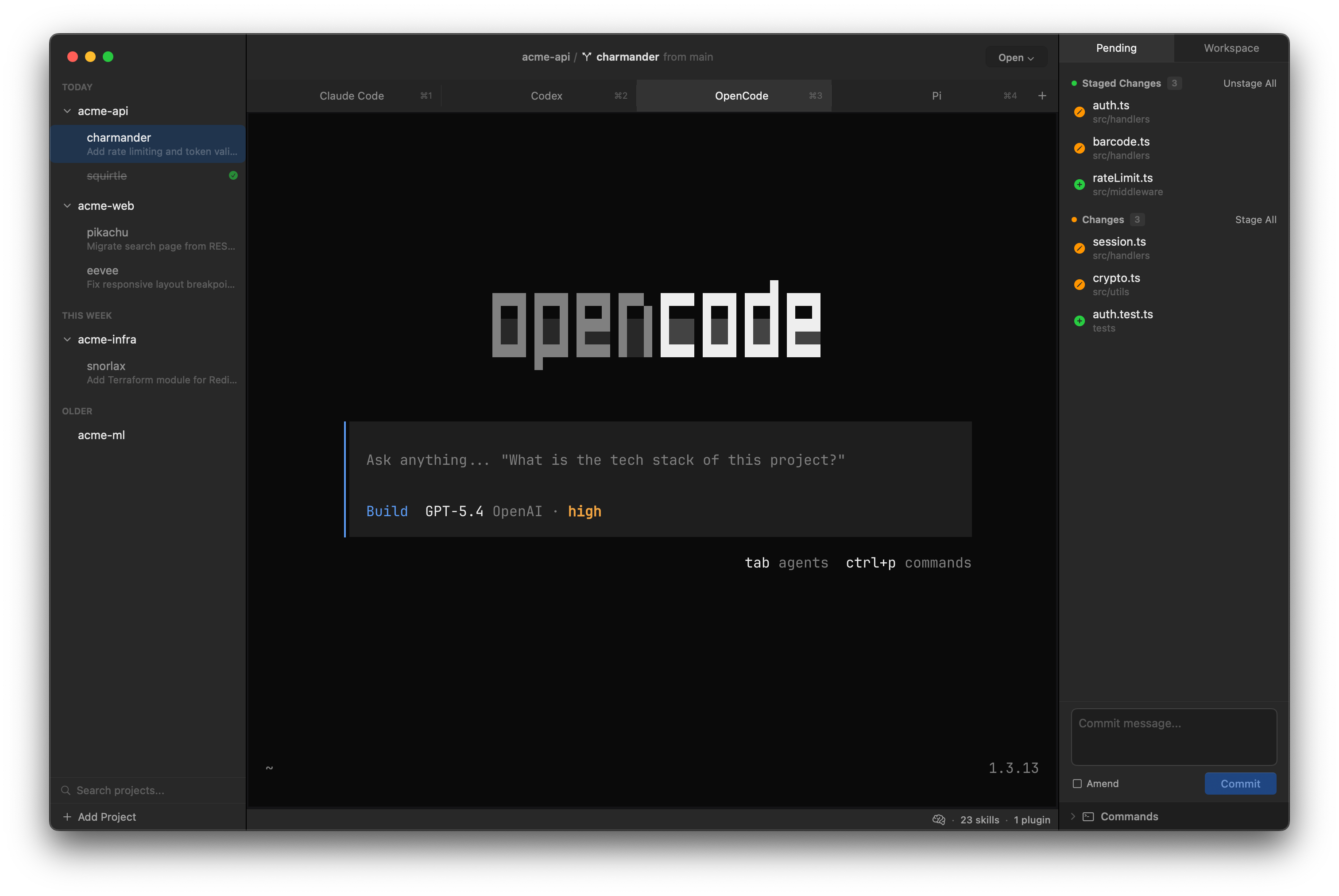
- Running multiple agent sessions without losing track of what each one is doing
- Giving agents isolated workspaces for local changes
- Letting each agent keep its own CLI and TUI instead of forcing a generic abstraction
- Inspecting, reviewing, and feeding back on the work agents produce
Core Concepts
Projects are Git repositories you add to Forge. They are the source of truth.
Workspaces are lightweight APFS CoW clones of a project with their own forge/{name} branch, so you can spin up isolated working copies, run agent sessions against them, and merge back when done.
Features
- GPU-accelerated terminal via Ghostty, with tabs and arbitrarily nested split panes
- Project and workspace management with lightweight APFS CoW workspace cloning
- Agent-aware terminal sessions with live status, notifications, and agent launching
- Built-in Git status, diff, and review workflows with full file context and native text selection
- Fuzzy command palette with intent-based sections for quick navigation
- Workspace activity log with AI-powered summaries of agent work
- Project configuration via
forge.jsonfor processes, port allocation, lifecycle scripts, and Docker Compose stacks - Customizable appearance and editor integration
- Bundled CLI for IPC and automation
Project Configuration
Drop a forge.json in your project root to configure per-workspace:
- Processes - dev servers, watchers, Docker Compose stacks
- Ports - automatic allocation with environment variable injection so workspaces don't collide
- Lifecycle scripts - setup and teardown commands that run on workspace create/destroy
Data Storage
Forge stores local state in ~/.forge/:
~/.forge/
  config.json
  projects.json
  state/
    sessions.json
    activity/
    forge.sock
  clones/
  reviews/
Per-project configuration lives in forge.json at the repository root (see docs/forge-json.md).
Requirements
- macOS 15.0 or later
- Xcode 16.0 or later
- XcodeGen
- SwiftFormat
- SwiftLint
Development
Install the required developer tools:
brew install xcodegen swiftformat swiftlint
Common commands:
make                # Show all available targets
make deps
make project
make test
make build
make format
make lint
make release
make dev            # Run a development build (uses ~/.forge-dev for isolation)
make can-release
Open the project in Xcode after generating it:
open Forge.xcodeproj
Dependencies
- GhosttyKit for GPU-accelerated terminal rendering, fetched by
make deps - Bonsplit for split-pane management
make project, make build, and make release fetch the pinned GhosttyKit artifact automatically when it is missing.
Living Personal Software
We now have the ability to build software tailored to our current needs in ways that are finally practical. Forge is a living tool that changes with my workflow as the software development space evolves at a rapid pace.
I think personal software is worth exploring more seriously: software shaped around how you want to work, not just how existing tools expect you to work. I hope someone finds this project useful, or better yet, is inspired to explore it with their agent and then make their own version.
Yorumlar (0)
Yorum birakmak icin giris yap.
Yorum birakSonuc bulunamadi