callmux
Health Uyari
- License — License: MIT
- Description — Repository has a description
- Active repo — Last push 0 days ago
- Low visibility — Only 5 GitHub stars
Code Gecti
- Code scan — Scanned 12 files during light audit, no dangerous patterns found
Permissions Gecti
- Permissions — No dangerous permissions requested
Bu listing icin henuz AI raporu yok.
Multiplexer for MCP tool calls: parallel execution, batching, caching, and pipelining for any MCP server
callmux
MCP multiplexer: parallel execution, batching, caching, pipelining, and shared infrastructure for any AI agent.



AI agents make tool calls one at a time. Creating 10 GitHub issues? That's 10 sequential round-trips. Fetching data from 3 different servers? 3 serial waits.
callmux sits between your agent and any MCP server, adding capabilities the original doesn't have:
| Without callmux | With callmux |
|---|---|
10 sequential create_issue calls |
1 callmux_batch call |
| 5 independent reads, one after another | 1 callmux_parallel call |
| Read > transform > write chain | 1 callmux_pipeline call |
| Same data fetched 3 times per session | Cached after first call |
| 40+ tools bloating the system prompt | 11 meta-tools via meta-only mode |
| 6 sessions × 5 servers = 30 processes | 1 shared callmux + 5 servers |
| MCP restart kills the agent session | Stdio bridge reconnects automatically |
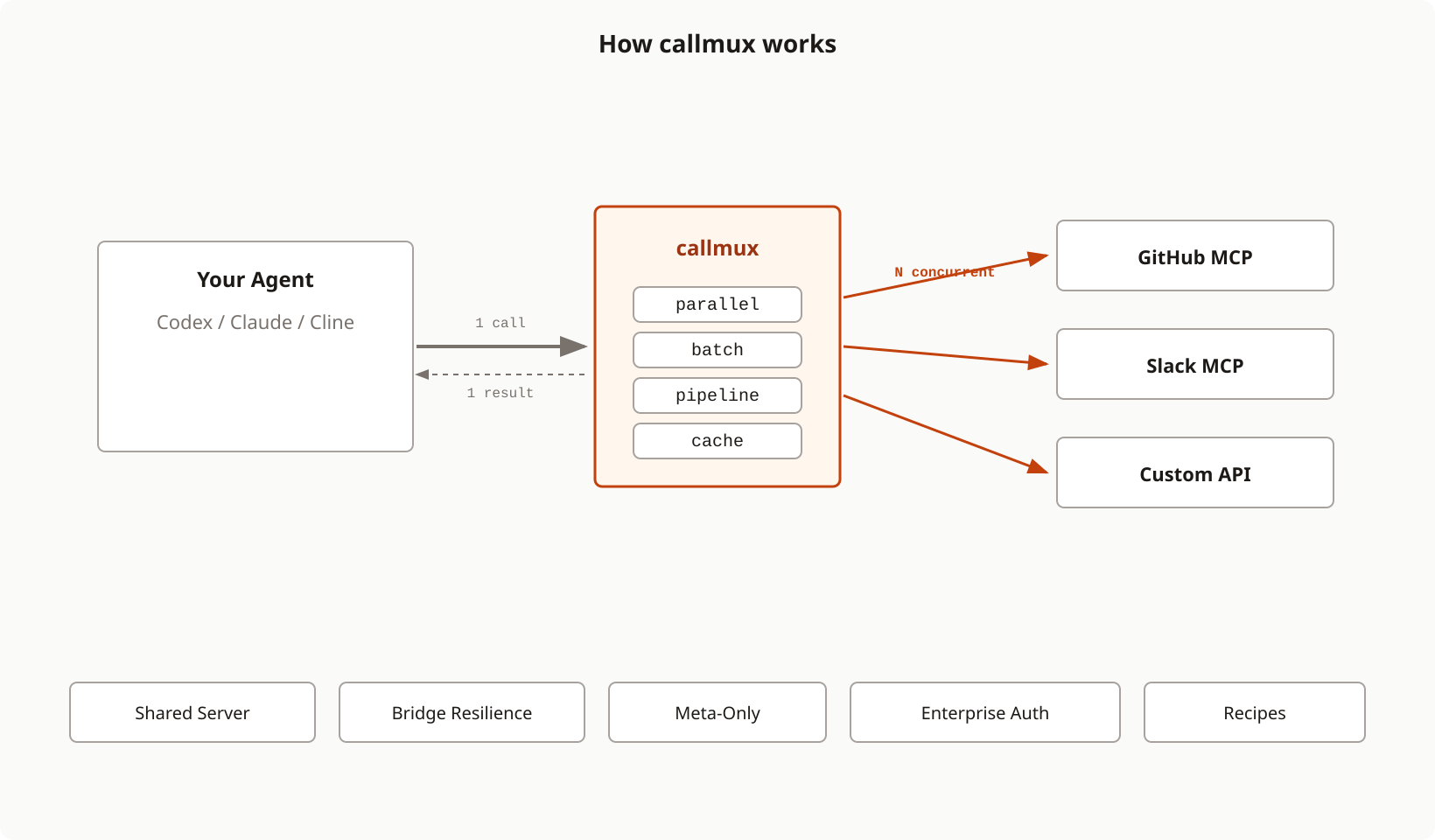
Why Tool Call Reduction Matters
Every tool call adds structural overhead (~75 tokens) and intermediate reasoning (~150 tokens of "Now I'll fetch the next one...") to your context window. Batch 7 calls into 1 and you eliminate ~1,350 tokens of pure waste, a 19:1 reduction in context pollution. Since context is cumulative (every turn re-processes everything before it), this compounds across a session.
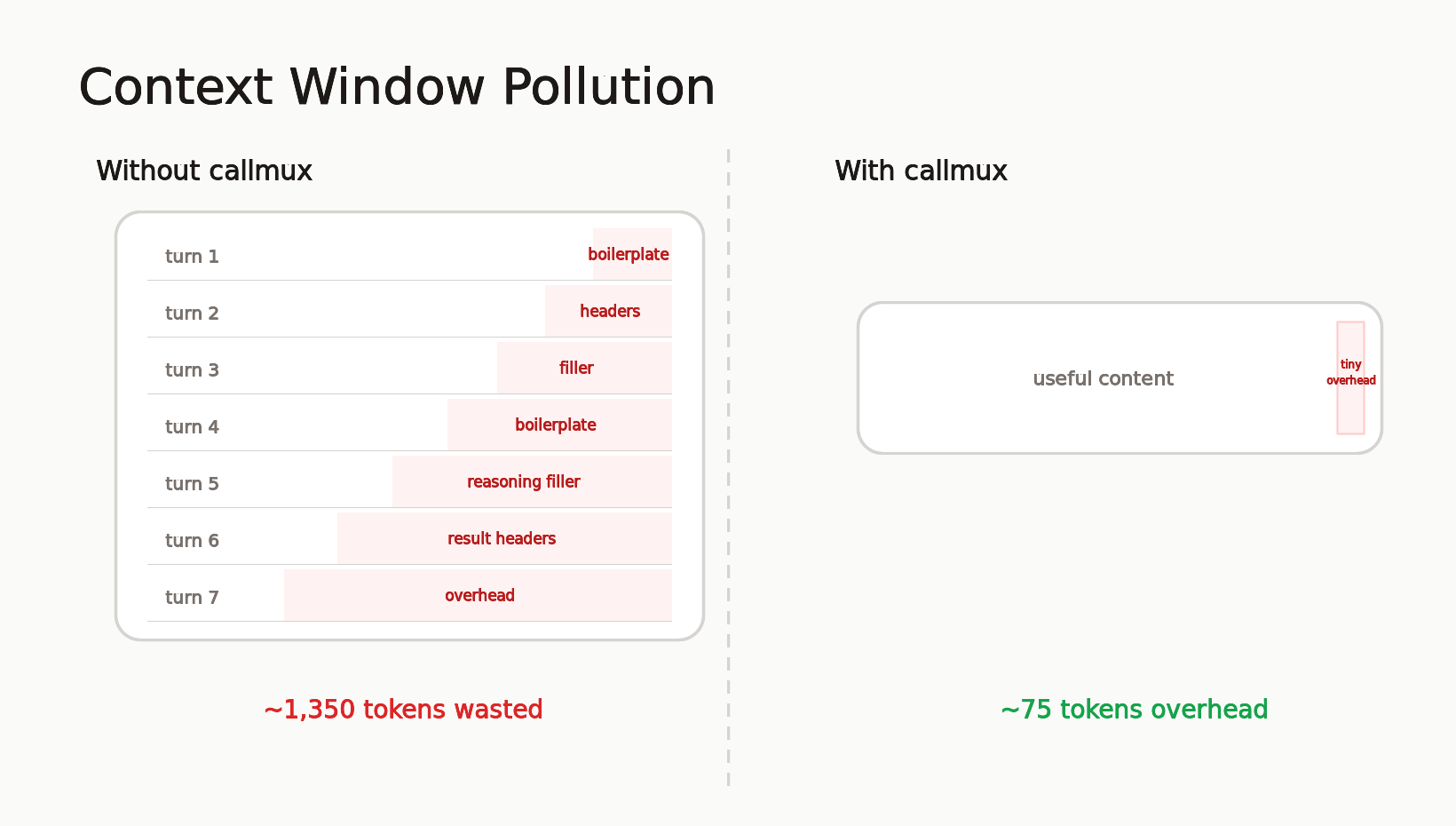
In practice, callmux reduces tool calls to ~15% of the original count. Sessions run longer before compaction, cost less in API tokens, and produce better output because the model isn't re-reading filler from 40 turns ago.
Full breakdown of the context math with diagrams
Install
No install needed. Use npx:
npx -y callmux -- npx -y @modelcontextprotocol/server-github
Or install globally:
npm install -g callmux
Quick Start
Add to ~/.claude.json or project .mcp.json (Claude Code):
{
  "mcpServers": {
    "github": {
      "command": "npx",
      "args": ["-y", "callmux", "--", "npx", "-y", "@modelcontextprotocol/server-github"]
    }
  }
}
Done. Claude now sees all GitHub tools plus the callmux_* meta-tools.
Works with any MCP client: Codex, Claude Desktop, Cursor, Windsurf, and anything that speaks MCP stdio or HTTP. The interactive setup wizard handles configuration for you.
Key Features
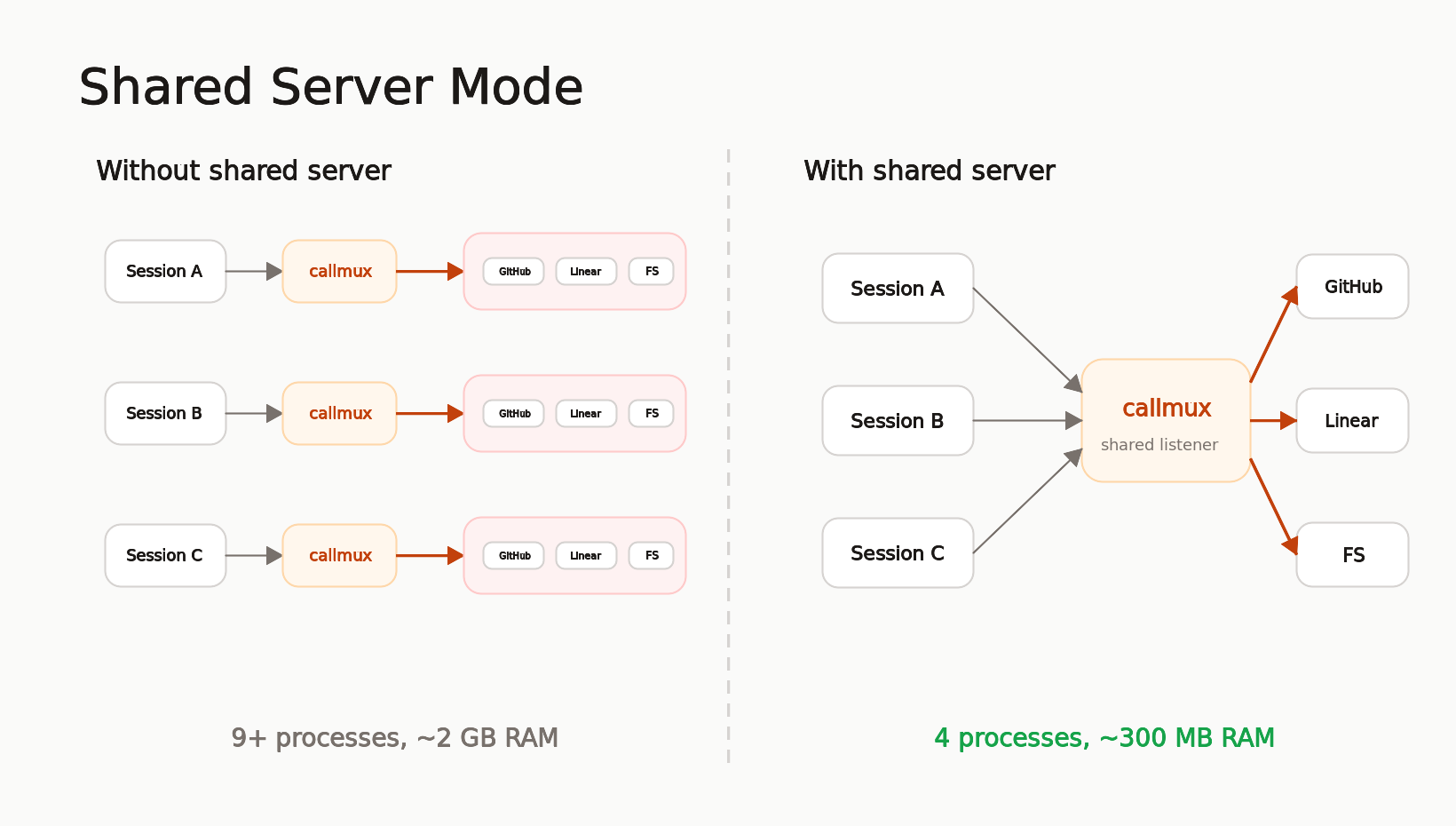
Shared Server: 60 Processes Down to 6
Run callmux once, connect all sessions. One set of downstream servers, shared cache, no orphaned processes. On a machine with 6 agent sessions and 5 MCP servers, that's ~60 processes and 4+ GB RAM collapsed to ~6 processes and ~500 MB.
callmux --listen 4860
callmux daemon install --start --enable
Resilient Bridge: Sessions That Survive Restarts
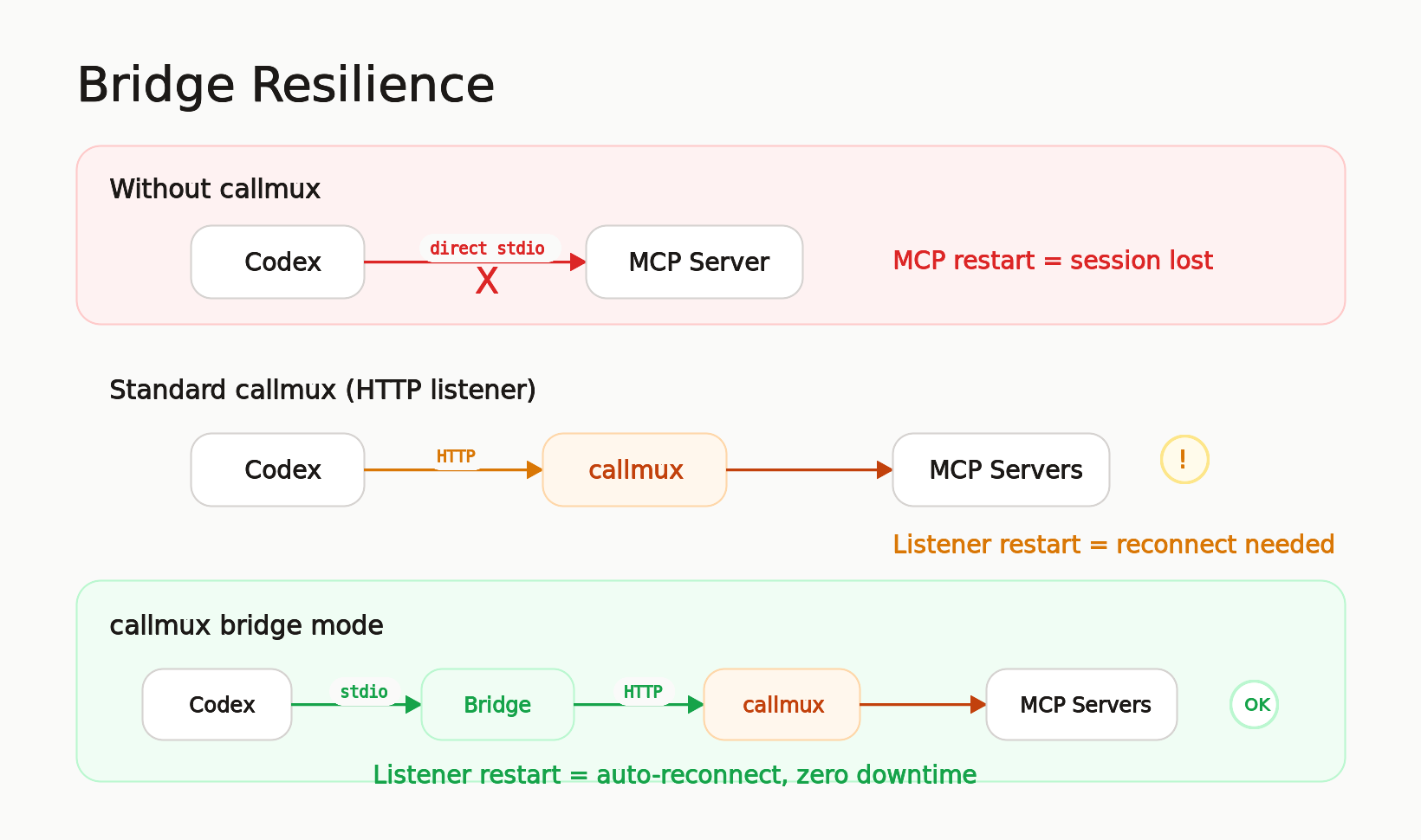
Codex users know the pain: when an MCP server restarts or loses its transport, the entire Codex session needs to restart to reconnect. callmux's stdio bridge sits between Codex and the shared listener. If the listener hiccups, the bridge reconnects and retries on the next tool call. The agent session never notices.
[mcp_servers.callmux]
command = "callmux"
args = ["bridge", "--url", "http://localhost:4860/mcp"]
Meta-Only Mode: Fixed System Prompt Size
50+ tool definitions bloat the system prompt on every API turn, costing tokens that compound across the session. Meta-only mode hides all downstream tools and exposes only 11 meta-tools. The agent discovers tools via callmux_search_tools or callmux_status and calls them through callmux_call. System prompt size stays fixed regardless of how many servers you add.
Enterprise Security Built In
Authentication (scrypt-hashed bearer tokens, OIDC JWT), role-based access control, rate limiting, CIDR allowlists, structured audit logging, and Prometheus metrics. Shared listeners hot-reload config-file changes and still support SIGHUP reloads. Hardened defaults: non-loopback listeners refuse to start without auth.
Read-Only Dashboard: Live Runtime Visibility
Optional dashboard for shared listeners. Disabled by default, then enabled with dashboard.enabled. It shows server health, active sessions, cache and response-store stats, recent tool calls, tool-suite changes, config reloads, and errors.
Recipes: Team Workflows as Callable Names
Define multi-step operations once in config, call them by name from any agent session. Encode team conventions (bug issues always get the bug label), triage workflows (fetch two issues in parallel for comparison), or analysis pipelines (search then analyze). One name, consistent execution, works across all clients.
Tool Scoping: Per-Server Filtering for Any Client
Whitelist which tools each server exposes. This gives any MCP client per-server tool filtering, even clients that don't support it natively (Codex, Cursor, Windsurf).
callmux server add github --tools "create_issue,get_issue,list_issues" -- npx -y @modelcontextprotocol/server-github
Meta-Tools
These tools are exposed to your agent alongside (or instead of) the proxied tools:
| Tool | Purpose |
|---|---|
callmux_parallel |
Fire independent calls concurrently, get all results in one turn |
callmux_batch |
Same tool, many items. The bulk operation pattern |
callmux_pipeline |
Chain tools where each step feeds into the next |
callmux_search_tools |
Search downstream tools by task, keyword, server, description, and input fields |
callmux_get_result |
Page, filter, or project a full stored result when callmux returns a truncated response ref |
callmux_call |
Call a single downstream tool by name, or callmux_get_result when the direct pagination tool is deferred |
callmux_dry_run |
Validate and preview calls without executing |
callmux_recipe_run |
Run a named recipe from config |
callmux_recipe_dry_run |
Preview a recipe without executing |
callmux_cache_clear |
Invalidate cached results by tool, server, or everything |
callmux_status |
Introspect servers, tools, cache state, and session diagnostics |
All argument objects support file references ($file, $jsonFile, $yamlFile, $text) for long content that doesn't belong in JSON strings.
Interactive Setup
The fastest way to go from zero to configured:
npx -y callmux setup
The wizard detects existing MCP servers, lets you pick from a curated list or add custom ones, auto-discovers tools via probing, configures caching, offers meta-only mode, and attaches to your client (Claude Code, Codex) automatically.
Documentation
| Topic | Description |
|---|---|
| Shared Server Mode | Listener setup, client config, stdio bridge, session-cwd |
| Dashboard | Enable the read-only dashboard and mount it behind reverse proxies |
| Meta-Only Mode | Fixed system prompt, tool discovery workflow |
| Enterprise Deployment | Auth, RBAC, rate limiting, audit, OIDC, metrics |
| Recipes | Config-defined workflow templates |
| Config Reference | Full config schema, caching, file references |
| CLI Reference | Commands, flags, common workflows |
| Threat Model | Security boundaries and controls |
| Release Profiles | Dev/staging/prod hardening presets |
Related
- tokenlean - CLI tools for AI agents, token-efficient code understanding. Same philosophy: make agents less wasteful.
License
MIT
Yorumlar (0)
Yorum birakmak icin giris yap.
Yorum birakSonuc bulunamadi