altium-copilot
Health Warn
- License — License: MIT
- Description — Repository has a description
- Active repo — Last push 0 days ago
- Low visibility — Only 5 GitHub stars
Code Pass
- Code scan — Scanned 12 files during light audit, no dangerous patterns found
Permissions Pass
- Permissions — No dangerous permissions requested
No AI report is available for this listing yet.
Stop pasting netlists. Give Claude real access to your Altium project.
Altium Copilot




Software engineers have Claude Code. Hardware engineers have been pasting netlists into chat.
Read the full writeup → maisamp.github.io
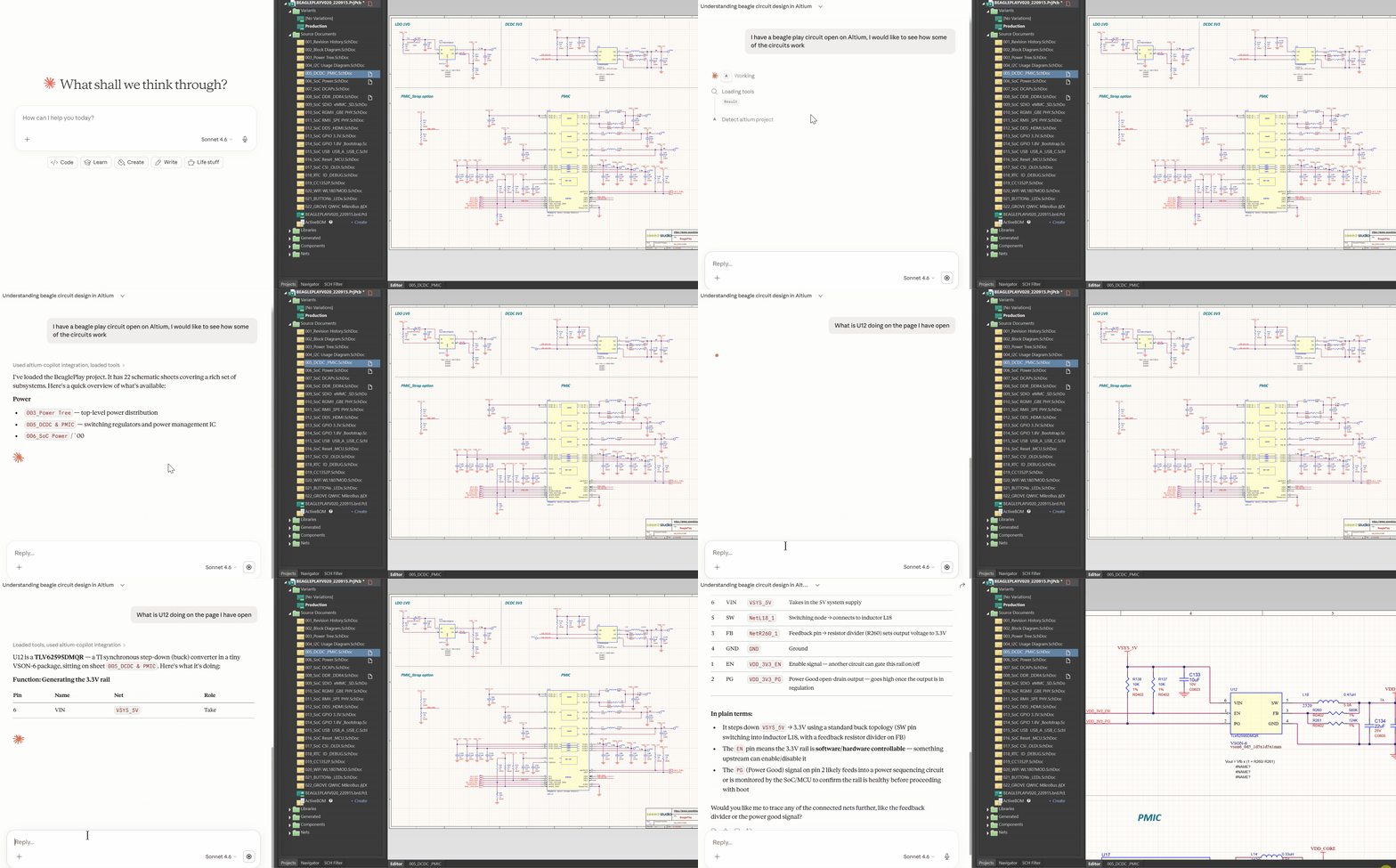
Altium Copilot gives Claude real-time read access to your open Altium project. Ask it about component values, trace a net across sheets, review your schematic, brainstorm a circuit — all from your Claude chat interface, grounded in your actual design files.
For now, the copilot is read-only. It only extracts data. It cannot modify your schematic, move components, or overwrite your .PrjPcb file, more features coming soon.
Part of the ee-in-a-box suite.
What it does
| What you ask | What happens |
|---|---|
| "What's connected to the 3.3V net?" | Traces the net across all sheets |
| "What's different in the Prototype variant?" | Compares DNP lists between variants |
| "Review this power supply circuit" | Structured multi-phase schematic review |
| "What does U12 do?" | Pulls component, all pins, connected nets |
| "Where does RMII_REF_CLK route?" | Layers, routed length per layer, vias, endpoints |
| "What runs within 10 mil of CLK on L3?" | Crosstalk proximity with parallel run lengths |
| "Describe my stackup" | Layer-by-layer: copper weight, dielectric, material |
| "Where is U12? What's next to it?" | Placement, side, rotation, nearest parts |
Specialist modes
Claude activates these automatically based on what you say — no commands needed.
| Mode | Triggers when you say... | What happens |
|---|---|---|
schematic_review |
"review this", "is this correct?", "check my power supply" | 3-phase structured audit: Claude reads datasheets and confirms its understanding before flagging anything. Every finding cites a datasheet value or a netlist fact. Report saved to markdown. |
brainstorm_circuits |
"I want to add a new circuit, lets brainstorm", "How would i improve this circuit", "What power supply topology should I use here?" | 5-phase design session: reads your loaded schematic first, then asks one question at a time — problem, constraints, proposes 2–3 topologies with tradeoffs, checks your existing design before recommending anything new. |
🆕 PCB awareness
Altium Copilot now reads your .PcbDoc directly. Ask where nets
route, what's near what (crosstalk), your full stackup, and where components sit.
Data refreshes automatically every time you save the board in Altium. Read-only,
like everything else.
Requirements
- Windows
- Altium Designer (must be running with a project open)
- Claude Desktop — works with Pro and Enterprise subscriptions
Install
- Install Claude Desktop or Claude Code
- Open PowerShell (search
powershellin the Start menu) and run:irm https://raw.githubusercontent.com/ee-in-a-box/altium-copilot/main/install.ps1 | iex - Open Altium Designer with your project loaded
- Start asking
Usage
Once installed, open Claude and ask anything about your schematic — the copilot detects your running Altium instance and orients itself to your project automatically.
Example prompts:
- "What's connected to the 3.3V net?"
- "What's U4 doing on this page?"
- "What's different between my schematic variants?"
- "How should i improve this circuit?"
- "Is this power supply circuit correct?" — triggers a structured design review automatically
Privacy
Your data stays yours. The MCP server runs locally, doesn't log anything, and doesn't phone home. All schematic data is sent only to Claude via your own Enterprise or Pro subscription.
🚀 NEW: Sharing with your team
Want to share the same capabilities with firmware, mechanical, and test engineers without them needing an Altium license?
Ask Claude to package your project:
"Package this Altium project to share with the cross functional team" / "Export this Altium project for sharing"
Claude calls package_for_xfn, which writes a portable SQLite snapshot (.db) next to your .PrjPcb. Share that file with your team via Confluence, Slack, or a shared drive.
Your teammates open it with pcb-copilot — a companion MCP server that gives Claude the same schematic Q&A tools against the snapshot, no Altium license required. Pairs well with the free Altium 365 Viewer for visual reference alongside the AI Q&A.
Give Claude system-level context
The schematic tools tell Claude what's in your design. A CLAUDE.md in your project folder tells it why.
Drop a CLAUDE.md file in the same folder as your .PrjPcb file — it's loaded automatically when the project opens. Put in what the schematic can't tell Claude:
- What the board does and where it lives in the system
- What it interfaces with upstream and downstream
- Terms that look similar but mean different things (board vs. assembly, vendor naming vs. internal naming)
- Key requirements — voltage rails, power budget, timing constraints, isolation barriers
- Pointers to your requirements doc, Confluence page, or block diagram
Don't have time to write one? Download the template, upload it to Claude, and say: "Use this template and what you can read from my schematic to draft a CLAUDE.md — then ask me one question at a time for anything you can't figure out from the netlist."
What i'm experimenting with next
- PCB layout understanding — same live-access model, extended to the board layer
- Simulator — walks you through simulating and validating your design before you spin a board
- Librarian — periodic audits of your component libraries, flags stale or discontinued entries
- Supply Chain Expert — component availability, lead times, alternatives, and sourcing risk
Contributing
See CONTRIBUTING.md.
For bug reports and support, open an issue at github.com/ee-in-a-box/altium-copilot/issues.
License
MIT © Maisam Pyarali
Reviews (0)
Sign in to leave a review.
Leave a reviewNo results found