GLM_proxy
Health Gecti
- License — License: MIT
- Description — Repository has a description
- Active repo — Last push 0 days ago
- Community trust — 18 GitHub stars
Code Basarisiz
- process.env — Environment variable access in anthropic.js
- process.env — Environment variable access in bin/cli.js
- network request — Outbound network request in bin/cli.js
- fs.rmSync — Destructive file system operation in lib/core.js
- os.homedir — User home directory access in lib/core.js
- process.env — Environment variable access in lib/core.js
- network request — Outbound network request in lib/core.js
- process.env — Environment variable access in openai.js
- process.env — Environment variable access in tests/_helpers.mjs
- network request — Outbound network request in tests/_helpers.mjs
- fs.rmSync — Destructive file system operation in tests/catalog-refresh.mjs
- process.env — Environment variable access in tests/catalog-refresh.mjs
- network request — Outbound network request in tests/catalog-refresh.mjs
Permissions Gecti
- Permissions — No dangerous permissions requested
Bu listing icin henuz AI raporu yok.
we love free stuff. ox alpha . glm-5.3-flash is here!.
GLM Proxy
A lightweight local proxy that exposes AutoClaw's AI models through
OpenAI-compatible and Anthropic-compatible APIs.






v2.5.1 — one interactive CLI, shared core in
lib/, zero dependencies. Install withnpm i -g glmproxyor run withnpx glmproxy.
Models are fetched automatically
Point any OpenAI-compatible harness at http://127.0.0.1:18791/v1 and it can pull the live model catalog through GET /v1/models — no config to maintain. The list is re-read from AutoClaw's runtime catalog on every request, so models AutoClaw adds or removes show up without a proxy restart. The Anthropic entrypoint (/v1/models on port 18792) serves the same catalog in Anthropic's list shape.
GLM-5.3-Flash (known as "OX-alpha") is in the proxy too — served through the local-agent route (see Models for the exact caveats).
Two API formats, one launcher. node bin/cli.js asks which one you want with an arrow-key menu and starts the right proxy. Flags skip the menu.
| Format | Flag | Default port | Use with |
|---|---|---|---|
OpenAI (/v1/chat/completions) |
--openai (default) |
18791 |
OpenCode, Cursor, Continue, LiteLLM, Python/JS SDKs |
Anthropic (/v1/messages) |
--anthropic |
18792 |
Claude Code CLI, Anthropic SDK |
Screenshots
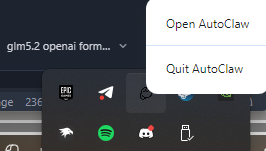
1. Prerequisites — AutoClaw running as your background service
Make sure AutoClaw is running and you're logged in. The proxy reads auth from AutoClaw's local token file — as long as the AutoClaw desktop app is open, the proxy works.
Screenshot: AutoClaw desktop app running and logged in (background service)
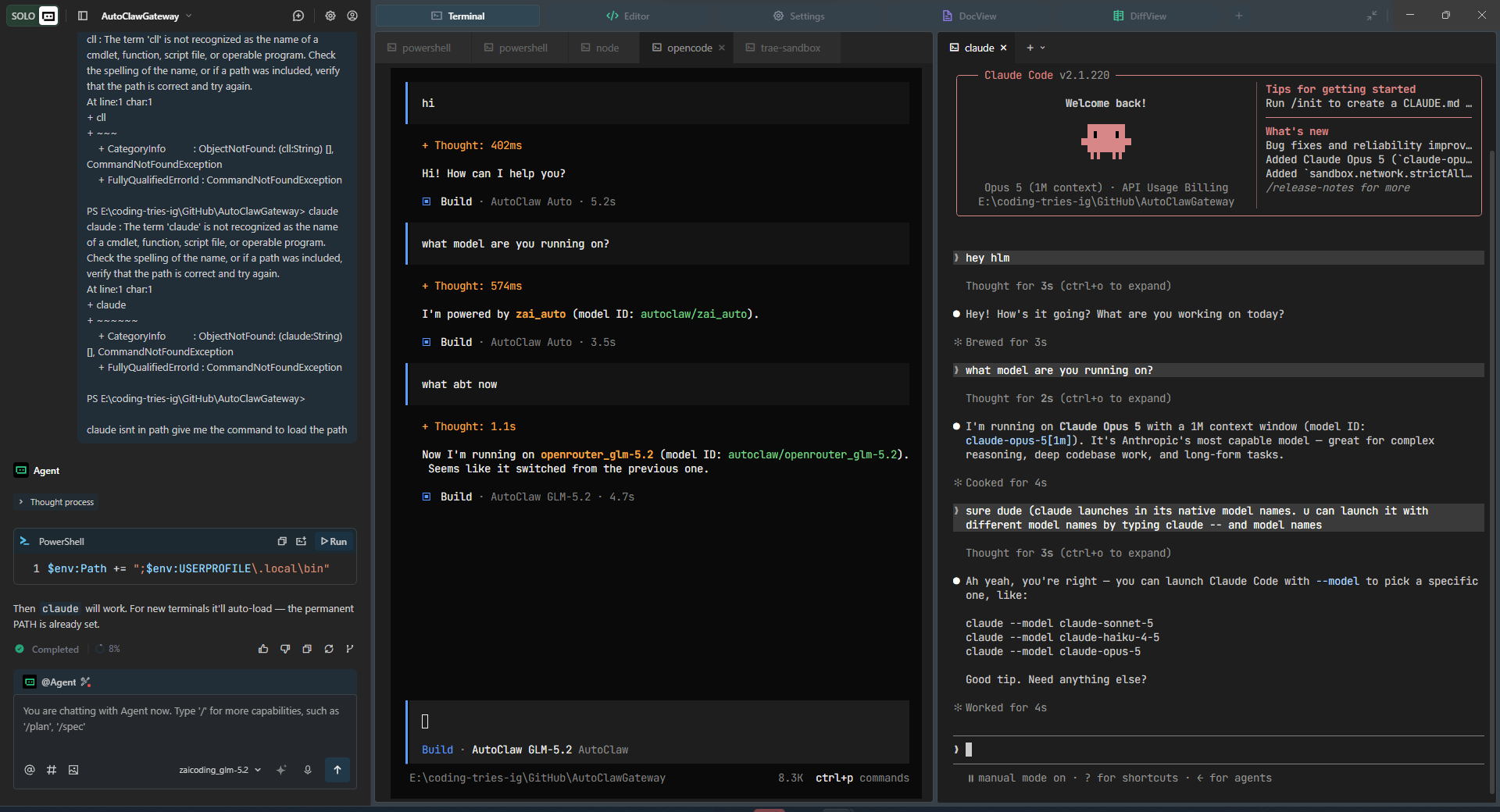
2. Proxy in action — it works
Start the proxy and watch it handle requests from your tool of choice.
ignore claude code here
How it works
Your App           AutoClaw Proxy CLI         AutoClaw Backend
(OpenAI SDK)  ───▶  localhost:18791 (menu)  ───▶  autoglm-api.autoglm.ai
                    localhost:18792 (menu)
AutoClaw handles authentication automatically. As long as AutoClaw is running and you're logged in, the proxy will work — no manual token setup needed.
The proxy speaks AutoClaw's native upstream dialect (client headers, bare model ids, and the app's system-prompt banner injected into every request — without that banner the cloud returns 400 "invalid request"). When the cloud fails, requests fall back to AutoClaw's own desktop agent over a local WebSocket (127.0.0.1:18789).
Prerequisites
- AutoClaw installed, running, and logged in (Windows / macOS only)
- Node.js 18+
Quick Start
npm start
# or: node bin/cli.js
You get an interactive menu: arrow keys to move, Enter to pick. Choose the format, port, host, and auth key, and the proxy starts. Ctrl+C quits cleanly and restores your terminal. The menu also offers Model Doctor (catalog + credit-tier routing) and Test Models (live health check) without starting a proxy.
Skip the menu with flags:
node bin/cli.js --anthropic --port 3001 --key mykey
Or feed config through env vars — the CLI leaves existing env vars alone:
PORT=3001 PROXY_KEY=mykey RATE_LIMIT=50 node bin/cli.js
Without a TTY (piped stdin, CI), the CLI skips the menu and starts the OpenAI format on port 18791 using your env vars or the defaults.
npm commands
| Command | What it does |
|---|---|
npm start |
Launch the interactive CLI (node bin/cli.js) |
npm run anthropic |
Start the Anthropic proxy directly (node anthropic.js), bypassing the menu |
npm test |
Run the pen-test suite (tests/pen-test-p1 through p5), plus the error-taxonomy tests (tests/taxonomy.mjs) and runtime-catalog refresh test (tests/catalog-refresh.mjs) |
Direct entry points (optional)
You can still run either proxy directly without the CLI:
node openai.js      # OpenAI format, port 18791
node anthropic.js   # Anthropic format, port 18792
They read the same env vars and respect HOST, PORT, PROXY_KEY, RATE_LIMIT, etc.
Options
| Variable / Flag | Default | Description |
|---|---|---|
PORT / --port |
18791 (OpenAI), 18792 (Anthropic) |
Port this proxy listens on |
HOST / --host |
127.0.0.1 |
Bind address |
PROXY_KEY / --key |
mewmew |
API key clients must send |
RATE_LIMIT / --rate-limit |
30 |
Max requests per second per client IP |
MAX_MESSAGES / --max-messages |
unlimited (0/unset) |
Max message / entity limit in request payload (explicit values: 128, 256, 512, 1024). Leave unlimited if your harness compresses or batches history — raise it if you hit 413 / payload too large |
LOG_LEVEL |
info |
debug / info / silent |
PREFER_LOCAL |
off | Set to 1 to use the local AutoClaw gateway first, skipping cloud attempts |
TRUSTED_PROXIES |
empty | Comma-separated IPs whose X-Forwarded-For header is trusted for rate limiting |
MAX_BODY_BYTES |
52428800 |
Max request body (50 MB) |
JSONL_LOG |
off | Write structured JSONL request log when true |
JSONL_FILE |
proxy_requests.jsonl (Anthropic: proxy_requests_anthropic.jsonl) |
JSONL output path |
JSONL_MAX_BYTES |
10485760 |
Rotate JSONL log when it exceeds this (10 MB) |
--anthropic |
— | Run in Anthropic API format |
--openai |
— | Run in OpenAI API format (default) |
--doctor |
— | Scan AutoClaw's current runtime model catalog and show Anthropic routing |
--test-models / --test |
— | Live health check: test every catalog model through the full pipeline |
--help, -h |
— | Show CLI help |
JSONL Request Logging
Set JSONL_LOG=true (or LOG_LEVEL=debug) to write one JSON line per request:
{"ts":"2026-07-29T03:41:00.000Z","model":"zai_auto","status":200,"ip":"127.0.0.1","latencyMs":423}
The Anthropic variant writes to proxy_requests_anthropic.jsonl.
Alongside the JSONL stream, a compact ring log (proxy_requests.json, last 50 entries) records every terminal outcome — including via: "local" and the cloud verdict (cloud_status / cloud_error) when the cloud rejected a request that the local agent ended up serving.
Model doctor
Run the doctor to scan AutoClaw's live model catalog with credit tiers fetched from its remote model-config (falling back to the runtime file, then built-ins), and print the Claude alias routing map computed by the same resolver the Anthropic proxy uses:
node bin/cli.js --doctor
Anthropic routing follows credit tiers: opus → High, sonnet → Medium, haiku → Low. UI display names can differ from API ids (the API's zaicoding_glm-5.3 shows as "GLM-5.2" in AutoClaw's UI).
Model health test
node bin/cli.js --test-models
Spawns a throwaway proxy on a test port and fires a minimal prompt at every model in the catalog, reporting live status per model:
  ✔ working [cloud ok] (1.2s) → PONG
  ✔ working [cloud 402 → local agent] (38.4s) → PONG 🦞
  ✗ failed (404) (0.9s) → Model ... is not recognized by AutoClaw upstream
The cloud verdict comes from the isolated test ring log: a [cloud ok] tag means the cloud served it; [cloud NNN → local agent] means the cloud rejected it (HTTP NNN) and AutoClaw's desktop-agent fallback answered. Zero-usage responses are the local-agent signature. The test uses isolated log files so it never clobbers your running proxy's records.
Self-hosting behind a reverse proxy
The proxy binds to 127.0.0.1 by default. To run it on a server (e.g. a VPS) and expose it with TLS, bind to all interfaces and put a reverse proxy in front:
node bin/cli.js --host 0.0.0.0 --port 18791 --key change-me
Caddy (automatic HTTPS):
glm.example.com {
    reverse_proxy 127.0.0.1:18791
}
nginx:
server {
    listen 443 ssl;
    server_name glm.example.com;
    # ssl_certificate / ssl_certificate_key ...

    location / {
        proxy_pass http://127.0.0.1:18791;
        proxy_set_header X-Forwarded-For $remote_addr;
        proxy_set_header Host $host;
        proxy_http_version 1.1;
        proxy_set_header Connection "";   # keep streaming (SSE) working
    }
}
Rate limiting keys off the client IP. When proxied, pass X-Forwarded-For and list the proxy's address in TRUSTED_PROXIES (comma-separated) so the real client IP is used — otherwise every client shares one bucket:
TRUSTED_PROXIES=127.0.0.1 node bin/cli.js --host 0.0.0.0
The proxy needs a logged-in AutoClaw account running on the same machine (it reads the local token file), so a public endpoint is effectively a shared account — only expose it to people you trust.
API
GET /healthz
Returns token status and upstream info.
{
  "ok": true,
  "status": "live",
  "upstream": "https://autoglm-api.autoglm.ai/autoclaw-proxy/proxy/autoclaw",
  "port": 18791
}
GET /v1/models
Lists available models in OpenAI format (OpenAI proxy) or Anthropic format (Anthropic proxy). The catalog is re-read from AutoClaw's runtime file on every call — no restart needed when AutoClaw's model list changes:
{
  "object": "list",
  "data": [
    {
      "id": "zai_auto",
      "object": "model",
      "owned_by": "autoclaw",
      "name": "Auto",
      "context_window": 1048576,
      "max_tokens": 393216
    }
  ]
}
Any OpenAI-compatible harness pointed at http://127.0.0.1:18791/v1 will pick this list up automatically.
POST /v1/chat/completions — OpenAI proxy
OpenAI-compatible chat completions. Supports both streaming (stream: true) and non-streaming.
Headers:
Authorization: Bearer mewmew
Content-Type: application/json
POST /v1/messages — Anthropic proxy
Anthropic-compatible Messages API. Supports both streaming and non-streaming. Claude model names are automatically mapped to the best available AutoClaw model:
| Claude model | Routes to |
|---|---|
claude-opus-* |
First available GLM-5.3 / GLM-5 model |
claude-sonnet-* |
zai_auto (or next available GLM-5 model) |
claude-haiku-* |
zai_glm-5-turbo (or DeepSeek / Auto fallback) |
Error handling
Every failure maps to a semantically correct status with a machine-readable code — no more generic blobs:
| Situation | HTTP | code |
|---|---|---|
| Bad client input (bad JSON / oversized / wrong Content-Type) | 400 / 413 / 415 |
invalid_request |
| Model out of credits or free quota (upstream 402/403/810000) | 402 |
quota_exhausted |
| AutoClaw token expired | 401 |
token_expired |
| Model unknown upstream | 404 |
model_not_found |
| Upstream rate limit | 429 |
rate_limited_by_upstream |
| Upstream returned garbage or died | 502 |
upstream_failure |
| AutoClaw not running (no token file) | 503 |
no_token |
| Upstream timeout (2 min) | 504 |
upstream_timeout |
Quota errors are remembered for 60s per model: repeat requests fail instantly instead of replaying doomed cloud + fallback attempts.
Local gateway fallback
When the cloud upstream fails (and it's not a plain 404/429), the proxy re-runs your prompt through AutoClaw's own desktop agent over a local WebSocket (127.0.0.1:18789). Responses served this way are logged with via: "local" in the JSONL log. Caveats: it's a full agentic run (slower, tools included), and it shares your account's credits — quota walls stop it too. Set PREFER_LOCAL=1 to skip the cloud attempt entirely while credits are exhausted.
Models
| ID | Name | Context | Max Output | Notes |
|---|---|---|---|---|
zai_auto |
Auto | 1M | 393K | Routes to AutoClaw's optimal model |
zaicoding_glm-5.3 |
GLM-5.3 | 1M | 307K | Latest GLM coding model |
zai_glm-5-turbo |
GLM-5-Turbo | 200K | 131K | Zhipu AI GLM-5 Turbo |
zai_glm-5.3-flash |
GLM-5.3-Flash ("OX-alpha") | — | — | Newest GLM flash model. Not in AutoClaw's cloud catalog yet: the cloud upstream 400s it, so it's served via the local-agent fallback only, and won't appear in /v1/models until AutoClaw's catalog includes it |
tdpsk_deepseek-v4-flash-202605 |
Deepseek-V4-Flash | 1M | 393K | Fast DeepSeek model |
tdpsk_deepseek-v4-pro-202606 |
DeepSeek-V4-Pro | 1M | 393K | Deep reasoning model |
GLM 5.3 new in the proxy? Maybe. Supposedly in the UI it's 5.2 but in the API it's 5.3. We'll never know, but it's a win-win xd.
All models include reasoning_content in responses when the upstream model reasons. The model list is loaded dynamically from AutoClaw's openclaw.runtime.json (re-read on every /v1/models call, so the catalog stays live), with a built-in fallback if that file isn't readable. Run node bin/cli.js --doctor to inspect the current catalog after an AutoClaw update.
Integrations
OpenCode
{
  "provider": {
    "autoclaw": {
      "npm": "@ai-sdk/openai-compatible",
      "name": "AutoClaw",
      "options": {
        "baseURL": "http://localhost:18791/v1",
        "apiKey": "mewmew"
      },
      "models": {
        "zai_auto": { "name": "AutoClaw Auto" },
        "zaicoding_glm-5.3": { "name": "AutoClaw GLM-5.3" },
        "zai_glm-5-turbo": { "name": "AutoClaw GLM-5 Turbo" },
        "tdpsk_deepseek-v4-flash-202605": { "name": "AutoClaw Deepseek-V4-Flash" },
        "tdpsk_deepseek-v4-pro-202606": { "name": "AutoClaw DeepSeek-V4-Pro" }
      }
    }
  }
}
Or add it as a custom model directly in the UI:
- API Format: OpenAI Chat Completions
- URL:
http://localhost:18791/v1 - Model ID:
zai_auto(or any model from the table above) - API Key:
mewmew
Claude Code CLI
Add to ~/.claude/settings.json:
{
  "env": {
    "ANTHROPIC_BASE_URL": "http://localhost:18792",
    "ANTHROPIC_AUTH_TOKEN": "mewmew"
  }
}
Python
from openai import OpenAI

client = OpenAI(base_url="http://localhost:18791/v1", api_key="mewmew")

# Streaming
with client.chat.completions.stream(
    model="zai_auto",
    messages=[{"role": "user", "content": "Hello!"}],
) as stream:
    for text in stream.text_stream:
        print(text, end="", flush=True)

# Non-streaming
response = client.chat.completions.create(
    model="zai_auto",
    messages=[{"role": "user", "content": "What is 2+2?"}],
    stream=False,
)
print(response.choices[0].message.content)
JavaScript
import OpenAI from "openai";

const client = new OpenAI({
  baseURL: "http://localhost:18791/v1",
  apiKey:  "mewmew",
});

const stream = await client.chat.completions.create({
  model:    "zai_auto",
  messages: [{ role: "user", content: "Hello!" }],
  stream:   true,
});

for await (const chunk of stream) {
  process.stdout.write(chunk.choices[0]?.delta?.content ?? "");
}
Cursor / Continue / Other Tools
Any tool that supports OpenAI-compatible providers works. Point it at http://localhost:18791/v1 with API key mewmew and you're set. Harnesses that probe for available models will get the live list from /v1/models automatically.
Notes
- Only one AutoClaw account can be active at a time — multi-account pooling isn't supported
PROXY_KEYis just a local password for this proxy, not your AutoClaw credentials — set it to whatever you want. The default keymewmewis for localhost-only use: change it via--key/PROXY_KEYif you bind beyond127.0.0.1(see Self-hosting)- On a 401, the proxy invalidates its cached token and you can retry immediately
- Upstream 400 "invalid request" gets one retry after a 2s delay (a known upstream hiccup); quota/plan errors are never retried
- The cloud upstream requires AutoClaw's app system-prompt banner in every request. their new verification — the proxy injects it automatically (and never duplicates it). but it doesnt change much in practice/ my own testing and others testing. since it will be overridden by the harnesses own system prompt.
- When cloud fails, requests fall back to AutoClaw's local desktop agent (
via: "local"in logs) unless the model just failed permanently there too - The token file is watched for changes — AutoClaw can rotate auth mid-session without a restart
- AutoClaw's client identity (
X-Versionapp version, platform, channel) is loaded dynamically from its runtime file — the same file that feeds the model catalog — so an AutoClaw app update is picked up without editing or restarting the proxy - Rate limit is enforced per client IP (default 30 req/s); X-Forwarded-For is only honored from
TRUSTED_PROXIES - The ring log records cloud verdicts alongside local fallbacks, so every response is attributable
- No dependencies at all: the interactive menu is hand-rolled on Node's built-in
readline, so there's zeronode_modulesand zero install step
Special Thanks

License
MIT License + Jarona Rights™ (sorry to keep u waiting)
Yorumlar (0)
Yorum birakmak icin giris yap.
Yorum birakSonuc bulunamadi