claude-context-optimizer
Health Gecti
- License — License: MIT
- Description — Repository has a description
- Active repo — Last push 0 days ago
- Community trust — 48 GitHub stars
Code Basarisiz
- execSync — Synchronous shell command execution in src/anatomy.js
Permissions Gecti
- Permissions — No dangerous permissions requested
Bu listing icin henuz AI raporu yok.
Claude Code plugin that tracks token usage, identifies wasted context, and saves 30-50% on API costs. Heatmaps, ROI reports, budget alerts, efficiency scores, git-aware suggestions — all local, zero config.
Stop burning tokens on weak prompts and redundant reads.
Tuned for Claude Opus 4.7 — including the 1M-context tier.




The Problem
The average Claude Code session wastes 30-50% of tokens on files that are read but never actually used. Every Read call consumes context — whether the file was relevant or not.
- A 200-line config file? 800 tokens gone.
- A README you glanced at once? 2,400 tokens burned.
- That
package.jsonClaude reads "just in case"? 120 tokens, every time.
At $15/M tokens (Opus), a developer spending $100/month is lighting $30-50 on fire on irrelevant context.
The Solution
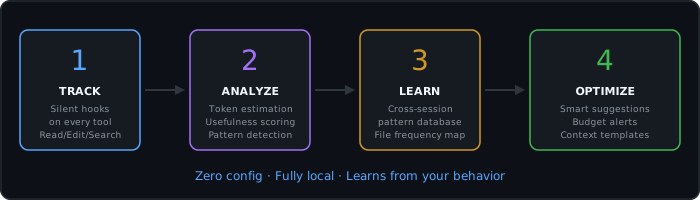
context-optimizer silently tracks every file read, edit, and search. It learns which files are actually useful and which are waste. Over time, it builds a profile of your coding patterns and tells you exactly where your tokens go — and how to stop wasting them.
What's new in v3.6 — Opus 4.7 update
The most expensive token leak isn't redundant reads — it's weak prompts that send Claude
reading 20 files to guess what you wanted. v3.6 attacks both sides of the problem.
NEW: Prompt Coach — grade and improve every prompt before it runs
A UserPromptSubmit hook scores your prompt on four dimensions and silently injects
suggestions for Claude when the score is below 80:
[prompt-coach] Prompt quality: D (38/100).
Suggestions to make this prompt produce better results:
  - Name the specific file(s), function(s), or module(s) you want changed.
  - Bound the scope: instead of "all bugs / rewrite everything", pick one concrete failure.
  - State the success condition: what tests pass? what error disappears?
Run /cco-coach to grade an arbitrary prompt or see your prompt history (with average score).
Strong prompts produce sharper edits, fewer reads, lower bills. The coach is deterministic
and runs locally — no model call, no telemetry.
NEW: Smart Context Pack — optimal file set for your task
$ /cco-pack "refactor login flow to support OAuth"

  SMART CONTEXT PACK
  Files proposed: 7
  Est. tokens: 18.4K (24% of context budget cap)

  1. src/auth/login.ts  (relevance 100, ~3.2K tokens)
     reason: mentioned in prompt
     read: offset=42, limit=120 — around `function handleLogin()`

  2. src/auth/oauth.ts  (relevance 85, ~2.1K tokens)
     reason: modified in git working tree
     read: full file

  3. src/auth/session.ts  (relevance 65, ~1.8K tokens)
     reason: historically useful (edited in 8/12 sessions)
     read: offset=0, limit=80
  ...
Mentioned files + git diff + historical patterns + keyword match → ranked, token-budget aware.
Stops at 25% of your effective context. With Opus 4.7 1M that's 250K of "safe to load now".
NEW: 1M context tier support — opus-4.7-1m
/cco-budget model opus-4.7-1m
Switching models retunes the entire plugin:
- Read Cache staleness thresholds scale — 100K/40-files/10min instead of 20K/8-files/10min,
so you don't get false re-reads in massive contexts. - Cost calculation uses 1M-tier prices — $22.50/M input, $112.50/M output.
- Budget warnings stop firing at 5% of a 1M window — they fire at the percentages of your
effective budget.
NEW: Real cost tracking (input + output)
Old behaviour: counted only input tokens. New: counts input AND output (Edit/Write content)
and uses the model's real prices. Your reported cost is now the cost you actually pay.
NEW: MCP tool tracking
PostToolUse matchers now include mcp__* — Linear, Slack, GitHub, Postgres, etc. show up
in token reports alongside Read/Edit/Write.
NEW: /cco-doctor — health check
✔ versions in sync (plugin.json vs package.json) — v3.6.0
✔ hooks.json is valid JSON                       — 6 event types wired
✔ data directory writable                        — ~/.claude-context-optimizer
✔ user config                                    — model=opus-4.7, budget=200.0K, window=200.0K
Catches the "installed but nothing happens" class of issues in under a second.
Features
Smart Read Cache — block redundant reads automatically
The #1 token waste in Claude Code: re-reading the same file multiple times per session.
Read Cache runs as a PreToolUse hook and blocks redundant reads when the file hasn't changed.
💾 [read-cache] tracker.js is already in context (983 lines, ~9.3K tokens saved).
   File unchanged — no need to re-read! Tip: use offset/limit to read a different section.
- First read: always allowed
- File modified since last read: allowed (detects via mtime)
- Different section (offset/limit): allowed if not already covered
- Agent subprocess reads: tracked separately — won't block reads in the main conversation
- Same file, same range, unchanged: blocked — saves 100% of those tokens
Typical savings: 30-60% fewer tokens per session from read deduplication alone.
NEW: .contextignore — block files you never need
Create a .contextignore file in your project root (like .gitignore) to permanently block wasteful reads. No more loading lockfiles, build output, or generated code.
# .contextignore
package-lock.json
yarn.lock
*.min.js
*.min.css
dist/**
node_modules/**
*.sql
🚫 [contextignore] package-lock.json matches pattern "package-lock.json" in .contextignore.
   Use Grep to search inside, or remove the pattern from .contextignore to allow reading.
- Project-level:
.contextignorein your repo root - Global rules:
~/.claude/.contextignorefor patterns across all projects - Supports globs:
*.lock,dist/**,*.min.js,*.generated.* - Copy
.contextignore.examplefrom the plugin to get started
NEW: Auto-Compact — automatic context cleanup
When your context budget reaches 80%, the plugin automatically tells Claude to run /compact instead of just showing a warning. At 90%, it becomes urgent.
[context-budget] ⚡ Auto-compact recommended — 80% budget used.
   Run /compact now to free ~12.5K tokens and keep the session efficient.
[context-budget] 🔴 Critical: 90% budget used (~90K/100K tokens).
   Run /compact immediately or the session will lose older context.
- Toggle with
/cco-budget auto onor/cco-budget auto off - Configurable thresholds in
budget-config.json - Smart rate-limiting — won't spam every single tool call
NEW: Session Replay — pick up where you left off
Every session automatically generates a summary saved to disk. Start your next session by running /cco-replay to see what was done before — no need to re-read files or guess context.
╔══════════════════════════════════════════════════════════════╗
║                    RECENT SESSION SUMMARIES                  ║
╚══════════════════════════════════════════════════════════════╝

[1] Session Mar 24 14:30 (12 min)
    Edited: src/read-cache.js, src/utils.js, README.md (3 files)
    Context: 45K tokens, 12 files read, 28% waste

[2] Session Mar 24 10:15 (25 min)
    Edited: src/tracker.js, src/budget.js (2 files)
    Context: 82K tokens, 18 files read, 15% waste
NEW: Project Anatomy — codebase map in one file
Run /cco-anatomy to generate a compact project map. Claude reads one file instead of opening twenty to understand the codebase.
# Project Anatomy: my-app
Generated: 2024-01-15 | 45 files | ~38K tokens if all read

## Structure
| Path | Lines | ~Tokens | Type |
|------|-------|---------|------|
| src/server.ts | 450 | 4.1K | source |
| src/routes/api.ts | 280 | 2.6K | source |
...

## Heaviest files (read these with offset/limit)
1. src/server.ts — 450 lines (~4.1K tokens)
NEW: ContextShield — proactive waste prevention
ContextShield runs as a PreToolUse hook and warns you before loading known-waste files. It checks historical patterns and suggests alternatives in real-time.
[context-shield] README.md went unused in 5 sessions (~12.4K tokens).
                 Use Grep to find specific content instead of full Read.
[context-shield] utils.js is usually edited with: tracker.js, budget.js.
                 Consider loading them together.
Run /cco-shield to see protection status and stats.
NEW: CLAUDE.md Analyzer — trim the bloat
Run /cco-claudemd to analyze your CLAUDE.md for token waste: duplicates, verbose patterns, oversized code blocks, excessive whitespace. Get concrete suggestions with estimated savings.
  CLAUDE.MD ANALYSIS — /project/CLAUDE.md — 342 lines | ~2.9K tokens
  ──────────────────────────────────────────────────────────────
  ⚠ 3 duplicate line(s) found (~25 saveable)
  ● "please make sure to" found 4x — Simplify to: "Always X" (~12 saveable)
  ● Code block at line 45 is 38 lines — consider shortening (~233 saveable)
  ○ 28% empty/separator lines — reduce for token savings (~98 saveable)
  POTENTIAL SAVINGS: ~368 tokens
NEW: Confidence Learning — smart pattern scoring
File patterns now have confidence scores (0.0-1.0) based on session count, usefulness consistency, and recency. High-confidence patterns produce stronger recommendations; old unused patterns decay naturally.
HTML Dashboard Export — Chart.js analytics
Run /cco-export html to generate a static HTML dashboard you can open in any browser:
- Waste trend line chart
- Token usage bar chart
- Project breakdown doughnut
- Edits-per-session timeline
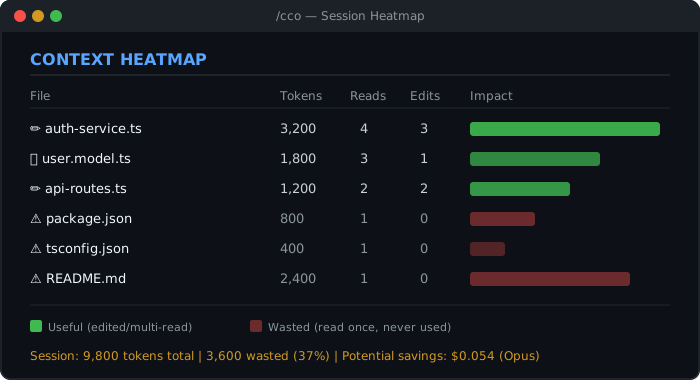
Context Heatmap — see where your tokens go
Run /cco to get a visual breakdown of every file in your session. Green = useful. Red = waste.
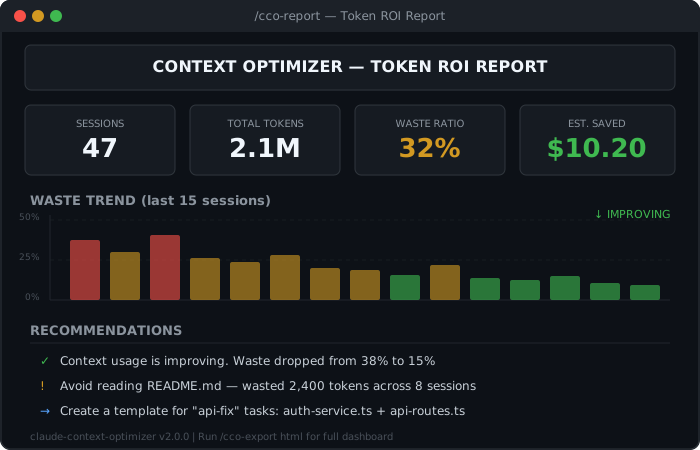
Token ROI Report — full analytics across sessions
Run /cco-report for a comprehensive dashboard: total tokens, waste ratio, cost estimates, trends, and actionable recommendations.
Efficiency Score — gamified optimization
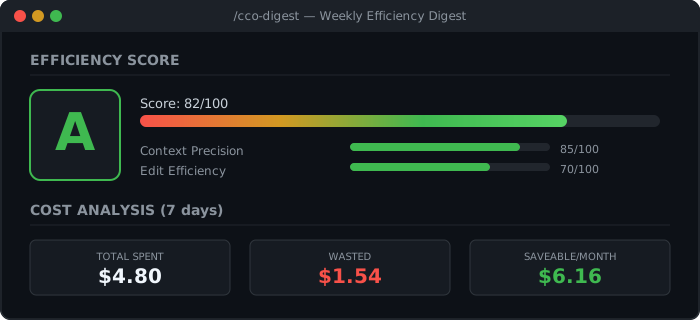
Run /cco-digest for a weekly efficiency grade (S/A/B/C/D/F) with breakdown by precision, edit ratio, search accuracy, and focus.
Token Budget — never overspend
Set a token budget and get real-time warnings as you approach the limit. Auto-compact kicks in at 80%, critical alerts at 90%.
[context-budget] 70% of budget used (~70K/100K) | Est. cost: $1.050 (opus)
[context-budget] ⚡ Auto-compact recommended — 80% budget used.
[context-budget] You can free ~8.2K tokens with /compact:
  drop README.md (~2.4K), tsconfig.json (~1.1K), package.json (~320)
Git-Aware Suggestions — smart context loading
Run /cco-git and the plugin analyzes your git diff, finds related test files, configs, and historically useful files — then suggests exactly what to load.
Context Templates — presets for common tasks
Create reusable context sets for different task types:
/cco-templates create bug-fix    # Save files you always need for bug fixes
/cco-templates apply bug-fix     # Load them instantly next time
Smart Loader Skill — automatic suggestions
The plugin learns from your behavior. When you start a new task, it silently suggests files you'll probably need based on historical patterns. No configuration required.
All Commands
When installed as a plugin, commands are namespaced: /claude-context-optimizer:cco. With --plugin-dir, they're also available as /cco.
| Command | Description |
|---|---|
/cco |
Session heatmap — visual file-by-file token breakdown |
/cco-report |
Full ROI report — stats, trends, waste analysis, recommendations |
/cco-digest [days] |
Efficiency digest — score, grade, cost analysis (default: 7 days) |
/cco-budget [status|set|model|auto] |
Token budget — configure limits, cost model, auto-compact |
/cco-git |
Git-aware suggestions — smart file loading based on diff |
/cco-templates [list|create|apply|delete] |
Context templates — reusable file sets for task types |
/cco-export [md|html] |
Export reports — Markdown or static HTML dashboard |
/cco-clean |
Cleanup — remove old tracking data |
/cco-shield |
ContextShield status — waste protection stats |
/cco-claudemd |
CLAUDE.md analyzer — find and fix token bloat |
/cco-anatomy |
Project anatomy — compact codebase map with file sizes and token estimates |
/cco-replay [N] |
Session replay — recent session summaries for quick context recovery |
/cco-coach [prompt] |
NEW — Prompt quality score (S/A/B/C/D/F) + concrete suggestions to improve |
/cco-pack [task] |
NEW — Build optimal context pack for a task: ranked files with offset/limit |
/cco-doctor |
NEW — Plugin health check (versions, hooks, data dir, model config) |
Installation
Option 1 — Plugin directory (recommended)
git clone https://github.com/egorfedorov/claude-context-optimizer.git ~/claude-context-optimizer
claude --plugin-dir ~/claude-context-optimizer
To make it persistent, add to ~/.claude/settings.json:
{
  "plugins": [
    "~/claude-context-optimizer"
  ]
}
This gives you full functionality: skills, auto-tracking hooks, Read Cache, ContextShield, and budget alerts.
Option 2 — Skills CLI
npx skills add https://github.com/egorfedorov/claude-context-optimizer
Installs skills globally to ~/.agents/skills/ and symlinks them to Claude Code. Works with Amp, Cline, Codex, Cursor, Gemini CLI, and other compatible agents.
Note: Skills CLI installs skill prompts only. Auto-tracking hooks (Read Cache, ContextShield, budget alerts) require the plugin directory installation (Option 1) to function.
Updating
claude plugin update claude-context-optimizer@egorfedorov-plugins
Then restart Claude Code to apply the update.
Requirements
- Node.js >= 18
- Claude Code (with plugin/skills support)
Install & Forget
Once installed, the plugin works automatically — no commands needed:
Before every file re-read (Read Cache):
- Blocks re-reading files that haven't changed since last read in this session
- Allows automatically if the file was modified or a new section is requested
On session start: Weekly savings streak, warnings about consistently wasted files, auto-generated template notifications.
Before every file read (ContextShield): Checks if the file was wasted in 3+ past sessions, suggests Grep alternatives, shows co-occurrence groups.
On every file read: Warns on 3+ reads without edits (suggests offset/limit), tiered warnings for large files (200+ soft, 500+ strong).
On budget thresholds (50%, 70%, 85%, 95%): Usage percentage, cost estimates, and at 85%+ lists specific files to drop with exact token savings.
On session end: Compares waste vs recent average, updates pattern database.
After 5+ sessions: Auto-creates file templates from frequently edited files.
You literally just code. The plugin watches and helps.
How It Works
You use Claude Code normally
         │
         ▼
┌─────────────────────┐
│  PreToolUse Hook     │  Read Cache: blocks re-reads of unchanged files.
│  read-cache.js       │  ContextShield: warns about historically wasted files.
│  context-shield.js   │
└─────────┬───────────┘
          │
          ▼
┌─────────────────────┐
│  PostToolUse Hook    │  Silent. Runs on every Read/Edit/Write/Glob/Grep/Agent.
│  tracker.js          │  Records: file path, line count, token estimate, timestamp.
│  budget.js           │  Tracks token accumulation, warns at thresholds.
└─────────┬───────────┘
          │
          ▼
┌─────────────────────┐
│  Session Store       │  ~/.claude-context-optimizer/sessions/<id>.json
│  Per-file tracking   │  Reads, edits, usefulness score, confidence score.
└─────────┬───────────┘
          │
          ▼
┌─────────────────────┐
│  SessionEnd Hook     │  Finalizes session. Computes waste. Updates patterns DB.
│  Confidence Learning │  Patterns scored 0.0-1.0, decay over time.
└─────────┬───────────┘
          │
          ▼
┌─────────────────────┐
│  Reports & Insights  │  /cco, /cco-report, /cco-digest, /cco-claudemd
│  HTML Dashboard      │  Static Chart.js analytics, open in any browser
│  ContextShield       │  Proactive waste prevention before file reads
│  Smart Suggestions   │  Confidence-scored recommendations
└─────────────────────┘
What counts as "useful"?
A file is useful if: edited after reading (+3 per edit), read multiple times (+0.5 per re-read, diminishing), or partially read with offset/limit (+1 bonus).
A file is wasted if: usefulness score is zero or negative (read but never edited, no re-reads). Large files (100+ lines) read 3+ times without edits get a penalty.
Token estimation
Tokens are estimated using extension-specific ratios (e.g., 3.8 chars/token for JS/TS, 4.2 for Markdown, 3.2 for JSON) applied to line counts. Not exact, but consistent enough for comparative analysis.
Data Storage
~/.claude-context-optimizer/
├── sessions/           # Per-session tracking data (JSON)
├── budget/             # Per-session budget state
├── templates/          # User-defined context templates
├── exports/            # Exported reports (MD/HTML)
├── read-cache/         # Per-session read cache state
├── config.json         # Budget and preference settings
├── patterns.json       # Cross-session file usage patterns
└── global-stats.json   # Aggregate statistics
Plugin Structure
claude-context-optimizer/
├── .claude-plugin/
│   └── plugin.json          # Plugin manifest
├── src/
│   ├── utils.js             # Shared: constants, classification, model costs, atomic JSON I/O
│   ├── read-cache.js        # Smart Read Cache (adaptive 1M-aware staleness)
│   ├── contextignore.js     # .contextignore: pattern-based file blocking
│   ├── replay.js            # Session Replay: recent session summaries
│   ├── anatomy.js           # Project Anatomy: compact codebase map generator
│   ├── tracker.js           # Core: file & token tracking engine + session summaries
│   ├── context-shield.js    # ContextShield: PreToolUse waste prevention
│   ├── claudemd-analyzer.js # CLAUDE.md token bloat analyzer
│   ├── budget.js            # Token budget monitor (input + output, model-aware costs)
│   ├── digest.js            # Efficiency score & weekly digest
│   ├── git-context.js       # Git-aware context suggestions
│   ├── report.js            # ROI report generator
│   ├── export.js            # Chart.js HTML dashboard exporter
│   ├── prompt-coach.js      # NEW — UserPromptSubmit hook + CLI: prompt quality scoring
│   ├── smart-pack.js        # NEW — Optimal file pack builder (git + history + keywords)
│   └── doctor.js            # NEW — Health check CLI
├── skills/
│   ├── cco/SKILL.md               # /cco — session heatmap
│   ├── cco-report/SKILL.md        # /cco-report — full ROI report
│   ├── cco-digest/SKILL.md        # /cco-digest — efficiency digest
│   ├── cco-budget/SKILL.md        # /cco-budget — budget manager
│   ├── cco-git/SKILL.md           # /cco-git — git suggestions
│   ├── cco-export/SKILL.md        # /cco-export — report export
│   ├── cco-templates/SKILL.md     # /cco-templates — template manager
│   ├── cco-clean/SKILL.md         # /cco-clean — data cleanup
│   ├── cco-shield/SKILL.md        # /cco-shield — ContextShield status
│   ├── cco-claudemd/SKILL.md      # /cco-claudemd — CLAUDE.md analyzer
│   ├── cco-anatomy/SKILL.md       # /cco-anatomy — project anatomy
│   ├── cco-coach/SKILL.md         # NEW — /cco-coach prompt quality grader
│   ├── cco-pack/SKILL.md          # NEW — /cco-pack smart context pack
│   ├── cco-doctor/SKILL.md        # NEW — /cco-doctor health check
│   └── smart-loader/SKILL.md      # Auto-suggestion skill (model-invoked)
├── agents/
│   └── context-analyzer.md  # Deep analysis agent
├── hooks/
│   └── hooks.json           # Hook configuration
├── assets/                  # SVG visuals for README
├── docs/
│   └── index.html           # Landing page (GitHub Pages)
└── package.json
Privacy
This plugin:
- Tracks only file paths and line counts — never file contents
- Stores everything locally in
~/.claude-context-optimizer/ - Sends zero telemetry — no network calls, no analytics, no tracking
- Can be fully wiped with
/cco-clean --reset-all
Your data never leaves your machine. Period.
FAQ
Q: Does this slow down Claude Code?
A: No. Hook scripts run asynchronously and typically complete in <10ms.
Q: How accurate are the token estimates?
A: They use a ~4 tokens/line heuristic. Not exact, but consistent across sessions for reliable trends.
Q: Can I use this with Claude Sonnet / Haiku / Opus 4.7 1M?
A: Yes. /cco-budget model haiku-4.5 / sonnet-4.6 / opus-4.7 / opus-4.7-1m — each retunes
context window, prices, and Read Cache staleness thresholds.
Q: Does Prompt Coach call any LLM?
A: No. It uses deterministic local heuristics (regex + scoring). Zero API calls,
zero latency added to your prompt submission, runs in <5ms.
Q: Will this work with subagents?
A: Yes. The PostToolUse hook fires for all tool calls, including those made by subagents.
Q: Does Read Cache break anything?
A: No. It only blocks truly redundant reads — same file, same range, no modifications since last read. If the file changed or you request a different section, the read goes through normally.
Support Development
context-optimizer is 100% free and open source. No paywalls, no premium tiers, no telemetry. If it saves you money on tokens, consider supporting development:
| Chain | Address |
|---|---|
| BTC | bc1q428exz5t2h9rzk7z5ya70madh0j3rs6h4gfgyd |
| ETH (ERC-20) | 0xB3f0C8e42B7cA9d65920cEfe82e3fef1B5C9d0C9 |
| SOL | 8ctK8nt3CBkPZGfWQXX8TsnqUYUy4JAbT1EMhr8rsQxm |
Contributing
PRs welcome: better token counting (AST-based), VSCode heatmap overlay, team pattern sharing, /cost integration, multi-language CLAUDE.md analysis.
License
MIT — do whatever you want with it.
Built with frustration at wasted tokens and love for efficiency.
If we saved you money, return the favor.
Yorumlar (0)
Yorum birakmak icin giris yap.
Yorum birakSonuc bulunamadi