cognivio
Health Warn
- License — License: AGPL-3.0
- Description — Repository has a description
- Active repo — Last push 0 days ago
- Low visibility — Only 5 GitHub stars
Code Pass
- Code scan — Scanned 12 files during light audit, no dangerous patterns found
Permissions Pass
- Permissions — No dangerous permissions requested
No AI report is available for this listing yet.
Memory for AI coding tools. Agents read your team's notes before a task and write back what they learn.
Cognivio
Memory for AI coding tools.
Claude Code, Cursor and Codex forget your project every session. Each new session rereads
the same files, asks the same questions and repeats the mistake someone fixed last month.
Cognivio is where they keep what they learn. The agent reads your team's notes before it
touches a file and writes a short note when it finishes.
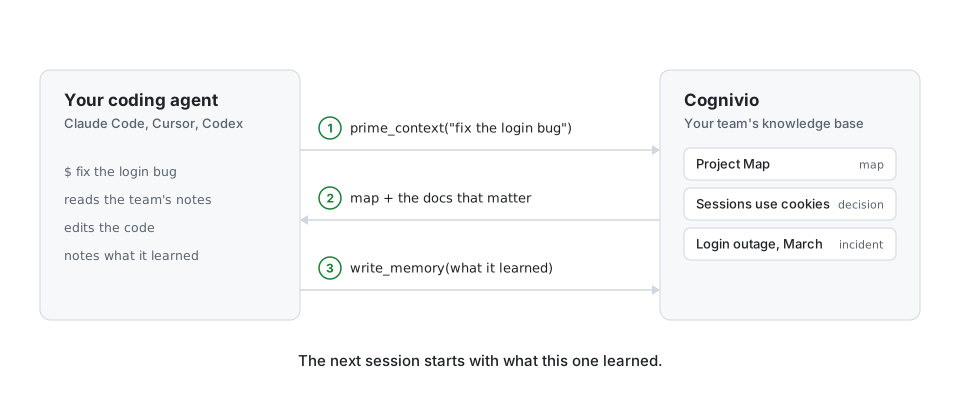
Cognivio is a server with a web workspace. Agents talk to it over the Model Context
Protocol (MCP).
Two ways to use it
- Hosted. Sign up at cognivio.app. It is free for one person.
For a team, contact us from the site. - Self-hosted. Cognivio is open source. Anyone can read the code, change it and run it
on their own server, with no limit on people, teams or projects. It runs from one Docker
image plus MongoDB. The quick start takes about a minute.
The server is licensed under AGPL-3.0 and the local connector under MIT. See
License for what that asks of you.
What changes for your team
- The agent starts each task with the decisions, gotchas and layout your team already
wrote down. Oneprime_contextcall returns the project map and the most relevant docs
as excerpts, so the agent does not crawl the codebase to get oriented. - What one agent learns, every other agent on the team gets. A lesson written from Claude
Code on Monday is there for a teammate's Cursor session on Tuesday. - Notes stay short. Writing to an existing title updates that doc in place, so reruns do
not pile up duplicates. - Your notes stay on your server. Search uses an embedding model that runs inside the
container on CPU. The server makes no calls to any model API. - You stay in charge of what agents write. Turn on the review queue and agent writes wait
as drafts until a person approves them. Every doc keeps its version history.
Quick start
You need Docker.
git clone https://github.com/Elbani/cognivio.git
cd cognivio
# Create .env from the example with a random JWT_SECRET:
sed "s/^JWT_SECRET=.*/JWT_SECRET=$(openssl rand -hex 32)/" .env.example > .env

docker compose up -d
Open http://localhost:8080 and register. You get an organization and a team right away.
Compose pulls the published image, ghcr.io/elbani/cognivio, for amd64 and arm64.
Nothing builds on your machine. On Windows without sed, copy .env.example to .env
and set JWT_SECRET to any random string of 32 characters or more.
With no email provider configured, new accounts skip email verification, and a password
reset link is written to the server log instead of emailed. Read it withdocker compose logs app.
To update, run docker compose pull and then docker compose up -d. To run your own
changes, docker compose up -d --build builds the image from your checkout.
Connect your agent
Create a key in the app under Agents, API keys. Keys start with ak_.
Claude Code:
claude mcp add --transport http cognivio http://localhost:8080/mcp \
  --header "Authorization: Bearer ak_..."
Cursor and Codex take the same URL and header in their MCP config. The Help & API page in
the app generates the exact config for all three.
Then tell the agent: "seed our Cognivio knowledge base". It calls seed_plan, scans your
repo and writes the first set of docs itself. You fix what it got wrong.
To make the agent use Cognivio on every task, ask it to call setup_rule. The tool returns
the rule file for Claude Code, Cursor or Codex, and the agent writes it into your repo.
There is also a local stdio connector for tools that cannot reach a remote MCP endpoint.
See mcp_server/README.md.
How it works
A doc is a Markdown document with a type: map, architecture, decision, playbook,incident, lesson or note. Docs link to each other with [[wiki links]]. Each team
has one Project Map, which is the page an agent reads first.
- Before a task, the agent calls
prime_context("the task"). It gets the Project Map and
the best-matching docs as excerpts. Ranking combines keyword matching with embedding
similarity, so a task phrased differently from the doc still finds it. - The agent calls
get_memoryfor the one or two docs it needs in full and follows the
file pointers and links inside them. - It does the work.
- It calls
write_memorywith anything non-obvious it found. It can also callmark_helpfulon a doc, which moves that doc up or down in later results.
Features
- Typed, linked docs with a Project Map and a link graph you can browse.
- Search by meaning and by keyword. The embedding model is
BAAI/bge-small-en-v1.5,
run withfastembedon ONNX. SetEMBEDDINGS_ENABLED=falsefor keyword search only. - A review queue that holds agent writes as drafts until someone approves them.
- Version history on every doc, a Verify button, and a stale flag after 90 days without
verification. - Insights: which docs agents read, which searches found nothing, and which docs agents
rated unhelpful. The failed searches are your list of docs to write next. - Repo coverage and drift. Connect a read-only GitHub or GitLab token and Cognivio shows
the parts of the repo no doc mentions and the docs whose cited files have changed. - Project documentation. The agent writes a developer handbook (overview, architecture,
setup) and the server stores each run as a snapshot you can diff. Agents never retrieve
these, so they do not crowd the knowledge base. - Organizations, teams, roles and scoped API keys.
- Single sign-on with OpenID Connect (Google Workspace, Okta, Entra ID, Keycloak and
others), with an option to turn off password login for your email domains. - An admin console for users, organizations, security events and key revocation.
What is in this repo
backend/is a FastAPI app on MongoDB. It serves the agent API (/api/v1), the web
app's API (/api), the remote MCP endpoint (/mcp) and the built frontend. It starts atbackend/app/main.py.frontend/is the React and Vite workspace. It starts atfrontend/src/App.tsx.mcp_server/is the local stdio MCP connector, a thin client over/api/v1.
Local development
Backend, with Python 3.12 and a MongoDB on localhost:27017:
cd backend
python -m venv .venv && source .venv/bin/activate
pip install -r requirements.txt -r requirements-dev.txt
JWT_SECRET=$(python -c "import secrets; print(secrets.token_hex(32))") \
  MONGO_URI=mongodb://localhost:27017 uvicorn app.main:app --reload
pytest            # uses a separate test database and drops it
Frontend, with Node 22:
cd frontend
npm ci
npm run dev       # http://localhost:5173, proxies /api to the backend
npm run build     # type-check and production bundle in frontend/dist
Configuration
Set these in the environment or in .env. See .env.example.
| Variable | Purpose |
|---|---|
JWT_SECRET |
Required, at least 32 characters. The API refuses to start without it. |
MONGO_URI, MONGO_DB |
MongoDB connection and database name. |
PUBLIC_URL |
The app's public URL. Email links are built from it, and the session cookie is marked Secure when it is https. |
ADMIN_EMAILS |
Comma-separated emails that can open the /admin console. |
REGISTRATION_OPEN |
false closes sign-up. Default true. |
RESEND_API_KEY, EMAIL_FROM |
Email through Resend. With no key, the server sends no email and new accounts skip verification. With a key, EMAIL_FROM and PUBLIC_URL are required. |
SELF_HOSTED |
Default true, which means no plan limits. false turns on the free plan (one person) and the Teams plan, for running a hosted service. |
FORWARDED_ALLOW_IPS |
Addresses of the reverse proxies uvicorn trusts for the client IP. |
EMBEDDINGS_ENABLED |
false turns off the embedding model and leaves keyword search. |
CORS_ORIGINS |
Comma-separated allowed origins. The web app is same-origin in production. |
SSO_SESSION_HOURS |
How long a single sign-on session lasts before the person signs in through the identity provider again. Default 12. |
CONTACT_EMAIL |
Contact address for the Teams plan when SELF_HOSTED=false. Shown in plan limit messages. |
DISABLE_DOCS |
true hides /docs, /redoc and /openapi.json. |
Deployment
One image holds the frontend, the connector and the backend, so any host that runs a
container and reaches a MongoDB works. MongoDB is not in the image. Use the published
image or build your own from the Dockerfile.
| Tag | What it is |
|---|---|
ghcr.io/elbani/cognivio:latest |
The newest release. |
ghcr.io/elbani/cognivio:0.1.0 |
One release. Pin this in production. |
ghcr.io/elbani/cognivio:main |
The current main branch. |
- Set
JWT_SECRETandMONGO_URIas secrets on the host. - Set
PUBLIC_URLandCORS_ORIGINSto the app's public URL, andDISABLE_DOCS=true. - The container listens on
$PORT, or 8000 when the host sets none. - Point the host's health check at
/api/health. - Serve it over HTTPS. Agents send their API key in a header on every request.
- Set
FORWARDED_ALLOW_IPSto your proxy's address. Rate limits are per client IP, and
without it every request appears to come from the proxy and shares one limit.
Before the server is reachable from the internet:
- Register the accounts listed in
ADMIN_EMAILSyourself. With email off, nobody has to
prove they own an address, so whoever registers an admin address first gets the console. - Set
REGISTRATION_OPEN=falseonce your team has accounts. Otherwise anyone who finds the
URL can sign up. They cannot see your organization's docs, but they can create their own. - Or configure Resend, which makes every new account verify its email address.
Single sign-on
Cognivio signs people in through any OpenID Connect provider. A platform admin (an
account in ADMIN_EMAILS) sets it up per organization, in the admin console under
Organizations, then the organization's detail view.
- Create an OIDC web application at your identity provider. Use the redirect URL the
form shows, which isPUBLIC_URLplus/api/auth/sso/callback. - Enter the issuer URL, client ID, client secret and the email domains the organization
owns. Saving checks that the issuer's OpenID configuration is reachable. - People with an address in those domains choose "Sign in with SSO" on the login page.
A first sign-in creates their account and adds them to the organization with the
role you picked.
What to know before turning it on:
- The identity provider can sign in as any address in the domains you enter, so only
enter domains the organization owns. This is why organization admins cannot change
these settings themselves. One domain belongs to one organization. - "Require" turns off password login and registration for those domains. Platform
admins keep password login, so a broken provider cannot lock you out. - The first time an existing account signs in through the provider, its old password
and sessions stop working. The person can set a new password by email reset. - The provider must send an
emailclaim in the ID token. The issuer must use https. - A single sign-on session ends after
SSO_SESSION_HOURS. Someone you deactivate at
the provider loses the web app within that time. - Removing a member from an organization revokes the API keys they created there.
Deactivating someone at the provider does not: there is no SCIM yet, so remove the
member in Cognivio too, or their keys keep working.
Contributing
See CONTRIBUTING.md. Report vulnerabilities privately as described inSECURITY.md.
License
- Everything except
mcp_server/is licensed under the GNU Affero General Public License
v3.0. SeeLICENSE. If you run a modified version as a network service, the
AGPL requires you to offer your users the modified source. mcp_server/, the local stdio connector, is licensed under MIT. Seemcp_server/LICENSE.
The licenses above do not cover the Cognivio name and logo. A fork needs its own name
and logo.
Reviews (0)
Sign in to leave a review.
Leave a reviewNo results found