agent-skills-in-practice
Health Pass
- License — License: Apache-2.0
- Description — Repository has a description
- Active repo — Last push 0 days ago
- Community trust — 48 GitHub stars
Code Warn
- Code scan incomplete — No supported source files were scanned during light audit
Permissions Pass
- Permissions — No dangerous permissions requested
This repository is an educational guide and reference material designed to teach developers how to design, structure, and implement reusable AI skills for modern agent systems.
Security Assessment
The overall risk is Low. The project does not request any dangerous permissions or execute shell commands. Because the automated code scan could not identify supported source files to analyze, a deep code review was not performed. However, based on the README, this appears to be a documentation-only resource containing instructions and YAML examples. There is no evidence of hardcoded secrets, sensitive data access, or unwanted network requests.
Quality Assessment
The project is highly active, with its last update occurring today. It is legally clear to use and build upon, protected under the permissive Apache-2.0 license. With 48 GitHub stars, it shows a good level of early community trust and recognition. The documentation is extensive, well-organized, and available in multiple languages, indicating strong maintenance and a commitment to helping other developers.
Verdict
Safe to use. It is a well-maintained, low-risk educational resource for developers looking to understand AI agent customization.
Learn what AI skills are and how to design, structure, and use them in real-world agent systems.
🌍 Language:
English | Português | Español
AI Skills — A Practical Guide
From prompts to systems — learn how to build reusable AI skills.
Skills are one of the core building blocks of modern AI systems.
They allow you to define reusable, task-specific capabilities that an AI system can automatically apply when relevant — without repeating instructions every time.
⭐ If this project helped you, please consider giving it a star — it helps others discover it and supports the work!
Table of Contents
- Skills Quick Guide
- What are Skills
- How Skills Work
- Skill Structure
- Where Skills Live
- Skills vs Other Customizations
- When to Use Skills
- Example Use Cases
- Creating Your First Skill
- Best Practices
- Common Mistakes
- Advanced Concepts
- Why Skills Matter
- Resources
- Final Thought
- Contributing
- Connect with me
Skills Quick Guide
A quick visual reference to understand how skills work — from structure to activation.
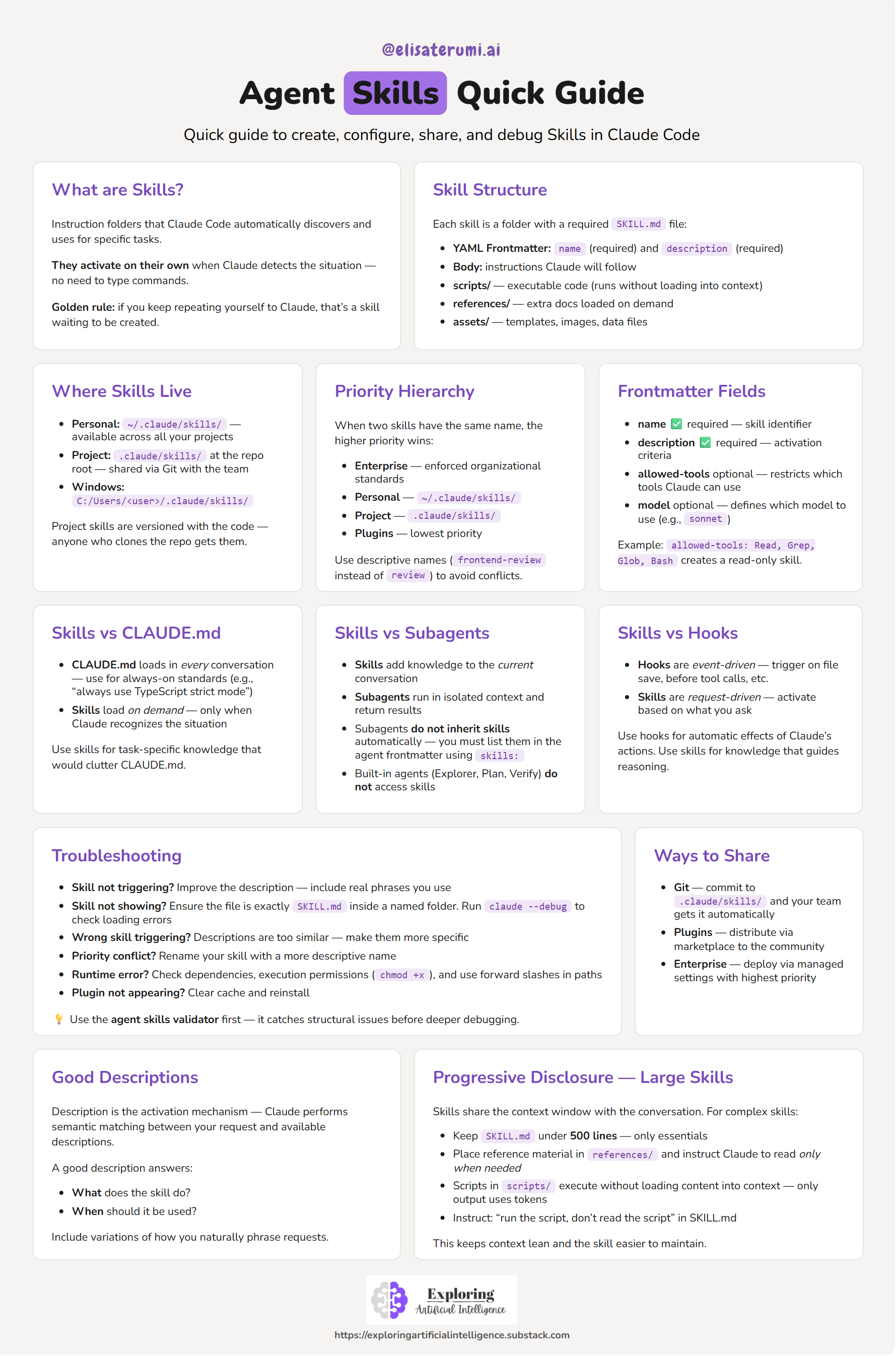
💡 Use this as a quick reference while building your own skills.
What are Skills?
A skill is a structured set of instructions that teaches an AI system how to perform a specific task.
In Claude Code, a skill is:
- A directory
- Containing a
SKILL.mdfile - With metadata and instructions
Once defined, the system can discover and use the skill automatically.
Instead of repeating prompts, you encode behavior once — and reuse it.
How Skills Work
Skills follow a semantic matching workflow:
- The system loads only skill names and descriptions
- A user request is received
- The system compares the request with available skill descriptions
- Matching skills are selected
- The full skill content is loaded and executed
This means:
- Skills are loaded on demand
- They do not clutter context unnecessarily
- They activate only when relevant
Skill Structure
Each skill lives inside a directory and must contain a SKILL.md file.
Example:
---
name: pr-review
description: Reviews pull requests for code quality. Use when reviewing PRs or checking code changes.
---
Below the frontmatter, you define the instructions:
When reviewing a PR:

1. Analyze code changes
2. Check for best practices
3. Suggest improvements
4. Format output as structured feedback
Where Skills Live
Skills can be scoped at different levels:
Personal Skills
- Location:
~/.claude/skills - Available across all your projects
- Ideal for personal workflows
Project Skills
- Location:
.claude/skills(inside a repository) - Shared via version control
- Used for team standards
Skills vs Other Customizations
| Feature | Behavior | Use Case |
|---|---|---|
| Skills | Load on demand | Task-specific expertise |
| CLAUDE.md | Always loaded | Global project rules |
| Slash Commands | Manual invocation | Explicit actions |
👉 Skills are automatic and contextual
When to Use Skills
Use a skill when:
- You repeat the same instructions frequently
- You need consistent output formats
- You want reusable workflows
- You want to share knowledge across a team
Rule of thumb:
If you explain the same thing more than once, it should be a skill.
Example Use Cases
- Code review standards
- Commit message formatting
- Documentation templates
- Debugging checklists
- Data transformation workflows
- Clinical text anonymization
👉 Explore ready-to-use skills: examples
Some examples are inspired by existing open-source skill repositories.
🚀 Creating Your First Skill
Step 1 — Create directory
mkdir -p ~/.claude/skills/my-skill
Step 2 — Create SKILL.md (or use the template)
Create a SKILL.md file inside your skill directory, or copy from the provided template.
---
name: my-skill
description: Describe what the skill does and when to use it.
---
Step 3 — Add instructions
Define:
- Steps
- Rules
- Output format
Best Practices
- Write clear and specific descriptions (this controls activation)
- Keep instructions structured and explicit
- Define expected output formats
- Avoid overly generic skills
- Keep
SKILL.mdconcise (use references if needed)
Common Mistakes
- Treating skills as simple prompts
- Writing vague descriptions (skill won’t trigger)
- Overloading a single skill with multiple responsibilities
- Not defining output structure
Advanced Concepts
Metadata Fields
name(required)description(required)allowed-tools(optional)model(optional)
Progressive Disclosure
- Keep core logic in
SKILL.md - Move large content to:
references/scripts/assets/
Why Skills Matter
Skills transform how we build with AI:
- From prompts → reusable systems
- From manual instructions → automatic behavior
- From experimentation → production-ready workflows
They are a key building block for:
- AI agents
- Automation pipelines
- Scalable AI systems
Resources
Curated links, documentation, and example repositories:
Final Thought
Skills shift the mindset from:
“What should I ask the model?”
To:
“What capability should this system have?”
🤝 Contributing
Contributions are welcome!
Ways to contribute:
- Add new skills or use cases
- Improve documentation and examples
- Report issues or suggest improvements
Feel free to open an issue or submit a pull request 🚀
🔗 Connect with me
I share practical insights about AI, agents, and real-world applications:
- LinkedIn (Profile): https://www.linkedin.com/in/elisa-terumi
- LinkedIn (Page): https://www.linkedin.com/company/exploring-artificial-intelligence
- Newsletter: https://exploringartificialintelligence.substack.com/
- Medium: https://medium.com/@elisa-terumi
Star History
Reviews (0)
Sign in to leave a review.
Leave a reviewNo results found