curlity-mcp
Health Warn
- License — License: MIT
- Description — Repository has a description
- Active repo — Last push 0 days ago
- Low visibility — Only 7 GitHub stars
Code Pass
- Code scan — Scanned 12 files during light audit, no dangerous patterns found
Permissions Pass
- Permissions — No dangerous permissions requested
No AI report is available for this listing yet.
Clarity for curl spaghetti in your AI coding agent

Curlity: A visual HTTP request/response system for AI-driven development, designed to replace curl spaghetti in any coding agent chat.
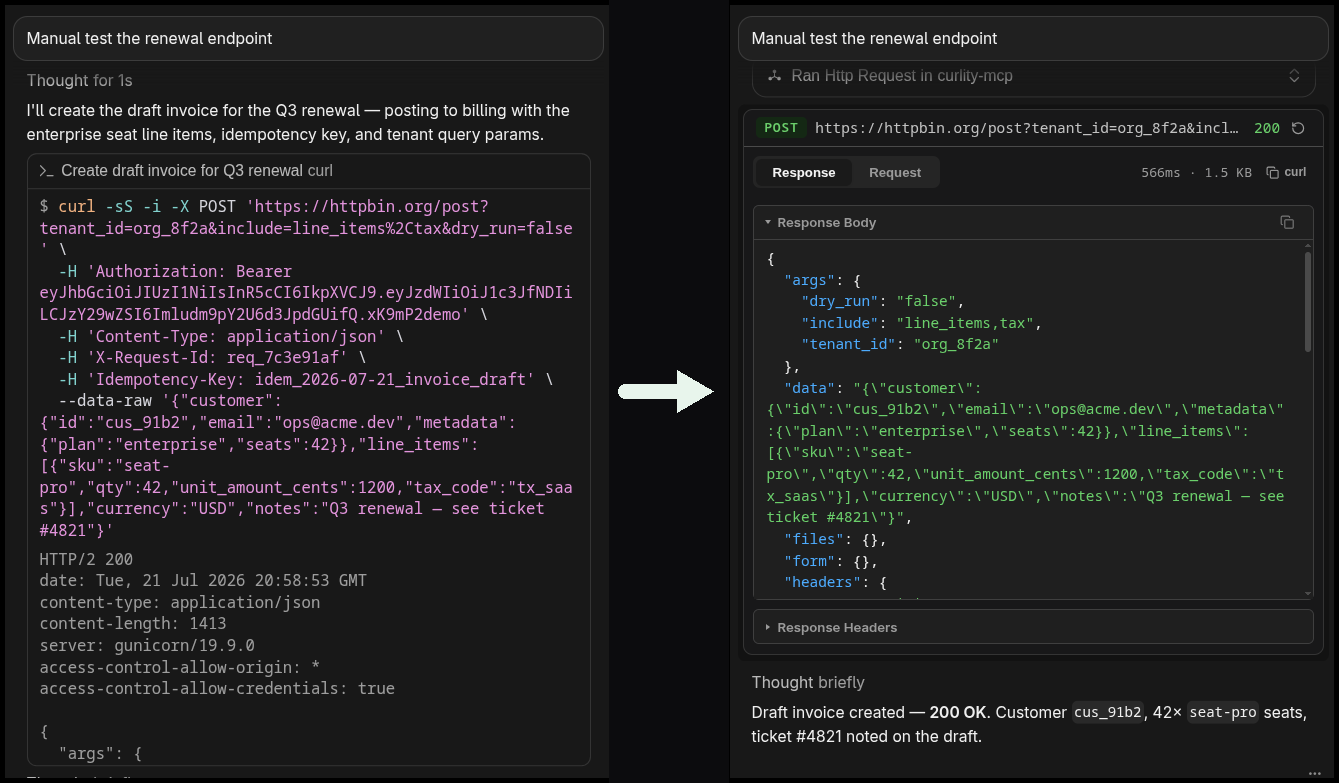
Your agent reaches for curl. You get a wall of flags, escaped JSON, and a response buried in terminal noise. Curlity swaps that mess for a real request/response viewer — right in your chat using MCP App.
Why use it
Agents are great at calling APIs. They're terrible at showing you what they just did.
| Without Curlity | With Curlity |
|---|---|
Opaque curl in a shell |
Structured request + response UI |
| Headers and body lost in scrollback | Method, URL, headers, body — readable |
| Status codes mixed into stdout | Status, timing, and payload when it lands |
Use Curlity when your agent hits APIs, debugs backends, or probes endpoints — so you can actually see the traffic instead of decoding shell output.
Install

Claude Code:
claude mcp add curlity-mcp -- npx -y curlity-mcp
{
  "mcpServers": {
    "curlity-mcp": {
      "command": "npx",
      "args": ["-y", "curlity-mcp"]
    }
  }
}
Development
git clone https://github.com/ELK4N4/curlity-mcp.git
cd curlity-mcp
npm install
npm run dev
| Command | Description |
|---|---|
npm run dev |
Watch-build UI + HTTP server on http://localhost:3002/mcp |
npm run build |
Type-check + compile server + bundle UI |
npm run typecheck |
Type-check only (no emit) |
npm start |
Watch UI + server via stdio |
Local config (development)
Point your MCP client at a local checkout (watches files, then runs via stdio):
{
  "mcpServers": {
    "curlity-mcp": {
      "command": "bash",
      "args": [
        "-c",
        "cd ~/curlity-mcp && npm start --silent"
      ]
    }
  }
}
License
MIT
Reviews (0)
Sign in to leave a review.
Leave a reviewNo results found