elu
Health Pass
- License — License: MIT
- Description — Repository has a description
- Active repo — Last push 0 days ago
- Community trust — 48 GitHub stars
Code Fail
- spawnSync — Synchronous process spawning in bin/elu-code.mjs
- process.env — Environment variable access in bin/elu-code.mjs
- exec() — Shell command execution in lib/adapters/agy.mjs
- os.homedir — User home directory access in lib/adapters/agy.mjs
- process.env — Environment variable access in lib/adapters/agy.mjs
- fs.rmSync — Destructive file system operation in lib/adapters/claude.mjs
- os.homedir — User home directory access in lib/adapters/claude.mjs
- process.env — Environment variable access in lib/adapters/claude.mjs
- os.homedir — User home directory access in lib/adapters/codex.mjs
- fs.rmSync — Destructive file system operation in lib/adapters/grok.mjs
- os.homedir — User home directory access in lib/adapters/grok.mjs
- process.env — Environment variable access in lib/adapters/grok.mjs
Permissions Pass
- Permissions — No dangerous permissions requested
No AI report is available for this listing yet.
A full-screen terminal app that runs coding sessions on the AI command lines you already use, with bots that review and do work, and teammates you can ask.
ELU Code
A full-screen terminal app that runs coding sessions on the AI command lines you already
use, with bots that review and do work, and teammates you can ask.
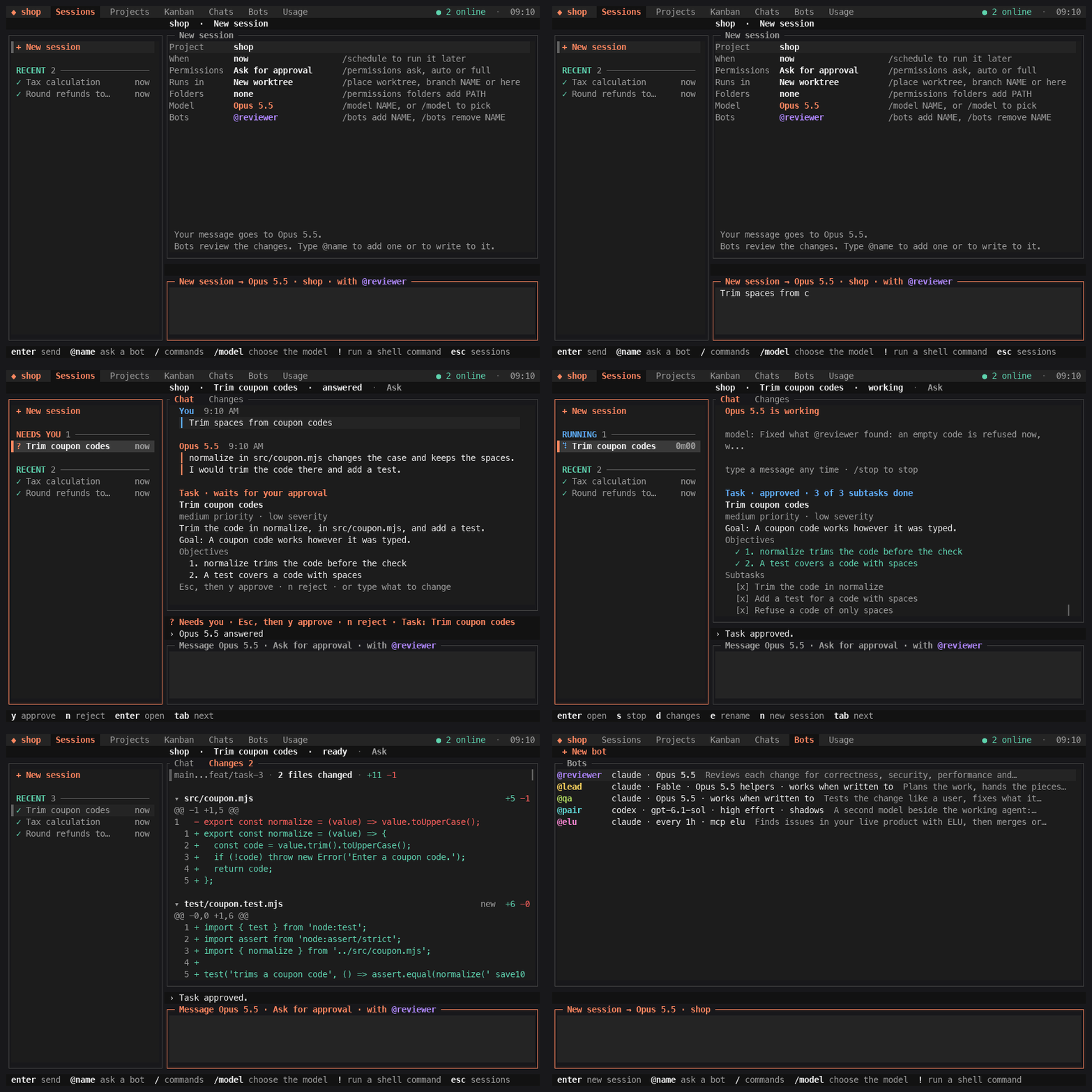
Install
From your home folder, not inside a project you do not trust:
npx -y @elu-labs/elu
This opens ELU Code and installs the elu command; next time you type elu.
You need macOS or Linux, Node 22 or newer, Git, Claude Code signed in, and Codex installed
(no sign-in needed; its sandbox runs your project's checks):npm install --global @openai/codex. Using Antigravity? Read
its page first. More in Install details.
Start
elu
The first start asks for a project name; later starts open your last project. Type a
message and press Enter. That starts a session: the model answers, or edits in a new Git
worktree on its own branch. Then the project's checks run and @reviewer reviews the
change. Nothing is pushed until you type /publish and confirm.
A worktree sits beside its repository, in a folder named after it with .elu-code added
(shop.elu-code beside shop). When a Task edits the project folder itself and the folder
has no commits yet, ELU Code first commits its files there as Start project history,
running git init if it needs to, and pushes nothing. A file that looks like a secret, such
as .env, stops it until .gitignore keeps that file out.
| Tab | What it shows |
|---|---|
| Sessions | Every session across your projects. The selected one is open beside the list. |
| Projects | Your projects. n makes one, o makes another the active one. |
| Kanban | The open project's tasks: To do, In progress, Needs you, Done. In a project shared with a team, the Tasks teammates' sessions are working on show under them, by teammate, to read only. |
| Chats | Your team's channels, your teammates and your bots. |
| Bots | Your bots. n makes one, Enter opens one. |
| Usage | Your vendor accounts and their plan usage. |
Click a tab's name. Or press Tab until the tab row is selected, choose with ← and →, and
press Enter.
Tasks
Ask for a change to code or files, or for work that needs planning, and the first reply is
a Task: a title, a description, the goal, the objectives that say when it is done, a
priority and a severity. Nothing is edited yet.
| Do | What happens |
|---|---|
Esc, then y |
Approves the Task. The work starts by itself. |
Esc, then n |
Rejects it. Nothing is changed. |
| Type a message | Changes the Task. The card shows the new revision. |
Typing yes and Enter approves too. A question gets a plain answer and no Task. A follow-up
inside an approved Task's goal starts at once; a new piece of work gets a Task of its own.
An approved Task gives its session its name, unless you named the session yourself.
On the Kanban tab a session with a Task shows as that Task: its title, how far it is, its
priority and its severity. One that waits for your approval is under Needs you. Enter opens
its session.
After you approve, the model splits the work into subtasks and changes them as it likes.
The card lists them as a checklist and marks the objectives the model reports met. The
Task is done when every objective is reported met and the turn, with its checks and
review, has ended. A new message opens it again.
ELU Code starts the edit only for a Task you approved. What the model can still do in its
first turn depends on the vendor and the mode:
docs/permissions.md.
Commands
Type these in the message box. / alone lists every command, and /help explains the keys.
You can send a message at any time. One sent while the session is working waits in the chat and is sent by itself when that turn ends; several go together, in order. ↑ in the empty message box takes the newest one back so you can change it.
| Type | What it does |
|---|---|
/new |
Starts a new session |
/model sonnet |
Chooses the model of this session; /model alone lists them |
/permissions auto |
Sets what the model may do: ask, auto or full |
/place branch try-coupons |
Sets where a new session runs: worktree, branch NAME or here |
/bots add qa |
Keeps a bot in this session; /bots remove qa takes it out |
/agent add fable |
Adds another model to this session as an agent; write @fable and what to do. Words after the model say what it is for, and --name NAME names it: /agent add sonnet you review my SQL --name sql |
@pair is there a simpler way? |
Asks a bot. Your next messages in that session go to it too |
@model and what do you think? |
Writes to the session's model again |
/changes |
Shows what this session changed; /chat goes back |
/publish |
Shows the exact push and draft pull request, then asks you |
/stop |
Stops the running response. A message you sent while it ran is sent next; /stop again cancels that message |
/schedule |
Starts a session later or on a schedule, such as daily 9:00 or every 2h |
/budget 5 |
Limits this session to 5 dollars; /budget off removes the limit |
! git status |
Runs a shell command. In an open session the model gets the command and its output with your next message |
/quit |
Closes ELU Code. Sessions that are running or queued go on in the background; elu conductor stop stops them |
A schedule also runs while ELU Code is closed, through a login item, once ELU Code is
installed (not run through npx). On macOS, while an agent works or a schedule is on, ELU
Code stops the Mac from going to sleep on its own (caffeinate -i); the display can still
sleep. Schedules show in the Sessions tab under Scheduled: p pauses one and x deletes
it.
Permissions
Each session runs in one of three modes. /permissions ask, auto or full changes it,
and /permissions default auto sets what new sessions start with.
- Ask for approval (
ask, the default): asks before outside edits, escapes, and internet.
Codex cannot ask you during a turn, so there these are refused and reported. - Approve for me (
auto): a reviewer model, not you, decides on escapes and internet.
On Grok Build, what its reviewer refuses then asks you. - Full access (
full): any file, any command, the internet.
When the model asks, y allows and n denies; f allows and gives that session Full access.a allows and keeps a narrow rule, such as npm test or git diff, for this project or all
of them, so it is not asked again. Reads in the project, git reads and the project's own test,
lint and build scripts run without asking from the start. /permissions rules orelu permissions lists them all and removes any. The never list always wins.
You can change the mode while a turn runs.
Bots that review, and a teammate's question, always run read only./permissions folders add <path> lets the model read one more folder of your home this
session.
On Claude Code, your own MCP servers (claude mcp list) are on for the model and for bots
that work, and their tools run without asking in every mode. Neither the sandbox nor the
never list below covers them, so a server can reach the internet and act on other services./mcp off NAME turns one off for the project. A teammate's question never gets them.
ELU Code does not push, merge, tag, deploy or publish by itself. /publish shows the exact
push and the draft pull request, waits for you, and refuses a default branch. The model is
told never to run those commands, and on Claude Code they are denied by rule; in Full access
that is a rule on the command's text, not a sandbox. Stand-in commands, first on every
session's PATH, also refuse them by name, inside a script too; a full path to the real
command gets past those. One exception: a bot that is allowed
to merge pull requests may run gh pr merge. Ask for approval still asks you first; in
Approve for me the reviewer model decides. @elu comes allowed; a bot you make is not.
Details:
docs/permissions.md, SECURITY.md.
Bots
A bot is a model with a name and instructions. You write it once and use it in any session.
In a session a bot reviews each change, answers when you write @name, or does work of its
own.
Five come with the app. You can edit or remove any of them in the Bots tab.
| Bot | Runs on | What it does |
|---|---|---|
@reviewer |
Claude, Opus | Reviews every change for correctness, security, performance and maintainability |
@lead |
Claude, Fable, with Opus helpers | When you write to it: plans the work, hands the pieces to helpers, and checks what they return |
@qa |
Claude, Opus | When you write to it: tests the change like a user, fixes what it finds, and verifies each fix |
@pair |
Codex, gpt-6.1-sol, high effort |
A second model beside the working agent: says what it would challenge after each turn, and reviews each change |
@elu |
Claude, every hour | Finds issues in your live product with ELU, then reviews and merges the fix pull request or writes the fix |
- A new session starts with
@reviewer./bots add qaadds another bot, and so does@qa
alone and then Enter. @lead plan the refund changegives a bot work.@lead,@qa,@eluand each bot you
make do the work you write to them, within the session's permissions;@reviewerand@pairread and answer.- After you write to a bot, your next messages in that session go to it too, until you name
another bot or start a message with@model. The title of the message box names who gets
the message. A bot you stop picks up where it stopped on your next message when it runs on
Claude Code or Grok Build; on the others its next turn starts from the chat. When it
cannot pick up, a line in the chat says so and the turn starts from the chat. - To make a bot, open the Bots tab, press
nand answer its questions. Enter on a bot
opens its page, where each row changes one thing: its model, its schedule, its MCP
servers, its instructions. How a bot goes about its work is in its instructions: write
there that it hands pieces to helpers, and on Claude Code it can start them. - A bot whose model your Claude account has no usage credits for runs once more on the
session's model, when that is another Claude model, and the chat says so in one line. Its later turns in that session start
there. - Each bot has a color: its name and its replies show in it. Color on its page changes
it, and so does/bots color qa gold./bots color qa randompicks another. @elustarts when it joins a session and then runs there every hour. Once ELU Code is
installed, it runs while ELU Code is closed too, through the login item that runs
schedules./bots schedule off elustops that in one session. It needs ELU connected:npx -y @elu-labs/cli --offer=promosigns you up, or in, adds ELU to your web app and
connects your AI tools.
Teammates
Your computer can ask a teammate's, and theirs can ask yours. There is no ELU server:
the two connect directly over Hyperswarm.
# on your computer
elu id --name sam        # once: your name on the team
elu team create shop
elu invite               # prints a code like k7qm-x2pd-9fhw; it works once, within 24 hours

# on your teammate's computer, in their copy of the project
elu id --name kim
elu join CODE            # joins their team; your messages start sessions here
There is nothing to turn on. Once your computer is on a team, a background process (the
peer daemon) keeps it reachable by your teammates, also while ELU Code is closed. Until you
invite someone or join a team, nothing starts and nothing connects. There is no off switch
while you stay on a team: /leave (or elu team leave) takes you off one, and once you are
on no team the daemon stops. If no teammate was online to hear that you left, it keeps
running until one of them connects and is told. The person who made a team cannot leave it.
An admin removes a teammate with /remove @kim (or elu team remove kim). Leaving, or being
removed, also forgets what that team's messages could do on your machine. A new invite
brings you back and sets it again: /join asks, and elu join saves its flags, Auto with
no rules when there are none.
elu peers shows who is online. In the app, write to a teammate in the Chats tab, or
type @kim where are the tax rates? in any session. A message always reaches them, and
they can reply in the same thread.
What a teammate's message does on your machine is yours to choose, once per team: /join
asks, and so does your first /invite for a team. Auto (the default for a new team)
starts a session in your project as if you had typed the message yourself: it runs in the
project folder, reads your home folder (not the secret folders) and uses your MCP servers,
in your default permission mode but never Full access, and its answer goes back without you
reading it unless it looks like a secret. Any Task it proposes waits for your approval, and
only an approved Task's edit runs in a new worktree. Manual keeps each message waiting
until you press y. You can also write rules in plain English, such as "Only work on the elu
repo. Don't write anything until I accept it.", and every session a teammate starts is told
them. A teammate's message never runs in your home folder on its own: ELU Code asks you
first, and runs it there only when you press y. Their session shows their own words under their name. Push, merge, tag, deploy and publish stay blocked as they are for your own sessions in
that mode. SECURITY.md has the details. /access,
or elu access, shows and changes all of it.
elu share, or /share in the app, shares the project you are in, so teammates can name it
and see its live work. Inviting a teammate shares one too: elu invite shares the folder you
run it in when it is an ELU Code project (--project PATH names another), and /invite
the open project. Joining shares nothing of yours. The wire format is in
docs/peer-network.md.
Teammates on a team a project is shared with also see the work in it: for each live
editing task, the first line of its request and the paths of the files it changed, and the
approved Tasks its sessions work on. elu share --no-status, in the project, turns that
off. SECURITY.md says exactly what is sent.
A message you type can carry pictures. Drag a screenshot into the message box, or write
its path, and it goes with the message: up to 4 pictures, 8 MB each. Your teammate's model
sees them when it answers.
/leave (or elu team leave) takes you off a team. An admin's /remove @kim (orelu team remove kim) takes kim off it, and kim's daemon stops when kim is on no other
team. Either way, a new invite brings them back, also when nobody heard the leave yet: the
leave goes along with the invite.
Your own computers work together the same way. On your laptop, /invite and choose
"Another computer of mine" (or elu invite --mine), then /join that code on your devbox
and answer Yes when it asks if the laptop is yours too (or elu join CODE --mine). A devbox
already on your team needs no code: pick it in that same list, or run /mine @devbox on the
laptop and /mine @laptop on the devbox. From then on, @devbox fix the flaky test in the
new session box starts the session on the devbox, with the mode, model and bots you picked.
It shows in Sessions marked "on devbox", live, and its approvals wait on both machines. It is
your own session there, so your rules apply, and a on its approval, from either machine,
keeps the rule on the devbox, where it runs. /mine lists your computers and/mine remove @devbox ends it.
SECURITY.md says what that allows.
In a channel, /invite @kim adds a teammate you already have. /invite alone makes a
code for someone new; the first time, it also makes your team, named after the open project.
Install details
Sessions run in the vendors' own unmodified command lines (Claude Code, Codex, Antigravity
and Grok Build), with your existing sign-in. ELU Code has no account and no telemetry, and
it never reads your Claude Code sign-in. The Usage tab shows Claude plan usage from what
Claude Code reports during your sessions. For Codex plan usage, ELU Code starts Codex's ownapp-server, which asks with your Codex sign-in, whenever codex is installed: when you
open a project that is set up or send a message, at most once a minute while a session is
on screen, and from the Usage tab (what is read and when).
You need macOS or Linux, Node 22 or newer, Git, and Claude Code (claude) installed and
signed in: new projects and the built-in bots run on it. To run sessions on Codex
(codex), sign in to it and choose it with /model.
Codex must be installed even if your sessions run on Claude Code, but it does not need to
be signed in. ELU Code runs your project's checks and its pre-push hooks inside Codex's
sandbox (codex sandbox); without it the checks fail and /publish refuses. Install it
with npm install --global @openai/codex. To use a copy that is not on your PATH, setELU_CODE_SANDBOX_HELPER to its absolute path. On Linux that sandbox is bubblewrap:
install bubblewrap and, on Ubuntu 24.04, load the AppArmor profile in
docs/permissions.md. The Linux tests run with both.
GitHub CLI (gh) is needed for draft pull requests, and for @elu to review and merge a
fix pull request.
The first run of npx -y @elu-labs/elu opens ELU Code and installs elu as a global
command: it prints the npm install --global line it runs, and uses ~/.local when npm's
global folder cannot be written. To open ELU Code without installing anything, runELU_NO_INSTALL=1 npx -y @elu-labs/elu.
Run npx -y @elu-labs/elu from your home folder, not from inside a project you do not
trust: npx lets the folder it starts in decide what runs.
The Usage tab lists the vendor command lines ELU Code found and whether each is signed in.
Antigravity (agy) and Grok Build (grok) are checked once on each machine: your first
message to one starts the check by itself. It takes about seven short turns on that vendor
and a few minutes. Vendor notes: docs/vendors.
Google's FAQ says that using another app to reach Antigravity breaks its terms and can get
your account suspended or terminated. ELU Code wraps agy, so read
docs/vendors/antigravity.md before you send it a message.
Update and remove
npx -y @elu-labs/elu@latest
That installs the newest version where elu already is, and opens it.
To remove ELU Code, first delete your schedules in the app (Sessions tab, under Scheduled:x on each one), so they no longer keep the Mac awake, and quit it with /quit.
Then remove the login item that runs schedules, and bots with a schedule such as @elu,
while ELU Code is closed, if there is one. On macOS, runlaunchctl bootout gui/$(id -u) ~/Library/LaunchAgents/dev.elu-code.scheduler.plist
and delete that file. On Linux, run systemctl --user disable --now elu-code-scheduler.timer
and delete elu-code-scheduler.service and elu-code-scheduler.timer in~/.config/systemd/user.
Stop what still runs in the background:
elu peer uninstall          # stops the peer daemon and removes its login item
elu conductor stop          # stops sessions that are still running
In each project folder that is a Git repository, see what ELU Code would remove there,
then remove it:
elu uninstall --dry-run
elu uninstall               # asks before it removes anything
That removes the project's run history in .git/elu-code, which can hold secrets a command
printed; its task worktrees, and their folder once it is empty; and what elu init or/setup wrote: .elu-code/config.yaml and the marked part of AGENTS.md and CLAUDE.md.
It keeps the task branches. It stops at a worktree with changes you have not committed,
and at a worktree of another repository: remove those first, as below.
Last:
npm uninstall --global @elu-labs/elu
If elu is in ~/.local/bin, add --prefix "$HOME/.local" to that line.
These stay, for you to delete:
~/.config/elu-code: your bots, your projects, your peer identity, and the sessions of a
project whose folder is not a Git repository.~/.local/share/elu-code: the stand-in commands that refuse the never list.~/.cache/elu: an empty folder that held Claude Code's temporary files..elu-code/project.jsonin each project folder, with the project's name, and any
setting saved beside it thatelu uninstalldid not list.- Task worktrees in a repository that is not itself the project folder, which a session
edited. They sit beside that repository, inshop.elu-codeforshop. In the
repository,git worktree listshows them andgit worktree remove PATHremoves one;
then delete the folder. - Task branches, whose names start with
feat/task-:git branch -D NAMEin their
repository.
Help and contributing
- A question or a bug: open an issue.
- A security problem: report it privately, as SECURITY.md says.
- A change to the code: CONTRIBUTING.md.
Credits and license
MIT licensed. Sponsored by ELU.
@reviewer is adapted from the code-review skill in Anthropic's knowledge-work-plugins
(Apache-2.0), and @qa from the qa skill in gstack by Garry Tan (MIT). The examples intest/fixtures/a2a/ come from the A2A specification (Apache-2.0). See
THIRD_PARTY_NOTICES.md.
Reviews (0)
Sign in to leave a review.
Leave a reviewNo results found