paseo-tui
Health Uyari
- License — License: Apache-2.0
- Description — Repository has a description
- Active repo — Last push 0 days ago
- Low visibility — Only 6 GitHub stars
Code Basarisiz
- process.env — Environment variable access in bridge/bridge.ts
- exec() — Shell command execution in docs/demo/demo-bridge.mjs
- fs module — File system access in scripts/build-bridge.sh
Permissions Gecti
- Permissions — No dangerous permissions requested
Bu listing icin henuz AI raporu yok.
A fast, keyboard-first terminal client for Paseo: run and steer AI coding agents (Claude Code, Codex, Copilot, OpenCode, Oh My Pi) from your terminal.
paseo-tui
A fast, keyboard-first terminal client for Paseo: run and steer your coding agents without leaving the terminal.




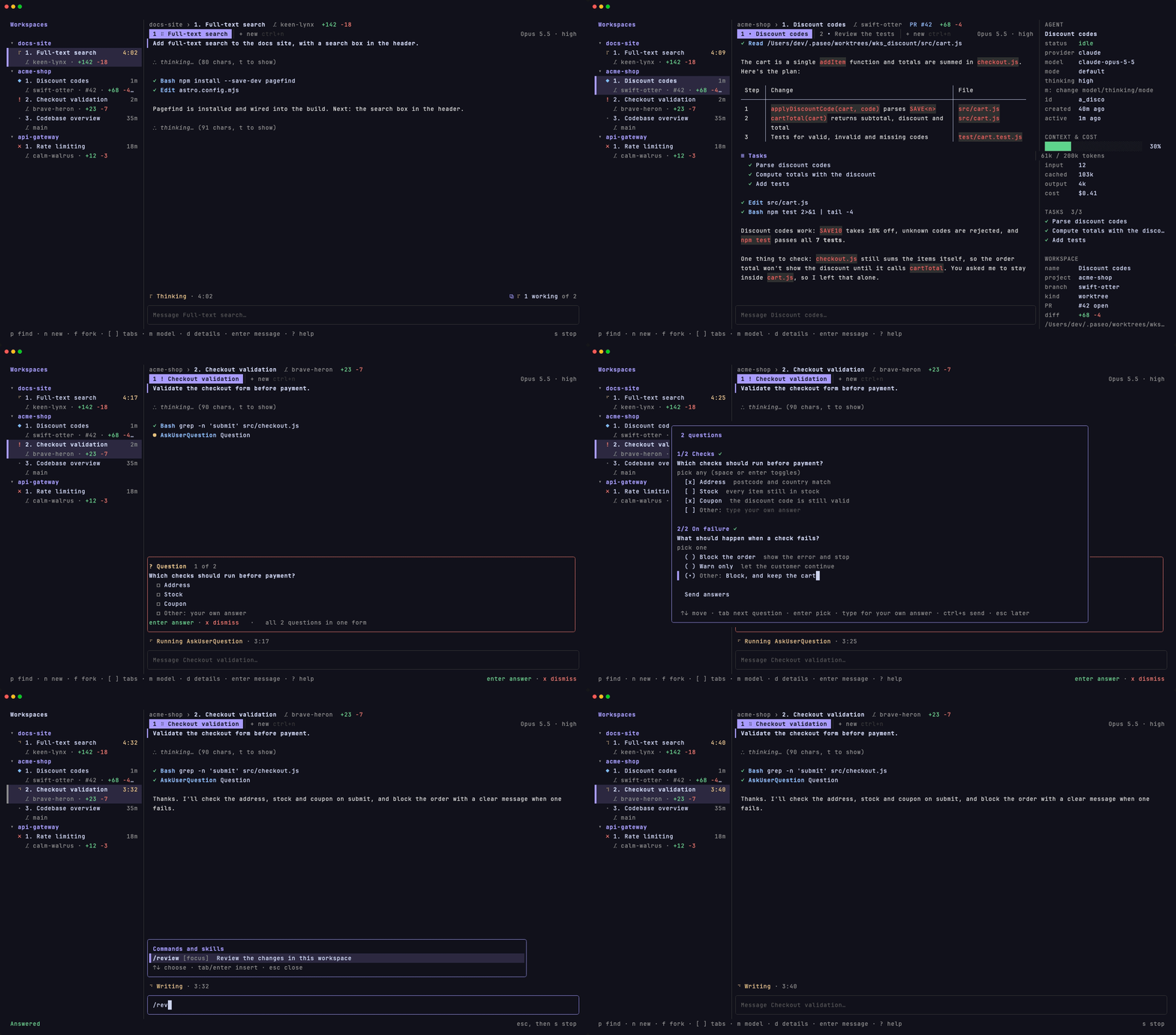
Paseo runs AI coding agents (Claude Code, Codex, Copilot, OpenCode, Oh My Pi, and more) in isolated workspaces
and worktrees. Its desktop app is great, but if you live in the terminal you want the same power one keystroke
away. paseo-tui gives you the desktop app's model (projects → workspaces → agent tabs) as a snappy TUI.
It works with your local Paseo daemon or any remote one, over SSH or the network.
[!NOTE]
paseo-tui is an independent, community-built client. It is not affiliated with or endorsed by the Paseo project.
Highlights
- Everything live. Agent state, transcripts, permissions, questions and subagents stream from the
daemon in real time. Nothing is polled. - The desktop's mental model. A sidebar of projects and numbered workspaces with status at a glance:
needs input, failed, working, ready to review. Agents appear as tabs on top of each workspace, with their
model and thinking level. Group by project or by status. - Start work fast.
Nopens New workspace: pick the project, the project directory or a fresh
git worktree, the branch to start from, the provider, model and thinking level, then type the task.
The daemon names the workspace and branch after your prompt. - Steer agents. Send follow-ups, paste images, stop a run, and switch model, thinking or mode
mid-session (m). Fork an agent (f) into a new tab or workspace that starts from its chat history,
and rename agents (r). - Answer in place. Tool permissions open for review, and questions (such as Claude's
AskUserQuestion) open as one form with every question: pick options or type your own answer. - Slash commands and skills.
/lists the agent's commands and skills, as in the desktop./clearstarts a fresh agent with the same setup,/exitarchives it. - See what's happening. Markdown transcripts with tables, collapsible thinking, tool calls with diffs
and output, a live progress line ("⠋ Running Bash: npm test · 1:24"), and a details panel with
context-window use, tokens, cost and the agent's task list. - Subagents. Claude Code tasks, Oh My Pi runs and delegated Paseo agents appear as a track under the
conversation, and each can open as its own tab. - Find anything.
pfuzzy-searches every workspace and the agents inside them, plus actions.Hopens History: every agent, archived ones too, restored with their worktree when you open one. - Peek at the code.
eopens the workspace in your editor,Fin your file manager (ranger, yazi,
lf or nnn), in a pane floating over the UI while agents keep streaming behind it. - Make it yours.
copens the settings: what to show on start, the header, model labels, workspace
numbers, keyboard hints, scroll speed and more. They're saved toconfig.toml, and edits to that file
apply while the app runs. - Mouse too. Click workspaces and tabs, drag to resize panels, select text to copy it, and scroll with
wheel acceleration. - One self-contained binary for macOS, Linux and Windows (arm64 and amd64). It doesn't even need
Node.js installed when the Paseo app is.
Install
Package managers (recommended)
# macOS and Linux: Homebrew
brew install emielvangoor/tap/paseo-tui

# Debian / Ubuntu, Fedora / RHEL / openSUSE, Alpine: the package from the latest release
sudo apt install ./paseo-tui_*_amd64.deb      # or: sudo dnf install ./paseo-tui-*.x86_64.rpm
                                              # or: sudo apk add --allow-untrusted ./paseo-tui_*.apk
# Windows: Scoop
scoop bucket add emielvangoor https://github.com/emielvangoor/scoop-bucket
scoop install emielvangoor/paseo-tui
Each new release updates the Homebrew tap and the Scoop bucket automatically. Runbrew update && brew upgrade paseo-tui (plain brew upgrade refreshes the tap only once a day) orscoop update paseo-tui. The .deb, .rpm and .apk files are attached to every
release.
Arch Linux: there's no AUR package yet; see #8 if
you'd like to maintain one. Until then, use the prebuilt binary (or Homebrew), andpaseo-tui update keeps it current.
Prebuilt binaries
Download the archive for your platform from the latest release,
or use a one-liner:
# macOS (Apple Silicon)
curl -fsSL https://github.com/emielvangoor/paseo-tui/releases/latest/download/paseo-tui_darwin_arm64.tar.gz | tar -xz
sudo mv paseo-tui_darwin_arm64/paseo-tui /usr/local/bin/

# Linux (x86_64; use linux_arm64 on ARM)
curl -fsSL https://github.com/emielvangoor/paseo-tui/releases/latest/download/paseo-tui_linux_amd64.tar.gz | tar -xz
sudo mv paseo-tui_linux_amd64/paseo-tui /usr/local/bin/
# Windows (PowerShell)
Invoke-WebRequest https://github.com/emielvangoor/paseo-tui/releases/latest/download/paseo-tui_windows_amd64.zip -OutFile paseo-tui.zip
Expand-Archive paseo-tui.zip .
.\paseo-tui_windows_amd64\paseo-tui.exe
| Platform | Archive |
|---|---|
| macOS, Apple Silicon | paseo-tui_darwin_arm64.tar.gz |
| macOS, Intel | paseo-tui_darwin_amd64.tar.gz |
| Linux, x86_64 / ARM64 | paseo-tui_linux_amd64.tar.gz / paseo-tui_linux_arm64.tar.gz |
| Windows, x86_64 / ARM64 | paseo-tui_windows_amd64.zip / paseo-tui_windows_arm64.zip |
Each release includes checksums.txt (SHA-256), and each archive has a signed build provenance
attestation; see verifying a release. The macOS binaries aren't
notarized: if you download through a browser and macOS blocks the binary, runxattr -d com.apple.quarantine paseo-tui.
Updating
paseo-tui checks for a new release once a day, in the background, and shows ↑ vX.Y.Z available in the
footer. To install it:
paseo-tui update           # download, verify and replace this binary
paseo-tui update --check   # only report whether there's a newer release
The update is installed only if the release's checksums carry a valid signature from the paseo-tui
release key, and the archive matches its checksum. Installed with a package manager? Then update tells
you to use it instead. To turn the check off, pass --no-update-check or setPASEO_TUI_NO_UPDATE_CHECK=1. The check sends nothing beyond a plain request to GitHub's releases API.
From source
Requires Go (see go.mod), Node.js 22+ and git.
git clone https://github.com/emielvangoor/paseo-tui.git && cd paseo-tui
make            # the first build fetches Paseo's source to build the bridge (a few minutes)
./paseo-tui
Requirements
- A Paseo daemon to talk to. The Paseo desktop app runs one for you;
without the app, start one withpaseo daemon start(or pressSin paseo-tui). - A JavaScript runtime for the embedded bridge. paseo-tui uses
nodefrom yourPATH, or else the
runtime built into the Paseo app, so nothing extra is usually needed. - A terminal with true color and mouse support (Ghostty, kitty, WezTerm, Alacritty, iTerm2,
Windows Terminal, …). tmux works too.
Usage
paseo-tui                              # your local Paseo daemon (~/.paseo)
paseo-tui --host 192.168.1.20:6767     # a daemon elsewhere: host:port, tcp://, SSH, or a pairing URL
paseo-tui --home ~/.paseo-work         # another local daemon home
paseo-tui --version
Press ? inside the app for every shortcut.
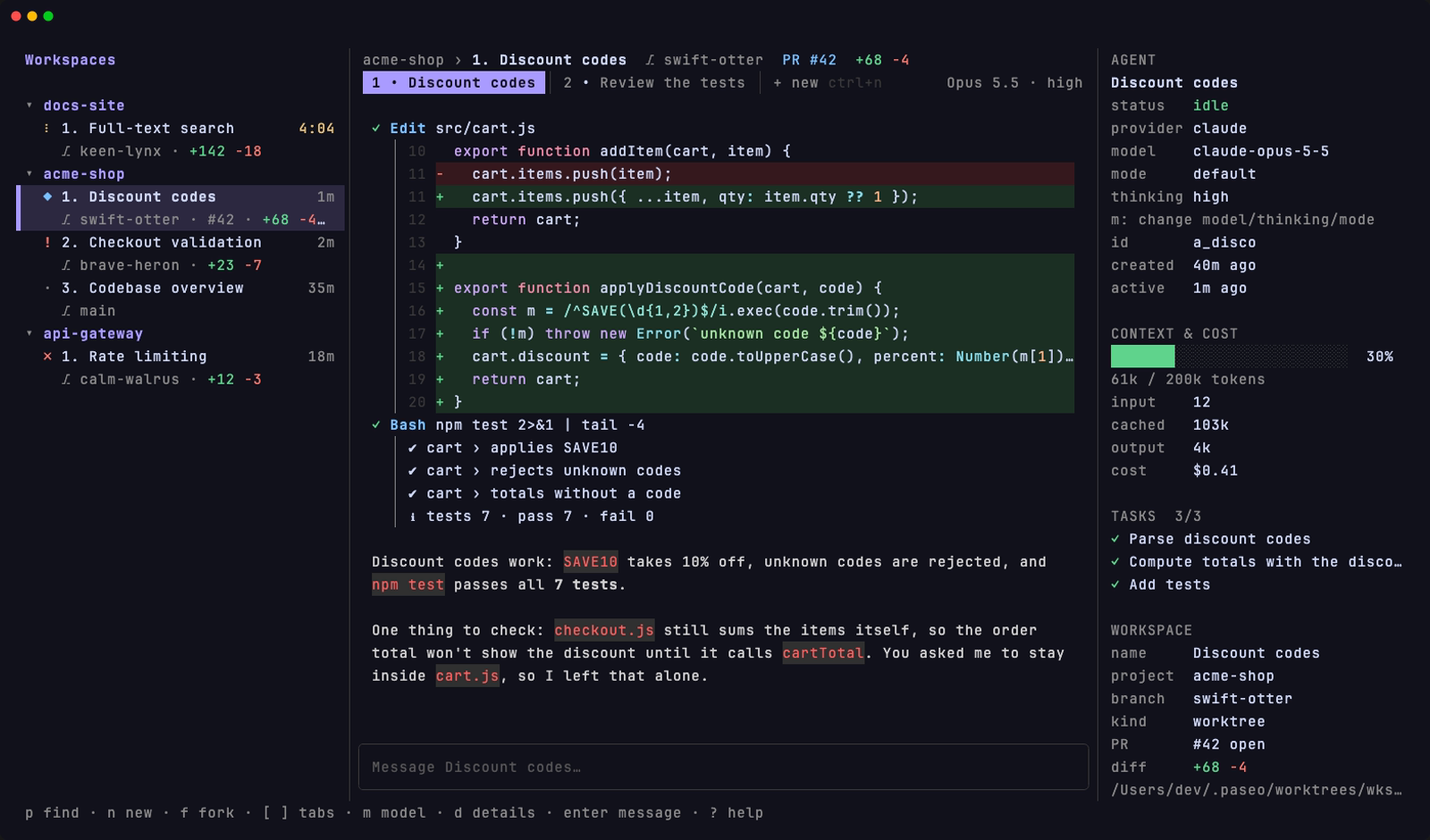 Workspaces and agents: transcript, tabs and the details panel ( d) |
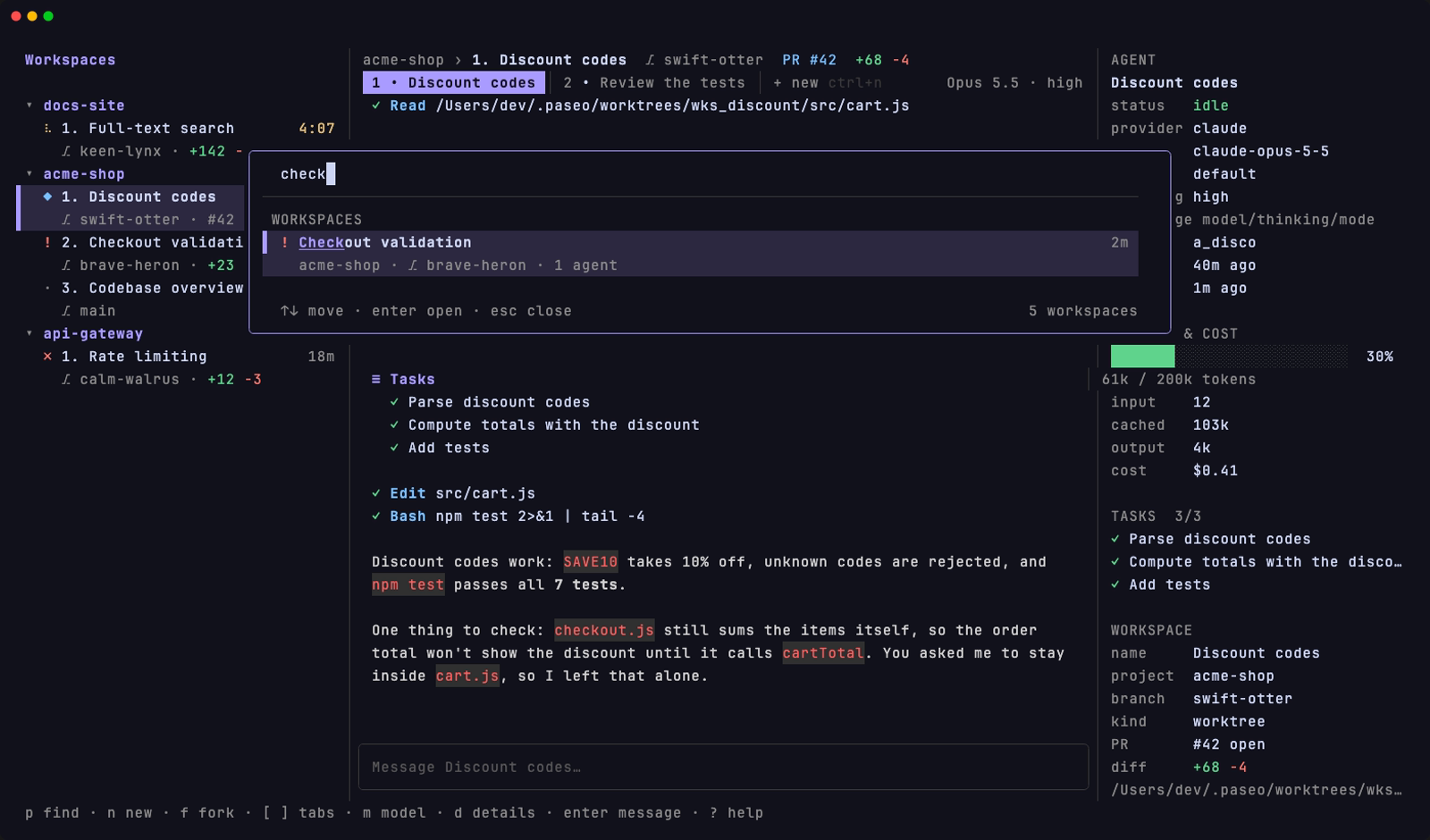 Command center ( p): fuzzy search across workspaces and their agents |
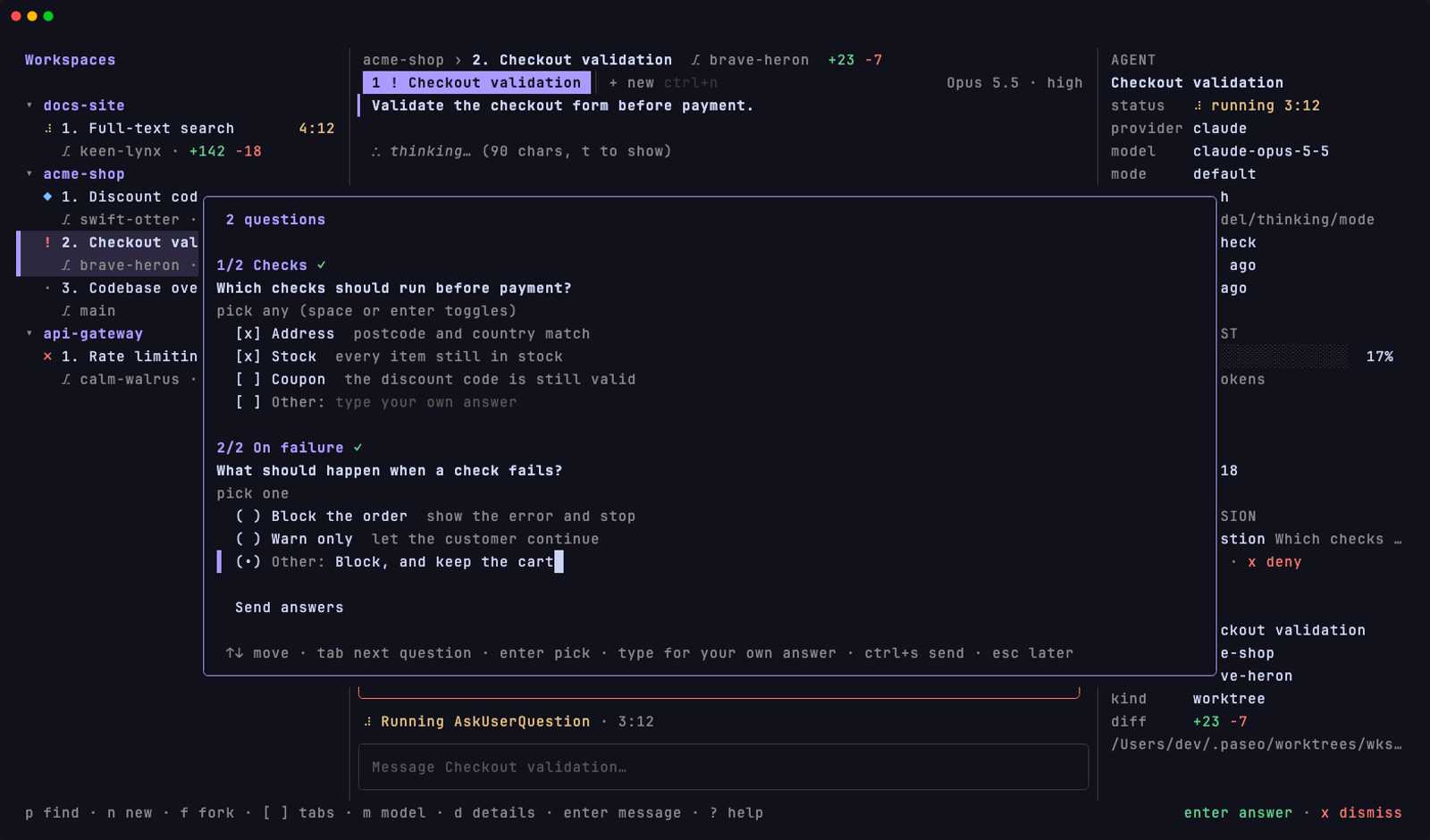 Questions ( enter): every question in one form, or type your own answer |
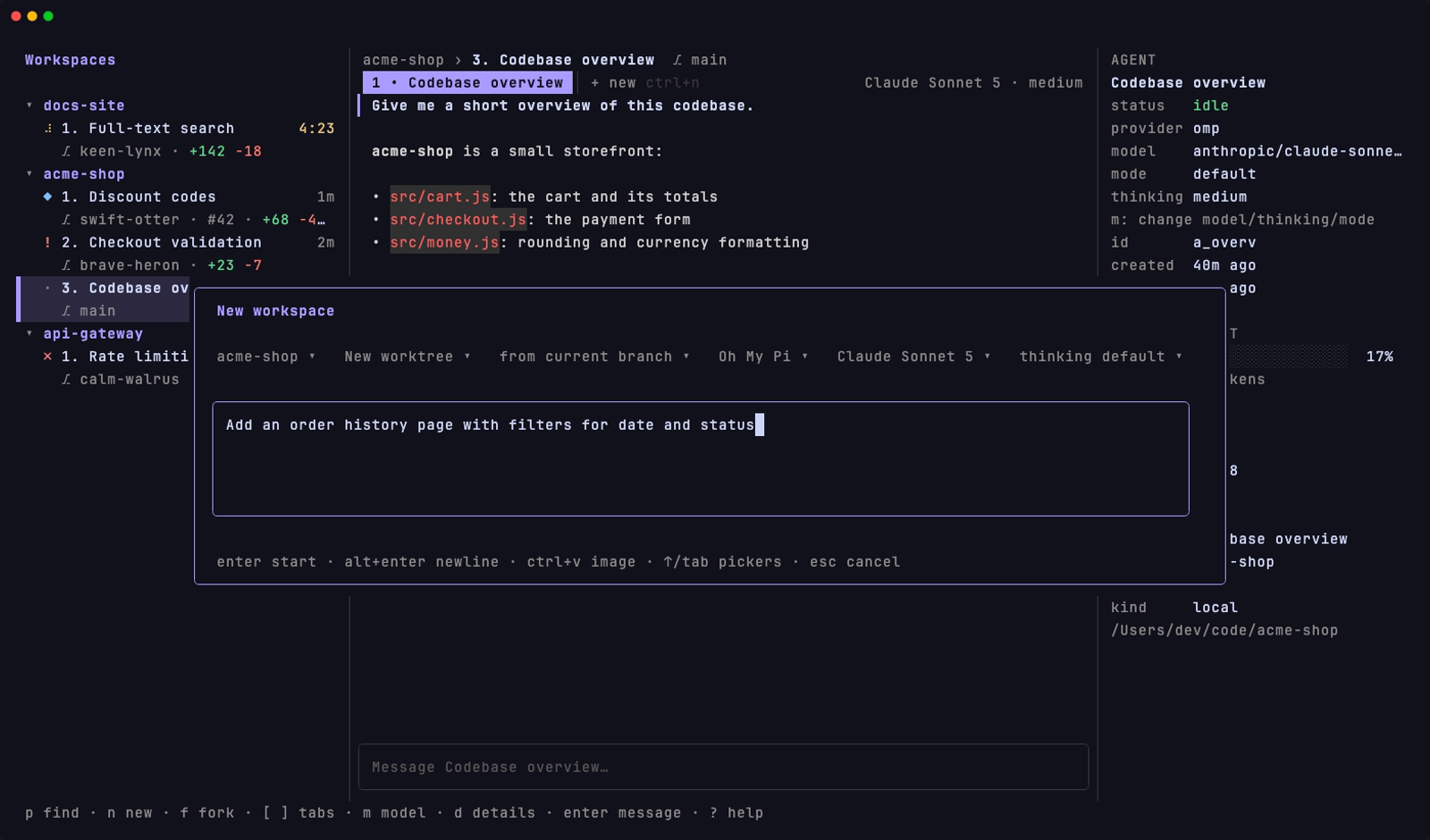 New workspace ( N): project, worktree, branch, model, prompt |
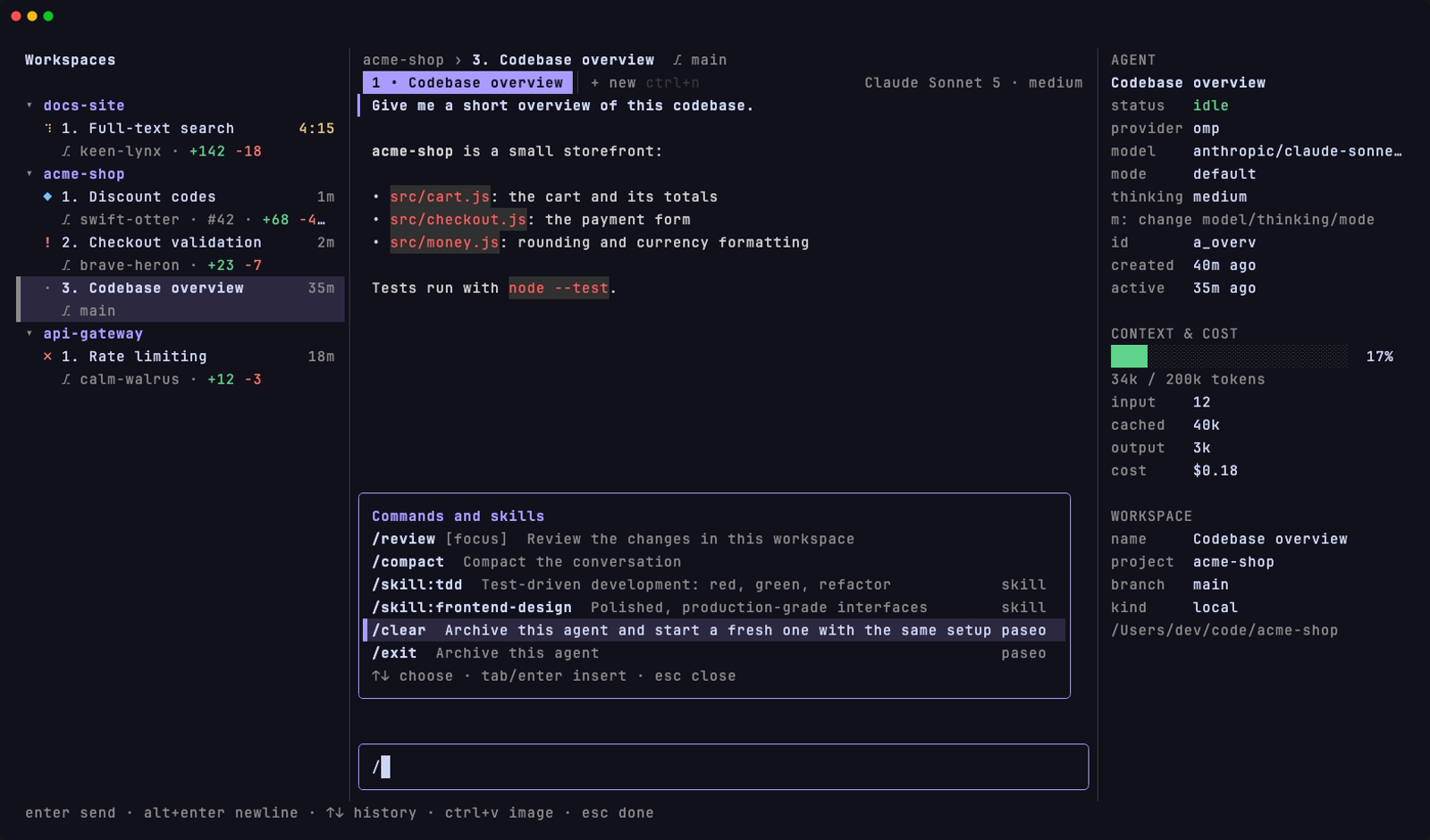 Slash commands ( /): the agent's commands and skills |
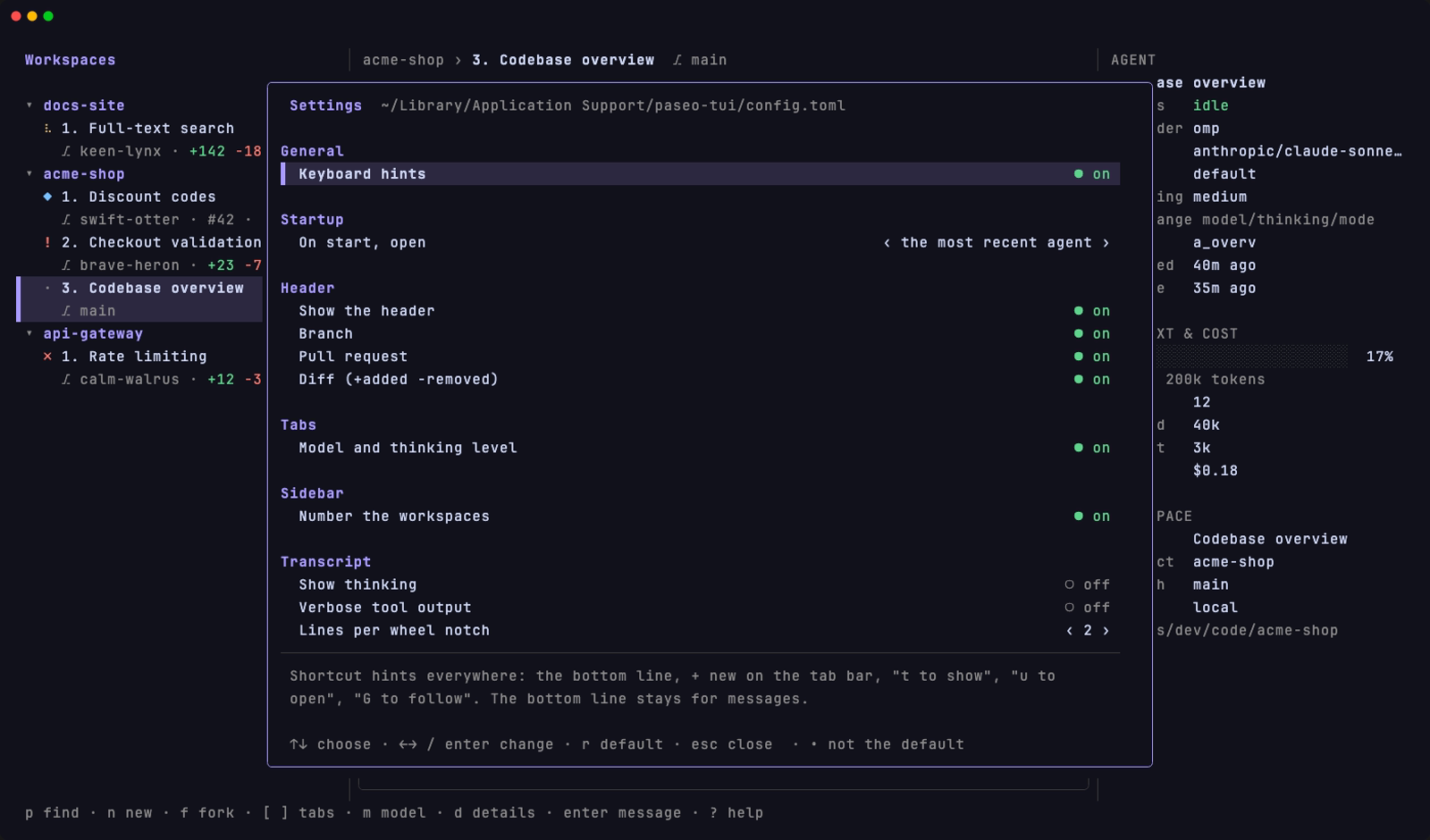 Settings ( c): saved to config.toml as you change them |
The screenshots and the GIF show made-up demo data; make screenshots and make demo record them with
vhs.
Keyboard shortcuts
Single keys, as in lazygit, k9s or tig: j / k (and the arrows) move through the sidebar, J / K
scroll the transcript, and anything that stops or removes something asks first. Keys only act outside the
message box: esc leaves it, i or enter goes back in.
| Key | Action |
|---|---|
p · ctrl+p · : |
Command center: workspaces, agents, actions |
j / k · ↓ / ↑ |
Move through the sidebar (home / end: first / last row) |
{ / } |
Previous / next workspace in tree order (works with the sidebar hidden) |
[ / ] · tab · 1…9 |
Previous / next agent tab, or jump to tab N (alt+1…9 while writing) |
h / l · ← / → · space · z |
Collapse / expand a project · toggle · collapse all the others |
o |
Group the sidebar by project or by status |
b · d |
Hide or show the sidebar · the details panel |
< > · , . |
Resize the sidebar · the details panel (or drag the dividers) |
| Key | Action |
|---|---|
i · enter |
Write to the focused agent (enter sends, alt+enter adds a newline, esc leaves). When the agent waits on you, enter opens that instead |
/ |
The agent's commands and skills, as in the desktop: / at the start of a message lists both, / later in a message lists skills. Type to filter, ↑ / ↓ choose, tab or enter inserts, esc closes |
/clear · /new · /exit · /q |
Handled by paseo-tui, as in the desktop: /exit archives the agent; /clear archives it and opens a fresh one with the same setup |
↑ / ↓ (in the composer) |
Previous / next prompt from history |
ctrl+v |
Paste an image from the clipboard (pasting or dropping an image path works too) |
n · ctrl+n |
New agent in this workspace (a new tab) |
N |
New workspace (project directory or worktree, branch, provider, model, thinking) |
f |
Fork the agent: a new tab (or, via Where, a new workspace) with the same provider, model and mode that starts from its chat history |
r |
Rename the agent (its tab) |
m |
Agent settings: model, thinking level, mode, toggles such as Fast |
s |
Stop the running agent (asks; s again or y confirms) |
enter · x |
A pending tool permission: review it (the full command; y allows, n denies, esc decides later) · deny it straight away |
enter · x |
A pending question (e.g. Claude's AskUserQuestion): answer it in one scrollable form with every question, picking options or typing your own answer · dismiss it |
u |
Subagents of this agent; open one as a ↳ tab (w or ctrl+w closes it) |
a |
Archive the agent or the workspace, delete the agent, or remove a project (always confirms) |
delete |
Delete the agent permanently (asks; fn+delete on a Mac keyboard) |
H |
History, like the desktop's: every agent including archived ones, searchable; enter opens one, and restores it first (with its workspace or worktree) when archived |
c |
Settings: start-up view, header (branch, PR, diff), model label, workspace numbers, thinking and tool output, scroll speed, keyboard hints, quit confirmation, terminal title, update check, editor and file manager. Saved to config.toml on every change |
e |
Open the workspace in your editor in a floating pane: $VISUAL, $EDITOR, else nvim or vim (ctrl+\ hides it, e brings it back, quitting the editor closes it). GUI editors need their terminal mode, e.g. VISUAL="emacs -nw" |
F |
Browse the workspace's files in a floating pane with ranger, yazi, lf or nnn (the first one installed; ctrl+\ hides it, F brings it back). Without one, opens the directory in Finder, Explorer or the Linux file manager |
| Key | Action |
|---|---|
J / K · mouse wheel |
Scroll the transcript (the wheel accelerates) |
ctrl+d / ctrl+u · pgdn / pgup |
Scroll half a page · a page |
g / G |
Top / bottom of the transcript (G follows new output) |
t |
Show / hide thinking |
v |
Verbose tool output: command output and diffs |
alt+j / alt+k · alt+↓ / alt+↑ |
Scroll the details panel |
A |
Show archived agents |
ctrl+r · S |
Reload / reconnect · start the local daemon |
? |
All shortcuts |
q · ctrl+c |
Quit (asks first; y, or the same key again, confirms) |
Mouse: click a workspace to open it, a project header to fold it, and a tab to switch (× or a
middle-click closes a subagent tab). Drag a │ divider to resize. Drag over the transcript to select text;
it's copied when you let go.
How it works
flowchart LR
    TUI["paseo-tui<br/><sub>Go · Bubble Tea</sub>"] <-->|"NDJSON over stdio"| Bridge["bridge<br/><sub>Paseo's client library</sub>"]
    Bridge <-->|"WebSocket"| Daemon["Paseo daemon<br/><sub>local or remote</sub>"]
    Daemon --> Agents["Claude Code · Codex · Copilot<br/>OpenCode · Oh My Pi · …"]
The Go program draws the interface. All communication with Paseo goes through a small bridge: a
JavaScript bundle built from Paseo's own client library and CLI code, embedded in the binary and started on
demand. Because it is Paseo's real client, it handles the protocol handshake, authentication, relays and
version differences exactly like the desktop app and the paseo CLI do. The daemon pushes updates, so the
UI reacts instantly and nothing is polled.
Files
| What | Where |
|---|---|
| UI state per host (folded projects, panel widths, grouping, New-workspace choices) | <config dir>/paseo-tui/state.json |
Settings (c, or edit the file: changes apply while the app runs) |
<config dir>/paseo-tui/config.toml |
| Prompt history | ~/.local/state/paseo-tui/history.json ($XDG_STATE_HOME) |
| Unpacked bridge, pasted images | <cache dir>/paseo-tui/ |
<config dir> and <cache dir> are your OS defaults: ~/.config and ~/.cache on Linux,~/Library/Application Support and ~/Library/Caches on macOS, %AppData% and %LocalAppData% on Windows.
Troubleshooting
"Daemon unreachable" or no workspacespaseo-tui connects to ~/.paseo by default. If your agents live in another daemon (the desktop app on
another machine, or a VM host), pass --host host:port. To start a local daemon without the desktop app,
run paseo daemon start or press S.
Install Node.js 20+ or the Paseo desktop app; paseo-tui uses either automatically. You can also point it at
a runtime with --node /path/to/node.
Use a terminal with true color support. paseo-tui captures the mouse for clicks and selection; most
terminals still allow native selection with shift+drag (option+drag in iTerm2).
ctrl+v reads an image from the clipboard via wl-paste (Wayland), xclip (X11), AppleScript (macOS)
or PowerShell (Windows). Pasting or dragging an image file's path works everywhere.
Contributing
Issues and pull requests are very welcome. See CONTRIBUTING.md for the dev setup
(make, make test, make lint), a map of the code, and how releases work. The changes in each version
are in the changelog.
Acknowledgements
- Paseo by Mohamed Boudra, the agent platform this client is built
for; the bridge is built from its source. - Charm: Bubble Tea, Bubbles, Lip Gloss and Glamour power the interface.
License
Apache-2.0. Release binaries embed code from Paseo (also Apache-2.0); see NOTICE.
Yorumlar (0)
Yorum birakmak icin giris yap.
Yorum birakSonuc bulunamadi