quietbrowser
Health Warn
- License — License: MIT
- Description — Repository has a description
- Active repo — Last push 0 days ago
- Low visibility — Only 6 GitHub stars
Code Fail
- spawnSync — Synchronous process spawning in npm/bin/quietbrowser.js
- process.env — Environment variable access in npm/bin/quietbrowser.js
- fs module — File system access in npm/bin/quietbrowser.js
- fs module — File system access in npm/prepack.js
- network request — Outbound network request in npm/prepack.js
Permissions Pass
- Permissions — No dangerous permissions requested
No AI report is available for this listing yet.
A browser for coding agents on Windows that never steals your focus
quietbrowser
A browser for coding agents that never steals your focus.
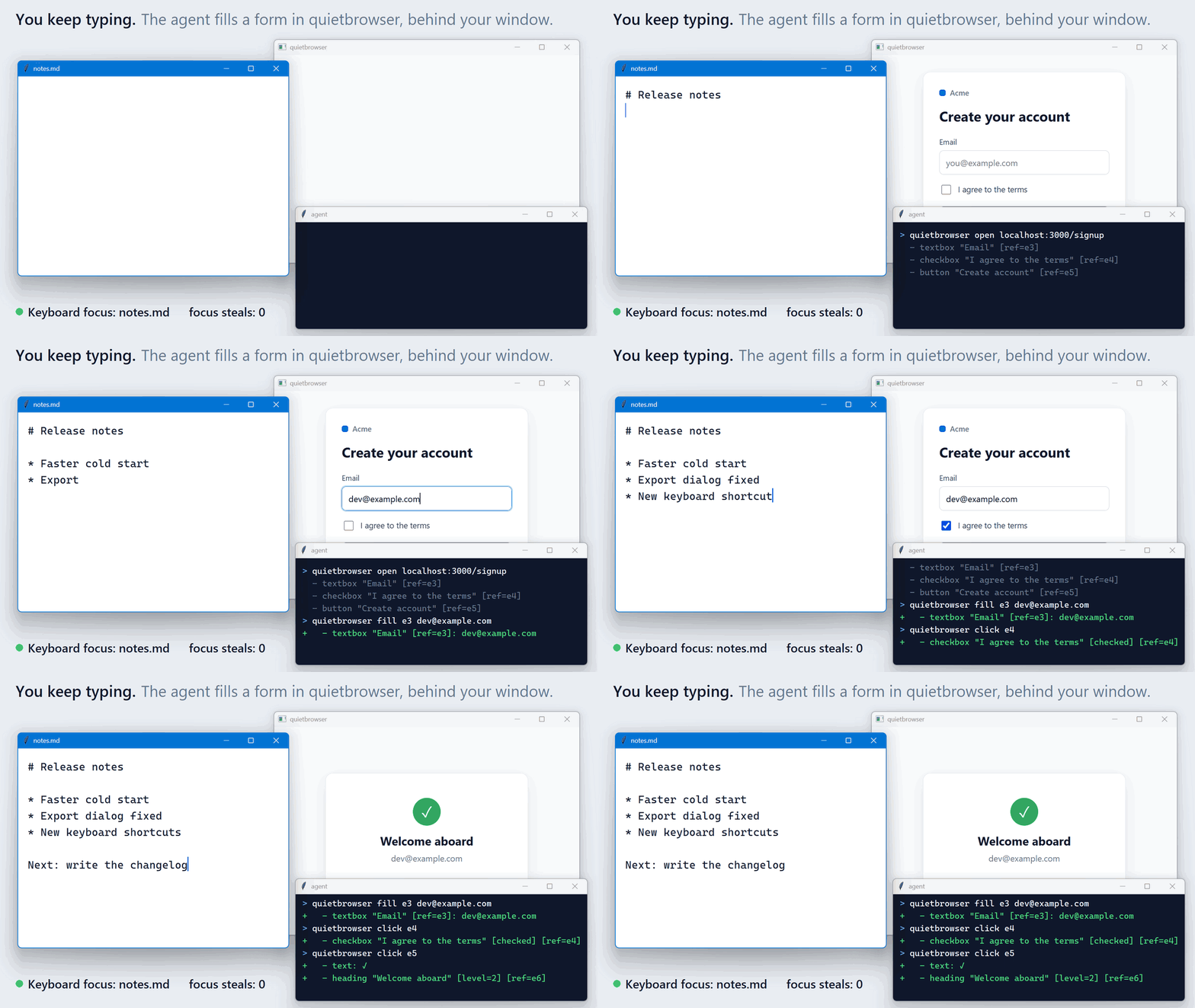
When Claude Code, Codex or another agent opens a browser, the window jumps in front of you and your next keystrokes land in the wrong place. On Windows, quietbrowser is a real browser window (Microsoft Edge WebView2) that shows up without taking focus. The agent drives it from the command line while you keep typing. Click the window when you want to use it yourself.
On macOS and Linux it drives the Chrome, Edge, Brave or Chromium you already have. Chrome raises its own window whenever it opens one, so there it runs without a window by default and cannot take focus. Set QUIETBROWSER_HEADED=1 to see the window, for example to log in once; Chrome then comes to the front when it starts.
Measured
On Windows. A test window stays in front while the browser is started and driven in the background. It records every moment another window becomes the foreground window and counts typed keys that never arrive. The test pages try hard to grab focus: autofocus, window.focus() every 50 ms, alert/confirm/prompt, window.open.
| Run | Commands | Focus taken | Keys lost |
|---|---|---|---|
| Microsoft Edge, new tabs over DevTools | 8 | 1 (on launch) | |
| quietbrowser with protections off (control) | 24 | 74 | |
| quietbrowser | 240 | 0 | |
| quietbrowser while typing | 120 | 0 | 0 of 871 |
Windows already blocks focus changes while you are typing, so most focus theft happens when you are idle: reading, or waiting for the agent. The idle runs are the ones that matter. Run it yourself with test/FocusTest.
Commands
quietbrowser open <url>              open a page, print a snapshot
quietbrowser snapshot                the page as an accessibility tree with [ref=eN] handles
quietbrowser click <ref|selector>    click with real mouse events, print what changed
quietbrowser fill <ref|selector> <text>
quietbrowser type <text>             type into the focused element
quietbrowser press <key>             Enter, Tab, Escape, Backspace, ArrowDown, a ...
quietbrowser hover <ref|selector>
quietbrowser select <ref|selector> <value>...
quietbrowser text                    visible text of the page
quietbrowser eval <js>               run JavaScript, print the JSON result
quietbrowser back | reload
quietbrowser wait <text|seconds>     wait for text to show up (--gone: to disappear)
quietbrowser console [all|errors]    console messages and uncaught errors
quietbrowser network [all|failed]    requests with their status
quietbrowser tabs                    list tabs
quietbrowser tab new [url] | tab select <i> | tab close [i]
quietbrowser dialogs                 dialogs answered so far
quietbrowser screenshot [file.png]   save a screenshot, print the path
quietbrowser record start | record stop [file.png]
quietbrowser media dark|light|reset  emulate the color scheme
quietbrowser login <url>             show a page to you, to log in by hand
quietbrowser start | quit [--all]
quietbrowser install-skill           install the agent skill for Claude Code
quietbrowser mcp                     run as an MCP server over stdio
The first command starts the browser. A snapshot looks like this:
Page: Shop
URL: http://localhost:3000/signup
- heading "Sign up" [level=1] [ref=e1]
- textbox "Email" [ref=e2]
- checkbox "I agree" [ref=e3]
- button "Create account" [ref=e4]
After an action you get only what changed, which keeps agent context small:
> quietbrowser fill e2 [email protected]
### Changes
+ - textbox "Email" [ref=e2]: [email protected]
- - textbox "Email" [ref=e2]
Debugging your own app
When an agent checks the web app it is working on, the first question is usually what broke. An action that logs an error says so right away:
> quietbrowser click e4
### Changes
+ - alert "Saved"
### Console errors
[error] Uncaught TypeError: user.name is undefined (profile.js:42)
console lists everything the page logged since it loaded, and network failed lists the requests that failed or answered 4xx or 5xx:
> quietbrowser network failed
POST 500 http://localhost:3000/api/profile (fetch)
GET failed net::ERR_CONNECTION_REFUSED http://localhost:4000/avatar.png (image)
record start and record stop demo.png save every step in between as an animated PNG, which plays in browsers and on GitHub, so an agent can show a change in a pull request.
Several agents at once
Agents that work at the same time each get tabs of their own in the same browser, so they do not click around in each other's pages but share your logins. Over MCP this happens by itself. On the command line, each agent passes its own name:
quietbrowser --session frontend open localhost:3000
quietbrowser --session docs open localhost:8000
(or sets QUIETBROWSER_SESSION). quit closes the session's tabs, and the browser closes with the last one.
Install
With Node.js, one line adds it to your agent as an MCP server:
claude mcp add quietbrowser -- npx -y quietbrowser mcp
codex mcp add quietbrowser -- npx -y quietbrowser mcp
The tools use the same names and arguments as Playwright MCP (browser_navigate, browser_snapshot, browser_click, browser_type, browser_tabs, browser_console_messages, ...), so agents already know how to use them. Two are extra: browser_record and browser_login. Then ask your agent to open a page. The window opens on the first command, behind whatever you are doing.
The package runs on Windows (x64), macOS (Intel and Apple Silicon) and Linux (x64). On macOS and Linux it needs Chrome, Edge, Brave or Chromium installed.
Without Node.js, download the single binary from Releases and add its path instead of npx -y quietbrowser. On Windows, in PowerShell:
mkdir "$env:LOCALAPPDATA\quietbrowser\bin" -Force
curl.exe -L -o "$env:LOCALAPPDATA\quietbrowser\bin\quietbrowser.exe" https://github.com/emrehangorgec/quietbrowser/releases/latest/download/quietbrowser.exe
claude mcp add quietbrowser -- "$env:LOCALAPPDATA\quietbrowser\bin\quietbrowser.exe" mcp
On macOS (use quietbrowser-linux-x64 on Linux):
mkdir -p ~/.local/bin
curl -L -o ~/.local/bin/quietbrowser https://github.com/emrehangorgec/quietbrowser/releases/latest/download/quietbrowser-macos
chmod +x ~/.local/bin/quietbrowser
claude mcp add quietbrowser -- ~/.local/bin/quietbrowser mcp
Command line and skill
Instead of MCP, agents can call the command line tool. This installs a skill in ~/.claude/skills/quietbrowser that tells Claude Code when and how to use it:
npx -y quietbrowser install-skill
Other agents can read skill/SKILL.md directly.
How it works
- The window is shown with
WS_EX_NOACTIVATEand never callsSetForegroundWindow. A click by you activates it like a normal window, and it goes quiet again when you switch away. alert,confirmandpromptare answered in code, popups open in the same tab and downloads are blocked, so no dialog appears. Tabs the agent opens are created in the background.- Snapshots come from the Chrome DevTools Protocol accessibility tree. Clicks and typing are sent as input events, so pages see a real user gesture.
- On macOS and Linux, Chrome is started with its own profile and driven over the same protocol through a WebSocket. Without
QUIETBROWSER_HEADED=1it runs headless. - One small executable (under 1 MB, written in Rust).
quietbrowser serveruns the window; every other command is a client that starts it when needed and talks to it over a local HTTP port (QUIETBROWSER_PORT, default 9555). Each command carries its session, and the server keeps a list of tabs per session.
Build
Windows 10 or 11 with the WebView2 runtime (included in current Windows) and the Rust toolchain.
cargo build --release
target\release\quietbrowser.exe open example.com
The result is a single quietbrowser.exe with no other files to ship. The focus test in test/FocusTest needs the .NET SDK.
On macOS and Linux, install Rust and one Chromium based browser, then:
cargo build --release
target/release/quietbrowser open example.com
If the browser is not found, point QUIETBROWSER_CHROME at it. python test/smoke.py target/release/quietbrowser runs the end to end test on any system; CI runs it on Windows, macOS and Linux.
Status
Early. The exe is not code signed yet, so a browser download may show a SmartScreen warning once. Not done yet: a DevTools endpoint for Playwright, and packages for winget and Scoop.
Logins are kept in %LOCALAPPDATA%\quietbrowser\profile on Windows, ~/Library/Application Support/quietbrowser on macOS and ~/.local/share/quietbrowser on Linux. If a site needs a login or a CAPTCHA, the agent runs login <url> and asks you to do it. On Windows the window shows the page and its taskbar button flashes, without taking focus. On macOS and Linux Chrome restarts with a window; log in, close the window, and it runs without one again.
License
Reviews (0)
Sign in to leave a review.
Leave a reviewNo results found