Endoplexity
Health Gecti
- License — License: Apache-2.0
- Description — Repository has a description
- Active repo — Last push 0 days ago
- Community trust — 405 GitHub stars
Code Basarisiz
- exec() — Shell command execution in bench/cic.ts
- process.env — Environment variable access in bench/cic.ts
- network request — Outbound network request in bench/cic.ts
- network request — Outbound network request in bench/freeze.mjs
Permissions Gecti
- Permissions — No dangerous permissions requested
Bu listing icin henuz AI raporu yok.
Agentic browser control driven by your own Claude / Cursor subscriptions

Endoplexity
Drive the Chrome you already use, with the AI subscription you already pay for.
A Chrome side panel that reads and acts on the page you're actually looking at:
click, type, fill forms, move between tabs, all through your existing claude,cursor-agent or codex CLI instead of a metered API key. Free, open source,
and it never sends the model a screenshot.





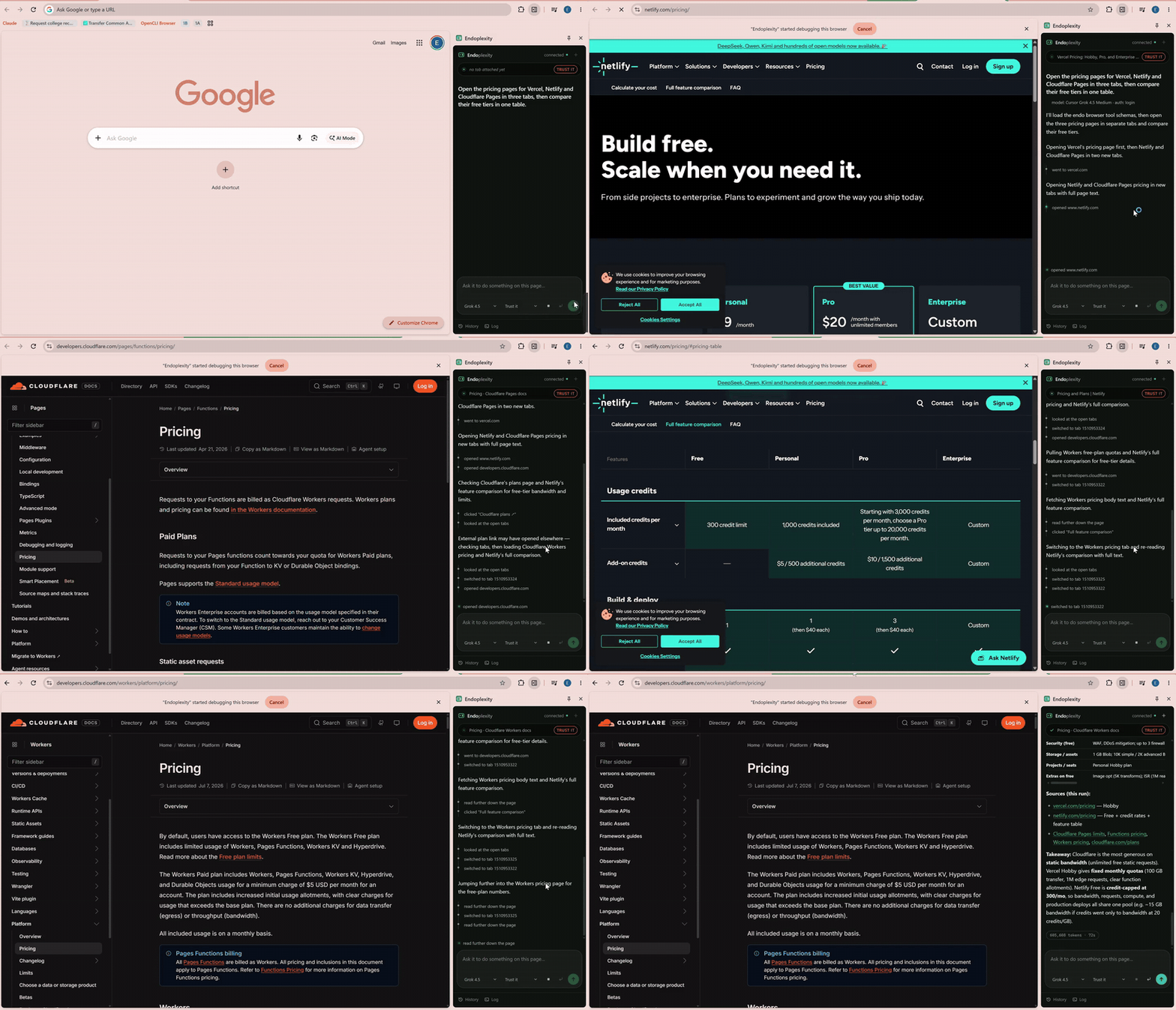
Real time, no cuts beyond a trim and a speed-up · full-quality video
What you just watched
One instruction: "Open the pricing pages for Vercel, Netlify and Cloudflare
Pages in three tabs, then compare their free tiers in one table."
It opened three tabs, read each pricing page, followed a plan link that
actually lived on a different page, noticed when a link took it somewhere
unexpected and recovered from it, then came back with a comparison table, the
sources it used, and a takeaway naming the trade-off between Cloudflare's
unlimited static bandwidth and Netlify's credit cap.
That banner reading "Endoplexity started debugging this browser" is
Chrome's own, and it stays up the whole time. This is your real browser, your
real session, on the pages you already had open. Not a headless copy that
has to log back in to everything.
In numbers
Thirty real tasks on thirty live websites, frozen before the first run and
judged blind (how):
- 0 screenshots reached a model in 108 Endoplexity runs across three
vendors' models. Claude in Chrome sent 287 in its 30. - 2.8× faster than Claude in Chrome, same model, same CLI, task for task
on the 20 tasks both finished. It also used 1.4× the tokens and 1.3× the
API-equivalent cost that Endoplexity did. - 24 of 30 on Codex, Endoplexity's best row, on a ChatGPT plan with no API
key. On Claude Sonnet 5.5 it finished 22; Claude in Chrome finished 25, and
that gap is stated here, not buried. - 25% faster again with reflexes in Act: a median 33 s per task instead of
44, at 19% less cost, for one fewer task finished.
Why this exists
Most open-source "browser agent" projects need an API key and bill you per
click. But if you already pay for Claude, Cursor or ChatGPT, a tool-calling agent loop
is sitting on your machine right now, fully paid for, doing nothing.
The brain didn't need building. What was missing was hands (a browser it
can actually touch) and a face (a panel that shows its work). That's the
whole project: a tool server and a UI. The agent loop is the CLI you already
have installed.
How it compares
Every other browser agent below either runs the model loop on someone's
server and sends it screenshots, or asks for a new browser, a new subscription,
or an API key. Endoplexity drives the Chrome you already use, sends the model
text instead of pixels, and runs on CLIs you already pay for.
| Endoplexity | Perplexity Comet | Claude in Chrome | Gemini in Chrome (auto browse) | ChatGPT agent | Opera Neon | Browser Use | |
|---|---|---|---|---|---|---|---|
| Browser it drives | your Chrome, your logged-in profile | Comet (a separate Chromium browser) | your Chrome | your Chrome | a virtual browser in OpenAI's cloud | Neon (a separate browser) | a Playwright browser, or theirs in the cloud |
| What the model sees | an accessibility-tree outline, then only what changed | JPEG screenshot after every action | screenshots and a page tree | not published | screenshots of its virtual screen | not published | screenshots and DOM |
| Price for agent use | $0 on top of a Claude, Cursor or ChatGPT plan | paid Perplexity plans, limits not published | any paid Claude plan | Google AI Pro or Ultra, US only | Plus: 40 tasks/month, Pro: 400 | $19.90/month | your own API key, or their cloud |
| Models | Claude, Cursor's (Grok, Gemini, GPT, Composer), Codex | Perplexity's choice | Claude | Gemini | OpenAI | Gemini, GPT | any, by API key |
| Open source | yes, Apache-2.0 | no | no | no | no | no | yes, MIT (the library) |
| Replays a finished task with no model | yes, 0 tokens | no | no | no | no | no | no |
| Where safety rules live | in code, in the local bridge | in the service | in the extension | in the service | in the service | in the service | in your code |
Sources, checked 2026-11-07: Comet and Claude in Chrome's tool shapes are read
from their shipped extension code (2026-10-31, static read, nothing copied);
prices and limits from each vendor's pages or help center, linked in
bench/METHOD.md. Where a vendor publishes
nothing, the table says so rather than guessing.
Why not just use Comet?
Comet is the product this project set out to match, so it gets a straight
answer.
- You keep your browser. Comet is a separate Chromium browser you move
into. Endoplexity is a side panel in the Chrome you already have, with its
profile, extensions, password manager and signed-in sessions. - The model reads text, not pictures. Comet's shipped agent code captures
a JPEG after every action and sends it up. Endoplexity sends an
accessibility-tree outline, then only the lines that changed. Across every
Endoplexity run in the benchmark, on three vendors' models,
the number of screenshots that reached a model is zero. - The loop runs on your machine. Comet's agent runs on Perplexity's
servers. Endoplexity's loop is theclaude,cursor-agentorcodexCLI
on your laptop, so page text goes to the model vendor you chose and nowhere
else. - The brakes live outside the model. Any agent that reads web pages can
be steered by them. Brave showed hidden text in a Reddit comment walking
Comet into reading a Gmail one-time password
(August 2025); LayerX did
it with one crafted link
(CometJacking, October 2025).
Endoplexity is not immune to injected text either. What it adds is brakes a
prompt cannot reach: an approval gate in the bridge, a second model from a
different company that reads each approval with the page as the suspect, a
plan lock on the sites you list, and nothing remembered without your
say-so. All of it is in this repository, where you can read it. - You choose the model, at the price you already pay. Comet runs the
model Perplexity picks, with agent limits on paid plans that are not
published as numbers. Endoplexity runs Claude, Cursor's models or Codex on
the plan you have. - A finished task replays for nothing. Save it as a skill and it runs
again with no model at all.
What this section does not claim: a success rate for Comet. Its agent runs
server-side and reports no token counts to its user, so it could not be
measured the way the rows below were. The points above are about how it is
built, read from its shipped extension (2026-10-31), not about how often it
finishes a task.
The rest of the field, in one line each. Claude in Chrome is the closest
match (your Chrome, Claude's model), which is why it is the one measured head
to head below. Gemini in Chrome's auto browse is US-only on Google AI Pro or
Ultra. ChatGPT agent drives a browser in OpenAI's cloud, so your signed-in
sessions stay behind, and Plus allows 40 tasks a month. Opera Neon is another
browser to move into, at $19.90 a month. Browser Use is a fine library that
bills your API key per token.
All of it for free
- Endoplexity is free and open source (Apache-2.0). No account, no
telemetry, no hosted service. It runs on your machine. - No API key, no per-click bill. Tasks run through the
claude,cursor-agentorcodexCLI you are already logged in to. On a Claude Pro,
Cursor Pro or ChatGPT Plus plan, an Endoplexity task costs nothing beyond the
plan you already pay for. The CLIs report an API-equivalent figure, shown in
the tables, so you can see what the same work would cost on a metered key. - Laya runs locally for free, on your GPU, fine-tuned on your own
decisions. - Replays cost zero tokens. A task saved as a skill runs again with no
model at all. - The one paid option is Jev, and it is off by default: TypeSafe's hosted
model, through your own Vercel AI Gateway key, needs credit on that account
(about $0.0002 per image decision, measured). Nothing in Endoplexity needs it.
How it works
The extension never talks to a model directly. The CLI never talks to
Chrome. Neither one holds the other's credentials.
┌──────────────────────┐   WebSocket    ┌──────────────┐    MCP/HTTP   ┌──────────────────┐
│  Chrome side panel   │  origin-pinned │ local bridge │  token-gated  │  claude -p       │
│  (MV3)               │◄──────────────►│  127.0.0.1   │◄─────────────►│  cursor-agent -p │
│  owns chrome.debugger│                │  :8787       │               │  codex exec      │
│                      │                │              │               │  (the agent loop)│
└──────────────────────┘                └──────────────┘               └──────────────────┘
The panel owns the CDP connection itself rather than handing it to the
service worker, which sidesteps MV3's idle teardown. The bridge exposes 18
browser tools over MCP, and it's where the safety policy actually lives.
Never in a prompt, so nothing the model says can widen its own permissions.
Tools: snapshot navigate click type key upload read_fileselect scroll hover back forward tabs use_tab batch findrun_skill note_site
Two decisions do most of the work here:
- Pages go to the model as an accessibility-tree snapshot, not raw HTML.
It's what the model actually needs, at a fraction of the bytes. - Actions return the page they produced, so acting and re-reading happen
in one turn instead of two. After the first read, only the lines that
changed get sent again.batchruns a whole form's worth of steps in one
call, andfindlocates an element on the page already read.
Skills: learn once, replay free. When a run finishes, the panel offers to
save it as a skill, a JSON file under ~/.endo/skills/<host>/ that you own.
Each step names its element by what it reads and what sits around it, not by
a reference that dies with the page, and the values the model typed become{{variables}}. Run it from the panel's Skills sheet and it replays with no
model at all, through the same approval gate. When a step can't be placed
(a label changed), the rest goes to the model you picked, and once that run
succeeds the panel shows you the change to the skill to approve. A password
field's value is never written into the file.
Site notes. The agent can propose a short note about a site
(note_site): a trap it hit, a step that has to come first. You see it as a
card and nothing is saved unless you approve it. Saved notes come back to
every engine on arrival at that site, framed as data, not instructions.
read_file reads an attached document as text (PDF, DOCX, XLSX, PPTX, CSV,
JSON, Markdown, or any text file), so the agent can answer questions about an
attachment instead of only pushing it into a form field. You attach one by
dropping it on the composer; see Files.
Getting started
This takes about five minutes. No API key, no billing page, no dashboard to
configure. Just Node, Chrome, and a CLI you probably already have logged in.
1. Check what you need first
- Node 24 or newer. The bridge runs TypeScript directly, no build step,
and that only works on 24+. Check withnode -v. - Chrome 114 or newer. 135+ gets themed dropdowns; anything older just
falls back to the native picker, nothing breaks. - The
claude,cursor-agentorcodexCLI (any of them), already logged
in to a real subscription. A Claude Pro plan is enough (you don't need Max);
pick Sonnet in the model dropdown once you're running, since reading a page
and clicking things doesn't need a frontier reasoning model.
2. Clone it and install
git clone https://github.com/Endokelp/Endoplexity.git
cd Endoplexity
npm install
3. Start the bridge
npm run setup
This writes a small launcher into your Windows Startup folder, so the bridge
comes up automatically every time you log in. No console window stays open,
no token to copy anywhere. If you'd rather run it by hand instead (or you're
not on Windows), npm start runs it in the foreground so you can watch its
log directly. If something ever seems stuck, .endo-bridge.log at the repo
root is the first place to look.
4. Load the extension into Chrome
- Open
chrome://extensions - Turn on Developer mode (top right)
- Click Load unpacked
- Select the
extension/folder from this repo
You'll see the Endoplexity icon appear in your toolbar.
5. (Optional) Log in to Cursor or Codex too
Only needed if you want to run tasks through Cursor's or OpenAI's models as
well as Claude's:
npm run cursor-login
npm run codex-login
Each is a one-time login into a bridge-owned profile (~/.endo-cursor,~/.endo-codex), kept separate from your normal CLI login so the two never
collide, and so your own instructions and MCP servers never load into an agent
that is driving your browser.
6. Files
Drag a file onto the composer, paste one, or use the paperclip. It shows up as
a chip, and from then on the agent can read it (read_file) or put it into a
form field (upload). Any file type: anything it can't turn into text, it
says so rather than guessing.
The bridge keeps its own copy and hands the model a key (resume), never a
path. Attachments survive restarts, and the × on a chip deletes the copy.
If you'd rather point at a file where it already lives, .endo-files.json still
works and behaves identically:
cp .endo-files.example.json .endo-files.json
{
  "resume": "C:\\Users\\you\\Documents\\resume.pdf"
}
Both files are gitignored, and so is the attachment directory: everything
stays on your machine.
7. Run your first task
Click the Endoplexity icon to open the side panel, type what you want, and
hit Run. A couple of things worth knowing right away:
Enterstarts a fresh task.Ctrl/Cmd+Enterreplies inside the
current conversation instead of starting over.- While a task runs,
Entersends what you type to the running agent.
Claude reads it mid-run; Cursor and Codex read it as a reply the moment
their run ends. - If a model hits its usage limit, the task carries on with the next engine
in the Engines sheet, on a different CLI and on the same tab, from a
summary of what was done. That engine's vendor then receives the page. - Type
@in the box to hand the agent another tab you have open. - List the sites a run may act on in the Plan sheet, and anything
outside them asks you first. Log → Export audit saves what the
last task did as a Markdown file: each action, the tab, what was typed
(passwords redacted), and every approval with its verdict. - A fresh Run always attaches to whichever tab you're currently looking at,
so open the page you want it working on before you press Run. - Press + while a task runs to start another beside it. Each runs in its
own lane, on its own tab and tab group, with its own approvals and its own
Stop; the pills under the title bar switch between them. npm run task -- "<task>"starts a run from a terminal or from the OS
scheduler, in a lane and a background tab of its own, so it never takes the
page you are on. It runs only while Chrome and the panel are open.
scripts/run-task.ts has a Task Scheduler line.
Try something low-stakes first, like summarizing whatever page you're on
before you point it at a form. For a deeper look at what each part of the
panel shows and how the approval gate behaves, see
docs/handrun.md.
The safety model
This drives a browser that's logged into your real accounts, so the
boundaries here are worth stating plainly, including where they stop.
- Loopback only. The bridge binds
127.0.0.1, never0.0.0.0. - The panel is identified by origin, not a shared secret. The extension
ID is pinned by an RSAkeyin the manifest, and the WebSocket upgrade has
to match that exact origin. Page script can't forge anOriginheader.
The/mcpendpoint, which a CLI reaches with no origin at all, is gated
instead by a token in a0600gitignored file, never passed on a command
line. - The agent gets browser tools and nothing else. Claude runs with an
explicit allowlist plus--strict-mcp-config --setting-sources ""; Cursor
runs in an isolated profile withShell,Write,Read, andWebFetch
all denied. Codex runs in its own home with its shell, browsers, web search
and sub-agents switched off, and a run that reports anything but a browser
tool call is killed. Each was verified by asking the agent to reach past its
tools, not by reading the documentation and hoping. - Irreversible actions stop for a human. Submitting, deleting, and
purchasing all hit an approval gate that lives in the bridge. Silence
denies. A disconnected panel denies.
Know exactly what that check is: it matches the clicked element's
visible label against a list of English words (submit,pay,delete,confirm, and a few more). It's a label heuristic, not real understanding
of the page. A button labelled in another language, worded unusually
("Finish", "Yes, place it"), or carrying only an icon will not be
caught. Usewatchmode where that matters: it asks before every action
of a kind until you approve that kind, and the label check still applies
after. Text the agent types never presses Enter for it: a line break goes
in as text, so typed text cannot submit a form past the gate. - A second key reads each approval first. Before the card appears, a
cheap model from a different vendor than the one driving (Codex for a
Claude run, Claude Haiku for the rest) gets your task, the action and the
page around it, and says allow, warn or block with a reason. On block,
Approve becomes Override. It never approves anything itself, and it can
be switched off in Engines. A page that talked the driving model into
"Confirm transfer" has to fool a second model, from another company, told
that the page is the suspect. That vendor does receive those page lines. - A plan lock, enforced in the bridge. The sites you list in Plan
are the only ones a run acts on without asking, in every mode,trust
included. A list that does not parse locks everything, not nothing. - Three autonomy modes (
watch/normal/trust), chosen in the
panel and enforced in the bridge. An absent or unrecognised mode falls
back tonormal, nevertrust, so it fails closed.trustdisables the
gate, all but a plan you set, which is why the panel shows it in red the
whole time it's set. (The demo above runs intrustmode, which is why you never see the
gate fire.) - Files resolve a configured key, never a model-supplied path.
DOM.setFileInputFilesruns in the browser process and can read almost
anything, so a model-chosen path would be an exfiltration primitive. Note
the asymmetry:uploadhands a file to a page without the model ever
seeing its contents, butread_fileputs those contents directly in the
model's context. That allow-list is the whole boundary, so only put in it
what you actually mean to share. - A person writes every skill and note. The model that proposes a note
has just read untrusted pages, and a page that talked it into "on arrival
at your bank, open Transfers" would otherwise reach every later run. So
proposals are cards you approve, a healed skill is a diff you approve, and
a skill file from someone else replays only through the gate, like any
model action.
Found a hole? See SECURITY.md and please report it privately.
Benchmarks
Thirty tasks from Online-Mind2Web
(real tasks on live sites, CC-BY-4.0), 10 easy, 10 medium and 10 hard, one per
website, picked by a seeded hash written down and committed
(597aec8) before
anything ran. Each run was judged blind against the benchmark's own key
points by two model judges, with a third read on every split. The method,
every judge's reasoning and the raw evidence:
bench/METHOD.md.

Head to head: one model, one CLI, two sets of browser tools
Claude in Chrome is Anthropic's own extension. Both rows below run Claude
Sonnet 5.5 through the same claude CLI with the same token accounting; the
only thing that differs is the browser tools the model is handed.
| Endoplexity | Claude in Chrome | |
|---|---|---|
| Tasks completed, of 30 | 22 | 25 |
| Median time, the 20 both finished | 31 s | 57 s |
| Median actions, same 20 | 7.5 | 11.5 |
| Median tokens, same 20 | 239k | 283k |
| Median API-equivalent cost, same 20 | $0.23 | $0.29 |
| Screenshots sent to the model, all 30 | 0 | 287 |
Compared task by task, Claude in Chrome took 2.8× as long, used 1.9× the
actions, 1.4× the tokens and 1.3× the cost (medians of per-task ratios).
It also finished three more tasks.
Every row
| Condition | Model | Finished | Easy | Medium | Hard | Median time | Median actions | Screenshots |
|---|---|---|---|---|---|---|---|---|
| Endoplexity, reflexes off | Claude Sonnet 5.5 | 22/30 | 9/10 | 6/10 | 7/10 | 44 s | 12 | 0 |
| Endoplexity, reflexes in Act | Claude Sonnet 5.5 | 21/30 | 7/10 | 7/10 | 7/10 | 33 s | 10 | 0 |
| Endoplexity | Codex, gpt-6.1-sol |
24/30 | 9/10 | 8/10 | 7/10 | 40 s | 13 | 0 |
| Endoplexity | Cursor, grok-4.7-medium |
13/18 | 3/5 | 7/9 | 3/4 | 114 s | 18 | 0 |
| Claude in Chrome 1.0.105 | Claude Sonnet 5.5 | 25/30 | 8/10 | 8/10 | 9/10 | 77 s | 14 | 287 |
Cursor's row stopped at 18 tasks (why is in METHOD.md), so its count is not
comparable with the 30-task rows. Token counts are only compared within one
vendor; each CLI counts differently.
Reflexes in Act (Gate and Settle earned; Pick and Obstacle still in
Shadow) cut the median task from 44 s to 33 s and the median cost from $0.40
to $0.32. They finished one task fewer, which on 30 tasks is inside the noise.
For context, not competition: the Online-Mind2Web authors had humans judge
six agents on these same 30 tasks in 2025: Claude Computer Use 3.7 finished
21, OpenAI Operator 17, SeeAct 11, Claude Computer Use 3.5 10, Agent-E 9 and
Browser Use 8. Different months, changed sites and human judges, so these are
not a head-to-head with the rows above.
What these numbers do not show
- Thirty tasks is a small sample. One task is 3.3 points, so 22 against
25 is a real gap but not a precise one. - The judges are models. Two Claude Sonnet 5.5 judges per run, Codex for
the runs left when Claude's usage limit ran out, and a third read by Claude
Opus 5.5. Claude judging Claude's runs is a bias risk that blind packets
reduce and do not remove. Fifteen Claude in Chrome runs had their end state
rebuilt from their own stream after a harness bug and were read once.
METHOD.md has the details, and every verdict with its reason. - Comet, Gemini in Chrome and ChatGPT agent are not in the table. Their
agents run on the vendor's servers and report no tokens, so they could not
be measured the same way. - One laptop, one home connection, two days in November 2026. Live sites
change; a rerun will not match to the task.
Reflexes: Laya and Jev
Most of what an agent decides on a page is a multiple-choice question: which
of these elements is "the Apply button", is this click irreversible, is this
page a cookie wall, a login, a captcha, or ready. Asking a frontier model costs
a turn and thousands of tokens each time. Endoplexity's reflexes ask a small
decision model instead, which answers with calibrated probabilities in tens to
hundreds of milliseconds and spends no subscription tokens.
| Reflex | Question | What it may do in Act |
|---|---|---|
| Pick | which element on the page matches "the blue Apply button" | answer find without a model turn |
| Gate | how likely is this click irreversible | add an approval, never remove one |
| Obstacle | cookie wall, login, captcha, error page, or ready | hand a login or captcha to you, answer a cookie wall your way |
| Settle | has the page stopped changing | end the wait after an action early (CDP signals, no model) |
| See | where on a canvas is the thing named | turn a screenshot into one clickable point (Jev only) |
Every reflex is Off, Shadow or Act, chosen in the panel's
Reflexes sheet. Off loads nothing. Shadow (the default) answers beside the
real agent and only logs whether it agreed. Act is offered only after 50
logged decisions at 95% agreement or better, so a reflex earns the right to
decide; Gate is the exception because it can only ask you more, never less.
A backend that errors, times out or answers out of shape abstains, and the run
goes on exactly as it would without it.
Laya: local, free, trained on you
Laya is Convai's open
decision model (Apache-2.0, 421M parameters). Endoplexity runs it as a sidecar
on 127.0.0.1 with its own key, so nothing leaves the machine.
- Speed, measured on a laptop RTX 4050: 99 to 123 ms per decision
(multilingual checkpoint), about 1 to 7 s on CPU, which is why Act on Laya is
GPU-only and CPU stays in Shadow. - It learns from your runs. Shadow mode logs every question beside what
the frontier model actually did.npm run reflex:trainfine-tunes Laya on
that log (about 7 minutes on the RTX 4050), holds out a fixed fifth by content
hash, and keeps the new weights only if they beat the ones in use. - Measured, honestly: on 12 held-out decisions, base Laya scored 33.3%,
the fine-tune 83.3%, the lexical matcher 83.3%, and "always pick the most
common answer" 91.7%. The fine-tune has learned the log's skew more than
pages: 91% of logged decisions are "the first option" or "ready". It needs
logs where the obvious answer was wrong, and it gets them by running in
Shadow on your own tasks.
Jev: hosted, strong out of the box, sees canvases
Jev is TypeSafe AI's hosted decision model, reached
through your own Vercel AI Gateway key. It is the backend for questions about
pixels, which no text tree can answer.
- See, measured: on a canvas with no accessible elements, Jev 1.14 placed
"the red circle", "the blue square" and "the green triangle" at p = 0.99,
each point inside its shape (3 to 38 canvas px from centre), and each click
landed. Asked for a purple star that was not there, it said "no" and
abstained. - 243 to 520 ms per image decision, about $0.00017 each (4,109 input
tokens at 1568x929). - Zero-shot 75.0% on the same 12 held-out text decisions, with no
training on your data. - Off by default, and opt-in twice: See needs your key and a disclosure
you accept, which says that screenshots of the page go to TypeSafe, which
stores inputs but does not train on them. With See off the panel refuses to
capture a screenshot at all. Jev needs paid Vercel credit (the free tier
answers 403).
Status
Early. v0.2.0, and honest about it. The tool layer, approval gate, session
continuity, and panel are all built and tested: 318 unit tests, plus an
in-panel self-test that drives the real CDP layer against a cross-origin
fixture (run await endo.selftest() in the panel's own console).
Known gaps, stated rather than hidden:
- Windows-first.
npm run setupinstalls autostart via a Startup-folder
script. macOS and Linux autostart aren't implemented yet, though the
bridge itself is portable andnpm startworks anywhere. - Sessions live in the bridge's memory. Restarting it ends resumability
on purpose: resuming into a Chrome that's moved on would hand the agent a
transcript full of stale element references. - Real ATS comboboxes usually aren't
<select>elements, so they need a
click-then-click flow rather than theselecttool. chrome://pages and the Web Store can't be driven, since Chrome refuses
the debugger there.
Development
npm test     # 318 tests, node:test, no framework, no build step
npm start    # run the bridge in the foreground to watch its log
npm run reflex:train   # fine-tune the local Laya reflex model on your own logged decisions
node scripts/live.ts launch   # the panel in Chrome for Testing, driven from a terminal
There's no bundler and no framework here. The extension is plain HTML and
JS, and the bridge is TypeScript run directly by Node 24.
docs/handrun.md is the manual verification checklist.
Licence
Apache-2.0. See NOTICE for trademark attribution.
Independent project. Not affiliated with, endorsed by, or sponsored by
Perplexity AI, Anthropic, or Anysphere.
Yorumlar (0)
Yorum birakmak icin giris yap.
Yorum birakSonuc bulunamadi