nanoclaw
Health Uyari
- No license — Repository has no license file
- Description — Repository has a description
- Active repo — Last push 0 days ago
- Low visibility — Only 9 GitHub stars
Code Gecti
- Code scan — Scanned 12 files during light audit, no dangerous patterns found
Permissions Gecti
- Permissions — No dangerous permissions requested
Bu listing icin henuz AI raporu yok.
Minimal personal AI assistant: gateway agent for Telegram, Slack & Discord. ~1,500 lines of Python, no bloat.
🦞 NanoClaw
Your personal AI assistant - like Hermes or OpenClaw, but distilled to its essentials.
~1,500 lines of Python. No dashboard. No bloat. Just the loop.


User: "summarize the errors in app.log from the last 10 minutes"
Bot:  [reads file] [runs grep] → "Found 3 ERROR lines: connection timeout (×2), OOM at 14:32"
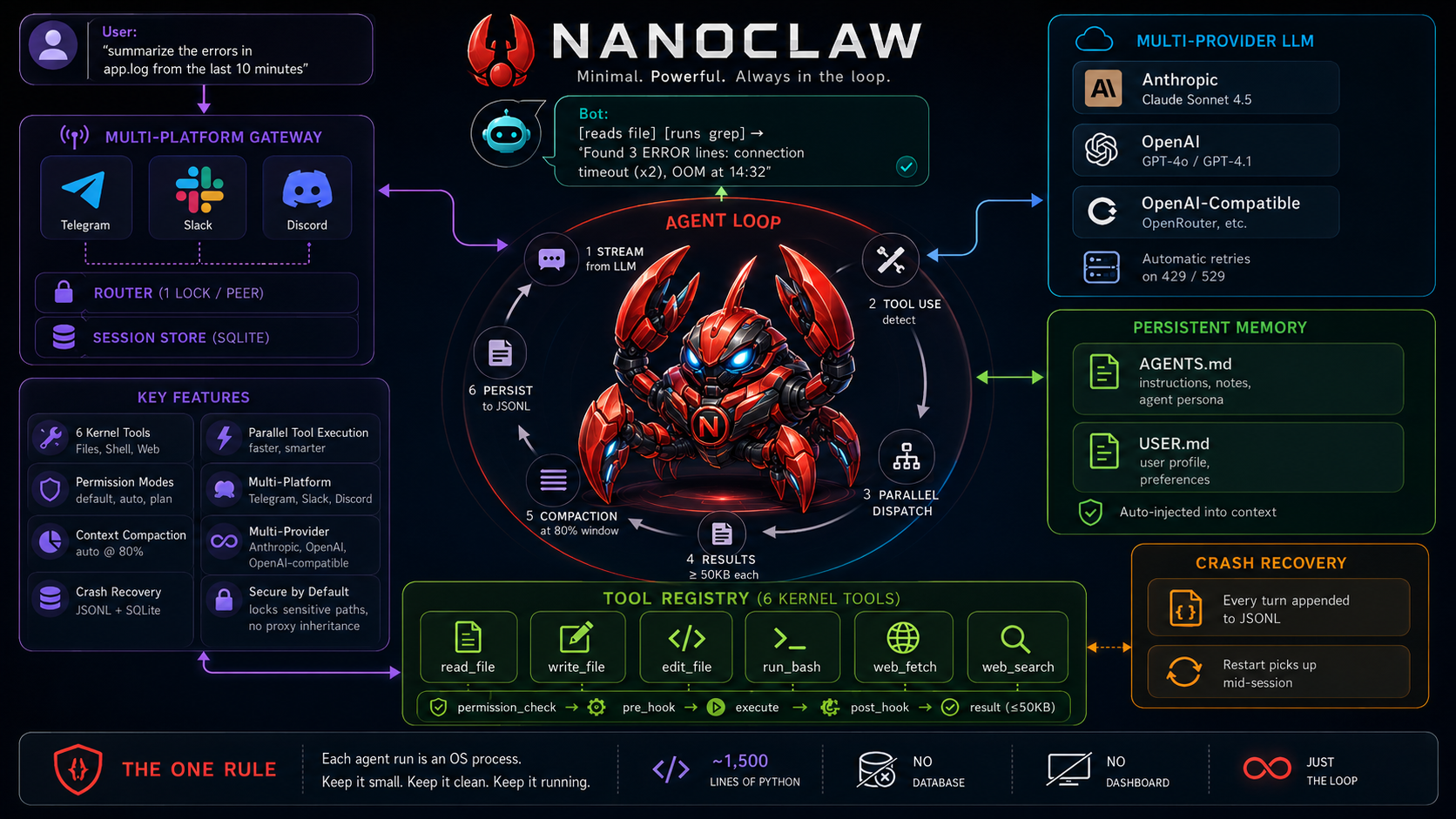
Why NanoClaw?
Most agent runtimes ship hundreds of abstractions, dozens of providers, and dashboards you never open. NanoClaw is a design: the fewest moving parts that still make a capable, recoverable personal assistant.
| NanoClaw | Claude Code CLI | Full agent framework | |
|---|---|---|---|
| Lines of code | ~1,500 | ~50,000 | 10,000–200,000 |
| Chat platforms | Telegram · Slack · Discord | Terminal only | Varies |
| State survives crash | ✅ JSONL + SQLite | ✅ | Depends |
| Needs a database | ❌ SQLite built-in | ❌ | Often yes |
| Cron / dashboard | ❌ (use real cron) | ❌ | Often yes |
Features
🔄 Agent Loop
• Streaming Tool-Call Cycle |
🛠 Kernel Tools
• |
🔐 Permissions
• |
📦 Context & Memory
• Auto-compact at 80% context window |
💬 Multi-Platform Gateway
• Telegram · Slack · Discord |
🔌 Multi-Provider
• Anthropic (Claude) |
♻️ Crash Recovery
• Each run is an isolated OS process |
🔒 Secure by Default
• No |
Getting Your API Tokens
You need two tokens: one for the LLM, one for the chat platform.
LLM (pick one)
| Provider | Where to get it | Env var |
|---|---|---|
| OpenRouter (recommended) | openrouter.ai/keys - free tier available, access to all models | OPENROUTER_API_KEY |
| Anthropic | console.anthropic.com/keys | ANTHROPIC_API_KEY |
| OpenAI | platform.openai.com/api-keys | OPENAI_API_KEY |
Chat platform (pick one)
| Platform | Steps |
|---|---|
| Discord | discord.com/developers/applications - New Application - Bot - Reset Token. Enable Message Content Intent. Invite bot with bot + applications.commands scopes. |
| Telegram | Message @BotFather on Telegram - /newbot - copy the token. |
| Slack | api.slack.com/apps - Create App - Socket Mode on - add chat:write + im:history scopes - install to workspace. You need both SLACK_BOT_TOKEN (xoxb-) and SLACK_APP_TOKEN (xapp-). |
Quick Start
git clone https://github.com/Engineering4AI/nanoclaw
cd nanoclaw
pip install -e ".[discord]"   # or [telegram] / [slack]

cp .env.example .env
# edit .env - set your API key + bot token

python -m nanoclaw
That's it. First run bootstraps ~/.nanoclaw/config.yaml and workspace files automatically.
Configuration
Everything lives in .env - no code changes needed:
# LLM (default: OpenRouter)
OPENROUTER_API_KEY=sk-or-...
NANOCLAW_MODEL=anthropic/claude-sonnet-4-6
NANOCLAW_PROVIDER=openai_compatible
NANOCLAW_BASE_URL=https://openrouter.ai/api/v1

# Platform (pick one)
DISCORD_TOKEN=your-discord-bot-token
# TELEGRAM_TOKEN=your-telegram-bot-token
# SLACK_BOT_TOKEN=xoxb-...
# SLACK_APP_TOKEN=xapp-...

# Agent behavior
NANOCLAW_PERMISSION_MODE=default   # default | auto | plan
Switch to Anthropic directly:
ANTHROPIC_API_KEY=sk-ant-...
NANOCLAW_PROVIDER=anthropic
NANOCLAW_MODEL=claude-opus-4-8
Architecture
flowchart TD
    TG[Telegram] & SL[Slack] & DC[Discord] --> R

    subgraph Gateway
        R["Router\n(1 lock / peer)"]
        SS[(SessionStore\nSQLite)]
        R <--> SS
    end

    R --> AL

    subgraph AgentLoop["Agent Loop"]
        AL["stream LLM response"] --> TD{tool_use?}
        TD -->|yes| PD["parallel dispatch"]
        TD -->|no| OUT[return text]
        PD --> AL
        AL --> CP["compact @ 80% context"]
        AL --> JP[(JSONL\npersistence)]
    end

    PD --> TR

    subgraph ToolRegistry["Tool Registry"]
        TR["permission_check"] --> PH[pre_hook]
        PH --> EX["execute\n(read · write · edit · bash · fetch · search)"]
        EX --> POH[post_hook]
        POH --> RS["result ≤ 50 KB"]
    end

    RS --> PD
File Layout
nanoclaw/
  __main__.py        # entry point
  config.py          # Config dataclass + env overrides
  permissions.py     # 3 modes + sensitive-path guard
  hooks.py           # pre/post hook registry
  agent/
    loop.py          # the agent loop
    compactor.py     # context compaction at 80% window
    session.py       # JSONL append-only persistence
  tools/
    __init__.py      # Tool dataclass, parallel dispatch
    files.py         # read_file / write_file / edit_file
    shell.py         # run_bash
    web.py           # web_fetch / web_search
  memory/
    workspace.py     # AGENTS.md / USER.md bootstrap + inject
  providers/
    anthropic.py     # Anthropic SDK with backoff
    openai.py        # OpenAI-compatible (OpenRouter etc.)
  gateway/
    session.py       # SQLite-backed session store
    router.py        # message → agent loop → deliver
    adapters/
      telegram.py    # python-telegram-bot
      slack.py       # slack_bolt socket mode
      discord.py     # discord.py
Persistent Memory
NanoClaw ships with two workspace files that persist across sessions:
~/.nanoclaw/workspace/AGENTS.md- operating instructions, task notes, agent persona. Injected as system prompt prefix.~/.nanoclaw/workspace/USER.md- user profile, preferences. Injected after AGENTS.md.
Edit these files to shape how the agent behaves. No vector store, no database - just files.
Intentionally Not Included
| Feature | Add it when... |
|---|---|
| Cron scheduler | Use crontab calling python -m nanoclaw -p "..." |
| Multi-agent board | You have >1 agent profile needing coordination |
| MCP servers | You hit a tool gap the 6 kernel tools can't cover |
| Dashboard / TUI | Gateway is the interface; a TUI is orthogonal |
| Skills / macros | AGENTS.md handles this at minimal scale |
| Trajectory recording | You need RL training data |
The One Rule
Each agent run is an OS process. Coordination state lives outside the process.
Session JSONL survives crashes. SQLite session store survives gateway restarts. A restart picks up where it left off. This constraint keeps everything else simple.
Yorumlar (0)
Yorum birakmak icin giris yap.
Yorum birakSonuc bulunamadi