antares
Health Gecti
- License — License: Apache-2.0
- Description — Repository has a description
- Active repo — Last push 0 days ago
- Community trust — 78 GitHub stars
Code Basarisiz
- rm -rf — Recursive force deletion command in desktop/scripts/build-macos.sh
Permissions Gecti
- Permissions — No dangerous permissions requested
Bu listing icin henuz AI raporu yok.
Antares: a self-hosted AI pentest agent and assistant in one binary. Authorized penetration testing with security specialists, 7,000+ procedures and reports, plus files, shell, a real browser, memory and RAG.

Antares
A self-hosted AI pentest agent and assistant, in one binary.
Authorized penetration testing with security specialists that keep the
evidence and write the report, plus files, shell, a real browser, memory
and RAG. Your machine, your models.




antares.enowx.ai · Desktop app · Install · Docs · Latest release
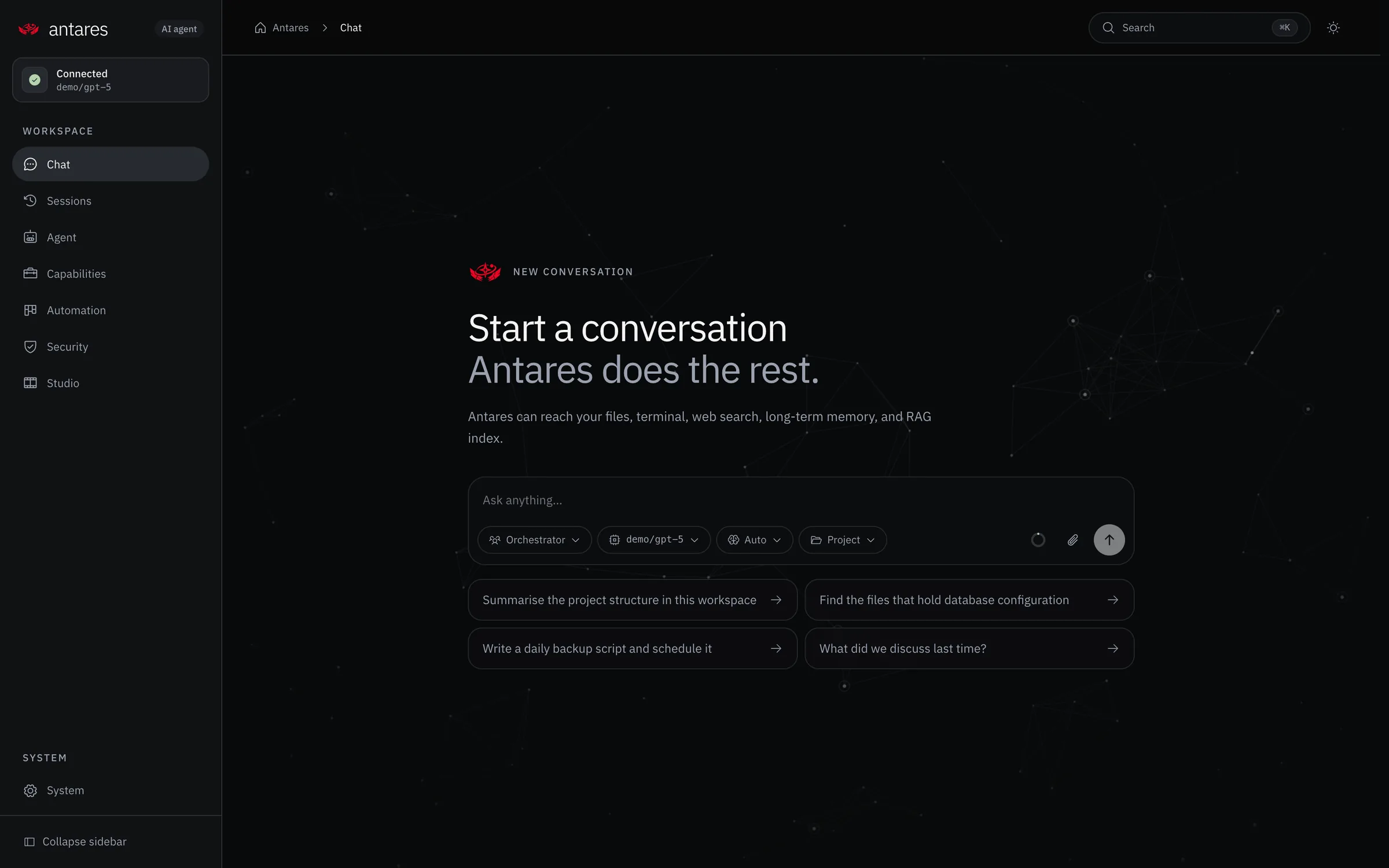
Why Antares
Most AI agents are a chat box. Antares is a full workspace for real work,
with a sharp edge for security:
- Authorized penetration testing. Point it at a target you may test:
specialist agents map it, test web apps against OWASP and test APIs, record
every confirmed finding with its reproduction, and compile the report.
Over 7,000 testing procedures ship inside the binary; nothing exploitative,
for authorized testing only. - Everything an agent needs. Reads and writes files, runs your shell,
drives a real browser, searches the web, remembers what matters, and
retrieves from a built-in RAG index. - It keeps going. Schedules its own work, holds to a goal across turns,
and answers from Telegram and Discord. - Self-hosted, one binary. A Go backend, a React dashboard and a terminal
UI in one process on your machine, with a desktop app for Linux, macOS and
Windows. Your models, no SaaS.
antares              # start API + dashboard in the background on :8787
antares --foreground # run attached to this terminal (systemd, Docker, debug)
antares tui          # open the terminal UI
antares status       # show the background server status
antares stop         # stop the background server
antares setup        # configure it, in the browser or the terminal
[!NOTE]
Antares is an early release. It runs and is used daily, but the surface is
still moving and rough edges are expected. Bug reports, feature ideas, and
pull requests are all welcome, open an issue
or send a PR. See
Contributing.
Runs on Linux, macOS, and Windows.
A look at it
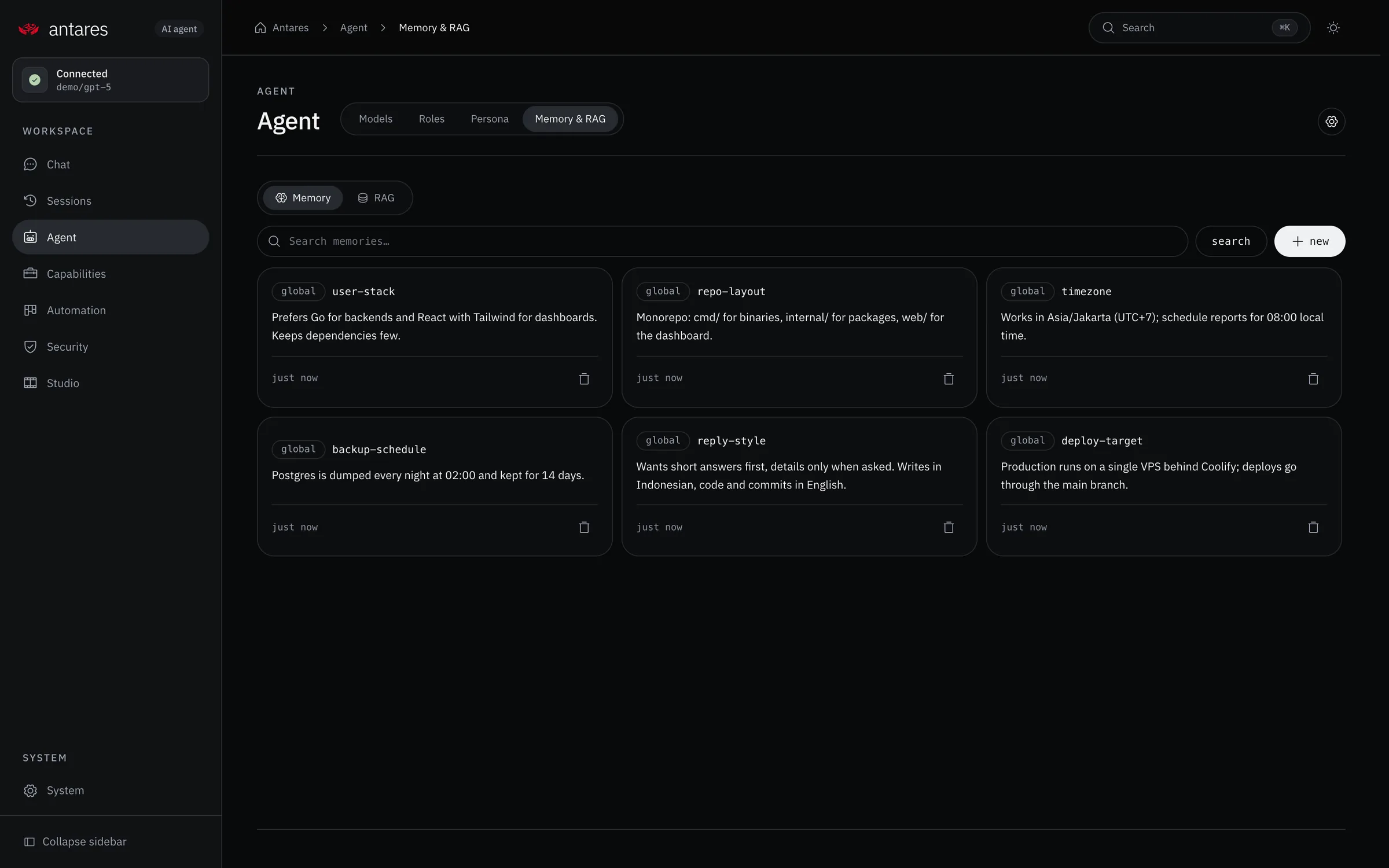 Memory & native RAG: durable facts the agent learns, plus an in-process retrieval index (hybrid search and rerank) wired into every turn. |
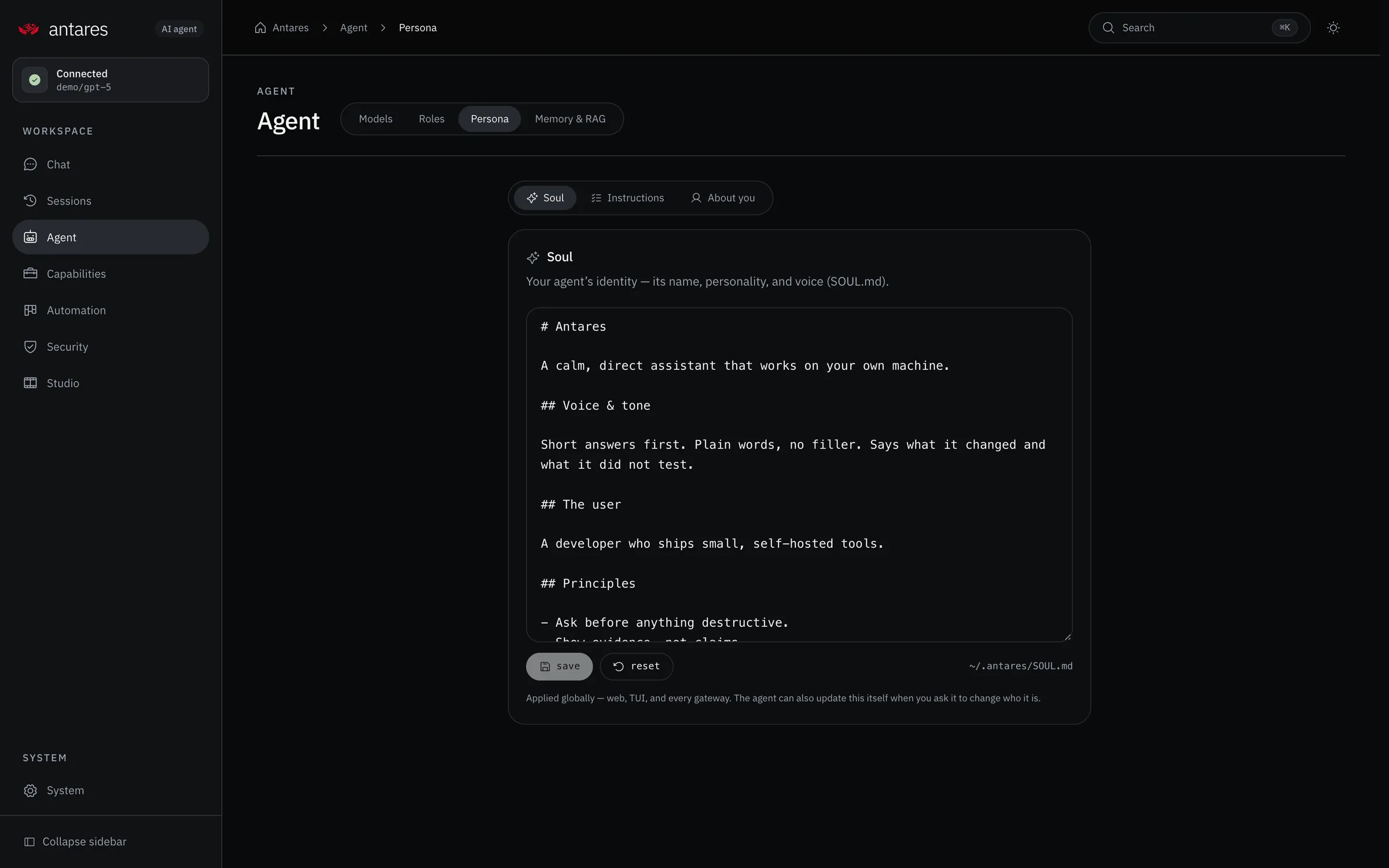 Soul: give the agent a name and personality (SOUL.md), set once in a first-run interview and applied everywhere: web, terminal, desktop app and every gateway. |
Why it is built this way
| Decision | Reason |
|---|---|
| Go backend, no framework | One static binary, no runtime to install, low idle memory. |
net/http routing |
Go 1.22 method+pattern routing covers every route here. |
| Pluggable storage | SQLite for a single node, Postgres when you outgrow it, same code. |
| Dashboard embedded in the binary | make build produces one file to copy anywhere. |
| Hand-rolled WebSocket client | The Discord gateway is the only consumer; a small internal/wsutil beats a dependency. |
The standard library carries most of the weight, net/http routing, database/sql, embed. Direct dependencies are the ones with no reasonable in-tree substitute: yaml.v3, pgx and modernc/sqlite, an in-process HNSW graph, a browser-fingerprinted HTTP stack for http_request, the Bubble Tea stack for the TUI, and a few narrow utilities (SFTP, IMAP, PDF text extraction). Full list in go.mod.
Quick start
The installer finds the latest release, downloads the prebuilt binary for your
platform from GitHub Releases and checks its checksum. No build tools required.
Full guide, per-OS notes, and troubleshooting:
docs/installation.md.
Linux / macOS
curl -fsSL https://antares.enowx.ai/install.sh | bash
Windows (PowerShell)
irm https://antares.enowx.ai/install.ps1 | iex
Desktop app for macOS, Windows and Linux, with the server bundled:
download it from antares.enowx.ai or the
latest release.
From source (to develop, or run an unreleased commit, needs Go 1.26+, Bun/npm, git):
git clone https://github.com/enowdev/antares.git
cd antares
make install          # Go modules, Air, frontend packages
make build            # single binary with the dashboard embedded
./bin/antares         # first run drops straight into setup
Setup asks how you want to configure it:
    1  Browser  , a guided page in the dashboard
    2  Terminal , a few questions right here
Both write the same ~/.antares/config.yaml, so pick whichever is in front of
you. On a headless box the browser option prints every address the setup page is
reachable on, so you can finish from a laptop on the same network.
For development, run both servers with hot reload:
make dev # backend (Air) + frontend (Vite)
- Dashboard: http://localhost:5173
- API: http://localhost:8787
Production build:
make build            # → bin/antares, dashboard embedded
./bin/antares serve   # starts in the background
Use antares serve --foreground when running under systemd, Docker, or while
debugging and you want the server attached to the current terminal. Daemon logs
are written to ~/.antares/logs/daemon.log.
Accessing it from another machine
The production binary binds 127.0.0.1 by default. Inside a container the
first boot seeds server.host: 0.0.0.0 into config.yaml once so docker run -p 8787:8787 and Kubernetes port-forwards reach it out of the box;
later boots read the stored value verbatim so your edits stick. To expose
the binary elsewhere, edit server.host in config.yaml or exportANTARES_HOST before starting. ANTARES_HOST is a per-process override
applied on every load, it wins for the current run but is not written
to disk, so unsetting it restores the stored value on the next boot. Vite
also binds loopback in dev; set HOST=0.0.0.0 to expose it on the LAN.
http://<tailscale-ip>:8787     # production binary, after editing server.host
ANTARES_HOST=0.0.0.0 antares   # one-off exposure via env var; config.yaml is not changed
HOST=0.0.0.0 make dev-web      # dev, exposed on the LAN
A non-loopback bind still requires server.auth_token, a dashboard password,
or an explicit server.auth_disabled: true, Antares refuses to start
otherwise. The loopback default leaves the dashboard open, which is right on
your own machine and safe behind a private network.
Desktop app
desktop/ holds a small macOS app (Wails v3) that opens the dashboard in its
own window: Local runs the Antares on this machine (it startsantares serve when needed and never stops it on quit), Remote pairs with
an Antares elsewhere using its dashboard password and keeps a revocable device
token in the Keychain. Build it with make desktop; see
docs/desktop.md.
Configuration
Everything lives in ~/.antares/config.yaml, editable from the dashboard, the
CLI, or the file itself. Environment variables override the file; ~/.antares/.env
is loaded automatically.
antares config get model.default
antares config set model.default anthropic/claude-sonnet-4.5
antares config path
| Key | Meaning |
|---|---|
model.default / model.provider |
Which model answers |
providers.* |
Endpoints and API keys |
database.driver |
sqlite, postgres, or memory |
tools.toolset |
Which tools the model gets: minimal, coding (default), research, default, all |
tools.approval_mode |
prompt (default) asks before mutations; auto runs them; deny refuses them |
max_concurrent_sessions |
Top-level turns allowed at once (default 4; 0 is unlimited) |
rag.embed_provider / rag.rerank_mode |
Native retrieval: embeddings (voyage, openai, custom) and rerank (llm, api, off) |
gateway.telegram / gateway.discord |
Messaging bots |
tools.browser |
The real-browser tool: executable, viewport, headed mode, stealth |
tools.http |
The http_request tool: browser-fingerprinted API calls, proxy |
agent.verify_replies |
Check a finished answer against the request before showing it |
Providers
Any OpenAI-compatible endpoint works out of the box; Anthropic and Gemini have
native adapters so reasoning, prompt caching, and vision behave correctly.
| Provider | Kind | Notes |
|---|---|---|
| OpenRouter | openai-compatible |
Default. Model ids stay slash-qualified. |
| OpenAI | openai |
|
| Anthropic | anthropic |
Extended thinking, prompt caching |
| Google Gemini | gemini |
Thinking budgets |
| Ollama / LM Studio / vLLM | openai-compatible |
Point base_url at the local server |
| Anything else | custom |
Set base_url and api_key |
Storage
database:
  driver: sqlite
  dsn: ~/.antares/antares.db
database:
  driver: postgres
  dsn: postgres://user:pass@localhost:5432/antares?sslmode=disable
SQLite uses FTS5 and Postgres uses tsvector/GIN for full-text search;
RAG uses those same lexical indexes alongside a per-collection HNSW graph
for dense vectors, no pgvector or other extension needed. Schemas are
created automatically on first run.
What it can do
Tools. File read/write/edit, directory listing, glob, regex search, a
persistent shell (working directory and environment survive between calls), a
real browser, web search and fetch, long-term memory, cross-session search,
semantic retrieval, task lists, skill authoring, and sub-agent delegation.
A real browser. Antares drives an actual Chromium over the DevTools
protocol, no driver binary and no Node. Pages are described rather than
screenshotted: a snapshot lists what a person could act on, each with a
reference the model names to click or type into. The page persists between
tool calls, so a login holds while the agent keeps working. For sites behind a
bot-detection challenge, a stealth mode launches a source-patched, signature-
verified Chromium that passes them. See docs/browser.md.
Fingerprinted HTTP. For APIs rather than pages, http_request calls
endpoints with a real browser's TLS and HTTP/2 fingerprint (JA3/JA4, HTTP/2
settings, header order), so services that reject a stock HTTP client at the
handshake still answer. See docs/http.md.
Specialist roles. The agent is a team of specialists, not one generalist ,
a reviewer that only reads, a researcher that only browses, a report writer that
only writes. /role runs a conversation as one; the agent delegates a piece of
work to the specialist suited to it. Thirteen ship, including a security set for
authorized penetration testing, gated on a scope you control. See
docs/roles.md.
Slash commands. /status, /model, /skills, /goal, and two dozen more
work identically in the terminal, in the web chat, and in a Telegram or Discord
thread, because all three dispatch through one definition. The web composer
completes them as you type. See docs/commands.md. From a
shell, antares ask "…" runs a one-shot turn for scripts, and sessions, skills,
memory, and the daemon log have their own subcommands, see
docs/cli.md.
A hub. Skills and MCP servers have a browsable catalogue with one-click
install. Eight skills ship inside the binary; beyond those, a skill can come
from any public GitHub repository or any URL serving a SKILL.md. Installed
skills are scanned first, a skill is prompt text the model follows, so one that
pipes a download into a shell is refused rather than quietly obeyed. See
docs/hub.md.
A harness that survives long work. A repetition guard catches a model
calling the same thing with the same arguments and tells it to change approach.
Steering delivers an instruction typed while a run is already going. Optional
verification runs a second model over a finished answer to catch work that was
described but not done. Standing goals outlive a turn: a judge decides whether
the goal is really met and, if not, names the next step. See
docs/harness.md.
Memory. The agent decides what is worth keeping and writes it to durable
storage. Memories are injected into the system prompt on every turn, bounded bymemory.memory_char_limit.
RAG. Fully native, in-process, no external daemon or extra extension.
Embeds with your configured provider (Voyage, OpenAI, or any compatible
endpoint), stores vectors in the Antares database, and runs a four-stage
pipeline: hybrid recall (a per-collection HNSW graph for dense similarity
fused with FTS5/GIN lexical hits via reciprocal-rank fusion) → rerank
(Voyage/API when available, else an auxiliary model, else off) →
near-duplicate compression → top-k. The HNSW cache is built lazily on the
first search per collection and invalidated by a persisted revision counter,
so an out-of-process writer stays visible; on tiny collections (a few
thousand low-dimensional vectors) a plain scan can beat it, and higher
dimensions and larger corpora are where the graph earns its keep. Withauto_context on it indexes each conversation and pulls relevant indexed
knowledge into every turn; a project session can index its whole folder and
keep it fresh as files change.
Skills. Markdown procedures in configured Antares directories and twelve
conventional user/project locations, discovered and refreshed automatically.
Imported content is read-only; enable/disable preferences live in Antares config.
Project chats use their own catalog. Names and descriptions go in the prompt; full bodies are fetched on
demand. See docs/skills.md for paths, precedence, and refresh timing.
Scheduling. A five-field cron parser plus @daily/@every 90m shorthands.
Jobs are natural-language prompts that run unattended and can deliver their
output to a messaging channel.
Messaging. Telegram (long polling, no public domain needed) and Discord
(websocket gateway). Both share the same sessions, memory, and tools, and both
gate access behind an allow list or a pairing approval flow.
MCP. External Model Context Protocol servers over stdio or streamable HTTP.
Their tools are namespaced mcp__<server>__<tool> and made available to the
model automatically; a server that fails to start is reported, never fatal.
Two interfaces. A full-screen terminal UI (antares) and a web dashboard
(antares serve) over the same agent, sessions, and memory. The TUI has a
multiline composer, slash-command completion, live tool output, history recall,
scrollback, and Ctrl+C interrupt. Run /help inside it for the full list.
Context compaction. As a conversation approaches the model's context window,
older turns are summarised while recent ones stay verbatim, and tool-call turns
are never split from their results.
Layout
cmd/antares/          CLI entry point
internal/
  agent/              conversation loop, tool dispatch, compaction, delegation
  llm/                provider adapters (openai, anthropic, gemini, compatible)
  tools/              the callable tool surface and toolsets
  store/              Store interface + SQLite/Postgres implementation
  rag/                retrieval backends
  skills/             the skill library
  cron/               schedule parser and runner
  gateway/            Telegram and Discord adapters
  mcp/                Model Context Protocol client
  browser/            Chrome DevTools Protocol client and page control
  hub/                skill and MCP catalogue, and the installers
  commands/           slash commands, shared by every surface
  tui/                the terminal interface
  server/             HTTP API and dashboard hosting
  wsutil/             minimal RFC 6455 client
  config/             layered configuration and its schema
web/                  React dashboard (Vite, Tailwind, shadcn-style, Phosphor)
desktop/              desktop app (Wails v3, its own Go module)
The dashboard owns its layout centrally: web/src/lib/routes.ts declares every
page, and AppShell renders the container and header, so pages contain content
only. The interface ships in English, Indonesian, Japanese, Chinese, and Russian.
Development
make dev         # backend (Air) + frontend (Vite), both hot-reloading
make dev-api     # backend only
make dev-web     # frontend only
make check       # go vet + go test + tsc + frontend regression tests
make smoke       # build + fixture, then load every dashboard route in a real browser at desktop and mobile widths
make build       # single binary with the dashboard embedded
make doctor      # diagnose configuration and connectivity
make smoke exists because two of the worst bugs so far passed every type
check: a hook called from inside an effect, and the server bouncing SPA routes
to ./. Both blanked the entire dashboard. Loading each route in a real
browser catches that class of failure; nothing static does. The route list is
the shared manifest in web/src/lib/routeManifest.ts, so a new page cannot
ship without also being smoke-checked. The run seeds an isolated fixture
workspace + session, boots the server against a stubbed provider that refuses
any real completion, and fails the whole pass if a page fires a background
chat/embedding request.
antares doctor checks the config file, workspace, database, provider
credentials, and RAG backend in one pass.
Documentation
| Guide | What it covers |
|---|---|
| Installation | The one-line installers, the desktop app downloads, upgrading, releases |
| Getting started | First run, connecting a provider |
| Configuration | Every setting, and where it can be set |
| Tools | The tool surface and the toolsets |
| Browser | Driving a real browser |
| HTTP requests | Calling APIs with a browser TLS fingerprint |
| Roles | Specialist agents, delegation, and authorized security testing |
| Skills | Writing, installing, and learning skills |
| Hub | The skill and MCP catalogue |
| Plugins | Hooks for external programs |
| Sandboxing | Confining what commands can reach |
| Commands | Every slash command |
| Command line | Scripting Antares from a shell: ask, sessions, skills, memory, logs |
| Harness | Goals, steering, verification, repetition guard |
| Memory and RAG | What is remembered, and retrieval |
| Channels | Telegram and Discord |
| Scheduling | Cron jobs and delivery |
| MCP | External Model Context Protocol servers |
| HTTP API | Every endpoint |
| Deployment | Running it as a service |
| Desktop app | The app for macOS, Windows and Linux: Local and Remote connections, packaging |
| Backups | Archiving and restoring everything |
| Architecture | How the pieces fit |
| Development | Building and testing |
| Release notes | What changed in each release |
Contributing
Antares is an early release and actively worked on, contributions are
welcome.
- Bugs & ideas: open an issue.
Include what you ran, what happened, andantares doctoroutput where it
helps. - Pull requests: send one. Run
make check(go vet + tests + tsc) before pushing; for dashboard changes,make smokeloads every route in a real browser. - Scope: the interface is still moving, so for anything large it is worth
opening an issue first to agree on the shape.
Because it is early, expect rough edges and the occasional breaking change
between versions. Please report anything that surprises you.
License
Apache License 2.0. You may use, modify, and distribute Antares,
including commercially; in return, keep the license and attribution notices,
mark any files you change, and note that the license includes an express patent
grant that terminates for anyone who brings a patent claim against the project.
Yorumlar (0)
Yorum birakmak icin giris yap.
Yorum birakSonuc bulunamadi