mayfly
Health Gecti
- License — License: MIT
- Description — Repository has a description
- Active repo — Last push 0 days ago
- Community trust — 19 GitHub stars
Code Gecti
- Code scan — Scanned 12 files during light audit, no dangerous patterns found
Permissions Gecti
- Permissions — No dangerous permissions requested
Bu listing icin henuz AI raporu yok.
Mayfly terminal UI bundle for DeepSeek Harness
Mayfly







English | 中文
Mayfly is an interactive terminal UI for
DeepSeek Harness (dsh) —
an out-of-tree Cordis bundle over dsh-base, built against Harness0.2.0-rc.2. Mayfly 0.1.3-rc.2 deliberately uses the same plugin model
as dsh Web: plugins are ordinary Cordis siblings and consume native dsh
services directly.
- Terminal-native rendering: Markdown tables, closed Mermaid fences in
assistant messages, and renderer-neutral line, point, bar, sparkline, and
heatmap nodes — with width-safe source or text fallbacks. - One activity row for live status: the spinner, current step, turn
elapsed time, estimated token count, and output rate live above the
editor; the transcript records only what has happened. - Side conversations:
/btwand the/agentssubagent tree share the
transcript pane;F7returns to the previous conversation andF8
closes the displayed one. - An ordinary plugin model: consume
ctx.commands,ctx.sessionProjections,ctx.tools, and other documented dsh services
directly; UI contributions go throughmayflyPanes,mayflyStatus,mayflyOverlays, andmayflyEditorExtensions.
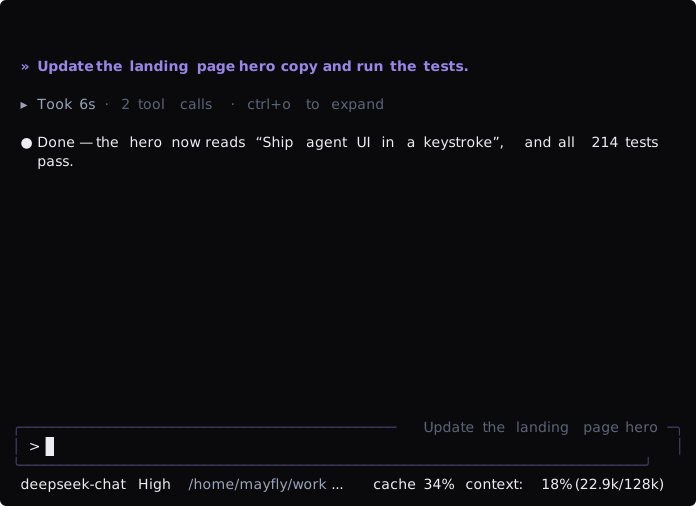
The activity row above the editor is the one place for live status: the
spinner, the current step (Thinking, Running commands), the turn's elapsed
time, and the estimated token count and output rate. The transcript records
only what has happened, so streaming reasoning shows as a captionless ✻ tail
that settles to one ✻ Thought for 6s row, and file changes stay visible as
diff cards next to the final answer.
Rates use four characters per token, exclude first-chunk latency, and disappear
after two seconds without output. Narrow terminals omit tips and rates first.
Plugin model
A plugin declares the services it needs with inject, then uses them from its
Cordis context:
ctx.commands,ctx.sessionProjections,ctx.tools, and the rest of
the documented dsh services are used directly.ctx.mayflyPanes,ctx.mayflyStatus,ctx.mayflyOverlays, andctx.mayflyEditorExtensionsare the only Mayfly-specific UI contribution
services.ctx.mayflyCurrentAgent.current()returns the exact Agent selected by this
Mayfly frontend when an Agent-scoped native service needs it.- Every registration belongs to the caller's Cordis Fiber. Unloading the
plugin removes its commands and UI contributions.
There is no Mayfly plugin manifest, capability negotiation, adapter facade,
private plugin realm, or separate plugin-author CLI. Mayfly's own features and
external plugins register through the same services.
Plugins always return ordinary renderer-neutral nodes. Mayfly automatically
windows large list nodes and delays hidden responsive branches, so plugins
do not manage viewport ranges, overscan, renderer caches, or scroll
controllers. Plugins still own database and network fetching.
Interactive panes and overlays declare onEvent: { observe, action }. Mayfly's
frontend owner retains form drafts, selections, tabs, document anchors,
confirmation, operation state, and feedback across renderer reloads. Plugins
perform native reads and writes in action, then return a structured settlement
such as accepted, invalid, conflict, or failed; external data refreshes
use set(node, { reason: 'data', source }).
import type { Context } from '@deepseek-ai/cordis'
import type {} from '@deepseek-ai/dsh-commands'
import type {} from '@ephemeral-ai/mayfly-ui'
import { ui } from '@ephemeral-ai/mayfly-ui'

export const name = '@acme/build-health'
export const inject = ['commands', 'mayflyPanes']

export function apply(ctx: Context): void {
  ctx.commands.register({
    name: 'health',
    description: 'Show build health',
    handler: () => ({ kind: 'success', text: 'healthy' }),
  })
  ctx.mayflyPanes.register({
    id: 'acme.build-health',
    placement: 'right',
    narrow: 'bottom',
  }, ui.text('healthy'))
}
Publish-shaped plugin packages live in examples/; the
developer manual covers the full contribution
lifecycle.
Install
Prerequisites are Node ^22.19 || >=24 and pnpm 11.
npm i -g @deepseek-ai/dsh
dsh plugin --profile mayfly add @ephemeral-ai/mayfly
dsh --profile mayfly
Or install the standalone launcher, which includes the tested dsh runtime:
npm -g install @ephemeral-ai/mayfly-cli
mayfly
Set DEEPSEEK_API_KEY before first run.
Usage
/help lists the active commands and key bindings. /agents browses the current session's subagent tree; Enter opens a child and/agents stop <id> stops a live continuable leaf child; a parent with live
descendants is refused so teardown cannot silently remove a whole subtree./btw <question> opens a
temporary side Agent. Side conversations (BTW and subagents, several at once)
render in the same transcript pane with the complete Mayfly layout and editor:
press F7 to return to the previous conversation and F8 to close the
displayed one. Interrupting the selected conversation also
interrupts every running continuable descendant without closing those Agents.
Architecture
The public npm surface is deliberately limited to three packages:
@ephemeral-ai/mayfly-ui: renderer-neutral contracts, builders, and the four UI services/provider.@ephemeral-ai/mayfly: all runtime areas, public runtime subpaths, composition, and presets.@ephemeral-ai/mayfly-cli: the dependency-free global launcher.
Frontend, conversation, app, core, transcript, and interaction remain internal
ownership areas and Cordis rows inside @ephemeral-ai/mayfly; they are not
independently published packages.
flowchart TB
    ROOT["one dsh process · one Cordis service graph"]
    DSH["native dsh services<br/>commands · sessionProjections · tools · agents"]
    PLUGIN["ordinary Cordis plugins<br/>official Mayfly rows and external siblings"]
    AGENT["mayflyConversations · mayflyCurrentAgent<br/>primary + side conversations<br/>exact displayed Agent"]
    UI["direct Mayfly UI services<br/>mayflyPanes · mayflyStatus<br/>mayflyOverlays · mayflyEditorExtensions"]
    CORE["@ephemeral-ai/mayfly core area<br/>only pi-tui and raw-terminal owner"]
    TERM["terminal"]

    ROOT --> DSH
    ROOT --> PLUGIN
    DSH --> PLUGIN
    AGENT --> PLUGIN
    PLUGIN --> UI
    UI --> CORE
    CORE --> TERM
Only packages/mayfly/src/core/ imports pi-tui or owns raw terminal behavior.@ephemeral-ai/mayfly-ui defines renderer-neutral nodes and direct registries.
The app area selects the current Agent and coordinates startup, while the
transcript and interaction areas consume native dsh services and publish UI
contributions.
See the architecture, the service seams,
and the developer manual.
Community
Questions, feedback, or feature ideas? Join the official Mayfly group on Feishu (primarily Chinese). Invite links expire every 7 days — grab the current one from the latest comment of the pinned group issue. Bug reports still belong in issues.
License
MIT.
Yorumlar (0)
Yorum birakmak icin giris yap.
Yorum birakSonuc bulunamadi