Hammer-MCP
Health Gecti
- License — License: MIT
- Description — Repository has a description
- Active repo — Last push 0 days ago
- Community trust — 40 GitHub stars
Code Gecti
- Code scan — Scanned 8 files during light audit, no dangerous patterns found
Permissions Gecti
- Permissions — No dangerous permissions requested
Bu listing icin henuz AI raporu yok.
MCP server that lets AI agents see and edit maps in Valve Hammer Editor: Source 1 Hammer, Hammer++, Strata, Source 2 (read) - beta

Hammer-MCP
Let AI agents see and edit maps in Valve Hammer Editor — live.
An MCP server for Hammer (Source 1), Hammer++ and friends.
English · Русский





Ask your agent "put a warm light at each corner of the room and name them by the scheme" — and watch the entities
appear in the Hammer you already have open. No plugins, no patched editor: Hammer-MCP talks to Hammer through the
shell channel that Valve built into the editor 20 years ago (Worldcraft_ShellMessageWnd, the mechanism behindeditor_sendcommand.cpp in the Source SDK) and through Hammer's own menu commands.
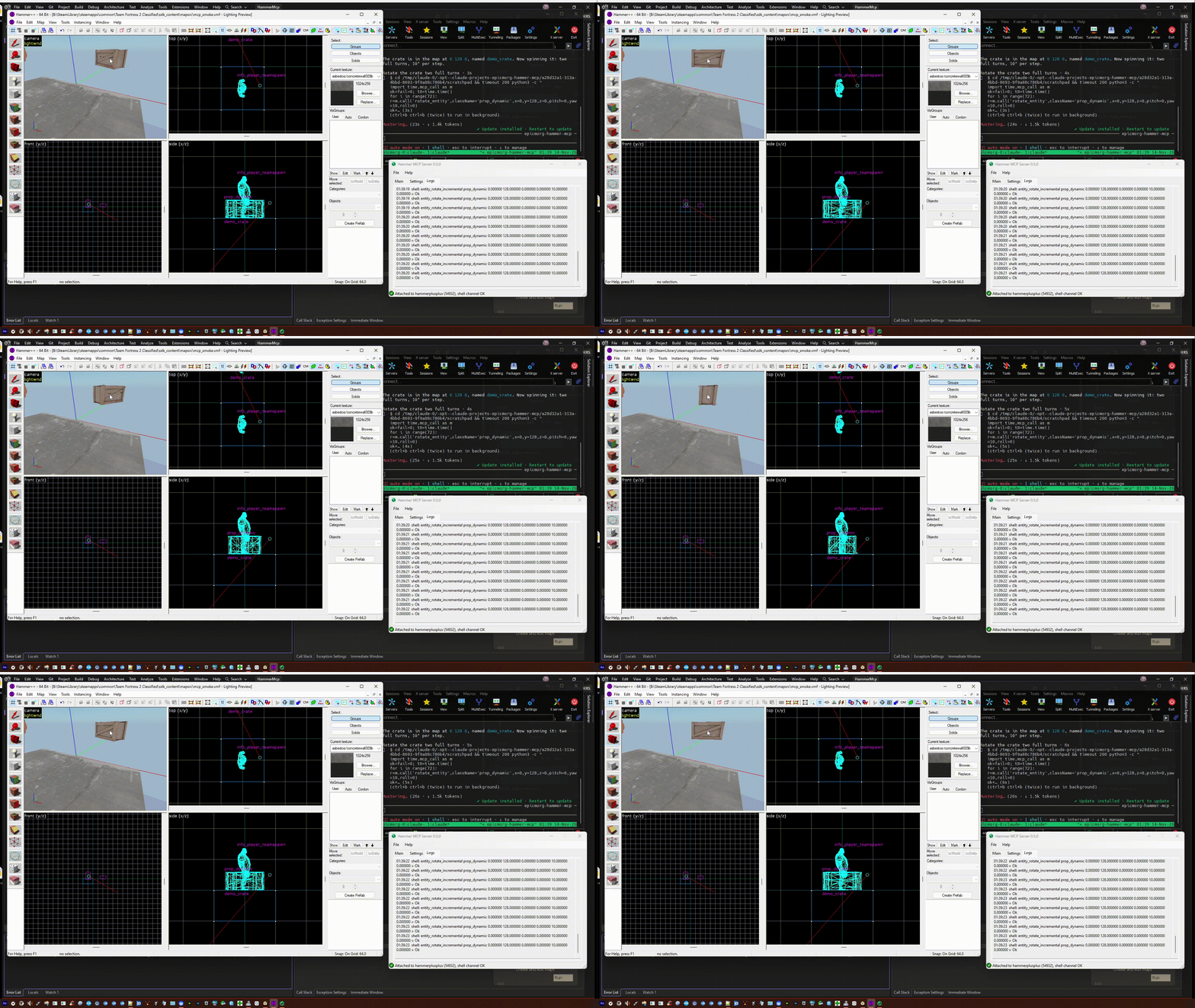
An agent spawns a prop_dynamic in Hammer++ and spins it - live, over MCP (video).
 AI agent (Claude Code, Cursor, …)
        │  MCP over HTTP (+ optional Bearer token, LAN-capable)
        ▼
 ┌────────────────────────────┐      WM_COPYDATA  (shell channel: entities, keyvalues, nodes)
 │  hammer-mcp.exe  (tray)    │ ───► WM_COMMAND   (menu: save, undo, redo, run map, …)        ──►  Hammer / Hammer++
 │  process attach · settings │ ───► reads the saved .vmf (map summary, mapversion)
 │  live log                  │
 └────────────────────────────┘
What works today
Verified live on Hammer++ 8873 x64 (TF2 Classified) and x86 (Source SDK 2013 SP mod), from an agent on another machine over the LAN:
✅ Create point entities with keyvalues (light, info_target, prop_dynamic with a model, …) |
✅ Rotate entities (a spinning locker at ~28 edits/s, Hammer stays responsive) |
| ✅ Set keyvalues, delete entities | ✅ Edits land in Hammer's undo history — Ctrl+Z works |
| ✅ Save / undo / redo / Run Map / Check for Problems via menu commands | ✅ Map summary from the saved .vmf (entities, brushes, classes, skybox…) |
| ✅ Recognises the running Hammer build by hash (registry of 179 known builds) | ✅ Token auth, localhost by default |
| ✅ Map knowledge: entities, outputs, I/O graph, validation against the game's FGD | ✅ Compile with Hammer's own Run Map sequences, parsed log, leak trace, compiled .bsp entities |
Screenshots
| Pick a Hammer process | Attached: build, shell channel | Live log of the demo |
|---|---|---|
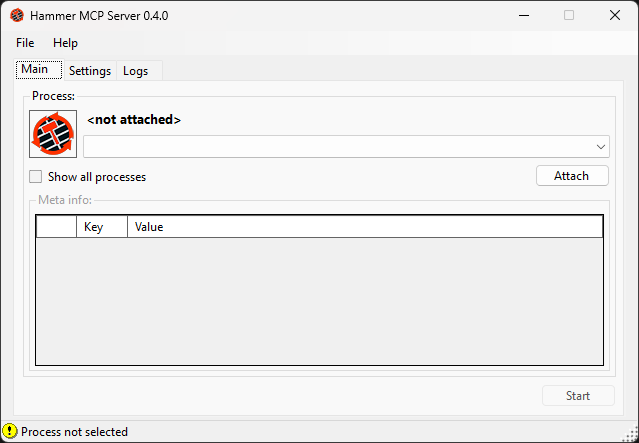 |
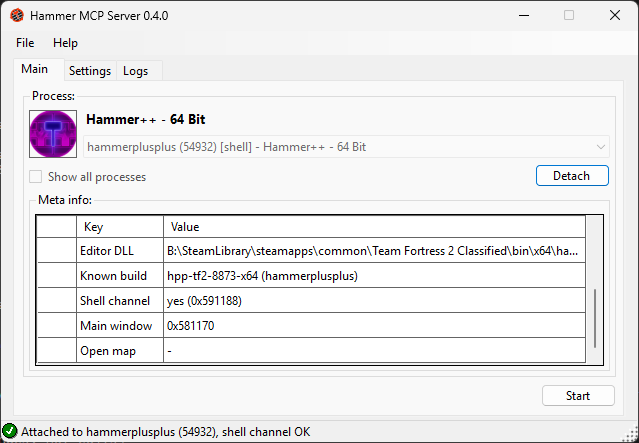 |
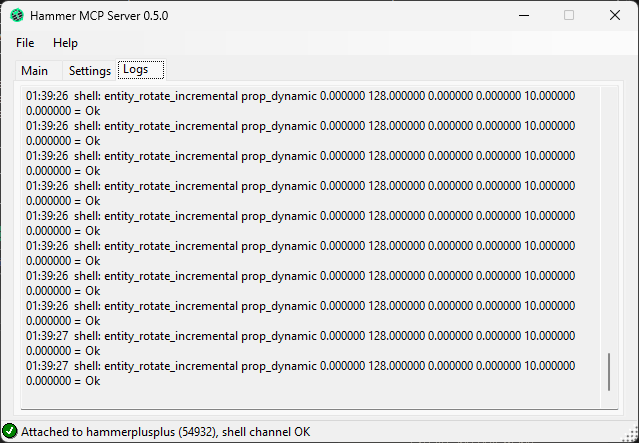 |
Supported editors
The shell channel exists in every stock Source Hammer since 2006 and in Hammer++ since build 8867;
menu command ids are identical across all 152 Source Hammer builds we analysed.
| Editor | Live edits (shell) | Menu commands | Map files |
|---|---|---|---|
| Stock Hammer — Source SDK 2013 SP/MP, HL2, Portal, TF2, CS:S, DoD:S, L4D/L4D2, Portal 2, GMod, … (x86 & x64) | ✅ | ✅ | ✅ |
| Hammer++ 8867+ (all games) | ✅ | ✅ | ✅ |
| Slammin' Hammer 5.2, Black Mesa, Nuclear Dawn | ✅ | ✅ | ✅ |
| Hammer++ ≤ 8866 | — | ✅ | ✅ |
| Strata Hammer (Portal: Revolution, P2CE, …) | — | ✅ | ✅ |
Source 2 Hammer (CS2, Dota 2, …) — recognised, .vmap and FGD read |
— | — | ✅ read |
| GoldSrc: Worldcraft 1.1–3.3, Hammer 3.4 / 3.5 and its mods (Neon, Neo, CSM) — recognised; J.A.C.K. | — | partly | RMF / MAP read |
Static analysis; live tests so far on Hammer++ 8873 (x64 and x86). Reports for other builds are very welcome.
Quick start
- Download/build
hammer-mcp.exeand run it — it lives in the tray. - Settings: pick a mode, address (
localhostby default), port (47800), generate a token for LAN use → Apply. - Main: choose your Hammer process → Attach (meta info shows the build, shell channel, open map) → Start
(Start needs an attached process; Apply on the Settings tab lights up only when something changed). - Connect your agent — tray menu → Copy client config:
claude mcp add --transport http hammer http://127.0.0.1:47800/mcp # LAN: ... http://10.0.0.5:47800/mcp --header "Authorization: Bearer <token>" - Open a map in Hammer and save it (sessions are bound to the saved
mapversion). Ask away.
Without the tray app: hammer-mcp-cli
The release also has hammer-mcp-cli.exe - the same server for MCP clients that start servers themselves (stdio):
{ "mcpServers": { "hammer": { "command": "C:\\Tools\\hammer-mcp-cli.exe", "args": ["--stdio", "--auto"] } } }
--auto attaches to the first running Hammer with a shell channel, --pid N to a given process; --mode Basic is read-only;--http --port 47800 serves HTTP like the app. A Dockerfile builds it for MCP catalogs (Hammer itself needs Windows).
Tools for the agent
| Tool | What it does |
|---|---|
hammer_status |
Which Hammer is attached, its build, shell channel, open map, saved mapversion, allowed mode |
map_summary |
Saved .vmf: versions, entity/brush counts, classes, skybox, visgroups |
list_entities · get_entity · find_io |
Saved map: entities with keyvalues and outputs, who triggers whom |
game_configs · fgd_class · fgd_search |
Hammer's game config and the game's FGD as an entity reference (keyvalues, choices, inputs, outputs) |
validate_map |
Saved map vs FGD: unknown classes, outputs to missing names, unknown inputs / outputs, extra keyvalues |
check_assets |
Materials, models, overlays, decals, skybox of the saved map vs the game's search paths (gameinfo.txt, folders, VPKs) |
compile_sequences · compile_log · leak_trace |
Hammer's own Run Map sequences (CmdSeq.wc / Hammer++ / Strata), parsed compile log, leak path from the .lin |
bsp_entities |
Entities as vbsp wrote them into the compiled .bsp (entity lump), outputs included |
source2_console |
Source 2 only: allowlisted developer console commands over VConsole2 (open maps, force autosave, help) |
run_compile |
Runs one of those sequences (vbsp / vvis / vrad, copy .bsp); edit modes only |
create_entity |
Point entity at x y z, with keyvalues |
set_keyvalue · rotate_entity · delete_entity |
Edit the entity of a class at an origin |
save_map · undo · redo |
Hammer menu commands |
open_run_map_dialog · open_check_for_problems |
Open those Hammer dialogs for the user |
Modes: Auto (live edits where a shell channel exists) · Basic (read-only) · Shell (live edits + menu) ·
Advanced (planned: injected adapters for live reading, selection, camera, geometry).
Limits of the shell channel
It is write-only and entity-level: entities are addressed by class + origin (no ids), brushes and brush entities
can't be created, there is no "move", and unsaved state can't be read back — the server reads the saved .vmf.
Outputs set with set_keyvalue are stored by Hammer as plain keyvalues: they are not shown on the Outputs tab, but
vbsp writes them into the .bsp as real outputs and they fire in game.
The planned Advanced mode lifts these limits for selected builds. It will only ever inject into a standalone
Hammer executable of a known build (hammer.exe, hammerplusplus.exe) — never into a game process: Source 2
Hammer runs inside cs2.exe / dota2.exe, and touching a VAC-protected process can get a Steam account banned.
Safety and VAC
Hammer-MCP is meant to be safe to run next to games with Valve Anti-Cheat.
- Source 1, Hammer++, Strata, GoldSrc: Hammer is its own process (
hammer.exe,hammerplusplus.exe, …), not a
game. The shell channel and menu commands are window messages to that editor process; the game you start from
Run Map is never touched. - Source 2 (CS2, Dota 2, HL: Alyx): Hammer runs inside the game process (
cs2.exe, …). Hammer-MCP only does what
Task Manager or OBS do with it — reads the exe path, window titles and command line (OpenProcesswith
query-only rights) — and reads map and game files from disk (.vmap, FGD). It never writes to the game's memory,
hooks or injects anything. - Injection (the planned Advanced mode) is limited by code (
InjectPolicy) to standalone Hammer executables of a
known build — never game processes, never Source 2, never unknown builds. -insecureis not required. Workshop Tools (-tools) already behave like an insecure client: CS2 refuses VAC
servers in that mode (checked live, 2026-11). You may add-insecureto the launch options for extra peace of
mind, but remove it afterwards, or you will not be able to join matchmaking / VAC servers.
Building
cd src
dotnet build HammerMcp.sln
dotnet test --solution HammerMcp.sln
.NET 10 SDK. App and server target net10.0-windows (they build on Linux via EnableWindowsTargeting, run on Windows 10/11 x64).
src/src/HammerMcp.Core      formats (VMF with outputs, RMF/MAP via Sledge, tolerant FGD parser incl. Hammer++/GMod
                            extensions, VMT, Hammer game configs), map validation, build registry, menu ids
src/src/HammerMcp.Shell     shell channel (WM_COPYDATA), menu commands (WM_COMMAND), sessions, process discovery
src/src/HammerMcp.Server    MCP server (Streamable HTTP, Bearer token) and tools
src/src/HammerMcp.App       hammer-mcp.exe — WinForms window + tray
src/src/HammerMcp.Cli       hammer-mcp-cli.exe — the server without the tray app (stdio / HTTP)
src/tests/HammerMcp.Tests   unit tests
src/registry/hammers.json   known Hammer builds
src/native/                 C++ injector and adapters (planned, CMake)
Roadmap
- Shell channel: entities, keyvalues, rotation, deletion · menu commands · build registry · tray app · LAN + token
- Map reading: entities, outputs, I/O graph; FGD reference from Hammer's own game config; map validation; ambiguity checks before edits
- Compile pipeline: Hammer's Run Map sequences, run_compile, parsed logs, leak tracing; asset checks via gameinfo.txt + VPK
- Releases 0.1 – 0.6: single-file
win-x64build — see CHANGELOG.md - Advanced mode: C++ inject adapters per build (live read, selection, camera, geometry, in-editor UI)
Releases
Tag vX.Y.Z[-suffix] on GitHub → the release workflow builds a self-contained single-file hammer-mcp.exe
(win-x64, ~65 MB) and attaches a zip to a GitHub release (-alpha / -beta tags become pre-releases).
Release notes come from CHANGELOG.md. Contributing, new Hammer builds, bug reports: CONTRIBUTING.md; security: SECURITY.md. Components and licenses: THIRD-PARTY-NOTICES.md.
Links
| Where | What |
|---|---|
| GitHub releases | Downloads (hammer-mcp.exe, hammer-mcp-cli.exe) and release notes |
| Valve Developer Community (RU) | Article about the tool |
| GameBanana | Tool page for mappers |
| Glama | MCP server listing and score |
| Issues | Bugs, unknown Hammer builds (how to report) |
Credits & legal
Built by EpicMorg. Shell-channel protocol as published by Valve in the
Source SDK 2013 (src/public/editor_sendcommand.{h,cpp}).
Thanks to ficool2 for Hammer++ and to the
Valve Developer Community.
Hammer-MCP contains no Valve source code and no leaked code; it talks to editors only through their public, built-in
interfaces. Not affiliated with or endorsed by Valve. Hammer, Source and related marks belong to Valve Corporation.
MIT — see LICENSE.
Yorumlar (0)
Yorum birakmak icin giris yap.
Yorum birakSonuc bulunamadi